Acer Aspire 5920g

frustration

New member
Local time
8:00 AM
Messages
14
Hi
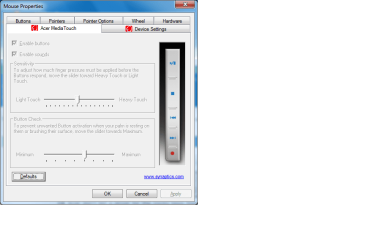
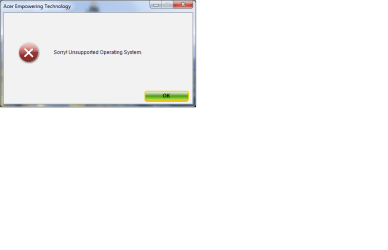
Is it just my notebook or do 5920g's not like windows 7? I cannot get my media keys on the right hand side to work even though they are enabled in the synaptics settings. Also I cannot get Acer empowering technology to work. Can anyone help me with this? I am not a complete computer noob but I am beat with this. I have updated all the drivers several times and even tried 6920 drivers to no avail, Everthing worked fine with Vista.
 

My Computer

Computer Manufacturer/Model Number
Acer aspire 5920g
OS
windows 7 ultimate 64 bit
CPU
T5750
Motherboard
?
Memory
4 GB DDR2
Graphics Card(s)
ati HD3470
Sound Card
Realtek on board
Hi
Is it just my notebook or do 5920g's not like windows 7? I cannot get my media keys on the right hand side to work even though they are enabled in the synaptics settings. Also I cannot get Acer empowering technology to work. Can anyone help me with this? I am not a complete computer noob but I am beat with this. I have updated all the drivers several times and even tried 6920 drivers to no avail, Everthing worked fine with Vista.

Frus

Did you upgrade the bios? do you have the Acer disks?

Ken
 

My Computer

Computer Manufacturer/Model Number
HP Pavillion dv-7 1005 Tx
OS
Win 8 Release candidate 8400
CPU
[email protected]
Memory
4 gigs
Graphics Card(s)
Nvidia 9600M
Sound Card
HD built-in
Monitor(s) Displays
17" Wxga
Screen Resolution
1440x900
Cooling
none
Internet Speed
45Mb down 5Mb up
No I didn't get any Acer discs and I upgraded without creating backup discs. Silly I know but I forgot.
No I haven't flashed the Bios I'm kind of scared to do it incase it doesn't work and kills my notebook. Although I do have Currys whatever happens cover I'm not sure they'd cover human error
 

My Computer

Computer Manufacturer/Model Number
Acer aspire 5920g
OS
windows 7 ultimate 64 bit
CPU
T5750
Motherboard
?
Memory
4 GB DDR2
Graphics Card(s)
ati HD3470
Sound Card
Realtek on board
Hi
Is it just my notebook or do 5920g's not like windows 7? I cannot get my media keys on the right hand side to work even though they are enabled in the synaptics settings. Also I cannot get Acer empowering technology to work. Can anyone help me with this? I am not a complete computer noob but I am beat with this. I have updated all the drivers several times and even tried 6920 drivers to no avail, Everthing worked fine with Vista.

You can go to the mfr support site and get the drivers you need for the function keys. Just make sure they are the correct version (32bit or 64bit) and are at least vista drivers

Let me know if you cant find them

Ken
 

My Computer

Computer Manufacturer/Model Number
HP Pavillion dv-7 1005 Tx
OS
Win 8 Release candidate 8400
CPU
[email protected]
Memory
4 gigs
Graphics Card(s)
Nvidia 9600M
Sound Card
HD built-in
Monitor(s) Displays
17" Wxga
Screen Resolution
1440x900
Cooling
none
Internet Speed
45Mb down 5Mb up
Acer don't list a driver for the media keys they are part of the synaptics touchpad system and the empowering technology drivers install but it won't run on Windows 7. I took some screenshots if that helps
 

Attachments

  • media key settings.png
    media key settings.png
    20.5 KB · Views: 1,388
  • empower tech.png
    empower tech.png
    9.5 KB · Views: 773

My Computer

Computer Manufacturer/Model Number
Acer aspire 5920g
OS
windows 7 ultimate 64 bit
CPU
T5750
Motherboard
?
Memory
4 GB DDR2
Graphics Card(s)
ati HD3470
Sound Card
Realtek on board
Hi frustration

You will need to call Acer.
 

My Computer

OS
ME/XP/Vista/Win7
Oh god the dreaded Acer customer support :cry:
 

My Computer

Computer Manufacturer/Model Number
Acer aspire 5920g
OS
windows 7 ultimate 64 bit
CPU
T5750
Motherboard
?
Memory
4 GB DDR2
Graphics Card(s)
ati HD3470
Sound Card
Realtek on board
You don't need Acer empowering technology it's bloatware everything will work without it.
Don't know about the media keys but i would be trying Synaptic before i contacted Acer, they might not have a win 7 compatible driver.
 

My Computer

Computer type
PC/Desktop
Computer Manufacturer/Model Number
Self Built Custom Computer.
OS
Windows 10 Pro x64
CPU
i7-4770K
Motherboard
Asus Z87 Sabertooth
Memory
16Gig DDR3-2400
Graphics Card(s)
Gigabyte GT740
Sound Card
Onboard
Monitor(s) Displays
Benq 27" - Dell 23' - Benq 22"
Screen Resolution
1680x1050
Hard Drives
Samsung 840 Pro 128g SSD
1xWestern Digital Caviar Green 1tb
2xWestern Digital Caviar Green 2 tb
PSU
Seasonic 760 watt Platinum
Case
Coolermaster Haf - X
Cooling
Noctua NH-C12P CPU Cooler
Keyboard
Logitech illuminated keyboard
Mouse
Logitech Perfomance MX
Internet Speed
Cable = speeds to 20Mbps downsteam and 512kbps upsteam
Antivirus
Avast Internet Security
Browser
Firefox
Oh god the dreaded Acer customer support :cry:

Frustration

Think I might have it. what driver did you install for the touch pad? was it a win 7 driver, or vista. If vista it needs to be installed in compatibility mode. to do that you need to right clicki?properties>cmpatibilty tab set to vista


Ken
 

My Computer

Computer Manufacturer/Model Number
HP Pavillion dv-7 1005 Tx
OS
Win 8 Release candidate 8400
CPU
[email protected]
Memory
4 gigs
Graphics Card(s)
Nvidia 9600M
Sound Card
HD built-in
Monitor(s) Displays
17" Wxga
Screen Resolution
1440x900
Cooling
none
Internet Speed
45Mb down 5Mb up

My Computer

Computer Manufacturer/Model Number
Self build
OS
Windows 7 Ultimate x64
CPU
AMD Phenom II x4
Motherboard
Gigabyte 880
Memory
8GB
Graphics Card(s)
NVIDIA GeForce HD
Sound Card
Realtek HD Audio
Screen Resolution
1920 x 1080
Hard Drives
2 x 1TB
PSU
Thermalake 550w
Case
XCase
Internet Speed
8MB
Thanks for all your help. Ken you were correct. I ran empowering tech in vista compatability mode and it works no problem. Now I just need to get the media keys to work. Currently working through all compatability modes to see if I can get them to work. Will keep you updated.

Thanks
 

My Computer

Computer Manufacturer/Model Number
Acer aspire 5920g
OS
windows 7 ultimate 64 bit
CPU
T5750
Motherboard
?
Memory
4 GB DDR2
Graphics Card(s)
ati HD3470
Sound Card
Realtek on board
Media keys still don't work in any compatability mode. I give up. I'll just wait till Acer release Windows 7 drivers
 

My Computer

Computer Manufacturer/Model Number
Acer aspire 5920g
OS
windows 7 ultimate 64 bit
CPU
T5750
Motherboard
?
Memory
4 GB DDR2
Graphics Card(s)
ati HD3470
Sound Card
Realtek on board
I have an Acer Aspire 5610z .Bluetooth don't work with windows 7. any one can help me????:cry::cry::cry:
 

My Computer

OS
Acer
Thanks for all your help. Ken you were correct. I ran empowering tech in vista compatability mode and it works no problem. Now I just need to get the media keys to work. Currently working through all compatability modes to see if I can get them to work. Will keep you updated.

Thanks

I run x64 Ultimate and when I press Fn + the keys they work......
 

My Computer

Computer Manufacturer/Model Number
Self build
OS
Windows 7 Ultimate x64
CPU
AMD Phenom II x4
Motherboard
Gigabyte 880
Memory
8GB
Graphics Card(s)
NVIDIA GeForce HD
Sound Card
Realtek HD Audio
Screen Resolution
1920 x 1080
Hard Drives
2 x 1TB
PSU
Thermalake 550w
Case
XCase
Internet Speed
8MB
Yes the home,pg up, pg dn, and end keys work with the Fn key but the touch sensitive buttons that are lit up blue do not
 

My Computer

Computer Manufacturer/Model Number
Acer aspire 5920g
OS
windows 7 ultimate 64 bit
CPU
T5750
Motherboard
?
Memory
4 GB DDR2
Graphics Card(s)
ati HD3470
Sound Card
Realtek on board
I have a 5920G and you have to download the synaptics drivers for the media buttons and touch pad to enable the features.

Plus the empowering software doesn't work on Windows 7 yet but Acer should release drivers for it after Windows 7 is officially released or soon after.

The only thing is I still haven't been able to get my memory card port to work yet but that should work when Acer release drivers for it.
 

My Computer

Computer Manufacturer/Model Number
Desktop
OS
Windows 7 Professional x64
CPU
Intel i5-2500k @ 3.3Ghz
Motherboard
Gigabyte GA-Z77X-UD5H
Memory
4GB DDR3
Graphics Card(s)
Nvidia GTS250 1GB
Monitor(s) Displays
Sony SDM S95A
Screen Resolution
1280x1024
Hard Drives
1x 1TB, 2x 250GB HDDs
PSU
Corsair HX850W
Case
Cooler Master 690 II
Cooling
Thermalright True Spirit 140mm & 3x 120mm & 3x 140mm Fans
Keyboard
Logitech Media Keyboard
Mouse
Microsoft Intellimouse
Internet Speed
8MB
I have a 5920G and you have to download the synaptics drivers for the media buttons and touch pad to enable the features.

Plus the empowering software doesn't work on Windows 7 yet but Acer should release drivers for it after Windows 7 is officially released or soon after.

The only thing is I still haven't been able to get my memory card port to work yet but that should work when Acer release drivers for it.

You can download the Ricoh drivers for the memory card port. Mine came straight from MS update after first install.
 

My Computer

Computer Manufacturer/Model Number
Self build
OS
Windows 7 Ultimate x64
CPU
AMD Phenom II x4
Motherboard
Gigabyte 880
Memory
8GB
Graphics Card(s)
NVIDIA GeForce HD
Sound Card
Realtek HD Audio
Screen Resolution
1920 x 1080
Hard Drives
2 x 1TB
PSU
Thermalake 550w
Case
XCase
Internet Speed
8MB
I have a 5920G and you have to download the synaptics drivers for the media buttons and touch pad to enable the features.

Plus the empowering software doesn't work on Windows 7 yet but Acer should release drivers for it after Windows 7 is officially released or soon after.

The only thing is I still haven't been able to get my memory card port to work yet but that should work when Acer release drivers for it.

You can download the Ricoh drivers for the memory card port. Mine came straight from MS update after first install.

Mine too. If there is a driver for the media keys could you link me to it please because I can't find it on Synaptics website. The only one there is for the Touchpad, and some features of Empowering technology do work if you run it in Vista compatability mode
 

My Computer

Computer Manufacturer/Model Number
Acer aspire 5920g
OS
windows 7 ultimate 64 bit
CPU
T5750
Motherboard
?
Memory
4 GB DDR2
Graphics Card(s)
ati HD3470
Sound Card
Realtek on board
I have a 5920G and you have to download the synaptics drivers for the media buttons and touch pad to enable the features.

Plus the empowering software doesn't work on Windows 7 yet but Acer should release drivers for it after Windows 7 is officially released or soon after.

The only thing is I still haven't been able to get my memory card port to work yet but that should work when Acer release drivers for it.

You can download the Ricoh drivers for the memory card port. Mine came straight from MS update after first install.

Mine too. If there is a driver for the media keys could you link me to it please because I can't find it on Synaptics website. The only one there is for the Touchpad, and some features of Empowering technology do work if you run it in Vista compatability mode

Download License Agreement | Synaptics

Scroll to the bottom and accept the agreement.

But afterwards you'll still need to configure the buttons.

Hope this helps.
 

My Computer

Computer Manufacturer/Model Number
Desktop
OS
Windows 7 Professional x64
CPU
Intel i5-2500k @ 3.3Ghz
Motherboard
Gigabyte GA-Z77X-UD5H
Memory
4GB DDR3
Graphics Card(s)
Nvidia GTS250 1GB
Monitor(s) Displays
Sony SDM S95A
Screen Resolution
1280x1024
Hard Drives
1x 1TB, 2x 250GB HDDs
PSU
Corsair HX850W
Case
Cooler Master 690 II
Cooling
Thermalright True Spirit 140mm & 3x 120mm & 3x 140mm Fans
Keyboard
Logitech Media Keyboard
Mouse
Microsoft Intellimouse
Internet Speed
8MB
Back
Top