
Solved W7 clean install on a Dell 7010 using Dell Media, Drivers are missing?

Mike Lynch

New member
I am trying to do a clean install on a Dell 7010 using Dell installation Media.
The install appears to work, however a number of Drivers are missing.

They appear under Other Devices:

- Ethernet Controller
- PCI Simple Communications Controller
- SM Bus Controller
- Universal Serial Bus (USB) Controller

I am unable to search for them as they control the Internet access from the PC.

Any suggestions or work arounds would be appreciated.
 

My Computer

Computer type
PC/Desktop
Computer Manufacturer/Model Number
Two HP Desktops. One in the Laundry Room / Bed Room.
OS
Microsoft Windows 7 Professional 64-bit 7601 Multiprocessor Free Service Pack 1
CPU
Intel(R) Core(TM) i7-3770 CPU @ 3.40GHz
Motherboard
Hewlett-Packard 3396
Memory
8.00 GB
Graphics Card(s)
Intel(R) HD Graphics 4000
Sound Card
(1) Realtek High Definition Audio (2) Intel(R) Display Aud
Monitor(s) Displays
Hanns-G
Screen Resolution
1440 x 900 x 32 bits (4294967296 colors) @ 59 Hz
Hard Drives
(1) ATA WDC WD40EZRX-00S SCSI Disk Device (2) HP Officejet Pro 86 USB Device (3) WD My Book 1230 USB Device
PSU
Whatever came with the CMT.
Case
HP CMT Black.
Cooling
Whatever came with the CMT.
Keyboard
Logitech K740.
Mouse
Microsoft Optical Mouse 1000.
Internet Speed
Spectrum 25Mbs.
Antivirus
WebRoot, Microsoft Security Essentials.
Browser
EDGE
Other Info
HP Officejet Pro 8600 Plus.
WD MyBook 4TB.
download them on a diffrenet pc and transfer to the 7010 on usb stick. usb 2 should be working.
 

My Computers

System One System Two

  • Computer type
    PC/Desktop
    OS
    7 X64
    CPU
    i5 8400
    Motherboard
    gigabyte b365m ds3h
    Memory
    2x8gb 3200mhz
    Hard Drives
    various
    PSU
    pure power 11 400w cm
    Case
    Coolermaster
    Cooling
    cryorig m9i
  • Computer type
    PC/Desktop
    OS
    7x64
    CPU
    g5400
    Motherboard
    ga b365m ds3h
    Memory
    8gb ddr4 2400
    PSU
    xfx pro 450w
Will do!
 

My Computer

Computer type
PC/Desktop
Computer Manufacturer/Model Number
Two HP Desktops. One in the Laundry Room / Bed Room.
OS
Microsoft Windows 7 Professional 64-bit 7601 Multiprocessor Free Service Pack 1
CPU
Intel(R) Core(TM) i7-3770 CPU @ 3.40GHz
Motherboard
Hewlett-Packard 3396
Memory
8.00 GB
Graphics Card(s)
Intel(R) HD Graphics 4000
Sound Card
(1) Realtek High Definition Audio (2) Intel(R) Display Aud
Monitor(s) Displays
Hanns-G
Screen Resolution
1440 x 900 x 32 bits (4294967296 colors) @ 59 Hz
Hard Drives
(1) ATA WDC WD40EZRX-00S SCSI Disk Device (2) HP Officejet Pro 86 USB Device (3) WD My Book 1230 USB Device
PSU
Whatever came with the CMT.
Case
HP CMT Black.
Cooling
Whatever came with the CMT.
Keyboard
Logitech K740.
Mouse
Microsoft Optical Mouse 1000.
Internet Speed
Spectrum 25Mbs.
Antivirus
WebRoot, Microsoft Security Essentials.
Browser
EDGE
Other Info
HP Officejet Pro 8600 Plus.
WD MyBook 4TB.
Mike:

I owned a few Dell OptiPlex 7010 minitowers with Windows 7 SP1 64-bit before re-doing and donating them.

The primary drivers that you probably need to install after installing Windows 7 SP1 64-bit are:
Intel chipset
Intel management engine components
Intel USB extensible host controller
Realtek high definition audio
Intel or Broadcom ethernet (depending on which one it has)
Intel HD 2500/4000 graphics

They should be installed in the order listed, and the computer should be restarted after installing each one.

-----------------------------------------------------------

You said you used Dell installation media to install Windows 7 SP1 64-bit in that Dell OptiPlex 7010.
Did that Dell installation media come with it, or is it from a different Dell?

What's the exact 7-character service tag number on that Dell OptiPlex 7010?
Unless it's been refurbished or its hardware has been changed, its support site will confirm what hardware it came with.
Its support site will also confirm the Windows 7 SP1 64-bit drivers it needs.
 

My Computer

Computer type
PC/Desktop
Computer Manufacturer/Model Number
Dell OptiPlex 9020
OS
Windows 7 Professional SP1 64-bit
CPU
Intel Core i7-4790 3.60 GHz
Memory
32 GB DDR3-1600 MHz
Graphics Card(s)
Integrated Intel HD Graphics 4600
Monitor(s) Displays
Viewsonic 32" LCD
Hard Drives
Kingston SATA 3 240 GB SSD
Internet Speed
Spectrum Internet 1000 Mbps
Pretty sure the recovery media for that machine is G13K9_PW4KGA00_W7SP1PRO64_ROW(DL).iso
 

My Computers

System One System Two

  • Computer type
    PC/Desktop
    OS
    7 X64
    CPU
    i5 8400
    Motherboard
    gigabyte b365m ds3h
    Memory
    2x8gb 3200mhz
    Hard Drives
    various
    PSU
    pure power 11 400w cm
    Case
    Coolermaster
    Cooling
    cryorig m9i
  • Computer type
    PC/Desktop
    OS
    7x64
    CPU
    g5400
    Motherboard
    ga b365m ds3h
    Memory
    8gb ddr4 2400
    PSU
    xfx pro 450w
I purchased two 7010's in refurbished condition, both came with W-10.
I did not want to use W-10 as I prefer W7.
I purchased two new drives and attempted to install W-7 on them.
I tried using Dell Media from Trinity Software in Tampa, SP-1.
It did not have the Drivers needed to access the Internet.
I tried using Windows-7 Media I also purchased from Trinity.
It also did not have the Drivers needed to access the Internet.
Here is the information of the Model Numbers of the Hardware.
Serial Number - BC3YYX1
Tag - 2010003310002
Dell Optiplex 7010 USFF
 

My Computer

Computer type
PC/Desktop
Computer Manufacturer/Model Number
Two HP Desktops. One in the Laundry Room / Bed Room.
OS
Microsoft Windows 7 Professional 64-bit 7601 Multiprocessor Free Service Pack 1
CPU
Intel(R) Core(TM) i7-3770 CPU @ 3.40GHz
Motherboard
Hewlett-Packard 3396
Memory
8.00 GB
Graphics Card(s)
Intel(R) HD Graphics 4000
Sound Card
(1) Realtek High Definition Audio (2) Intel(R) Display Aud
Monitor(s) Displays
Hanns-G
Screen Resolution
1440 x 900 x 32 bits (4294967296 colors) @ 59 Hz
Hard Drives
(1) ATA WDC WD40EZRX-00S SCSI Disk Device (2) HP Officejet Pro 86 USB Device (3) WD My Book 1230 USB Device
PSU
Whatever came with the CMT.
Case
HP CMT Black.
Cooling
Whatever came with the CMT.
Keyboard
Logitech K740.
Mouse
Microsoft Optical Mouse 1000.
Internet Speed
Spectrum 25Mbs.
Antivirus
WebRoot, Microsoft Security Essentials.
Browser
EDGE
Other Info
HP Officejet Pro 8600 Plus.
WD MyBook 4TB.
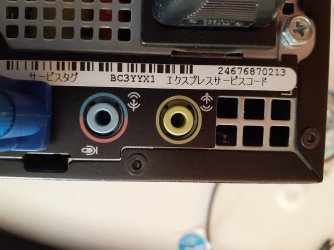
Mike:

According to service tag #BC3YYX1, you have THIS Dell OptiPlex 7010 Ultra Small Form Factor which was originally purchased in July 2013 in Japan and came with Windows 7 Professional SP1 32-bit.

If it's been legitimately refurbished, it should have the original C-O-A sticker on it which shows the operating system it originally came with, and it should have a refurbished C-O-A sticker on it which shows the operating system it was refurbished with.

The product specifications section at its support site is a mixture of Japanese and English language, so I'm not able to decipher a lot of it.

You didn't provide the service tag # for the second 7010, so I wasn't able to research it.

Note: Tampa is my home town, but I haven't lived there in almost 40 years, so I'm not familiar with "Trinity Software".
 

My Computer

Computer type
PC/Desktop
Computer Manufacturer/Model Number
Dell OptiPlex 9020
OS
Windows 7 Professional SP1 64-bit
CPU
Intel Core i7-4790 3.60 GHz
Memory
32 GB DDR3-1600 MHz
Graphics Card(s)
Integrated Intel HD Graphics 4600
Monitor(s) Displays
Viewsonic 32" LCD
Hard Drives
Kingston SATA 3 240 GB SSD
Internet Speed
Spectrum Internet 1000 Mbps
Trinity Software Distribution

I have purchased software from them for over ten years.

Whatever I have purchased has been up to snuff.

I make another post once I figure out how to get the photos from my phone to the PC.

5R6KDZ1

- - - Updated - - -

I have struggled to add /attach photos to my Post(s) but I am just not up to it.

I attempt to follow the instructions but NADA.

I know I could Email them somewhere but Attaching them just isn't working for me.

- - - Updated - - -

I hope it works.004.jpeg.jpg005.jpeg.jpg

- - - Updated - - -

Is there any way to get me to a download that will allow the Ethernet Adapter to work?
If so, I could try and search from the machine the adapter works on for the other drivers.
I believe I am too inept to work on one machine to fix another or even the Pictures on my phone.
 
Last edited:

My Computer

Computer type
PC/Desktop
Computer Manufacturer/Model Number
Two HP Desktops. One in the Laundry Room / Bed Room.
OS
Microsoft Windows 7 Professional 64-bit 7601 Multiprocessor Free Service Pack 1
CPU
Intel(R) Core(TM) i7-3770 CPU @ 3.40GHz
Motherboard
Hewlett-Packard 3396
Memory
8.00 GB
Graphics Card(s)
Intel(R) HD Graphics 4000
Sound Card
(1) Realtek High Definition Audio (2) Intel(R) Display Aud
Monitor(s) Displays
Hanns-G
Screen Resolution
1440 x 900 x 32 bits (4294967296 colors) @ 59 Hz
Hard Drives
(1) ATA WDC WD40EZRX-00S SCSI Disk Device (2) HP Officejet Pro 86 USB Device (3) WD My Book 1230 USB Device
PSU
Whatever came with the CMT.
Case
HP CMT Black.
Cooling
Whatever came with the CMT.
Keyboard
Logitech K740.
Mouse
Microsoft Optical Mouse 1000.
Internet Speed
Spectrum 25Mbs.
Antivirus
WebRoot, Microsoft Security Essentials.
Browser
EDGE
Other Info
HP Officejet Pro 8600 Plus.
WD MyBook 4TB.
Mike:

This is a continuation of post #7.

According to service tag #5R6KDZ1, you have THIS Dell OptiPlex 7010 Ultra Small Form Factor which was originally purchased in January 2014 in the U.S. and came with Windows 7 Professional SP1 32-bit.

If it's been legitimately refurbished, it should have the original C-O-A sticker on it which shows the operating system it originally came with, and it should have a refurbished C-O-A sticker on it which shows the operating system it was refurbished with.

The product specifications section at its support site is all in English, so I had no trouble determining what hardware it originally came with.
But because it's been refurbished, some of its hardware has probably been replaced or upgraded.

The disc shown in post #8 is what Dell provides to re-install Windows 7 Professional SP1 64-bit in Dell computers.
It installs only the operating system, so you need to install the drivers afterwards for its primary devices (chipset, graphics, audio, ethernet, etc.).

I believe both of those 7010's have an Intel 82579LM gigabit ethernet device.
THIS is the last driver (25.0) that was released for that ethernet device for Windows 7 SP1 32-bit/64-bit.

If you don't know how to download and save and install device drivers, you need to ask someone who does to help you do it.
 

My Computer

Computer type
PC/Desktop
Computer Manufacturer/Model Number
Dell OptiPlex 9020
OS
Windows 7 Professional SP1 64-bit
CPU
Intel Core i7-4790 3.60 GHz
Memory
32 GB DDR3-1600 MHz
Graphics Card(s)
Integrated Intel HD Graphics 4600
Monitor(s) Displays
Viewsonic 32" LCD
Hard Drives
Kingston SATA 3 240 GB SSD
Internet Speed
Spectrum Internet 1000 Mbps
Optiplex 7010 drivers are here. Also note you should install the Chipset drivers, as there may be additional devices Device Manager doesn't detect until the Chipset drivers are installed.

FWIW, another resource is to visit this page and search for "7010". It will take you about halfway down the page to "D4 Optiplex Family", which includes the 7010. Download the A07 link and it will provide all drivers applicable to the 7010 in a single archive file.

The download is in .cab format, so use Winzip or 7-Zip to extract the contents to a temporary folder. (Do NOT extract with Windows File Explorer or you will lose all the nested folder hierarchy!) The "Win7_x64.csv" file included in the download helps with a rudimentary description for each file.

After extraction, you can select a device in Device Manager and point the driver update wizard to your extracted folder (and included subfolders). Windows should find what it needs by itself and clear the yellow triangle.
 

My Computer

Computer type
PC/Desktop
Computer Manufacturer/Model Number
Dell Optiplex 7050
OS
Windows 7/8.1/10 multiboot
CPU
Intel Core i7-7700
Motherboard
Dell, Intel Q270 chipset
Memory
48GB (2x16GB Crucial DDR4-3200 + 2x8GB Hynix DDR4-2400)
Graphics Card(s)
Intel HD630 + AMD Radeon R7 450 PCIe
Monitor(s) Displays
Asus VC279 (27")
Screen Resolution
1920x1080
Hard Drives
Toshiba M.2 NVMe (256GB),
Samsung 960 Evo (500GB),
WD Red Plus 80EFBX (8TB)
I get this message and am afraid to proceed:

See the Attachment.
 

Attachments

  • Capture - 7010 Download.PNG
    Capture - 7010 Download.PNG
    10.5 KB · Views: 1

My Computer

Computer type
PC/Desktop
Computer Manufacturer/Model Number
Two HP Desktops. One in the Laundry Room / Bed Room.
OS
Microsoft Windows 7 Professional 64-bit 7601 Multiprocessor Free Service Pack 1
CPU
Intel(R) Core(TM) i7-3770 CPU @ 3.40GHz
Motherboard
Hewlett-Packard 3396
Memory
8.00 GB
Graphics Card(s)
Intel(R) HD Graphics 4000
Sound Card
(1) Realtek High Definition Audio (2) Intel(R) Display Aud
Monitor(s) Displays
Hanns-G
Screen Resolution
1440 x 900 x 32 bits (4294967296 colors) @ 59 Hz
Hard Drives
(1) ATA WDC WD40EZRX-00S SCSI Disk Device (2) HP Officejet Pro 86 USB Device (3) WD My Book 1230 USB Device
PSU
Whatever came with the CMT.
Case
HP CMT Black.
Cooling
Whatever came with the CMT.
Keyboard
Logitech K740.
Mouse
Microsoft Optical Mouse 1000.
Internet Speed
Spectrum 25Mbs.
Antivirus
WebRoot, Microsoft Security Essentials.
Browser
EDGE
Other Info
HP Officejet Pro 8600 Plus.
WD MyBook 4TB.

It is invisible
 

My Computers

System One System Two

  • Computer type
    PC/Desktop
    OS
    7 X64
    CPU
    i5 8400
    Motherboard
    gigabyte b365m ds3h
    Memory
    2x8gb 3200mhz
    Hard Drives
    various
    PSU
    pure power 11 400w cm
    Case
    Coolermaster
    Cooling
    cryorig m9i
  • Computer type
    PC/Desktop
    OS
    7x64
    CPU
    g5400
    Motherboard
    ga b365m ds3h
    Memory
    8gb ddr4 2400
    PSU
    xfx pro 450w
Did what I could to cause it to re-appear. Print, Scan and then Send.

I hope this worked.

- - - Updated - - -

Mike Lynch

- - - Updated - - -

Looks like it will not work.

This is what the message says:

"win7_optiplexd4_a07.cab can't be downloaded securely"

I added the quote marks.

That's the entire message.
 

Attachments

My Computer

Computer type
PC/Desktop
Computer Manufacturer/Model Number
Two HP Desktops. One in the Laundry Room / Bed Room.
OS
Microsoft Windows 7 Professional 64-bit 7601 Multiprocessor Free Service Pack 1
CPU
Intel(R) Core(TM) i7-3770 CPU @ 3.40GHz
Motherboard
Hewlett-Packard 3396
Memory
8.00 GB
Graphics Card(s)
Intel(R) HD Graphics 4000
Sound Card
(1) Realtek High Definition Audio (2) Intel(R) Display Aud
Monitor(s) Displays
Hanns-G
Screen Resolution
1440 x 900 x 32 bits (4294967296 colors) @ 59 Hz
Hard Drives
(1) ATA WDC WD40EZRX-00S SCSI Disk Device (2) HP Officejet Pro 86 USB Device (3) WD My Book 1230 USB Device
PSU
Whatever came with the CMT.
Case
HP CMT Black.
Cooling
Whatever came with the CMT.
Keyboard
Logitech K740.
Mouse
Microsoft Optical Mouse 1000.
Internet Speed
Spectrum 25Mbs.
Antivirus
WebRoot, Microsoft Security Essentials.
Browser
EDGE
Other Info
HP Officejet Pro 8600 Plus.
WD MyBook 4TB.

The underlying download link is to "http://downloads.delltechcenter.com/DIA/Drivers/win7_optiplexd4_a07.cab". The message you're getting is likely just a warning from your browser that the link is not https. It's not that there's anything wrong with the download, it's just that the connection is to plain http instead of secure https.

Can you push through it and download anyway? Depending on your browser configuration, it may or may not let you do that. If not, try another browser that's less of a nanny.
 

My Computer

Computer type
PC/Desktop
Computer Manufacturer/Model Number
Dell Optiplex 7050
OS
Windows 7/8.1/10 multiboot
CPU
Intel Core i7-7700
Motherboard
Dell, Intel Q270 chipset
Memory
48GB (2x16GB Crucial DDR4-3200 + 2x8GB Hynix DDR4-2400)
Graphics Card(s)
Intel HD630 + AMD Radeon R7 450 PCIe
Monitor(s) Displays
Asus VC279 (27")
Screen Resolution
1920x1080
Hard Drives
Toshiba M.2 NVMe (256GB),
Samsung 960 Evo (500GB),
WD Red Plus 80EFBX (8TB)
I tried another browser and was able to download it and copy it to a DVD.
I'm a very tired right now and am going to go back to bed before I cause myself a problem.
In the morning I continue.
Thanks for the prodding.
 

My Computer

Computer type
PC/Desktop
Computer Manufacturer/Model Number
Two HP Desktops. One in the Laundry Room / Bed Room.
OS
Microsoft Windows 7 Professional 64-bit 7601 Multiprocessor Free Service Pack 1
CPU
Intel(R) Core(TM) i7-3770 CPU @ 3.40GHz
Motherboard
Hewlett-Packard 3396
Memory
8.00 GB
Graphics Card(s)
Intel(R) HD Graphics 4000
Sound Card
(1) Realtek High Definition Audio (2) Intel(R) Display Aud
Monitor(s) Displays
Hanns-G
Screen Resolution
1440 x 900 x 32 bits (4294967296 colors) @ 59 Hz
Hard Drives
(1) ATA WDC WD40EZRX-00S SCSI Disk Device (2) HP Officejet Pro 86 USB Device (3) WD My Book 1230 USB Device
PSU
Whatever came with the CMT.
Case
HP CMT Black.
Cooling
Whatever came with the CMT.
Keyboard
Logitech K740.
Mouse
Microsoft Optical Mouse 1000.
Internet Speed
Spectrum 25Mbs.
Antivirus
WebRoot, Microsoft Security Essentials.
Browser
EDGE
Other Info
HP Officejet Pro 8600 Plus.
WD MyBook 4TB.
Back
Top