HP LaserJet 5000 drivers?

Thomas R

New member
Member
Local time
12:06 AM
Messages
69
Location
SF Bay
Is there any driver better than the Windows 7 default driver or the ones currently available from HP? Those from HP seem to be actually for a different printer - the HP Color LaserJet CP2025 Series.
The real issue is that those drivers only support a resolution of 600 x 600 dpi but the HP LaserJet 5000 has a max resolution is 1200 x 1200 dpi.

Any idea how get the max resolution out of the printer?
 

My Computer

Computer type
PC/Desktop
Computer Manufacturer/Model Number
Dell Precision M6300
OS
Windows 7 Ultimate x64 SP1 Ver. 6.1.7601 (Build 7601)
CPU
Intel Core 2 Extreme X9000, 2.80GHz 6MB L2-Cache, 800MHz FSB
Motherboard
Dell JM679
Memory
8 GB - 2x 4GB SODIMM DDR-II
Graphics Card(s)
NVIDIA Quadro FX 3600M (Driver Ver. 8.17.12.6776)
Sound Card
IDT/SigmaTel STAC 92XX C Major HD Audio
Monitor(s) Displays
17'' WUXGA TFT
Screen Resolution
1920 x 1200
Hard Drives
SSD Crucial m4 512GB (CT512M4SSD2)
Case
Laptop
Mouse
Microsoft Wireless Laser Mouse 8000
Browser
IE 10
but the HP LaserJet 5000 has a max resolution is 1200 x 1200 dpi.

Any idea how get the max resolution out of the printer?

What does the manual say? Regardless of the driver, you still have to set the printer up to output that resolution. However I do agree that it would help to have the correct driver installed.

And did you check HP's website because I see Windows 7 x64-bit drivers for the 5000 printer here HP LaserJet 5000 Printer series- Download drivers and software - HP Business Support Center
 

My Computer

Computer type
PC/Desktop
Computer Manufacturer/Model Number
Custom built by me.
OS
Windows 10 Pro
CPU
Intel Core i7-4770K (3.5Ghz)
Motherboard
Gigabyte G1 Sniper 5 (F10 Bios)
Memory
32 gig Corsair Dominator Platinum (4x8Gig)
Graphics Card(s)
Sapphire Tri-X R9 Fury
Sound Card
Soundblaster ZXR
Monitor(s) Displays
NEC PA242W 24" LCD Monitor
Screen Resolution
1920 x 1200
Hard Drives
Primary - Samsung 850 Pro (512gig), Samsung 840 Pro (256gig), 2TB WD Caviar Black.
PSU
EVGA Supernova 1000 G2
Case
Cooler Master HAF X
Cooling
Corsair H100i with Corsair Air Series SP120 Quiet Fans
Keyboard
Logitech Wireless Wave
Mouse
Logitech Performance MX
Internet Speed
High Speed Cable
Antivirus
Norton Security
Browser
IE11
Other Info
Memory Timings - 1866MHz @ 9-9-9-27-1T @ 1.5 volts
What does the manual say? Regardless of the driver, you still have to set the printer up to output that resolution. However I do agree that it would help to have the correct driver installed.
The max resolution is 1200 x 1200 and it should be set up that way since that was what I had with XP

And did you check HP's website because I see Windows 7 x64-bit drivers for the 5000 printer here HP LaserJet 5000 Printer series- Download drivers and software - HP Business Support Center

That's the driver I have. But that driver seems to be actually for the HP Color LaserJet CP2025 Series - that's at least the name that shows up in the Windows device manager.
 

My Computer

Computer type
PC/Desktop
Computer Manufacturer/Model Number
Dell Precision M6300
OS
Windows 7 Ultimate x64 SP1 Ver. 6.1.7601 (Build 7601)
CPU
Intel Core 2 Extreme X9000, 2.80GHz 6MB L2-Cache, 800MHz FSB
Motherboard
Dell JM679
Memory
8 GB - 2x 4GB SODIMM DDR-II
Graphics Card(s)
NVIDIA Quadro FX 3600M (Driver Ver. 8.17.12.6776)
Sound Card
IDT/SigmaTel STAC 92XX C Major HD Audio
Monitor(s) Displays
17'' WUXGA TFT
Screen Resolution
1920 x 1200
Hard Drives
SSD Crucial m4 512GB (CT512M4SSD2)
Case
Laptop
Mouse
Microsoft Wireless Laser Mouse 8000
Browser
IE 10
What does the manual say? Regardless of the driver, you still have to set the printer up to output that resolution.

The max resolution is 1200 x 1200 and it should be set up that way since that was what I had with XP.

Do yo not have the same or similar settings settings in the Windows 7 driver? Is there another piece of the software that needs to be installed? Look on the CD to see if you forgot to install something. Then go to HP's website and look for updated versions.

And what does the owner's manual say about printing at that res? That's where you need to look.

And did you check HP's website because I see Windows 7 x64-bit drivers for the 5000 printer here HP LaserJet 5000 Printer series- Download drivers and software - HP Business Support Center

That's the driver I have. But that driver seems to be actually for the HP Color LaserJet CP2025 Series - that's at least the name that shows up in the Windows device manager.

I would suggest you then contact HP about that issue. I would also inquire as to why you seem to be missing some settings in the software.

Since I don't have an HP printer, I can't help there. Perhaps someone with a similar printer can chime in, but I'd call HP nonetheless.

Sorry I couldn't help.

Good luck
 

My Computer

Computer type
PC/Desktop
Computer Manufacturer/Model Number
Custom built by me.
OS
Windows 10 Pro
CPU
Intel Core i7-4770K (3.5Ghz)
Motherboard
Gigabyte G1 Sniper 5 (F10 Bios)
Memory
32 gig Corsair Dominator Platinum (4x8Gig)
Graphics Card(s)
Sapphire Tri-X R9 Fury
Sound Card
Soundblaster ZXR
Monitor(s) Displays
NEC PA242W 24" LCD Monitor
Screen Resolution
1920 x 1200
Hard Drives
Primary - Samsung 850 Pro (512gig), Samsung 840 Pro (256gig), 2TB WD Caviar Black.
PSU
EVGA Supernova 1000 G2
Case
Cooler Master HAF X
Cooling
Corsair H100i with Corsair Air Series SP120 Quiet Fans
Keyboard
Logitech Wireless Wave
Mouse
Logitech Performance MX
Internet Speed
High Speed Cable
Antivirus
Norton Security
Browser
IE11
Other Info
Memory Timings - 1866MHz @ 9-9-9-27-1T @ 1.5 volts
Well, I have this printer since 2001 and it's actually from the last century :D so any CD that came with it would be heavily outdated - not that I ever got a CD in the first place. I always downloaded the drivers directly from HP.
Since it's a pretty pricey business model HP still supports it.

Contacting HP might be the only option.
 

My Computer

Computer type
PC/Desktop
Computer Manufacturer/Model Number
Dell Precision M6300
OS
Windows 7 Ultimate x64 SP1 Ver. 6.1.7601 (Build 7601)
CPU
Intel Core 2 Extreme X9000, 2.80GHz 6MB L2-Cache, 800MHz FSB
Motherboard
Dell JM679
Memory
8 GB - 2x 4GB SODIMM DDR-II
Graphics Card(s)
NVIDIA Quadro FX 3600M (Driver Ver. 8.17.12.6776)
Sound Card
IDT/SigmaTel STAC 92XX C Major HD Audio
Monitor(s) Displays
17'' WUXGA TFT
Screen Resolution
1920 x 1200
Hard Drives
SSD Crucial m4 512GB (CT512M4SSD2)
Case
Laptop
Mouse
Microsoft Wireless Laser Mouse 8000
Browser
IE 10
I would say so.

Good luck.
 

My Computer

Computer type
PC/Desktop
Computer Manufacturer/Model Number
Custom built by me.
OS
Windows 10 Pro
CPU
Intel Core i7-4770K (3.5Ghz)
Motherboard
Gigabyte G1 Sniper 5 (F10 Bios)
Memory
32 gig Corsair Dominator Platinum (4x8Gig)
Graphics Card(s)
Sapphire Tri-X R9 Fury
Sound Card
Soundblaster ZXR
Monitor(s) Displays
NEC PA242W 24" LCD Monitor
Screen Resolution
1920 x 1200
Hard Drives
Primary - Samsung 850 Pro (512gig), Samsung 840 Pro (256gig), 2TB WD Caviar Black.
PSU
EVGA Supernova 1000 G2
Case
Cooler Master HAF X
Cooling
Corsair H100i with Corsair Air Series SP120 Quiet Fans
Keyboard
Logitech Wireless Wave
Mouse
Logitech Performance MX
Internet Speed
High Speed Cable
Antivirus
Norton Security
Browser
IE11
Other Info
Memory Timings - 1866MHz @ 9-9-9-27-1T @ 1.5 volts
Were you successful in finding a driver that works with the Laserjet 5000? Their Universal Print Driver will not work for me - appears that I'm having the same problems you had. No luck either searching the HP site.
 

My Computer

OS
Windows 7 64 bit
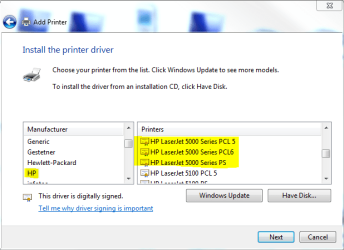
Have you tried adding your printer using Windows 7 built-in drivers? For LaserJet 5000 there are three drivers available: PCL 5, 6 and postscript.

If you decide to give it a try, follow these instructions, replacing the PSC 1315 printer mentioned in the linked post with your LaserJet 5000.

Kari
 

Attachments

  • LJ5000.PNG
    LJ5000.PNG
    18.6 KB · Views: 325

My Computer

Computer type
Laptop
Computer Manufacturer/Model Number
HP ENVY 17-1150eg
OS
Windows 10 Pro x64 EN-GB
CPU
1.6 GHz Intel Core i7-720QM Processor
Memory
6 GB
Graphics Card(s)
ATI Mobility Radeon HD 5850 Graphics
Sound Card
Beats sound system with integrated subwoofer
Monitor(s) Displays
17" laptop display, 22" LED and 32" Full HD TV through HDMI
Screen Resolution
1600*900 (1), 1920*1080 (2&3)
Hard Drives
Internal: 2 x 500 GB SATA Hard Disk Drive 7200 rpm
External: 2TB for backups, 3TB USB3 network drive for media
Cooling
As Envy runs a bit warm, I have it on a Cooler Master pad
Keyboard
Logitech diNovo Media Desktop Laser (bluetooth)
Mouse
Logitech Performance Mouse MX
Internet Speed
50/10 Mbps VDSL
Antivirus
Windows Defender 4.3.9431.0
Browser
Maxthon 3.5.2., IE11
The HP LJ5000 is connected to a networked Windows XP computer via a parallel cable (the printer is so old that it does not have a USB connection). The new Windows 7 computer is so new that it does not have a parallel port. So I cannot connect the printer directly to the W7 computer. Instead I have to connect through my existing lan.
How does this change the instructions?
 

My Computer

OS
Windows 7 64 bit
The HP LJ5000 is connected to a networked Windows XP computer via a parallel cable (the printer is so old that it does not have a USB connection). The new Windows 7 computer is so new that it does not have a parallel port. So I cannot connect the printer directly to the W7 computer. Instead I have to connect through my existing lan.
How does this change the instructions?

First, connect the printer to the XP computer and power both printer and XP on. Check that network is OK (7 can see XP).

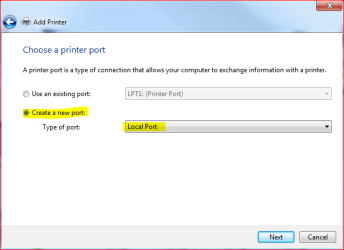
On 7, instead of choosing an existing port when adding a printer, choose Create a new port, choosing Local Port as port type:

NewPort1.PNG

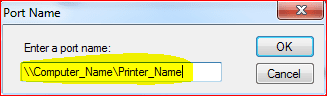
Click Next, give the port a name. Format is \\Computer_Name\Printer_Name, where Computer_Name is the network name of your XP computer and Printer_Name is the name printer is shared with:

NewPort2.PNG

Click OK, follow the instructions given on screen.

Kari
 

My Computer

Computer type
Laptop
Computer Manufacturer/Model Number
HP ENVY 17-1150eg
OS
Windows 10 Pro x64 EN-GB
CPU
1.6 GHz Intel Core i7-720QM Processor
Memory
6 GB
Graphics Card(s)
ATI Mobility Radeon HD 5850 Graphics
Sound Card
Beats sound system with integrated subwoofer
Monitor(s) Displays
17" laptop display, 22" LED and 32" Full HD TV through HDMI
Screen Resolution
1600*900 (1), 1920*1080 (2&3)
Hard Drives
Internal: 2 x 500 GB SATA Hard Disk Drive 7200 rpm
External: 2TB for backups, 3TB USB3 network drive for media
Cooling
As Envy runs a bit warm, I have it on a Cooler Master pad
Keyboard
Logitech diNovo Media Desktop Laser (bluetooth)
Mouse
Logitech Performance Mouse MX
Internet Speed
50/10 Mbps VDSL
Antivirus
Windows Defender 4.3.9431.0
Browser
Maxthon 3.5.2., IE11
Thanks, Thanks, & Thanks Again!!

This worked! And after getting the W7 machine to print to the XP machine, I connected the printer to the W7 machine (using a parallel to USB cable) and then got the XP machine to print to it using the same method. Outstanding.

So now I can begin the process of migrating my data and programs to the W7 machine with complete assurance that I can get all of the programs to print from either computer.
 

My Computer

OS
Windows 7 64 bit
Nice to hear it worked.

Good luck with migrating.

Kari
 

My Computer

Computer type
Laptop
Computer Manufacturer/Model Number
HP ENVY 17-1150eg
OS
Windows 10 Pro x64 EN-GB
CPU
1.6 GHz Intel Core i7-720QM Processor
Memory
6 GB
Graphics Card(s)
ATI Mobility Radeon HD 5850 Graphics
Sound Card
Beats sound system with integrated subwoofer
Monitor(s) Displays
17" laptop display, 22" LED and 32" Full HD TV through HDMI
Screen Resolution
1600*900 (1), 1920*1080 (2&3)
Hard Drives
Internal: 2 x 500 GB SATA Hard Disk Drive 7200 rpm
External: 2TB for backups, 3TB USB3 network drive for media
Cooling
As Envy runs a bit warm, I have it on a Cooler Master pad
Keyboard
Logitech diNovo Media Desktop Laser (bluetooth)
Mouse
Logitech Performance Mouse MX
Internet Speed
50/10 Mbps VDSL
Antivirus
Windows Defender 4.3.9431.0
Browser
Maxthon 3.5.2., IE11
The HP LJ5000 is connected to a networked Windows XP computer via a parallel cable (the printer is so old that it does not have a USB connection). The new Windows 7 computer is so new that it does not have a parallel port. So I cannot connect the printer directly to the W7 computer. Instead I have to connect through my existing lan.
How does this change the instructions?

First, connect the printer to the XP computer and power both printer and XP on. Check that network is OK (7 can see XP).

On 7, instead of choosing an existing port when adding a printer, choose Create a new port, choosing Local Port as port type:

View attachment 51638

Click Next, give the port a name. Format is \\Computer_Name\Printer_Name, where Computer_Name is the network name of your XP computer and Printer_Name is the name printer is shared with:

View attachment 51639

Click OK, follow the instructions given on screen.

Kari

I had my HP LJ5000 connected to an XP laptop and I had no problem printing 11x17 duplex. I now have a new laptop running Win 7 and it doesn't have a parallel port so I purchased a USB printer cable from the HP LJ5000 to my laptop but I cannot seem to get the right printer drivers to recognize duplexing? Any ideas?
 

My Computer

OS
win 7
Anybody had luck printing from Win 7 to HP 5000 Laserjet with TRUE 1200 x 1200 -- which means the printer runs at half-speed? You can get a pseudo 1200 resolution at fast speed, but not true. . . Thanks
 

My Computer

OS
Windows 7 64 bit
At this point I have given up on the 1200 x 1200 printing resolution. For what I do 600 x 600 is fine and it does not look like HP is going put out anything better for this model.

As for connecting the printer to a new computer without a parallel port: I would suggest to connect it over LAN by installing a HP JetDirect 610N (J4169A) network print server card into the printer - works perfectly. These days you find plenty of them for $20 or less on eBay.
 
Last edited:

My Computer

Computer type
PC/Desktop
Computer Manufacturer/Model Number
Dell Precision M6300
OS
Windows 7 Ultimate x64 SP1 Ver. 6.1.7601 (Build 7601)
CPU
Intel Core 2 Extreme X9000, 2.80GHz 6MB L2-Cache, 800MHz FSB
Motherboard
Dell JM679
Memory
8 GB - 2x 4GB SODIMM DDR-II
Graphics Card(s)
NVIDIA Quadro FX 3600M (Driver Ver. 8.17.12.6776)
Sound Card
IDT/SigmaTel STAC 92XX C Major HD Audio
Monitor(s) Displays
17'' WUXGA TFT
Screen Resolution
1920 x 1200
Hard Drives
SSD Crucial m4 512GB (CT512M4SSD2)
Case
Laptop
Mouse
Microsoft Wireless Laser Mouse 8000
Browser
IE 10
I just recently got this thing up and running networked through an old Windows 98 machine by first tricking it into thinking it was a LTP connected printer and then changing the port to the network share location. I used the driver from windows update on the Windows 7 64bit machine, but it only seems to let me print to 'Letter' from the form feeder. This HP has a Tray 2 and 3 but I cannot get it to select them. Is it worth trying the same steps above with the driver from HPs site? On the printer properties page it only has Letter as available paper, but it is loaded with both Legal and 8.5 x 17 in tray 3.

Cheers.
 

My Computer

OS
Windows 7 Professional 64-bit
CPU
Core i7 920 D0 @4.05GHz
Motherboard
ASUS P6T SE
Memory
6GB DDR3 1600 G.Skill
Graphics Card(s)
Sapphire Radeon 5850
Monitor(s) Displays
Samsung SyncMaster 2253LW
Screen Resolution
1680x1050
Hard Drives
Western Digital Black 640GB
Seagate 7200.12 500GB
PSU
Antec TruePower Blue 750W
Case
Antec 902
Cooling
Thermalright Ultra 120 Extreme 1366
Internet Speed
Bell Aliant High-Speed Ultra 7Mbps
Other Info
Pioneer DVR-116DBK Burner
You need to get the driver from HP which actually communicates with the printer to get the actual hardware configuration and which trays and other options are present. I’m using the HP Universal Printing PCL 6 (v5.2) driver (upd-PCL6-X64-5_2_6_9321.exe)

If you operate the printer in a network I would strongly recommend to install the HP JetDirect 610N (J4169A) LAN adapter card into the printer. Search eBay for JetDirect 610N J4169A and you will find plenty, starting at $12 Buy It Now, most even with free shipping.

Connecting the printer that way beats USB any day and enables each computer in the network to directly access the printer with the latest driver for its OS. Also you no longer need to keep an old computer up and running to connect to the printer indirectly.

I have my LaserJet 5000 connected this way to several Windows 7 computers and even to an old NeXTstation.
The setup in Windows 7 with the HP driver is a snap – you basically just need to enter the IP address of the printer.
 

My Computer

Computer type
PC/Desktop
Computer Manufacturer/Model Number
Dell Precision M6300
OS
Windows 7 Ultimate x64 SP1 Ver. 6.1.7601 (Build 7601)
CPU
Intel Core 2 Extreme X9000, 2.80GHz 6MB L2-Cache, 800MHz FSB
Motherboard
Dell JM679
Memory
8 GB - 2x 4GB SODIMM DDR-II
Graphics Card(s)
NVIDIA Quadro FX 3600M (Driver Ver. 8.17.12.6776)
Sound Card
IDT/SigmaTel STAC 92XX C Major HD Audio
Monitor(s) Displays
17'' WUXGA TFT
Screen Resolution
1920 x 1200
Hard Drives
SSD Crucial m4 512GB (CT512M4SSD2)
Case
Laptop
Mouse
Microsoft Wireless Laser Mouse 8000
Browser
IE 10
HP Laserjet 5000 problem

I have an HP Notebook with Windows 7 Home Premium 64-bit as the OS.

I have an old (but very serviceable) HP Laserjet 5000 that worked fine on Windows ME with parallel port connexion. (Although the driver text was in Arabic!)

I have bought a USB-Centronics cable in an attempt to hook it up to my notebook.

Windows sees the printer and instals USB support driver and HP Laserjet 5000 PCL5 drivers from WU.

Printing does not work, although test page splutters 1 character at a time on to each sheet. MS WORD fails to print, as does NOTEPAD.

The printer prints self diagnostic pages offline, no problem.

The model is C4110A with three paper trays.

It has an HP Jetsend Address ip of 10.0.1.175 with an installed option
E10 1 HP JETDIRECT J3111A. Presumably a network card?

I have tried installing all of the HP drivers (PS, PCL5, PCL6) to no avail.

Can anyone suggest a solution please?

Many thanks
 

My Computer

Computer Manufacturer/Model Number
Hewlett-Packard HP G56 Notebook
OS
Windows 7 Home Premium 64-bit
CPU
Pentium t4500 dual core
Memory
4 gb RAM
Problem Solved.

Sabrent USB 2.0 Bi-Directional cable worked fine.
 

My Computer

Computer Manufacturer/Model Number
Hewlett-Packard HP G56 Notebook
OS
Windows 7 Home Premium 64-bit
CPU
Pentium t4500 dual core
Memory
4 gb RAM
Back
Top