lightningpace
New member
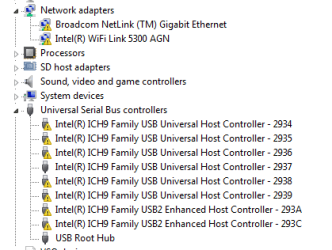
Hi, the problem I have is that every time i shutdown and power back on, my Wifi, WLAN and all the USB drivers are not working.
I found all I have to do is disable and then enable the Wifi / WLAN drivers in device manager, to start them working. And I found that If I uninstall all the USB devices in device manager they then reinstall automatically.
But then when I reboot then they are not working again.
I tried a system restore to when the drivers were working but they don't change.
I have downloaded the latest drivers from Intel's website, and tried DriverMax which says the drivers are the latest version.
I'm using Windows 7 Ultimate 64 bit on a Dell Studio 1555. The Wifi / WLAN drivers are Intel.
I've tried searching on google but I haven't come across anyone with this problem. I was wondering if anyone had any ideas?
I found all I have to do is disable and then enable the Wifi / WLAN drivers in device manager, to start them working. And I found that If I uninstall all the USB devices in device manager they then reinstall automatically.
But then when I reboot then they are not working again.
I tried a system restore to when the drivers were working but they don't change.
I have downloaded the latest drivers from Intel's website, and tried DriverMax which says the drivers are the latest version.
I'm using Windows 7 Ultimate 64 bit on a Dell Studio 1555. The Wifi / WLAN drivers are Intel.
I've tried searching on google but I haven't come across anyone with this problem. I was wondering if anyone had any ideas?
Attachments

My Computer
At a glance
Windows 7 Ultimate 64bitCore 2 Duo P8600 (2.4Ghz, 3MB, 1066Mhz)4GB RAM512MB ATI RADEON HD 4570
- Computer Manufacturer/Model Number
- Dell Studio 1555
- OS
- Windows 7 Ultimate 64bit
- CPU
- Core 2 Duo P8600 (2.4Ghz, 3MB, 1066Mhz)
- Memory
- 4GB RAM
- Graphics Card(s)
- 512MB ATI RADEON HD 4570
- Monitor(s) Displays
- LCD 15.6 inch HD (1366x768) WLED
- Hard Drives
- 320GB