Razer Lachesis mouse

simpel

New member
Local time
11:15 PM
Messages
5
My Razer Lachesis mouse is not working properly under 7 (jumping cursor).

The system cant find the mouse via firmware and also for firmware and mouseware it`s impossible to upgrade..

Anyone knows when razer is releasing new win seven drivers?
 
Last edited:

My Computer

OS
7
I'm using a Lachesis mouse, I didn't need to install any driver myself and I have no problems. You could try a different usb port but I'm afraid it wont help
 

My Computer

Computer Manufacturer/Model Number
hp
OS
win7.7100x64
CPU
core2duo t5870
Memory
4gb
Monitor(s) Displays
l2245w
go to razors website and download the newest driver for vista (32 or 64 depending on what you have installed). Then extract the files into a folder. Go into the device manager and delete the mouse and driver. Reboot and it will find the mouse again and point it to the folder where you put the files.
 

My Computer

Computer Manufacturer/Model Number
Black_Box (homebuilt)
OS
windows 7 RTM x64
CPU
Phenom II 965 Quad Core 3.4Ghz
Motherboard
Asus M4A79T Deluxe
Memory
Mushkin Blackline 8GB (4x2gb)
Graphics Card(s)
XFX Radeon 5970 Black Edition
Sound Card
onboard
Monitor(s) Displays
Dell 2408WPF-main Dell E248WFP-secondary
Screen Resolution
1920x1200-main 1920x1200-secondary
Hard Drives
OCZ Vertex Limited Edition 100GB (OS)
x1 WD Black Edition 500GB drive (Storage)
PSU
XFX 850w Black Edition (Modular)
Case
Mountian Mods H2go
Cooling
CoolITSystems ECO A.L.C.
Keyboard
Logitech MX 5500 wireless keyboard
Mouse
Razor Copperhead
Internet Speed
16Mb down/2Mb up Wowway Cable Internet
go to razors website and download the newest driver for vista (32 or 64 depending on what you have installed). Then extract the files into a folder. Go into the device manager and delete the mouse and driver. Reboot and it will find the mouse again and point it to the folder where you put the files.

only mice and pointing-device hardware in device manager is "HID-compliant mouse"...it didn`t help to deinstall and reinstall - problem always the same, it`s a problem with razerware under windows seven x64..
mouse jumping after bootup is quite noticeable, but not real heavy - but later the issue gets much bigger;

- then i have to plug out the usb-cable and stick it in again a few times.., i am using newest drivers - but razerware shows old driver ver. 1.10 and mouse ver. 1.00
 

My Computer

OS
7
only mice and pointing-device hardware in device manager is "HID-compliant mouse"...it didn`t help to deinstall and reinstall - problem always the same, it`s a problem with razerware under windows seven x64..
mouse jumping after bootup is quite noticeable, but not real heavy - but later the issue gets much bigger;

- then i have to plug out the usb-cable and stick it in again a few times.., i am using newest drivers - but razerware shows old driver ver. 1.10 and mouse ver. 1.00


razerware under my X64 is fine mate, no issues one bit
 

My Computer

Computer Manufacturer/Model Number
Made by Mastercard
OS
Windows 7 RTM x64
CPU
Core 2 Quad, @3.8 on aircooling
Motherboard
XFX 750i Nforce
Memory
8 Gig Geil Black Dragon
Graphics Card(s)
Nvidia 8800GTX 512 x 2 in SLI
Sound Card
Razor Barracuda
Monitor(s) Displays
2 X 24 Inch Hannsg
Screen Resolution
1600x1050
Hard Drives
1X64 Gig Kingston SSD Drive
2X 320 sata
2X250 ide
1X 320 External. and lets not forget the 8 gig thumbdrive :)
and a partridge in a pear tree
PSU
600 Watt Coolermaster Elite Silent Pro
Case
Coolermaster Storm
Cooling
Coolermaster V8
Keyboard
Razor Lycosa
Mouse
Razor Mamba, sweet as candy
Internet Speed
Virgin 50MB.
Other Info
Zalman Guardian System Fan Controls
Aerocool Modern V system monitor.
And a nice bunch of stickers on the front!! All that money for something that glows blue. But thats why we do it kids. all for the bling!!

100mbit Seedbox, loving that!
Razor Destructor Gaming Mat, Razor Moray Headphones.

To much spare money perhaps? Nah, my mrs has shoes. I have a very expensive way of her shopping for
I have a razor copperhead, and am on RC1-x86 and also have no issues. I dont have the razorware installed at this moment and all of the options on the mouse work, i have two buttons setup to change the resolution on the fly and they work without the razorware. Just setup the profiles on another machine for the time being.
 

My Computer

Computer Manufacturer/Model Number
Black_Box (homebuilt)
OS
windows 7 RTM x64
CPU
Phenom II 965 Quad Core 3.4Ghz
Motherboard
Asus M4A79T Deluxe
Memory
Mushkin Blackline 8GB (4x2gb)
Graphics Card(s)
XFX Radeon 5970 Black Edition
Sound Card
onboard
Monitor(s) Displays
Dell 2408WPF-main Dell E248WFP-secondary
Screen Resolution
1920x1200-main 1920x1200-secondary
Hard Drives
OCZ Vertex Limited Edition 100GB (OS)
x1 WD Black Edition 500GB drive (Storage)
PSU
XFX 850w Black Edition (Modular)
Case
Mountian Mods H2go
Cooling
CoolITSystems ECO A.L.C.
Keyboard
Logitech MX 5500 wireless keyboard
Mouse
Razor Copperhead
Internet Speed
16Mb down/2Mb up Wowway Cable Internet
problem still the same..
you also got only "HID-compliant mouse" device in device manager?
 

My Computer

OS
7
ur mouse might be spoilt, did u try it on other comp?
 

My Computer

Computer Manufacturer/Model Number
Asus F83VF Noteook
OS
Windows 7 Home Premium x64
CPU
Intel Core 2 Duo P8800
Motherboard
Intel PM45 Chipset
Memory
4 GB DDR3
Graphics Card(s)
NVIDIA GeForce GT 220M, 1 GB GDDR3 SDRAM
Sound Card
Realtek
Screen Resolution
1366x768
Hard Drives
Seagate 500 GB
PSU
-
Case
-
Cooling
-
Keyboard
-
Mouse
Razer Lachesis
Internet Speed
10 Mb/s
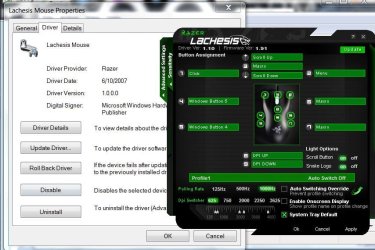
It seems the razer software and device manager are confused which driver is being used:
lachesis2.JPG

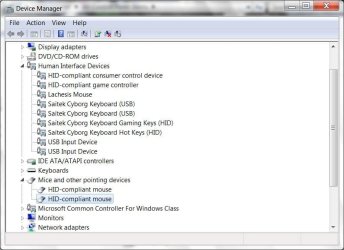
The mouse should show up in 'Human Interface Devices' instead of 'Mice and other pointing devices':
lachesis.JPG

For those having trouble, have you tried: (if you can use the razerware that is)

disabling acceleration
adjusting the polling rate
reseting both profile and config

A little while ago, all the side/extra buttons stopped responding completely in both Seven and Vista until I reset the profiles/configs. It could be worth a shot.

I haven't had a problem with either the mouse or software since build 7000. Then again, I updated the firmware to 1.91 under Vista x64.
 

My Computer

Computer type
PC/Desktop
Computer Manufacturer/Model Number
Systems by SmartEyeball
OS
8 Pro x64
CPU
i7 3770K 4.6GHz
Motherboard
ASUS P8Z77 WS
Memory
16GB G.Skill Trident X 2666mhz
Graphics Card(s)
x2 EVGA 780 Ti Superclocked SLI
Sound Card
SB X-FI Surround 5.1 PRO USB / ATH-AD900 Headphones
Monitor(s) Displays
x3 Dell U2410 / 58" Samsung
Screen Resolution
5760*1200/ 1920*1200
Hard Drives
2x Intel 520 240GB (RAID 0) * 2x WD Caviar Blacks 2TB (RAID 0) * 2TB WD Caviar Black * Sony Optirac DVD
PSU
Silverstone Strider Evolution 1200W
Case
Thermaltake Level 10 GT Snow Edition
Cooling
Noctua NH-D14
Keyboard
Topre Realforce // Ducky Shine MX Black // Filco Ninja TKL
Mouse
Thermaltake Theron (Highly Recommended) + Razer Imperator
Antivirus
MSE
Browser
IE, FF, WaterFox
Other Info
GT Extreme V2 Sim Racing Cockpit + 40" LCD and K/B Mouse stand ▼
Fanatec CSR Elite Wheel + Clubsport V1 Pedals + CSR shifter/7G-H ▼Saitek X52 Pro ▼ TrackIR 5 Pro
Buttkicker v2 Seat Rumbler with Dedicated 5.1 and Sub Woofer attached to frame ▼
=
Bloody Big Grin
Thanks for the reply.. now I think I really ****ed up .. all the sudden my usb drives are saying device malfunctioned etc. any ideas thanks
 

My Computer

OS
7
think 32 bit will be better?

think 32 bit will be better?
 

My Computer

OS
7
i had my lachesis firmware updated, and it spoilt it due to electrical surges.
 

My Computer

Computer Manufacturer/Model Number
Asus F83VF Noteook
OS
Windows 7 Home Premium x64
CPU
Intel Core 2 Duo P8800
Motherboard
Intel PM45 Chipset
Memory
4 GB DDR3
Graphics Card(s)
NVIDIA GeForce GT 220M, 1 GB GDDR3 SDRAM
Sound Card
Realtek
Screen Resolution
1366x768
Hard Drives
Seagate 500 GB
PSU
-
Case
-
Cooling
-
Keyboard
-
Mouse
Razer Lachesis
Internet Speed
10 Mb/s
think 32 bit will be better?

Possible, but unlikely. Can you post a screenshot of device manager with relevant trees expanded?

You could always try uninstalling the USB devices through device manager, rebooting and let them be reinstalled again.

Have you installed your mobo/chipset drivers?

i had my lachesis firmware updated, and it spoilt it due to electrical surges.

ouch. A power surge while it was updating, or surges from the USB ports. Is it dead now?
 

My Computer

Computer type
PC/Desktop
Computer Manufacturer/Model Number
Systems by SmartEyeball
OS
8 Pro x64
CPU
i7 3770K 4.6GHz
Motherboard
ASUS P8Z77 WS
Memory
16GB G.Skill Trident X 2666mhz
Graphics Card(s)
x2 EVGA 780 Ti Superclocked SLI
Sound Card
SB X-FI Surround 5.1 PRO USB / ATH-AD900 Headphones
Monitor(s) Displays
x3 Dell U2410 / 58" Samsung
Screen Resolution
5760*1200/ 1920*1200
Hard Drives
2x Intel 520 240GB (RAID 0) * 2x WD Caviar Blacks 2TB (RAID 0) * 2TB WD Caviar Black * Sony Optirac DVD
PSU
Silverstone Strider Evolution 1200W
Case
Thermaltake Level 10 GT Snow Edition
Cooling
Noctua NH-D14
Keyboard
Topre Realforce // Ducky Shine MX Black // Filco Ninja TKL
Mouse
Thermaltake Theron (Highly Recommended) + Razer Imperator
Antivirus
MSE
Browser
IE, FF, WaterFox
Other Info
GT Extreme V2 Sim Racing Cockpit + 40" LCD and K/B Mouse stand ▼
Fanatec CSR Elite Wheel + Clubsport V1 Pedals + CSR shifter/7G-H ▼Saitek X52 Pro ▼ TrackIR 5 Pro
Buttkicker v2 Seat Rumbler with Dedicated 5.1 and Sub Woofer attached to frame ▼
=
Bloody Big Grin
The mouse should show up in 'Human Interface Devices' instead of 'Mice and other pointing devices':

Thank you for this info. i`ve tried all your tipps..

here are the error messages i get:
http://img34.imageshack.us/img34/5609/errortfo.png
<--by trying to upgrade lachesis firmware to 1.91 (on my notebook under vistax64 it works perfect)
http://img34.imageshack.us/img34/779/lachesisfirm.png
<--if i manually open the razerware config, mouse is not recognized..

I hope there will be a win7 driver out within the next two month; :S
 
Last edited:

My Computer

OS
7
solved the problem now! :p

by browsing manually for the lachesis driver in device manager -> human interface devices!

I tried to update all of my four USB-input-devices ...the 4th then installed driver 4 lachesis mouse :D
 

My Computer

OS
7
Good to hear mate :) However it's still odd you had to go to all the trouble... :huh:

It's just as well though, considering how often Razer update thier drivers, you could have been waiting a long time for a seven driver :p
 

My Computer

Computer type
PC/Desktop
Computer Manufacturer/Model Number
Systems by SmartEyeball
OS
8 Pro x64
CPU
i7 3770K 4.6GHz
Motherboard
ASUS P8Z77 WS
Memory
16GB G.Skill Trident X 2666mhz
Graphics Card(s)
x2 EVGA 780 Ti Superclocked SLI
Sound Card
SB X-FI Surround 5.1 PRO USB / ATH-AD900 Headphones
Monitor(s) Displays
x3 Dell U2410 / 58" Samsung
Screen Resolution
5760*1200/ 1920*1200
Hard Drives
2x Intel 520 240GB (RAID 0) * 2x WD Caviar Blacks 2TB (RAID 0) * 2TB WD Caviar Black * Sony Optirac DVD
PSU
Silverstone Strider Evolution 1200W
Case
Thermaltake Level 10 GT Snow Edition
Cooling
Noctua NH-D14
Keyboard
Topre Realforce // Ducky Shine MX Black // Filco Ninja TKL
Mouse
Thermaltake Theron (Highly Recommended) + Razer Imperator
Antivirus
MSE
Browser
IE, FF, WaterFox
Other Info
GT Extreme V2 Sim Racing Cockpit + 40" LCD and K/B Mouse stand ▼
Fanatec CSR Elite Wheel + Clubsport V1 Pedals + CSR shifter/7G-H ▼Saitek X52 Pro ▼ TrackIR 5 Pro
Buttkicker v2 Seat Rumbler with Dedicated 5.1 and Sub Woofer attached to frame ▼
=
Bloody Big Grin
well ... for me that didn't really work, windows still tells me my driver is version 1.000 instead of 1.10 ...
and firmware update doesn't work ...
any fix for this?

razer-configuration app tells me I use driver v1.1 and firmware v1.00 and I would like to upgrade my firmware...
 

My Computer

OS
Windows 7 Professional x64
CPU
Intel i7 930 2.8 Ghz
Motherboard
Gigabyte GA-EX58-UD5
Memory
Mushkin Redline 3x2GB, DDR3-1600 CL6-8-6-24
Graphics Card(s)
Sapphire HD 5770 1G
Sound Card
Creative X-Fi XtremeGamer Fatal1ty Pro Series
Monitor(s) Displays
Samsung SyncMaster 226BW
Hard Drives
1x 500 GB System
2x 1TB
1x 1.5 TB
2x 2TB
PSU
be quiet! DARK POWER PRO, P8 900W
Case
Lian Li PCB-70 Black
Cooling
stock
Keyboard
Logitech G15 Blue Backlight
Mouse
Logitech G5 Laser Mouse
Internet Speed
100 mbit
unfortunately me to install it at all, uz know what to do:)
sw install, but the driver unfortunately ...
 

My Computer

OS
win 7
Really weird ... I plugged my Lachesis mouse into Windows 7 in March, it pulled a driver from the 'Net automatically, and I haven't had a problem since...
 

My Computer

Computer Manufacturer/Model Number
Alienware X51
OS
Windows 7 Home Premium x64
CPU
Intel Core i7-2600 @3.40GHz
Memory
8.00GB DDR3
Graphics Card(s)
NVIDIA GeForce GTX 555 w/1.0GB RAM
Monitor(s) Displays
BenQ XL2420TX
Screen Resolution
1920x1080@120Hz
Hard Drives
1TB
PSU
330-watt
Keyboard
Logitech Wireless Illuminated Keyboard K800
Mouse
Razer Orochi
Internet Speed
Campus Internet
Back
Top