Marvell SATA-III 6Gb driver failure under Win7 64bit

TallSteve

New member
Local time
12:46 PM
Messages
5
MY first post... Shame it has to be about the failure of Marvell's SATA-III 6Gb controller driver to load under Windows 7 64bit.

The driver fails to load from both the manufacturers CD as well as from the latest (supposedly 64bit) driver download from their website... the manufacturer being Gigabyte - the motherboard being a GA-X58A-UD3R (revision 1).

Device manager shows the Intel iCH10 SATA channels and the Gigabyte SATA channels loaded and operating correctly... however even after attempting to load 'legacy devices' and pointing to the (supposedly) Marvell 64bit *.inf Windows 7 still cacks itself that the driver is a "non-64bit compliant device driver"...

Now... because I have a dual boot system with Win-XP Pro installed on a separate HDD I've loaded the 32bit version of the Marvell SATA-III 6Gb controller driver from the Gigabyte download centre (and just to be certain, from the Mobo setup CD) without hiccup or problem of any sort; and the Marvell SATA-III 6Gb controller shows up clearly in XP-Pro's Device Manager - giving me the sort of performance from my Seagate 2Tb SATA-III 6gb HDD that I was expecting, as well as hoping to have under Windows7 64Bit!

Bottom line: I have seen nothing regarding the Marvell 64bit SATA-III 6Gb controller and it's performance (or in my case, lack of performance!!) under Windows7 64bit.

That Gigabyte clearly has what they purport to be a "64bit" version of the Marvell SATA controller for download on their support sites, when it clearly won't load on a Windows7 64bit system that has the exact hardware and OS that is supposed to be supported is - in my view, a pretty poor show!

Don't these people test their stuff?!!!

Anyway - rant over...

If there's anyone out there who also has a mothereboard with Marvell SATA-III 6Gb SATA ports, a SATA-III 6Gb Hard Disk Drive and is running a 64bit OS, who has managed to get verified installation (not just assumed installation, simply off the back of the 'console' loading the software to it's destination folder...) - I'd be very, very interested to know how you achieved it!


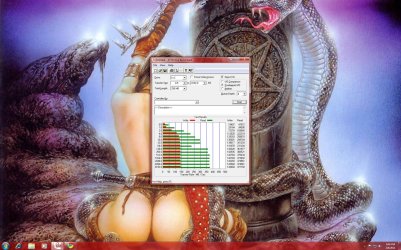
(BTW - HDD test app shows that the Seagate 2Tb SATA-III 6Gb drive is running as SATA-III 6Gb under Win-XP Pro while it is running as SATA-II 3Gb under Windows7 with 'various options' unavailable, which shows that even if people think (assume) the Marvell 64bit SATA-III 6Gb controller driver has loaded under Windows7 64bit... it hasn't!!)
 

My Computer My Computer

At a glance

Win 7 64 and XP Pro 32
OS
Win 7 64 and XP Pro 32
Welcome to Seven Forums. Hopefully someone on here has resolved this issue, but for now it seems like something I would be on Gigabytes back about. Maybe contacting them will get you some much needed help as it appears you know what your doing.JMO Fabe
 

My Computer My Computer

At a glance

Windows 7 ultimate 64 bit / XP Home sp3intel Core 2 Duo E8400 3.0ghz8 gigs 1066 OCZ Fata1tyEVGA GTX 580 Call of Duty Black Ops Edition
Computer Manufacturer/Model Number
Self Built
OS
Windows 7 ultimate 64 bit / XP Home sp3
CPU
intel Core 2 Duo E8400 3.0ghz
Motherboard
Asus P5ND bios 1401
Memory
8 gigs 1066 OCZ Fata1ty
Graphics Card(s)
EVGA GTX 580 Call of Duty Black Ops Edition
Sound Card
Creative Soundblaster Audigy 2zs
Monitor(s) Displays
Asus 24in LCD's 2MS X2
Screen Resolution
1920x1080p @60Hz
Hard Drives
WD Caviar 500 Black/ WD Caviar 200 Blue
PSU
OCZ 700W GameXtreme
Case
NZXT Apollo
Cooling
Corsair H50 CPU/120mm x3 /60mm x2 /Corsair Dominator Ram
Keyboard
Logitech Bluetooth Wireless MX5000
Mouse
Logitech Bluetooth Wireless MX1000
Internet Speed
Download 19.83 Upload 0.97
Other Info
Logitech Z2300 Speakers/ Bose Noise Cancelling Headphones/Avermedia PCI-e Hybrid TV Bravo/Epson NX415 all in one/ 4 Port Powered USB Hub/ LG 10x Bluray Burner /TSST Corp DVDRW External
Hi TallSteve,

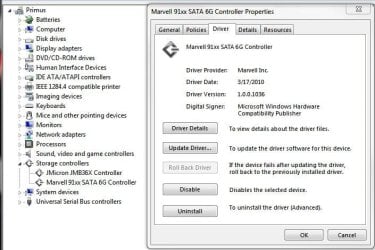
I have an Asus board with Marvell SATA-III 6Gb 64 bit installed, version V1.0.0.1036.
I'm going to give you a link to my motherboard (yes I have an Asus), select download, OS, then scroll down to other...Marvell V1.0.0.1036 is in there.
It should work because it's not "locked" to any particular board.

Mine works fine, if it doesn't, then your mobo maker Gigabyte is at fault.
I hope this sorts out your problem.
ASUSTeK Computer Inc.
 

Attachments

  • marvell.JPG
    marvell.JPG
    60 KB · Views: 3,402

My Computer My Computer

At a glance

Windows 7 Professional 64i7 8608GB Corsair CMX4GX3M2A1600C9 DDR3 1600(2) Nvidia EVGA GTX 470 SLI
Computer Manufacturer/Model Number
self built
OS
Windows 7 Professional 64
CPU
i7 860
Motherboard
ASUS P7P55D-E Pro /onboard SATA 6Gb/s USB 3.0
Memory
8GB Corsair CMX4GX3M2A1600C9 DDR3 1600
Graphics Card(s)
(2) Nvidia EVGA GTX 470 SLI
Sound Card
Onboard VIA VT1828S 8 channels
Monitor(s) Displays
ASUS VW266H 25.5" HDMI Widescreen LCD and HP vs19 LCD 19"
Screen Resolution
1920 x 1200 : 1280 X 1024 dual
Hard Drives
Intel X25-M 80GB SSD (boot)
Seagate Barracuda 80GB
Western Digital Caviar Black 500GB
Asus DRW-24B1ST/BLK/B/AS
PSU
COOLER MASTER Silent Pro 1000W
Case
LIAN LI Lancool PC-K62
Cooling
Prolimatech Megahalems with Scythe "ULTRA KAZE" 120
Keyboard
Saitek
Mouse
Microsoft Optical comfort mouse 3000
Internet Speed
Comcast Ultra tier 30/5
Hi TallSteve,

I have an Asus board with Marvell SATA-III 6Gb 64 bit installed, version V1.0.0.1036.
I'm going to give you a link to my motherboard (yes I have an Asus), select download, OS, then scroll down to other...Marvell V1.0.0.1036 is in there.
It should work because it's not "locked" to any particular board.

Mine works fine, if it doesn't, then your mobo maker Gigabyte is at fault.
I hope this sorts out your problem.
ASUSTeK Computer Inc.

Thanks for the replies!

I have posted to Gigabyte's support about the issue - but no response as yet...

And... I reckon your reasoning is sound Sanvean!!

I'll give the Asus version of the Marvell SATA-III 6Gb 64bit controller driver a go!

Fingers crossed it does the trick... it is only loading the driver for the controller chip, rather than Gigabyte's or Asus's iteration of the hardware after all!

I'll let you know how it goes!
 

My Computer My Computer

At a glance

Win 7 64 and XP Pro 32
OS
Win 7 64 and XP Pro 32
Hi TallSteve,

I have an Asus board with Marvell SATA-III 6Gb 64 bit installed, version V1.0.0.1036.
I'm going to give you a link to my motherboard (yes I have an Asus), select download, OS, then scroll down to other...Marvell V1.0.0.1036 is in there.
It should work because it's not "locked" to any particular board.

Mine works fine, if it doesn't, then your mobo maker Gigabyte is at fault.
I hope this sorts out your problem.
ASUSTeK Computer Inc.

Thanks for the replies!

I have posted to Gigabyte's support about the issue - but no response as yet...

And... I reckon your reasoning is sound Sanvean!!

I'll give the Asus version of the Marvell SATA-III 6Gb 64bit controller driver a go!

Fingers crossed it does the trick... it is only loading the driver for the controller chip, rather than Gigabyte's or Asus's iteration of the hardware after all!

I'll let you know how it goes!

I hope it goes well! :cool:
 

My Computer My Computer

At a glance

Windows 7 Professional 64i7 8608GB Corsair CMX4GX3M2A1600C9 DDR3 1600(2) Nvidia EVGA GTX 470 SLI
Computer Manufacturer/Model Number
self built
OS
Windows 7 Professional 64
CPU
i7 860
Motherboard
ASUS P7P55D-E Pro /onboard SATA 6Gb/s USB 3.0
Memory
8GB Corsair CMX4GX3M2A1600C9 DDR3 1600
Graphics Card(s)
(2) Nvidia EVGA GTX 470 SLI
Sound Card
Onboard VIA VT1828S 8 channels
Monitor(s) Displays
ASUS VW266H 25.5" HDMI Widescreen LCD and HP vs19 LCD 19"
Screen Resolution
1920 x 1200 : 1280 X 1024 dual
Hard Drives
Intel X25-M 80GB SSD (boot)
Seagate Barracuda 80GB
Western Digital Caviar Black 500GB
Asus DRW-24B1ST/BLK/B/AS
PSU
COOLER MASTER Silent Pro 1000W
Case
LIAN LI Lancool PC-K62
Cooling
Prolimatech Megahalems with Scythe "ULTRA KAZE" 120
Keyboard
Saitek
Mouse
Microsoft Optical comfort mouse 3000
Internet Speed
Comcast Ultra tier 30/5
Update!!

I found the 9128 Marvell controller chip on the ASUS site (thanks again Sanvean!!), and it has done the trick!!!

Why Gigabyte couldn't supply a proper version of the Marvell 9128 controller installer along with the 'console' is beyond me!


Thanks again for your help. It's most appreciated!!!
 

My Computer My Computer

At a glance

Win 7 64 and XP Pro 32
OS
Win 7 64 and XP Pro 32
Update!!

I found the 9128 Marvell controller chip on the ASUS site (thanks again Sanvean!!), and it has done the trick!!!

Why Gigabyte couldn't supply a proper version of the Marvell 9128 controller installer along with the 'console' is beyond me!


Thanks again for your help. It's most appreciated!!!

LOL that's awesome!!!! Glad I could help :party:
 

My Computer My Computer

At a glance

Windows 7 Professional 64i7 8608GB Corsair CMX4GX3M2A1600C9 DDR3 1600(2) Nvidia EVGA GTX 470 SLI
Computer Manufacturer/Model Number
self built
OS
Windows 7 Professional 64
CPU
i7 860
Motherboard
ASUS P7P55D-E Pro /onboard SATA 6Gb/s USB 3.0
Memory
8GB Corsair CMX4GX3M2A1600C9 DDR3 1600
Graphics Card(s)
(2) Nvidia EVGA GTX 470 SLI
Sound Card
Onboard VIA VT1828S 8 channels
Monitor(s) Displays
ASUS VW266H 25.5" HDMI Widescreen LCD and HP vs19 LCD 19"
Screen Resolution
1920 x 1200 : 1280 X 1024 dual
Hard Drives
Intel X25-M 80GB SSD (boot)
Seagate Barracuda 80GB
Western Digital Caviar Black 500GB
Asus DRW-24B1ST/BLK/B/AS
PSU
COOLER MASTER Silent Pro 1000W
Case
LIAN LI Lancool PC-K62
Cooling
Prolimatech Megahalems with Scythe "ULTRA KAZE" 120
Keyboard
Saitek
Mouse
Microsoft Optical comfort mouse 3000
Internet Speed
Comcast Ultra tier 30/5
I tried all and no drivers work for me

I downloaded the drivers and what is it that they are in 'Floppy64' folders and i cant install windwos 7 because the drive does not appear in the windows installer..... help!!!
 

My Computer My Computer

At a glance

Windows 7 64-bitIntel 930Corsair 6GbFX 580
Computer Manufacturer/Model Number
Gigabyte
OS
Windows 7 64-bit
CPU
Intel 930
Motherboard
X58A-UD5
Memory
Corsair 6Gb
Graphics Card(s)
FX 580
Hard Drives
1TB Sata 3.0
PSU
750hx
Case
Clear Acrylic
Cooling
Fans
Hi Turuca,
You have to go into device manager and right click your Marvell SATA III controller. Select update driver software, then second option "browse" and point it at either the 32 or 64 folder, then install, reboot.

There's no installer, it has to be updated thru device manager manually. If works or doesn't please post back!

Are you trying to install a fresh Win 7 on a drive using the Marvell sata III controller? If that is the case, take the contents of the 32 or 64 version (Floppy32 or Floppy64) just the files (no folder) and copy to a usb drive. When you go to load windows it will ask about drivers, that is when you point it to the usb drive.
 

My Computer My Computer

At a glance

Windows 7 Professional 64i7 8608GB Corsair CMX4GX3M2A1600C9 DDR3 1600(2) Nvidia EVGA GTX 470 SLI
Computer Manufacturer/Model Number
self built
OS
Windows 7 Professional 64
CPU
i7 860
Motherboard
ASUS P7P55D-E Pro /onboard SATA 6Gb/s USB 3.0
Memory
8GB Corsair CMX4GX3M2A1600C9 DDR3 1600
Graphics Card(s)
(2) Nvidia EVGA GTX 470 SLI
Sound Card
Onboard VIA VT1828S 8 channels
Monitor(s) Displays
ASUS VW266H 25.5" HDMI Widescreen LCD and HP vs19 LCD 19"
Screen Resolution
1920 x 1200 : 1280 X 1024 dual
Hard Drives
Intel X25-M 80GB SSD (boot)
Seagate Barracuda 80GB
Western Digital Caviar Black 500GB
Asus DRW-24B1ST/BLK/B/AS
PSU
COOLER MASTER Silent Pro 1000W
Case
LIAN LI Lancool PC-K62
Cooling
Prolimatech Megahalems with Scythe "ULTRA KAZE" 120
Keyboard
Saitek
Mouse
Microsoft Optical comfort mouse 3000
Internet Speed
Comcast Ultra tier 30/5
Marvell 9128 SATA 3 Controller and Drive

On my Gigabyte Motherboard x58a ud3r v2 the Marvell 9128 6Gb/s needs to beenabled in BIOS prior to attempting to load an operating system. There is also a BIOS setting to go in and configure the raid configuration. Then once that is saved to BIOS the computer reboots and the Win 6 64 bit operating system detects the drive or drives depending on whether you have used Raid 0 or Raid 1. It is also possible to load the 64-bit marvell driver from a USB drive prior to installing win 7 but I'm not convinced that is absolutely necessary. But the first step of enabling the BIOS and configuring the raid configuration is definitely needed on my board. I don't know if that is any help. First post. Also on my motherboard you must plug the Sata connectors to Sata 6 and 7 as they are the only ones that support Sata3.
 

My Computer My Computer

At a glance

Win 7 64 bit Ultimatei7 930Corsair DDR3 XMS 1600MZRadeon HD 5850 1GB DDR5
Computer Manufacturer/Model Number
Home Built
OS
Win 7 64 bit Ultimate
CPU
i7 930
Motherboard
Gigabyte X58A UD3R
Memory
Corsair DDR3 XMS 1600MZ
Graphics Card(s)
Radeon HD 5850 1GB DDR5
Sound Card
On board relaltek hd
Monitor(s) Displays
Generic
Hard Drives
2xWD Caviar 1TB 6Gb/s Black Edition
PSU
750W
Case
Coolmaster Elite
Cooling
Stock
sata 3 and gigabyte

I have a GA-X58A-UD5 motherboard. Installed everything from the disc that came with it but after seeing this thread I checked and the sata 3 controller was not installed. I installed the new one from Asus. I have a crucial ssd sata 3 and now in device manager its shown as: SCSI Disc Device. Is this normal for a sata 3 disc?

Before I think it was ata instead. I used to have the eject option in the notification area, just like anything you insert that is usb.

Also how can I test its speed?

I contacted gigabyte but they were not helpful. Hope someone can help me and thank you for your patience.
 

My Computer My Computer

At a glance

Windows 7 Ultimate x64
OS
Windows 7 Ultimate x64
It is normal. Download and run ATTO and post a snip of your results
 

My Computer My Computer

At a glance

Windows 7 Ultimate (x64) SP1Intel 3770k 4.6GHz8GB (2x 4GB) Crucial BallistixSapphire 7950 (1060/1600)
Computer Manufacturer/Model Number
tw33k
OS
Windows 7 Ultimate (x64) SP1
CPU
Intel 3770k 4.6GHz
Motherboard
ASUS Maximus V Formula
Memory
8GB (2x 4GB) Crucial Ballistix
Graphics Card(s)
Sapphire 7950 (1060/1600)
Sound Card
On Board Realtek HD Audio
Monitor(s) Displays
27" Acer B273HU (via HDMI)
Screen Resolution
2048 x 1152
Hard Drives
Crucial M4 128GB
2TB WD Black
1TB Samsung F3 SATA
1TB WD Elite External
2TB WD USB 3.0
PSU
Corsair AX750 Gold
Case
Corsair Obsidian 800DW
Cooling
Corsair H100 (2x AP-121/2x UK-3000 push/pull)
Keyboard
Microsoft Wireless 5000
Mouse
Microsoft Wireless 5000
Internet Speed
5mb/s
Other Info
Logitech z-2300 2.1 speakers
Lamptron FC-5 v2
Get the 1051 drivers from here if you want the latest WHQL (in use on my Ausus board):

Marvell drivers
 

My Computer My Computer

At a glance

Windows 10 Pro. EFI boot partition, full EFI ...i7 4770k 4.4GHz (44-44-43-43 turbo) @ 1.248V16GB (8GBx2) @2200 MHz G.skill Sniper 10-11-1...MSI GTX 970 Gaming 4G
Computer type
PC/Desktop
Computer Manufacturer/Model Number
Home built (GeneO industries)/Model 4
OS
Windows 10 Pro. EFI boot partition, full EFI boot
CPU
i7 4770k 4.4GHz (44-44-43-43 turbo) @ 1.248V
Motherboard
ASUS Maximus VI Hero
Memory
16GB (8GBx2) @2200 MHz G.skill Sniper 10-11-10-30-1, 1.6V
Graphics Card(s)
MSI GTX 970 Gaming 4G
Sound Card
Onboard SupremeFX Audio
Monitor(s) Displays
NEC Spectraview 2490WUXi-SV
Screen Resolution
1920 x 1200
Hard Drives
Samsung 850 Pro 256GB (OS), Samsung 2x 128GB 840 Pro SSD in RAID0, 3x WD Blue 6Gb/s 1TB RAID0, WD 2TB Black external USB 3.0, 2TB WD20EARS Green external USB 3.0, 2x 500GB Seagate and 1 750 GB external USB, 1x 350GB external USB3
PSU
Seasonic X-850 (2012 KM3 model)
Case
Fractal Design Define R4
Cooling
NH-D14, NF-F12, NF-A15; NF-P14, NF-P12,NF-A14, S12A PWM
Keyboard
Cooler Master Storm Quickfire Rapid - Brown
Mouse
Logitech G602
Internet Speed
126.4 Mb/s down, 24.3 Mb/s up
Other Info
USB 3.0 x8 , SATA III x8, eSATA, USB 2.0 x6. Samsung DVD R/W drive.

WEI: CPU 7.8, Memory 7.9, Graphics 7.9, Disk 7.9
Screenshot posted.
 

Attachments

  • atto_screenshot.jpg
    atto_screenshot.jpg
    316.6 KB · Views: 791

My Computer My Computer

At a glance

Windows 7 Ultimate x64
OS
Windows 7 Ultimate x64
Your drive is performing great! Is it a 128GB C300?
 

My Computer My Computer

At a glance

Windows 7 Ultimate (x64) SP1Intel 3770k 4.6GHz8GB (2x 4GB) Crucial BallistixSapphire 7950 (1060/1600)
Computer Manufacturer/Model Number
tw33k
OS
Windows 7 Ultimate (x64) SP1
CPU
Intel 3770k 4.6GHz
Motherboard
ASUS Maximus V Formula
Memory
8GB (2x 4GB) Crucial Ballistix
Graphics Card(s)
Sapphire 7950 (1060/1600)
Sound Card
On Board Realtek HD Audio
Monitor(s) Displays
27" Acer B273HU (via HDMI)
Screen Resolution
2048 x 1152
Hard Drives
Crucial M4 128GB
2TB WD Black
1TB Samsung F3 SATA
1TB WD Elite External
2TB WD USB 3.0
PSU
Corsair AX750 Gold
Case
Corsair Obsidian 800DW
Cooling
Corsair H100 (2x AP-121/2x UK-3000 push/pull)
Keyboard
Microsoft Wireless 5000
Mouse
Microsoft Wireless 5000
Internet Speed
5mb/s
Other Info
Logitech z-2300 2.1 speakers
Lamptron FC-5 v2
Thank you very much both. Spent a lot of money on the ssd and did not want it to be wasted.
Updated controller driver from 1042 to 1051 just now. :)
 

My Computer My Computer

At a glance

Windows 7 Ultimate x64
OS
Windows 7 Ultimate x64
I've read the entire thread and my problem lies very close to this. Therefore, I decided to continue on this thread.

I am having trouble installing Win 7 Ultimate x64 on my new Intel 510 SSD drive connected to the Marvell controller (on my Asus board) in AHCI mode.
Mind you, Windows installed fine on the 510 when Marvell was in IDE mode.
I am usually able to get to the HDD selection-screen, and here I see the Intel 510 drive just fine. Then, I load the Marvell 912x Controller Driver V1.0.0.1036 (downloaded from asus.com - where I made sure to select Win 7 64-bit). I also tried the 1.0.0.1051 version - downloaded from some other place.

During the subsequent installation, the setup crashes/hangs at various times. And nothing more happens.
One time I managed to get into Windows after the installation but after one more reboot, that was the last I saw of the Desktop.

I read a guide on how to switch to AHCI controller-mode after having done the installation in IDE mode.
The guide (How to enable AHCI in Windows 7 RC after installation | iThinkDifferent), along with several other guides, talks about modifying the "msahci" entry to value "0" under
HKEY_LOCAL_MACHINE\System\CurrentControlSet\Services\

This results in the same hang-situation during boot-up - after the switch to AHCI has been done in the BIOS.

Side-notes: Have run Memtest on the RAM for over 12 hours with no errors (also, the system has run stable as heck the past six months on a regular HDD on the exact same Marvell port).

I sooo need your suggestions! I find it so frustrating that I cannot enjoy my new and blazing fast hardware with the optimal settings.
 

My Computer My Computer

At a glance

Windows 7 Ultimate x64Intel Core i7 930 @ stock=2.8 GhzCorsair DDR3 PC1600 3x2GB kit (CMP6GX3M3A1600C7)Asus Radeon PCI-E HD4350
OS
Windows 7 Ultimate x64
CPU
Intel Core i7 930 @ stock=2.8 Ghz
Motherboard
Asus P6X58D-E, BIOS: 0502
Memory
Corsair DDR3 PC1600 3x2GB kit (CMP6GX3M3A1600C7)
Graphics Card(s)
Asus Radeon PCI-E HD4350
Sound Card
On-board
Monitor(s) Displays
Samsung 17" TFT
Hard Drives
1 x Intel 510 SSD Sata III (SSDSC2MH120A2K5) 120 GB,
1 x WD HDD Sata II 1 TB,
1 x WD HDD Sata II 2 TB,
1 x External: Samsung S2 Portable USB 3.0 640 GB
PSU
Chill Innovation 450 W
Case
Antec Solo
Cooling
CPU: Scythe Ninja 2 Rev. B
Internet Speed
50 Mbit/s
First change to AHCI mode from Bios, then install Windows 7. After installation install the marvell driver version 1.0.0.1051.
I am using Windows 7 64bit too but on Gigabyte motherboard.
 

My Computer My Computer

At a glance

Windows 7 Ultimate x64
OS
Windows 7 Ultimate x64
Thank you for the tip Soundlover. The problem is that I practically never make it through the entire installation of Windows before the setup hangs - this only being a problem when installing in AHCI mode.

In the attempt to adhere to proper forum conduct, I'd probably better refer all invested readers to this new thread on the subject here:
http://www.sevenforums.com/drivers/...l-9128-controller-windows-7-ultimate-x64.html
 

My Computer My Computer

At a glance

Windows 7 Ultimate x64Intel Core i7 930 @ stock=2.8 GhzCorsair DDR3 PC1600 3x2GB kit (CMP6GX3M3A1600C7)Asus Radeon PCI-E HD4350
OS
Windows 7 Ultimate x64
CPU
Intel Core i7 930 @ stock=2.8 Ghz
Motherboard
Asus P6X58D-E, BIOS: 0502
Memory
Corsair DDR3 PC1600 3x2GB kit (CMP6GX3M3A1600C7)
Graphics Card(s)
Asus Radeon PCI-E HD4350
Sound Card
On-board
Monitor(s) Displays
Samsung 17" TFT
Hard Drives
1 x Intel 510 SSD Sata III (SSDSC2MH120A2K5) 120 GB,
1 x WD HDD Sata II 1 TB,
1 x WD HDD Sata II 2 TB,
1 x External: Samsung S2 Portable USB 3.0 640 GB
PSU
Chill Innovation 450 W
Case
Antec Solo
Cooling
CPU: Scythe Ninja 2 Rev. B
Internet Speed
50 Mbit/s
Back
Top