"lag" in online games with Windows 7

pinstripe

New member
Member
Local time
6:03 AM
Messages
46
Hi there, I've recently had an extremely annoying issue regarding sound, games, multiplayer, and Windows 7. When I would start up a game (such as Counter-Strike Source or Heroes of Newerth) and connect to server, my fps and ping would be nominally OK, but the game would lag. In HoN this would be displayed by the heroes moving jerkily around the map, even though my fps and ping were good. In Counter Strike, this evidenced itself by glitchy nades that don't bounce smoothly, and whenever sounds are played, the ping spikes a bit. It's kind of like playing on a 33 tic server, for those of you familiar with the game. None of these issues occurred in single player games or in the aforementioned games with a local server. Symptoms included warping, skipping, and lagging while moving or viewing other players move.

Anyway, I searched and searched here and couldn't find anything, but finally I found something in Google (note: this is only a partial fix, don't do this, see update):

  • Stop and disable the "Multimedia Class Scheduler" service
  • Run regedit and go to "HKEY_LOCAL_MACHINE\SYSTEM\CurrentControlSet\Services\Audiosrv"
  • Double click on the entry "DependOnService" and delete the line with "MMCSS" from the text box
  • Reboot and enjoy lag free games

I diagnosed the issue by realizing that by disabling audio devices in device manager, lag would disappear in-game. So glad I found this solution after installing 6 different audio drivers and generally being very frustrated. Just thought I'd leave this here as a reference for others with a similar issue.

Update: doing this will likely induce audio issues such as crackling, popping, stuttering, and skipping. My final solution was to leave this service enabled but disable it's network throttling component (if you already did the first fix you should undo it and re-enable the service). This resolved my audio issues caused by disabling the MMCS while keeping my games lag free. This is not a solution if you are not experiencing network issues. If you are experiencing audio issues only, you should make sure the MMCSS is running. The best way to test if you have this problem is to disable your sound device in Device Manager and then see if the lag persists. If it does, you have some other issue. If the lag goes away, re-enable your sound device and try the following fix:

Leave the multimedia class scheduler service running, but disable its network throttling "feature":

  • Open regedit
  • Go to: HKEY_LOCAL_MACHINE\SOFTWARE\Microsoft\Windows NT\CurrentVersion\Multimedia\SystemProfile
  • There will be an entry for network performance throttling, default value is 10; set it to FFFFFFFF hex (willl look like 0xFFFFFFFF to the right of the entry)
  • Reboot
Here are some example threads where this fix was useful:
Counter-Strike Series & Windows 7 = Lag?
http://www.sevenforums.com/gaming/35544-stuttering-games-mainly-valve.html#post355977
http://www.sevenforums.com/gaming/38549-high-ping-choke-windows-7-css-tf2.html#post377783

Games affected:
Source Engine Games (Team Fortress 2 (TF2), Left 4 Dead, Left 4 Dead 2, Counter Strike Source (CS:S, CSS))
Heroes of Newerth (HoN)
Call of Duty Series (CoD), possibly including Modern Warfare
Overlord Series (Overlord, Overlord: Raising Hell, Overlord 2)

Post if you find another game that's affected so I can add it to this list!

For those interested, here are some articles on the MMCSS:
http://courtneymalone.com/2007/08/28...network-speed/
http://blogs.msdn.com/larryosterman/...slowdowns.aspx
http://msdn.microsoft.com/en-us/libr...8VS.85%29.aspx
http://blogs.technet.com/markrussino...7/1833290.aspx
http://support.microsoft.com/kb/948066
http://en.wikipedia.org/wiki/Multimedia_Class_Scheduler_Service
 
Last edited:

My Computer My Computer

At a glance

Windows 7 x64 ProfessionalAMD Athlon 64 3800+Corsair DDR1 2GBRadeon x1800xt 256mb
OS
Windows 7 x64 Professional
CPU
AMD Athlon 64 3800+
Motherboard
Chaintech VNF4 Ultra
Memory
Corsair DDR1 2GB
Graphics Card(s)
Radeon x1800xt 256mb
Sound Card
Creative Audigy 2 ZS
hey i did what you did, did not work for me :/
 

My Computer My Computer

At a glance

Windows 7
OS
Windows 7
if you disable your sound completely does the problem still exist? what are your machine specs?
 

My Computer My Computer

At a glance

Windows 7 x64 ProfessionalAMD Athlon 64 3800+Corsair DDR1 2GBRadeon x1800xt 256mb
OS
Windows 7 x64 Professional
CPU
AMD Athlon 64 3800+
Motherboard
Chaintech VNF4 Ultra
Memory
Corsair DDR1 2GB
Graphics Card(s)
Radeon x1800xt 256mb
Sound Card
Creative Audigy 2 ZS
what is the MMCSS anyway???
 

My Computer My Computer

At a glance

windows 7 professional 64 bitintel core i7 920 (1366)Corsair Dominators (TR3X6G1600C8D)Sapphire 5970
OS
windows 7 professional 64 bit
CPU
intel core i7 920 (1366)
Motherboard
Asus P6T Deluxe V2
Memory
Corsair Dominators (TR3X6G1600C8D)
Graphics Card(s)
Sapphire 5970
Sound Card
on board / Asus Xonar D2
Monitor(s) Displays
lg flatron wide 22" 2x
Hard Drives
caviar black 1tb
caviar green 1tb

external western digital my book 1tb
external western my book digital 500gb
PSU
corsair 750w
Case
antec 1200
Cooling
sythek mugen - 2
Keyboard
flico maje
Mouse
g500
Internet Speed
comcast houstont x, 16mb down with boost. 2mb up
its the multimedia class scheduler. it works with the new audio system and tries to balance various tasks. in my case, it was throttling my network in order for sound to work. disabling it removed the throttling, which was more important to me than sound.

eventually, i found a way to disable network throttling while leaving the service enabled, which seems to be the optimal solution, since otherwise you get cackling, skipping sound.
 

My Computer My Computer

At a glance

Windows 7 x64 ProfessionalAMD Athlon 64 3800+Corsair DDR1 2GBRadeon x1800xt 256mb
OS
Windows 7 x64 Professional
CPU
AMD Athlon 64 3800+
Motherboard
Chaintech VNF4 Ultra
Memory
Corsair DDR1 2GB
Graphics Card(s)
Radeon x1800xt 256mb
Sound Card
Creative Audigy 2 ZS
yea im having some weird issues, with sound as well. im trying to diagnose it in call of duty seems to happen on 1 map. and also right now in css it seems like the gun firing was a bit off from what it used to be. i finally diabled my onboard and key my asus xonar d2 cause i was thinking 2 sound cards may be also causing a conflict.

but in cod on that 1 map the only way i dont get this quick sticks is when i have no sound enabled.. its very weird, almost makes me think that something is setup in my audio options wrong...


also what do you have your defualt format at??? 24 bit 48k??
 

My Computer My Computer

At a glance

windows 7 professional 64 bitintel core i7 920 (1366)Corsair Dominators (TR3X6G1600C8D)Sapphire 5970
OS
windows 7 professional 64 bit
CPU
intel core i7 920 (1366)
Motherboard
Asus P6T Deluxe V2
Memory
Corsair Dominators (TR3X6G1600C8D)
Graphics Card(s)
Sapphire 5970
Sound Card
on board / Asus Xonar D2
Monitor(s) Displays
lg flatron wide 22" 2x
Hard Drives
caviar black 1tb
caviar green 1tb

external western digital my book 1tb
external western my book digital 500gb
PSU
corsair 750w
Case
antec 1200
Cooling
sythek mugen - 2
Keyboard
flico maje
Mouse
g500
Internet Speed
comcast houstont x, 16mb down with boost. 2mb up
i have my sound at dvd quality. did you try disabling the mmcss service like i said in my first post? you're not being very clear about what problem you're experiencing.
 

My Computer My Computer

At a glance

Windows 7 x64 ProfessionalAMD Athlon 64 3800+Corsair DDR1 2GBRadeon x1800xt 256mb
OS
Windows 7 x64 Professional
CPU
AMD Athlon 64 3800+
Motherboard
Chaintech VNF4 Ultra
Memory
Corsair DDR1 2GB
Graphics Card(s)
Radeon x1800xt 256mb
Sound Card
Creative Audigy 2 ZS
i have my sound at dvd quality. did you try disabling the mmcss service like i said in my first post? you're not being very clear about what problem you're experiencing.

How do you disable that exactly? I am having issues in dungeon fighter online with the audio clipping out even when the game audio is turned off and I am listening to an mp3 in creative media source. It also causes media source to error and stop playing the music at certain points which makes me think the issue is coming from a process being improperly prioritized where the audio takes the low end of the priority and then has an issue.

I found it in the services and disabled it I will report back if it corrects the issue or not.
 

My Computer My Computer

At a glance

Win7 64bit UltimateAMD Phenom II X6 1100T Black Edition Thuban 3...CORSAIR DOMINATOR GT 8GB (2 x 4GB) 1866 DDR3XFX HD-697A-CNDC Radeon HD6970 2GB 256-bit
Computer Manufacturer/Model Number
Custom
OS
Win7 64bit Ultimate
CPU
AMD Phenom II X6 1100T Black Edition Thuban 3.3GHz, 3.7GHz
Motherboard
Gigabyte GA-890FXA-UD5
Memory
CORSAIR DOMINATOR GT 8GB (2 x 4GB) 1866 DDR3
Graphics Card(s)
XFX HD-697A-CNDC Radeon HD6970 2GB 256-bit
Sound Card
Creative SoundBlaster X-Fi Platinum Fatal1ty Edition
Monitor(s) Displays
Dual 25 Inch Hanns-G HZ251
Screen Resolution
1920x1080 X 2
PSU
Corsair 850W Single Rail
Case
Thermaltake V9 BlacX w/ Dual HDD Docking Station
Cooling
Air lots and lots of air and copper...
Keyboard
Kensington (Low-Profile)
Mouse
Creative Fatal1ty
Internet Speed
15Gbit (15 Down 5 Up)
Other Info
XIGMATEK HDT-S1284F 120mm HYPRO Bearing CPU Cooler, LG Blu-Ray Burner.
system.jpg


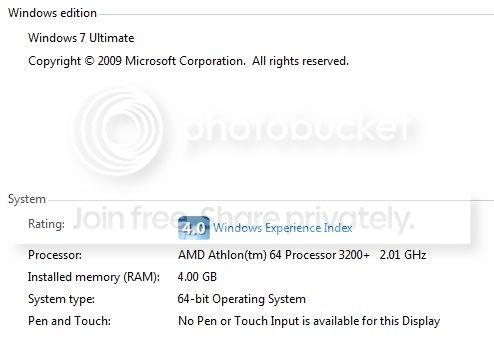
This is my system, I disabled the Media scheduler like you said, but nothing changed, still having spikes in HoN.

Graphics card I'm using is 4850 HD Radeon
 

My Computer My Computer

At a glance

Windows 7
OS
Windows 7
eventually, i found a way to disable network throttling while leaving the service enabled, which seems to be the optimal solution, since otherwise you get cackling, skipping sound.

What was your FINAL (Optimal) solution?? What did you do??
 

My Computer My Computer

At a glance

Windows 7 Ultimate x64AMD Phenome x4 965 Black Ed (Lovingly OverClo...6 Gb (3 x 2 Gb GSKILL 16000CL9 )ASUS EAH5850/2DIS/1GD5 Radeon HD 5850 1GB
Computer Manufacturer/Model Number
Custom Built and Maintained...by Me
OS
Windows 7 Ultimate x64
CPU
AMD Phenome x4 965 Black Ed (Lovingly OverClocked.a tad)
Motherboard
Gigabyte GA 890GPA-UD3H
Memory
6 Gb (3 x 2 Gb GSKILL 16000CL9 )
Graphics Card(s)
ASUS EAH5850/2DIS/1GD5 Radeon HD 5850 1GB
Sound Card
Creative SB X-Fi
Monitor(s) Displays
Dual 24" Samsung Wide-Sceens
Screen Resolution
Good Enough.
Hard Drives
5x SATA Seagates (in assorted sizes, shapes, and colors--Variety is the spice of Life)
PSU
790 Watt Enermax Modular
Case
Lian-Li Black Mesh (Love that Mesh !!)
Cooling
Pure Air Baby..Flowin Freely
Keyboard
Microsoft 4000 Natural Ergonomic
Mouse
Multiple Logitech Laser mice....each has its specific use
Internet Speed
Not Fast Enough, it's probably never going to be fast enough
Other Info
This Computer building crap started out years ago as a simple hobby..that has now gotten completely out of hand !!
(It does come in handy though, when everyone in the family wants their own computer)
@LPDad: My optimal solution was to keep the MMCS service running, as if you turn it off your audio may start cackling/skipping in an annoying fashion. However, I disabled the network throttling component of this service. I believe it's a general audio problem specific to Windows 7 and multiplayer / online games. I don't think the audio card or the drivers make a difference, or at least they didn't in my case.

Leave the multimedia class scheduler service running, but disable its network throttling feature:

  • Open regedit
  • Go to: HKEY_LOCAL_MACHINE\SOFTWARE\Microsoft\Windows NT\CurrentVersion\Multimedia\SystemProfile
  • There will be an entry for network performance throttling, default value is 10; set it to FFFFFFFF hex (willl look like 0xFFFFFFFF to the right of the entry)
  • Reboot

This removed the lag I was experiencing while still enabling me to have normal sound in-game. Specs in profile.

If you disable the MMCS and you still experience glitchy, lag-like behavior (sound glitches like crackles, pops, stutters, and skips are expected when you disable it!) then you almost certainly have a different issue. Another way to troubleshoot is to disable your sound device in device manager and see if you still experience lag spikes. I strongly advise you first try disabling your sound device and testing before messing with the registry, since it's much easier and I don't think it requires a reboot.

@Corpsecrank: You have a different issue. It almost sounds like you need to increase the throttling being done, not remove it. It seems odd to me you're having trouble, since you have a quad-core and stuff. Your audio IS glitching out, but apparently you're not having lag or ping oddities. Therefore you should not disable MMCSS. Try using something to play audio other than creative audio source.

@unrl: Try disabling your sound device in device manager, and see if the lag persists. That will help narrow things down. Also, your processor is bottle-necking that 4850. A faster CPU would probably help you. I suspect you are actually having fps issues. Lag spike != fps drop. Edit: I read your thread, and it appears you are indeed having lag spikes. Disabling the MMCS should have alleviated this, but confirm by disabling your sound device.

I cannot help you guys if you are not clear about what your problems are. Here is an example of a thread where I was able to identify this problem and provide the solution: http://www.sevenforums.com/gaming/33625-counter-strike-series-windows-7-lag.html#post342268

Updated original post with current information.
 
Last edited:

My Computer My Computer

At a glance

Windows 7 x64 ProfessionalAMD Athlon 64 3800+Corsair DDR1 2GBRadeon x1800xt 256mb
OS
Windows 7 x64 Professional
CPU
AMD Athlon 64 3800+
Motherboard
Chaintech VNF4 Ultra
Memory
Corsair DDR1 2GB
Graphics Card(s)
Radeon x1800xt 256mb
Sound Card
Creative Audigy 2 ZS
you say this will only work for people with single core processors.
 

My Computer My Computer

At a glance

windows 7 professional 64 bitintel core i7 920 (1366)Corsair Dominators (TR3X6G1600C8D)Sapphire 5970
OS
windows 7 professional 64 bit
CPU
intel core i7 920 (1366)
Motherboard
Asus P6T Deluxe V2
Memory
Corsair Dominators (TR3X6G1600C8D)
Graphics Card(s)
Sapphire 5970
Sound Card
on board / Asus Xonar D2
Monitor(s) Displays
lg flatron wide 22" 2x
Hard Drives
caviar black 1tb
caviar green 1tb

external western digital my book 1tb
external western my book digital 500gb
PSU
corsair 750w
Case
antec 1200
Cooling
sythek mugen - 2
Keyboard
flico maje
Mouse
g500
Internet Speed
comcast houstont x, 16mb down with boost. 2mb up
I don't know. Those are the only people I've seen so far with this issue. Obviously if you don't have this specific issue it will not fix anything. :rolleyes: You do not have this issue because you are experiencing sound problems, not network problems, is that correct?

Edit: read your posts in the other thread satorious, did any of these fixes help you? You stated the lag you were experiencing was fixed. If so, I can rule out that it only occurs on single core processors. It sounds like it did, so I'm going to go ahead and remove the bit about single core processors, since you have a quad core.
 
Last edited:

My Computer My Computer

At a glance

Windows 7 x64 ProfessionalAMD Athlon 64 3800+Corsair DDR1 2GBRadeon x1800xt 256mb
OS
Windows 7 x64 Professional
CPU
AMD Athlon 64 3800+
Motherboard
Chaintech VNF4 Ultra
Memory
Corsair DDR1 2GB
Graphics Card(s)
Radeon x1800xt 256mb
Sound Card
Creative Audigy 2 ZS
Post if you find another game that's affected so I can add it to this list!

Bought Overlord Complete Pack during Steam Weekend Deal.
All parts suffered from Lag. Overlord 1 more than part two.
With the fix both runs smooth like I would play under WinXP. :p
 

My Computer My Computer

At a glance

WinXP Pro (x86) / Win7 Pro (x64)Core 2 Quad Q9500(8192MB) 4x2GB DDR2 FSB1066Mhz (800mhz) Kings...Gigabyte GeForce GTX 670 OC 2GB
Computer Manufacturer/Model Number
Handjob ;)
OS
WinXP Pro (x86) / Win7 Pro (x64)
CPU
Core 2 Quad Q9500
Motherboard
Gigabyte GA-EP35-DS3R (rev. 2.1)
Memory
(8192MB) 4x2GB DDR2 FSB1066Mhz (800mhz) Kingston HyperX
Graphics Card(s)
Gigabyte GeForce GTX 670 OC 2GB
Sound Card
Creative SB X-Fi Titanium PCI-E, (Onboard) Realtek ALC889A
Monitor(s) Displays
24" TFT NEC EA241WM, 24" TFT LG 24EB23 IPS LED
Screen Resolution
2x TFT 1920*1200
Hard Drives
IDE/-ATA Samsung 250GB SP2514N
SATA Raid 5 Array 2xSamsung 500GB HD501LJ, 1xHitachi 500GB HDS721050CLA362, 1xSamsung 1.GB HD154UI
SATA Samsung 1.5TB HD154UI
SATA Seagate Barracuda Green Drive 2TB ST2000DL003-9VT166
4 External USB-Backup HDD's per
PSU
Thermaltake Toughpower XT 875W
Case
Antec Nine Hundred
Cooling
Arctic Freezer 7 Pro
Keyboard
Microsoft Natural MultiMedia
Mouse
Steelseries Sensei
Internet Speed
DSL 1.6 MB/s
Antivirus
Microsoft Security Essentials
Browser
Firefox / IE 10
Other Info
Microsoft XBox 360 Wireless reciever + Controller,
Teratec DVB-T Cinergy DT USB XS Diversity
I don't know. Those are the only people I've seen so far with this issue. Obviously if you don't have this specific issue it will not fix anything. :rolleyes: You do not have this issue because you are experiencing sound problems, not network problems, is that correct?

Edit: read your posts in the other thread satorious, did any of these fixes help you? You stated the lag you were experiencing was fixed. If so, I can rule out that it only occurs on single core processors. It sounds like it did, so I'm going to go ahead and remove the bit about single core processors, since you have a quad core.

yea but im not sure if it was your method only that fixed it i did it anyway, but there was 2 other people that specificaly said that they did what you did and it fixed there problem.

after my stuttering and sound loop problem i did fix, this was the other problem i was having

tf2 demo freeze stut hd

if you play close attention you can see where i kinda freeze / warp and everyone around me does the same. i have yet to experience this again, but only time will tell.
 

My Computer My Computer

At a glance

windows 7 professional 64 bitintel core i7 920 (1366)Corsair Dominators (TR3X6G1600C8D)Sapphire 5970
OS
windows 7 professional 64 bit
CPU
intel core i7 920 (1366)
Motherboard
Asus P6T Deluxe V2
Memory
Corsair Dominators (TR3X6G1600C8D)
Graphics Card(s)
Sapphire 5970
Sound Card
on board / Asus Xonar D2
Monitor(s) Displays
lg flatron wide 22" 2x
Hard Drives
caviar black 1tb
caviar green 1tb

external western digital my book 1tb
external western my book digital 500gb
PSU
corsair 750w
Case
antec 1200
Cooling
sythek mugen - 2
Keyboard
flico maje
Mouse
g500
Internet Speed
comcast houstont x, 16mb down with boost. 2mb up
Bought Overlord Complete Pack during Steam Weekend Deal.
All parts suffered from Lag. Overlord 1 more than part two.
With the fix both runs smooth like I would play under WinXP. :p

Whoa, that's weird! Aren't those games offline? Did you disable the MMCSS or just do registry fix that removes network throttling? Anyway, I'm glad it helped, even if I wouldn't have expected it too.
 

My Computer My Computer

At a glance

Windows 7 x64 ProfessionalAMD Athlon 64 3800+Corsair DDR1 2GBRadeon x1800xt 256mb
OS
Windows 7 x64 Professional
CPU
AMD Athlon 64 3800+
Motherboard
Chaintech VNF4 Ultra
Memory
Corsair DDR1 2GB
Graphics Card(s)
Radeon x1800xt 256mb
Sound Card
Creative Audigy 2 ZS
Post if you find another game that's affected so I can add it to this list!

Bought Overlord Complete Pack during Steam Weekend Deal.
All parts suffered from Lag. Overlord 1 more than part two.
With the fix both runs smooth like I would play under WinXP. :p

if you can post some of your specs.

also pinstripe if you have aim or something of that nature, steam can i get your aim or stead user name, i would like to KIT
 
Last edited:

My Computer My Computer

At a glance

windows 7 professional 64 bitintel core i7 920 (1366)Corsair Dominators (TR3X6G1600C8D)Sapphire 5970
OS
windows 7 professional 64 bit
CPU
intel core i7 920 (1366)
Motherboard
Asus P6T Deluxe V2
Memory
Corsair Dominators (TR3X6G1600C8D)
Graphics Card(s)
Sapphire 5970
Sound Card
on board / Asus Xonar D2
Monitor(s) Displays
lg flatron wide 22" 2x
Hard Drives
caviar black 1tb
caviar green 1tb

external western digital my book 1tb
external western my book digital 500gb
PSU
corsair 750w
Case
antec 1200
Cooling
sythek mugen - 2
Keyboard
flico maje
Mouse
g500
Internet Speed
comcast houstont x, 16mb down with boost. 2mb up
Bought Overlord Complete Pack during Steam Weekend Deal.
All parts suffered from Lag. Overlord 1 more than part two.
With the fix both runs smooth like I would play under WinXP. :p

Whoa, that's weird! Aren't those games offline? Did you disable the MMCSS or just do registry fix that removes network throttling? Anyway, I'm glad it helped, even if I wouldn't have expected it too.

Just the registry Fix (MMCSS shutdown itself anyway after booting even it is set to automatic),
but I'm surprised as you that it effected an offline game too.
After reading your post the first time I immediately went ahead and turn off my both soundcards (X-Fi Titanium and on-board Realtek HD Audio) off in Device Manager.
Launched Overlords 1&2, both running smooth. Then I turn on the one card, tested, turned off again, than tried the other soundcard. Every time the short "pauses" came back with either soundcard.
Finally I turn on both soundcards again, but disabled sound in Overlord configuration, and the game ran smooth again.
I then did the registry Fix, rebooted and all Overlord games worked smooth with sound. Of cause all source games than too.
BTW, if you think that maybe the reason I had this "pauses" even on a "offline" like Overlord is because I bought the Steam version, than the answer is no.
During my previous attempts to solve the problem I downloaded a ...uhm... err..., well I think you know what I am trying to say not to say. Just in case Steam itself was the root of the problem.

Here a list of Games I tested and had NOT this problem. In case someone mention them.
I tested C&C3, Red Alert 3, Civilization IV, Mass Effect, NWN2, Dragon Age, Call of Duty MW2, Oblivion, Dawn of War 2, Total War Medieval II + Empire, Splinter Cell, Mirror's Edge, Prey, Sims 3.
All this games runs smooth.
Only all source games and Overlord had this strange lag and/or pauses.

My System specs
Intel Core 2 Dou E8400
4GB Ram in two modules (dual channel)
Gigabyte GA-EP35-DS3R Mainboard
Nvidia 8800 GTS 512
X-Fi Titanium PCI-E
Dual screen environment
 

My Computer My Computer

At a glance

WinXP Pro (x86) / Win7 Pro (x64)Core 2 Quad Q9500(8192MB) 4x2GB DDR2 FSB1066Mhz (800mhz) Kings...Gigabyte GeForce GTX 670 OC 2GB
Computer Manufacturer/Model Number
Handjob ;)
OS
WinXP Pro (x86) / Win7 Pro (x64)
CPU
Core 2 Quad Q9500
Motherboard
Gigabyte GA-EP35-DS3R (rev. 2.1)
Memory
(8192MB) 4x2GB DDR2 FSB1066Mhz (800mhz) Kingston HyperX
Graphics Card(s)
Gigabyte GeForce GTX 670 OC 2GB
Sound Card
Creative SB X-Fi Titanium PCI-E, (Onboard) Realtek ALC889A
Monitor(s) Displays
24" TFT NEC EA241WM, 24" TFT LG 24EB23 IPS LED
Screen Resolution
2x TFT 1920*1200
Hard Drives
IDE/-ATA Samsung 250GB SP2514N
SATA Raid 5 Array 2xSamsung 500GB HD501LJ, 1xHitachi 500GB HDS721050CLA362, 1xSamsung 1.GB HD154UI
SATA Samsung 1.5TB HD154UI
SATA Seagate Barracuda Green Drive 2TB ST2000DL003-9VT166
4 External USB-Backup HDD's per
PSU
Thermaltake Toughpower XT 875W
Case
Antec Nine Hundred
Cooling
Arctic Freezer 7 Pro
Keyboard
Microsoft Natural MultiMedia
Mouse
Steelseries Sensei
Internet Speed
DSL 1.6 MB/s
Antivirus
Microsoft Security Essentials
Browser
Firefox / IE 10
Other Info
Microsoft XBox 360 Wireless reciever + Controller,
Teratec DVB-T Cinergy DT USB XS Diversity
huh, well that's really interesting. first of all, it's confirmed now it can occur on systems even with plenty of CPU power, and... it affects offline games. huh. ok. of all those games, did they all have problems before the fix?
 

My Computer My Computer

At a glance

Windows 7 x64 ProfessionalAMD Athlon 64 3800+Corsair DDR1 2GBRadeon x1800xt 256mb
OS
Windows 7 x64 Professional
CPU
AMD Athlon 64 3800+
Motherboard
Chaintech VNF4 Ultra
Memory
Corsair DDR1 2GB
Graphics Card(s)
Radeon x1800xt 256mb
Sound Card
Creative Audigy 2 ZS
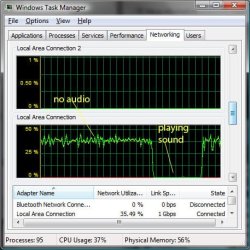
How do i get my network like this??? like at a constant speed. so i can test the audio and see if it drops
 

Attachments

  • audionetgraph.jpg
    audionetgraph.jpg
    47.5 KB · Views: 172

My Computer My Computer

At a glance

windows 7 professional 64 bitintel core i7 920 (1366)Corsair Dominators (TR3X6G1600C8D)Sapphire 5970
OS
windows 7 professional 64 bit
CPU
intel core i7 920 (1366)
Motherboard
Asus P6T Deluxe V2
Memory
Corsair Dominators (TR3X6G1600C8D)
Graphics Card(s)
Sapphire 5970
Sound Card
on board / Asus Xonar D2
Monitor(s) Displays
lg flatron wide 22" 2x
Hard Drives
caviar black 1tb
caviar green 1tb

external western digital my book 1tb
external western my book digital 500gb
PSU
corsair 750w
Case
antec 1200
Cooling
sythek mugen - 2
Keyboard
flico maje
Mouse
g500
Internet Speed
comcast houstont x, 16mb down with boost. 2mb up
Back
Top