Games with black bars in ATI hd2400

DREEP

New member
Local time
9:46 PM
Messages
20
Good afternoon, is the following, I have an ATI Mobility HD2400 already installed the latest drivers for the windows7, but all the games I install steam, they get black bars aside, I am talking about counter strike 1.6 and left 4 dead, and only get to play in widescreen. Is there any solution to can play in normal mode?

Regards,
DREEP :)
 

My Computer My Computer

At a glance

Windows sevenhd radeon 2400
OS
Windows seven
Graphics Card(s)
hd radeon 2400
If you want 4:3 resolution, set one of them.

If you want 16:9/10 resolution, set one of them.
 

My Computer My Computer

At a glance

7600.20510 x86P4 550 3.4 GHz HT running at 3.5 GHzOCZ 2 GB(2x1GB) DDR400mHz running @ 414 mHzHIS Radeon HD 3850 IceQ 3 Turbo HDMI Dual DL-...
Computer Manufacturer/Model Number
self built
OS
7600.20510 x86
CPU
P4 550 3.4 GHz HT running at 3.5 GHz
Motherboard
MSI PM8M3-V (MS-7211 v1.x) Micro-ATX mainboard
Memory
OCZ 2 GB(2x1GB) DDR400mHz running @ 414 mHz
Graphics Card(s)
HIS Radeon HD 3850 IceQ 3 Turbo HDMI Dual DL-DVI AGP
Sound Card
MOTU Traveler firewire studio interface 192 kHz 24 bit
Monitor(s) Displays
22" widescreen Acer X223W LCD, 17" Compaq P75 CRT
Screen Resolution
1680x1050 and 1280x1024
Hard Drives
SATA I x2 WD, 400 GB and 120 GB, SATA 2 WD Caviar Black 1 TB
PSU
350W generic
Case
Cybertronpc, it glows blue
Cooling
stock cpu fan, Ice-Q 3 gpu and system, many case fans
Keyboard
Logitch Classical Keyboard 200
Mouse
Logitech Mediaplay cordless
Internet Speed
1792/448 kbits/sec
Other Info
SATA II PCI fake RAID adapter, 1 GB Readyboost, original ATI Remote Wonder (even works with WMC perfectly), Logitech Rumblepad 2 game controller x2
I dont understand :\
 

My Computer My Computer

At a glance

Windows sevenhd radeon 2400
OS
Windows seven
Graphics Card(s)
hd radeon 2400

My Computer My Computer

At a glance

7600.20510 x86P4 550 3.4 GHz HT running at 3.5 GHzOCZ 2 GB(2x1GB) DDR400mHz running @ 414 mHzHIS Radeon HD 3850 IceQ 3 Turbo HDMI Dual DL-...
Computer Manufacturer/Model Number
self built
OS
7600.20510 x86
CPU
P4 550 3.4 GHz HT running at 3.5 GHz
Motherboard
MSI PM8M3-V (MS-7211 v1.x) Micro-ATX mainboard
Memory
OCZ 2 GB(2x1GB) DDR400mHz running @ 414 mHz
Graphics Card(s)
HIS Radeon HD 3850 IceQ 3 Turbo HDMI Dual DL-DVI AGP
Sound Card
MOTU Traveler firewire studio interface 192 kHz 24 bit
Monitor(s) Displays
22" widescreen Acer X223W LCD, 17" Compaq P75 CRT
Screen Resolution
1680x1050 and 1280x1024
Hard Drives
SATA I x2 WD, 400 GB and 120 GB, SATA 2 WD Caviar Black 1 TB
PSU
350W generic
Case
Cybertronpc, it glows blue
Cooling
stock cpu fan, Ice-Q 3 gpu and system, many case fans
Keyboard
Logitch Classical Keyboard 200
Mouse
Logitech Mediaplay cordless
Internet Speed
1792/448 kbits/sec
Other Info
SATA II PCI fake RAID adapter, 1 GB Readyboost, original ATI Remote Wonder (even works with WMC perfectly), Logitech Rumblepad 2 game controller x2
Good afternoon, is the following, I have an ATI Mobility HD2400 already installed the latest drivers for the windows7, but all the games I install steam, they get black bars aside, I am talking about counter strike 1.6 and left 4 dead, and only get to play in widescreen. Is there any solution to can play in normal mode?

Regards,
DREEP :)

I take it English isn't your first language so maybe you are just having trouble understanding what torrentg is saying. In order to play the games without the black bars on the side the game must be running in a resolution that has the same aspect ratio your monitor has, in this case 16:10.

In counter strike go to options and then the video tab. In the drop down box that says Aspect Ratio you want to pick 16:10 then you will be able to pick a 16:10 resolution from the Resolution drop down box. Most likely if you have a newer monitor you will want to pick 1680x1050 or 1440x900. The process will be pretty similar for Left4Dead but I believe the menu is a little different. Just look for an Aspect Ratio setting and make sure it is set to 16:10 and then choose a resolution.
 

My Computer My Computer

At a glance

Windows 7 Home x64
OS
Windows 7 Home x64
Yes, I don't know much english. I know I can play without black bars in 16:9 aspect ratio but I want to know how can I play in 800x600 stretched, forcing 16:9 aspect ratio.

Regards
 

My Computer My Computer

At a glance

Windows sevenhd radeon 2400
OS
Windows seven
Graphics Card(s)
hd radeon 2400
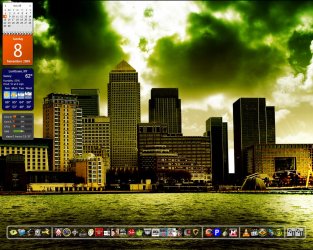
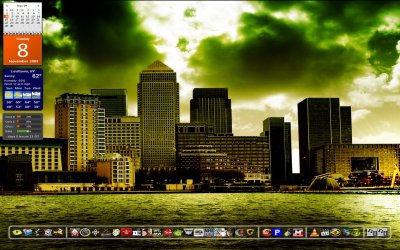
You don't really want to do that. Here are screenshots showing you why. The first is 1280x1024 which is 1.25 (5:4 or 10:8) aspect ratio and correctly displayed.

The second is the same image stretched out to 1680x1050 which is now at 16:10, 1.6 aspect ratio like you want to do. You can see why it's not a good thing to do to your games. Look at how the bottom of the calendar in orange is a square and then in second picture, it is a rectangle.
 

Attachments

  • 1.jpg
    1.jpg
    282.3 KB · Views: 241
  • 2.jpg
    2.jpg
    344.3 KB · Views: 197

My Computer My Computer

At a glance

7600.20510 x86P4 550 3.4 GHz HT running at 3.5 GHzOCZ 2 GB(2x1GB) DDR400mHz running @ 414 mHzHIS Radeon HD 3850 IceQ 3 Turbo HDMI Dual DL-...
Computer Manufacturer/Model Number
self built
OS
7600.20510 x86
CPU
P4 550 3.4 GHz HT running at 3.5 GHz
Motherboard
MSI PM8M3-V (MS-7211 v1.x) Micro-ATX mainboard
Memory
OCZ 2 GB(2x1GB) DDR400mHz running @ 414 mHz
Graphics Card(s)
HIS Radeon HD 3850 IceQ 3 Turbo HDMI Dual DL-DVI AGP
Sound Card
MOTU Traveler firewire studio interface 192 kHz 24 bit
Monitor(s) Displays
22" widescreen Acer X223W LCD, 17" Compaq P75 CRT
Screen Resolution
1680x1050 and 1280x1024
Hard Drives
SATA I x2 WD, 400 GB and 120 GB, SATA 2 WD Caviar Black 1 TB
PSU
350W generic
Case
Cybertronpc, it glows blue
Cooling
stock cpu fan, Ice-Q 3 gpu and system, many case fans
Keyboard
Logitch Classical Keyboard 200
Mouse
Logitech Mediaplay cordless
Internet Speed
1792/448 kbits/sec
Other Info
SATA II PCI fake RAID adapter, 1 GB Readyboost, original ATI Remote Wonder (even works with WMC perfectly), Logitech Rumblepad 2 game controller x2
Not that I want to keep the game in windowed mode but occupy the entire screen.
 

My Computer My Computer

At a glance

Windows sevenhd radeon 2400
OS
Windows seven
Graphics Card(s)
hd radeon 2400
Not that I want to keep the game in windowed mode but occupy the entire screen.

Then you have to set the resolution for the game to the same resolution your desktop is at. However it will still have a bar at the top of the window. Newer source engine games like Team Fortress 2 and Left4Dead allow you to run in a borderless window mode but that option is not available in counter strike. If you want to try it with TF2 or L4D right click on the game in your Steam game list and go to properties and then choose "set launch options..." in the launch options add in this "-window -noborder" without the quotes.
 

My Computer My Computer

At a glance

Windows 7 Home x64
OS
Windows 7 Home x64
I got it, thank you. And the programs that make it there? To move from window to full screen..

Regards
 

My Computer My Computer

At a glance

Windows sevenhd radeon 2400
OS
Windows seven
Graphics Card(s)
hd radeon 2400
I got it, thank you. And the programs that make it there? To move from window to full screen..

Regards

I'm sorry. I don't understand the question. You don't need another program to make the game full screen or windowed. You just need to go to the video options in the game.
 

My Computer My Computer

At a glance

Windows 7 Home x64
OS
Windows 7 Home x64
I just wanted the window mode became bigger, because getting into widescreen not play it at 800x600, you understand now ?
 

My Computer My Computer

At a glance

Windows sevenhd radeon 2400
OS
Windows seven
Graphics Card(s)
hd radeon 2400
I just wanted the window mode became bigger, because getting into widescreen not play it at 800x600, you understand now ?

Like I said earlier, you have to choose a higher resolution in the game. I don't know how I can make it any clearer than I did earlier.

Edit: I just realized you were talking about the old version of counter strike, not source. The options however are still very similar. In the display mode drop down box pick Normal for a square looking image and Widescreen if you want more of a rectangle. Then in the resolution drop box the higher the resolution you pick the bigger the window will be.
 

My Computer My Computer

At a glance

Windows 7 Home x64
OS
Windows 7 Home x64
Okay, thank you :)
 

My Computer My Computer

At a glance

Windows sevenhd radeon 2400
OS
Windows seven
Graphics Card(s)
hd radeon 2400
Back
Top