Chips Challenge on window 7???

ineedchip

New member
Local time
9:35 PM
Messages
2
hi, ive searched this site for a couple days, and havent found a thread that points to where i could get chips challenge for win7....ive searched google as well, and all their downloads wont install on my laptop...i can download the game, but when i try to install it, it wont install......


any help would be great...thanks:p
 

My Computer

Computer Manufacturer/Model Number
dell
OS
windows 7
Hello Ineedchip, welcome to the Seven Forums.

Chips wont run on a 64-bit Windows. However, if your Win7 is a 32-bit version, it runs well. There's nothing to install, just download the zip-archive, extract the files to a folder, and run the game.

I tested it on a 32-bit virtual Win7 just now, I had no problems to get it running.

Kari
 

My Computer

Computer type
Laptop
Computer Manufacturer/Model Number
HP ENVY 17-1150eg
OS
Windows 10 Pro x64 EN-GB
CPU
1.6 GHz Intel Core i7-720QM Processor
Memory
6 GB
Graphics Card(s)
ATI Mobility Radeon HD 5850 Graphics
Sound Card
Beats sound system with integrated subwoofer
Monitor(s) Displays
17" laptop display, 22" LED and 32" Full HD TV through HDMI
Screen Resolution
1600*900 (1), 1920*1080 (2&3)
Hard Drives
Internal: 2 x 500 GB SATA Hard Disk Drive 7200 rpm
External: 2TB for backups, 3TB USB3 network drive for media
Cooling
As Envy runs a bit warm, I have it on a Cooler Master pad
Keyboard
Logitech diNovo Media Desktop Laser (bluetooth)
Mouse
Logitech Performance Mouse MX
Internet Speed
50/10 Mbps VDSL
Antivirus
Windows Defender 4.3.9431.0
Browser
Maxthon 3.5.2., IE11
thanks for the reply.....one question lol....how do i find out if im runnin 32bit or 64bit??

edit: nvm i found it....guess im runnin 64bit....any idea how to get it runnin on 64 bit??? or should i get another laptop from craigslist and put 32bit on it??
 

My Computer

Computer Manufacturer/Model Number
dell
OS
windows 7
Right click on your My Computer icon and select properties.. it will bring up a screen that will tell you ...
 

My Computer

Computer type
PC/Desktop
Computer Manufacturer/Model Number
LENOVO K450 @3.0GHZ
OS
64-bit Windows 8.1 Pro
CPU
Core(TM) i5 CPU 4330 Haswell @ 3.20GHz
Motherboard
LENOVO
Memory
12.00 GB
Graphics Card(s)
Intel(R) HD Graphics
Sound Card
Intel HD integtrated
Monitor(s) Displays
HP 25' ISP Monitor
Screen Resolution
1900/1020
Hard Drives
(1) ST1000DM003-1CH162 (2) Generic STORAGE DEVICE USB Device (3) Generic STORAGE DEVICE USB Device
Internet Speed
100mb down/10mb up
or should i get another laptop from craigslist and put 32bit on it??
That old game so important to you? :)

If you are running Win7 Professional or Ultimate, you could install Virtual PC and XP Mode, and run the game on XP Mode virtual machine. I tested it, works perfectly.

If you are running Win7 Home, Basic or Premium, you could use another virtualization application. Both VirtualBox and VMWare Player are free.

XP Mode includes a full free licence to XP Professional SP3. If you choose one of the two other alternatives I mentioned, you need a licensed 32-bit Windows (XP, Vista or Seven) install media.

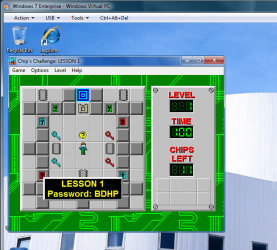
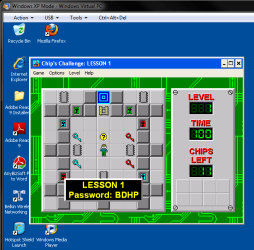
The screenshots showing Chip's Challenge running on a 32-bit Windows 7 and XP Mode.

Kari

Windows 7:

Chip.PNG


Windows XP:
Chip_2.PNG
 

My Computer

Computer type
Laptop
Computer Manufacturer/Model Number
HP ENVY 17-1150eg
OS
Windows 10 Pro x64 EN-GB
CPU
1.6 GHz Intel Core i7-720QM Processor
Memory
6 GB
Graphics Card(s)
ATI Mobility Radeon HD 5850 Graphics
Sound Card
Beats sound system with integrated subwoofer
Monitor(s) Displays
17" laptop display, 22" LED and 32" Full HD TV through HDMI
Screen Resolution
1600*900 (1), 1920*1080 (2&3)
Hard Drives
Internal: 2 x 500 GB SATA Hard Disk Drive 7200 rpm
External: 2TB for backups, 3TB USB3 network drive for media
Cooling
As Envy runs a bit warm, I have it on a Cooler Master pad
Keyboard
Logitech diNovo Media Desktop Laser (bluetooth)
Mouse
Logitech Performance Mouse MX
Internet Speed
50/10 Mbps VDSL
Antivirus
Windows Defender 4.3.9431.0
Browser
Maxthon 3.5.2., IE11
Kari even with the programs you mentioned chips challenge will not run on the windows 7 64 bit computer? and there is no way around this?
 

My Computer

OS
no clue
Kari even with the programs you mentioned chips challenge will not run on the windows 7 64 bit computer? and there is no way around this?
Yes, there is a way around this. My last post told what that way is: you can install virtualization software on your 64-bit system, then install a 32-bit operating system on a virtual machine, and run the game on it.

More about virtualization and Virtual PC (VMWare and VirtualBox are based on the same principle, working as VirtualPC does):
This screenshot shows a 32-bit Windows 7 virtual machine (guest), running on a 64-bit computer (host). Click the image to see it bigger.

VPC_example_1.png

Kari
 
Last edited:

My Computer

Computer type
Laptop
Computer Manufacturer/Model Number
HP ENVY 17-1150eg
OS
Windows 10 Pro x64 EN-GB
CPU
1.6 GHz Intel Core i7-720QM Processor
Memory
6 GB
Graphics Card(s)
ATI Mobility Radeon HD 5850 Graphics
Sound Card
Beats sound system with integrated subwoofer
Monitor(s) Displays
17" laptop display, 22" LED and 32" Full HD TV through HDMI
Screen Resolution
1600*900 (1), 1920*1080 (2&3)
Hard Drives
Internal: 2 x 500 GB SATA Hard Disk Drive 7200 rpm
External: 2TB for backups, 3TB USB3 network drive for media
Cooling
As Envy runs a bit warm, I have it on a Cooler Master pad
Keyboard
Logitech diNovo Media Desktop Laser (bluetooth)
Mouse
Logitech Performance Mouse MX
Internet Speed
50/10 Mbps VDSL
Antivirus
Windows Defender 4.3.9431.0
Browser
Maxthon 3.5.2., IE11
Nvm. I got it now. Thanks for the tip about Virtual PC. Works like a charm. Glad I went with Professional. :D
 
Last edited:

My Computer

OS
Windows 7 Professional 64-bit
CPU
Intel Core i7-2600 Processor
Motherboard
Gigabyte GA-Z68A-D3-B3
Memory
8 GB
Graphics Card(s)
XFX Radeon HD 6850 - 1GB
Monitor(s) Displays
HP S2031 Black 20" 5ms Widescreen LCD Monitor
Screen Resolution
1600x900
Hard Drives
1 TB -- 32M Cache, 7200 RPM, 6.0Gb/s
PSU
650 Watt -- Corsair CMPSU-650TXV2
Cooling
Liquid CPU Cooling System
Keyboard
Standard
Mouse
Standard
Ok I downloaded the VMware but now I can't get the game to load & play. What am I doing wrong?
 

My Computer

OS
Windows 7 64-bit
Back
Top