
System Specs. how to

Snufffed

Expelled
1. ORB -> type msinfo32
you will have several pages of everything in your computer.
2. you can either snip - & paste into paint, save as .png upload to your favorite storage place and post links for us to see,
3. you can use Printscreen - open paint then paste - save as sysinfo-pg1 then upload to your favorite storage place and post links.
4. There are several FREE programs which will also let you save all this info as .html or txt files which you can post to your favorite storage place and post links here.

5. you can also simply attache these saved pic, doc, txt html file using Attachments available on this forum.

6. There also is a FREE program "Belarc" which will allow you to see all versions, numbers and KEY used to install with... put this on a
1. floppy 2. USB, 3. Flash card, and you will always have for emergency reference.
easy to post for the Geeks & Techies who what this info to assist you.
believe me I have NO NEED for your KEYS, I have all the keys I need, for XP, Vista, Win7 Office 2003, Office 2007 or Office 14. I'm also sure the other GEEKS, Techies need them either.

Please to the people who have problems, this info will save many of the GEEKS, Techy people here many questions, saying you have Win7 is not hardly enough info... Windows 7 has several different versions, and more than one #, 7077, 7100, 7106, 7127, 7137. So please be specific. reason:
Ultimate -7127 is different from Ultimate 7137 and different than Pro 7106.

Thanks
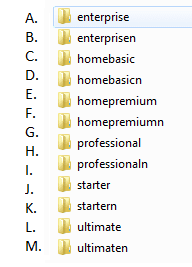
 

Attachments

  • versions.png
    versions.png
    5.7 KB · Views: 939

My Computer

Computer Manufacturer/Model Number
Self Build 64bit
OS
Vista Ult64, Win7600
CPU
Intel Core 2 Quad Q6600 @ 2400 MHz 64bit OS
Motherboard
Asus P5E3 Deluxe WiFi @p 64 bit OS
Memory
4096 MB DDR3-SDRAM
Graphics Card(s)
ATI Radeon HD 3870 Series x2 Crossfired
Sound Card
Realtek on board
Monitor(s) Displays
Samsung SyncMaster - 23 inches
Screen Resolution
1680x1050 pixels at 60 Hz in True Colors
Hard Drives
Hitachi (250 GB)/Samsung 750 GB. /Barracuda 160 GB.
My Book 1 TB external..
PSU
Cooler Master 1000w
Case
Cooler Master Cosmos 1000.
Cooling
Fans and fresh air,
Keyboard
Wireless
Mouse
Wireless
Internet Speed
Never fast enough
Other Info
I use a Magnum.
msinfo32

1. ORB -> type msinfo32
you will have several pages of everything in your computer.
2. you can either snip - & paste into paint, save as .png upload to your favorite storage place and post links for us to see,
3. you can use Printscreen - open paint then paste - save as sysinfo-pg1 then upload to your favorite storage place and post links.
4. There are several FREE programs which will also let you save all this info as .html or txt files which you can post to your favorite storage place and post links here.

5. you can also simply attache these saved pic, doc, txt html file using Attachments available on this forum.

6. There also is a FREE program "Belarc" which will allow you to see all versions, numbers and KEY used to install with... put this on a
1. floppy 2. USB, 3. Flash card, and you will always have for emergency reference.
easy to post for the Geeks & Techies who what this info to assist you.
believe me I have NO NEED for your KEYS, I have all the keys I need, for XP, Vista, Win7 Office 2003, Office 2007 or Office 14. I'm also sure the other GEEKS, Techies need them either.

Please to the people who have problems, this info will save many of the GEEKS, Techy people here many questions, saying you have Win7 is not hardly enough info... Windows 7 has several different versions, and more than one #, 7077, 7100, 7106, 7127, 7137. So please be specific. reason:
Ultimate -7127 is different from Ultimate 7137 and different than Pro 7106.

Thanks
Nice! It should be required reading like how to put info into "my system specs":D
Tried to give you rep but have to spread it around:(
K
 

My Computer

Computer Manufacturer/Model Number
HP Pavillion dv-7 1005 Tx
OS
Win 8 Release candidate 8400
CPU
[email protected]
Memory
4 gigs
Graphics Card(s)
Nvidia 9600M
Sound Card
HD built-in
Monitor(s) Displays
17" Wxga
Screen Resolution
1440x900
Cooling
none
Internet Speed
45Mb down 5Mb up
Go to Start and type "msinfo32" (without the quotes) and press Enter
Go to the File menu and select "Save" or "Export"
Save will save the information as an .nfo file
Export will save the information as a .txt file
 

My Computer

Computer Manufacturer/Model Number
Home built (x64), Lenovo x61s Tablet, Samsung Netbook
OS
Win7 x64 + x86
CPU
Intel i7 920, other Intel chips, and the Atom in the netbook
Motherboard
Asus P6T Deluxe
Memory
12 gB; 4 gB Lenovo; 1 gB Samsung netbook
Graphics Card(s)
ATI 4870
Sound Card
Yes, I have one of these
Monitor(s) Displays
32" Sharp Aquos TV
Screen Resolution
800x600 - I have vision issues
Hard Drives
4 - 150 gB Velociraptors in RAID 5
Promise controller
PSU
1000 watt (can't recall the brand)
Case
Antec 300
Cooling
Big honking cooler that was rated highly at Toms Hardware
Keyboard
Microsoft Natural
Mouse
Logitech Trackman
Internet Speed
Cable
Other Info
GeekSquad UPS
CyberPower UPS
DLink DNS-323 NAS (2 tB)
Netgear wireless router as an access point
Netgear wired router FSV-318
Home network consists of
4 desktop computers (2 Vista, 2 Win7)
1 netbook (Win7)
4 laptop computers (XP, 2-Vista, Win7)
Wii and XBox 360
Please to the people who have problems, this info will save many of the GEEKS, Techy people here many questions, saying you have Win7 is not hardly enough info... Windows 7 has several different versions, and more than one #, 7077, 7100, 7106, 7127, 7137. So please be specific. reason:
Ultimate -7127 is different from Ultimate 7137 and different than Pro 7106.

Thanks
Snuffy,
The box that says: "Attachments" don't give no pics...

Have you ever used "SIW" ? I use this with XP Pro, dunno about Win7 yet.
(pretty comprehensive, except under BartPE)

SIW | System Information for Windows by Gabriel Topala

All computer users should have a SAVED file, showing these statistics,
BEFORE the computer goes down.
Then, the techie can see what the GOOD system looked like...
 

My Computer

Computer Manufacturer/Model Number
Gateway GT5056
OS
XP_Pro, W7_7201, W7RC.vhd, SciLinux5.3, Fedora12, Fedora9_2x, OpenSolaris_09-06
CPU
AMD 64x2
Motherboard
Yes
Memory
1 gig
Graphics Card(s)
Dunno
Sound Card
Realtek something
Monitor(s) Displays
Samsung SyncMaster 940MW w/TV
Screen Resolution
1280x1024
Hard Drives
250 GB WD, USB Seagate Freedesk 1.5 T
Internet Speed
Cable modem
Other Info
1 + 1 = 10b,
7 + 7 = 16o,
a + b = 15h.
Please to the people who have problems, this info will save many of the GEEKS, Techy people here many questions, saying you have Win7 is not hardly enough info... Windows 7 has several different versions, and more than one #, 7077, 7100, 7106, 7127, 7137. So please be specific. reason:
Ultimate -7127 is different from Ultimate 7137 and different than Pro 7106.

Thanks

Have you ever used "SIW" ? I use this with XP Pro, dunno about Win7 yet.
(pretty comprehensive, except under BartPE)

SIW | System Information for Windows by Gabriel Topala

All computer users should have a SAVED file, showing these statistics,
BEFORE the computer goes down.
Then, the techie can see what the GOOD system looked like...

SIW has a Win7 version out now and works on mine, funny was using the old SIW on Win7 with no problems, one day I got a message when opening it saying it won't work with Win7 and to d/l the Win7 version!

Good program, lots of information.

Just hit the save button and you get a complete file in .html, mine was 1,085 kb.

Snuffy
Thank you for the tips :)
 

My Computer

Computer type
PC/Desktop
Computer Manufacturer/Model Number
76~2.0
OS
Windows 7 Ult x64 - SP1/ Windows 8 Pro x64
CPU
Intel Core i5-3570K 4.6GHz
Motherboard
Gigabyte GA-Z77X UD3H, f18
Memory
8GB (2X4GB) DDR3 1600 Corsair Vengeance CL8 1.5v
Graphics Card(s)
Sapphire HD 7770 Vapor-X OC 1GB DDR5
Sound Card
Onboard VIA VT2021
Monitor(s) Displays
22" LCD Dell
Screen Resolution
1680x1050
Hard Drives
Samsung 840Pro 128GB SSD,
Seagate Barracuda 500GB SATA2 7200rpm 32MB cache, Seagate Barracuda 1TB SATA2 7200rpm 32MB cache,
PSU
Corsair HX650W
Case
Cooler Master Storm Scout
Cooling
Corsair H80 2x12cm Noctua NF P12 , 2x14cm case fans
Keyboard
Logitech Wave
Mouse
CM Sentinel
Internet Speed
Dismal
Antivirus
Avast
Browser
Opera Next
Other Info
Haswell laptop: HP Envy 17t-j, i7-4700MQ, GeForce 740M 2GB DDR3, 17.3" Full HD 1920x1080, 16GB RAM, Samsung 840 Pro 128GB, 1TB Hitachi 7200 HDD,
Desktop: eSATA ports,
External eSATA Seagate 500GB SATA2 7200rpm,
External WD USB 500GB
Back
Top