How to search across a particular part of the directory tree?

shiphen

Banned
Local time
11:55 AM
Messages
207
Hi

How dow I do a search across just a particular part of the directory tree?

...For:
a) A filename search
b) Text search

In WindowsXP I could go to the directory in question and right-click and
get to search from that location. But how the HECK do we do something similar
in Windows 7?

With thanks


John
John Smith
 

My Computer My Computer

At a glance

Windows7 Pro x64Intel Core I5 750 2.66GHz8GB = (2GB 1066 DDR3 Memory) x4 modulesNVIDIA XTF GeForce 9500GT 512Mb
Computer Manufacturer/Model Number
Custom built
OS
Windows7 Pro x64
CPU
Intel Core I5 750 2.66GHz
Motherboard
Intel DP55WB (MA TX)
Memory
8GB = (2GB 1066 DDR3 Memory) x4 modules
Graphics Card(s)
NVIDIA XTF GeForce 9500GT 512Mb
Sound Card
none
Monitor(s) Displays
Samsung SyncMaster 244T
Screen Resolution
1920 x 1200
Hard Drives
Seagate 500Gb, RPM: 7200, Cache:32MB, SATA
PSU
500W ATX 12v 80+ PSU
Case
Midi Tower
Cooling
?
Keyboard
Logitech Y-UV90 (corded ergonomic)
Mouse
Microsoft Intellimouse Explorer Tilt Wheel Mouse
Internet Speed
ADSL
Hi

How dow I do a search across just a particular part of the directory tree?

...For:
a) A filename search
b) Text search

In WindowsXP I could go to the directory in question and right-click and
get to search from that location. But how the HECK do we do something similar
in Windows 7?

With thanks


John
John Smith

Just go into that folder and start the search.

For example, I have "F:\Pictures" open in Windows Explorer, and want to search for screenshots. I want to restrict the search to only "F:\Pictures\Forums" and relevant subfolders. I will double-click the "Forums" folder to open it, then I start my search by typing "tag:screenshots" (without the quotes) in the search box.
 

My Computer My Computer

At a glance

Windows 7 Professional 32-bit SP1AMD A4/A63.00GB EDOVMware SVGA 3D
Computer type
PC/Desktop
Computer Manufacturer/Model Number
Virtual Machine
OS
Windows 7 Professional 32-bit SP1
CPU
AMD A4/A6
Motherboard
Intel Corporation 440BX Desktop Reference Platform
Memory
3.00GB EDO
Graphics Card(s)
VMware SVGA 3D
Sound Card
High Definition Audio Device
Monitor(s) Displays
Generic Non-PnP Monitor on VMware SVGA 3D
Screen Resolution
1440x900
Hard Drives
1 x 60GB VMware Virtual SATA Hard Drive ATA Device
Antivirus
Kaspersky Total Security
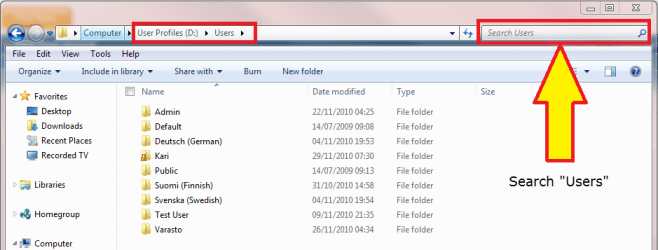
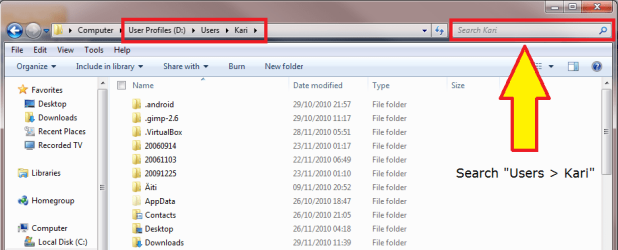
Searching from Start Menu's search field searches the indexed locations of whole computer. Searching from Explorer window's search field searches also non-indexed locations in that folder or drive and downwards i.e searching in Users searches all user folders, searching from an invidual users main folder searches only that user and so on.

Search_A.png

Search_B.png

Search_C.png

Kari
 

My Computer My Computer

At a glance

Windows 10 Pro x64 EN-GB1.6 GHz Intel Core i7-720QM Processor6 GBATI Mobility Radeon HD 5850 Graphics
Computer type
Laptop
Computer Manufacturer/Model Number
HP ENVY 17-1150eg
OS
Windows 10 Pro x64 EN-GB
CPU
1.6 GHz Intel Core i7-720QM Processor
Memory
6 GB
Graphics Card(s)
ATI Mobility Radeon HD 5850 Graphics
Sound Card
Beats sound system with integrated subwoofer
Monitor(s) Displays
17" laptop display, 22" LED and 32" Full HD TV through HDMI
Screen Resolution
1600*900 (1), 1920*1080 (2&3)
Hard Drives
Internal: 2 x 500 GB SATA Hard Disk Drive 7200 rpm
External: 2TB for backups, 3TB USB3 network drive for media
Cooling
As Envy runs a bit warm, I have it on a Cooler Master pad
Keyboard
Logitech diNovo Media Desktop Laser (bluetooth)
Mouse
Logitech Performance Mouse MX
Internet Speed
50/10 Mbps VDSL
Antivirus
Windows Defender 4.3.9431.0
Browser
Maxthon 3.5.2., IE11
If you're interested in third party search tools software, Agent Ransack - Free File Searching Utility is a free 64 bit Windows 7 file searcher that is similar to XP in that it lets you choose the drive or path to search.
 

My Computer My Computer

At a glance

Vista 64 bit and 32 bit (SP2)Intel(R) Core(TM)2 Duo Processor T9400 (2.53 GHz4GB DDR2 System Memory (2 Dimm)512 MB NVIDIA GeForce 9600M GT
Computer Manufacturer/Model Number
HP Pavillion dv5t (generation 1)
OS
Vista 64 bit and 32 bit (SP2)
CPU
Intel(R) Core(TM)2 Duo Processor T9400 (2.53 GHz
Memory
4GB DDR2 System Memory (2 Dimm)
Graphics Card(s)
512 MB NVIDIA GeForce 9600M GT
Monitor(s) Displays
15.4" diagonal WSXGA+ High-Definition HP BrightView Widescre
Screen Resolution
1680 x 1050
Hard Drives
320GB 5400RPM SATA Hard Drive with HP ProtectSmart Hard Drive Protection
Keyboard
Built-in HP
Mouse
Built in - Synaptics TouchPad V6.5 on PS/2 Port
Internet Speed
Max
Other Info
~ Intel Next-Gen Wireless-N Mini-card w/Bluetooth ~ Blu-Ray ROM DVD+/-R/RW ~ Integ. HDTV Hybrid Tuner ~ 12 Cell Battery ~ MS Office (Home Premium) 2007 ~
If you're interested in third party search tools software, Agent Ransack - Free File Searching Utility is a free 64 bit Windows 7 file searcher that is similar to XP in that it lets you choose the drive or path to search.
Why would you suggest/want to use a third-party app when the built-in search does exactly what is needed.

If I could put out a PSA, it would be this: Instead of complaining that the search feature doesn't work by reading your thoughts and doing what you intended...learn how to use it, and how to use the syntax. It blows my mind that Kari had to post screenshots showing how to use the Explorer window to search in non-indexed places. That's a basic feature that users/readers of an enthusiast forum should know how to do. That's part of using your computer...nothing advanced, nothing technical. My users at work are some of the least technical people around, and they've all picked up on this themselves.

You don't need third party search apps. The included one works wonderfully.
 

My Computer My Computer

At a glance

Windows 7 Ultimate x64 SP1Intel Core i7-260012 GB Patriot Extreme DDR3-1333Nvidia GTX 470
OS
Windows 7 Ultimate x64 SP1
CPU
Intel Core i7-2600
Motherboard
Gigabyte GA-P67A-UD3P-B3
Memory
12 GB Patriot Extreme DDR3-1333
Graphics Card(s)
Nvidia GTX 470
Monitor(s) Displays
Dell UltraSharp 2209WA
Hard Drives
OCZ Agility3 240 GB, WD5001AALS, WD7501AALS
PSU
OCZ ModStream 700W
Case
CoolerMaster HAF 912 Advanced
Cooling
CoolerMaster Hyper 212 Plus
If you're interested in third party search tools software, Agent Ransack - Free File Searching Utility is a free 64 bit Windows 7 file searcher that is similar to XP in that it lets you choose the drive or path to search.
Why would you suggest/want to use a third-party app when the built-in search does exactly what is needed.

If I could put out a PSA, it would be this: Instead of complaining that the search feature doesn't work by reading your thoughts and doing what you intended...learn how to use it, and how to use the syntax. It blows my mind that Kari had to post screenshots showing how to use the Explorer window to search in non-indexed places. That's a basic feature that users/readers of an enthusiast forum should know how to do. That's part of using your computer...nothing advanced, nothing technical. My users at work are some of the least technical people around, and they've all picked up on this themselves.

You don't need third party search apps. The included one works wonderfully.

A LOT of people don't care for Windows 7 Search. There is nothing wrong with offering someone an alternative, third party or not. Don't be so judgmental, DeaconFrost. . . it's good to have multiple options.
 

My Computer My Computer

At a glance

Vista 64 bit and 32 bit (SP2)Intel(R) Core(TM)2 Duo Processor T9400 (2.53 GHz4GB DDR2 System Memory (2 Dimm)512 MB NVIDIA GeForce 9600M GT
Computer Manufacturer/Model Number
HP Pavillion dv5t (generation 1)
OS
Vista 64 bit and 32 bit (SP2)
CPU
Intel(R) Core(TM)2 Duo Processor T9400 (2.53 GHz
Memory
4GB DDR2 System Memory (2 Dimm)
Graphics Card(s)
512 MB NVIDIA GeForce 9600M GT
Monitor(s) Displays
15.4" diagonal WSXGA+ High-Definition HP BrightView Widescre
Screen Resolution
1680 x 1050
Hard Drives
320GB 5400RPM SATA Hard Drive with HP ProtectSmart Hard Drive Protection
Keyboard
Built-in HP
Mouse
Built in - Synaptics TouchPad V6.5 on PS/2 Port
Internet Speed
Max
Other Info
~ Intel Next-Gen Wireless-N Mini-card w/Bluetooth ~ Blu-Ray ROM DVD+/-R/RW ~ Integ. HDTV Hybrid Tuner ~ 12 Cell Battery ~ MS Office (Home Premium) 2007 ~
If you're interested in third party search tools software, Agent Ransack - Free File Searching Utility is a free 64 bit Windows 7 file searcher that is similar to XP in that it lets you choose the drive or path to search.
Why would you suggest/want to use a third-party app when the built-in search does exactly what is needed.

If I could put out a PSA, it would be this: Instead of complaining that the search feature doesn't work by reading your thoughts and doing what you intended...learn how to use it, and how to use the syntax. It blows my mind that Kari had to post screenshots showing how to use the Explorer window to search in non-indexed places. That's a basic feature that users/readers of an enthusiast forum should know how to do. That's part of using your computer...nothing advanced, nothing technical. My users at work are some of the least technical people around, and they've all picked up on this themselves.

You don't need third party search apps. The included one works wonderfully.

A LOT of people don't care for Windows 7 Search. There is nothing wrong with offering someone an alternative, third party or not. Don't be so judgmental, DeaconFrost. . . it's good to have multiple options.

Yes, it's good to have differing opinions and alternatives. And I indeed encourage people to speak their minds.

The trouble arises from far too many armchair experts offering far too many conflicting opinions, that it eventually overshadows the truth. Take windows Vista as an example.

We all know that Windows Vista has one of the worst reputations out there, and is constantly being bombarded as Microsoft's worst ever operating system. I've encountered far too many people (some of whom are utter noobs) that absolutely despise Vista (but have never used it) because a trusted friend told him that Vista is rubbish because of [INSERT WHATEVER REASON YOU LIKE HERE].

Hell, 1 day after Vista was officially released to the public, the company from which I purchased Vista x64 ultimate, instead of smiling and taking my money and calling for the next customer, actually tried to convince me that Vista is rubbish, that I should stick to XP, and that the whole "x64" moniker is nothing more than a clever marketing scam developed by Bill Gates' cronies at Microsoft.

But Windows Vista was for me a godsend, that finally allowed my computer to run with the stability and performance that I never got with XP on the same hardware. Its was (then) the most stable version of Windows I had ever encountered - untill Windows 7 came along and improved even further on perfection.

The point I'm trying make is that too many people make ill-informed decisions based on rumors or lack of information. But even though I encourage differing ideas and opinions, I will always strive to stick to the subject matter of this forum - Windows.

If someone asks me for an alternative to Windows Search, I will try to inform him of the tools he already has, and how to use it properly, so that he will not need third-party software.

No, DeaconFrost is not being judgemental. He's only trying to encourage people to notice and to use what they already have.

 

My Computer My Computer

At a glance

Windows 7 Professional 32-bit SP1AMD A4/A63.00GB EDOVMware SVGA 3D
Computer type
PC/Desktop
Computer Manufacturer/Model Number
Virtual Machine
OS
Windows 7 Professional 32-bit SP1
CPU
AMD A4/A6
Motherboard
Intel Corporation 440BX Desktop Reference Platform
Memory
3.00GB EDO
Graphics Card(s)
VMware SVGA 3D
Sound Card
High Definition Audio Device
Monitor(s) Displays
Generic Non-PnP Monitor on VMware SVGA 3D
Screen Resolution
1440x900
Hard Drives
1 x 60GB VMware Virtual SATA Hard Drive ATA Device
Antivirus
Kaspersky Total Security
A LOT of people don't care for Windows 7 Search. There is nothing wrong with offering someone an alternative, third party or not. Don't be so judgmental, DeaconFrost. . . it's good to have multiple options.
I'm not being judgemental...I'm being honest and factual. Most people who claim to not like the Windows Search don't seem to know how to use it. Look at how many threads we've had recently of people not knowing how to search using the box in the main Explorer window. I'm a minimalist. I don't like installing extra software if it isn't needed or doesn't provide me with anything that isn't there already. The Windows Search does its job and does it quite well. If there is some feature it cannot provide, then an alternative would be necessary...but if you read back through a lot of these type threads...you'll see that most are solved by education...and not by an alternative.
 

My Computer My Computer

At a glance

Windows 7 Ultimate x64 SP1Intel Core i7-260012 GB Patriot Extreme DDR3-1333Nvidia GTX 470
OS
Windows 7 Ultimate x64 SP1
CPU
Intel Core i7-2600
Motherboard
Gigabyte GA-P67A-UD3P-B3
Memory
12 GB Patriot Extreme DDR3-1333
Graphics Card(s)
Nvidia GTX 470
Monitor(s) Displays
Dell UltraSharp 2209WA
Hard Drives
OCZ Agility3 240 GB, WD5001AALS, WD7501AALS
PSU
OCZ ModStream 700W
Case
CoolerMaster HAF 912 Advanced
Cooling
CoolerMaster Hyper 212 Plus
A LOT of people don't care for Windows 7 Search. There is nothing wrong with offering someone an alternative, third party or not. Don't be so judgmental, DeaconFrost. . . it's good to have multiple options.
I'm not being judgemental...I'm being honest and factual. Most people who claim to not like the Windows Search don't seem to know how to use it. Look at how many threads we've had recently of people not knowing how to search using the box in the main Explorer window. I'm a minimalist. I don't like installing extra software if it isn't needed or doesn't provide me with anything that isn't there already. The Windows Search does its job and does it quite well. If there is some feature it cannot provide, then an alternative would be necessary...but if you read back through a lot of these type threads...you'll see that most are solved by education...and not by an alternative.

Amen ^ infinity. That is so incredibly and unfortunately true.

However, I suppose the onus falls back on the experts of forums like this to create stickies to address issues like this and shed light on the features that many people don't yet understand.
 

My Computer My Computer

At a glance

XP / Win7 x64 ProIntel Quad-Core Q9450 @ 3.2GHz2x2GB GSkill DDR2NVIDIA GeForce 8600 GTS (EVGA)
OS
XP / Win7 x64 Pro
CPU
Intel Quad-Core Q9450 @ 3.2GHz
Motherboard
Asus P5-E
Memory
2x2GB GSkill DDR2
Graphics Card(s)
NVIDIA GeForce 8600 GTS (EVGA)
Monitor(s) Displays
Dell 2408WFP
Screen Resolution
1920x1200
Back
Top