I was disabling features in windows to try to improve performance. I disabled windows search but now its gone. tried a scan check in command prompt for windows file and it said everythings fine. when i try to press the windows button and f it says that there is no program associated with this action. how can i get my windows search feature back?:huh:
My Computer
At a glance
windows 7 Home Premium 64bitintel core i3 2.12 ghz4g
I'll edit this thread and post some steps - don't go away.
Steps:
1. Click Start, and right-click on Manage - > this opens the Management Console
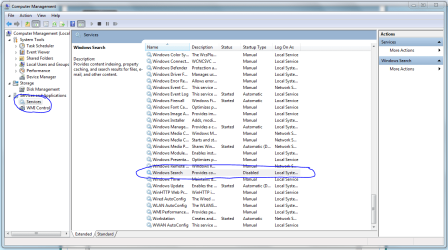
2. Click Services and Applications, then click Services
- scroll down to Windows Search
- does it say "Disabled" as per the image below?
3. Right Click on Windows Search, and then click Properties
4. Change Disabled to Automatic as per the image.
5. Click Apply, Click OK, and then close the Management Console.
6. Reboot your PC
Everything should now be good to go. Let me know how you get on.
Golden
Attachments
Capture.PNG
45.1 KB
· Views: 25
Capture2.PNG
21.1 KB
· Views: 3
My Computer
At a glance
Windows 10 Pro x64 ; Xubuntu x64Intel i7 860 @ 2.80 GHz O/C'ed to 4.0GHz16GB Corsair Vengance DDR3 @ 661 MHz Dual Cha...EVGA NVidia GTX 560 1024MB
1*Samsung 840 EVO 120GB SSD;
1*OCZ Vertex 2 60GB SSD;
2*Samsung F3 SpinPoint 1TB in RAID0;
1*Samsung F1 SpinPoint 1TB;
2*Western Digital 1TB External USB 3.0
1*Western Digital 500GB External USB 3.0
1*Seagate 500GB External USB 2.0
PSU
Thermaltake ToughPower QFan 750W
Case
Thermaltake Element S VK60001W2Z
Cooling
Corsair H60 Water Cooling, 2*230mm and 2*80mm case fans
1*Samsung 840 EVO 120GB SSD;
1*OCZ Vertex 2 60GB SSD;
2*Samsung F3 SpinPoint 1TB in RAID0;
1*Samsung F1 SpinPoint 1TB;
2*Western Digital 1TB External USB 3.0
1*Western Digital 500GB External USB 3.0
1*Seagate 500GB External USB 2.0
PSU
Thermaltake ToughPower QFan 750W
Case
Thermaltake Element S VK60001W2Z
Cooling
Corsair H60 Water Cooling, 2*230mm and 2*80mm case fans