
Solved Show Volume name in SRH

snahl

New member
The function 'Safely remove Hardware and eject Media' (SRH) normally displays the volume name just below the corresponding disk name.

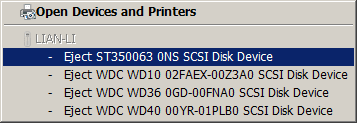
In this case, 2 external disks connected via eSATA to a specific controller show their disk name (friendly name) like under 'Disk drives' in the device manager, but the disks do NOT show their volume names.

I have found that klicking the SRH-function triggers the DeviceDisplayStatusManager.exe and its .dll (DDSM) which then reads the content of a disk to be displayed in the SRH panel.
this of course is convenient to ensure the anticipated selection of the drive (volume) to be removed.

Back to the case mentioned, the DDSM shows 2 drives with the same name but without volume specific information.
It is impossible to know which one of the 2 disks is the one anticipated to be removed. (Naturally one selects the wrong disk).

Hence the question is: What can I do so that the volume names are listed for those 2 drives as well? I'd assume there is a parameter in the registry that enables the DDSM to retrieve the volume information for each disk per specific port.
Does anyone know the registry key that enables the SRH-function to read & display the volume name for each disk?

The controller is a Marvell9128 in AHCI mode*. Connected to it are 2x SATA disks Western Digital WD1002FAEX via a SATA Hot Swap HDD Rack Kit (Lian-Li EX-H34)
The problem described only applies for that specific controller, other disks and volumes are displayed correctly.

* a PEXSAT32-2-Port-SATA-6-Gbps-PCI-Express-SATA-Controller-Card
from startech.com

Suggestions and advices are appreciated,
thanks.
 

My Computer

OS
Windows 7 Professional
CPU
Intel i7 [email protected]
Motherboard
ASUS P7P55D-E Deluxe
Memory
8GB
Graphics Card(s)
ATI FirePro V5800
Monitor(s) Displays
NEC PA241W
Hard Drives
many WDC & Seagate
Case
Lian-Li
Cooling
Liquid and quiet fans
"safely remove hardware" shows the device name from it's firmware. Showing instead the volume label would be impractical since a device may have two or more volumes (partitions) on it, and it would not be possible to remove one partition independently of the others on the same device.

It therefore follows that it also wouldn't make sense to list volume labels for external disks in the "safely remove hardware" utility.
 

My Computer

Computer Manufacturer/Model Number
Custom-build to order (no brand)
OS
Windows 7 32-bit
CPU
Intel Q8300 Core 2 Quad (2.50GHz x 4)
Motherboard
ASRock G31M-VS
Memory
4GB
Graphics Card(s)
Intel G33 Express (Integrated)
Sound Card
Realtek (Integrated)
Monitor(s) Displays
AOC 831W 19-inch LCD
Screen Resolution
1366 x 768
Hard Drives
Maxtor 500GB x 1
PSU
Octigen 500W Dual Fan
Case
Octigen Tower
Cooling
2 x case fans
Keyboard
Generic PS2
Mouse
Microsoft Wireless 3000
Internet Speed
2Mbit
"safely remove hardware" shows the device name from it's firmware. Showing instead the volume label would be impractical since a device may have two or more volumes (partitions) on it yet it would not be possible to remove them independently of each other.

Here is a tip for you:
On disk create 2 partitions and you will see 2 volume names displayed when clicking 'Safely Remove Hardware'.

The first line is the disk name as mentioned it's the friendly name stored in the corresponding registry key.
The second line shows indeed the volume name or label.
In case there is a 2nd partition, that name is shown on the 3rd line.
Just try it yourself and you will understand that your statement is not correct.

And it is NOT impractical to have the volume names displayed, in contrary, when you have all the same disks in a system inserted in a hot-swap drive cage the you DO want to know which one to remove.

Your are correct by stating that a single volume cannot be removed - well, of course not, a volume is not a hardware device.

So let me rephrase my question: How to display the volume names when only the disk names are shown?
 

My Computer

OS
Windows 7 Professional
CPU
Intel i7 [email protected]
Motherboard
ASUS P7P55D-E Deluxe
Memory
8GB
Graphics Card(s)
ATI FirePro V5800
Monitor(s) Displays
NEC PA241W
Hard Drives
many WDC & Seagate
Case
Lian-Li
Cooling
Liquid and quiet fans
My safely remove hardware shows both the "device name" and the "volume label" right below it. I can click the "device name" to safely remove it, but not the "volume label". The volume label is grayed out. My external USB hard drive and USB thumbdrives all show the volume label when I click the safely remove hardware icon. I have several identical thumbdrives so the volume label is the only way I can tell them apart. I don't have any devices with more than one partition on them but my guess is you would see the volume labels listed under the device name. I don't have any eSATA devices though to play around with.
 

My Computer

Computer type
PC/Desktop
Computer Manufacturer/Model Number
Home Built
OS
Windows 10 Education 64 bit
CPU
AMD Phenom II X4 980 Black Edition Deneb 3.7GHz
Motherboard
Asus M4N68T-M V2 µATX Motherboard
Memory
8GB 4GBx2 Kingston PC10600 DDR3 1333 Memory
Graphics Card(s)
Zotac NVIDIA Geforce GT640 2 Gig DDR3 PCIe
Sound Card
VIA VT1708s High Definition Audio 8-channel Onboard
Monitor(s) Displays
22" LG E2242 1080p and 2 19" I-INC AG191D
Screen Resolution
1280x1024 - 1920x1080 - 1280x1024
Hard Drives
Crucial M100 256 GB SSD and 500 GB WD Blue SATA
PSU
Thermaltake TR 620
Case
Power Up Black ATX Mid-Tower Case
Cooling
Stock heatsink and fan
Keyboard
Logitech Wireless K350 Wave
Mouse
Logitech Wireless M570 Trackman Wheel
Internet Speed
80 Mbps Down 30 Mbps Up
Antivirus
Windows Defender
Browser
Internet Explorer 11
Other Info
HP DVD1040e Lightscribe - External USB2
My safely remove hardware shows both the "device name" and the "volume label" right below it. I can click the "device name" to safely remove it, but not the "volume label". The volume label is grayed out.

'alphanumeric' Thank you, your're right, that is normally the case and perfectly fine.

Except for the disks that I have in that hard drive cage with a back-plane. I should add that each disk has its own cable each leading to its dedicated port on the controller with a Marvell 9128 chip.
Also, I assume that the OS regards disks connected that way as external disks. But this should not matter.

Fact is that the volume name is retrieved from the disk by the 'DeviceDisplayObjectFunctionDiscoveryProvider'-service upon clicking 'Safely remove hardware' icon. Whereas the disk name (presumably) is retrieved from the registry.
Therefore I'd think (and hope) that there might be a specific registry key instructing the 'DeviceDisplayObjectFunctionDiscoveryProvider'-service whether to read and display the volume name(s) or not.

Refining the question: Is there such a key in the registry and if 'yes' which key is it?
 
Last edited:

My Computer

OS
Windows 7 Professional
CPU
Intel i7 [email protected]
Motherboard
ASUS P7P55D-E Deluxe
Memory
8GB
Graphics Card(s)
ATI FirePro V5800
Monitor(s) Displays
NEC PA241W
Hard Drives
many WDC & Seagate
Case
Lian-Li
Cooling
Liquid and quiet fans
:confused: I'm thinking its more of a controller issue than a Windows problem. If you open Computer from the start menu do they show up and are their Volume labels displayed? If not maybe windows just can't retrieve them because of the way the controller works. If there is a registry key I have no idea what it is.
 

My Computer

Computer type
PC/Desktop
Computer Manufacturer/Model Number
Home Built
OS
Windows 10 Education 64 bit
CPU
AMD Phenom II X4 980 Black Edition Deneb 3.7GHz
Motherboard
Asus M4N68T-M V2 µATX Motherboard
Memory
8GB 4GBx2 Kingston PC10600 DDR3 1333 Memory
Graphics Card(s)
Zotac NVIDIA Geforce GT640 2 Gig DDR3 PCIe
Sound Card
VIA VT1708s High Definition Audio 8-channel Onboard
Monitor(s) Displays
22" LG E2242 1080p and 2 19" I-INC AG191D
Screen Resolution
1280x1024 - 1920x1080 - 1280x1024
Hard Drives
Crucial M100 256 GB SSD and 500 GB WD Blue SATA
PSU
Thermaltake TR 620
Case
Power Up Black ATX Mid-Tower Case
Cooling
Stock heatsink and fan
Keyboard
Logitech Wireless K350 Wave
Mouse
Logitech Wireless M570 Trackman Wheel
Internet Speed
80 Mbps Down 30 Mbps Up
Antivirus
Windows Defender
Browser
Internet Explorer 11
Other Info
HP DVD1040e Lightscribe - External USB2
:confused: ... its more of a controller issue than a Windows problem.

The problem only occurs when the disks reside inside a hot swap disk cage (Lian-Li EX-H34).
Connecting the disks directly (with the same SATA cables) to the HD controller (Startech: PEXSAT32) all Volume Labels are displayed properly.

If you open Computer from the start menu do they show up and are their Volume labels displayed?

Yes, Volume Labels are displayed properly.
In both cases; connected directly to the HD controller and with the drive cage in between.

According to Lian-Li each signal is transmitted unchanged and that not one signal is manipulated.
Exchanged SATA Cables already, no change.
Applied latest controller drivers (Marvell 1.0.0.1051 / 22.11.0210), no change.

I am puzzled. :confused:
 

My Computer

OS
Windows 7 Professional
CPU
Intel i7 [email protected]
Motherboard
ASUS P7P55D-E Deluxe
Memory
8GB
Graphics Card(s)
ATI FirePro V5800
Monitor(s) Displays
NEC PA241W
Hard Drives
many WDC & Seagate
Case
Lian-Li
Cooling
Liquid and quiet fans
The only option I can think of is to find the Hardware ID of each drive by running devmgmt.msc from a command prompt, double click a device, choose the Details tab of each hard drive and then select the Hardware Id from the drop-down. Once you have those, you can download this Windows tool called DevCon here:

The DevCon command-line utility functions as an alternative to Device Manager

With that, you can remove each drive from the command line via the hardware ID (or set up a separate batch file to remove each drive).
 

My Computer

OS
XP / Win7 x64 Pro
CPU
Intel Quad-Core Q9450 @ 3.2GHz
Motherboard
Asus P5-E
Memory
2x2GB GSkill DDR2
Graphics Card(s)
NVIDIA GeForce 8600 GTS (EVGA)
Monitor(s) Displays
Dell 2408WFP
Screen Resolution
1920x1200
to FliGi7:
Thanks for your suggestion - it's a good and working idea.
A bit cumbersome to implement, especially when the hot-swap drives change.

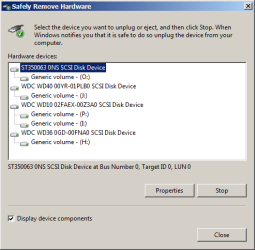
So I went to look further and finally found a very workable solution - right here in the forum posted by 'brink':
http://www.sevenforums.com/hardware-devices/36928-safely-remove-hardware-alternative-needed.html#post365761

The problem is within the driver versions (1.0.0.1042 by ASUS and the latest 1.0.0.1051 by Marvell) for the Marvell 9128 chip.
These drivers display the device components once only, when a device is new to the system. Once recognized the diskname (derived from Firmware) is stored in the registry and the 'Safely Remove Hardware'-Function uses this previously stored value for each device and does NOT re-read the Volume-Label of each drive anymore.

Left image: 'Safely Remove Hardware' provided by Windows (default)
Right image: Solution suggested by 'Brink'.

Thanks 'Brink'.
 

Attachments

  • SRH-1.png
    SRH-1.png
    7.6 KB · Views: 9
  • SRH-2.png
    SRH-2.png
    23.3 KB · Views: 19

My Computer

OS
Windows 7 Professional
CPU
Intel i7 [email protected]
Motherboard
ASUS P7P55D-E Deluxe
Memory
8GB
Graphics Card(s)
ATI FirePro V5800
Monitor(s) Displays
NEC PA241W
Hard Drives
many WDC & Seagate
Case
Lian-Li
Cooling
Liquid and quiet fans
Back
Top