kstevens870
New member
Hello,
I'll start from the beginning. I'm a photographer looking to re-organize my workflow by getting another drive (1 tb wd blue) to put all my photos on to work off of from lightroom. My main drive for 2 years now is a 600gb western digital I bought after realizing I needed more space. I bought a 1tb western digital blue drive. I added that one successfully and moved all my photos to it. I then proceeded to reformat my secondary drive (300gb) to put my media on it. When I went to reboot from my main drive (600gb) I ran into an error. Disk Boot Failure, instert sytem disk and press enter. I've come to figure out that the main drive I've been booting off of for 2 years now (600gb) was using the 300gb drive as a way to boot. I don't know how it got all messed up having to use that other drive, both now have windows 7 64 on it, and only the 300gb (newly reformatted drive) will boot.
TL;DR: I need to get my 600 gb drive to be able to be bootable again so I can get back to work. Can you help me? Time is of the essence here.
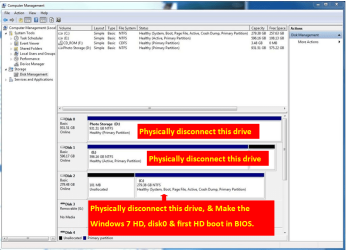
When looking in computer management it shows:

Can anyone help me? Thank you very much.
Kurt
I'll start from the beginning. I'm a photographer looking to re-organize my workflow by getting another drive (1 tb wd blue) to put all my photos on to work off of from lightroom. My main drive for 2 years now is a 600gb western digital I bought after realizing I needed more space. I bought a 1tb western digital blue drive. I added that one successfully and moved all my photos to it. I then proceeded to reformat my secondary drive (300gb) to put my media on it. When I went to reboot from my main drive (600gb) I ran into an error. Disk Boot Failure, instert sytem disk and press enter. I've come to figure out that the main drive I've been booting off of for 2 years now (600gb) was using the 300gb drive as a way to boot. I don't know how it got all messed up having to use that other drive, both now have windows 7 64 on it, and only the 300gb (newly reformatted drive) will boot.
TL;DR: I need to get my 600 gb drive to be able to be bootable again so I can get back to work. Can you help me? Time is of the essence here.
When looking in computer management it shows:
Can anyone help me? Thank you very much.
Kurt
My Computer
- Computer Manufacturer/Model Number
- Custom
- OS
- Windows Ultimate 64 bit.
- CPU
- AMD Phenom II 945
- Motherboard
- Gigabyte GA-MA770T-UD3P
- Memory
- 8GB Ripjaw
- Graphics Card(s)
- 1gb sapphire 4870
- Sound Card
- x-fi home
- Monitor(s) Displays
- 23'' Asus
- Hard Drives
- 1 - 1tb Western Digital blue
1 - 640 Western Digital
1 - 300 Maxtor
- PSU
- 850 Antec
- Case
- Antec 1200
- Cooling
- Air