How to detect if a Win7 install DVD contains 32bit or 64bit version?

pstein

New member
Member
VIP
Local time
7:14 AM
Messages
244
We have bought some month ago 32bit and 64bit versions of Win7.
From one of them we burned a backup DVD.

Now we need to re-install Win7 on a computer but we did not found the original DVDs. Fortunately we have the backup DVD available.

Is there a way to find out if it contains the 32 bit or 64bit version?
Of cause without trial and error by installing it. Just from inspecting the files.

We found no info/readme file on it which shows the version.

Peter
 

My Computer My Computer

At a glance

win7pro 64bit
Computer type
PC/Desktop
OS
win7pro 64bit
We have bought some month ago 32bit and 64bit versions of Win7.
From one of them we burned a backup DVD.

Now we need to re-install Win7 on a computer but we did not found the original DVDs. Fortunately we have the backup DVD available.

Is there a way to find out if it contains the 32 bit or 64bit version?
Of cause without trial and error by installing it. Just from inspecting the files.

We found no info/readme file on it which shows the version.

Peter

If it is the same as the original 32bit is about 2.5 gigs (the ISO) and 64 is a bit over 3 gigs.
 

My Computer My Computer

At a glance

Win 8 Release candidate 8400[email protected]4 gigsNvidia 9600M
Computer Manufacturer/Model Number
HP Pavillion dv-7 1005 Tx
OS
Win 8 Release candidate 8400
CPU
[email protected]
Memory
4 gigs
Graphics Card(s)
Nvidia 9600M
Sound Card
HD built-in
Monitor(s) Displays
17" Wxga
Screen Resolution
1440x900
Cooling
none
Internet Speed
45Mb down 5Mb up
Quick. The one with the largest contents is the 64 bit.
If you have lost the very expensive originals, I hope you have not lost the keys which came with them.
 

My Computer My Computer

At a glance

Vista and now 7 in 32 and 64 bit.
Computer Manufacturer/Model Number
Three desktops and one laptop with good specs..
OS
Vista and now 7 in 32 and 64 bit.
Quick. The one with the largest contents is the 64 bit.
If you have lost the very expensive originals, I hope you have not lost the keys which came with them.

Hmm, we have only ONE DVD and we cannot compare them with another or the originals.

Instead of calculating the DVD content size I would prefer to

- inspect the size of a certain core file or
- read an entry in an info text file content or
- view the 23th byte of file xxxxx.dll or
- call a certain setup.exe file with parameter -version
- or something similar.

Is there really no such inherent, fool proof solution?
 

My Computer My Computer

At a glance

win7pro 64bit
Computer type
PC/Desktop
OS
win7pro 64bit
Examine the root and open the autorun.inf file with notepad.
The 64 bit version shows:[AutoRun.Amd64]
open=setup.exe
icon=setup.exe,0

[AutoRun]
open=sources\sperr32.exe x64
icon=sources\sperr32.exe,0

The 32 bit version shows:[Autorun]
open=setup.exe
icon=setup.exe,0
 

My Computer My Computer

At a glance

Vista and now 7 in 32 and 64 bit.
Computer Manufacturer/Model Number
Three desktops and one laptop with good specs..
OS
Vista and now 7 in 32 and 64 bit.
If it is the same as the original 32bit is about 2.5 gigs (the ISO) and 64 is a bit over 3 gigs.

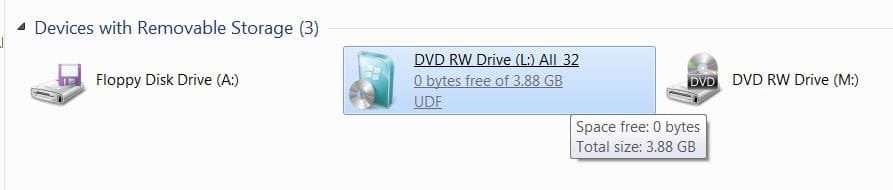
As said, it's simple, put the DVD in the CD/DVD drive and in "Computer" click properties and check the size(s) the larger is the 64-bit.

click to enlarge
size.jpg size2.JPG
 

My Computer My Computer

At a glance

W 7 64-bit UltimateIntel Q9550 Yorkfield8GB Dominator 8500C5DATI : XFX 5870
Computer Manufacturer/Model Number
* BFK Customs *
OS
W 7 64-bit Ultimate
CPU
Intel Q9550 Yorkfield
Motherboard
ASUS P5Q Pro
Memory
8GB Dominator 8500C5D
Graphics Card(s)
ATI : XFX 5870
Sound Card
Realtek HD Audio 7-1
Monitor(s) Displays
1x 47" LCD HDMI & 3x 26" LCD HDMI
Screen Resolution
1920x1080P & 1920x1200
Hard Drives
1x 80GB Intel X25-M G2 SSD : 1x 500GB & 1x 640GB WD Caviar Black(s)
PSU
Corsair 620HX
Case
Cooler Master RC-690
Cooling
Tuniq Tower 120, 2x 140mm and 3x 120mm case fans
Keyboard
Microsoft 500
Mouse
Razer Diamondback 3G
Internet Speed
14 Mb/s
Other Info
1x Koutech 3Gb/s SATA HDD Hot Swap Rack
Seems he does not have both on the one dvd, so nothing to compare.
 

My Computer My Computer

At a glance

Vista and now 7 in 32 and 64 bit.
Computer Manufacturer/Model Number
Three desktops and one laptop with good specs..
OS
Vista and now 7 in 32 and 64 bit.
He doesn't need to compare anything, look at the size in "Computer" is all that's needed, 32-bit is just over 2.5GB and the 64-bit is just over 3GB
 

My Computer My Computer

At a glance

W 7 64-bit UltimateIntel Q9550 Yorkfield8GB Dominator 8500C5DATI : XFX 5870
Computer Manufacturer/Model Number
* BFK Customs *
OS
W 7 64-bit Ultimate
CPU
Intel Q9550 Yorkfield
Motherboard
ASUS P5Q Pro
Memory
8GB Dominator 8500C5D
Graphics Card(s)
ATI : XFX 5870
Sound Card
Realtek HD Audio 7-1
Monitor(s) Displays
1x 47" LCD HDMI & 3x 26" LCD HDMI
Screen Resolution
1920x1080P & 1920x1200
Hard Drives
1x 80GB Intel X25-M G2 SSD : 1x 500GB & 1x 640GB WD Caviar Black(s)
PSU
Corsair 620HX
Case
Cooler Master RC-690
Cooling
Tuniq Tower 120, 2x 140mm and 3x 120mm case fans
Keyboard
Microsoft 500
Mouse
Razer Diamondback 3G
Internet Speed
14 Mb/s
Other Info
1x Koutech 3Gb/s SATA HDD Hot Swap Rack
I believe Zigzag has already suggested that.
 

My Computer My Computer

At a glance

Vista and now 7 in 32 and 64 bit.
Computer Manufacturer/Model Number
Three desktops and one laptop with good specs..
OS
Vista and now 7 in 32 and 64 bit.
Back
Top