Run command not saving history

shalom

New member
My Run command doesn't save the history of commands entered. I was told the registry was missing some commands and the only way to fix it is to create a new user account. The problem is I have tweaked a lot of settings the way I want them and it would be a lot of work to redo them. Is there a way to edit the registry and fix this in my current user account?

I'm not a pro at editing the registry, but I do some some experience with it. (Ex. I had a conflict w/2 versions of a program - B wouldn't uninstall, A would install but loaded as B. I deleted all references in registry for B & reinstalled both, now they work correctly.)
 

My Computer

Computer Manufacturer/Model Number
Acer
OS
Win7 Pro 64bit
CPU
Intel Core is-470UM
Memory
4gb DDR3
Graphics Card(s)
Intel HD

My Computer

Computer type
PC/Desktop
Computer Manufacturer/Model Number
Self built custom
OS
64-bit Windows 11 Pro for Workstations
CPU
Intel i7-8700K OC'd to 5 GHz
Motherboard
ASUS ROG Maximus XI Formula Z390
Memory
64 GB (4x16GB) G.SKILL TridentZ RGB DDR4 3600 MHz
Graphics Card(s)
ASUS ROG-STRIX-GTX1080TI-O11G-GAMING
Sound Card
Integrated
Monitor(s) Displays
2 x Samsung Odyssey G7 27"
Screen Resolution
2560x1440
Hard Drives
1TB Samsung 990 PRO M.2,
4TB Samsung 990 PRO PRO M.2,
TerraMaster F8 SSD Plus NAS
PSU
Seasonic Prime Titanium 850W
Case
Thermaltake Core P3
Cooling
Corsair Hydro H115i
Keyboard
Logitech wireless K800
Mouse
Logitech MX Master 4
Internet Speed
2 Gb/s Download and 100 Mb/s Upload
Antivirus
Malwarebyte Anti-Malware Premium
Browser
Google Chrome
Other Info
Logitech Z625 speaker system,
Logitech BRIO 4K Pro webcam,
HP Color LaserJet Pro MFP M477fdn,
APC SMART-UPS RT 1000 XL - SURT1000XLI,
Galaxy S23 Plus phone
It was already turned on. I did create a new user which does save the Run command history, but it would be a real hassle to have to switch everything to that user. I would rather get the history working on the original user. Is is possible to save the registry section that applies to this feature in the new user, then load it into the registry of the original user? If so, what area(s) should I save?
 

My Computer

Computer Manufacturer/Model Number
Acer
OS
Win7 Pro 64bit
CPU
Intel Core is-470UM
Memory
4gb DDR3
Graphics Card(s)
Intel HD
Sorry, but no you wouldn't be able to copy over the history. :(

Double check each option in the tutorial above to make sure it's turned on in each one.

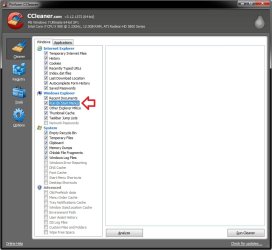
Are you using a program, like CCleaner with the "Run (Start Menu)" option checked, that may be deleting the Windows Explorer/Run auto suggest history? If so, you would need to uncheck that option to not delete the history anymore.

CCleaner.jpg
 

My Computer

Computer type
PC/Desktop
Computer Manufacturer/Model Number
Self built custom
OS
64-bit Windows 11 Pro for Workstations
CPU
Intel i7-8700K OC'd to 5 GHz
Motherboard
ASUS ROG Maximus XI Formula Z390
Memory
64 GB (4x16GB) G.SKILL TridentZ RGB DDR4 3600 MHz
Graphics Card(s)
ASUS ROG-STRIX-GTX1080TI-O11G-GAMING
Sound Card
Integrated
Monitor(s) Displays
2 x Samsung Odyssey G7 27"
Screen Resolution
2560x1440
Hard Drives
1TB Samsung 990 PRO M.2,
4TB Samsung 990 PRO PRO M.2,
TerraMaster F8 SSD Plus NAS
PSU
Seasonic Prime Titanium 850W
Case
Thermaltake Core P3
Cooling
Corsair Hydro H115i
Keyboard
Logitech wireless K800
Mouse
Logitech MX Master 4
Internet Speed
2 Gb/s Download and 100 Mb/s Upload
Antivirus
Malwarebyte Anti-Malware Premium
Browser
Google Chrome
Other Info
Logitech Z625 speaker system,
Logitech BRIO 4K Pro webcam,
HP Color LaserJet Pro MFP M477fdn,
APC SMART-UPS RT 1000 XL - SURT1000XLI,
Galaxy S23 Plus phone
Shalom,

I have had the same problem since I started using Windows 7. I wrote about it here months ago, was given the same answers regarding CCleaner and Internet Options, and neither of those suggestions worked.

Now, I just googled again, and finally found the answer, in a different thread on these forums:

http://www.sevenforums.com/general-...un-doesnt-remember-my-previous-types-why.html

Starts with the same ccleaner response, but go to the fourth post in that thread, by Fayla. The answer lies there--it is in the options for the Taskbar and start menu. RIght-click the taskbar, choose properties, select the second tab-"Start Menu", then look under "Privacy". Both options should be checked, and then you will get the run menu history. It worked for the OP in the thread above, and just worked for me.
 

My Computer

OS
Windows 7

My Computer

Computer type
PC/Desktop
Computer Manufacturer/Model Number
Self built custom
OS
64-bit Windows 11 Pro for Workstations
CPU
Intel i7-8700K OC'd to 5 GHz
Motherboard
ASUS ROG Maximus XI Formula Z390
Memory
64 GB (4x16GB) G.SKILL TridentZ RGB DDR4 3600 MHz
Graphics Card(s)
ASUS ROG-STRIX-GTX1080TI-O11G-GAMING
Sound Card
Integrated
Monitor(s) Displays
2 x Samsung Odyssey G7 27"
Screen Resolution
2560x1440
Hard Drives
1TB Samsung 990 PRO M.2,
4TB Samsung 990 PRO PRO M.2,
TerraMaster F8 SSD Plus NAS
PSU
Seasonic Prime Titanium 850W
Case
Thermaltake Core P3
Cooling
Corsair Hydro H115i
Keyboard
Logitech wireless K800
Mouse
Logitech MX Master 4
Internet Speed
2 Gb/s Download and 100 Mb/s Upload
Antivirus
Malwarebyte Anti-Malware Premium
Browser
Google Chrome
Other Info
Logitech Z625 speaker system,
Logitech BRIO 4K Pro webcam,
HP Color LaserJet Pro MFP M477fdn,
APC SMART-UPS RT 1000 XL - SURT1000XLI,
Galaxy S23 Plus phone
Back
Top