Solved Any one know about bios updating w/FLASH drive please help me

SdSteve760

New member
Local time
6:54 AM
Messages
20
Location
San Diego, CA
I AM CURRENTLY TRYING TO UPDATE MY INTEL BIOS MOTHERBOARD W/FLASH DRIVE. I HAVE MADE A BOOT ABLE DRIVE HAVE BIOS LOADED ON IT AND AM COMPLETLY STUCK AT THE DOS SECTION TO LOAD FILES ... PLEASE CAN ANYONE HELP ME IF YOU KNOW ABOUT THIS STUFF PLEASE REPLY AND WILL GIVE YOU WHAT INFO NEEDED TO HELP ME

i AM CURRENTLY SITTING AT THE IFLASH2 COMMAND LINE OPTIONS DONT KNOW WHAT TO DO PLEASE HELP ME... THANK YOU


INTEL DG31PR MOTHERBOARD

7 ULTIMATE 64BIT
 
Last edited:

My Computer My Computer

At a glance

Microsoft Windows 7 Home Premium 64bitAMD Athlon(tm) II X2 240 ProcessorSamsung 4GB @2GBX2 DDR3-1333 (667 MHz)XFX GeForce 9800 GTX+
Computer Manufacturer/Model Number
HP
OS
Microsoft Windows 7 Home Premium 64bit
CPU
AMD Athlon(tm) II X2 240 Processor
Motherboard
Asus M2N68-LA (Narra6)
Memory
Samsung 4GB @2GBX2 DDR3-1333 (667 MHz)
Graphics Card(s)
XFX GeForce 9800 GTX+
Sound Card
Creative Audigy 2 ZS
Monitor(s) Displays
Dell E197FP
Screen Resolution
1280 x 1024
Hard Drives
Seagate Barracuda 1TB @ 7200RPM & Seagate Barracuda 500GB @ 7200RPM
PSU
650Watt
Keyboard
Microsoft Digital Media Keyboard 3000 (IntelliType Pro)
Mouse
Razer Mamba 6400dpi 4G Dual Sensor System
Most BIOS updates come with intructions on how to flash. Please see read the doucmentation.

Also please be aware that posting in all bold capital letters is considered shouting. There's no need to shout here.

And it might help to tell us which Intel board you have.

Thanks.
 

My Computer My Computer

At a glance

Windows 10 ProIntel Core i7-4770K (3.5Ghz)32 gig Corsair Dominator Platinum (4x8Gig)Sapphire Tri-X R9 Fury
Computer type
PC/Desktop
Computer Manufacturer/Model Number
Custom built by me.
OS
Windows 10 Pro
CPU
Intel Core i7-4770K (3.5Ghz)
Motherboard
Gigabyte G1 Sniper 5 (F10 Bios)
Memory
32 gig Corsair Dominator Platinum (4x8Gig)
Graphics Card(s)
Sapphire Tri-X R9 Fury
Sound Card
Soundblaster ZXR
Monitor(s) Displays
NEC PA242W 24" LCD Monitor
Screen Resolution
1920 x 1200
Hard Drives
Primary - Samsung 850 Pro (512gig), Samsung 840 Pro (256gig), 2TB WD Caviar Black.
PSU
EVGA Supernova 1000 G2
Case
Cooler Master HAF X
Cooling
Corsair H100i with Corsair Air Series SP120 Quiet Fans
Keyboard
Logitech Wireless Wave
Mouse
Logitech Performance MX
Internet Speed
High Speed Cable
Antivirus
Norton Security
Browser
IE11
Other Info
Memory Timings - 1866MHz @ 9-9-9-27-1T @ 1.5 volts
Oh sorry about that didnt mean to shout... my board was listed at bottom of post its a intel DG31PR desktop motherboard and yes I am aware that there was instructions as to how to generally carry out the update and i followed it to a T till it got to where you select the file that you need loaded, at that point it had a A: for the drive location and was told to switch that to anything other than A: it suggested B: but that did not work and my flash drive is actually E: on that computer and it does not recognize that as a valid drive letter.. Any ideas have taken a pic of my screen at what im looking at if it may help in any way at all


Most BIOS updates come with intructions on how to flash. Please see read the doucmentation.

Also please be aware that posting in all bold capital letters is considered shouting. There's no need to shout here.

And it might help to tell us which Intel board you have.

Thanks.
 

Attachments

  • bios update image.jpg
    bios update image.jpg
    337.2 KB · Views: 57
Last edited:

My Computer My Computer

At a glance

Microsoft Windows 7 Home Premium 64bitAMD Athlon(tm) II X2 240 ProcessorSamsung 4GB @2GBX2 DDR3-1333 (667 MHz)XFX GeForce 9800 GTX+
Computer Manufacturer/Model Number
HP
OS
Microsoft Windows 7 Home Premium 64bit
CPU
AMD Athlon(tm) II X2 240 Processor
Motherboard
Asus M2N68-LA (Narra6)
Memory
Samsung 4GB @2GBX2 DDR3-1333 (667 MHz)
Graphics Card(s)
XFX GeForce 9800 GTX+
Sound Card
Creative Audigy 2 ZS
Monitor(s) Displays
Dell E197FP
Screen Resolution
1280 x 1024
Hard Drives
Seagate Barracuda 1TB @ 7200RPM & Seagate Barracuda 500GB @ 7200RPM
PSU
650Watt
Keyboard
Microsoft Digital Media Keyboard 3000 (IntelliType Pro)
Mouse
Razer Mamba 6400dpi 4G Dual Sensor System
You might want to check your BIOS to make sure your USB is seen as a drive. Check that Something like legacy USB is enabled.

BTW is there a reason why you can't use the Express BIOS update (update through Windows). Not only do I do it all the time, but I've done it many times on Intel boards. In fact the first time I used the express update was on an Intel board.

Don't belive the hype, there's no issues taking that route. Anyway check check your BIOS first and go from there. If that doesn't work, try the express route.

Let us know.
 

My Computer My Computer

At a glance

Windows 10 ProIntel Core i7-4770K (3.5Ghz)32 gig Corsair Dominator Platinum (4x8Gig)Sapphire Tri-X R9 Fury
Computer type
PC/Desktop
Computer Manufacturer/Model Number
Custom built by me.
OS
Windows 10 Pro
CPU
Intel Core i7-4770K (3.5Ghz)
Motherboard
Gigabyte G1 Sniper 5 (F10 Bios)
Memory
32 gig Corsair Dominator Platinum (4x8Gig)
Graphics Card(s)
Sapphire Tri-X R9 Fury
Sound Card
Soundblaster ZXR
Monitor(s) Displays
NEC PA242W 24" LCD Monitor
Screen Resolution
1920 x 1200
Hard Drives
Primary - Samsung 850 Pro (512gig), Samsung 840 Pro (256gig), 2TB WD Caviar Black.
PSU
EVGA Supernova 1000 G2
Case
Cooler Master HAF X
Cooling
Corsair H100i with Corsair Air Series SP120 Quiet Fans
Keyboard
Logitech Wireless Wave
Mouse
Logitech Performance MX
Internet Speed
High Speed Cable
Antivirus
Norton Security
Browser
IE11
Other Info
Memory Timings - 1866MHz @ 9-9-9-27-1T @ 1.5 volts
they flash drive is a boo table flash drive and yes it shows in the bios boot order as USB 2.0 or something i moved it to the first boot option. to get to where I am now. I also have tried the express update it would not work that's what has me at this option.. I appreciate the help you are trying to give me though an if you have any other ideas I would be glad to hear them.. Ty
 

My Computer My Computer

At a glance

Microsoft Windows 7 Home Premium 64bitAMD Athlon(tm) II X2 240 ProcessorSamsung 4GB @2GBX2 DDR3-1333 (667 MHz)XFX GeForce 9800 GTX+
Computer Manufacturer/Model Number
HP
OS
Microsoft Windows 7 Home Premium 64bit
CPU
AMD Athlon(tm) II X2 240 Processor
Motherboard
Asus M2N68-LA (Narra6)
Memory
Samsung 4GB @2GBX2 DDR3-1333 (667 MHz)
Graphics Card(s)
XFX GeForce 9800 GTX+
Sound Card
Creative Audigy 2 ZS
Monitor(s) Displays
Dell E197FP
Screen Resolution
1280 x 1024
Hard Drives
Seagate Barracuda 1TB @ 7200RPM & Seagate Barracuda 500GB @ 7200RPM
PSU
650Watt
Keyboard
Microsoft Digital Media Keyboard 3000 (IntelliType Pro)
Mouse
Razer Mamba 6400dpi 4G Dual Sensor System
Oh sorry about that didnt mean to shout... my board was listed at bottom of post its a intel DG31PR desktop motherboard and yes I am aware that there was instructions as to how to generally carry out the update and i followed it to a T till it got to where you select the file that you need loaded, at that point it had a A: for the drive location and was told to switch that to anything other than A: it suggested B: but that did not work and my flash drive is actually E: on that computer and it does not recognize that as a valid drive letter.. Any ideas have taken a pic of my screen at what im looking at if it may help in any way at all


Most BIOS updates come with intructions on how to flash. Please see read the doucmentation.

Also please be aware that posting in all bold capital letters is considered shouting. There's no need to shout here.

And it might help to tell us which Intel board you have.

Thanks.

Did you prepare a bootable USB drive using the HP utility? It appears that you have made a drive with a floppy image, which is much less useful than a DOS bootable key drive. (The drive prepared with the HP utility can have the full capacity of the USB key.)

HP Drive Key Boot Utility - HP Business Support Center
 

My Computer My Computer

At a glance

Windows 7 Pro X64 SP1Intel Core I7-3930k16 GB Gskill DDR3-2133eVGA GTX680
Computer Manufacturer/Model Number
homegrown
OS
Windows 7 Pro X64 SP1
CPU
Intel Core I7-3930k
Motherboard
Asus P9X79 Pro
Memory
16 GB Gskill DDR3-2133
Graphics Card(s)
eVGA GTX680
Sound Card
Creative X-Fi Titanium
Monitor(s) Displays
As PA246Q
Screen Resolution
1920 X 1200
Hard Drives
Corsair Force GT, 120 GB
WDC 1.5TB Caviar Black
PSU
PCP&C Silencer 750 Crossfire
Case
Silverstone FT02
Cooling
Noctua NH-D14
Keyboard
cheap Logitech USB
Mouse
Microsoft Intellimouse Explorer (old optical) USB
Internet Speed
6Mb cable
Other Info
Pioneer BDR-205
Samsung SH-203B
Monsoon 5.1 speakers
As mentioned the drive needs to be formated with HP tool, in a FAT format. As well as having Win boot files installed on it.

Drag and drop bios files (all of them inside the main folder) to it afterwards.
This is a very important part.


Assuming you have done this part correctly, and are unsure how to proceed from there:

-Reset bios to Optimized default -- Save & Exit

-Boot from USB stick

-At cmd prompt typr "dir" without quotes.

-Then type then name of your bios flash BAT that you see there.
Will likely be something along the lines of (( ****DOS.BAT ))

-Then follow the prompts.


But this will not work, nor will it boot from the USB if you did not set it up properly with the HP format tool.
 

My Computer My Computer

At a glance

Windows 7 Home Premium 64bitIntel Core i7 2700k8GB Mushkin Redline Ridgebacks @1866EVGA GTX570 SC
Computer Manufacturer/Model Number
Custom (Self Build)
OS
Windows 7 Home Premium 64bit
CPU
Intel Core i7 2700k
Motherboard
eVGA P67 SLI
Memory
8GB Mushkin Redline Ridgebacks @1866
Graphics Card(s)
EVGA GTX570 SC
Sound Card
XiFi Titanium HD
Monitor(s) Displays
LG W2453V
Screen Resolution
1920x1080
Hard Drives
Intel 320 80GB -- Intel X25-V 40GB --WD Black 1TB x2 -- WD Blue 640GB
PSU
Seasonic x750
Case
Corsair 600T SE White
Cooling
eVGA Superclocked CPU Cooler
Keyboard
Saitek Cyborg
Antivirus
Kaspersky
Browser
IE
Other Info
LG BD/DVD
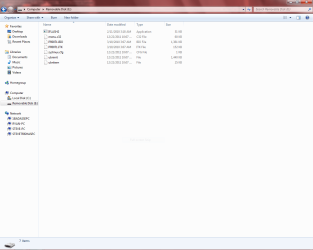
Can you put out a screenshot of the what folders/files are in the flashdrive?
 

My Computer My Computer

At a glance

Windows 7 Home Premium 32 bit
OS
Windows 7 Home Premium 32 bit
1. Save the iFlash BIOS update file to a temporary directory.
2. Double-click the *.EXE to extract necessary files.
3. Copy the .BIO file and IFLASH.EXE to the bootable USB device.
4. Configure the BIOS of the target system to boot to the USB device:


a. Press F2 during boot to enter BIOS Setup.
b. Go to the Boot menu.
c. Enable USB Boot.


d. Save by pressing F10 and exit the BIOS Setup.
5. Boot the target PC with the USB device connected.


6. At the prompt, type
IFLASH /PF XXX.BIO (where XXX.BIO is the filename of the .BIO
file) to launch the iFlash BIOS update process.


According to these instructions, you're not specifying the BIO file. Besides that, you're currently on the C drive.


Your thumb drive MUST be bootable BEFORE copying the files to it. Simply copying the files to it does not make it bootable.
 

My Computer My Computer

At a glance

Windows 7 Pro-x64i7-2600 3.4GHz - 3.8GHz Turbo8Gb - 2x4GB, Muskin 991770 PC3-1333Integrated Intel HD 2000
Computer type
PC/Desktop
Computer Manufacturer/Model Number
Built 2/11/2011
OS
Windows 7 Pro-x64
CPU
i7-2600 3.4GHz - 3.8GHz Turbo
Motherboard
Intel DH67BL-B3
Memory
8Gb - 2x4GB, Muskin 991770 PC3-1333
Graphics Card(s)
Integrated Intel HD 2000
Sound Card
Integrated Intel 10.1 HD, RealTek ALC892
Monitor(s) Displays
Asus LCD VH222H, Haier HL24XSL2a
Screen Resolution
1920x1080, 1920x1080
Hard Drives
Crucial SSD C300-128Gb,
Western Digital WD5002AALX - 500Gb,
Western Digital WD7501AALS - 750Gb
PSU
Seasonic 650W 80+ Gold Modular
Case
Rosewill Defender
Cooling
Stock CPU, Four 120mm case fans, PCH fan added
Keyboard
Logitech EX100 Y-RBH94 Wireless
Mouse
Logitech EX100 M-RCE95 Wireless
Internet Speed
3.0/1.5 Mbs
Antivirus
Microsoft Security Essentials
Browser
Microsoft Internet Explorer 11
Other Info
Antec Veris Premier-Multimedia IR Station,
Cyber Accoustics-3602 Speakers,
AFT XM-5U Card Reader,
Hauppauge TV-HVR-2250,
Sony LX300 USB Turntable
Yeah preparing the drive helps :)

As to the express option - why can't you use it? What happened? Did you get the correct BIOS for your board?

Thanks.
 

My Computer My Computer

At a glance

Windows 10 ProIntel Core i7-4770K (3.5Ghz)32 gig Corsair Dominator Platinum (4x8Gig)Sapphire Tri-X R9 Fury
Computer type
PC/Desktop
Computer Manufacturer/Model Number
Custom built by me.
OS
Windows 10 Pro
CPU
Intel Core i7-4770K (3.5Ghz)
Motherboard
Gigabyte G1 Sniper 5 (F10 Bios)
Memory
32 gig Corsair Dominator Platinum (4x8Gig)
Graphics Card(s)
Sapphire Tri-X R9 Fury
Sound Card
Soundblaster ZXR
Monitor(s) Displays
NEC PA242W 24" LCD Monitor
Screen Resolution
1920 x 1200
Hard Drives
Primary - Samsung 850 Pro (512gig), Samsung 840 Pro (256gig), 2TB WD Caviar Black.
PSU
EVGA Supernova 1000 G2
Case
Cooler Master HAF X
Cooling
Corsair H100i with Corsair Air Series SP120 Quiet Fans
Keyboard
Logitech Wireless Wave
Mouse
Logitech Performance MX
Internet Speed
High Speed Cable
Antivirus
Norton Security
Browser
IE11
Other Info
Memory Timings - 1866MHz @ 9-9-9-27-1T @ 1.5 volts
As expressed above, there are only two parts here.

1. Preparing a bootable flash drive and ensure that it boots. Here the OP has to go as per instructions given by Wishmaster above. I shall make only one correction. If the OP's pendrive is less than 3.25GB only, he will get the FAT format option. If the OP's pendrive is larger than 3.25GB, he has to format it with FAT32.(He will not get FAT format option)

HP USB Format tool: http://files.extremeoverclocking.com/file.php?f=197

Win98boot files:Windows 98 System Files Download - EXTREME Overclocking .

2. Extracting the appropriate bios files into the pendrive and giving the right Command as specified by Intel. (This is exactly why I wanted to see what files/folders are there in the pendrive) Now that carwiz has posted what it should be, OP should follow these instructions in giving the right command.
 

My Computer My Computer

At a glance

Windows 7 Home Premium 32 bit
OS
Windows 7 Home Premium 32 bit
Can you put out a screenshot of the what folders/files are in the flashdrive?


have attached a sceenshot of files on the flash drive ..
let me know if its what is needed ty
 

Attachments

  • screenshot flash drive contents.PNG
    screenshot flash drive contents.PNG
    37.5 KB · Views: 28

My Computer My Computer

At a glance

Microsoft Windows 7 Home Premium 64bitAMD Athlon(tm) II X2 240 ProcessorSamsung 4GB @2GBX2 DDR3-1333 (667 MHz)XFX GeForce 9800 GTX+
Computer Manufacturer/Model Number
HP
OS
Microsoft Windows 7 Home Premium 64bit
CPU
AMD Athlon(tm) II X2 240 Processor
Motherboard
Asus M2N68-LA (Narra6)
Memory
Samsung 4GB @2GBX2 DDR3-1333 (667 MHz)
Graphics Card(s)
XFX GeForce 9800 GTX+
Sound Card
Creative Audigy 2 ZS
Monitor(s) Displays
Dell E197FP
Screen Resolution
1280 x 1024
Hard Drives
Seagate Barracuda 1TB @ 7200RPM & Seagate Barracuda 500GB @ 7200RPM
PSU
650Watt
Keyboard
Microsoft Digital Media Keyboard 3000 (IntelliType Pro)
Mouse
Razer Mamba 6400dpi 4G Dual Sensor System
Yeah preparing the drive helps :)

As to the express option - why can't you use it? What happened? Did you get the correct BIOS for your board?

Thanks.

Express gave ma a error message saying cant continue due to internal error
yes went through intel to get correct update..
 

My Computer My Computer

At a glance

Microsoft Windows 7 Home Premium 64bitAMD Athlon(tm) II X2 240 ProcessorSamsung 4GB @2GBX2 DDR3-1333 (667 MHz)XFX GeForce 9800 GTX+
Computer Manufacturer/Model Number
HP
OS
Microsoft Windows 7 Home Premium 64bit
CPU
AMD Athlon(tm) II X2 240 Processor
Motherboard
Asus M2N68-LA (Narra6)
Memory
Samsung 4GB @2GBX2 DDR3-1333 (667 MHz)
Graphics Card(s)
XFX GeForce 9800 GTX+
Sound Card
Creative Audigy 2 ZS
Monitor(s) Displays
Dell E197FP
Screen Resolution
1280 x 1024
Hard Drives
Seagate Barracuda 1TB @ 7200RPM & Seagate Barracuda 500GB @ 7200RPM
PSU
650Watt
Keyboard
Microsoft Digital Media Keyboard 3000 (IntelliType Pro)
Mouse
Razer Mamba 6400dpi 4G Dual Sensor System
1. Save the iFlash BIOS update file to a temporary directory.
2. Double-click the *.EXE to extract necessary files.
3. Copy the .BIO file and IFLASH.EXE to the bootable USB device.
4. Configure the BIOS of the target system to boot to the USB device:


a. Press F2 during boot to enter BIOS Setup.
b. Go to the Boot menu.
c. Enable USB Boot.


d. Save by pressing F10 and exit the BIOS Setup.
5. Boot the target PC with the USB device connected.


6. At the prompt, type
IFLASH /PF XXX.BIO (where XXX.BIO is the filename of the .BIO
file) to launch the iFlash BIOS update process.

According to these instructions, you're not specifying the BIO file. Besides that, you're currently on the C drive.


Your thumb drive MUST be bootable BEFORE copying the files to it. Simply copying the files to it does not make it bootable.


As like stated in above steps is exactly what i did and when it came to the promptI got a invalid command or filename on any drive letter used accept when i used the C: drive then at that time is when i got the screen that says iflash2 with valid dos
commands ... So am not sure what i did wrong or if as you stated ai did not properly set up the actual usb port on the target pc ... was not aware that there
was anything I had to do to that just thought i only had to make the flash drive bootable ... by adding the dos files needed along with the flash utility and bios update file. Never did this before So i really appreciate all of your extensive knowledge on this sublect and appreciate the help very much.
 

My Computer My Computer

At a glance

Microsoft Windows 7 Home Premium 64bitAMD Athlon(tm) II X2 240 ProcessorSamsung 4GB @2GBX2 DDR3-1333 (667 MHz)XFX GeForce 9800 GTX+
Computer Manufacturer/Model Number
HP
OS
Microsoft Windows 7 Home Premium 64bit
CPU
AMD Athlon(tm) II X2 240 Processor
Motherboard
Asus M2N68-LA (Narra6)
Memory
Samsung 4GB @2GBX2 DDR3-1333 (667 MHz)
Graphics Card(s)
XFX GeForce 9800 GTX+
Sound Card
Creative Audigy 2 ZS
Monitor(s) Displays
Dell E197FP
Screen Resolution
1280 x 1024
Hard Drives
Seagate Barracuda 1TB @ 7200RPM & Seagate Barracuda 500GB @ 7200RPM
PSU
650Watt
Keyboard
Microsoft Digital Media Keyboard 3000 (IntelliType Pro)
Mouse
Razer Mamba 6400dpi 4G Dual Sensor System
I never used the hp utility tool for anything I used Unebootin windows netboot installer to configure the flash drive with the proper dos files then added the iflash2 files an .bio files from the update to it also and that was it... Sorry if I was misinformed but intel did not provide the instructions on how to make a flashdrive only on what files to add to it.. :(


As mentioned the drive needs to be formated with HP tool, in a FAT format. As well as having Win boot files installed on it.

Drag and drop bios files (all of them inside the main folder) to it afterwards.
This is a very important part.


Assuming you have done this part correctly, and are unsure how to proceed from there:

-Reset bios to Optimized default -- Save & Exit

-Boot from USB stick

-At cmd prompt typr "dir" without quotes.

-Then type then name of your bios flash BAT that you see there.
Will likely be something along the lines of (( ****DOS.BAT ))

-Then follow the prompts.


But this will not work, nor will it boot from the USB if you did not set it up properly with the HP format tool.
 

My Computer My Computer

At a glance

Microsoft Windows 7 Home Premium 64bitAMD Athlon(tm) II X2 240 ProcessorSamsung 4GB @2GBX2 DDR3-1333 (667 MHz)XFX GeForce 9800 GTX+
Computer Manufacturer/Model Number
HP
OS
Microsoft Windows 7 Home Premium 64bit
CPU
AMD Athlon(tm) II X2 240 Processor
Motherboard
Asus M2N68-LA (Narra6)
Memory
Samsung 4GB @2GBX2 DDR3-1333 (667 MHz)
Graphics Card(s)
XFX GeForce 9800 GTX+
Sound Card
Creative Audigy 2 ZS
Monitor(s) Displays
Dell E197FP
Screen Resolution
1280 x 1024
Hard Drives
Seagate Barracuda 1TB @ 7200RPM & Seagate Barracuda 500GB @ 7200RPM
PSU
650Watt
Keyboard
Microsoft Digital Media Keyboard 3000 (IntelliType Pro)
Mouse
Razer Mamba 6400dpi 4G Dual Sensor System
OK, you could have gone astray creating the bootable pendrive with UNetbootin and may be FreeDOS. (I had used FreeDOS on Ultimate Boot CD to flash the bios)

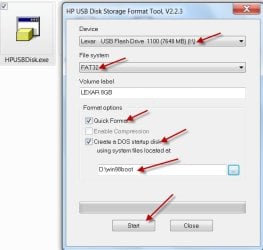
Anyway scrap it now and create your bootable DOS drive using HP USB Disk Storage Format Tool. Download it from the link I had given in the previous post. Also download the win98boot.zip and extract it to a folder named win98boot.

Run the HP tool as an administrator. Screenshot to make it easier for you :)

bootpendrv.jpg

Your bootable pendrive to run DOS is ready.

Now extract/copy the bios files to the pendrive. Follow the instructions given by carwiz in his post above.
 

My Computer My Computer

At a glance

Windows 7 Home Premium 32 bit
OS
Windows 7 Home Premium 32 bit
If your system is booting to Windows, just use the Windows flash utility. Download the BIOS file for your board with EB in the name, and you don't need to worry about boot disks, flash drives, etc.
 

My Computer My Computer

At a glance

Windows 7 Ultimate x64 SP1Intel Core i7-260012 GB Patriot Extreme DDR3-1333Nvidia GTX 470
OS
Windows 7 Ultimate x64 SP1
CPU
Intel Core i7-2600
Motherboard
Gigabyte GA-P67A-UD3P-B3
Memory
12 GB Patriot Extreme DDR3-1333
Graphics Card(s)
Nvidia GTX 470
Monitor(s) Displays
Dell UltraSharp 2209WA
Hard Drives
OCZ Agility3 240 GB, WD5001AALS, WD7501AALS
PSU
OCZ ModStream 700W
Case
CoolerMaster HAF 912 Advanced
Cooling
CoolerMaster Hyper 212 Plus
I want to say ty to all you guys for taking the time to help me in getting
my bios flashed You all have been a great help and I thank you very much
you guys ROCK !! :party::D
 

My Computer My Computer

At a glance

Microsoft Windows 7 Home Premium 64bitAMD Athlon(tm) II X2 240 ProcessorSamsung 4GB @2GBX2 DDR3-1333 (667 MHz)XFX GeForce 9800 GTX+
Computer Manufacturer/Model Number
HP
OS
Microsoft Windows 7 Home Premium 64bit
CPU
AMD Athlon(tm) II X2 240 Processor
Motherboard
Asus M2N68-LA (Narra6)
Memory
Samsung 4GB @2GBX2 DDR3-1333 (667 MHz)
Graphics Card(s)
XFX GeForce 9800 GTX+
Sound Card
Creative Audigy 2 ZS
Monitor(s) Displays
Dell E197FP
Screen Resolution
1280 x 1024
Hard Drives
Seagate Barracuda 1TB @ 7200RPM & Seagate Barracuda 500GB @ 7200RPM
PSU
650Watt
Keyboard
Microsoft Digital Media Keyboard 3000 (IntelliType Pro)
Mouse
Razer Mamba 6400dpi 4G Dual Sensor System
If your system is booting to Windows, just use the Windows flash utility. Download the BIOS file for your board with EB in the name, and you don't need to worry about boot disks, flash drives, etc.

I already preposed that and he said it didn't work :confused:

BTW is there a reason why you can't use the Express BIOS update (update through Windows). Not only do I do it all the time, but I've done it many times on Intel boards. In fact the first time I used the express update was on an Intel board.

Yeah preparing the drive helps :)

As to the express option - why can't you use it? What happened? Did you get the correct BIOS for your board?

Thanks.

Express gave ma a error message saying cant continue due to internal error
yes went through intel to get correct update..
 

My Computer My Computer

At a glance

Windows 10 ProIntel Core i7-4770K (3.5Ghz)32 gig Corsair Dominator Platinum (4x8Gig)Sapphire Tri-X R9 Fury
Computer type
PC/Desktop
Computer Manufacturer/Model Number
Custom built by me.
OS
Windows 10 Pro
CPU
Intel Core i7-4770K (3.5Ghz)
Motherboard
Gigabyte G1 Sniper 5 (F10 Bios)
Memory
32 gig Corsair Dominator Platinum (4x8Gig)
Graphics Card(s)
Sapphire Tri-X R9 Fury
Sound Card
Soundblaster ZXR
Monitor(s) Displays
NEC PA242W 24" LCD Monitor
Screen Resolution
1920 x 1200
Hard Drives
Primary - Samsung 850 Pro (512gig), Samsung 840 Pro (256gig), 2TB WD Caviar Black.
PSU
EVGA Supernova 1000 G2
Case
Cooler Master HAF X
Cooling
Corsair H100i with Corsair Air Series SP120 Quiet Fans
Keyboard
Logitech Wireless Wave
Mouse
Logitech Performance MX
Internet Speed
High Speed Cable
Antivirus
Norton Security
Browser
IE11
Other Info
Memory Timings - 1866MHz @ 9-9-9-27-1T @ 1.5 volts
If your system is booting to Windows, just use the Windows flash utility. Download the BIOS file for your board with EB in the name, and you don't need to worry about boot disks, flash drives, etc.

IMO, flashing the BIOS with DOS is much safer and less risky than flashing it from within Windows.

Though seemingly user-friendly and convenient Windows flashing carries an additional risk of flash failure due to a crash, conflict, or other instabilty within Windows.

Just imagine this scenario. The AV program trying to interrupt the flashing thinking that some virus is attacking the BIOS. If it succeeds , well, you have a bricked PC.

Now to DOS. It does a singular task - that of flashing the BIOS - putting Windows and other elements associated with it that can spoil the broth, to rest.

Better to be safe than sorry and it takes very little time to prepare the bootable pendrive that can run DOS.
 
Last edited:

My Computer My Computer

At a glance

Windows 7 Home Premium 32 bit
OS
Windows 7 Home Premium 32 bit
Back
Top