
Solved How do I remove 'Open with CFF Explorer' from right click menu?

AbhishekS

Fun lover
Power User
Local time
5:47 PM
Messages
110
Location
India
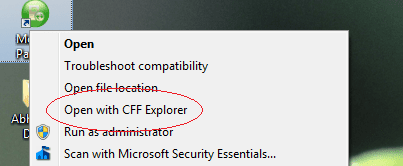
How do I remove 'Open with CFF Explorer' from the right click menu?

I had installed Explorer Suite and later removed it. Even after removing it, it's right click menu item didn't go away.

Please help. It's too annoying and it gives an error on clicking it.

Thanks.

Regards,
Abhishek Sharma
 

Attachments
  • Untitled.png
    Untitled.png
    12.1 KB · Views: 31

My Computer My Computer

At a glance

32-bit Windows 7 Home Premium & Windows 8 Rel...Intel(R) Core(TM)2 Duo4 GB RAM DDR3NVIDIA GeForce G 105M
Computer Manufacturer/Model Number
Acer Aspire 5738G
OS
32-bit Windows 7 Home Premium & Windows 8 Release Preview
CPU
Intel(R) Core(TM)2 Duo
Motherboard
Acer JV50
Memory
4 GB RAM DDR3
Graphics Card(s)
NVIDIA GeForce G 105M
Sound Card
Realtek High Definition
Monitor(s) Displays
1x Generic PnP Monitor
Screen Resolution
1366 x 768 - 32 bit
Hard Drives
C: (263 GB)
K: (24.3 GB)
Keyboard
Acer Inbuilt
Mouse
5 Button Wheel Laser Mouse
Internet Speed
3 MBPS Download and 2 MBPS Upload
Hello Abhishek,

If you haven't already, you might see if reinstalling the program, unchecking the option to display the context menu in the program's settings/options to remove it, then uninstalling the program may work. :)

Hope this helps,
Shawn
 

My Computer My Computer

At a glance

64-bit Windows 11 Pro for WorkstationsIntel i7-8700K OC'd to 5 GHz64 GB (4x16GB) G.SKILL TridentZ RGB DDR4 3600...ASUS ROG-STRIX-GTX1080TI-O11G-GAMING
Computer type
PC/Desktop
Computer Manufacturer/Model Number
Self built custom
OS
64-bit Windows 11 Pro for Workstations
CPU
Intel i7-8700K OC'd to 5 GHz
Motherboard
ASUS ROG Maximus XI Formula Z390
Memory
64 GB (4x16GB) G.SKILL TridentZ RGB DDR4 3600 MHz
Graphics Card(s)
ASUS ROG-STRIX-GTX1080TI-O11G-GAMING
Sound Card
Integrated
Monitor(s) Displays
2 x Samsung Odyssey G7 27"
Screen Resolution
2560x1440
Hard Drives
1TB Samsung 990 PRO M.2,
4TB Samsung 990 PRO PRO M.2,
TerraMaster F8 SSD Plus NAS
PSU
Seasonic Prime Titanium 850W
Case
Thermaltake Core P3
Cooling
Corsair Hydro H115i
Keyboard
Logitech wireless K800
Mouse
Logitech MX Master 4
Internet Speed
2 Gb/s Download and 100 Mb/s Upload
Antivirus
Malwarebyte Anti-Malware Premium
Browser
Google Chrome
Other Info
Logitech Z625 speaker system,
Logitech BRIO 4K Pro webcam,
HP Color LaserJet Pro MFP M477fdn,
APC SMART-UPS RT 1000 XL - SURT1000XLI,
Galaxy S23 Plus phone
Ok, I hope this works, I found this on another forum and the person had the same issue. Gor to the following link and download fast explorer, Download Fast Explorer 2008 3.1.11.430 Free - This utility allows you to manage context menu items of the file objects - Softpedia.

Here is the exact quote that this person used: "EDIT: I found the location of it using fast explorer, seems to have been in HKEY_CLASSES_ROOT\exefile\open with cff, I deleted the entry, right clicked an .exe and BAM no more "open with CFF Explorer"

Again this si just a suggestion, someone else may have a better solution.

Still Learning, Learning Still

Curtis
 

My Computer My Computer

At a glance

XP
OS
XP
Hello Abhishek,

If you haven't already, you might see if reinstalling the program, unchecking the option to display the context menu in the program's settings/options to remove it, then uninstalling the program may work. :)

Hope this helps,
Shawn
I will try this out now.


@curtiswardwell: I tried Fast Explorer and honestly speaking, I couldn't understand anything in it.
 

My Computer My Computer

At a glance

32-bit Windows 7 Home Premium & Windows 8 Rel...Intel(R) Core(TM)2 Duo4 GB RAM DDR3NVIDIA GeForce G 105M
Computer Manufacturer/Model Number
Acer Aspire 5738G
OS
32-bit Windows 7 Home Premium & Windows 8 Release Preview
CPU
Intel(R) Core(TM)2 Duo
Motherboard
Acer JV50
Memory
4 GB RAM DDR3
Graphics Card(s)
NVIDIA GeForce G 105M
Sound Card
Realtek High Definition
Monitor(s) Displays
1x Generic PnP Monitor
Screen Resolution
1366 x 768 - 32 bit
Hard Drives
C: (263 GB)
K: (24.3 GB)
Keyboard
Acer Inbuilt
Mouse
5 Button Wheel Laser Mouse
Internet Speed
3 MBPS Download and 2 MBPS Upload
You can also use the freeware ShellMenuView from Nirsoft, an excellent small program which gives you a graphical interface for enable/disabling the right click context menus.

Download and open the program and in the program, click on the "Menu name" for sorting the list, locate the offending context menu and then either right click on the item and select "Disable Selected Items" or press F7 or click on the Red Light on the top of the screen below File menu. To reverse the command select "Enable Selected Items" or press F8 or click on the Green Light on the top of the screen.
 

My Computer My Computer

At a glance

MS Windows 7 Ultimate 64-bit SP1i5-2410M 2.3GHz (2.9GHz Turbo-Boost) Sandy Br...4GB+4GB Samsung DDR3 PC3-10700 (1333 MHz)Video Intel(R) HD Graphics Family, 1696MB ava...
Computer Manufacturer/Model Number
Toshiba Satellite P775-S7232
OS
MS Windows 7 Ultimate 64-bit SP1
CPU
i5-2410M 2.3GHz (2.9GHz Turbo-Boost) Sandy Bridge 32nm
Motherboard
Toshiba PHRAA ver. PSBY1U-00F003
Memory
4GB+4GB Samsung DDR3 PC3-10700 (1333 MHz)
Graphics Card(s)
Video Intel(R) HD Graphics Family, 1696MB available memory
Sound Card
Realtek High Definition Audio version=6.0.1.6323
Monitor(s) Displays
17.3 " Trubrite TFT LCD, LED Backlit
Screen Resolution
1600x900 32 bit, Native support for 720P content
Hard Drives
TOSHIBA MK6476GSXN
580.614 [GB] partitioned C: 80GB and D: 500GB with hidden recovery partitons.

Spare bay for 2nd HDD but no SATA connector :-(
PSU
Toshiba AC/DC Adapter
Case
Notebook
Cooling
Built-in Fan
Keyboard
Premium Raised Tile keyboard
Mouse
Logitech M215 wireless mouse
Internet Speed
Not fast enough
Other Info
Built-in Harman Kardon speakers with Dolby Advanced Audio, Waves MaxxAudio® 3. HDMI, 1xUSB3+3xUSB2 ports, WebCam, Battery life 4hrs 11mins, 4GB Readyboost SDHC card, WD My Book Essential Ext HDDs 2 TB, 2x1TB, My Passport SE 1TB and WDTV 1st Gen for Multimedia playing on a Sony Wega 32" LCD.
Recent addition to my toys are Asus Transformer Pad TF300T with 32GB onboard sd card + 32GB microsd card.
Hurray! :D

Before trying what Brink suggested, I tried curtiswardwell's second method as it's quicker. I deleted the registry entry and now the 'Open with CFF Explorer' has gone.

Thanks for the help, curtiswardwell and Brink.
 

My Computer My Computer

At a glance

32-bit Windows 7 Home Premium & Windows 8 Rel...Intel(R) Core(TM)2 Duo4 GB RAM DDR3NVIDIA GeForce G 105M
Computer Manufacturer/Model Number
Acer Aspire 5738G
OS
32-bit Windows 7 Home Premium & Windows 8 Release Preview
CPU
Intel(R) Core(TM)2 Duo
Motherboard
Acer JV50
Memory
4 GB RAM DDR3
Graphics Card(s)
NVIDIA GeForce G 105M
Sound Card
Realtek High Definition
Monitor(s) Displays
1x Generic PnP Monitor
Screen Resolution
1366 x 768 - 32 bit
Hard Drives
C: (263 GB)
K: (24.3 GB)
Keyboard
Acer Inbuilt
Mouse
5 Button Wheel Laser Mouse
Internet Speed
3 MBPS Download and 2 MBPS Upload
That's great news Abhishek. Thank you for posting back with your results. :)
 

My Computer My Computer

At a glance

64-bit Windows 11 Pro for WorkstationsIntel i7-8700K OC'd to 5 GHz64 GB (4x16GB) G.SKILL TridentZ RGB DDR4 3600...ASUS ROG-STRIX-GTX1080TI-O11G-GAMING
Computer type
PC/Desktop
Computer Manufacturer/Model Number
Self built custom
OS
64-bit Windows 11 Pro for Workstations
CPU
Intel i7-8700K OC'd to 5 GHz
Motherboard
ASUS ROG Maximus XI Formula Z390
Memory
64 GB (4x16GB) G.SKILL TridentZ RGB DDR4 3600 MHz
Graphics Card(s)
ASUS ROG-STRIX-GTX1080TI-O11G-GAMING
Sound Card
Integrated
Monitor(s) Displays
2 x Samsung Odyssey G7 27"
Screen Resolution
2560x1440
Hard Drives
1TB Samsung 990 PRO M.2,
4TB Samsung 990 PRO PRO M.2,
TerraMaster F8 SSD Plus NAS
PSU
Seasonic Prime Titanium 850W
Case
Thermaltake Core P3
Cooling
Corsair Hydro H115i
Keyboard
Logitech wireless K800
Mouse
Logitech MX Master 4
Internet Speed
2 Gb/s Download and 100 Mb/s Upload
Antivirus
Malwarebyte Anti-Malware Premium
Browser
Google Chrome
Other Info
Logitech Z625 speaker system,
Logitech BRIO 4K Pro webcam,
HP Color LaserJet Pro MFP M477fdn,
APC SMART-UPS RT 1000 XL - SURT1000XLI,
Galaxy S23 Plus phone
Back
Top