Wavy lines across screen, (usually grey-ish colours) on new setup.

Manic1002

New member
Local time
5:39 AM
Messages
10
Hi all,

I recently bought a new setup for myself specs;

Version: Windows 7 Ultimate x64
CPU: AMD FX Bulldozer 8120 x8 3.10GHz
MOBO: Asus M5A78L-MLX V2
VGA: nVidia GeForce GTX 275
RAM: Ripjaws G.Skill 8GB
PSU: Powercool 750W
HDD: Samsung HD753LJ 750GB
Monitor: Acer X223W

And once I formatted a new version of Windows 7 onto it I noticed wavy lines running across the screen, now these are quite faint and only appear on grey/darker backgrounds and are otherwise unnoticable on other colours.

I have tried several things and nothing seems to be working, this is what I have tried;

Changing monitor
Changing VGA cable (twice)
Reformatting
Changing power supply
Changing graphics card
Tried setting monitor at 60 refresh rate
Updating drivers for monitor and VGA

After running out of options I emailed the place I bought my MOBO, RAM and CPU from (Aria.co.uk) and they said to run Memtest on my RAM, I did and I returned 3 errors within 3-4 hours so I emailed them giving them the error and they said to return the RAM which I did.

In the end after them testing it twice they said there was no fault on the RAM,(They tested it once at 2 hours and once at 19 hours). So I was sent the RAM back and after putting it in again and reformatting I'm still having the problem of wavy lines.

I think it's impossible to get a screenshot of it so I can't really show it but does anyone have any idea what it could possibly be?

They only thing I can't test and change is the MOBO and CPU because I have no other compatable pieces lying around.

Cheers
 

My Computer My Computer

At a glance

Windows 7 Ultimate x64
OS
Windows 7 Ultimate x64
No one has any idea? Aria today said it may be a graphics problem but a change of montior and graphics card both still showed the same error.

I understand its a hard one to solve but anything I can try would help.
 

My Computer My Computer

At a glance

Windows 7 Ultimate x64
OS
Windows 7 Ultimate x64
Hi,

When you received the RAM back again, did you redo the test in MemTest86+?

Regards,
Golden
 

My Computer My Computer

At a glance

Windows 10 Pro x64 ; Xubuntu x64Intel i7 860 @ 2.80 GHz O/C'ed to 4.0GHz16GB Corsair Vengance DDR3 @ 661 MHz Dual Cha...EVGA NVidia GTX 560 1024MB
Computer type
PC/Desktop
Computer Manufacturer/Model Number
Golden Mk. I.4
OS
Windows 10 Pro x64 ; Xubuntu x64
CPU
Intel i7 860 @ 2.80 GHz O/C'ed to 4.0GHz
Motherboard
Gigabyte P55A-UD3R Rev.1. Award BIOS F13
Memory
16GB Corsair Vengance DDR3 @ 661 MHz Dual Channel (9-9-9-24)
Graphics Card(s)
EVGA NVidia GTX 560 1024MB
Sound Card
Realtek Integrated
Monitor(s) Displays
Dual Samsung SyncMaster 2494HS
Screen Resolution
1920*1080 and 1920*1080
Hard Drives
1*Samsung 840 EVO 120GB SSD;
1*OCZ Vertex 2 60GB SSD;
2*Samsung F3 SpinPoint 1TB in RAID0;
1*Samsung F1 SpinPoint 1TB;
2*Western Digital 1TB External USB 3.0
1*Western Digital 500GB External USB 3.0
1*Seagate 500GB External USB 2.0
PSU
Thermaltake ToughPower QFan 750W
Case
Thermaltake Element S VK60001W2Z
Cooling
Corsair H60 Water Cooling, 2*230mm and 2*80mm case fans
Keyboard
Logitech G110
Mouse
Logitech MX518
Well I can try but really didn't seem a point since Aria didn't fix anything and today also said it could just be bios settings that are giving back the error, am not too experienced with the bios to really want to test anything but I have updated the bios and still no change.

I'll give Memtest another shot though soon.
 

My Computer My Computer

At a glance

Windows 7 Ultimate x64
OS
Windows 7 Ultimate x64
Hi,

The reason I ask is that they sent it back to you, but they could not replicate your RAM test failure - correct?

Therefore, I conclude there is something about your system that isn't interacting with your RAM properly (possibly a slot on your motherboard).....whether thats the cause of the graphics glitch, I'm not entirely sure yet.

However, lets get the RAM issue out the way since you did have errors with that. Run MemTest86+ : we recommend a minimum of 7 passes (typicaly an overnight job), or until you get errors.

Post back here when its done and we can take it from there.

Regards,
Golden
 

My Computer My Computer

At a glance

Windows 10 Pro x64 ; Xubuntu x64Intel i7 860 @ 2.80 GHz O/C'ed to 4.0GHz16GB Corsair Vengance DDR3 @ 661 MHz Dual Cha...EVGA NVidia GTX 560 1024MB
Computer type
PC/Desktop
Computer Manufacturer/Model Number
Golden Mk. I.4
OS
Windows 10 Pro x64 ; Xubuntu x64
CPU
Intel i7 860 @ 2.80 GHz O/C'ed to 4.0GHz
Motherboard
Gigabyte P55A-UD3R Rev.1. Award BIOS F13
Memory
16GB Corsair Vengance DDR3 @ 661 MHz Dual Channel (9-9-9-24)
Graphics Card(s)
EVGA NVidia GTX 560 1024MB
Sound Card
Realtek Integrated
Monitor(s) Displays
Dual Samsung SyncMaster 2494HS
Screen Resolution
1920*1080 and 1920*1080
Hard Drives
1*Samsung 840 EVO 120GB SSD;
1*OCZ Vertex 2 60GB SSD;
2*Samsung F3 SpinPoint 1TB in RAID0;
1*Samsung F1 SpinPoint 1TB;
2*Western Digital 1TB External USB 3.0
1*Western Digital 500GB External USB 3.0
1*Seagate 500GB External USB 2.0
PSU
Thermaltake ToughPower QFan 750W
Case
Thermaltake Element S VK60001W2Z
Cooling
Corsair H60 Water Cooling, 2*230mm and 2*80mm case fans
Keyboard
Logitech G110
Mouse
Logitech MX518
Test individual sticks in different slots too to eliminate a bad board. Any error, you can stop the test and move to the next stick/slot. Most RAM has a lifetime guarantee from the manufacturer.
 

My Computer My Computer

At a glance

Windows 7 Ultimate X64 SP1Intel i5-2550K, Differing ~4.4-4.8GHz No buil...16GB G.Skill Sniper 1866MHz @ 2133MHz 2x8GBASUS GTX650TIB-DC2OC-2GD5, (650TI Boost)
Computer type
PC/Desktop
Computer Manufacturer/Model Number
Home Built Desktop By DataTech
OS
Windows 7 Ultimate X64 SP1
CPU
Intel i5-2550K, Differing ~4.4-4.8GHz No built in GPU
Motherboard
ASUS P8Z68-V PRO/GEN3
Memory
16GB G.Skill Sniper 1866MHz @ 2133MHz 2x8GB
Graphics Card(s)
ASUS GTX650TIB-DC2OC-2GD5, (650TI Boost)
Sound Card
Onboard Realtek 5-1
Monitor(s) Displays
Samsung P2570HD
Screen Resolution
1920x1080
Hard Drives
Samsung 840 Pro 256GB SSD for OS, 500GB Seagate Constellation (Enterprise drive) for Data
PSU
Corsair HX650W
Case
Inwin Dragon Rider
Cooling
Hyper 212 EVO w/two Noctua fans, push-pull, @1300 RPM
Keyboard
E-Z Eyes, bright yellow keys with large characters
Mouse
steelseries SENSEI Laser Pro Gaming
Internet Speed
48-51Mbs Mbs down, 11 Mbs up Xfinity Cable
Antivirus
Norton Internet Security 2013
Browser
IE 10, Opera, Pale Moon if needed
Other Info
4 case fans, LG BluRay-RE, ASUS DVD-RW, Mr. Fusion power supply, 1.21 gigawatts.
Okay

So is it worth running 7 passes with both and see if I get errors, then 3ish passes with single ram plugged in, in different slots?
 

My Computer My Computer

At a glance

Windows 7 Ultimate x64
OS
Windows 7 Ultimate x64
Hi,

If it passes all 7, then the RAM and slots are fine. If it fails before 7 passes, then we can start with each stick and each slot.

Regards,
Golden
 

My Computer My Computer

At a glance

Windows 10 Pro x64 ; Xubuntu x64Intel i7 860 @ 2.80 GHz O/C'ed to 4.0GHz16GB Corsair Vengance DDR3 @ 661 MHz Dual Cha...EVGA NVidia GTX 560 1024MB
Computer type
PC/Desktop
Computer Manufacturer/Model Number
Golden Mk. I.4
OS
Windows 10 Pro x64 ; Xubuntu x64
CPU
Intel i7 860 @ 2.80 GHz O/C'ed to 4.0GHz
Motherboard
Gigabyte P55A-UD3R Rev.1. Award BIOS F13
Memory
16GB Corsair Vengance DDR3 @ 661 MHz Dual Channel (9-9-9-24)
Graphics Card(s)
EVGA NVidia GTX 560 1024MB
Sound Card
Realtek Integrated
Monitor(s) Displays
Dual Samsung SyncMaster 2494HS
Screen Resolution
1920*1080 and 1920*1080
Hard Drives
1*Samsung 840 EVO 120GB SSD;
1*OCZ Vertex 2 60GB SSD;
2*Samsung F3 SpinPoint 1TB in RAID0;
1*Samsung F1 SpinPoint 1TB;
2*Western Digital 1TB External USB 3.0
1*Western Digital 500GB External USB 3.0
1*Seagate 500GB External USB 2.0
PSU
Thermaltake ToughPower QFan 750W
Case
Thermaltake Element S VK60001W2Z
Cooling
Corsair H60 Water Cooling, 2*230mm and 2*80mm case fans
Keyboard
Logitech G110
Mouse
Logitech MX518
Okay will do, which version of memtest should I download/run before I think I used the binary boot just wondering if the ISO one or something is better.

Also by passes do you mean the amount of versions of Memtest running at once?

Memtest86+ - Advanced Memory Diagnostic Tool
 

My Computer My Computer

At a glance

Windows 7 Ultimate x64
OS
Windows 7 Ultimate x64

My Computer My Computer

At a glance

Windows 10 Pro x64 ; Xubuntu x64Intel i7 860 @ 2.80 GHz O/C'ed to 4.0GHz16GB Corsair Vengance DDR3 @ 661 MHz Dual Cha...EVGA NVidia GTX 560 1024MB
Computer type
PC/Desktop
Computer Manufacturer/Model Number
Golden Mk. I.4
OS
Windows 10 Pro x64 ; Xubuntu x64
CPU
Intel i7 860 @ 2.80 GHz O/C'ed to 4.0GHz
Motherboard
Gigabyte P55A-UD3R Rev.1. Award BIOS F13
Memory
16GB Corsair Vengance DDR3 @ 661 MHz Dual Channel (9-9-9-24)
Graphics Card(s)
EVGA NVidia GTX 560 1024MB
Sound Card
Realtek Integrated
Monitor(s) Displays
Dual Samsung SyncMaster 2494HS
Screen Resolution
1920*1080 and 1920*1080
Hard Drives
1*Samsung 840 EVO 120GB SSD;
1*OCZ Vertex 2 60GB SSD;
2*Samsung F3 SpinPoint 1TB in RAID0;
1*Samsung F1 SpinPoint 1TB;
2*Western Digital 1TB External USB 3.0
1*Western Digital 500GB External USB 3.0
1*Seagate 500GB External USB 2.0
PSU
Thermaltake ToughPower QFan 750W
Case
Thermaltake Element S VK60001W2Z
Cooling
Corsair H60 Water Cooling, 2*230mm and 2*80mm case fans
Keyboard
Logitech G110
Mouse
Logitech MX518
Which Linux Distribution do I want to use?

Thanks for all the help too :)
 

My Computer My Computer

At a glance

Windows 7 Ultimate x64
OS
Windows 7 Ultimate x64
Its just the one that comes with the pendrive software - its automatic, you dont need to physically install anything apart from MemTest86+ to the USB.

Regards,
Golden
 

My Computer My Computer

At a glance

Windows 10 Pro x64 ; Xubuntu x64Intel i7 860 @ 2.80 GHz O/C'ed to 4.0GHz16GB Corsair Vengance DDR3 @ 661 MHz Dual Cha...EVGA NVidia GTX 560 1024MB
Computer type
PC/Desktop
Computer Manufacturer/Model Number
Golden Mk. I.4
OS
Windows 10 Pro x64 ; Xubuntu x64
CPU
Intel i7 860 @ 2.80 GHz O/C'ed to 4.0GHz
Motherboard
Gigabyte P55A-UD3R Rev.1. Award BIOS F13
Memory
16GB Corsair Vengance DDR3 @ 661 MHz Dual Channel (9-9-9-24)
Graphics Card(s)
EVGA NVidia GTX 560 1024MB
Sound Card
Realtek Integrated
Monitor(s) Displays
Dual Samsung SyncMaster 2494HS
Screen Resolution
1920*1080 and 1920*1080
Hard Drives
1*Samsung 840 EVO 120GB SSD;
1*OCZ Vertex 2 60GB SSD;
2*Samsung F3 SpinPoint 1TB in RAID0;
1*Samsung F1 SpinPoint 1TB;
2*Western Digital 1TB External USB 3.0
1*Western Digital 500GB External USB 3.0
1*Seagate 500GB External USB 2.0
PSU
Thermaltake ToughPower QFan 750W
Case
Thermaltake Element S VK60001W2Z
Cooling
Corsair H60 Water Cooling, 2*230mm and 2*80mm case fans
Keyboard
Logitech G110
Mouse
Logitech MX518
Have you updated all the drivers from the Asus motherboard site?

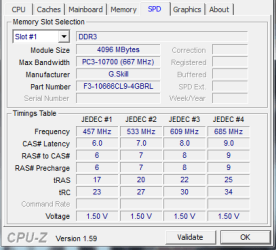
Can you give us some info on the RAM?

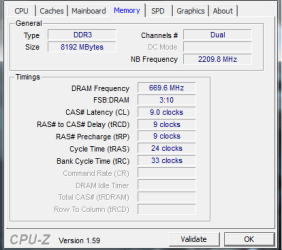
D/L CPUZ and post a snip of the CPU, Mainboard, Memory, and SPD tabs.
For posting the information , enter 'Snipping tool' in the Start button > Search box, hit enter. Select the area you want to post and save to a convenient place.
How to Post a Screenshot in Seven Forums

Go to your BIOS and tell us what the CPU, RAM and the CPU integrated memory controller voltages are.
 

My Computer My Computer

At a glance

Windows 7 Ult x64 - SP1/ Windows 8 Pro x64Intel Core i5-3570K 4.6GHz8GB (2X4GB) DDR3 1600 Corsair Vengeance CL8 1.5vSapphire HD 7770 Vapor-X OC 1GB DDR5
Computer type
PC/Desktop
Computer Manufacturer/Model Number
76~2.0
OS
Windows 7 Ult x64 - SP1/ Windows 8 Pro x64
CPU
Intel Core i5-3570K 4.6GHz
Motherboard
Gigabyte GA-Z77X UD3H, f18
Memory
8GB (2X4GB) DDR3 1600 Corsair Vengeance CL8 1.5v
Graphics Card(s)
Sapphire HD 7770 Vapor-X OC 1GB DDR5
Sound Card
Onboard VIA VT2021
Monitor(s) Displays
22" LCD Dell
Screen Resolution
1680x1050
Hard Drives
Samsung 840Pro 128GB SSD,
Seagate Barracuda 500GB SATA2 7200rpm 32MB cache, Seagate Barracuda 1TB SATA2 7200rpm 32MB cache,
PSU
Corsair HX650W
Case
Cooler Master Storm Scout
Cooling
Corsair H80 2x12cm Noctua NF P12 , 2x14cm case fans
Keyboard
Logitech Wave
Mouse
CM Sentinel
Internet Speed
Dismal
Antivirus
Avast
Browser
Opera Next
Other Info
Haswell laptop: HP Envy 17t-j, i7-4700MQ, GeForce 740M 2GB DDR3, 17.3" Full HD 1920x1080, 16GB RAM, Samsung 840 Pro 128GB, 1TB Hitachi 7200 HDD,
Desktop: eSATA ports,
External eSATA Seagate 500GB SATA2 7200rpm,
External WD USB 500GB
Right done the things that you have mentioned Dave.

I have installed all lastest drivers and bios from ASUS website and that didn't change anything.

I went into the BIOS and the only voltages I could find were:
VCore Voltage 1.323V
3.3V Voltage 3.344V
5V Voltage 4.980V
12V Voltage 11.797V

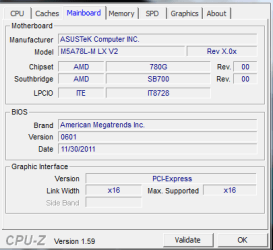
I installed CPU and took the nessessary screenshots.
CPU.PNG Mainboard.PNG

SPD.PNG Memory.PNG

Also some updated information.

The lines only seem to appear when the mouse is moving, when the mouse is still nothing appears to be wrong. I've changed the mouse and still happens.
And also when I load the computer up I get quite a distinct buzzing sound, it only last maybe 5 seconds and I just put it down to the computer loading up but still any information might help. Its not a bleeping sound like if the computer doesn't dected a keyboard or something just a constant buzzing for couple of seconds.

*UPDATE*
I tried taking out a slot of RAM and starting the computer, still had same problem tried taking out the other slot and still having problem so it seems to me that it can't be the RAM after all.

Which to be honest only leaves a motherboard glitch or processor but I imagine if the CPU wasnt working then pretty much everything wouldn't be working.

**UPDATE**
Since am literally pulling at loose ends now I dunno if sound or case would have any interferance.
So was thinking of unplugging all sound n trying that and my girlfriend has the same case as me and is experiencing no problems so it can't be really the case (it would be very unusual if it was anyway).

I dunno am just trying to think of anything that maybe the problem. I'm maybe still looking at buying a new motherboard one that isn't Micro ATX...whats difference with uATX and just ATX? and seeing if that is the problem but I'm going to wait to see what you guys say and if you can help.
 
Last edited by a moderator:

My Computer My Computer

At a glance

Windows 7 Ultimate x64
OS
Windows 7 Ultimate x64
Look in the UEFI for the DRAM and CPU VTT voltage.

Un-install the mouse driver and install a new version.

Unplug all speakers and see if you can still hear the sound.
It may be a motherboard capacitor problem, look on you motherboard for leaking or swelling capacitors, or any discoloration.

Find your internal speaker and unplug it to confirm if it's a fault code.
Some codes are a continuous beep, which may stop.

Any component, new or old can have/develop a fault.

The difference between mATX and AYX motherboard is size and features, ATX is larger so usually has more features.
microATX, also known as µATX (sometimes transliterated as mATX[1] or uATX[2][3] on Internet forums) is a standard for motherboards that was introduced in December 1997.[4] The maximum size of a microATX motherboard is 244 mm × 244 mm (9.6 in × 9.6 in), but some microATX boards can be as small as 171.45 mm × 171.45 mm (6.75 in × 6.75 in)[5]. The standard ATX size is 25% longer, at 305 mm × 244 mm (12 in × 9.6 in).

ATX (Advanced Technology eXtended) is a motherboard form factor specification developed by Intel in 1995 to improve on previous de facto standards like the AT form factor.
 

My Computer My Computer

At a glance

Windows 7 Ult x64 - SP1/ Windows 8 Pro x64Intel Core i5-3570K 4.6GHz8GB (2X4GB) DDR3 1600 Corsair Vengeance CL8 1.5vSapphire HD 7770 Vapor-X OC 1GB DDR5
Computer type
PC/Desktop
Computer Manufacturer/Model Number
76~2.0
OS
Windows 7 Ult x64 - SP1/ Windows 8 Pro x64
CPU
Intel Core i5-3570K 4.6GHz
Motherboard
Gigabyte GA-Z77X UD3H, f18
Memory
8GB (2X4GB) DDR3 1600 Corsair Vengeance CL8 1.5v
Graphics Card(s)
Sapphire HD 7770 Vapor-X OC 1GB DDR5
Sound Card
Onboard VIA VT2021
Monitor(s) Displays
22" LCD Dell
Screen Resolution
1680x1050
Hard Drives
Samsung 840Pro 128GB SSD,
Seagate Barracuda 500GB SATA2 7200rpm 32MB cache, Seagate Barracuda 1TB SATA2 7200rpm 32MB cache,
PSU
Corsair HX650W
Case
Cooler Master Storm Scout
Cooling
Corsair H80 2x12cm Noctua NF P12 , 2x14cm case fans
Keyboard
Logitech Wave
Mouse
CM Sentinel
Internet Speed
Dismal
Antivirus
Avast
Browser
Opera Next
Other Info
Haswell laptop: HP Envy 17t-j, i7-4700MQ, GeForce 740M 2GB DDR3, 17.3" Full HD 1920x1080, 16GB RAM, Samsung 840 Pro 128GB, 1TB Hitachi 7200 HDD,
Desktop: eSATA ports,
External eSATA Seagate 500GB SATA2 7200rpm,
External WD USB 500GB
Right I ran Memtest86+ 7 passes took around 14 hours and didn't get a single error so I'm guessing we can rule that out.

Thanks again for all the help.

I can't find UEFI or CPU VTT in my Bios anywhere to be honest, dunno if am just not seeing it for if something is set to Auto and not giving me the options like it would if it was in Manual.

There doesn't seem to be any motherboard capacitor problems, none leaking, swelling, tilted or discoloured.

Again this is just a list of everything I have tried.

  1. 2 different monitors
  2. 2 different VGA cables
  3. 3 different mice
  4. 3 different keyboards
  5. change power supply
  6. change graphics card
  7. used onboard graphics
  8. switched ram sticks and removed one at a time
  9. reformatted a dozen of times
  10. unplugged all sound from computer
  11. checked motherboard for any visual problems and couldn't see any
  12. updated all drivers I could possibly think of
  13. Ran Memtest for 7 passes with no errors
To be fair the list is ridicoulous I've had my fair share of computer problems but none as puzzling as this, I may just very well have to take a plunge on a new motherboard and hope for the best.


The only other thing I can think of is compatability issue, but the RAM is compatable with my motherboard and my motherboard is AM3+ which supports the AMD FX+ Bulldozer so really if anything wasn't compatable it surely wouldn't work.

I may just have to get a new motherboard n hope. Unless its somekind of software issue but even does it on fresh install of Windows 7
 

My Computer My Computer

At a glance

Windows 7 Ultimate x64
OS
Windows 7 Ultimate x64
Ram can pass memtest86+ several times and then throw errors, just the way electronics are.
It is a good sign it passed.

Sorry, the new BIOS is called UEFI, thought your board had it but, it has BIOS.

NB voltage is the VDDNB Overvoltage.
 

My Computer My Computer

At a glance

Windows 7 Ult x64 - SP1/ Windows 8 Pro x64Intel Core i5-3570K 4.6GHz8GB (2X4GB) DDR3 1600 Corsair Vengeance CL8 1.5vSapphire HD 7770 Vapor-X OC 1GB DDR5
Computer type
PC/Desktop
Computer Manufacturer/Model Number
76~2.0
OS
Windows 7 Ult x64 - SP1/ Windows 8 Pro x64
CPU
Intel Core i5-3570K 4.6GHz
Motherboard
Gigabyte GA-Z77X UD3H, f18
Memory
8GB (2X4GB) DDR3 1600 Corsair Vengeance CL8 1.5v
Graphics Card(s)
Sapphire HD 7770 Vapor-X OC 1GB DDR5
Sound Card
Onboard VIA VT2021
Monitor(s) Displays
22" LCD Dell
Screen Resolution
1680x1050
Hard Drives
Samsung 840Pro 128GB SSD,
Seagate Barracuda 500GB SATA2 7200rpm 32MB cache, Seagate Barracuda 1TB SATA2 7200rpm 32MB cache,
PSU
Corsair HX650W
Case
Cooler Master Storm Scout
Cooling
Corsair H80 2x12cm Noctua NF P12 , 2x14cm case fans
Keyboard
Logitech Wave
Mouse
CM Sentinel
Internet Speed
Dismal
Antivirus
Avast
Browser
Opera Next
Other Info
Haswell laptop: HP Envy 17t-j, i7-4700MQ, GeForce 740M 2GB DDR3, 17.3" Full HD 1920x1080, 16GB RAM, Samsung 840 Pro 128GB, 1TB Hitachi 7200 HDD,
Desktop: eSATA ports,
External eSATA Seagate 500GB SATA2 7200rpm,
External WD USB 500GB
Back
Top