Add Shutdown to lock screen?

genesis7

Banned
Local time
5:15 PM
Messages
23
anyone know how to do this, as it be a lot easier to have the shutdown menu there also and not having to click switch user
 

My Computer

Computer Manufacturer/Model Number
Gateway
OS
Windows 7 RC; Build 7100
CPU
AMD Athlon X2 64
Motherboard
Nividia MCP61
Memory
2GB DDR2
Graphics Card(s)
Nvidia Geforce 6150SE
Monitor(s) Displays
720p LCD Monitor
Screen Resolution
1440 x 900
Hard Drives
300GB Western Digital
Press Windows Logo key+L to lock your computer. Now press the Switch User button. Now look at the bottom right side, there you go. ;)
 

My Computer

Computer Manufacturer/Model Number
Samsung NP530U4B-S02IN
OS
Windows® 8 Pro (64-bit)
CPU
Intel® Core™ i5 Processor 2467M (1.60GHz, 3MB L3 Cache)
Motherboard
Samsung Electronics
Memory
6GB DDR3 System Memory at 1,333MHz (on BD 4GB + 2GB x 1)
Graphics Card(s)
AMD Radeon™ HD7550M 1GB DDR3 (Ext. Graphic)
Sound Card
Realtek High Definition Audio
Monitor(s) Displays
35.56cm (14.0) SuperBright 300nit HD LED Display
Screen Resolution
1366x768
Hard Drives
1TB S-ATA II Hard Drive (5400RPM) with ExpressCache 16GB SSD
Internet Speed
sucks
Antivirus
Microsoft Security Essentials
Browser
Google Chrome (Sync enabled)
i know that but i want to know it you could add it to the lock screen so i would have to click switch user
 

My Computer

Computer Manufacturer/Model Number
Gateway
OS
Windows 7 RC; Build 7100
CPU
AMD Athlon X2 64
Motherboard
Nividia MCP61
Memory
2GB DDR2
Graphics Card(s)
Nvidia Geforce 6150SE
Monitor(s) Displays
720p LCD Monitor
Screen Resolution
1440 x 900
Hard Drives
300GB Western Digital
Sorry genesis, that's the only option i m aware of. :(
 

My Computer

Computer Manufacturer/Model Number
Samsung NP530U4B-S02IN
OS
Windows® 8 Pro (64-bit)
CPU
Intel® Core™ i5 Processor 2467M (1.60GHz, 3MB L3 Cache)
Motherboard
Samsung Electronics
Memory
6GB DDR3 System Memory at 1,333MHz (on BD 4GB + 2GB x 1)
Graphics Card(s)
AMD Radeon™ HD7550M 1GB DDR3 (Ext. Graphic)
Sound Card
Realtek High Definition Audio
Monitor(s) Displays
35.56cm (14.0) SuperBright 300nit HD LED Display
Screen Resolution
1366x768
Hard Drives
1TB S-ATA II Hard Drive (5400RPM) with ExpressCache 16GB SSD
Internet Speed
sucks
Antivirus
Microsoft Security Essentials
Browser
Google Chrome (Sync enabled)
is there some kind of registry hack any1 knows of
 

My Computer

Computer Manufacturer/Model Number
Gateway
OS
Windows 7 RC; Build 7100
CPU
AMD Athlon X2 64
Motherboard
Nividia MCP61
Memory
2GB DDR2
Graphics Card(s)
Nvidia Geforce 6150SE
Monitor(s) Displays
720p LCD Monitor
Screen Resolution
1440 x 900
Hard Drives
300GB Western Digital
Are you referring to the Power Button next to the arrow for the Shutdown Menu?
If so, right click on it and select Properties, then set the Power Button to "Switch User" in the dropdown box.
 

My Computer

Computer Manufacturer/Model Number
Home built (x64), Lenovo x61s Tablet, Samsung Netbook
OS
Win7 x64 + x86
CPU
Intel i7 920, other Intel chips, and the Atom in the netbook
Motherboard
Asus P6T Deluxe
Memory
12 gB; 4 gB Lenovo; 1 gB Samsung netbook
Graphics Card(s)
ATI 4870
Sound Card
Yes, I have one of these
Monitor(s) Displays
32" Sharp Aquos TV
Screen Resolution
800x600 - I have vision issues
Hard Drives
4 - 150 gB Velociraptors in RAID 5
Promise controller
PSU
1000 watt (can't recall the brand)
Case
Antec 300
Cooling
Big honking cooler that was rated highly at Toms Hardware
Keyboard
Microsoft Natural
Mouse
Logitech Trackman
Internet Speed
Cable
Other Info
GeekSquad UPS
CyberPower UPS
DLink DNS-323 NAS (2 tB)
Netgear wireless router as an access point
Netgear wired router FSV-318
Home network consists of
4 desktop computers (2 Vista, 2 Win7)
1 netbook (Win7)
4 laptop computers (XP, 2-Vista, Win7)
Wii and XBox 360
More than 1 year and no solution posted.

This thing is driving me nuts! With XP I used to leave my computer locked and when I had to leave my house, I would just press the power button on the PC case - without touching the mouse/keyboard and without even looking at the screen - to quickly turn my computer off.
Now every time I want to turn my computer off I have to turn on the screen and click with my mouse on the "switch user" button. If I don't do that, the power button on my PC case does nothing.
This is a major annoyance! I want to be able to press the power button while the computer is locked to quickly turn it off (or make it go to sleep mode or whatever is set in power options). I hate the hassle of having to click on extra buttons on the screen.
Please somebody post a solution if there is any.
 

My Computer

OS
Windows 7 Ultimate x64
The action of the power button on the case is set by the BIOS. This can be instant off or delay 4 seconds. In the case of the latter, you need to keep the button pressed for 4 seconds in order to power down your system.

You should realise that this is not the recommended way to shutdown your system, and should only be used when you have a crash resulting in a non-responding system. Overuse of this method can lead to file corruption.
 

My Computer

Computer type
PC/Desktop
Computer Manufacturer/Model Number
Dwarf Dwf/11/2012 r09/2013
OS
Windows 8.1 Pro RTM x64
CPU
Intel Core-i5-3570K 4-core @ 3.4GHz (Ivy Bridge) (OC 4.4GHz)
Motherboard
ASRock Z77 Extreme4-M
Memory
4 x 4GB DDR3-1600 Corsair Vengeance CMZ8GX3M2A1600C9B (16GB)
Graphics Card(s)
MSI GeForce GTX770 Gaming OC 2GB
Sound Card
Realtek High Definition on board solution (ALC 898)
Monitor(s) Displays
ViewSonic VA1912w Widescreen (VGA)
Screen Resolution
1440x900
Hard Drives
OCZ Agility 3 SSD 120GB SATA III x2 (RAID 0)
Samsung HD501LJ 500GB SATA II x2
Hitachi HDS721010CLA332 1TB SATA II
Iomega 1.5TB Ext USB 2.0
WD 2.0TB Ext USB 3.0
PSU
XFX Pro Series 850W Semi-Modular
Case
Gigabyte IF233
Cooling
1 x 120mm Front Inlet 1 x 120mm Rear Exhaust
Keyboard
Microsoft Comfort Curve Keyboard 3000 (USB)
Mouse
Microsoft Comfort Mouse 3000 for Business (USB)
Internet Speed
NetGear DG834Gv3 ADSL Modem/Router (Ethernet) ~4.0 Mb/s (O2)
Antivirus
Avast! 8.0.1497
Browser
IE 11
Other Info
Optical Drive: HL-DT-ST BD-RE BH10LS30 SATA Bluray
Lexmark S305 Printer/Scanner/Copier (USB)
WEI Score: 8.1/8.1/8.5/8.5/8.25
Asus Eee PC 1011PX Netbook (Windows 7 x86 Starter)
The action of the power button on the case is set by the BIOS. This can be instant off or delay 4 seconds. In the case of the latter, you need to keep the button pressed for 4 seconds in order to power down your system.

You should realise that this is not the recommended way to shutdown your system, and should only be used when you have a crash resulting in a non-responding system. Overuse of this method can lead to file corruption.

A side from that in windows XP you can set the option as to what happens when you press the power button while windows is running. I know what he's talking about, on my windows XP pc I can momentarily press the power button on my case and windows will shut down gracefully just as it does if you go though the sart menu. I've never tried it on my windows 7 PC, I have a shortcut on my desktop that shuts down windows with one mouse click.
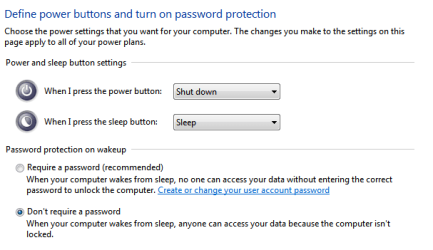
It looks like you have the same option in windows 7
power button.PNG
 

My Computer

Computer type
PC/Desktop
Computer Manufacturer/Model Number
Home Built
OS
Windows 10 Education 64 bit
CPU
AMD Phenom II X4 980 Black Edition Deneb 3.7GHz
Motherboard
Asus M4N68T-M V2 µATX Motherboard
Memory
8GB 4GBx2 Kingston PC10600 DDR3 1333 Memory
Graphics Card(s)
Zotac NVIDIA Geforce GT640 2 Gig DDR3 PCIe
Sound Card
VIA VT1708s High Definition Audio 8-channel Onboard
Monitor(s) Displays
22" LG E2242 1080p and 2 19" I-INC AG191D
Screen Resolution
1280x1024 - 1920x1080 - 1280x1024
Hard Drives
Crucial M100 256 GB SSD and 500 GB WD Blue SATA
PSU
Thermaltake TR 620
Case
Power Up Black ATX Mid-Tower Case
Cooling
Stock heatsink and fan
Keyboard
Logitech Wireless K350 Wave
Mouse
Logitech Wireless M570 Trackman Wheel
Internet Speed
80 Mbps Down 30 Mbps Up
Antivirus
Windows Defender
Browser
Internet Explorer 11
Other Info
HP DVD1040e Lightscribe - External USB2
leipricon, I see what you mean. If I lock my desktop nothing happens if you press the power button and you have to click the switch user button to get to the on screen shut down button. I don't see an easy way around it either. I almost never lock my desktop so its not a big deal for me. Sorry I couldn't help.
 

My Computer

Computer type
PC/Desktop
Computer Manufacturer/Model Number
Home Built
OS
Windows 10 Education 64 bit
CPU
AMD Phenom II X4 980 Black Edition Deneb 3.7GHz
Motherboard
Asus M4N68T-M V2 µATX Motherboard
Memory
8GB 4GBx2 Kingston PC10600 DDR3 1333 Memory
Graphics Card(s)
Zotac NVIDIA Geforce GT640 2 Gig DDR3 PCIe
Sound Card
VIA VT1708s High Definition Audio 8-channel Onboard
Monitor(s) Displays
22" LG E2242 1080p and 2 19" I-INC AG191D
Screen Resolution
1280x1024 - 1920x1080 - 1280x1024
Hard Drives
Crucial M100 256 GB SSD and 500 GB WD Blue SATA
PSU
Thermaltake TR 620
Case
Power Up Black ATX Mid-Tower Case
Cooling
Stock heatsink and fan
Keyboard
Logitech Wireless K350 Wave
Mouse
Logitech Wireless M570 Trackman Wheel
Internet Speed
80 Mbps Down 30 Mbps Up
Antivirus
Windows Defender
Browser
Internet Explorer 11
Other Info
HP DVD1040e Lightscribe - External USB2
Isn't it that way for security reasons? Say I went away on lunch break while my computer was... rendering? it would be very troublesome if someone could just walk up and one click shut down my computer.

leipricon, I see what you mean. If I lock my desktop nothing happens if you press the power button and you have to click the switch user button to get to the on screen shut down button. I don't see an easy way around it either. I almost never lock my desktop so its not a big deal for me. Sorry I couldn't help.
 

My Computer

Computer Manufacturer/Model Number
HP DV6 1330sa
OS
Windows 7 Professional 64 Bit SP1
CPU
INTEL DUAL CORE 2.1Ghz
Motherboard
N/A
Memory
4GB DDR3
Graphics Card(s)
INTEL
Sound Card
LAPTOP
Monitor(s) Displays
2
Screen Resolution
3200x1080
Hard Drives
250GB
PSU
LAPTOP
Case
LAPTOP
Cooling
LAPTOP
Keyboard
SOLID YEAR 260U
Mouse
USB
Internet Speed
20 MB/S
Isn't it that way for security reasons? Say I went away on lunch break while my computer was... rendering? it would be very troublesome if someone could just walk up and one click shut down my computer.

You can do it anyway if you really wanted to. If you hold the power button down for 4 seconds the BIOS function will turn the power supply off, so it doesn't stop anybody from turning your PC off. I'm sure its done that way for a reason though. The other annoying thing is even if you only have the one user account, you can't turn off fast user switching in windows 7. You can in windows XP even if you have more than one user account setup. I never use fast user switching.

My spare PC which is running XP is in my bedroom. Quit often I will lay in bed and listen to music on that PC. I turn my monitor off. When I'm done for the night I just click the power button and turn off the speakers. A whole lot easier that turning the monitor back on and going though the start menu to shut down. It is a nice feature.
 

My Computer

Computer type
PC/Desktop
Computer Manufacturer/Model Number
Home Built
OS
Windows 10 Education 64 bit
CPU
AMD Phenom II X4 980 Black Edition Deneb 3.7GHz
Motherboard
Asus M4N68T-M V2 µATX Motherboard
Memory
8GB 4GBx2 Kingston PC10600 DDR3 1333 Memory
Graphics Card(s)
Zotac NVIDIA Geforce GT640 2 Gig DDR3 PCIe
Sound Card
VIA VT1708s High Definition Audio 8-channel Onboard
Monitor(s) Displays
22" LG E2242 1080p and 2 19" I-INC AG191D
Screen Resolution
1280x1024 - 1920x1080 - 1280x1024
Hard Drives
Crucial M100 256 GB SSD and 500 GB WD Blue SATA
PSU
Thermaltake TR 620
Case
Power Up Black ATX Mid-Tower Case
Cooling
Stock heatsink and fan
Keyboard
Logitech Wireless K350 Wave
Mouse
Logitech Wireless M570 Trackman Wheel
Internet Speed
80 Mbps Down 30 Mbps Up
Antivirus
Windows Defender
Browser
Internet Explorer 11
Other Info
HP DVD1040e Lightscribe - External USB2
Even switching user does not show a power option from a locked screen. I had the problem recently with a customers screen repair, I tested out the screen before putting it all together, then the hardware power button only put it to sleep and the customer had put the computer to hibernate. So I had to finish the job while the computer was in a sleep state.
 

My Computer

OS
windows7
Two years later + the year already mentioned. No solution yet? I can hold the power button for four seconds but when I turn the computer back it, it gives the "Windows did not shut down successfully" message any time I hold the power button at the lock screen. I don't want to have to type in my password just to shut the machine down.
 

My Computer

Computer type
PC/Desktop
Computer Manufacturer/Model Number
Dell Optiplex 780
OS
Windows 7 Ultimate 64-bit SP1
CPU
Intel Core 2 Duo E8400 @ 3.00GHz
Motherboard
Dell Inc. 03NVJ6 (CPU)
Memory
8.00GB Single-Channel DDR3 @ 531MHz (7-7-7-20)
Graphics Card(s)
Intel Q45/Q43 Express Chipset (Dell)
Sound Card
SoundMAX Integrated Digital High Definition Audio
Monitor(s) Displays
Viore
Screen Resolution
1920x1080
Hard Drives
149GB Seagate ST3160318AS (SATA)
Keyboard
Dell
Mouse
Dell
Internet Speed
up to 7 Mbps (average 3.2 Mbps)
Antivirus
AVG IS
Browser
Firefox, Chrome
Two years later + the year already mentioned. No solution yet?...
There won't be a solution unless Microsoft decides to change this. Any "solution" that users created would probably be a security issue.


I can hold the power button for four seconds...
Don't do that. It is not good for the OS.


I don't want to have to type in my password just to shut the machine down.
What happens if you follow the steps in post #2? The steps in that post do not mention entering in a password.
 

My Computer

Computer type
Laptop
Computer Manufacturer/Model Number
Employer provided Dell Latitude
OS
W7 Pro SP1 64bit
CPU
i7
Memory
8GB
Graphics Card(s)
Intel HD Graphics
Hard Drives
crappy SSD
Antivirus
Employer mandated Symantec Endpoint Protection
Browser
Pale Moon 64bit, IE11 64bit & Chrome 64bit
Back
Top