Possible to "Rename" items in Context Menu?

ben07

New member
Power User
Local time
4:20 PM
Messages
111
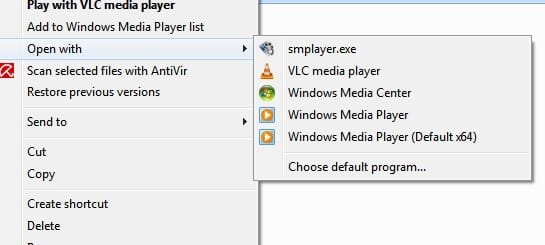
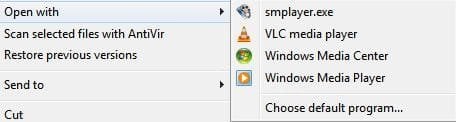
Is it possible to rename the Windows Media Player to Windows Media Player x86? cause I will be making Windows Media Player x64 as my default player and the last time I did that Windows automaticaaly added another Windows Media Player to the right click context menu, in the end 2 entries of "Windows Media Player" in the context menu.

I'm hoping to rename the current Windows Media Player to x86 before making the change, so that I can easily differentiate the x86 and x64 in the right click context menu.

Thanks.
 

Attachments
  • Context Menu.JPG
    Context Menu.JPG
    16.7 KB · Views: 32

My Computer

OS
Windows 7 Pro x64 RTM
CPU
Intel
I'm hoping to rename the current Windows Media Player to x86 before making the change, so that I can easily differentiate the x86 and x64 in the right click context menu.
Well, do not do that. It is better not to rename files, especially ones built directly into the OS.

I am posting at this time in aneffort to stop you. You can rename the context menu entry properly.

brb
 
It is better not to rename files, especially ones built directly into the OS.
brb

Thanks Antman, quick response as usual:geek:

Ops, I meant to rename the Windows Media Player in the context menu ONLY, not the sys file name, my bad:o.
 

My Computer

OS
Windows 7 Pro x64 RTM
CPU
Intel
Use this. FileMenu Tools

I use it for another purpose, but I just tested it for the context menu rename.

You can rename context menu entries manually, and there is info here on the forum on how to do it, but this tool is nice.

It adds some nice features to right click.
 
You can rename context menu entries manually, and there is info here on the forum on how to do it, but this tool is nice.

Hey Antman, I want to learn the manual way also if possible, but I couldn't find it under Tutorial:(. Please let me know should you come across that tutorial again in the future, thanks.
 

My Computer

OS
Windows 7 Pro x64 RTM
CPU
Intel
Never Fear as Zidane knows all
HKEY_CLASSES_ROOT\*

This is where the context menu stuff is located
 

My Computer

Computer Manufacturer/Model Number
Compal JFT02 (Custom Build Laptop)
OS
Windows 7 Home Premium x64 - Mac OS X 10.6.4 x64
CPU
Intel Core 2 Duo T9300 2.5 GHz
Motherboard
JFT02
Memory
4GB Kingston DDR2-800
Graphics Card(s)
NVIDIA Geforce 8600M GT (512MB Model)
Sound Card
Realtek HD Audio
Monitor(s) Displays
WUXGA Standard Laptop Display
Screen Resolution
1680*1050
Hard Drives
Toshiba 320GB 5400RPM Laptop HD
PSU
Standard Laptop Power Supply
Case
Standard Laptop Case
Cooling
Standard Laptop Cooling
Keyboard
Standard Laptop 105 Key-Keyboard
Mouse
Synaptics Touchpad
Internet Speed
Verizion Online DSL 3360/864 kbs (dl/up)
Never Fear as Zidane knows all
HKEY_CLASSES_ROOT\*

This is where the context menu stuff is located

Hey Zidane24, the "Windows Media Player" listed in the context menu is not stored in the registry, but instead may be taken from the program file itself, and hence not listed under HKEY_CLASSES_ROOT\* .wmv at all.

Usually these types of Context Menu items can be modified easily - changing the displayed name, icon, and even the program that it links to. HOWEVER, it looks to me like the "Open With" lists are done a little differently.:confused:
 

My Computer

OS
Windows 7 Pro x64 RTM
CPU
Intel
Noticed that a few moments ago...will have to do some more research
 

My Computer

Computer Manufacturer/Model Number
Compal JFT02 (Custom Build Laptop)
OS
Windows 7 Home Premium x64 - Mac OS X 10.6.4 x64
CPU
Intel Core 2 Duo T9300 2.5 GHz
Motherboard
JFT02
Memory
4GB Kingston DDR2-800
Graphics Card(s)
NVIDIA Geforce 8600M GT (512MB Model)
Sound Card
Realtek HD Audio
Monitor(s) Displays
WUXGA Standard Laptop Display
Screen Resolution
1680*1050
Hard Drives
Toshiba 320GB 5400RPM Laptop HD
PSU
Standard Laptop Power Supply
Case
Standard Laptop Case
Cooling
Standard Laptop Cooling
Keyboard
Standard Laptop 105 Key-Keyboard
Mouse
Synaptics Touchpad
Internet Speed
Verizion Online DSL 3360/864 kbs (dl/up)
Hey Antman, I want to learn the manual way also if possible, but I couldn't find it under Tutorial. Please let me know should you come across that tutorial again in the future, thanks.
If possible, you might want to load up a VM and play there. Much better to learn the registry on a "live" system that won't kill your workstation. And you will kill your registry. More than twice.

Last post of the day. Good night, gentlemen.
 
If possible, you might want to load up a VM and play there. Much better to learn the registry on a "live" system that won't kill your workstation. And you will kill your registry. More than twice.

Last post of the day. Good night, gentlemen.

I ALWAYS backup before I "play" with Windows 7:geek:, come to the worst I still have my GHOST image:p.

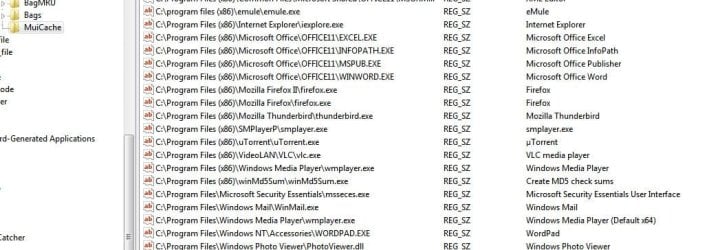
I finally solved it:D, it's in the MuiCache under HCR!
 

Attachments

  • WMP12 x64 right click context menu.jpg
    WMP12 x64 right click context menu.jpg
    17 KB · Views: 56
  • MuiCache.JPG
    MuiCache.JPG
    76 KB · Views: 116

My Computer

OS
Windows 7 Pro x64 RTM
CPU
Intel
If possible, you might want to load up a VM and play there. Much better to learn the registry on a "live" system that won't kill your workstation. And you will kill your registry. More than twice.

Last post of the day. Good night, gentlemen.

I ALWAYS backup before I "play" with Windows 7:geek:, come to the worst I still have my GHOST image:p.

I finally solved it:D, it's in the MuiCache under HCR!
Excellent find...persistence is key and I applaud you for finding that out
 

My Computer

Computer Manufacturer/Model Number
Compal JFT02 (Custom Build Laptop)
OS
Windows 7 Home Premium x64 - Mac OS X 10.6.4 x64
CPU
Intel Core 2 Duo T9300 2.5 GHz
Motherboard
JFT02
Memory
4GB Kingston DDR2-800
Graphics Card(s)
NVIDIA Geforce 8600M GT (512MB Model)
Sound Card
Realtek HD Audio
Monitor(s) Displays
WUXGA Standard Laptop Display
Screen Resolution
1680*1050
Hard Drives
Toshiba 320GB 5400RPM Laptop HD
PSU
Standard Laptop Power Supply
Case
Standard Laptop Case
Cooling
Standard Laptop Cooling
Keyboard
Standard Laptop 105 Key-Keyboard
Mouse
Synaptics Touchpad
Internet Speed
Verizion Online DSL 3360/864 kbs (dl/up)
Back
Top