Solved Do you want to open this file? We can't verify who created this file.

UsernameIssues

a.k.a. UNI
Guru
Gold Member
Local time
11:06 PM
Messages
8,138
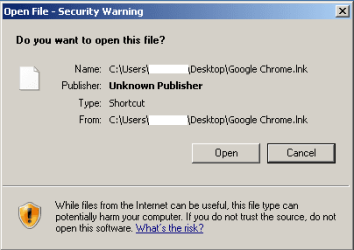
1a-warning.png

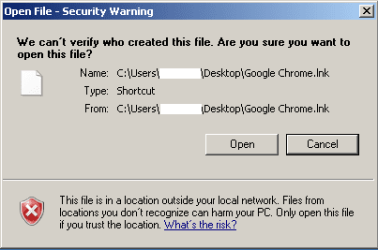
1b-warning.png

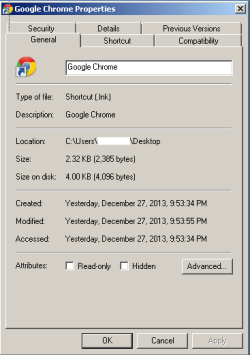
2a-block.png

2b-block.png

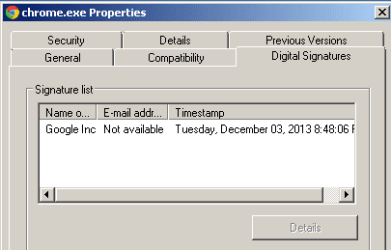
3-digital signature.png


Shortcuts to EXEs on the user's desktop give warnings like those shown above and in this tut:
http://www.sevenforums.com/tutorials/124367-open-file-security-warning-unblock-file.html

This also happens with shortcuts to the stock/native calculator app, notepad and other native apps.

Some computers generate the "Do you want to open this file?" warning...
...while others generate the "We can't verify who created this file." warning
...and still others do not generate any warning (per the norm).


You get these warnings if...
...the shortcut is on the user's desktop
...you send a fresh shortcut to the user's desktop from the user's Start Menu
...you send a fresh shortcut to the user's desktop from the public Start Menu
...the UAC is turned on or off.
(These are not UAC warnings - but some posts suggested testing with UAC off.)

You DO NOT get these warnings if...
...the shortcut is on the public desktop
...you use the shortcuts from the user's Start Menu
...you use the shortcuts from the public Start Menu
...the EXEs are opened via Windows (file) Explorer.


Creating a new user profile DOES halt the warnings for that new user.

IE was totally reset while logged into the bad user account and the computer was restarted... still got the warnings.

All user accounts used for this testing are of the admin type.

NTFS and file ownership for the user's desktop look fine. I compared a good computer to a bad one.


I'm not sure how long this has been going on and I don't have any system restore points. These are on corporate imaged boxes. If no solution is found, I'll just create a new profile. But there are several threads in these forums that dead end with no solution for this issue. It would be nice to figure out why this happens and how to fix it.
 

My Computer My Computer

At a glance

W7 Pro SP1 64biti78GBIntel HD Graphics
Computer type
Laptop
Computer Manufacturer/Model Number
Employer provided Dell Latitude
OS
W7 Pro SP1 64bit
CPU
i7
Memory
8GB
Graphics Card(s)
Intel HD Graphics
Hard Drives
crappy SSD
Antivirus
Employer mandated Symantec Endpoint Protection
Browser
Pale Moon 64bit, IE11 64bit & Chrome 64bit
I've seen this behavior on AD domain environment, when AD admins have added a new user account copying an existing account. User then logs in to a new PC with these AD credentials first time and gets these warnings, as if Windows were warning the user that the stuff has been installed not by this user himself.

When a new user is instead created on the PC in question which is then joined to domain, these warnings do not occur.
 

My Computer My Computer

At a glance

Windows 10 Pro x64 EN-GB1.6 GHz Intel Core i7-720QM Processor6 GBATI Mobility Radeon HD 5850 Graphics
Computer type
Laptop
Computer Manufacturer/Model Number
HP ENVY 17-1150eg
OS
Windows 10 Pro x64 EN-GB
CPU
1.6 GHz Intel Core i7-720QM Processor
Memory
6 GB
Graphics Card(s)
ATI Mobility Radeon HD 5850 Graphics
Sound Card
Beats sound system with integrated subwoofer
Monitor(s) Displays
17" laptop display, 22" LED and 32" Full HD TV through HDMI
Screen Resolution
1600*900 (1), 1920*1080 (2&3)
Hard Drives
Internal: 2 x 500 GB SATA Hard Disk Drive 7200 rpm
External: 2TB for backups, 3TB USB3 network drive for media
Cooling
As Envy runs a bit warm, I have it on a Cooler Master pad
Keyboard
Logitech diNovo Media Desktop Laser (bluetooth)
Mouse
Logitech Performance Mouse MX
Internet Speed
50/10 Mbps VDSL
Antivirus
Windows Defender 4.3.9431.0
Browser
Maxthon 3.5.2., IE11
Thanks for the info.

These AD accounts are probably copies of older AD accounts since they are somewhat complex accounts (several groups on the "Members of" tab). The new profile that I tested with was just another AD account and it did not show the warnings. Is there a way to know if an AD account was made by copying another AD account?

> When a new user is instead created on the PC in question...
Unfortunately, I cannot use local computer accounts. Or maybe I've misunderstood.

Our IT staff will be working on resolving this, but I was hoping to find/document a solution here too.
 

My Computer My Computer

At a glance

W7 Pro SP1 64biti78GBIntel HD Graphics
Computer type
Laptop
Computer Manufacturer/Model Number
Employer provided Dell Latitude
OS
W7 Pro SP1 64bit
CPU
i7
Memory
8GB
Graphics Card(s)
Intel HD Graphics
Hard Drives
crappy SSD
Antivirus
Employer mandated Symantec Endpoint Protection
Browser
Pale Moon 64bit, IE11 64bit & Chrome 64bit
I explained myself badly. Second try:

Typically it's an AD admin who creates a new domain user account. This can be done from scratch, or copying an existing account. The user then gets a new PC, windows installed and PC joined the domain and logs in with AD credentials for the first time. Whenever I have stumbled upon the messages you describe in your original post, it has been an AD user account created like this.

However, if we install Windows on a new computer, create an user on it and later add user to domain and join the PC to a domain, these messages do not occur.

I have no idea why this is, nor have I found documentation. I was simply suggesting that this could be a feature rather than an error, as in the cases I have seen these messages the programs have been installed by AD admin, not the user himself.
 

My Computer My Computer

At a glance

Windows 10 Pro x64 EN-GB1.6 GHz Intel Core i7-720QM Processor6 GBATI Mobility Radeon HD 5850 Graphics
Computer type
Laptop
Computer Manufacturer/Model Number
HP ENVY 17-1150eg
OS
Windows 10 Pro x64 EN-GB
CPU
1.6 GHz Intel Core i7-720QM Processor
Memory
6 GB
Graphics Card(s)
ATI Mobility Radeon HD 5850 Graphics
Sound Card
Beats sound system with integrated subwoofer
Monitor(s) Displays
17" laptop display, 22" LED and 32" Full HD TV through HDMI
Screen Resolution
1600*900 (1), 1920*1080 (2&3)
Hard Drives
Internal: 2 x 500 GB SATA Hard Disk Drive 7200 rpm
External: 2TB for backups, 3TB USB3 network drive for media
Cooling
As Envy runs a bit warm, I have it on a Cooler Master pad
Keyboard
Logitech diNovo Media Desktop Laser (bluetooth)
Mouse
Logitech Performance Mouse MX
Internet Speed
50/10 Mbps VDSL
Antivirus
Windows Defender 4.3.9431.0
Browser
Maxthon 3.5.2., IE11
You are kind to explain again. Feel free to give up on me :-)

"However, if we install Windows on a new computer, create an user on it and later add user to domain and join the PC to a domain, these messages do not occur."

If I'm understanding you:
install Windows on a new computer
on a computer named W7pro...
...install Windows (create user named test during that install)
when the install completes - we are logged on as test

create an user on it
create a local user account named John
(Do I then log on as John?)

and later add user to domain
create an AD account for John

and join the PC to a domain
join the computer named W7pro to the domain

log on as domain\John?

these messages do not occur. :-)


If the local user account named John logs on, then a profile folder named John should appear.

When the domain user named John logs on, then a profile folder named John.domain should appear.

The two accounts should have different SIDs - it is strange that there should be any interaction between them... Wait. Maybe I'm looking at this wrong. Are you saying that there is a way to create an AD account that uses the SID (and thus, profile files) of the previously created local account named John?

I can work with the AD admins to test for a solution, but I want to make sure that I understand the steps to be tested.

Thanks again for your replies.
 

My Computer My Computer

At a glance

W7 Pro SP1 64biti78GBIntel HD Graphics
Computer type
Laptop
Computer Manufacturer/Model Number
Employer provided Dell Latitude
OS
W7 Pro SP1 64bit
CPU
i7
Memory
8GB
Graphics Card(s)
Intel HD Graphics
Hard Drives
crappy SSD
Antivirus
Employer mandated Symantec Endpoint Protection
Browser
Pale Moon 64bit, IE11 64bit & Chrome 64bit
I am most definitely not an AD expert, in fact my AD knowledge is quite limited. However, I have seen this so often that I have an idea of the principles included.

This is how our AD guru does it:
  • New PC, Windows 7 installed with one local admin account LocalUser
  • AD admin has created a user account DomainUser
  • PC is joined to domain using profile DomainUser
  • Using USMT the LocalUser profile is copied to DomainUser
A bit surprisingly the Windows Easy Transfer works also quite well in copying the local profile to domain profile. Whichever method is used, those messages mentioned in your original post do no longer occur.

Kari
 

My Computer My Computer

At a glance

Windows 10 Pro x64 EN-GB1.6 GHz Intel Core i7-720QM Processor6 GBATI Mobility Radeon HD 5850 Graphics
Computer type
Laptop
Computer Manufacturer/Model Number
HP ENVY 17-1150eg
OS
Windows 10 Pro x64 EN-GB
CPU
1.6 GHz Intel Core i7-720QM Processor
Memory
6 GB
Graphics Card(s)
ATI Mobility Radeon HD 5850 Graphics
Sound Card
Beats sound system with integrated subwoofer
Monitor(s) Displays
17" laptop display, 22" LED and 32" Full HD TV through HDMI
Screen Resolution
1600*900 (1), 1920*1080 (2&3)
Hard Drives
Internal: 2 x 500 GB SATA Hard Disk Drive 7200 rpm
External: 2TB for backups, 3TB USB3 network drive for media
Cooling
As Envy runs a bit warm, I have it on a Cooler Master pad
Keyboard
Logitech diNovo Media Desktop Laser (bluetooth)
Mouse
Logitech Performance Mouse MX
Internet Speed
50/10 Mbps VDSL
Antivirus
Windows Defender 4.3.9431.0
Browser
Maxthon 3.5.2., IE11
Thanks again. Now I see how we were on different pages.

I'll see what our IT says. This should be fun to watch them try and solve :-)
 

My Computer My Computer

At a glance

W7 Pro SP1 64biti78GBIntel HD Graphics
Computer type
Laptop
Computer Manufacturer/Model Number
Employer provided Dell Latitude
OS
W7 Pro SP1 64bit
CPU
i7
Memory
8GB
Graphics Card(s)
Intel HD Graphics
Hard Drives
crappy SSD
Antivirus
Employer mandated Symantec Endpoint Protection
Browser
Pale Moon 64bit, IE11 64bit & Chrome 64bit
My only point is (and has been) that in a way those messages are understandable, if and when the apps have been installed using domain admin's credentials instead of the end user's.
 

My Computer My Computer

At a glance

Windows 10 Pro x64 EN-GB1.6 GHz Intel Core i7-720QM Processor6 GBATI Mobility Radeon HD 5850 Graphics
Computer type
Laptop
Computer Manufacturer/Model Number
HP ENVY 17-1150eg
OS
Windows 10 Pro x64 EN-GB
CPU
1.6 GHz Intel Core i7-720QM Processor
Memory
6 GB
Graphics Card(s)
ATI Mobility Radeon HD 5850 Graphics
Sound Card
Beats sound system with integrated subwoofer
Monitor(s) Displays
17" laptop display, 22" LED and 32" Full HD TV through HDMI
Screen Resolution
1600*900 (1), 1920*1080 (2&3)
Hard Drives
Internal: 2 x 500 GB SATA Hard Disk Drive 7200 rpm
External: 2TB for backups, 3TB USB3 network drive for media
Cooling
As Envy runs a bit warm, I have it on a Cooler Master pad
Keyboard
Logitech diNovo Media Desktop Laser (bluetooth)
Mouse
Logitech Performance Mouse MX
Internet Speed
50/10 Mbps VDSL
Antivirus
Windows Defender 4.3.9431.0
Browser
Maxthon 3.5.2., IE11
I see:
Installing an app (like Chrome) as the user - might still be using credentials other than that user.


As you see in the OP, some computers give one warning and some computers give a different warning. I was looking for a reason for this difference when I stumbled on something weird:
Right click on the Chrome EXE
Select Copy
Right click inside the user's "My Documents" folder
Select Paste (yes, paste the EXE)
Right click again inside the user's "My Documents" folder
Select Paste shortcut
Delete the unneeded copy of the EXE
Move the newly created shortcut to the user's desktop
That newly created shortcut will work without the warning.

Shortcuts created directly on the user's desktop will throw the warning when executed.
This includes...
...copying the EXE - selecting Paste shortcut on the desktop
...using the Send to option from Explorer's context menu
...using New > Shortcut from Explorer's context menu
...installing an app that creates a shortcut on the user's desktop
The Public desktop does not have this problem.
It is like the user's desktop is poisoned.

I can see a difference between a "bad" shortcut file and a "good" one if I open them in notepad. I cannot seem to find a way to get PSPad to open the LNK files. It always wants to open the EXE that the shortcut is pointing to.


I used the steps above to rebuild a few shortcuts on the user's desktop - then restarted the computer to see if the changes held. They did, so I rebuilt all of the other desktop shortcuts. I'm still leaning towards blowing away this profile and starting fresh. But I'll wait to see what IT says because there are a lot of computers that are doing this.
 

My Computer My Computer

At a glance

W7 Pro SP1 64biti78GBIntel HD Graphics
Computer type
Laptop
Computer Manufacturer/Model Number
Employer provided Dell Latitude
OS
W7 Pro SP1 64bit
CPU
i7
Memory
8GB
Graphics Card(s)
Intel HD Graphics
Hard Drives
crappy SSD
Antivirus
Employer mandated Symantec Endpoint Protection
Browser
Pale Moon 64bit, IE11 64bit & Chrome 64bit
Have you tested to delete the Chrome.exe and reinstall it? Shouldn't give the messages, is not any more complicated than the copy paste circus you described.
 

My Computer My Computer

At a glance

Windows 10 Pro x64 EN-GB1.6 GHz Intel Core i7-720QM Processor6 GBATI Mobility Radeon HD 5850 Graphics
Computer type
Laptop
Computer Manufacturer/Model Number
HP ENVY 17-1150eg
OS
Windows 10 Pro x64 EN-GB
CPU
1.6 GHz Intel Core i7-720QM Processor
Memory
6 GB
Graphics Card(s)
ATI Mobility Radeon HD 5850 Graphics
Sound Card
Beats sound system with integrated subwoofer
Monitor(s) Displays
17" laptop display, 22" LED and 32" Full HD TV through HDMI
Screen Resolution
1600*900 (1), 1920*1080 (2&3)
Hard Drives
Internal: 2 x 500 GB SATA Hard Disk Drive 7200 rpm
External: 2TB for backups, 3TB USB3 network drive for media
Cooling
As Envy runs a bit warm, I have it on a Cooler Master pad
Keyboard
Logitech diNovo Media Desktop Laser (bluetooth)
Mouse
Logitech Performance Mouse MX
Internet Speed
50/10 Mbps VDSL
Antivirus
Windows Defender 4.3.9431.0
Browser
Maxthon 3.5.2., IE11
Yes - I uninstalled Chrome (which removed the desktop shortcut) and re-installed Chrome - but any shortcut created on the user's desktop will cause this warning. Re-installing Chrome just re-creates the desktop shortcut.

This warning was happening before Chrome was installed. Just using about every shortcut on the desktop causes this warning.

Hopefully, IT can figure out why this happens and more importantly, has a cure.
 

My Computer My Computer

At a glance

W7 Pro SP1 64biti78GBIntel HD Graphics
Computer type
Laptop
Computer Manufacturer/Model Number
Employer provided Dell Latitude
OS
W7 Pro SP1 64bit
CPU
i7
Memory
8GB
Graphics Card(s)
Intel HD Graphics
Hard Drives
crappy SSD
Antivirus
Employer mandated Symantec Endpoint Protection
Browser
Pale Moon 64bit, IE11 64bit & Chrome 64bit
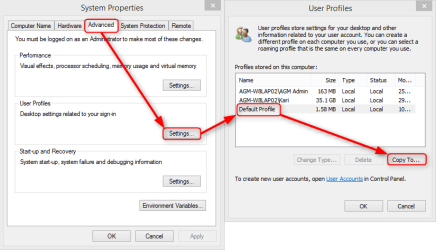
Might be worth trying to copy the default profile to the user profile and test if Desktop Shortcuts work as expected? Profile can be copied also in domain environment.

2013-12-29_22h09_49.png

Kari
 

My Computer My Computer

At a glance

Windows 10 Pro x64 EN-GB1.6 GHz Intel Core i7-720QM Processor6 GBATI Mobility Radeon HD 5850 Graphics
Computer type
Laptop
Computer Manufacturer/Model Number
HP ENVY 17-1150eg
OS
Windows 10 Pro x64 EN-GB
CPU
1.6 GHz Intel Core i7-720QM Processor
Memory
6 GB
Graphics Card(s)
ATI Mobility Radeon HD 5850 Graphics
Sound Card
Beats sound system with integrated subwoofer
Monitor(s) Displays
17" laptop display, 22" LED and 32" Full HD TV through HDMI
Screen Resolution
1600*900 (1), 1920*1080 (2&3)
Hard Drives
Internal: 2 x 500 GB SATA Hard Disk Drive 7200 rpm
External: 2TB for backups, 3TB USB3 network drive for media
Cooling
As Envy runs a bit warm, I have it on a Cooler Master pad
Keyboard
Logitech diNovo Media Desktop Laser (bluetooth)
Mouse
Logitech Performance Mouse MX
Internet Speed
50/10 Mbps VDSL
Antivirus
Windows Defender 4.3.9431.0
Browser
Maxthon 3.5.2., IE11
Testing that process in a VM did not work for me - I cannot log on to the profile that was copied over. Perhaps I did something wrong.

Before the video below was made, the VM was restarted to free up the account named username. The user named admin is logged on.


Logging back in as admin, username's profile folder seems fine.
 

My Computer My Computer

At a glance

W7 Pro SP1 64biti78GBIntel HD Graphics
Computer type
Laptop
Computer Manufacturer/Model Number
Employer provided Dell Latitude
OS
W7 Pro SP1 64bit
CPU
i7
Memory
8GB
Graphics Card(s)
Intel HD Graphics
Hard Drives
crappy SSD
Antivirus
Employer mandated Symantec Endpoint Protection
Browser
Pale Moon 64bit, IE11 64bit & Chrome 64bit
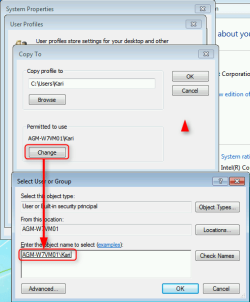
My mistake, sorry. I forgot to tell you that you also need to give the owner of that profile the rights to use it, otherwise what happens is exactly as shown in your video: Log in, system checks the user rights and logs instantly off as no rights are granted.

2013-12-30_01h09_50.png

Also, if a dialog tells you the profile can't be copied because the profile folder can't be deleted, you simply need to delete the user profile folder manually.

Kari
 

My Computer My Computer

At a glance

Windows 10 Pro x64 EN-GB1.6 GHz Intel Core i7-720QM Processor6 GBATI Mobility Radeon HD 5850 Graphics
Computer type
Laptop
Computer Manufacturer/Model Number
HP ENVY 17-1150eg
OS
Windows 10 Pro x64 EN-GB
CPU
1.6 GHz Intel Core i7-720QM Processor
Memory
6 GB
Graphics Card(s)
ATI Mobility Radeon HD 5850 Graphics
Sound Card
Beats sound system with integrated subwoofer
Monitor(s) Displays
17" laptop display, 22" LED and 32" Full HD TV through HDMI
Screen Resolution
1600*900 (1), 1920*1080 (2&3)
Hard Drives
Internal: 2 x 500 GB SATA Hard Disk Drive 7200 rpm
External: 2TB for backups, 3TB USB3 network drive for media
Cooling
As Envy runs a bit warm, I have it on a Cooler Master pad
Keyboard
Logitech diNovo Media Desktop Laser (bluetooth)
Mouse
Logitech Performance Mouse MX
Internet Speed
50/10 Mbps VDSL
Antivirus
Windows Defender 4.3.9431.0
Browser
Maxthon 3.5.2., IE11
Thanks - that worked. I'll see if I can find a computer that I can try this on. Unfortunately, these computers stay pretty busy. Even finding time for IT to look at them is a problem. And wouldn't you know it, two computers that are not so busy don't have this warning issue.

I had seen that Copy to button before, but I had never explored its use. Thanks for the tip.
 

My Computer My Computer

At a glance

W7 Pro SP1 64biti78GBIntel HD Graphics
Computer type
Laptop
Computer Manufacturer/Model Number
Employer provided Dell Latitude
OS
W7 Pro SP1 64bit
CPU
i7
Memory
8GB
Graphics Card(s)
Intel HD Graphics
Hard Drives
crappy SSD
Antivirus
Employer mandated Symantec Endpoint Protection
Browser
Pale Moon 64bit, IE11 64bit & Chrome 64bit
Once again, sorry, I simply forgot the permission part.

Might be a bit OT but I make an extra effort with customizing the default profile when creating a Windows image to be deployed or installing Windows to my private computers, in order to have an extensive default profile to be used when an existing profile needs to be replaced with the default one. This customization includes for instance installing the general (all users) software like browsers, Office etc., setting home pages and favorites / bookmarks and so on.

Reasons to have to replace a profile are many, starting from a corrupted profile. All domain admins should of course know how to customize the default profile with sysprep and an unattended answer file.

http://www.sevenforums.com/tutorials/285983-user-profile-customize-during-installation.html

The default profile is also used for every new user account created; the more extensive it is, the more features and programs are already automatically included in a new user account.

Kari
 

My Computer My Computer

At a glance

Windows 10 Pro x64 EN-GB1.6 GHz Intel Core i7-720QM Processor6 GBATI Mobility Radeon HD 5850 Graphics
Computer type
Laptop
Computer Manufacturer/Model Number
HP ENVY 17-1150eg
OS
Windows 10 Pro x64 EN-GB
CPU
1.6 GHz Intel Core i7-720QM Processor
Memory
6 GB
Graphics Card(s)
ATI Mobility Radeon HD 5850 Graphics
Sound Card
Beats sound system with integrated subwoofer
Monitor(s) Displays
17" laptop display, 22" LED and 32" Full HD TV through HDMI
Screen Resolution
1600*900 (1), 1920*1080 (2&3)
Hard Drives
Internal: 2 x 500 GB SATA Hard Disk Drive 7200 rpm
External: 2TB for backups, 3TB USB3 network drive for media
Cooling
As Envy runs a bit warm, I have it on a Cooler Master pad
Keyboard
Logitech diNovo Media Desktop Laser (bluetooth)
Mouse
Logitech Performance Mouse MX
Internet Speed
50/10 Mbps VDSL
Antivirus
Windows Defender 4.3.9431.0
Browser
Maxthon 3.5.2., IE11
This has happened again; but to a different set of 20+ computers.

There was an outage of name resolution services. That broke the folder redirection for IE's Favorites. I fixed that by using the file server's static IP address, but somehow during that minor edit, Windows 7 pro 64bit decided that it needed to assign the user's desktop folder an integrity level of Low. Windows also assigned this Low integrity level to every local or networked shortcut on that user's desktop. The user's Start Menu shortcuts, the "all users" Start Menu shortcuts, the Public desktop folder and shortcuts pinned to the taskbar escaped this mess.

ICACLS does not seem to be able to remove the integrity level. By default, no level is assigned to a user's desktop folder or to most shortcuts on the user's desktop. However, ICACLS can change the integrity level to medium - thus avoiding the security warning.

There is an app floating around that claims to be able to remove the integrity level on folders and files... but I've not tested it. So I won't link to it.
 

My Computer My Computer

At a glance

W7 Pro SP1 64biti78GBIntel HD Graphics
Computer type
Laptop
Computer Manufacturer/Model Number
Employer provided Dell Latitude
OS
W7 Pro SP1 64bit
CPU
i7
Memory
8GB
Graphics Card(s)
Intel HD Graphics
Hard Drives
crappy SSD
Antivirus
Employer mandated Symantec Endpoint Protection
Browser
Pale Moon 64bit, IE11 64bit & Chrome 64bit

My Computer My Computer

At a glance

W7 Pro SP1 64biti78GBIntel HD Graphics
Computer type
Laptop
Computer Manufacturer/Model Number
Employer provided Dell Latitude
OS
W7 Pro SP1 64bit
CPU
i7
Memory
8GB
Graphics Card(s)
Intel HD Graphics
Hard Drives
crappy SSD
Antivirus
Employer mandated Symantec Endpoint Protection
Browser
Pale Moon 64bit, IE11 64bit & Chrome 64bit
I unblocked, how do I re-block?

My file used to look like the first image with that Security area and the option to unblock, so I unblocked it, and now it looks like the 2nd image with no Security area (general tab).

Will the registry "allow blocking" restore the Security area with "unblock"? (It's hard to determine if instead it does something else, and I want it to apply only to this one file, or a limited set of files, not system-wide.)

I don't want to run the registry thing until I know it will restore the unblock-ability in this file's Properties.

If the registry change won't restore the Security "unblock" option, how do I restore it? Is it an ACL thing where that info is kept?

We run Win7 Pro as regular users, with IE9. None of us regular users have admin. Admin wasn't required to use "unblock".
 

My Computer My Computer

At a glance

7, XP, osx, iosi5, amd, intel-duo core2G, 6G, 8G
Computer type
Laptop
Computer Manufacturer/Model Number
Dell, selfmade, Apple
OS
7, XP, osx, ios
CPU
i5, amd, intel-duo core
Motherboard
dell, aopen, apple
Memory
2G, 6G, 8G
Hard Drives
250G, multiple, 320G
Mouse
Dell wired, Logitech wireless, Canon MarkI wireless.
Antivirus
SEP, ZoneAlarm, don't need
Browser
IE9, FF&Ie, FF&Chrome rarely Safari
Other Info
I'm in CT, but DST occurs here and I don't see a way to declare that.
Will the registry "allow blocking" restore the Security area with "unblock"? (It's hard to determine if instead it does something else, and I want it to apply only to this one file, or a limited set of files, not system-wide.)
No registry tweak has been mentioned in this thread. However, I can confidently say that what ever registry change you are referring to, it will implement a system-wide or user account-wide change, and will not be per file.

If the registry change won't restore the Security "unblock" option, how do I restore it? Is it an ACL thing where that info is kept?
Yes actually. The blocked state of a file is stored in the file's ACL… that is, only if the file is ‘blocked’ using the integrity level method…

There are two circumstances in which Windows will consider a file ‘blocked’: one case involves a file having a low integrity level (integrity levels are in fact stored in an object’s ACL). The alternate way involves a file having a specific Alternate Data Stream named ‘Zone.Identifier’ and containing some particular data. I believe the latter being the more common variety.

Though I’ve never come across one naturally, this thread is concerned with the low integrity level type of blocked file. The difference between the LIL and ADS ways of blocking a file is that LIL-ed blocked files do not allow for an easy way for users to unblock them. That is, there’s no “Always ask before opening this file” check box in these files’ “Open File - Security Warning” dialogues, nor is there an “Unblock” button in their Properties pane. So you can imagine how odd the experience would have been, for people who have been in the OP’s position.


For people who have found this thread looking for a way to un-unblock a file, below is a batch file. Drop a file onto the script and it’ll ‘block’ the given file (using the ADS method).
Code:
:: BlockFile.bat FileName
@echo off
REM Block a file by writing information to it's 'Zone.Identifier' ADS stream. 
if "%~1"=="" echo Missing 1 expected argument&& exit /b
if not "%~2"=="" echo Unexpected arguments&& exit /b
if not exist "%~1" echo File "%~1" does not exist&& exit /b
if exist "%~1"\* echo Unable to block a folder&& exit /b
> "%~1":Zone.Identifier (
    echo [ZoneTransfer]
    echo ZoneId=3
)
 

My Computer My Computer

At a glance

Windows 10, Windows 8.1 Pro, Windows 7 Profes...
Computer type
PC/Desktop
OS
Windows 10, Windows 8.1 Pro, Windows 7 Professional, OS X El Capitan
Back
Top