bulk delete certain types of files in rar/zip archive

kenny1999

Banned
Local time
3:04 PM
Messages
76
i've got thousands of rar/zip files where each of them could have some types of files I don't want. for example, *.txt or *.html etc. I would like to know if there is any shortcut way to delete them all quickly? I don't want to do it one by one. I will go crazy
 

My Computer My Computer

At a glance

Microsoft Windows 7 Home Premium 64-bit 7600 ...Intel(R) Core(TM) i5-2400 CPU @ 3.10GHz8.00 GBIntel(R) HD Graphics
Computer type
PC/Desktop
OS
Microsoft Windows 7 Home Premium 64-bit 7600 Multiprocessor Free
CPU
Intel(R) Core(TM) i5-2400 CPU @ 3.10GHz
Motherboard
ASUSTeK COMPUTER INC. P8B75-M LX PLUS
Memory
8.00 GB
Graphics Card(s)
Intel(R) HD Graphics
Sound Card
Realtek High Definition Audio
Screen Resolution
1680 x 1050 x 32 bits (4294967296 colors) @ 59 Hz
Hard Drives
(1) ST1000DM003-1CH162 (2) Seagate Expansion Desk USB Device
PSU
Antec
Case
Fractal Design Define Mini
Keyboard
Logitech
Internet Speed
100MB/s Hong Kong Broadband
Antivirus
Kaspersky
Browser
IE, Google Chrome
Are they scattered all over your hard drive, or are they in a particular part of your directory tree?

If the latter, I'd think you could do it from a command prompt.

Have they been unzipped so the contents are viewable from a command prompt?
 

My Computer My Computer

At a glance

Windows 7 Home Premium SP1, 64-bitIntel Skylake i5-6600K, not overclocked8 GB HyperX DDR4-2666 (2 x 4 GB)none; graphics are integrated on CPU
Computer type
PC/Desktop
Computer Manufacturer/Model Number
Ignatz Special; 4 speed manual gearbox; factory air conditioning; one of one
OS
Windows 7 Home Premium SP1, 64-bit
CPU
Intel Skylake i5-6600K, not overclocked
Motherboard
AsRock Z170M Extreme 4, micro ATX
Memory
8 GB HyperX DDR4-2666 (2 x 4 GB)
Graphics Card(s)
none; graphics are integrated on CPU
Sound Card
onboard: Realtek ALC1150; external: USB Behringer UF0-202
Monitor(s) Displays
Dell S2340M 23 inch IPS
Screen Resolution
1600 x 900
Hard Drives
System: Crucial MX100 series SSD, 128 GB;
Data: Samsung Spinpoint 103SJ, 1 TB;
Backup: WD Caviar Green WD30EZRX-00D8PB0, 3 TB
PSU
Rosewill SilentNight 500 watt fanless, semi-modular
Case
Antec Solo II
Cooling
Noctua NH-U12S; Noctua F12 intake, Noctua S12A exhaust
Keyboard
Microsoft 200 6JH-00001 USB
Mouse
Dell or Microsoft optical wired; USB
Antivirus
Microsoft Security Essentials and Malwarebytes Premium
Browser
Pale Moon
Other Info
All fans PWM; speeds at idle: CPU circa 500 rpm; intake circa 600 rpm; exhaust circa 600 rpm; CPU temps 27 idle and 47 C load in a warm room (27 C/81 F) when running Intel Extreme Tuning Utility stress test.
Hi,

The below script should do the trick, you are best putting all your .rar files into a single folder and replace the bit i have marked <file_path_here> with the path to the folder with all the .rar's

From Command Line
Code:
for %I in (<file_path_here>\*.rar) do "C:\Program Files\WinRAR\WinRAR.exe" d -ibck "%I" *.txt

From Batch File
Code:
for %%I in (<file_path_here>\*.rar) do "C:\Program Files\WinRAR\WinRAR.exe" d -ibck "%%I" *.txt

*** Important ***
Create yourself a test folder with a copy of a couple of the .rars and do a small test against them first


At the end of the script you will notice .txt, specify the file extension you want to remove there
You can list multiple file extensions at once...
Code:
for %%I in (<file_path_here>\*.rar) do "C:\Program Files\WinRAR\WinRAR.exe" d -ibck "%%I" *.txt *.exe *.jpg

Please advise if you need some assistance.

Regards,
Jamie
 

My Computer My Computer

At a glance

Windows 8.1 Pro x64Intel Core i5-2500K @ 3.30GHz - S11558GB Corsair DDR3 XMS3, PC3-12800NVIDIA GeForce GTX 650
Computer type
PC/Desktop
Computer Manufacturer/Model Number
Self Built
OS
Windows 8.1 Pro x64
CPU
Intel Core i5-2500K @ 3.30GHz - S1155
Motherboard
Asus P8P67 LE Rev3, Intel P67, S115
Memory
8GB Corsair DDR3 XMS3, PC3-12800
Graphics Card(s)
NVIDIA GeForce GTX 650
Sound Card
On-Board
Monitor(s) Displays
3 x 24" {Extended Display}
Screen Resolution
1920 x 1080
Hard Drives
300GB Seagate Barracuda 7200
PSU
550W Coolermaster GX550
Case
Silverstone Precision PS04B
Cooling
Stock
Keyboard
Logitech K120
Mouse
World of Warcraft Cataclysm MMO Gaming Mouse
Internet Speed
80 MB
Antivirus
MSE / Windows Defender
Browser
Chrome
Are they scattered all over your hard drive, or are they in a particular part of your directory tree?

If the latter, I'd think you could do it from a command prompt.

Have they been unzipped so the contents are viewable from a command prompt?

hi

it is not all over my hard drives. It is only a particular group of zip/rar files under certain directory that I want to have special treatment with them. I have a lot other zip/rar files that should not be altered in any way.

Now I haven't extracted them all, but I can do so if it helps. I think extracting is easy.
I only want to bulk delete all *.txt and *.html without doing it with my hand one by one.
 

My Computer My Computer

At a glance

Microsoft Windows 7 Home Premium 64-bit 7600 ...Intel(R) Core(TM) i5-2400 CPU @ 3.10GHz8.00 GBIntel(R) HD Graphics
Computer type
PC/Desktop
OS
Microsoft Windows 7 Home Premium 64-bit 7600 Multiprocessor Free
CPU
Intel(R) Core(TM) i5-2400 CPU @ 3.10GHz
Motherboard
ASUSTeK COMPUTER INC. P8B75-M LX PLUS
Memory
8.00 GB
Graphics Card(s)
Intel(R) HD Graphics
Sound Card
Realtek High Definition Audio
Screen Resolution
1680 x 1050 x 32 bits (4294967296 colors) @ 59 Hz
Hard Drives
(1) ST1000DM003-1CH162 (2) Seagate Expansion Desk USB Device
PSU
Antec
Case
Fractal Design Define Mini
Keyboard
Logitech
Internet Speed
100MB/s Hong Kong Broadband
Antivirus
Kaspersky
Browser
IE, Google Chrome
Hi,

The below script should do the trick, you are best putting all your .rar files into a single folder and replace the bit i have marked <file_path_here> with the path to the folder with all the .rar's

From Command Line
Code:
for %I in (<file_path_here>\*.rar) do "C:\Program Files\WinRAR\WinRAR.exe" d -ibck "%I" *.txt

From Batch File
Code:
for %%I in (<file_path_here>\*.rar) do "C:\Program Files\WinRAR\WinRAR.exe" d -ibck "%%I" *.txt

*** Important ***
Create yourself a test folder with a copy of a couple of the .rars and do a small test against them first


At the end of the script you will notice .txt, specify the file extension you want to remove there
You can list multiple file extensions at once...
Code:
for %%I in (<file_path_here>\*.rar) do "C:\Program Files\WinRAR\WinRAR.exe" d -ibck "%%I" *.txt *.exe *.jpg

Please advise if you need some assistance.

Regards,
Jamie


Sorry ,I don't have any experience dealing with code/script. I am just a computer 'user'.. I always used tools and software. It looks very complicated for me, but I am willing to learn and try.

Can you teach me again in a 'for dummies' way??

what is batch? what is command line? how to get there?
 

My Computer My Computer

At a glance

Microsoft Windows 7 Home Premium 64-bit 7600 ...Intel(R) Core(TM) i5-2400 CPU @ 3.10GHz8.00 GBIntel(R) HD Graphics
Computer type
PC/Desktop
OS
Microsoft Windows 7 Home Premium 64-bit 7600 Multiprocessor Free
CPU
Intel(R) Core(TM) i5-2400 CPU @ 3.10GHz
Motherboard
ASUSTeK COMPUTER INC. P8B75-M LX PLUS
Memory
8.00 GB
Graphics Card(s)
Intel(R) HD Graphics
Sound Card
Realtek High Definition Audio
Screen Resolution
1680 x 1050 x 32 bits (4294967296 colors) @ 59 Hz
Hard Drives
(1) ST1000DM003-1CH162 (2) Seagate Expansion Desk USB Device
PSU
Antec
Case
Fractal Design Define Mini
Keyboard
Logitech
Internet Speed
100MB/s Hong Kong Broadband
Antivirus
Kaspersky
Browser
IE, Google Chrome
Sorry ,I don't have any experience dealing with code/script. I am just a computer 'user'.. I always used tools and software. It looks very complicated for me, but I am willing to learn and try.

Can you teach me again in a 'for dummies' way??

what is batch? what is command line? how to get there?

No worries... Command Line / Batch Files allow you to automate tasks and with the right script can do a series of tasks much quicker than you could manually.

1. You said you only want to do a particular group of .rars... please create a copy of them in a new folder (maybe on your desktop?) i say create a copy so if anything goes wrong you still have the original copy.

2. Now you have created a copy of the .rar files, where have you stored them? (i.e c:\users\kenny\desktop\rar)

3. What file extensions would you like to delete?

Cheers,
Jamie
 

My Computer My Computer

At a glance

Windows 8.1 Pro x64Intel Core i5-2500K @ 3.30GHz - S11558GB Corsair DDR3 XMS3, PC3-12800NVIDIA GeForce GTX 650
Computer type
PC/Desktop
Computer Manufacturer/Model Number
Self Built
OS
Windows 8.1 Pro x64
CPU
Intel Core i5-2500K @ 3.30GHz - S1155
Motherboard
Asus P8P67 LE Rev3, Intel P67, S115
Memory
8GB Corsair DDR3 XMS3, PC3-12800
Graphics Card(s)
NVIDIA GeForce GTX 650
Sound Card
On-Board
Monitor(s) Displays
3 x 24" {Extended Display}
Screen Resolution
1920 x 1080
Hard Drives
300GB Seagate Barracuda 7200
PSU
550W Coolermaster GX550
Case
Silverstone Precision PS04B
Cooling
Stock
Keyboard
Logitech K120
Mouse
World of Warcraft Cataclysm MMO Gaming Mouse
Internet Speed
80 MB
Antivirus
MSE / Windows Defender
Browser
Chrome
Are they scattered all over your hard drive, or are they in a particular part of your directory tree?

If the latter, I'd think you could do it from a command prompt.

Have they been unzipped so the contents are viewable from a command prompt?

hi

it is not all over my hard drives. It is only a particular group of zip/rar files under certain directory that I want to have special treatment with them. I have a lot other zip/rar files that should not be altered in any way.

Now I haven't extracted them all, but I can do so if it helps. I think extracting is easy.
I only want to bulk delete all *.txt and *.html without doing it with my hand one by one.

If they were all extracted and in folders underneath a folder called "stuff" on the C drive, such as C:\stuff\cat and C:\stuff\dog and C:\stuff\fish, you could use this command to get rid of all files with a txt extension.

First, you would open a command prompt and navigate to C:\stuff. This would be your "certain directory" that you mentioned.

Once you have navigated to the correct location, this would be the command to delete all .txt files:

del /s *.txt

After that completes, you would enter this command to get rid of all .html files

del /s *.html


And so on for other file types.

Be careful. The command isn't forgiving. You have to be at the correct location (your "certain directory") before you execute the command.

Are you even familiar with a command prompt?
 

My Computer My Computer

At a glance

Windows 7 Home Premium SP1, 64-bitIntel Skylake i5-6600K, not overclocked8 GB HyperX DDR4-2666 (2 x 4 GB)none; graphics are integrated on CPU
Computer type
PC/Desktop
Computer Manufacturer/Model Number
Ignatz Special; 4 speed manual gearbox; factory air conditioning; one of one
OS
Windows 7 Home Premium SP1, 64-bit
CPU
Intel Skylake i5-6600K, not overclocked
Motherboard
AsRock Z170M Extreme 4, micro ATX
Memory
8 GB HyperX DDR4-2666 (2 x 4 GB)
Graphics Card(s)
none; graphics are integrated on CPU
Sound Card
onboard: Realtek ALC1150; external: USB Behringer UF0-202
Monitor(s) Displays
Dell S2340M 23 inch IPS
Screen Resolution
1600 x 900
Hard Drives
System: Crucial MX100 series SSD, 128 GB;
Data: Samsung Spinpoint 103SJ, 1 TB;
Backup: WD Caviar Green WD30EZRX-00D8PB0, 3 TB
PSU
Rosewill SilentNight 500 watt fanless, semi-modular
Case
Antec Solo II
Cooling
Noctua NH-U12S; Noctua F12 intake, Noctua S12A exhaust
Keyboard
Microsoft 200 6JH-00001 USB
Mouse
Dell or Microsoft optical wired; USB
Antivirus
Microsoft Security Essentials and Malwarebytes Premium
Browser
Pale Moon
Other Info
All fans PWM; speeds at idle: CPU circa 500 rpm; intake circa 600 rpm; exhaust circa 600 rpm; CPU temps 27 idle and 47 C load in a warm room (27 C/81 F) when running Intel Extreme Tuning Utility stress test.
Sorry ,I don't have any experience dealing with code/script. I am just a computer 'user'.. I always used tools and software. It looks very complicated for me, but I am willing to learn and try.

Can you teach me again in a 'for dummies' way??

what is batch? what is command line? how to get there?

No worries... Command Line / Batch Files allow you to automate tasks and with the right script can do a series of tasks much quicker than you could manually.

1. You said you only want to do a particular group of .rars... please create a copy of them in a new folder (maybe on your desktop?) i say create a copy so if anything goes wrong you still have the original copy.

2. Now you have created a copy of the .rar files, where have you stored them? (i.e c:\users\kenny\desktop\rar)

3. What file extensions would you like to delete?

Cheers,
Jamie


hey, sorry just back from world cup TV

1. Yes, I know It's important to make copies. They are in my G: drive. um, let me sort them first.

2. let say G:\zip_rar_copy\

3. yes, there are 400 files, either zip or rar. In each zip and rar there are some *.txt that I want to delete them. Do I have to extract all the zip first?? Can I avoid this?
 

My Computer My Computer

At a glance

Microsoft Windows 7 Home Premium 64-bit 7600 ...Intel(R) Core(TM) i5-2400 CPU @ 3.10GHz8.00 GBIntel(R) HD Graphics
Computer type
PC/Desktop
OS
Microsoft Windows 7 Home Premium 64-bit 7600 Multiprocessor Free
CPU
Intel(R) Core(TM) i5-2400 CPU @ 3.10GHz
Motherboard
ASUSTeK COMPUTER INC. P8B75-M LX PLUS
Memory
8.00 GB
Graphics Card(s)
Intel(R) HD Graphics
Sound Card
Realtek High Definition Audio
Screen Resolution
1680 x 1050 x 32 bits (4294967296 colors) @ 59 Hz
Hard Drives
(1) ST1000DM003-1CH162 (2) Seagate Expansion Desk USB Device
PSU
Antec
Case
Fractal Design Define Mini
Keyboard
Logitech
Internet Speed
100MB/s Hong Kong Broadband
Antivirus
Kaspersky
Browser
IE, Google Chrome
Are they scattered all over your hard drive, or are they in a particular part of your directory tree?

If the latter, I'd think you could do it from a command prompt.

Have they been unzipped so the contents are viewable from a command prompt?

hi

it is not all over my hard drives. It is only a particular group of zip/rar files under certain directory that I want to have special treatment with them. I have a lot other zip/rar files that should not be altered in any way.

Now I haven't extracted them all, but I can do so if it helps. I think extracting is easy.
I only want to bulk delete all *.txt and *.html without doing it with my hand one by one.

If they were all extracted and in folders underneath a folder called "stuff" on the C drive, such as C:\stuff\cat and C:\stuff\dog and C:\stuff\fish, you could use this command to get rid of all files with a txt extension.

First, you would open a command prompt and navigate to C:\stuff. This would be your "certain directory" that you mentioned.

Once you have navigated to the correct location, this would be the command to delete all .txt files:

del /s *.txt

After that completes, you would enter this command to get rid of all .html files

del /s *.html


And so on for other file types.

Be careful. The command isn't forgiving. You have to be at the correct location (your "certain directory") before you execute the command.

Are you even familiar with a command prompt?

how to open command prompt? start > cmd ????
 

My Computer My Computer

At a glance

Microsoft Windows 7 Home Premium 64-bit 7600 ...Intel(R) Core(TM) i5-2400 CPU @ 3.10GHz8.00 GBIntel(R) HD Graphics
Computer type
PC/Desktop
OS
Microsoft Windows 7 Home Premium 64-bit 7600 Multiprocessor Free
CPU
Intel(R) Core(TM) i5-2400 CPU @ 3.10GHz
Motherboard
ASUSTeK COMPUTER INC. P8B75-M LX PLUS
Memory
8.00 GB
Graphics Card(s)
Intel(R) HD Graphics
Sound Card
Realtek High Definition Audio
Screen Resolution
1680 x 1050 x 32 bits (4294967296 colors) @ 59 Hz
Hard Drives
(1) ST1000DM003-1CH162 (2) Seagate Expansion Desk USB Device
PSU
Antec
Case
Fractal Design Define Mini
Keyboard
Logitech
Internet Speed
100MB/s Hong Kong Broadband
Antivirus
Kaspersky
Browser
IE, Google Chrome
The script i posted that we will run will remove the specified file type(s) from the .rar file so don't extract them.

I'm not sure if this will work against .zip file though... let me do a quick test
 

My Computer My Computer

At a glance

Windows 8.1 Pro x64Intel Core i5-2500K @ 3.30GHz - S11558GB Corsair DDR3 XMS3, PC3-12800NVIDIA GeForce GTX 650
Computer type
PC/Desktop
Computer Manufacturer/Model Number
Self Built
OS
Windows 8.1 Pro x64
CPU
Intel Core i5-2500K @ 3.30GHz - S1155
Motherboard
Asus P8P67 LE Rev3, Intel P67, S115
Memory
8GB Corsair DDR3 XMS3, PC3-12800
Graphics Card(s)
NVIDIA GeForce GTX 650
Sound Card
On-Board
Monitor(s) Displays
3 x 24" {Extended Display}
Screen Resolution
1920 x 1080
Hard Drives
300GB Seagate Barracuda 7200
PSU
550W Coolermaster GX550
Case
Silverstone Precision PS04B
Cooling
Stock
Keyboard
Logitech K120
Mouse
World of Warcraft Cataclysm MMO Gaming Mouse
Internet Speed
80 MB
Antivirus
MSE / Windows Defender
Browser
Chrome
You are correct about command prompt... we will go through it one step at a time though.
 

My Computer My Computer

At a glance

Windows 8.1 Pro x64Intel Core i5-2500K @ 3.30GHz - S11558GB Corsair DDR3 XMS3, PC3-12800NVIDIA GeForce GTX 650
Computer type
PC/Desktop
Computer Manufacturer/Model Number
Self Built
OS
Windows 8.1 Pro x64
CPU
Intel Core i5-2500K @ 3.30GHz - S1155
Motherboard
Asus P8P67 LE Rev3, Intel P67, S115
Memory
8GB Corsair DDR3 XMS3, PC3-12800
Graphics Card(s)
NVIDIA GeForce GTX 650
Sound Card
On-Board
Monitor(s) Displays
3 x 24" {Extended Display}
Screen Resolution
1920 x 1080
Hard Drives
300GB Seagate Barracuda 7200
PSU
550W Coolermaster GX550
Case
Silverstone Precision PS04B
Cooling
Stock
Keyboard
Logitech K120
Mouse
World of Warcraft Cataclysm MMO Gaming Mouse
Internet Speed
80 MB
Antivirus
MSE / Windows Defender
Browser
Chrome
how to open command prompt? start > cmd ????

If you have absolutely no experience in navigation from a command prompt, it may be easier for you to use the script method that Dobbsy mentions.
 

My Computer My Computer

At a glance

Windows 7 Home Premium SP1, 64-bitIntel Skylake i5-6600K, not overclocked8 GB HyperX DDR4-2666 (2 x 4 GB)none; graphics are integrated on CPU
Computer type
PC/Desktop
Computer Manufacturer/Model Number
Ignatz Special; 4 speed manual gearbox; factory air conditioning; one of one
OS
Windows 7 Home Premium SP1, 64-bit
CPU
Intel Skylake i5-6600K, not overclocked
Motherboard
AsRock Z170M Extreme 4, micro ATX
Memory
8 GB HyperX DDR4-2666 (2 x 4 GB)
Graphics Card(s)
none; graphics are integrated on CPU
Sound Card
onboard: Realtek ALC1150; external: USB Behringer UF0-202
Monitor(s) Displays
Dell S2340M 23 inch IPS
Screen Resolution
1600 x 900
Hard Drives
System: Crucial MX100 series SSD, 128 GB;
Data: Samsung Spinpoint 103SJ, 1 TB;
Backup: WD Caviar Green WD30EZRX-00D8PB0, 3 TB
PSU
Rosewill SilentNight 500 watt fanless, semi-modular
Case
Antec Solo II
Cooling
Noctua NH-U12S; Noctua F12 intake, Noctua S12A exhaust
Keyboard
Microsoft 200 6JH-00001 USB
Mouse
Dell or Microsoft optical wired; USB
Antivirus
Microsoft Security Essentials and Malwarebytes Premium
Browser
Pale Moon
Other Info
All fans PWM; speeds at idle: CPU circa 500 rpm; intake circa 600 rpm; exhaust circa 600 rpm; CPU temps 27 idle and 47 C load in a warm room (27 C/81 F) when running Intel Extreme Tuning Utility stress test.
Just tested againt a .zip file and it worked so working on the folder G:\zip_rar_copy\

1. Open a command prompt
(Click Start >> Type CMD >> Click CMD.exe from the search result)

You now have the Command Prompt open...

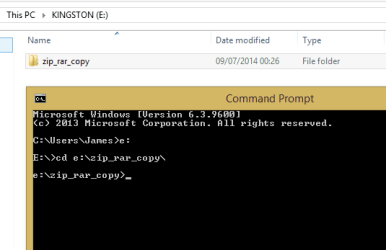
2. Lets change the directory/folder you are in - Type or copy/paste the following:
Type G: then press enter
Type cd G:\zip_rar_copy\ then press enter

Example (although my letter is E:, your is G: )
2014-07-09 00_29_02-Command Prompt.png


You should now be in G:\zip_rar_copy\ (see my screenshot above for example)
Before moving on... please confirm you get to this stage ok

Cheers,
Jamie
 

My Computer My Computer

At a glance

Windows 8.1 Pro x64Intel Core i5-2500K @ 3.30GHz - S11558GB Corsair DDR3 XMS3, PC3-12800NVIDIA GeForce GTX 650
Computer type
PC/Desktop
Computer Manufacturer/Model Number
Self Built
OS
Windows 8.1 Pro x64
CPU
Intel Core i5-2500K @ 3.30GHz - S1155
Motherboard
Asus P8P67 LE Rev3, Intel P67, S115
Memory
8GB Corsair DDR3 XMS3, PC3-12800
Graphics Card(s)
NVIDIA GeForce GTX 650
Sound Card
On-Board
Monitor(s) Displays
3 x 24" {Extended Display}
Screen Resolution
1920 x 1080
Hard Drives
300GB Seagate Barracuda 7200
PSU
550W Coolermaster GX550
Case
Silverstone Precision PS04B
Cooling
Stock
Keyboard
Logitech K120
Mouse
World of Warcraft Cataclysm MMO Gaming Mouse
Internet Speed
80 MB
Antivirus
MSE / Windows Defender
Browser
Chrome
The script i posted that we will run will remove the specified file type(s) from the .rar file so don't extract them.

I'm not sure if this will work against .zip file though... let me do a quick test

thanks waiting for your result.
 

My Computer My Computer

At a glance

Microsoft Windows 7 Home Premium 64-bit 7600 ...Intel(R) Core(TM) i5-2400 CPU @ 3.10GHz8.00 GBIntel(R) HD Graphics
Computer type
PC/Desktop
OS
Microsoft Windows 7 Home Premium 64-bit 7600 Multiprocessor Free
CPU
Intel(R) Core(TM) i5-2400 CPU @ 3.10GHz
Motherboard
ASUSTeK COMPUTER INC. P8B75-M LX PLUS
Memory
8.00 GB
Graphics Card(s)
Intel(R) HD Graphics
Sound Card
Realtek High Definition Audio
Screen Resolution
1680 x 1050 x 32 bits (4294967296 colors) @ 59 Hz
Hard Drives
(1) ST1000DM003-1CH162 (2) Seagate Expansion Desk USB Device
PSU
Antec
Case
Fractal Design Define Mini
Keyboard
Logitech
Internet Speed
100MB/s Hong Kong Broadband
Antivirus
Kaspersky
Browser
IE, Google Chrome
Just tested againt a .zip file and it worked so working on the folder G:\zip_rar_copy\

1. Open a command prompt
(Click Start >> Type CMD >> Click CMD.exe from the search result)

You now have the Command Prompt open...

2. Lets change the directory/folder you are in - Type or copy/paste the following:
Type G: then press enter
Type cd G:\zip_rar_copy\ then press enter

Example (although my letter is E:, your is G: )
View attachment 324781


You should now be in G:\zip_rar_copy\ (see my screenshot above for example)
Before moving on... please confirm you get to this stage ok

Cheers,
Jamie

give me some time to study it first. Thanks
 

My Computer My Computer

At a glance

Microsoft Windows 7 Home Premium 64-bit 7600 ...Intel(R) Core(TM) i5-2400 CPU @ 3.10GHz8.00 GBIntel(R) HD Graphics
Computer type
PC/Desktop
OS
Microsoft Windows 7 Home Premium 64-bit 7600 Multiprocessor Free
CPU
Intel(R) Core(TM) i5-2400 CPU @ 3.10GHz
Motherboard
ASUSTeK COMPUTER INC. P8B75-M LX PLUS
Memory
8.00 GB
Graphics Card(s)
Intel(R) HD Graphics
Sound Card
Realtek High Definition Audio
Screen Resolution
1680 x 1050 x 32 bits (4294967296 colors) @ 59 Hz
Hard Drives
(1) ST1000DM003-1CH162 (2) Seagate Expansion Desk USB Device
PSU
Antec
Case
Fractal Design Define Mini
Keyboard
Logitech
Internet Speed
100MB/s Hong Kong Broadband
Antivirus
Kaspersky
Browser
IE, Google Chrome
You can put copies of all the .rar/.zip files in one folder, Select all>extract here. Use the folder sorting option and sort in to Types. Now you can find all the .txt or html files easily.
Problem with this is you'd have to re-compress all the remains back into separate files.
 

My Computer My Computer

At a glance

Windows 7 Ultimate X64 SP1Intel i5-2550K, Differing ~4.4-4.8GHz No buil...16GB G.Skill Sniper 1866MHz @ 2133MHz 2x8GBASUS GTX650TIB-DC2OC-2GD5, (650TI Boost)
Computer type
PC/Desktop
Computer Manufacturer/Model Number
Home Built Desktop By DataTech
OS
Windows 7 Ultimate X64 SP1
CPU
Intel i5-2550K, Differing ~4.4-4.8GHz No built in GPU
Motherboard
ASUS P8Z68-V PRO/GEN3
Memory
16GB G.Skill Sniper 1866MHz @ 2133MHz 2x8GB
Graphics Card(s)
ASUS GTX650TIB-DC2OC-2GD5, (650TI Boost)
Sound Card
Onboard Realtek 5-1
Monitor(s) Displays
Samsung P2570HD
Screen Resolution
1920x1080
Hard Drives
Samsung 840 Pro 256GB SSD for OS, 500GB Seagate Constellation (Enterprise drive) for Data
PSU
Corsair HX650W
Case
Inwin Dragon Rider
Cooling
Hyper 212 EVO w/two Noctua fans, push-pull, @1300 RPM
Keyboard
E-Z Eyes, bright yellow keys with large characters
Mouse
steelseries SENSEI Laser Pro Gaming
Internet Speed
48-51Mbs Mbs down, 11 Mbs up Xfinity Cable
Antivirus
Norton Internet Security 2013
Browser
IE 10, Opera, Pale Moon if needed
Other Info
4 case fans, LG BluRay-RE, ASUS DVD-RW, Mr. Fusion power supply, 1.21 gigawatts.
You can put copies of all the .rar/.zip files in one folder, Select all>extract here. Use the folder sorting option and sort in to Types. Now you can find all the .txt or html files easily.
Problem with this is you'd have to re-compress all the remains back into separate files.

The script that i posted earlier will remove the specified file(s) from the zip/rar without the need to extract / zip up again

We are about to get to that stage, just waiting for confirmation that the first steps mentioned above are completed.
 

My Computer My Computer

At a glance

Windows 8.1 Pro x64Intel Core i5-2500K @ 3.30GHz - S11558GB Corsair DDR3 XMS3, PC3-12800NVIDIA GeForce GTX 650
Computer type
PC/Desktop
Computer Manufacturer/Model Number
Self Built
OS
Windows 8.1 Pro x64
CPU
Intel Core i5-2500K @ 3.30GHz - S1155
Motherboard
Asus P8P67 LE Rev3, Intel P67, S115
Memory
8GB Corsair DDR3 XMS3, PC3-12800
Graphics Card(s)
NVIDIA GeForce GTX 650
Sound Card
On-Board
Monitor(s) Displays
3 x 24" {Extended Display}
Screen Resolution
1920 x 1080
Hard Drives
300GB Seagate Barracuda 7200
PSU
550W Coolermaster GX550
Case
Silverstone Precision PS04B
Cooling
Stock
Keyboard
Logitech K120
Mouse
World of Warcraft Cataclysm MMO Gaming Mouse
Internet Speed
80 MB
Antivirus
MSE / Windows Defender
Browser
Chrome
You can put copies of all the .rar/.zip files in one folder, Select all>extract here. Use the folder sorting option and sort in to Types. Now you can find all the .txt or html files easily.
Problem with this is you'd have to re-compress all the remains back into separate files.

The script that i posted earlier will remove the specified file(s) from the zip/rar without the need to extract / zip up again

We are about to get to that stage, just waiting for confirmation that the first steps mentioned above are completed.

The files are copying to the folder. It's 17Gb in total with 4XX files.
It takes some time.

I truly understand how to get to that folder by cmd.

you may show me the next step following. Thank you very much
 

My Computer My Computer

At a glance

Microsoft Windows 7 Home Premium 64-bit 7600 ...Intel(R) Core(TM) i5-2400 CPU @ 3.10GHz8.00 GBIntel(R) HD Graphics
Computer type
PC/Desktop
OS
Microsoft Windows 7 Home Premium 64-bit 7600 Multiprocessor Free
CPU
Intel(R) Core(TM) i5-2400 CPU @ 3.10GHz
Motherboard
ASUSTeK COMPUTER INC. P8B75-M LX PLUS
Memory
8.00 GB
Graphics Card(s)
Intel(R) HD Graphics
Sound Card
Realtek High Definition Audio
Screen Resolution
1680 x 1050 x 32 bits (4294967296 colors) @ 59 Hz
Hard Drives
(1) ST1000DM003-1CH162 (2) Seagate Expansion Desk USB Device
PSU
Antec
Case
Fractal Design Define Mini
Keyboard
Logitech
Internet Speed
100MB/s Hong Kong Broadband
Antivirus
Kaspersky
Browser
IE, Google Chrome
I've gone to that stage? what should be the next?
 

My Computer My Computer

At a glance

Microsoft Windows 7 Home Premium 64-bit 7600 ...Intel(R) Core(TM) i5-2400 CPU @ 3.10GHz8.00 GBIntel(R) HD Graphics
Computer type
PC/Desktop
OS
Microsoft Windows 7 Home Premium 64-bit 7600 Multiprocessor Free
CPU
Intel(R) Core(TM) i5-2400 CPU @ 3.10GHz
Motherboard
ASUSTeK COMPUTER INC. P8B75-M LX PLUS
Memory
8.00 GB
Graphics Card(s)
Intel(R) HD Graphics
Sound Card
Realtek High Definition Audio
Screen Resolution
1680 x 1050 x 32 bits (4294967296 colors) @ 59 Hz
Hard Drives
(1) ST1000DM003-1CH162 (2) Seagate Expansion Desk USB Device
PSU
Antec
Case
Fractal Design Define Mini
Keyboard
Logitech
Internet Speed
100MB/s Hong Kong Broadband
Antivirus
Kaspersky
Browser
IE, Google Chrome
WOW... that's a lot of zipped up stuff ha ha.

Ok... starting where we left off, you are now within G:\zip_rar_copy\
This is where the fun / potentially dangerous bit begins... hence the "copy" of data.
Make sure you have WinRar installed - WinRAR archiver, a powerful tool to process RAR and ZIP files
(Download link at the bottom of the page 'English 64-bit')


Type or copy/paste the following into the command prompt:

This is currently set to remove .txt files, change the .txt bit at the end of the line to the filetype you want to remove.
Code:
for %I in (*.rar) do "C:\Program Files\WinRAR\WinRAR.exe" d -ibck "%I" *.txt

Once it finishes lets do the same but for .zip files...
Notice the difference at the beginning, i have changed (*.rar) to (*.zip)

This is currently set to remove .txt files, change the .txt bit at the end of the line to the filetype you want to remove.
Code:
for %I in (*.zip) do "C:\Program Files\WinRAR\WinRAR.exe" d -ibck "%I" *.txt


Now, when you look in the rar/zip files you shouldn't see anything of the file types you have just removed

Let me know how it goes.

Regards,
Jamie
 

My Computer My Computer

At a glance

Windows 8.1 Pro x64Intel Core i5-2500K @ 3.30GHz - S11558GB Corsair DDR3 XMS3, PC3-12800NVIDIA GeForce GTX 650
Computer type
PC/Desktop
Computer Manufacturer/Model Number
Self Built
OS
Windows 8.1 Pro x64
CPU
Intel Core i5-2500K @ 3.30GHz - S1155
Motherboard
Asus P8P67 LE Rev3, Intel P67, S115
Memory
8GB Corsair DDR3 XMS3, PC3-12800
Graphics Card(s)
NVIDIA GeForce GTX 650
Sound Card
On-Board
Monitor(s) Displays
3 x 24" {Extended Display}
Screen Resolution
1920 x 1080
Hard Drives
300GB Seagate Barracuda 7200
PSU
550W Coolermaster GX550
Case
Silverstone Precision PS04B
Cooling
Stock
Keyboard
Logitech K120
Mouse
World of Warcraft Cataclysm MMO Gaming Mouse
Internet Speed
80 MB
Antivirus
MSE / Windows Defender
Browser
Chrome
Back
Top