Heads up: Users cannot upgrade to 8.1 Pro if 7 User Profile was moved?

gregrocker

New member
Guru
Local time
12:53 PM
Messages
50,634
I got two cases on this today. It was the subject of an Ed Bott article a year ago though I hadn't heard anything until now. It seems some users wanting to upgrade to 8.1 Pro have been stranded and are blaming moving User profile based on Ed Bott's article Don't move your Windows user profiles folder to another drive | ZDNet. The latest case used Kari's tutorial for User Profiles - Create and Move During Windows 7 Installation.

I don't yet fully know the irreversibility of this and whether it might also apply to User Profile - Change Default Location. Will Method Two to Restore User Profile to Defaults suffice for either method of moving?

I've never recommended moving the entire User Profile but only the active User folders, mainly because of the thicket of file associations involved in AppData.

Kari and Shawn may be needed to help in http://www.sevenforums.com/general-...user-profile-prior-upgrading.html#post2883233 and another thread I'll find the link for.
 
That Ed Bott article is incorrect. Kari will be able to explain a lot better than I can.
 

My Computer My Computer

At a glance

Windows 10 Pro x64 ; Xubuntu x64Intel i7 860 @ 2.80 GHz O/C'ed to 4.0GHz16GB Corsair Vengance DDR3 @ 661 MHz Dual Cha...EVGA NVidia GTX 560 1024MB
Computer type
PC/Desktop
Computer Manufacturer/Model Number
Golden Mk. I.4
OS
Windows 10 Pro x64 ; Xubuntu x64
CPU
Intel i7 860 @ 2.80 GHz O/C'ed to 4.0GHz
Motherboard
Gigabyte P55A-UD3R Rev.1. Award BIOS F13
Memory
16GB Corsair Vengance DDR3 @ 661 MHz Dual Channel (9-9-9-24)
Graphics Card(s)
EVGA NVidia GTX 560 1024MB
Sound Card
Realtek Integrated
Monitor(s) Displays
Dual Samsung SyncMaster 2494HS
Screen Resolution
1920*1080 and 1920*1080
Hard Drives
1*Samsung 840 EVO 120GB SSD;
1*OCZ Vertex 2 60GB SSD;
2*Samsung F3 SpinPoint 1TB in RAID0;
1*Samsung F1 SpinPoint 1TB;
2*Western Digital 1TB External USB 3.0
1*Western Digital 500GB External USB 3.0
1*Seagate 500GB External USB 2.0
PSU
Thermaltake ToughPower QFan 750W
Case
Thermaltake Element S VK60001W2Z
Cooling
Corsair H60 Water Cooling, 2*230mm and 2*80mm case fans
Keyboard
Logitech G110
Mouse
Logitech MX518
Good to know. My first instinct is that he's a commentator and not a help expert. Strange that there were two posts referencing this today.

It would be great to have something to link for this and I hope this is replied to his article.
 
That Ed Bott article is incorrect. Kari will be able to explain a lot better than I can.

Kari's response to that article is on page 4 of the comments.

Don't move your Windows user profiles folder to another drive | ZDNet

I have to most respectfully disagree!

As far as I can recall, this is the first time I have to disagree with you :). Not because I have written a few tutorials on those "third party websites" as you put it to instruct in doing this but because what you are saying is simply not valid and true.

Let's start with this extract from your article:

"Important

This setting should be used only in a test environment. By changing the default location of the user profile directories or program data folders to a volume other than the System volume, you will not be able to service your Windows installation. Any updates, fixes, or service packs will fail to be applied to the installation. Microsoft does not recommend that you change the location of the user profile directories or program data folders. [emphasis added]"

That is, to put it simple, absolutely totally not true. Since introduction of Windows Vista all my Windows systems private and business have had the main Users folder relocated on another partition than C: using sysprep and unattended answer file. I have never had any issues with Windows update nor with in-place upgrade installations.

As the method discussed changes the value of an internal windows environment variable, it is so well "hard coded" in system that Windows Update will recognize it and has no issues.

When upgrading I simply run sysprep on Windows first, using an answer file I relocate the Users folder back from E: to C:, reboot, run in-place upgrade and sysprep once again, moving Users back to E:.

Not a single issue. This laptop I'm using now was upgraded in above mentioned way from 7 to 8 august of 2012 and again August this year to 8.1, system files and folders except Users folder on C:, Users on E:, and the machine is working just fine, all updates done, Windows Update working as it should.

As Windows has evolved, so have its tools like sysprep. You did notice that the TechNet article you are referring to is already several years old (for instance it's using Vista Home Premium to Vista Ultimate as an upgrade example)?.

I can understand that there must be days with nothing new to write. However, scandalizing totally working methods and spreading false information is not a good way to get something published, if you ask my opinion.

Kari
 

My Computer My Computer

At a glance

Win 10 Pro x64Intel I5-2500K @3.3GHz16GB G.Skill Ripjaws X (4x4GB)EVGA GeForce 750 Ti SC 2GB
Computer type
PC/Desktop
Computer Manufacturer/Model Number
Self Built
OS
Win 10 Pro x64
CPU
Intel I5-2500K @3.3GHz
Motherboard
Asrock P67 Extreme4
Memory
16GB G.Skill Ripjaws X (4x4GB)
Graphics Card(s)
EVGA GeForce 750 Ti SC 2GB
Sound Card
ASUS Xonar DG 5.1 Channels 24-bit 96KHz PCI Interface Sound
Monitor(s) Displays
auria eq2367
Screen Resolution
1920 x 1080
Hard Drives
250GB Samsung 850 EVO SSD
1TB WD Blue
1TB Hitachi
PSU
SeaSonic X 650W 80 Plus Gold
Case
Corsair Obsidian 750D
Cooling
Corsair H60, Three 140mm case fans
Keyboard
Logitech Wireless Keyboard K520
Mouse
Logitech Wireless Mouse M310
Internet Speed
Wave Broadband ~ 100 dn 5 up
Antivirus
Windows Defender, Malwarebytes Premium
Browser
Edge, IE11, Chrome
Other Info
Laptop specs: HP g7-1365dx /
CPU: AMD A6-3420M APU with Radeon(tm) HD Graphics /
RAM: Crucial 8Gb (2x4Gb) /
SSD: Crucial M4-CT128M4SSD2 ATA Device/ FW 000F /
GFX: AMD Radeon HD 6520G /
OS: Windows 10 Pro x64
The solution Kari offers to create a new Answer file applies to his tutorial to move User profile, but how about http://www.sevenforums.com/tutorials/87555-user-profile-change-default-location.html which doesn't involve SysPrep? Does it avoid these issues? Would restoring default location work for both?

Inasmuch as Kari's tutorial was referenced by the inquiries today, I'll refer them and future such cases to him.

Thanks for the assist.
 
I got two cases on this today. It was the subject of an Ed Bott article a year ago though I hadn't heard anything until now. It seems some users wanting to upgrade to 8.1 Pro have been stranded and are blaming moving User profile based on Ed Bott's article Don't move your Windows user profiles folder to another drive | ZDNet. The latest case used Kari's tutorial for User Profiles - Create and Move During Windows 7 Installation.

I don't yet fully know the irreversibility of this and whether it might also apply to User Profile - Change Default Location. Will Method Two to Restore User Profile to Defaults suffice for either method of moving?

I've never recommended moving the entire User Profile but only the active User folders, mainly because of the thicket of file associations involved in AppData.

Kari and Shawn may be needed to help in http://www.sevenforums.com/general-...user-profile-prior-upgrading.html#post2883233 and another thread I'll find the link for.
I will response in a more detailed way within next hours but in the mean time I want you to read this post of mine in one of my tutorials: http://www.sevenforums.com/tutorial...ng-windows-7-installation-73.html#post2644232

Although the post handles Windows 8, the same methods and procedures apply to Windows Vista and Windows 7.

Kari
 

My Computer My Computer

At a glance

Windows 10 Pro x64 EN-GB1.6 GHz Intel Core i7-720QM Processor6 GBATI Mobility Radeon HD 5850 Graphics
Computer type
Laptop
Computer Manufacturer/Model Number
HP ENVY 17-1150eg
OS
Windows 10 Pro x64 EN-GB
CPU
1.6 GHz Intel Core i7-720QM Processor
Memory
6 GB
Graphics Card(s)
ATI Mobility Radeon HD 5850 Graphics
Sound Card
Beats sound system with integrated subwoofer
Monitor(s) Displays
17" laptop display, 22" LED and 32" Full HD TV through HDMI
Screen Resolution
1600*900 (1), 1920*1080 (2&3)
Hard Drives
Internal: 2 x 500 GB SATA Hard Disk Drive 7200 rpm
External: 2TB for backups, 3TB USB3 network drive for media
Cooling
As Envy runs a bit warm, I have it on a Cooler Master pad
Keyboard
Logitech diNovo Media Desktop Laser (bluetooth)
Mouse
Logitech Performance Mouse MX
Internet Speed
50/10 Mbps VDSL
Antivirus
Windows Defender 4.3.9431.0
Browser
Maxthon 3.5.2., IE11
Thanks, Kari. Whatever you post will be word, and linked.
 
Thanks, Kari. Whatever you post will be word, and linked.

OK, here we go. A bit long post but I tried to keep it as short as possible:

This quote is from quite beginning of the referred article:

What about this error?

"Sorry, it looks like this PC can't run Windows 8.1. This might be because the Users or Program Files folder is being redirected to another partition."

As all geeks, including the writer of that article certainly know that error message like that or anything similar does not exist. I repeat: that is invalid information. I can only guess why it was included in the article.

Later on the article the writer refers to a Microsoft TechNet support article, written when Vista was still in beta; since those days both Windows and its native tool Sysprep have evolved. A native Microsoft tool Windows® Automated Installation Kit (AIK) for Windows® 7, free to download makes relocating the Users and / or PrograData folders really easy by automating the creation of an unattended answer file needed to give instructions to Sysprep when it is run.

Below a screenshot showing how this feature is included in Windows System Image Manager, a key component of the Windows AIK:

304593d1391385189t-windows-7-image-customize-audit-mode-sysprep-folderlocations_1.png

(Screenshot from the Seven Forums tutorial http://www.sevenforums.com/tutorials/319903-windows-7-image-customize-audit-mode-sysprep.html, Part 9. Creating an Answer File)​

The same tool is also available for Windows 8 with a bit different name: Windows Assessment and Deployment Kit (ADK) for Windows® 8

A bit logics now: Microsoft has included a semi-automated tool Sysprep in Windows, the tool which can be used for customizing the Windows image as you wish including for relocating two system folders in question (Users and ProgramData, only system folders which can be relocated without issues). Why does Microsoft create a special tool for a special procedure if using it would ruin your system? A native Microsoft application named Automated Installation Kit, which is used to create instructions for a built-in Windows tool Sysprep in form of a so called unattended answer file has a built-in feature which when used destroys your Windows installation? I do not buy it.

Anyway, here are some indisputable facts:
  • Updates work totally normally on a sysprepped system with relocated folders
  • A sysprepped Windows with relocated Users and / or ProgramData folders can be upgraded
  • If upgraded by clean install, a later version of Windows completely replacing the current version and no settings, installed apps and user data kept, it's straight forward:
    • Boot the PC with the upgrade version, select Custom install, wipe the C: drive and install.
    • When done, move the user data in profile folders of the previous installation to C:\Users
    • BTW, this is one of the reasons why relocating by Sysprep is so practical; in this example user could let his Users folder with all profiles and data sit on the drive he had relocated it in previous OS version, then after clean install just copy files over.
  • If user wants to do an in-place upgrade on a sysprepped system with relocated Users and / or ProgramData:
    • Simply relocate said folders back to C: by following the procedure told in this tutorial, only changing the FolderLocations variables to point the C: drive.
    • Now do the in-place upgrade
    • When done, if you want to sysprep your newly upgraded Windows to relocate the Users back to another drive, you will get an error telling you cannot sysprep an upgraded Windows. A minute of registry editing solves this:
      • Remove the key HKEY_LOCAL_MACHINE > SYSTEM > Setup > Upgrade
      • Change the value of HKEY_LOCAL_MACHINE\SYSTEM > Setup > Status > SysprepStatus > CleanupState to value 7
      • Run command slmgr /dli on an elevated Command Prompt
      • You can now run Sysprep
That's it. This whole "issue" and article used to confirm it is a non-issue, it does not exist. Feeling a bit "poetic" now, I could finish with the name of a play by William Shakespeare: Much Ado About Nothing!


The solution Kari offers to create a new Answer file applies to his tutorial to move User profile, but how about http://www.sevenforums.com/tutorials/87555-user-profile-change-default-location.html which doesn't involve SysPrep? Does it avoid these issues? Would restoring default location work for both?

Whatever method is used to move / relocate the main profile folder Users, parts of it or any other system folders, the same method must be used to move / relocate said folders back to C: for an in-place upgrade or repair install to work.

Additional reading about this subject, two posts in the tutorial thread:
http://www.sevenforums.com/tutorial...ng-windows-7-installation-80.html#post2745011
http://www.sevenforums.com/tutorial...ng-windows-7-installation-73.html#post2644232

Kari


EDIT:

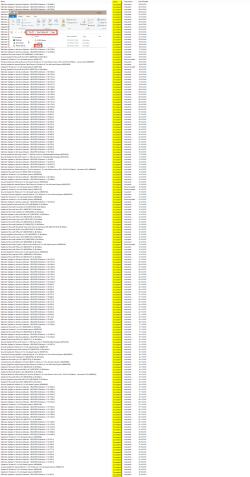
Just for posterity, here's a screenshot to show how valid fact the "relocated Users folder causes Windows Updates to fail" is, as the referred article and some other sources claim. Screenshot shows that my Windows 8.1 main profile folder is located on E: drive and not a single failed update. Click to enlarge and zoom in:

304228-walkthrough-customize-windows-7-image-audit-mode-sysprep-2014-01-31_075252.png
 
Last edited:

My Computer My Computer

At a glance

Windows 10 Pro x64 EN-GB1.6 GHz Intel Core i7-720QM Processor6 GBATI Mobility Radeon HD 5850 Graphics
Computer type
Laptop
Computer Manufacturer/Model Number
HP ENVY 17-1150eg
OS
Windows 10 Pro x64 EN-GB
CPU
1.6 GHz Intel Core i7-720QM Processor
Memory
6 GB
Graphics Card(s)
ATI Mobility Radeon HD 5850 Graphics
Sound Card
Beats sound system with integrated subwoofer
Monitor(s) Displays
17" laptop display, 22" LED and 32" Full HD TV through HDMI
Screen Resolution
1600*900 (1), 1920*1080 (2&3)
Hard Drives
Internal: 2 x 500 GB SATA Hard Disk Drive 7200 rpm
External: 2TB for backups, 3TB USB3 network drive for media
Cooling
As Envy runs a bit warm, I have it on a Cooler Master pad
Keyboard
Logitech diNovo Media Desktop Laser (bluetooth)
Mouse
Logitech Performance Mouse MX
Internet Speed
50/10 Mbps VDSL
Antivirus
Windows Defender 4.3.9431.0
Browser
Maxthon 3.5.2., IE11
That is scary smart Kari :)
 

My Computer My Computer

At a glance

Win-7-Pro64bit 7-H-Prem-64biti7-5930K 2nd i9-9940x both water blocked VRM'...Trident-z 3200C14 2nd Trident-z 3600C16EVGA 1080ti ftw3 2nd Titan Xp both water blocked
Computer type
PC/Desktop
Computer Manufacturer/Model Number
Custom assembled by me :}
OS
Win-7-Pro64bit 7-H-Prem-64bit
CPU
i7-5930K 2nd i9-9940x both water blocked VRM's too
Motherboard
ASUS SABERTOOTH X99 2nd ASUS x299 Apex
Memory
Trident-z 3200C14 2nd Trident-z 3600C16
Graphics Card(s)
EVGA 1080ti ftw3 2nd Titan Xp both water blocked
Sound Card
Built-in Realtek
Monitor(s) Displays
1-AOC G2460PG 24"G-Sync 144Hz/ 2nd 1-ASUS VG248QE 24" 144Hz
Screen Resolution
1920 x 1080 144Hz
Hard Drives
2-Samsung M.2 Evo & Evo Plus
2-Samsung 850 EVO 500GB SSD's/ 3-2.5 W.D. Black 1tb-&3-1tb/3-3.5 WD Black 1tb hdd's
PSU
EVGA SuperNOVA 1000-P2 2nd 1200-P2
Case
2-Corsair Obsidian Series 450D Black ATX Mid Tower
Cooling
Custom water loops
Keyboard
Logitech G710+/ 2nd Logitech G910
Mouse
2-RedDragon M901 Perdition 16400 dpi Gaming mouse = wired
Internet Speed
Comcast Ping 19ms 89.31mbps download speed 6.12mbps upload
Antivirus
Malwarebytes Pro/ Superantispyware Pro
Browser
FireFox & Pale moon
Other Info
2nd ASUS X299 Apex/Intel i9-9940x with Custom water loop/7H-Prem-x64/Corsair 450D case/Ram Trident-z 3600C16 4x8gb / Samsung970Evo plus 500gb SSD/Dual ssd EZ swap evo/PSU EVGA SuperNova 1200w-P2 80+Platinum/GPU Titan Xp /8-ML-140 on push-pull on 2-280GTX rads

My Computer My Computer

At a glance

Windows 10 Pro x64 ; Xubuntu x64Intel i7 860 @ 2.80 GHz O/C'ed to 4.0GHz16GB Corsair Vengance DDR3 @ 661 MHz Dual Cha...EVGA NVidia GTX 560 1024MB
Computer type
PC/Desktop
Computer Manufacturer/Model Number
Golden Mk. I.4
OS
Windows 10 Pro x64 ; Xubuntu x64
CPU
Intel i7 860 @ 2.80 GHz O/C'ed to 4.0GHz
Motherboard
Gigabyte P55A-UD3R Rev.1. Award BIOS F13
Memory
16GB Corsair Vengance DDR3 @ 661 MHz Dual Channel (9-9-9-24)
Graphics Card(s)
EVGA NVidia GTX 560 1024MB
Sound Card
Realtek Integrated
Monitor(s) Displays
Dual Samsung SyncMaster 2494HS
Screen Resolution
1920*1080 and 1920*1080
Hard Drives
1*Samsung 840 EVO 120GB SSD;
1*OCZ Vertex 2 60GB SSD;
2*Samsung F3 SpinPoint 1TB in RAID0;
1*Samsung F1 SpinPoint 1TB;
2*Western Digital 1TB External USB 3.0
1*Western Digital 500GB External USB 3.0
1*Seagate 500GB External USB 2.0
PSU
Thermaltake ToughPower QFan 750W
Case
Thermaltake Element S VK60001W2Z
Cooling
Corsair H60 Water Cooling, 2*230mm and 2*80mm case fans
Keyboard
Logitech G110
Mouse
Logitech MX518

My Computer My Computer

At a glance

Windows 10 Pro x64 EN-GB1.6 GHz Intel Core i7-720QM Processor6 GBATI Mobility Radeon HD 5850 Graphics
Computer type
Laptop
Computer Manufacturer/Model Number
HP ENVY 17-1150eg
OS
Windows 10 Pro x64 EN-GB
CPU
1.6 GHz Intel Core i7-720QM Processor
Memory
6 GB
Graphics Card(s)
ATI Mobility Radeon HD 5850 Graphics
Sound Card
Beats sound system with integrated subwoofer
Monitor(s) Displays
17" laptop display, 22" LED and 32" Full HD TV through HDMI
Screen Resolution
1600*900 (1), 1920*1080 (2&3)
Hard Drives
Internal: 2 x 500 GB SATA Hard Disk Drive 7200 rpm
External: 2TB for backups, 3TB USB3 network drive for media
Cooling
As Envy runs a bit warm, I have it on a Cooler Master pad
Keyboard
Logitech diNovo Media Desktop Laser (bluetooth)
Mouse
Logitech Performance Mouse MX
Internet Speed
50/10 Mbps VDSL
Antivirus
Windows Defender 4.3.9431.0
Browser
Maxthon 3.5.2., IE11
Back
Top