Free utility or inbuilt program to compare source & destination files

DBenz

New member
Member
Local time
4:30 AM
Messages
55
Free utility or inbuilt program to compare source & destination files

Hi Win7 64 pro
I have copied 2gb using Teracopy to a folder, it showed at least one where path not found.
It has no means of selecting that line and showing me the source file, I cant even copy out the address.

Its ok as along as i get OK in its test, else if I get a red warning it then doesn't offer a means of attempting that source file again. It also doesnt have a way of putting those to the top of the stack. You have to scroll through 2Gb of files to find them.

Then I managed to exit teracopy, now I havent a clue what files needs copying across.

I could do with a second prog to compare source and destination and repair any differences etc.

Any suggestions ?

I had hoped Terracopy would do this.

DBenz
 

My Computer My Computer

Computer type
PC/Desktop
Computer Manufacturer/Model Number
Custom built
OS
Windows 7 64bit pro
CPU
Intel Core i7 4790
Motherboard
Gigabyte Z97P-D3 Intel Z97 Socket 1150 DDR3
Memory
32Gb DDR3
Graphics Card(s)
GeForce GTX970
Hard Drives
Samsung SSD for OS and WD green for data
Antivirus
Kaspersky Internet Security 2014
Browser
Firefox
You can use the built-in RoboCopy and use it only to compare files and folders, NOT to copy anything. Start a command window (cmd.exe) and use this syntax:

robocopy "c:\tools" "c:\toolscopy" /E /L

c:\tools is the source
c:\toolscopy is the destination
/E will include subdirectories incl. empty ones
/L will only do a compare and not copy anything

I changed this in the source folder: one changed file, one new file, one new empty directory
The output from robocopy:

Newer 27 tempEMETfolder.txt
New File 26624 TestBlank.exe
New Dir 0 c:\tools\emptySubFolder\
 

My Computer My Computer

Computer type
Laptop
Computer Manufacturer/Model Number
HP Elitebook 8540p
OS
Windows 7 Pro 32
CPU
Intel(R) Core(TM) i5 CPU M 540 @ 2.53GHz
Motherboard
Hewlett-Packard 1521
Memory
4,00 GB (Usable 2,98)
Graphics Card(s)
NVIDIA NVS 5100M
Sound Card
NVIDIA High Definition Audio
Screen Resolution
1600x900
Hard Drives
INTEL SSDSA2CW120G3
Antivirus
F-Secure Internet Security
Browser
IE, Firefox, Opera
Other Info
Sandboxie,
SRP (Software Restriction Policy),
EMET (Enhanced Mitigation Experience Toolkit),
WFC (Windows Firewall Control by BiniSoft),
Malwarebytes Premium
Another possible solution

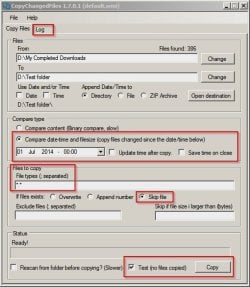
What I use - mostly when I want to roll back the system to a system image backup but keep recently added personal files and folders is to copy existing files and folders including directory structure to another partition then use TSR Copy Changed Files to only transfer the files needed back to the current partition.

Example:

First choose Test Copy and inspect the log. No files are actually copied at this stage. If it looks okay - go ahead and copy.

CopyChangedFiles 1.7.0.1.jpg

TSR Copy Changed Files

For a final comparison try:

WinMerge
 
Last edited:

My Computer My Computer

Computer type
Laptop
Computer Manufacturer/Model Number
ASUS
OS
Microsoft Windows 7 Home Premium 64-bit 7601 Multiprocessor Free Service Pack 1
CPU
AMD C-60 APU with Radeon(tm) HD Graphics
Motherboard
ASUSTeK COMPUTER INC. X501U
Memory
4.00 GB
Graphics Card(s)
AMD Radeon HD 6290 Graphics
Sound Card
(1) AMD High Definition Audio Device (2) Realtek High Defi
Screen Resolution
1366 x 768 x 32 bits (4294967296 colors) @ 60 Hz
Hard Drives
Hitachi HTS545050A7E380 SATA Disk Device
Antivirus
Comodo CIS & FW, SecureAplus App Whitelisting, Threatfire
Browser
Cyberfox 64bit, Opera 64bit, Airfox
Other Info
Spy-The-Spy, HitmanPro.Alert, Norton Connect Safe, MJRegWatcher, BitDefender TrafficLight, Voodoo Shield, Zemana AntiMalware
Back
Top