Solved Windows Explorer right pane does not match left folder

Nick Sergeant

New member
Local time
12:33 PM
Messages
30
Location
Australia
Hello,

I just noticed Win Explorer does not refresh the right pane as I navigate up/down a list of folders via arrow keys in the left pane. It used to make rapid visual read of folder contents possible. Can that feature be switched back on?

I've seen this reported elsewhere few years ago but I cannot find it on this site.
 

My Computer My Computer

Computer type
PC/Desktop
Computer Manufacturer/Model Number
AusPC build
OS
Microsoft Windows 7 Professional 64-bit 7601 Multiprocessor Free Service Pack 1
CPU
Intel(R) Core(TM) i7-4790K CPU @ 4.00GHz
Motherboard
ASUSTeK COMPUTER INC. Z97-PRO(Wi-Fi ac)
Memory
16GB Corsair (2x8GB) DDR3 2133MHz Dimm, Unbuffered, 11
Graphics Card(s)
Leadtek nVidia Quadro K620 PCI Express 3.0 x16, 2GB DDR3, 12
Sound Card
(1) Bluetooth Hands-free Audio (2) NVIDIA High Definition
Monitor(s) Displays
Eizo
Screen Resolution
1920 x nnnn
Hard Drives
(1) Samsung SSD 840 EVO 120G SCSI Disk Device
(2) Samsung SSD 840 EVO 120G SCSI Disk Device
(3) ST2000DM 001-1CH164 SCSI Disk Device
(4) LaCie Rugged FW/USB USB Device
(5) WD Elements 10B8 USB Device
(6) WD Elements 10B8 USB Devic
PSU
850W Seasonic S12D Power Supply PSUSEAS12-D850W
Case
Black PC-9F Mid Tower Chassis (USB3)
Keyboard
Dell
Mouse
Mionix Naos 7000 Optical Gaming Mouse, ADNS-3100 Optical Sen
Antivirus
MSE plus Malwarebytes
Browser
Firefox

My Computer My Computer

Computer type
PC/Desktop
Computer Manufacturer/Model Number
Self built custom
OS
64-bit Windows 11 Pro for Workstations
CPU
Intel i7-8700K OC'd to 5 GHz
Motherboard
ASUS ROG Maximus XI Formula Z390
Memory
64 GB (4x16GB) G.SKILL TridentZ RGB DDR4 3600 MHz
Graphics Card(s)
ASUS ROG-STRIX-GTX1080TI-O11G-GAMING
Sound Card
Integrated
Monitor(s) Displays
2 x Samsung Odyssey G7 27"
Screen Resolution
2560x1440
Hard Drives
1TB Samsung 990 PRO M.2,
4TB Samsung 990 PRO PRO M.2,
TerraMaster F8 SSD Plus NAS
PSU
Seasonic Prime Titanium 850W
Case
Thermaltake Core P3
Cooling
Corsair Hydro H115i
Keyboard
Logitech wireless K800
Mouse
Logitech MX Master 4
Internet Speed
2 Gb/s Download and 100 Mb/s Upload
Antivirus
Malwarebyte Anti-Malware Premium
Browser
Google Chrome
Other Info
Logitech Z625 speaker system,
Logitech BRIO 4K Pro webcam,
HP Color LaserJet Pro MFP M477fdn,
APC SMART-UPS RT 1000 XL - SURT1000XLI,
Galaxy S23 Plus phone
Brink, thanks for your swift response.

For some reason I can't make that solution work. Bear in mind the function I am after is what I thought was a Win XP thing. It may be ancient history now, if it existed at all -- the mind plays tricks. I just migrated to Win 7 64 (after a bad virus chewed my OS late last year ;\

So I have no Win XP box to reassure myself with. Still, I may be wrong but I believe the right pane always showed the content of the highlighted folder in the left pane regardless of how focus got there, mouse click, arrow key, meteor strike. I really liked the arrow key because of the ultra-low motor-coord demand in moving up and down (!). I was rarely able to arrange a meteor.

I followed your instructions and even then the right pane will only reveal the left pane folder if I mouse into that folder and click. (I'm averse to that if a keyboard action will suffice!) I also did not see any logical effect via Ctrl-Shift-E: the displayed files or folders bore no relation to the left-pane folder high-lighted. (I do see I can right click a left-pane folder with the +sign to expand its content in the left pane. That is familiar to me.)

As I said, maybe I misremembered the other Win XP function. I will know for sure after I cruelly and for sentimental reasons repair the XP laptop.
 

My Computer My Computer

Computer type
PC/Desktop
Computer Manufacturer/Model Number
AusPC build
OS
Microsoft Windows 7 Professional 64-bit 7601 Multiprocessor Free Service Pack 1
CPU
Intel(R) Core(TM) i7-4790K CPU @ 4.00GHz
Motherboard
ASUSTeK COMPUTER INC. Z97-PRO(Wi-Fi ac)
Memory
16GB Corsair (2x8GB) DDR3 2133MHz Dimm, Unbuffered, 11
Graphics Card(s)
Leadtek nVidia Quadro K620 PCI Express 3.0 x16, 2GB DDR3, 12
Sound Card
(1) Bluetooth Hands-free Audio (2) NVIDIA High Definition
Monitor(s) Displays
Eizo
Screen Resolution
1920 x nnnn
Hard Drives
(1) Samsung SSD 840 EVO 120G SCSI Disk Device
(2) Samsung SSD 840 EVO 120G SCSI Disk Device
(3) ST2000DM 001-1CH164 SCSI Disk Device
(4) LaCie Rugged FW/USB USB Device
(5) WD Elements 10B8 USB Device
(6) WD Elements 10B8 USB Devic
PSU
850W Seasonic S12D Power Supply PSUSEAS12-D850W
Case
Black PC-9F Mid Tower Chassis (USB3)
Keyboard
Dell
Mouse
Mionix Naos 7000 Optical Gaming Mouse, ADNS-3100 Optical Sen
Antivirus
MSE plus Malwarebytes
Browser
Firefox

My Computer My Computer

Computer type
PC/Desktop
Computer Manufacturer/Model Number
Self built custom
OS
64-bit Windows 11 Pro for Workstations
CPU
Intel i7-8700K OC'd to 5 GHz
Motherboard
ASUS ROG Maximus XI Formula Z390
Memory
64 GB (4x16GB) G.SKILL TridentZ RGB DDR4 3600 MHz
Graphics Card(s)
ASUS ROG-STRIX-GTX1080TI-O11G-GAMING
Sound Card
Integrated
Monitor(s) Displays
2 x Samsung Odyssey G7 27"
Screen Resolution
2560x1440
Hard Drives
1TB Samsung 990 PRO M.2,
4TB Samsung 990 PRO PRO M.2,
TerraMaster F8 SSD Plus NAS
PSU
Seasonic Prime Titanium 850W
Case
Thermaltake Core P3
Cooling
Corsair Hydro H115i
Keyboard
Logitech wireless K800
Mouse
Logitech MX Master 4
Internet Speed
2 Gb/s Download and 100 Mb/s Upload
Antivirus
Malwarebyte Anti-Malware Premium
Browser
Google Chrome
Other Info
Logitech Z625 speaker system,
Logitech BRIO 4K Pro webcam,
HP Color LaserJet Pro MFP M477fdn,
APC SMART-UPS RT 1000 XL - SURT1000XLI,
Galaxy S23 Plus phone
Are you saying, that when you click on a folder in the left (navigation) pane, the contents of that folder don't appear in the right (main) pane?

If you use the keyboard to navigate in the left pane, the right pane will only show the contents of the highlighted folder if you use the Spacebar or Enter key.
 

My Computer My Computer

Computer type
PC/Desktop
Computer Manufacturer/Model Number
n/a
OS
W7 Ultimate SP1, LM19.2 MATE, W10 Home 1703, W10 Pro 1703 VM, #All 64 bit
CPU
AMD Phenom II x6 1100T, 3.3 GHz
Motherboard
ASUS M4A88T-M/USB3 (AM3)
Memory
12GB DDR3 1333 G-Skill (4GB x 2), G-Skill (2GB x 2)
Graphics Card(s)
NVIDIA GeForce GTX 660
Sound Card
Realtek?
Monitor(s) Displays
Samsung S23B350
Screen Resolution
1920x1080
Hard Drives
WD Green 2TB (SATA), WD Green 3TB (SATA), WD Blue 4TB (SATA), WD Blue 6TB (SATA)
PSU
Cooler Master
Case
Antec GX300 Tower
Cooling
3x Antec TRICOOL 120mm Fans
Mouse
Wired Optical
Internet Speed
DSL
Antivirus
Avast
Browser
Pale Moon (64 bit)
Other Info
2018-12-27 Upgraded HDDs
2015-12-10 Upgraded case, graphics card, storage
2015-08-15 Upgraded motherboard & RAM
2015-07-15 Upgraded LM17.1 to LM17.2
Lechnerus, the Spacebar or Enter key functionality works. But I thought in Win XP it showed folder contents even just by using the arrow keys to highlight in the left pane, with no need of any extra key stroke.
But if necessary I can get used to the extra keystroke I guess.

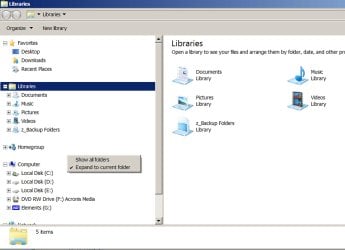
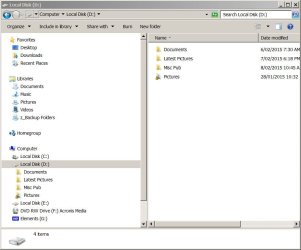
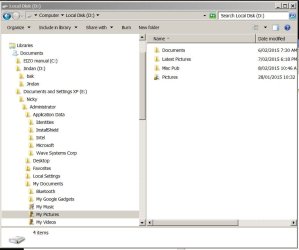
Brink, here are some screen shots:
01 shows the option selected;
02 shows after I click on "Local Drive D"
03 shows previous main display unchanged after I navigate by keyboard all the way to a far flung instance of "My Pictures" somewhere on Drive E I believe.
That's quite counter-intuitive.
 

Attachments

  • Win 7 Navig question 01.JPG
    Win 7 Navig question 01.JPG
    220.7 KB · Views: 1
  • Win 7 Navig question 02.JPG
    Win 7 Navig question 02.JPG
    54.9 KB · Views: 0
  • Win 7 Navig question 03.JPG
    Win 7 Navig question 03.JPG
    60 KB · Views: 0

My Computer My Computer

Computer type
PC/Desktop
Computer Manufacturer/Model Number
AusPC build
OS
Microsoft Windows 7 Professional 64-bit 7601 Multiprocessor Free Service Pack 1
CPU
Intel(R) Core(TM) i7-4790K CPU @ 4.00GHz
Motherboard
ASUSTeK COMPUTER INC. Z97-PRO(Wi-Fi ac)
Memory
16GB Corsair (2x8GB) DDR3 2133MHz Dimm, Unbuffered, 11
Graphics Card(s)
Leadtek nVidia Quadro K620 PCI Express 3.0 x16, 2GB DDR3, 12
Sound Card
(1) Bluetooth Hands-free Audio (2) NVIDIA High Definition
Monitor(s) Displays
Eizo
Screen Resolution
1920 x nnnn
Hard Drives
(1) Samsung SSD 840 EVO 120G SCSI Disk Device
(2) Samsung SSD 840 EVO 120G SCSI Disk Device
(3) ST2000DM 001-1CH164 SCSI Disk Device
(4) LaCie Rugged FW/USB USB Device
(5) WD Elements 10B8 USB Device
(6) WD Elements 10B8 USB Devic
PSU
850W Seasonic S12D Power Supply PSUSEAS12-D850W
Case
Black PC-9F Mid Tower Chassis (USB3)
Keyboard
Dell
Mouse
Mionix Naos 7000 Optical Gaming Mouse, ADNS-3100 Optical Sen
Antivirus
MSE plus Malwarebytes
Browser
Firefox
Nick,

Yep, it's has Peter posted. Only if you click on the folder in the navigation pane will it instantly show it's contents.
 

My Computer My Computer

Computer type
PC/Desktop
Computer Manufacturer/Model Number
Self built custom
OS
64-bit Windows 11 Pro for Workstations
CPU
Intel i7-8700K OC'd to 5 GHz
Motherboard
ASUS ROG Maximus XI Formula Z390
Memory
64 GB (4x16GB) G.SKILL TridentZ RGB DDR4 3600 MHz
Graphics Card(s)
ASUS ROG-STRIX-GTX1080TI-O11G-GAMING
Sound Card
Integrated
Monitor(s) Displays
2 x Samsung Odyssey G7 27"
Screen Resolution
2560x1440
Hard Drives
1TB Samsung 990 PRO M.2,
4TB Samsung 990 PRO PRO M.2,
TerraMaster F8 SSD Plus NAS
PSU
Seasonic Prime Titanium 850W
Case
Thermaltake Core P3
Cooling
Corsair Hydro H115i
Keyboard
Logitech wireless K800
Mouse
Logitech MX Master 4
Internet Speed
2 Gb/s Download and 100 Mb/s Upload
Antivirus
Malwarebyte Anti-Malware Premium
Browser
Google Chrome
Other Info
Logitech Z625 speaker system,
Logitech BRIO 4K Pro webcam,
HP Color LaserJet Pro MFP M477fdn,
APC SMART-UPS RT 1000 XL - SURT1000XLI,
Galaxy S23 Plus phone
XP is different to W7

Lechnerus, the Spacebar or Enter key functionality works. But I thought in Win XP it showed folder contents even just by using the arrow keys to highlight in the left pane, with no need of any extra key stroke.
You don't need the 'c' in my user name. :D

In XP, it works as you have posted.
If you use the keyboard to navigate in the left pane, the right pane will show the contents of the highlighted folder.

I found a couple of locations that didn't do this though. :confused:
 

My Computer My Computer

Computer type
PC/Desktop
Computer Manufacturer/Model Number
n/a
OS
W7 Ultimate SP1, LM19.2 MATE, W10 Home 1703, W10 Pro 1703 VM, #All 64 bit
CPU
AMD Phenom II x6 1100T, 3.3 GHz
Motherboard
ASUS M4A88T-M/USB3 (AM3)
Memory
12GB DDR3 1333 G-Skill (4GB x 2), G-Skill (2GB x 2)
Graphics Card(s)
NVIDIA GeForce GTX 660
Sound Card
Realtek?
Monitor(s) Displays
Samsung S23B350
Screen Resolution
1920x1080
Hard Drives
WD Green 2TB (SATA), WD Green 3TB (SATA), WD Blue 4TB (SATA), WD Blue 6TB (SATA)
PSU
Cooler Master
Case
Antec GX300 Tower
Cooling
3x Antec TRICOOL 120mm Fans
Mouse
Wired Optical
Internet Speed
DSL
Antivirus
Avast
Browser
Pale Moon (64 bit)
Other Info
2018-12-27 Upgraded HDDs
2015-12-10 Upgraded case, graphics card, storage
2015-08-15 Upgraded motherboard & RAM
2015-07-15 Upgraded LM17.1 to LM17.2
Okay, I'll stop looking for Win XP behaviour where it can't be found.

Thanks to you both for checking this out with me.
 

My Computer My Computer

Computer type
PC/Desktop
Computer Manufacturer/Model Number
AusPC build
OS
Microsoft Windows 7 Professional 64-bit 7601 Multiprocessor Free Service Pack 1
CPU
Intel(R) Core(TM) i7-4790K CPU @ 4.00GHz
Motherboard
ASUSTeK COMPUTER INC. Z97-PRO(Wi-Fi ac)
Memory
16GB Corsair (2x8GB) DDR3 2133MHz Dimm, Unbuffered, 11
Graphics Card(s)
Leadtek nVidia Quadro K620 PCI Express 3.0 x16, 2GB DDR3, 12
Sound Card
(1) Bluetooth Hands-free Audio (2) NVIDIA High Definition
Monitor(s) Displays
Eizo
Screen Resolution
1920 x nnnn
Hard Drives
(1) Samsung SSD 840 EVO 120G SCSI Disk Device
(2) Samsung SSD 840 EVO 120G SCSI Disk Device
(3) ST2000DM 001-1CH164 SCSI Disk Device
(4) LaCie Rugged FW/USB USB Device
(5) WD Elements 10B8 USB Device
(6) WD Elements 10B8 USB Devic
PSU
850W Seasonic S12D Power Supply PSUSEAS12-D850W
Case
Black PC-9F Mid Tower Chassis (USB3)
Keyboard
Dell
Mouse
Mionix Naos 7000 Optical Gaming Mouse, ADNS-3100 Optical Sen
Antivirus
MSE plus Malwarebytes
Browser
Firefox
Different File Manager

If you don't like the way Windows Explorer works you could try a different file manager. :)

There are quite a few free file managers for Windows.

I use FreeCommander 2009.02b when I want to anything other than basic file management.

You could also look through the programs on this site:
File & Disk Management Downloads - Filepuma.com
 

My Computer My Computer

Computer type
PC/Desktop
Computer Manufacturer/Model Number
n/a
OS
W7 Ultimate SP1, LM19.2 MATE, W10 Home 1703, W10 Pro 1703 VM, #All 64 bit
CPU
AMD Phenom II x6 1100T, 3.3 GHz
Motherboard
ASUS M4A88T-M/USB3 (AM3)
Memory
12GB DDR3 1333 G-Skill (4GB x 2), G-Skill (2GB x 2)
Graphics Card(s)
NVIDIA GeForce GTX 660
Sound Card
Realtek?
Monitor(s) Displays
Samsung S23B350
Screen Resolution
1920x1080
Hard Drives
WD Green 2TB (SATA), WD Green 3TB (SATA), WD Blue 4TB (SATA), WD Blue 6TB (SATA)
PSU
Cooler Master
Case
Antec GX300 Tower
Cooling
3x Antec TRICOOL 120mm Fans
Mouse
Wired Optical
Internet Speed
DSL
Antivirus
Avast
Browser
Pale Moon (64 bit)
Other Info
2018-12-27 Upgraded HDDs
2015-12-10 Upgraded case, graphics card, storage
2015-08-15 Upgraded motherboard & RAM
2015-07-15 Upgraded LM17.1 to LM17.2
Thanks, lehnerus, I've heard about some freeware alternatives but forgot to note the links.

I'll give your suggestion a try.
 

My Computer My Computer

Computer type
PC/Desktop
Computer Manufacturer/Model Number
AusPC build
OS
Microsoft Windows 7 Professional 64-bit 7601 Multiprocessor Free Service Pack 1
CPU
Intel(R) Core(TM) i7-4790K CPU @ 4.00GHz
Motherboard
ASUSTeK COMPUTER INC. Z97-PRO(Wi-Fi ac)
Memory
16GB Corsair (2x8GB) DDR3 2133MHz Dimm, Unbuffered, 11
Graphics Card(s)
Leadtek nVidia Quadro K620 PCI Express 3.0 x16, 2GB DDR3, 12
Sound Card
(1) Bluetooth Hands-free Audio (2) NVIDIA High Definition
Monitor(s) Displays
Eizo
Screen Resolution
1920 x nnnn
Hard Drives
(1) Samsung SSD 840 EVO 120G SCSI Disk Device
(2) Samsung SSD 840 EVO 120G SCSI Disk Device
(3) ST2000DM 001-1CH164 SCSI Disk Device
(4) LaCie Rugged FW/USB USB Device
(5) WD Elements 10B8 USB Device
(6) WD Elements 10B8 USB Devic
PSU
850W Seasonic S12D Power Supply PSUSEAS12-D850W
Case
Black PC-9F Mid Tower Chassis (USB3)
Keyboard
Dell
Mouse
Mionix Naos 7000 Optical Gaming Mouse, ADNS-3100 Optical Sen
Antivirus
MSE plus Malwarebytes
Browser
Firefox

My Computer My Computer

Computer type
PC/Desktop
Computer Manufacturer/Model Number
n/a
OS
W7 Ultimate SP1, LM19.2 MATE, W10 Home 1703, W10 Pro 1703 VM, #All 64 bit
CPU
AMD Phenom II x6 1100T, 3.3 GHz
Motherboard
ASUS M4A88T-M/USB3 (AM3)
Memory
12GB DDR3 1333 G-Skill (4GB x 2), G-Skill (2GB x 2)
Graphics Card(s)
NVIDIA GeForce GTX 660
Sound Card
Realtek?
Monitor(s) Displays
Samsung S23B350
Screen Resolution
1920x1080
Hard Drives
WD Green 2TB (SATA), WD Green 3TB (SATA), WD Blue 4TB (SATA), WD Blue 6TB (SATA)
PSU
Cooler Master
Case
Antec GX300 Tower
Cooling
3x Antec TRICOOL 120mm Fans
Mouse
Wired Optical
Internet Speed
DSL
Antivirus
Avast
Browser
Pale Moon (64 bit)
Other Info
2018-12-27 Upgraded HDDs
2015-12-10 Upgraded case, graphics card, storage
2015-08-15 Upgraded motherboard & RAM
2015-07-15 Upgraded LM17.1 to LM17.2
It's a known bug of Windows Explorer (that MS has no intention to fix) introduced in the greatly flawed Explorer in Vista an latter versions.
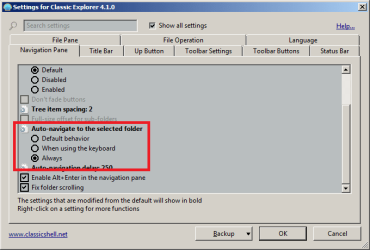
The workaround, other than throwing the whole Explorer away, is to install Classic Shell that contains a vast number of bugfixes and improvements to Explorer (as well as the start menu and IE).
The exact setting that corrects this is in this screen:
ClassicShell.png
 

My Computer My Computer

Computer type
Laptop
Computer Manufacturer/Model Number
Toshiba Sattelite A665-S6092
OS
Windows 7 Ultimate x64
CPU
Intel Core i7-740QM
Memory
8 GB DDR3
Graphics Card(s)
NVIDIA GeForce 330GT
Screen Resolution
1366x768
Hard Drives
Samsung 840 SSD 500GB
1TB USB3 external HD
Cooling
Coolermaster Notepal U3 notebook cooling pad
Internet Speed
3mbps ASDL
Antivirus
ClamWin 0.98.7
Browser
Opera 12.17 x86 (main), Firefox 38 (sec), IE11 (last resort)
Thanks, Alejandro, I might give Classic Shell a try.

Lehnerus, I have tried out FreeCommander XE. I haven't gotten used to it yet but will see how it goes.
 

My Computer My Computer

Computer type
PC/Desktop
Computer Manufacturer/Model Number
AusPC build
OS
Microsoft Windows 7 Professional 64-bit 7601 Multiprocessor Free Service Pack 1
CPU
Intel(R) Core(TM) i7-4790K CPU @ 4.00GHz
Motherboard
ASUSTeK COMPUTER INC. Z97-PRO(Wi-Fi ac)
Memory
16GB Corsair (2x8GB) DDR3 2133MHz Dimm, Unbuffered, 11
Graphics Card(s)
Leadtek nVidia Quadro K620 PCI Express 3.0 x16, 2GB DDR3, 12
Sound Card
(1) Bluetooth Hands-free Audio (2) NVIDIA High Definition
Monitor(s) Displays
Eizo
Screen Resolution
1920 x nnnn
Hard Drives
(1) Samsung SSD 840 EVO 120G SCSI Disk Device
(2) Samsung SSD 840 EVO 120G SCSI Disk Device
(3) ST2000DM 001-1CH164 SCSI Disk Device
(4) LaCie Rugged FW/USB USB Device
(5) WD Elements 10B8 USB Device
(6) WD Elements 10B8 USB Devic
PSU
850W Seasonic S12D Power Supply PSUSEAS12-D850W
Case
Black PC-9F Mid Tower Chassis (USB3)
Keyboard
Dell
Mouse
Mionix Naos 7000 Optical Gaming Mouse, ADNS-3100 Optical Sen
Antivirus
MSE plus Malwarebytes
Browser
Firefox
Lehnerus, I have tried out FreeCommander XE. I haven't gotten used to it yet but will see how it goes.
You should read through the docs, if you have time.

Apart from twin pane and tabbed GUI, FreeCommander has a couple of nice tools:

  • md5 creation and validation
  • Mass Rename Tool
  • Compare files and folders
 

My Computer My Computer

Computer type
PC/Desktop
Computer Manufacturer/Model Number
n/a
OS
W7 Ultimate SP1, LM19.2 MATE, W10 Home 1703, W10 Pro 1703 VM, #All 64 bit
CPU
AMD Phenom II x6 1100T, 3.3 GHz
Motherboard
ASUS M4A88T-M/USB3 (AM3)
Memory
12GB DDR3 1333 G-Skill (4GB x 2), G-Skill (2GB x 2)
Graphics Card(s)
NVIDIA GeForce GTX 660
Sound Card
Realtek?
Monitor(s) Displays
Samsung S23B350
Screen Resolution
1920x1080
Hard Drives
WD Green 2TB (SATA), WD Green 3TB (SATA), WD Blue 4TB (SATA), WD Blue 6TB (SATA)
PSU
Cooler Master
Case
Antec GX300 Tower
Cooling
3x Antec TRICOOL 120mm Fans
Mouse
Wired Optical
Internet Speed
DSL
Antivirus
Avast
Browser
Pale Moon (64 bit)
Other Info
2018-12-27 Upgraded HDDs
2015-12-10 Upgraded case, graphics card, storage
2015-08-15 Upgraded motherboard & RAM
2015-07-15 Upgraded LM17.1 to LM17.2
Back
Top