Solved Notepad trick to get all your computer specs?

stuckstuck

New member
Member
VIP
Local time
1:09 AM
Messages
168
I remember being in this forum seeking some help from the community and one of the members had gave me a set of instructions, one of which included using the notepad I think? I had typed in something in the notepad, saved it with a specific name, and voilà, all my computer specs were in that notepad. I'm not entirely too sure if it's the notepad that you type this command in, but by this point whoever's reading this will either know or not know what I'm talking about.
"Could anybody tell me how to do that thing with the thing", is what I'm trying to say. Thanks in advance.
 

My Computer My Computer

Computer type
PC/Desktop
Computer Manufacturer/Model Number
Custom
OS
Microsoft Windows 7 Professional 64-bit
CPU
5960X @ 4.4GHz
Motherboard
X99 SABERTOOTH
Memory
16.0 GB
Graphics Card(s)
NVIDIA GeForce GTX 980 Ti
Hard Drives
(1) OCZ-VERT EX460 SCSI Disk Device
(2) WDC WD1002FAEX-00Z3A SCSI Disk Device
(3) WDC WD1003FZEX-00MK2 SCSI Disk Device
Internet Speed
God Speed.
Antivirus
Glock 9
Run this from a Command Prompt:

systeminfo > %userprofile%\Desktop\SysSpecs.txt & notepad %userprofile%\Desktop\SysSpecs.txt

or run this from the Run box:

cmd /c systeminfo > %userprofile%\Desktop\SysSpecs.txt & notepad %userprofile%\Desktop\SysSpecs.txt

Both will load the output of the systeminfo command into notepad for you.

If you want more information, try this: http://www.sevenforums.com/tutorials/180324-system-info-see-your-system-specs.html
 

My Computer My Computer

Computer type
PC/Desktop
Computer Manufacturer/Model Number
Lenovo IdeaCenter 450
OS
Windows 10 Pro X64
CPU
Intel Quad Core i7-4770 @ 3.4Ghz
Memory
16.0GB PC3-12800 DDR3 SDRAM 1600 MHz
Graphics Card(s)
Intel Integrated HD Graphics
Sound Card
Realtek HD Audio
Monitor(s) Displays
HP 22" LCD
Screen Resolution
1680 x 1050
Hard Drives
250GB Samsung EVO SATA-3 SSD
2TB Seagate ST2000DM001 SATA-2
1.5TB Seagate ST3150041AS SATA
Keyboard
Dell USB
Mouse
Lenovo USB
Internet Speed
Cable via Road Runner 3MB Upload, 30MB Download
Antivirus
Windows Defender, MBAM Pro, MBAE
Browser
Seamonkey
Other Info
UEFI/GPT
PLDS DVD-RW DH16AERSH
Or you can google SIW, (system information windows). Very small program which gives you the whole rundown on what's on your comp......and it's free :)

Update: I just checked and it seems the developer no longer supports a freeware version...but...you can still get a free older version from other sites. I've been using an older version for yonks.
 

My Computer My Computer

Computer type
PC/Desktop
Computer Manufacturer/Model Number
Self built
OS
Windows 7 home premium 64bit
CPU
intel Core i7 4790 3.6Ghz
Motherboard
Gigabyte H97-D3H
Memory
16Gb G.Skill Sniper
Graphics Card(s)
Nvidia GTX 760
Sound Card
Realtek ALC1150 115dB SNR HD Audio
Monitor(s) Displays
LG 32" TV as monitor
Screen Resolution
1920 x 1080
Hard Drives
Samsung 840 PRO series SATA3 256Gb SSD.
Western Digital Black SATA3 -1Tb.
Western Digital external HDD-1TB.

Pioneer DVD-RW.
PSU
Antec HCG 620w
Case
Thermaltake A41
Cooling
Stock fans x 3. After market Arctic Freezer i11 cpu cooler
Keyboard
Logitech M520r wireless
Mouse
Logitech M310t wireless
Internet Speed
Fair to middlin'
Antivirus
Avast free
Browser
Firefox
Other Info
MBAM Pro
SuperAntiSpyware free edition
AdwCleaner
Ccleaner
Revo uninstaller Pro
Run this from a Command Prompt:

systeminfo > %userprofile%\Desktop\SysSpecs.txt & notepad %userprofile%\Desktop\SysSpecs.txt

or run this from the Run box:

cmd /c systeminfo > %userprofile%\Desktop\SysSpecs.txt & notepad %userprofile%\Desktop\SysSpecs.txt

Both will load the output of the systeminfo command into notepad for you.

If you want more information, try this: http://www.sevenforums.com/tutorials/180324-system-info-see-your-system-specs.html

I'm afraid you're going to have to dumb it down even more for me.
I've tried typing into cmd what I thought was I was supposed to type in, apparently not.
 

Attachments

  • a.png
    a.png
    3.3 KB · Views: 1

My Computer My Computer

Computer type
PC/Desktop
Computer Manufacturer/Model Number
Custom
OS
Microsoft Windows 7 Professional 64-bit
CPU
5960X @ 4.4GHz
Motherboard
X99 SABERTOOTH
Memory
16.0 GB
Graphics Card(s)
NVIDIA GeForce GTX 980 Ti
Hard Drives
(1) OCZ-VERT EX460 SCSI Disk Device
(2) WDC WD1002FAEX-00Z3A SCSI Disk Device
(3) WDC WD1003FZEX-00MK2 SCSI Disk Device
Internet Speed
God Speed.
Antivirus
Glock 9
You don't type this stuff. You just copy/paste it. And you need an elevated command prompt. The run box may be easier. Just press the WIN key plus the letter R
 

My Computer My Computer

Computer Manufacturer/Model Number
HP, Dell, Gateway, Toshiba - 4 laptops and 2 desktops
OS
Vista, Windows7, Mint Mate, Zorin, Windows 8
CPU
from 1.6GHz Duo to i7
Monitor(s) Displays
2x HP w2207
Hard Drives
5x HDD, 7x SSD, 12x Externals
Keyboard
with trackball - no mices
Mouse
Trackball mice
Internet Speed
DSL 6000
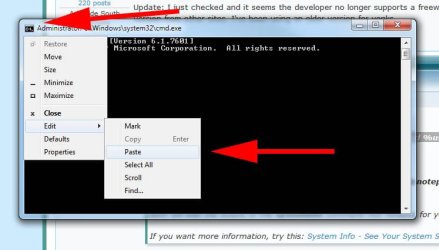
Highlight the text in bold in Ztruker's post, CTRL-C to copy. Open a cmd window, click the icon top L and go Edit Paste.

Hit enter - See snip

cmd_paste.jpg
 

My Computer My Computer

Computer type
PC/Desktop
Computer Manufacturer/Model Number
self build
OS
W10 Pro x64, W7 Pro x64 in VMware
CPU
i7 2600K @ 4.4GHz
Motherboard
MSI Z68A-GD80
Memory
8GB Mushkin @ 1600MHz
Graphics Card(s)
Nvidia GTX 750 Ti
Monitor(s) Displays
27" Benq + 27" LG
Screen Resolution
1080p
Hard Drives
500GB 850 Evo SSD + 3 * 2TB Seagate
PSU
EVGA 650 GS modular
Case
Antec 300
Cooling
Seidon 120V v2
Internet Speed
62/18 Mbps
Antivirus
Defender (W10) + MSE (W7)
Browser
Firefox
got it! thanks guys
 

My Computer My Computer

Computer type
PC/Desktop
Computer Manufacturer/Model Number
Custom
OS
Microsoft Windows 7 Professional 64-bit
CPU
5960X @ 4.4GHz
Motherboard
X99 SABERTOOTH
Memory
16.0 GB
Graphics Card(s)
NVIDIA GeForce GTX 980 Ti
Hard Drives
(1) OCZ-VERT EX460 SCSI Disk Device
(2) WDC WD1002FAEX-00Z3A SCSI Disk Device
(3) WDC WD1003FZEX-00MK2 SCSI Disk Device
Internet Speed
God Speed.
Antivirus
Glock 9
Back
Top