Stuck in startup repair loop and no safe mode access

Pigdog99

New member
Local time
7:20 AM
Messages
7
Im stuck in the repair loop. I was able to get into safemode before but now it always goes to the startup repair that cant be fixed. I get the error code 0x490. Also when it does the does the search for Windows it says its on E drive. Which is the drive letter of a 2nd HD. The main thing is my user accounts no longer show up. I cant find my user doc,pics etc. I can do the notepad/my computer from the cmd prompt and look at some files but all the main ones I need to save are gone. I have my Win7 install disk and have done most things suggested. So are all my files gone for good? I just wanted to try and get my docs, pics and all off and then just re install windows. Thanks-Chris
 

My Computer My Computer

At a glance

Windows 7 64 proIntel i5CorsairMsi 790
Computer type
PC/Desktop
Computer Manufacturer/Model Number
Custom
OS
Windows 7 64 pro
CPU
Intel i5
Motherboard
Asrock
Memory
Corsair
Graphics Card(s)
Msi 790
Hard Drives
Samsung ssd/seagateHHD
Antivirus
Trend micro malwarebytes
Browser
Internet Explorer
Hi Pigdog99, welcome to the Forum.

How many drive do have in that computer. Windows should be on C drive & not on E drive.

Have you recently reinstalled Windows with more than one drive connected to the motherboard. If so the installation of Windows often gets put on the wrong drive or the boot files get misplaced.

Have you had a look in the BIOS to see what the boot order is. Try setting the drive that should have Windows on it as the first in the boot order.

Report back with answers to these questions & any other info that you think could help.
 

My Computer My Computer

At a glance

Windows 7 Home Premium 64 bit sp1Intel i5 3570 3.4Ghz Ivy Bridge SKT 1155 quad...G-Skill Rip Jaws 16Gb (8x2) DDR3 -1600 PC3 12...Gigabyte NVIDIA GT610 1Gb DDR3 810/1200 PCI-E...
Computer type
PC/Desktop
Computer Manufacturer/Model Number
Self built using existing case
OS
Windows 7 Home Premium 64 bit sp1
CPU
Intel i5 3570 3.4Ghz Ivy Bridge SKT 1155 quad core
Motherboard
Gigabyte Z77-HD3 SKT 1155 2xSata 3, 4x USB 3.0
Memory
G-Skill Rip Jaws 16Gb (8x2) DDR3 -1600 PC3 12800 CL 10 red
Graphics Card(s)
Gigabyte NVIDIA GT610 1Gb DDR3 810/1200 PCI-E 2.0 Silent
Sound Card
NVIDIA High Definition & Realtech High Definition Audio
Monitor(s) Displays
2 x Philips 226V4L 16:9 aspect ratio
Screen Resolution
1920 x 1080 HD
Hard Drives
Samsung 840 Pro 256gb SSD, SATA 3.
Hitachi Touro Portable 1tb, USB 3.0 HDD used for image b/ups.
PSU
Corsair VS450
Case
Codeng
Cooling
PSU fan & CPU fan
Keyboard
Logitech
Mouse
Logitech Wireless trackball M570
Internet Speed
Wireless 3G. 3mg down & 550kb up.
Antivirus
Bitdefender Internet Security 2020
Browser
Opera (Current Version) & Firefox
Other Info
MS Office 2013 Pro. Davis weather station software. MGE Nova 600 avr UPS.
No I installed win7 on the ssd as c: the 2nd drive was added at a later time. I found it strange that it finds the os on E:and not C:. When using the DIR cmd it lists no files on c. Also if I type in D: and dir it lists files there. I never had a D: drive. I confirmed when I could get into safe mode that the windows files were on the C: drive which confused me on the repair screen it always listed the OS as on E:. I was able to do a full scan with Malwarebytes in safe mode before it stopped booting and it found nothing.
 

My Computer My Computer

At a glance

Windows 7 64 proIntel i5CorsairMsi 790
Computer type
PC/Desktop
Computer Manufacturer/Model Number
Custom
OS
Windows 7 64 pro
CPU
Intel i5
Motherboard
Asrock
Memory
Corsair
Graphics Card(s)
Msi 790
Hard Drives
Samsung ssd/seagateHHD
Antivirus
Trend micro malwarebytes
Browser
Internet Explorer
Have look at it by booting the win 7 install disk. Try running recovery options ( Repair My Computer) first. You can also launch notepad from the command prompt in the booted recovery environment.
 

My Computers My Computers

  • At a glance

    7 X64i5 84002x8gb 3200mhz
    Computer type
    PC/Desktop
    OS
    7 X64
    CPU
    i5 8400
    Motherboard
    gigabyte b365m ds3h
    Memory
    2x8gb 3200mhz
    Hard Drives
    various
    PSU
    pure power 11 400w cm
    Case
    Coolermaster
    Cooling
    cryorig m9i
  • At a glance

    7x64g54008gb ddr4 2400
    Computer type
    PC/Desktop
    OS
    7x64
    CPU
    g5400
    Motherboard
    ga b365m ds3h
    Memory
    8gb ddr4 2400
    PSU
    xfx pro 450w
Just to say that I had a similar problem a couple of months ago. Something screwed up MBR and resulted in a startup repair loop.

Tried the fix here:

Startup Repair Infinite Loop Recovery

It didn't work though. Solution was to boot into PE from USB and use a partition tool to fix drive letters then still in PE use the same partiton tool to wipe windows partition. That allowed me to restore backup of windows partition using Macrium Reflect USB. You might be able to copy files to another partition/ drive using PE.

I can't really give specific help though.
 

My Computer My Computer

At a glance

Microsoft Windows 7 Home Premium 64-bit 7601 ...AMD C-60 APU with Radeon(tm) HD Graphics4.00 GBAMD Radeon HD 6290 Graphics
Computer type
Laptop
Computer Manufacturer/Model Number
ASUS
OS
Microsoft Windows 7 Home Premium 64-bit 7601 Multiprocessor Free Service Pack 1
CPU
AMD C-60 APU with Radeon(tm) HD Graphics
Motherboard
ASUSTeK COMPUTER INC. X501U
Memory
4.00 GB
Graphics Card(s)
AMD Radeon HD 6290 Graphics
Sound Card
(1) AMD High Definition Audio Device (2) Realtek High Defi
Screen Resolution
1366 x 768 x 32 bits (4294967296 colors) @ 60 Hz
Hard Drives
Hitachi HTS545050A7E380 SATA Disk Device
Antivirus
Comodo CIS & FW, SecureAplus App Whitelisting, Threatfire
Browser
Cyberfox 64bit, Opera 64bit, Airfox
Other Info
Spy-The-Spy, HitmanPro.Alert, Norton Connect Safe, MJRegWatcher, BitDefender TrafficLight, Voodoo Shield, Zemana AntiMalware
Ive done the repair loop fix and that didnt work. The main problem is my user accounts are gone. All the docs, pics, saves, desktop files arent there. It only lists public as the only user. So why would my user files folders be gone but other windows files show up? So if I can use the notebook file open option does that show me all the files I can access? Is there any different paths for user files? Would booting a Rufus Usb allow you more file access in windows? I pretty much just need to find my user files and folders. If there not showing up then they must be gone.
 

My Computer My Computer

At a glance

Windows 7 64 proIntel i5CorsairMsi 790
Computer type
PC/Desktop
Computer Manufacturer/Model Number
Custom
OS
Windows 7 64 pro
CPU
Intel i5
Motherboard
Asrock
Memory
Corsair
Graphics Card(s)
Msi 790
Hard Drives
Samsung ssd/seagateHHD
Antivirus
Trend micro malwarebytes
Browser
Internet Explorer
Try creating a bootable USB with PE on it:

Make A Bootable USB Using AOMEI PE Builder

Boot using the USB then see what files you can find. Move important stuff to another partition of possible.

Also use the built in tools to check disk management and see which drives show up. Check drive letters and contents. If drive letters look wrong correct them using the partition tool. Note: If using the partition tool you need to make changes one at a time only and click the apply button before making any other change.
 

My Computer My Computer

At a glance

Microsoft Windows 7 Home Premium 64-bit 7601 ...AMD C-60 APU with Radeon(tm) HD Graphics4.00 GBAMD Radeon HD 6290 Graphics
Computer type
Laptop
Computer Manufacturer/Model Number
ASUS
OS
Microsoft Windows 7 Home Premium 64-bit 7601 Multiprocessor Free Service Pack 1
CPU
AMD C-60 APU with Radeon(tm) HD Graphics
Motherboard
ASUSTeK COMPUTER INC. X501U
Memory
4.00 GB
Graphics Card(s)
AMD Radeon HD 6290 Graphics
Sound Card
(1) AMD High Definition Audio Device (2) Realtek High Defi
Screen Resolution
1366 x 768 x 32 bits (4294967296 colors) @ 60 Hz
Hard Drives
Hitachi HTS545050A7E380 SATA Disk Device
Antivirus
Comodo CIS & FW, SecureAplus App Whitelisting, Threatfire
Browser
Cyberfox 64bit, Opera 64bit, Airfox
Other Info
Spy-The-Spy, HitmanPro.Alert, Norton Connect Safe, MJRegWatcher, BitDefender TrafficLight, Voodoo Shield, Zemana AntiMalware
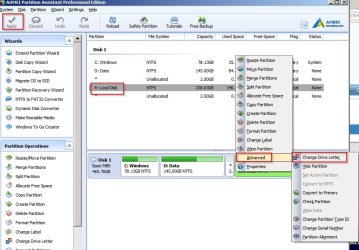
Check and change your incorrect drive letters one at a time:

Drive Letter.jpg

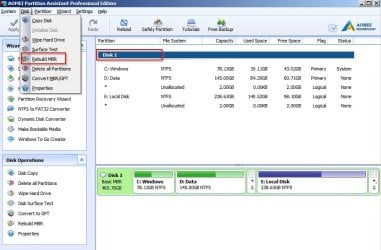
Then rebuild MBR:

MBR.jpg

Then shutdown and unplug USB. Boot and see if it boots into windows.
 
Last edited:

My Computer My Computer

At a glance

Microsoft Windows 7 Home Premium 64-bit 7601 ...AMD C-60 APU with Radeon(tm) HD Graphics4.00 GBAMD Radeon HD 6290 Graphics
Computer type
Laptop
Computer Manufacturer/Model Number
ASUS
OS
Microsoft Windows 7 Home Premium 64-bit 7601 Multiprocessor Free Service Pack 1
CPU
AMD C-60 APU with Radeon(tm) HD Graphics
Motherboard
ASUSTeK COMPUTER INC. X501U
Memory
4.00 GB
Graphics Card(s)
AMD Radeon HD 6290 Graphics
Sound Card
(1) AMD High Definition Audio Device (2) Realtek High Defi
Screen Resolution
1366 x 768 x 32 bits (4294967296 colors) @ 60 Hz
Hard Drives
Hitachi HTS545050A7E380 SATA Disk Device
Antivirus
Comodo CIS & FW, SecureAplus App Whitelisting, Threatfire
Browser
Cyberfox 64bit, Opera 64bit, Airfox
Other Info
Spy-The-Spy, HitmanPro.Alert, Norton Connect Safe, MJRegWatcher, BitDefender TrafficLight, Voodoo Shield, Zemana AntiMalware
Ok I'll try aomei pe. Ive downloaded on an older Windows 8.1 laptop and get the message "the signature of this program is corrupt or invaild" So I dont wanna try that. I wouldnt want any more computer problems.
 

My Computer My Computer

At a glance

Windows 7 64 proIntel i5CorsairMsi 790
Computer type
PC/Desktop
Computer Manufacturer/Model Number
Custom
OS
Windows 7 64 pro
CPU
Intel i5
Motherboard
Asrock
Memory
Corsair
Graphics Card(s)
Msi 790
Hard Drives
Samsung ssd/seagateHHD
Antivirus
Trend micro malwarebytes
Browser
Internet Explorer

My Computer My Computer

At a glance

Microsoft Windows 7 Home Premium 64-bit 7601 ...AMD C-60 APU with Radeon(tm) HD Graphics4.00 GBAMD Radeon HD 6290 Graphics
Computer type
Laptop
Computer Manufacturer/Model Number
ASUS
OS
Microsoft Windows 7 Home Premium 64-bit 7601 Multiprocessor Free Service Pack 1
CPU
AMD C-60 APU with Radeon(tm) HD Graphics
Motherboard
ASUSTeK COMPUTER INC. X501U
Memory
4.00 GB
Graphics Card(s)
AMD Radeon HD 6290 Graphics
Sound Card
(1) AMD High Definition Audio Device (2) Realtek High Defi
Screen Resolution
1366 x 768 x 32 bits (4294967296 colors) @ 60 Hz
Hard Drives
Hitachi HTS545050A7E380 SATA Disk Device
Antivirus
Comodo CIS & FW, SecureAplus App Whitelisting, Threatfire
Browser
Cyberfox 64bit, Opera 64bit, Airfox
Other Info
Spy-The-Spy, HitmanPro.Alert, Norton Connect Safe, MJRegWatcher, BitDefender TrafficLight, Voodoo Shield, Zemana AntiMalware
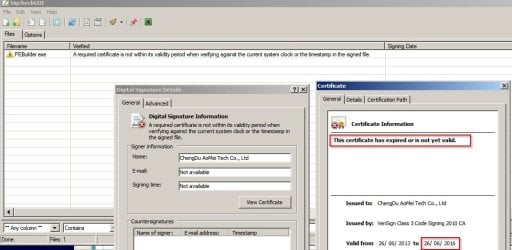
Okay I checked and the certificate has expired. They need to update it. The program should still work but I'm not really sure about using a PE Stick created on a windows 8 machine on windows 7. It's your call if you don't want to try it.

Certificate.jpg

On another note - fixing drive letters and MBR may or may not work.
 

My Computer My Computer

At a glance

Microsoft Windows 7 Home Premium 64-bit 7601 ...AMD C-60 APU with Radeon(tm) HD Graphics4.00 GBAMD Radeon HD 6290 Graphics
Computer type
Laptop
Computer Manufacturer/Model Number
ASUS
OS
Microsoft Windows 7 Home Premium 64-bit 7601 Multiprocessor Free Service Pack 1
CPU
AMD C-60 APU with Radeon(tm) HD Graphics
Motherboard
ASUSTeK COMPUTER INC. X501U
Memory
4.00 GB
Graphics Card(s)
AMD Radeon HD 6290 Graphics
Sound Card
(1) AMD High Definition Audio Device (2) Realtek High Defi
Screen Resolution
1366 x 768 x 32 bits (4294967296 colors) @ 60 Hz
Hard Drives
Hitachi HTS545050A7E380 SATA Disk Device
Antivirus
Comodo CIS & FW, SecureAplus App Whitelisting, Threatfire
Browser
Cyberfox 64bit, Opera 64bit, Airfox
Other Info
Spy-The-Spy, HitmanPro.Alert, Norton Connect Safe, MJRegWatcher, BitDefender TrafficLight, Voodoo Shield, Zemana AntiMalware
I did the download from their website the one you had a link to. Thanks much for taking the time to check it out and offer solutions. Spent the whole weekend messing around with the computers. I'll look into the other programs but the only other computer is a 8.1 crappy laptop.
 

My Computer My Computer

At a glance

Windows 7 64 proIntel i5CorsairMsi 790
Computer type
PC/Desktop
Computer Manufacturer/Model Number
Custom
OS
Windows 7 64 pro
CPU
Intel i5
Motherboard
Asrock
Memory
Corsair
Graphics Card(s)
Msi 790
Hard Drives
Samsung ssd/seagateHHD
Antivirus
Trend micro malwarebytes
Browser
Internet Explorer
Checked that page and load link is actually here:

Free Download AOMEI Software| Download AOMEI Backupper and Partition Assistant

RE: Your files. Maybe give this a go?

Emergency Kit - save your files from a dead OS - Windows 7 Help Forums

Personally I've not used that software but have used Knoppix and Puppy in the past. Currently I don't have any version of Linux lying around.

Just got done replying to your post on the other thread there. When not having any distro on hand the first place to go would be a site like SorceForge I mentioned on the other thread where you can look up each distro and then proceed to that particular distro's own home site for choosing the latest release. Linux Mint has been found an excellent replacement as a Debian build you can run live with or see run on VMs a bit larger but also packs in plenty of a bit more Windows to Linux user friendly things like the media player. The installer packages are a bit easier these days as well as compared to years past since manual installations are best left for the "Linux Geeks" if you follow the drift?!

Ubuntu has continued on as well with many favoring Ubuntu for Ubuntu compatible apps when going to multiple OSs. The freeware ISO burning/writing apps linked on the other thread are always good to keep on hand since I been seeing Bootable flash drives for Vista as well as 7 and 10 along with various distros over the years for live repairs as well as live data recovery.
 

My Computers My Computers

  • At a glance

    W7 Ultimate x64/W10 Pro x64/W11 Pro Triple Bo...AMD Phenom II X4 975 Deneb 3.6ghz - 965 2nd r...Kingston Hyper X DDR3 1600 1.5v 16gb - Hyper ...MSI HD Radeon 5750 1gb - MSI HD Radeon 6450 o...
    Computer type
    PC/Desktop
    Computer Manufacturer/Model Number
    Custom builds = 2
    OS
    W7 Ultimate x64/W10 Pro x64/W11 Pro Triple Boot - Main PC W7 Remote PC Micro ATX W7 Pro x64/W11 Pro
    CPU
    AMD Phenom II X4 975 Deneb 3.6ghz - 965 2nd remote pc
    Motherboard
    Gigabyte GA-790XTA-UD4-Gigabyte GA-880GM-D2H remote pc
    Memory
    Kingston Hyper X DDR3 1600 1.5v 16gb - Hyper X Fury 8gb 2nd
    Graphics Card(s)
    MSI HD Radeon 5750 1gb - MSI HD Radeon 6450 on mini tower
    Sound Card
    Creative Labs X-Fi Xtreme Audio P - Realtek onooard 2nd case
    Monitor(s) Displays
    ASUS VW199T-P 19" HP 2082a Main-HP 2082a 20" remote pc
    Screen Resolution
    Asus 1440x900 - HP 1600x900
    Hard Drives
    WD Black 1TB HD per OS W7, W10, and pending W11 presently on 500gb OS Drive - Pending Triple 1TB HDs for Spanned Storage/backup volume
    Single 2TB external USB enclosure, single 1TB System 7 Host/Boot drive, Pending 8TB external HD for system image b
    PSU
    Corsair 750TX - primary / Corsair CX600 - second
    Case
    Antec 900-2 - SSD compatible / NZXT Vulcan mini tower
    Cooling
    Zalman CNPS9900A
    Keyboard
    AZIO L70 Backlit Letters Gaming - ONN Cordless/USB
    Mouse
    MSI DS200 Programmable, Logitech Cordless
    Internet Speed
    30mbps upgrade - primary hard wired - mini tower usb WiFi
    Antivirus
    GFI VIPRE Internet Security 2014 on W7 2016 beta on W10,
    Browser
    Cyberfox, WaterFox 64bit FF variants, FireFox x64, Pale Moon
    Other Info
    Accomdata fan cooled usb 2.0 PIDE/Sata II, III external enclosure.
    Sambient usb/eSata PATA/Sata II, III external enclosure.
  • At a glance

    W7 Pro x64/W11 ProAMD Deneb 3.6ghz - 965Kingston Hyper X Fury 8gbMSI HD Radeon 6450 DVI Output
    Computer type
    PC/Desktop
    System Manufacturer/Model Number
    CUSTOM ASSEMBLY
    OS
    W7 Pro x64/W11 Pro
    CPU
    AMD Deneb 3.6ghz - 965
    Motherboard
    Gigabyte GA-880GM-D2H remote pc
    Memory
    Kingston Hyper X Fury 8gb
    Graphics Card(s)
    MSI HD Radeon 6450 DVI Output
    Sound Card
    Realtek onooard Creative or Other separate PENDING
    Monitor(s) Displays
    VIZIO 32" LCD TV Separate LCD Pending
    Screen Resolution
    1600x1080
    Hard Drives
    WD 500GB OS Host/Boot WD Green 1TB Storage/Backup
    PSU
    Corsair 600W - THERMALTAKE 600W spare case
    Case
    NZXT Vulcan mini tower
    Cooling
    Twin 120mm Top Fans - 240mm Side Cover
    Keyboard
    ONN Cordless/USB Logitech Cordless
    Mouse
    ONN USB/Cordless - Logitech Cordless
    Internet Speed
    DSL 5G
    Browser
    MS Edge, FireFox, WaterFox x64, FireFox Nightly
    Other Info
    OS Testing-Remote Access to Main TeamViewer
Just wanted to update. I was able to get linux puppy on a bootable USB. My user files from the HD were gone. I had to take the comp in and pay to get my files recovered. Its been a painfull lesson in doing backups. Thanks again for the info help.
 

My Computer My Computer

At a glance

Windows 7 64 proIntel i5CorsairMsi 790
Computer type
PC/Desktop
Computer Manufacturer/Model Number
Custom
OS
Windows 7 64 pro
CPU
Intel i5
Motherboard
Asrock
Memory
Corsair
Graphics Card(s)
Msi 790
Hard Drives
Samsung ssd/seagateHHD
Antivirus
Trend micro malwarebytes
Browser
Internet Explorer
8.1 versus W10 labtop I would agree is a "Lost Cause" for sure! On the other hand however the ability to recover files using the alternative OS's capabilities during a live boot from usb type session can be just that an effective tool when you... OOPS! SO SORRY... Did Not See that ANY Methods of Backing things up was put in use prior to any type of mishap? A GOOD working Backup plan is precisely what CAN Save You on a worst day! F

ollow the guides for this in the Tutorial section before you run into anything like this again is the solid "Word of Advice" to follow! After decades of dealing with this stuff I still find circumstances Where IF I had not Backed Things UP! would now be shaking my head saying Why Didn't I do just that?! Pigdog99 Take Heed of the Lesson to be Learned! Too many of us have already been caught off guard having NOT done full backups in years past and have also learned some Hard Lessons!
 

My Computers My Computers

  • At a glance

    W7 Ultimate x64/W10 Pro x64/W11 Pro Triple Bo...AMD Phenom II X4 975 Deneb 3.6ghz - 965 2nd r...Kingston Hyper X DDR3 1600 1.5v 16gb - Hyper ...MSI HD Radeon 5750 1gb - MSI HD Radeon 6450 o...
    Computer type
    PC/Desktop
    Computer Manufacturer/Model Number
    Custom builds = 2
    OS
    W7 Ultimate x64/W10 Pro x64/W11 Pro Triple Boot - Main PC W7 Remote PC Micro ATX W7 Pro x64/W11 Pro
    CPU
    AMD Phenom II X4 975 Deneb 3.6ghz - 965 2nd remote pc
    Motherboard
    Gigabyte GA-790XTA-UD4-Gigabyte GA-880GM-D2H remote pc
    Memory
    Kingston Hyper X DDR3 1600 1.5v 16gb - Hyper X Fury 8gb 2nd
    Graphics Card(s)
    MSI HD Radeon 5750 1gb - MSI HD Radeon 6450 on mini tower
    Sound Card
    Creative Labs X-Fi Xtreme Audio P - Realtek onooard 2nd case
    Monitor(s) Displays
    ASUS VW199T-P 19" HP 2082a Main-HP 2082a 20" remote pc
    Screen Resolution
    Asus 1440x900 - HP 1600x900
    Hard Drives
    WD Black 1TB HD per OS W7, W10, and pending W11 presently on 500gb OS Drive - Pending Triple 1TB HDs for Spanned Storage/backup volume
    Single 2TB external USB enclosure, single 1TB System 7 Host/Boot drive, Pending 8TB external HD for system image b
    PSU
    Corsair 750TX - primary / Corsair CX600 - second
    Case
    Antec 900-2 - SSD compatible / NZXT Vulcan mini tower
    Cooling
    Zalman CNPS9900A
    Keyboard
    AZIO L70 Backlit Letters Gaming - ONN Cordless/USB
    Mouse
    MSI DS200 Programmable, Logitech Cordless
    Internet Speed
    30mbps upgrade - primary hard wired - mini tower usb WiFi
    Antivirus
    GFI VIPRE Internet Security 2014 on W7 2016 beta on W10,
    Browser
    Cyberfox, WaterFox 64bit FF variants, FireFox x64, Pale Moon
    Other Info
    Accomdata fan cooled usb 2.0 PIDE/Sata II, III external enclosure.
    Sambient usb/eSata PATA/Sata II, III external enclosure.
  • At a glance

    W7 Pro x64/W11 ProAMD Deneb 3.6ghz - 965Kingston Hyper X Fury 8gbMSI HD Radeon 6450 DVI Output
    Computer type
    PC/Desktop
    System Manufacturer/Model Number
    CUSTOM ASSEMBLY
    OS
    W7 Pro x64/W11 Pro
    CPU
    AMD Deneb 3.6ghz - 965
    Motherboard
    Gigabyte GA-880GM-D2H remote pc
    Memory
    Kingston Hyper X Fury 8gb
    Graphics Card(s)
    MSI HD Radeon 6450 DVI Output
    Sound Card
    Realtek onooard Creative or Other separate PENDING
    Monitor(s) Displays
    VIZIO 32" LCD TV Separate LCD Pending
    Screen Resolution
    1600x1080
    Hard Drives
    WD 500GB OS Host/Boot WD Green 1TB Storage/Backup
    PSU
    Corsair 600W - THERMALTAKE 600W spare case
    Case
    NZXT Vulcan mini tower
    Cooling
    Twin 120mm Top Fans - 240mm Side Cover
    Keyboard
    ONN Cordless/USB Logitech Cordless
    Mouse
    ONN USB/Cordless - Logitech Cordless
    Internet Speed
    DSL 5G
    Browser
    MS Edge, FireFox, WaterFox x64, FireFox Nightly
    Other Info
    OS Testing-Remote Access to Main TeamViewer
Back
Top