Solved I am looking for software to scan my drives for every photo on them.

Mike Lynch

New member
Pro User
VIP
Local time
3:21 PM
Messages
958
Location
Clearwater Florida
I am looking for software to scan my drives for every photo on them.


I have many drives with photos on them, scattered in many files.
Perhaps there are duplicates on them, I do not care.
I just want to be able to accumulate single photos from every drive, regardless if it's a duplicate or not.
Once I have them all in one place on disk, then I will worry about eliminating duplicates.

If any Forum use could "recommend" a program that would do this for me, I would appreciate it.

I originally had this post on Software but did not get any reply's.

Mike Lynch


- - - Updated - - -

Please help if you can.
 

My Computer My Computer

At a glance

Microsoft Windows 7 Professional 64-bit 7601 ...Intel(R) Core(TM) i7-3770 CPU @ 3.40GHz8.00 GBIntel(R) HD Graphics 4000
Computer type
PC/Desktop
Computer Manufacturer/Model Number
Two HP Desktops. One in the Laundry Room / Bed Room.
OS
Microsoft Windows 7 Professional 64-bit 7601 Multiprocessor Free Service Pack 1
CPU
Intel(R) Core(TM) i7-3770 CPU @ 3.40GHz
Motherboard
Hewlett-Packard 3396
Memory
8.00 GB
Graphics Card(s)
Intel(R) HD Graphics 4000
Sound Card
(1) Realtek High Definition Audio (2) Intel(R) Display Aud
Monitor(s) Displays
Hanns-G
Screen Resolution
1440 x 900 x 32 bits (4294967296 colors) @ 59 Hz
Hard Drives
(1) ATA WDC WD40EZRX-00S SCSI Disk Device (2) HP Officejet Pro 86 USB Device (3) WD My Book 1230 USB Device
PSU
Whatever came with the CMT.
Case
HP CMT Black.
Cooling
Whatever came with the CMT.
Keyboard
Logitech K740.
Mouse
Microsoft Optical Mouse 1000.
Internet Speed
Spectrum 25Mbs.
Antivirus
WebRoot, Microsoft Security Essentials.
Browser
EDGE
Other Info
HP Officejet Pro 8600 Plus.
WD MyBook 4TB.
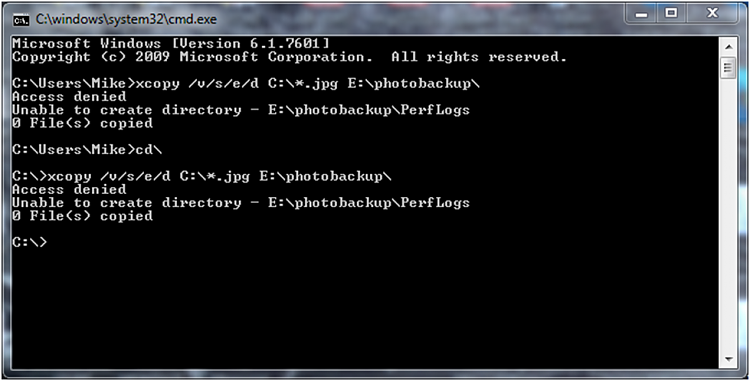
did you try xcopy /cheriky

if you enter kind:=picture in explorer search box.

picture.jpg

might take a while if you have several disks attached
 

My Computers My Computers

  • At a glance

    7 X64i5 84002x8gb 3200mhz
    Computer type
    PC/Desktop
    OS
    7 X64
    CPU
    i5 8400
    Motherboard
    gigabyte b365m ds3h
    Memory
    2x8gb 3200mhz
    Hard Drives
    various
    PSU
    pure power 11 400w cm
    Case
    Coolermaster
    Cooling
    cryorig m9i
  • At a glance

    7x64g54008gb ddr4 2400
    Computer type
    PC/Desktop
    OS
    7x64
    CPU
    g5400
    Motherboard
    ga b365m ds3h
    Memory
    8gb ddr4 2400
    PSU
    xfx pro 450w
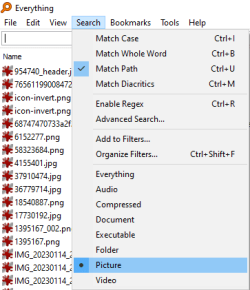
Run the program Everything.exe linked to in my signature below. In Everything.exe check off this option shown in my screenshot.

image.png
 

My Computer My Computer

At a glance

Windows 7 Ultimate x64
Computer type
PC/Desktop
OS
Windows 7 Ultimate x64
A very old friend was found.

It was good to see her again.

Thank you!
 

Attachments

  • 2-5-15 Smaller.jpg
    2-5-15 Smaller.jpg
    125.7 KB · Views: 0

My Computer My Computer

At a glance

Microsoft Windows 7 Professional 64-bit 7601 ...Intel(R) Core(TM) i7-3770 CPU @ 3.40GHz8.00 GBIntel(R) HD Graphics 4000
Computer type
PC/Desktop
Computer Manufacturer/Model Number
Two HP Desktops. One in the Laundry Room / Bed Room.
OS
Microsoft Windows 7 Professional 64-bit 7601 Multiprocessor Free Service Pack 1
CPU
Intel(R) Core(TM) i7-3770 CPU @ 3.40GHz
Motherboard
Hewlett-Packard 3396
Memory
8.00 GB
Graphics Card(s)
Intel(R) HD Graphics 4000
Sound Card
(1) Realtek High Definition Audio (2) Intel(R) Display Aud
Monitor(s) Displays
Hanns-G
Screen Resolution
1440 x 900 x 32 bits (4294967296 colors) @ 59 Hz
Hard Drives
(1) ATA WDC WD40EZRX-00S SCSI Disk Device (2) HP Officejet Pro 86 USB Device (3) WD My Book 1230 USB Device
PSU
Whatever came with the CMT.
Case
HP CMT Black.
Cooling
Whatever came with the CMT.
Keyboard
Logitech K740.
Mouse
Microsoft Optical Mouse 1000.
Internet Speed
Spectrum 25Mbs.
Antivirus
WebRoot, Microsoft Security Essentials.
Browser
EDGE
Other Info
HP Officejet Pro 8600 Plus.
WD MyBook 4TB.

everything is faster than windows search. :-)
 

My Computers My Computers

  • At a glance

    7 X64i5 84002x8gb 3200mhz
    Computer type
    PC/Desktop
    OS
    7 X64
    CPU
    i5 8400
    Motherboard
    gigabyte b365m ds3h
    Memory
    2x8gb 3200mhz
    Hard Drives
    various
    PSU
    pure power 11 400w cm
    Case
    Coolermaster
    Cooling
    cryorig m9i
  • At a glance

    7x64g54008gb ddr4 2400
    Computer type
    PC/Desktop
    OS
    7x64
    CPU
    g5400
    Motherboard
    ga b365m ds3h
    Memory
    8gb ddr4 2400
    PSU
    xfx pro 450w
@S1W2...
I've been using Everything for a few years and I never even noticed the "Search" function in the Menu bar...:eek: much less the screen you posted.

Makes using Everything even better! Thank you!
 

My Computer My Computer

At a glance

Windows 7 Home Premium, 64 bit6 GB
Computer type
Laptop
Computer Manufacturer/Model Number
Toshiba
OS
Windows 7 Home Premium, 64 bit
Memory
6 GB
Hard Drives
500 GB
Mouse
Wireless mouse
Browser
Firefox
It was a struggle to create Removable Media for W10.

It appears that a non-double layer DVD is too small.
I tried but no cigar.
Being antiquated and a novice, I searched through all my non-written DVD's and found 8 of 30 unused.
I popped one in and started the Burn.
After about 45 minutes, I received a Failure Message, please see the Attachment One.
I researched the Error Code which asked me to "Disable Third party Antivirus".
Well, I was afraid to do that and would have had to figure out how.
I started searching again for a 16GB Thumb Drive to try the DVD alternative.
I found one which had photos of a trip to Alaska I took over a decade ago.
I moved the photos to a Desktop Folder and formatted the Thumb Drive.
Again, after about 45 minutes the Thumb Drive creation ended but this time successfully, please see Attachment Two.
It seems strange to me that Microsoft would wait until the end of writing the DVD to check for a Third party Antivirus.
Why not do that first and save the User 45 minutes and avoid creating a DVD Coaster?

Thanks to everyone who responded.

Mike Lynch

PS I do not understand why Attachment Two fails to appear in my Post?


  • png.gif
    Capture DVD Failed.PNG (14.2 KB)
  • docx.gif
    Error code 0x80004005.docx (11.4 KB)
 

Attachments

Last edited:

My Computer My Computer

At a glance

Microsoft Windows 7 Professional 64-bit 7601 ...Intel(R) Core(TM) i7-3770 CPU @ 3.40GHz8.00 GBIntel(R) HD Graphics 4000
Computer type
PC/Desktop
Computer Manufacturer/Model Number
Two HP Desktops. One in the Laundry Room / Bed Room.
OS
Microsoft Windows 7 Professional 64-bit 7601 Multiprocessor Free Service Pack 1
CPU
Intel(R) Core(TM) i7-3770 CPU @ 3.40GHz
Motherboard
Hewlett-Packard 3396
Memory
8.00 GB
Graphics Card(s)
Intel(R) HD Graphics 4000
Sound Card
(1) Realtek High Definition Audio (2) Intel(R) Display Aud
Monitor(s) Displays
Hanns-G
Screen Resolution
1440 x 900 x 32 bits (4294967296 colors) @ 59 Hz
Hard Drives
(1) ATA WDC WD40EZRX-00S SCSI Disk Device (2) HP Officejet Pro 86 USB Device (3) WD My Book 1230 USB Device
PSU
Whatever came with the CMT.
Case
HP CMT Black.
Cooling
Whatever came with the CMT.
Keyboard
Logitech K740.
Mouse
Microsoft Optical Mouse 1000.
Internet Speed
Spectrum 25Mbs.
Antivirus
WebRoot, Microsoft Security Essentials.
Browser
EDGE
Other Info
HP Officejet Pro 8600 Plus.
WD MyBook 4TB.
Back
Top