double shortcuts

reasoner

New member
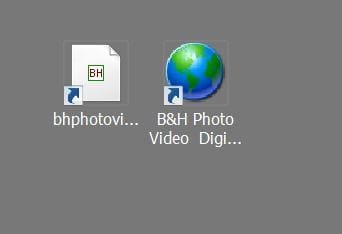
When I create a shortcut on my W7 desktop, I always get two shortcuts: one is a white square with a faint white line framing it (this shortcut is active), and the second is a green globe which cannot connect to the designated site.

How can I lose the green globe short cut?

and

Why is the graphic on the white short cut so small? How can I increase the graphic size?

Thanks - bitraker
 

My Computer

Computer Manufacturer/Model Number
Dell
OS
Win7 64
CPU
Dell 2.8 Intel Dual Core
Memory
Dell 8G
Graphics Card(s)
NVideo 260
Sound Card
Delta 2496
Monitor(s) Displays
3 flat panels
Hard Drives
many

My Computer

Computer Manufacturer/Model Number
Dell XPS420
OS
Vista Ult 64 bit Seven Ult RTM x64
CPU
Intel Core2 Quad Q6600 2.40 gigahertz
Memory
Crucial Ballistix 4x2GB PC2 6400
Graphics Card(s)
NVIDIA GeForce 8600 GTS 256 MB
Sound Card
Creative SB X-Fi audio
Monitor(s) Displays
HP w2207 + HPvs15
Screen Resolution
1680x1050 + 1024x768
Hard Drives
2-WD5000AAKS-500 GB
WD5000AAV-500 GB external
Keyboard
Microsoft Comfort Curve
Mouse
MX Revolution
Other Info
Wacom Intuos 2 Graphics Tablet
Experience Index=5.5

My Computer

Computer type
PC/Desktop
Computer Manufacturer/Model Number
Dell XPS 420
OS
Windows 10, Home Clean Install
CPU
Intel Core2 processsor Q8200(2.33Ghz 1333FSB) Quad Core Tech
Motherboard
Dell
Memory
6 gb
Graphics Card(s)
ATI Radeon 256MB HD3650
Sound Card
Intergrated 7.1 Channel Audio
Monitor(s) Displays
Dell SP2009W 20"
Hard Drives
640 GB Serial ATA Hard drive
Cooling
Fan
Keyboard
Dell USB Keyboard
Mouse
Dell Premium Optical USB
Internet Speed
DSL 2.85
shortcuts - one good, one bad

I've attached a screen shot to illustrate

I get the white square shortcut first - it is active

seconds later I get the green globe shortcut - when I click on it I get a dialogue box that says "invalid shortcut" - so I have to delete it

I tried the hidden folders etc., thanks, but the problem persists.

sorry for the late response

any help greatly appreciated

bruce
 

Attachments

  • double shortcuts.JPG
    double shortcuts.JPG
    12.9 KB · Views: 6

My Computer

Computer Manufacturer/Model Number
Dell
OS
Win7 64
CPU
Dell 2.8 Intel Dual Core
Memory
Dell 8G
Graphics Card(s)
NVideo 260
Sound Card
Delta 2496
Monitor(s) Displays
3 flat panels
Hard Drives
many
The one with the white background is the new IE8 shortcut with the "FavIcon" graphic in the center.

The tiny tiny graphic on the huge white page is new to Windows 7 and is an irritation to me personally. Previously the FavIcon would cover the entire icon but I think that that was seen as a secuirty issue. Some malicious website could install a FavIcon that mimiced a windows program or something to make you click it :P

But anyway as for the second issue... it's not normal, I'd guess an IE plugin, virus program or other desktop "helper" program (icon arranger etc) or possibly even a virus itself is causing it.
 

My Computer

Computer Manufacturer/Model Number
Scratch built
OS
Windows 7 x64 Ultimate
CPU
i7 960
Motherboard
Asus P6X58D
Memory
12 Gig Corsair Dominator
Graphics Card(s)
Nvidia 480
Sound Card
Maudio Delta 44 + breakout box
Monitor(s) Displays
Dell UltraSharp U2410 24in and Samsung 21 dual monitors
Screen Resolution
1920x1200 and 1280x1024
Hard Drives
Primary: Intel X-25M G2 160G SSD
Secondary: Segate baracuda 1.0 TB
HDs in AHCI mode.
PSU
Corasair TX850
Case
Cooler Master HAF
Cooling
Corsair H50
Keyboard
Logitech G15 + N52 game pad
Mouse
Logitech MX518
Internet Speed
15kbs down 4.5kbps up
Other Info
WEI 7.6
CPU & RAM 7.6
Graphics 7.9
Hard disk 7.7
It's not a virus because I have two shortcuts to Amazon.com on 'hold'
 

Attachments

  • web pages shortcut.jpg
    web pages shortcut.jpg
    5.4 KB · Views: 516

My Computer

Computer type
PC/Desktop
Computer Manufacturer/Model Number
Bruce ... somewhere in his 40's
OS
Windows 7 Ultimate 32bit SP1
CPU
Intel(R) Core(TM)2 Quad CPU @ 2.40GHz, 2400 MHz
Motherboard
INTEL/D975XBX2
Memory
4 GB
Graphics Card(s)
ATI Radeon HD 2600 Pro
Monitor(s) Displays
Samsung SyncMaster 914v
Screen Resolution
1280 x 1024
Hard Drives
2/500GB each ... ST3500630AS ATA Device.
One is not connected
PSU
Rocketfish 700 W
Case
G.Skill Gigabyte Chassis
Keyboard
Standard PS/2 Keyboard
Mouse
Microsoft PS/2 Mouse
Internet Speed
DSL
Antivirus
Avira Internet Security
Browser
IE 11
Other Info
ATI HDMI Audio
If you can/don't mind can you pose the exact URL of one that causes it? Maybe there's something "extra" going on at some sites? Some IIS/IE8 integration or something (speaking of FavIcon). I'll test at home...
 

My Computer

Computer Manufacturer/Model Number
Scratch built
OS
Windows 7 x64 Ultimate
CPU
i7 960
Motherboard
Asus P6X58D
Memory
12 Gig Corsair Dominator
Graphics Card(s)
Nvidia 480
Sound Card
Maudio Delta 44 + breakout box
Monitor(s) Displays
Dell UltraSharp U2410 24in and Samsung 21 dual monitors
Screen Resolution
1920x1200 and 1280x1024
Hard Drives
Primary: Intel X-25M G2 160G SSD
Secondary: Segate baracuda 1.0 TB
HDs in AHCI mode.
PSU
Corasair TX850
Case
Cooler Master HAF
Cooling
Corsair H50
Keyboard
Logitech G15 + N52 game pad
Mouse
Logitech MX518
Internet Speed
15kbs down 4.5kbps up
Other Info
WEI 7.6
CPU & RAM 7.6
Graphics 7.9
Hard disk 7.7
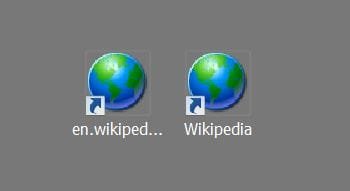
now the shortcut icons are the same design

I tested again using Wikipedia

the shortcut on the left is active, the one of the right is invalid: they appeared simultaneously

the URL for the active one is

http://en.wikipedia.org/wiki/Main_Page

b
 

Attachments

  • Capture.JPG
    Capture.JPG
    12.4 KB · Views: 7

My Computer

Computer Manufacturer/Model Number
Dell
OS
Win7 64
CPU
Dell 2.8 Intel Dual Core
Memory
Dell 8G
Graphics Card(s)
NVideo 260
Sound Card
Delta 2496
Monitor(s) Displays
3 flat panels
Hard Drives
many
Hello Bitraker,

How are you creating these internet shortcuts?

When I right click on a empty space on the website and click on Create Shortcut and Yes for it to be created on the desktop, I only get one shortcut. Another alternative is to create the internet shortcut using this as well.

http://www.sevenforums.com/tutorials/60274-internet-website-shortcut-create.html

Hope this helps some for now,
Shawn
 

My Computer

Computer type
PC/Desktop
Computer Manufacturer/Model Number
Self built custom
OS
64-bit Windows 11 Pro for Workstations
CPU
Intel i7-8700K OC'd to 5 GHz
Motherboard
ASUS ROG Maximus XI Formula Z390
Memory
64 GB (4x16GB) G.SKILL TridentZ RGB DDR4 3600 MHz
Graphics Card(s)
ASUS ROG-STRIX-GTX1080TI-O11G-GAMING
Sound Card
Integrated
Monitor(s) Displays
2 x Samsung Odyssey G7 27"
Screen Resolution
2560x1440
Hard Drives
1TB Samsung 990 PRO M.2,
4TB Samsung 990 PRO PRO M.2,
TerraMaster F8 SSD Plus NAS
PSU
Seasonic Prime Titanium 850W
Case
Thermaltake Core P3
Cooling
Corsair Hydro H115i
Keyboard
Logitech wireless K800
Mouse
Logitech MX Master 4
Internet Speed
2 Gb/s Download and 100 Mb/s Upload
Antivirus
Malwarebyte Anti-Malware Premium
Browser
Google Chrome
Other Info
Logitech Z625 speaker system,
Logitech BRIO 4K Pro webcam,
HP Color LaserJet Pro MFP M477fdn,
APC SMART-UPS RT 1000 XL - SURT1000XLI,
Galaxy S23 Plus phone
Hi

I am using the method you first described - worked great in XP: right click on the site, select create shortcut, hit yes, voila.

I did so on the blank white space under your message and got two shortcuts as before.

I'll try the other method.

bitraker
 

My Computer

Computer Manufacturer/Model Number
Dell
OS
Win7 64
CPU
Dell 2.8 Intel Dual Core
Memory
Dell 8G
Graphics Card(s)
NVideo 260
Sound Card
Delta 2496
Monitor(s) Displays
3 flat panels
Hard Drives
many
I tweaked W7 using

***LINK REMOVED***

and the double-icons are gone....

next day

spoke too soon, seems there is a lag time between creating a shortcut and getting its invalid ghost...


bitraker
 
Last edited:

My Computer

Computer Manufacturer/Model Number
Dell
OS
Win7 64
CPU
Dell 2.8 Intel Dual Core
Memory
Dell 8G
Graphics Card(s)
NVideo 260
Sound Card
Delta 2496
Monitor(s) Displays
3 flat panels
Hard Drives
many
Back
Top