

hwy
New member
- Local time
- 8:13 AM
- Messages
- 4
Hello  I've posted this at another forum but they didn't have any answers at all, so I'm coming to you guys and I really hope someone can shed some light onto this.
My level of experience is beginner to intermediate, depending. I've copied and pasted from the previous forum as it's set up neatly:
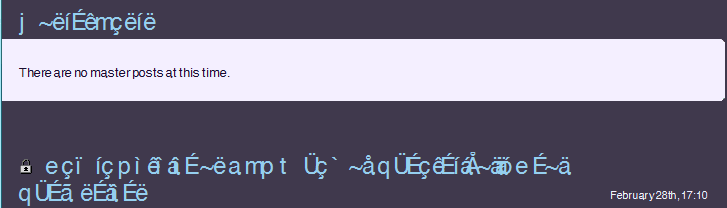
Problem: I naively replaced my current fonts folder with a backup from my Windows 7 RTM build fonts folder -- as I had just upgraded. Now, firefox is incorrectly displaying Helvetica (I believe that's the culprit) font at larger/normal size and not reverting to Arial once I remove Helvetica. Cyrillic characters show instead of the actual text, unless I zoom out the font.
Operating System, Version and Service Pack: Windows 7 Ultimate.
Web Browser and Version: Firefox 3.5.8 (3.6 does the same thing, so I just reverted back so I can at least use my theme).
Your level of experience: Intermediate-ish. I know my way around the PC and know how to do most troubleshooting things.
When did the problem start? Has it been going on constantly since then? It started yesterday after re-installing Windows 7 (installed a new mb, cpu and hdd) and then installing Firefox, as well as a copy of my old Fonts folder (the latter never caused trouble when I first went to Windows 7 last October).
Any steps you've taken to troubleshoot? I've attempted to remove Helvetica (as well as Helvetica Neue -- the latter which I cannot delete because it is 'in use), Arial, Calibri and any other potential 'corrupt' fonts that the Firefox tech help forum said 'could' be the culprit, rebooted. Still nothing. Deleted FNTCACHE.dat, rebooted. Nothing. Upgraded Firefix to 3.6, nothing. Updated motherboard and graphics drivers. I'm at a loss.
It happens on WoW_Ladies: Girl Gamers of World of Warcraft (yes I'm a Warcraft player ;p), Twitter, Tumblr and any site using Helvetica, Calibri, Myriad Pro, etc. I also have ran a font checking program that's saying 80% of my fonts are corrupt, not installed properly or not entered in the registry.
I just want to replace my current fonts folder with the old one, since I cannot delete any fonts. I have a disc I can do a repair install on, if that will work.
Screenshot uploaded below. Thank you to anyone that can help. I've been banging my head over this for a week no to no avail.
I've posted this at another forum but they didn't have any answers at all, so I'm coming to you guys and I really hope someone can shed some light onto this.My level of experience is beginner to intermediate, depending. I've copied and pasted from the previous forum as it's set up neatly:
Problem: I naively replaced my current fonts folder with a backup from my Windows 7 RTM build fonts folder -- as I had just upgraded. Now, firefox is incorrectly displaying Helvetica (I believe that's the culprit) font at larger/normal size and not reverting to Arial once I remove Helvetica. Cyrillic characters show instead of the actual text, unless I zoom out the font.
Operating System, Version and Service Pack: Windows 7 Ultimate.
Web Browser and Version: Firefox 3.5.8 (3.6 does the same thing, so I just reverted back so I can at least use my theme).
Your level of experience: Intermediate-ish. I know my way around the PC and know how to do most troubleshooting things.
When did the problem start? Has it been going on constantly since then? It started yesterday after re-installing Windows 7 (installed a new mb, cpu and hdd) and then installing Firefox, as well as a copy of my old Fonts folder (the latter never caused trouble when I first went to Windows 7 last October).
Any steps you've taken to troubleshoot? I've attempted to remove Helvetica (as well as Helvetica Neue -- the latter which I cannot delete because it is 'in use), Arial, Calibri and any other potential 'corrupt' fonts that the Firefox tech help forum said 'could' be the culprit, rebooted. Still nothing. Deleted FNTCACHE.dat, rebooted. Nothing. Upgraded Firefix to 3.6, nothing. Updated motherboard and graphics drivers. I'm at a loss.
It happens on WoW_Ladies: Girl Gamers of World of Warcraft (yes I'm a Warcraft player ;p), Twitter, Tumblr and any site using Helvetica, Calibri, Myriad Pro, etc. I also have ran a font checking program that's saying 80% of my fonts are corrupt, not installed properly or not entered in the registry.
I just want to replace my current fonts folder with the old one, since I cannot delete any fonts. I have a disc I can do a repair install on, if that will work.
Screenshot uploaded below. Thank you to anyone that can help. I've been banging my head over this for a week no to no avail.
Attachments
My Computer
At a glance
Windows 7 UltimateAMD Sempron 140 Processor SDX140HBGQBOX2.00 GBNvidia GeForce 8400
- OS
- Windows 7 Ultimate
- CPU
- AMD Sempron 140 Processor SDX140HBGQBOX
- Motherboard
- ASUS M2N68-AM SE2
- Memory
- 2.00 GB
- Graphics Card(s)
- Nvidia GeForce 8400
- Sound Card
- Onboard
- Monitor(s) Displays
- Acer 21"
- Screen Resolution
- 1680x1050
- Hard Drives
- Seagate Barracuda 120gb
Seagate Barracude 80gb
Seagate Barracude 7200.12 500gb
- Case
- Compaq
- Keyboard
- Compaq
- Mouse
- Logitech G3


