can i get full 4 Gb RAM for my specifications?

Sorry to say that after half an hour of searching the consensus is that it can't be done in Vista/7. Shared system memory is now controlled by the OS, not the video card driver. It can be done in XP, but you have 4gigs of RAM, so there would be no point. It still seems odd that there is not a registry change that can do it. It looks like a lot of really smart people have tried and failed. Sorry for making you think I could help when I can't *hangs head in sham*

dats ok,i appreciate dat u al are trying so much to find the solution..thanx to all

Btw, even if its a 512 Mb card and it uses another 512 Mb of my RAM, why would it show total 1778 Mb in dxdiag? shouldn it be limited to 1 Gb only?
 

My Computer My Computer

At a glance

windows 7 ultimateintel core2duo e45004 gb DDR2nvidia geforce 6400 1 gb
OS
windows 7 ultimate
CPU
intel core2duo e4500
Motherboard
gigabyte 945gcm-s2c
Memory
4 gb DDR2
Graphics Card(s)
nvidia geforce 6400 1 gb
Since 7 is handling the shared memory, it might just give it a gig instead of 512MB. No, it is not limited to only 1GB.
 

My Computer My Computer

At a glance

Windows 7 Professional SP1 64-bitIntel Core i5-2450M @2.5 GHz6 GB DDR3 1333MHzIntel HD 3000
Computer type
Laptop
Computer Manufacturer/Model Number
Toshiba P775-S7100
OS
Windows 7 Professional SP1 64-bit
CPU
Intel Core i5-2450M @2.5 GHz
Memory
6 GB DDR3 1333MHz
Graphics Card(s)
Intel HD 3000
Monitor(s) Displays
Built-in 17.3" LED; 22" Insignia NS-L22Q-10A
Screen Resolution
1600x900; 1360x768
Hard Drives
750 GB Hitachi
1TB Seagate FreeAgent External
Internet Speed
Verizon DSL Speed(Down/Up): 3360 Kbps / 800 Kbps
Antivirus
MSE and MBAM Pro
Browser
IE10

My Computer My Computer

At a glance

Win 7 Ultimate x64FX-8350 @ 4.6 GHz so farADATA XPG V1 Series Black 8GB DDR3 1600Sapphire R9 270x Dual-X
Computer type
PC/Desktop
Computer Manufacturer/Model Number
Me
OS
Win 7 Ultimate x64
CPU
FX-8350 @ 4.6 GHz so far
Motherboard
Asus M5A97 EVO
Memory
ADATA XPG V1 Series Black 8GB DDR3 1600
Graphics Card(s)
Sapphire R9 270x Dual-X
Sound Card
Xonar DGX w/ Corsair Vengence 1300
Monitor(s) Displays
Acer S232HL Abid
Screen Resolution
1920x1080
Hard Drives
120 GB OCZ Vertex 3
500 GB Seagate 7200.12
PSU
Antec Earthwatts 650W Green
Case
Antec Three Hundred
Cooling
Cooler Master 212 EVO
Keyboard
Logitech G510
Mouse
Logitech G500s
Internet Speed
35000/3000
oh k. so on the whole,i cant get al 4 Gb RAM even for x64? :huh: pretty disappointing coz i specially upgraded from 2 GB to 4 Gb just b4 3 days for it.. ne other option for it?
 

My Computer My Computer

At a glance

windows 7 ultimateintel core2duo e45004 gb DDR2nvidia geforce 6400 1 gb
OS
windows 7 ultimate
CPU
intel core2duo e4500
Motherboard
gigabyte 945gcm-s2c
Memory
4 gb DDR2
Graphics Card(s)
nvidia geforce 6400 1 gb
Btw, even if its a 512 Mb card and it uses another 512 Mb of my RAM, why would it show total 1778 Mb in dxdiag? shouldn it be limited to 1 Gb only?

Already posted a link explaining why it shows like that,

http://www.sevenforums.com/tutorials/89278-video-memory-virtualization-brief-guide.html

oh ya,i dint understood it a bit..

"What it doesn't do is take anything from system memory unless the full amount of graphics memory has been used, and then will only use what is required and release it once it is no longer needed."

what does this mean?does it mean it returns the memory back as RAM wn not needed?a bit confused.
 

My Computer My Computer

At a glance

windows 7 ultimateintel core2duo e45004 gb DDR2nvidia geforce 6400 1 gb
OS
windows 7 ultimate
CPU
intel core2duo e4500
Motherboard
gigabyte 945gcm-s2c
Memory
4 gb DDR2
Graphics Card(s)
nvidia geforce 6400 1 gb
Btw reps added to all 3 of u......
 

My Computer My Computer

At a glance

windows 7 ultimateintel core2duo e45004 gb DDR2nvidia geforce 6400 1 gb
OS
windows 7 ultimate
CPU
intel core2duo e4500
Motherboard
gigabyte 945gcm-s2c
Memory
4 gb DDR2
Graphics Card(s)
nvidia geforce 6400 1 gb
Thanks you for rep. Always appreciated. I've read a lot about the whole shared memory thing, but it seems to work differently when a TurboCache card is installed. The only way I know for you to get all 4gigs is to get a different video card, which doesn't seem worth it to me unless you were thinking of upgrading anyways. And technically it is still better than what you had. At least you have 3GB instead of 1.
 

My Computer My Computer

At a glance

Windows 7 Professional SP1 64-bitIntel Core i5-2450M @2.5 GHz6 GB DDR3 1333MHzIntel HD 3000
Computer type
Laptop
Computer Manufacturer/Model Number
Toshiba P775-S7100
OS
Windows 7 Professional SP1 64-bit
CPU
Intel Core i5-2450M @2.5 GHz
Memory
6 GB DDR3 1333MHz
Graphics Card(s)
Intel HD 3000
Monitor(s) Displays
Built-in 17.3" LED; 22" Insignia NS-L22Q-10A
Screen Resolution
1600x900; 1360x768
Hard Drives
750 GB Hitachi
1TB Seagate FreeAgent External
Internet Speed
Verizon DSL Speed(Down/Up): 3360 Kbps / 800 Kbps
Antivirus
MSE and MBAM Pro
Browser
IE10
Thanks you for rep. Always appreciated. I've read a lot about the whole shared memory thing, but it seems to work differently when a TurboCache card is installed. The only way I know for you to get all 4gigs is to get a different video card, which doesn't seem worth it to me unless you were thinking of upgrading anyways. And technically it is still better than what you had. At least you have 3GB instead of 1.

i got both 1 Gb replaced by 2Gb so i guess only 1 replacement would ve been enough..neways, do tel me if u get any more info.....Thanx
 

My Computer My Computer

At a glance

windows 7 ultimateintel core2duo e45004 gb DDR2nvidia geforce 6400 1 gb
OS
windows 7 ultimate
CPU
intel core2duo e4500
Motherboard
gigabyte 945gcm-s2c
Memory
4 gb DDR2
Graphics Card(s)
nvidia geforce 6400 1 gb
You can change the video card all you want but if what it says here,

The system memory that is reported in the System Information dialog box in Windows Vista is less than you expect if 4 GB of RAM is installed

applies to your motherboard, the best6 you're going to get is 3 GB. From the KB article,

For Windows Vista to use all 4 GB of memory on a computer that has 4 GB of memory installed, the computer must meet the following requirements:
  • The chipset must support at least 8 GB of address space. Chipsets that have this capability include the following:
    • Intel 975X
    • Intel P965
    • Intel 955X on Socket 775
    • Chipsets that support AMD processors that use socket F, socket 940, socket 939, or socket AM2. These chipsets include any AMD socket and CPU combination in which the memory controller resides in the CPU.
  • The CPU must support the x64 instruction set. The AMD64 CPU and the Intel EM64T CPU support this instruction set.
  • The BIOS must support the memory remapping feature. The memory remapping feature allows for the segment of system memory that was previously overwritten by the Peripheral Component Interconnect (PCI) configuration space to be remapped above the 4 GB address line. This feature must be enabled in the BIOS configuration utility on the computer. View your computer product documentation for instructions that explain how to enable this feature. Many consumer-oriented computers may not support the memory remapping feature. No standard terminology is used in documentation or in BIOS configuration utilities for this feature. Therefore, you may have to read the descriptions of the various BIOS configuration settings that are available to determine whether any of the settings enable the memory remapping feature.
  • An x64 (64-bit) version of Windows Vista must be used.
Contact the computer vendor to determine whether your computer meets these requirements.
You have all of that but the chipset. Your motherboard has the Intel 945G chipset, which isn't in the list. That brings up the note there as well,

Note When the physical RAM that is installed on a computer equals the address space that is supported by the chipset, the total system memory that is available to the operating system is always less than the physical RAM that is installed. For example, consider a computer that has an Intel 975X chipset that supports 8 GB of address space. If you install 8 GB of RAM, the system memory that is available to the operating system will be reduced by the PCI configuration requirements. In this scenario, PCI configuration requirements reduce the memory that is available to the operating system by an amount that is between approximately 200 MB and approximately 1 GB. The reduction depends on the configuration.
That chipset supports up to 4 GB of ram and you have 4 GB of ram installed so the address space has to go somewhere, and as a result it gets taken from the installed memory.

Unfortunately in your case it isn't the video card you need to change but the motherboard, if you want to use the full 4 GB of ram.
 

My Computer My Computer

At a glance

Win 7 Ultimate x64FX-8350 @ 4.6 GHz so farADATA XPG V1 Series Black 8GB DDR3 1600Sapphire R9 270x Dual-X
Computer type
PC/Desktop
Computer Manufacturer/Model Number
Me
OS
Win 7 Ultimate x64
CPU
FX-8350 @ 4.6 GHz so far
Motherboard
Asus M5A97 EVO
Memory
ADATA XPG V1 Series Black 8GB DDR3 1600
Graphics Card(s)
Sapphire R9 270x Dual-X
Sound Card
Xonar DGX w/ Corsair Vengence 1300
Monitor(s) Displays
Acer S232HL Abid
Screen Resolution
1920x1080
Hard Drives
120 GB OCZ Vertex 3
500 GB Seagate 7200.12
PSU
Antec Earthwatts 650W Green
Case
Antec Three Hundred
Cooling
Cooler Master 212 EVO
Keyboard
Logitech G510
Mouse
Logitech G500s
Internet Speed
35000/3000
  • Like
Reactions: JMH
what if i install xp x64 version? then also it would share video memory like this?
 

My Computer My Computer

At a glance

windows 7 ultimateintel core2duo e45004 gb DDR2nvidia geforce 6400 1 gb
OS
windows 7 ultimate
CPU
intel core2duo e4500
Motherboard
gigabyte 945gcm-s2c
Memory
4 gb DDR2
Graphics Card(s)
nvidia geforce 6400 1 gb
ussually with any windows they leave 1 gig unused especially when you have the max recommended im using 8 gigs but only 6.83 are usable some memory gets shifted to the gpu but ultimatly windows will all ways leave one gig unusable
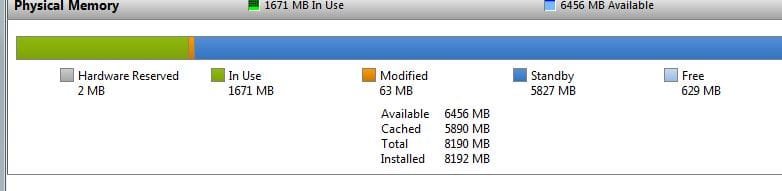
It sounds like you have something else going on there instead. Here's mine, showing 2 MB as well.
 

Attachments

  • Capture.JPG
    Capture.JPG
    21.4 KB · Views: 15

My Computer My Computer

At a glance

Windows 7 Ultimate x64 SP1Intel Core i7-260012 GB Patriot Extreme DDR3-1333Nvidia GTX 470
OS
Windows 7 Ultimate x64 SP1
CPU
Intel Core i7-2600
Motherboard
Gigabyte GA-P67A-UD3P-B3
Memory
12 GB Patriot Extreme DDR3-1333
Graphics Card(s)
Nvidia GTX 470
Monitor(s) Displays
Dell UltraSharp 2209WA
Hard Drives
OCZ Agility3 240 GB, WD5001AALS, WD7501AALS
PSU
OCZ ModStream 700W
Case
CoolerMaster HAF 912 Advanced
Cooling
CoolerMaster Hyper 212 Plus
what if i install xp x64 version? then also it would share video memory like this?
 

My Computer My Computer

At a glance

windows 7 ultimateintel core2duo e45004 gb DDR2nvidia geforce 6400 1 gb
OS
windows 7 ultimate
CPU
intel core2duo e4500
Motherboard
gigabyte 945gcm-s2c
Memory
4 gb DDR2
Graphics Card(s)
nvidia geforce 6400 1 gb
yes to the shared memory question on 64-bit OS.
 

My Computer My Computer

At a glance

Windows 7 Ultimate x64Intel Q9550 2.83Ghz OC'd to 3.40Ghz8GB G.Skill PI DDR2-800, 4-4-4-12 timingsEVGA 1280MB Nvidia GeForce GTX570
Computer Manufacturer/Model Number
Self-Built in July 2009
OS
Windows 7 Ultimate x64
CPU
Intel Q9550 2.83Ghz OC'd to 3.40Ghz
Motherboard
Gigabyte GA-EP45-UD3R rev. 1.1, F12 BIOS
Memory
8GB G.Skill PI DDR2-800, 4-4-4-12 timings
Graphics Card(s)
EVGA 1280MB Nvidia GeForce GTX570
Sound Card
Realtek ALC899A 8 channel onboard audio
Monitor(s) Displays
23" Acer x233H
Screen Resolution
1920x1080
Hard Drives
Intel X25-M 80GB Gen 2 SSD
Western Digital 1TB Caviar Black, 32MB cache. WD1001FALS
PSU
Corsair 620HX modular
Case
Antec P182
Cooling
stock
Keyboard
ABS M1 Mechanical
Mouse
Logitech G9 Laser Mouse
Internet Speed
15/2 cable modem
Other Info
Windows and Linux enthusiast. Logitech G35 Headset.
Back
Top