Gadget Installer is Missing

moonknight

New member
When I download a gadget.. Windows doesn't install it for me. It tells me that it can't open the file. I can choose a program to open it with. But what program do I choose?

I already went to Start > Run > optionalfeatures.exe, and made sure "Windows Gadget Platform" is checked and installed.

Please help, thanks.
 

My Computer

OS
Windows 7 Ultimate x64
CPU
i7 950
Graphics Card(s)
XFX 5830
What is the gadget ? Can you give us a link to it so maybe we can try to install it?

Some of my Gadgets :geek:
 

Attachments

  • Gadget_Cluster_10_17_2009.JPG
    Gadget_Cluster_10_17_2009.JPG
    263.3 KB · Views: 131

My Computer

Computer type
PC/Desktop
Computer Manufacturer/Model Number
Built them myself, Science Experiments !
OS
Win7 Enterprise, Win7 x86 (Ult 7600), Win7 x64 Ult 7600, TechNet RTM on AMD x64 (2.8Ghz)
CPU
AMD fx8350 4ghz, AMD-32 2400mhz, AMD-64 3200mhz, AMDx64 2.8G
Motherboard
SIS 755, ECS-K8M890M-M (Ult 7600), GigaByte & others
Memory
2gb, 4gb on the Ult 7600, 4gb on Technet RTM, 32gb on FX8350
Graphics Card(s)
Draw my own Graphics, several nVidia cards
Sound Card
on motherboard
Monitor(s) Displays
19" flat scr, 28" I-Inc widescr,22" Emprex Widescr, 23" Acer
Screen Resolution
1280 x 1024, 1440 x 900, 1920 x 1080
Hard Drives
6 pata Ide HD's & 2 Sata HD's
added 80gb external on Ult 7600 computer,
numerous extra 1tb, 2TB, 3Tb SATA HD's
A collection of ext HD Docks w/ HDs
PSU
430w, 550w, 600w, 700, 800, etc
Case
All Generic Full Towers
Cooling
Open Air & a few fans, some w/ colored LEDs
Keyboard
Compaq & Dell recycled from GoodWill
Mouse
Made in China Optical Wired Mouse
Internet Speed
Fast Cable InterNet
Antivirus
AVG Free on 24 different Desktops, NO Problems!
Browser
IE 8 is preferred, but use FireFox sometimes
Other Info
Linksys Routers, switches, & Hubs
Too Many USB Flash Drives to count, Biggest is 64GB !
Eight computers in my home network.
Sixteen computers at my business network.
Linked via TeamViewer !
Lots of old used spare computer parts everywhere!
What is the gadget ? Can you give us a link to it so maybe we can try to install it?

Some of my Gadgets :geek:

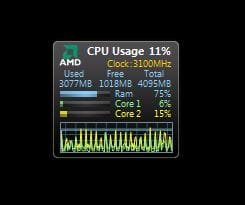
It's called All CPU Meter. I don't think it matters what Gadget it is. I just can't install them because Windows doesn't recognize it. Anybody know why?
 

My Computer

OS
Windows 7 Ultimate x64
CPU
i7 950
Graphics Card(s)
XFX 5830
I just download the lates version of it & it installed as soon as I double clicked on it.

Have you check our tutorials section for the ones on gadgets ?
 

Attachments

  • All_CPU_Meter_Gadget.JPG
    All_CPU_Meter_Gadget.JPG
    14.6 KB · Views: 3,563

My Computer

Computer type
PC/Desktop
Computer Manufacturer/Model Number
Built them myself, Science Experiments !
OS
Win7 Enterprise, Win7 x86 (Ult 7600), Win7 x64 Ult 7600, TechNet RTM on AMD x64 (2.8Ghz)
CPU
AMD fx8350 4ghz, AMD-32 2400mhz, AMD-64 3200mhz, AMDx64 2.8G
Motherboard
SIS 755, ECS-K8M890M-M (Ult 7600), GigaByte & others
Memory
2gb, 4gb on the Ult 7600, 4gb on Technet RTM, 32gb on FX8350
Graphics Card(s)
Draw my own Graphics, several nVidia cards
Sound Card
on motherboard
Monitor(s) Displays
19" flat scr, 28" I-Inc widescr,22" Emprex Widescr, 23" Acer
Screen Resolution
1280 x 1024, 1440 x 900, 1920 x 1080
Hard Drives
6 pata Ide HD's & 2 Sata HD's
added 80gb external on Ult 7600 computer,
numerous extra 1tb, 2TB, 3Tb SATA HD's
A collection of ext HD Docks w/ HDs
PSU
430w, 550w, 600w, 700, 800, etc
Case
All Generic Full Towers
Cooling
Open Air & a few fans, some w/ colored LEDs
Keyboard
Compaq & Dell recycled from GoodWill
Mouse
Made in China Optical Wired Mouse
Internet Speed
Fast Cable InterNet
Antivirus
AVG Free on 24 different Desktops, NO Problems!
Browser
IE 8 is preferred, but use FireFox sometimes
Other Info
Linksys Routers, switches, & Hubs
Too Many USB Flash Drives to count, Biggest is 64GB !
Eight computers in my home network.
Sixteen computers at my business network.
Linked via TeamViewer !
Lots of old used spare computer parts everywhere!
I just download the lates version of it & it installed as soon as I double clicked on it.

Have you check our tutorials section for the ones on gadgets ?

Like I said, I'm pretty sure it doesn't have anything to do with which Gadget it is. I can't install it because I don't have the program/installer for it... so if I double click it it asks me to select a program.
 

My Computer

OS
Windows 7 Ultimate x64
CPU
i7 950
Graphics Card(s)
XFX 5830

My Computer

Computer type
PC/Desktop
Computer Manufacturer/Model Number
Built them myself, Science Experiments !
OS
Win7 Enterprise, Win7 x86 (Ult 7600), Win7 x64 Ult 7600, TechNet RTM on AMD x64 (2.8Ghz)
CPU
AMD fx8350 4ghz, AMD-32 2400mhz, AMD-64 3200mhz, AMDx64 2.8G
Motherboard
SIS 755, ECS-K8M890M-M (Ult 7600), GigaByte & others
Memory
2gb, 4gb on the Ult 7600, 4gb on Technet RTM, 32gb on FX8350
Graphics Card(s)
Draw my own Graphics, several nVidia cards
Sound Card
on motherboard
Monitor(s) Displays
19" flat scr, 28" I-Inc widescr,22" Emprex Widescr, 23" Acer
Screen Resolution
1280 x 1024, 1440 x 900, 1920 x 1080
Hard Drives
6 pata Ide HD's & 2 Sata HD's
added 80gb external on Ult 7600 computer,
numerous extra 1tb, 2TB, 3Tb SATA HD's
A collection of ext HD Docks w/ HDs
PSU
430w, 550w, 600w, 700, 800, etc
Case
All Generic Full Towers
Cooling
Open Air & a few fans, some w/ colored LEDs
Keyboard
Compaq & Dell recycled from GoodWill
Mouse
Made in China Optical Wired Mouse
Internet Speed
Fast Cable InterNet
Antivirus
AVG Free on 24 different Desktops, NO Problems!
Browser
IE 8 is preferred, but use FireFox sometimes
Other Info
Linksys Routers, switches, & Hubs
Too Many USB Flash Drives to count, Biggest is 64GB !
Eight computers in my home network.
Sixteen computers at my business network.
Linked via TeamViewer !
Lots of old used spare computer parts everywhere!
When I download a gadget.. Windows doesn't install it for me. It tells me that it can't open the file. I can choose a program to open it with. But what program do I choose?

I already went to Start > Run > optionalfeatures.exe, and made sure "Windows Gadget Platform" is checked and installed.

Please help, thanks.

Do you have gadgets that you are using that are already installed? When you right click on your desktop, does the context menu include Gadgets? If so does clicking it open your installed gadget list? Can you then double click on one to have it appear on desktop? Have you tried to install a gadget manually? Let us know these answers, and we'll know where we stand now. A Guy
 

My Computer

Computer type
PC/Desktop
OS
Windows 10 Home x64
CPU
INTEL Core i5-750 Quad-Core 3.37GHz
Motherboard
ASUS P7P55D
Memory
HyperX Fury Black Series 8GB (2 x 4GB) 1866Mhz
Graphics Card(s)
EVGA GeForce GTX 750 Superclocked 1GB 128-Bit GDDR5
Monitor(s) Displays
LG 32MA68HY 32" IPS
Screen Resolution
1920 x 1080
Hard Drives
Samsung 840 Evo 120GB, SEAGATE 500GB Barracuda® 7200.12, SATA 3 Gb/s, 7200 RPM, 16MB cache
PSU
ANTEC TruePower New TP-550, 80 PLUS, 550W
Case
ANTEC Three Hundred Illusion
Cooling
COOLER MASTER Hyper 212 Plus, 4 x 120mm 1 x 140mm Noctua's
Internet Speed
85 + Mbps
Antivirus
Avast
Browser
Vivaldi
When I download a gadget.. Windows doesn't install it for me. It tells me that it can't open the file. I can choose a program to open it with. But what program do I choose?

I already went to Start > Run > optionalfeatures.exe, and made sure "Windows Gadget Platform" is checked and installed.

Please help, thanks.

Do you have gadgets that you are using that are already installed? When you right click on your desktop, does the context menu include Gadgets? If so does clicking it open your installed gadget list? Can you then double click on one to have it appear on desktop? Have you tried to install a gadget manually? Let us know these answers, and we'll know where we stand now. A Guy

Yes to all the questions. I have manually installed Gadgets before that's why I know that you're supposed to able to install just by double-clicking it. But now there's no program associated with the Gadget extension files, so I can't open these files.
 

My Computer

OS
Windows 7 Ultimate x64
CPU
i7 950
Graphics Card(s)
XFX 5830
Try this. Download a gadget.

Right click the gadget on your desktop> Left click Open With> Browse to C:\Program Files\Windows Sidebar folder> Choose sidebar.exe

See if it will install. If so, repeat and check the box that says Always use the selected program to open this kind of file.

A Guy
 

My Computer

Computer type
PC/Desktop
OS
Windows 10 Home x64
CPU
INTEL Core i5-750 Quad-Core 3.37GHz
Motherboard
ASUS P7P55D
Memory
HyperX Fury Black Series 8GB (2 x 4GB) 1866Mhz
Graphics Card(s)
EVGA GeForce GTX 750 Superclocked 1GB 128-Bit GDDR5
Monitor(s) Displays
LG 32MA68HY 32" IPS
Screen Resolution
1920 x 1080
Hard Drives
Samsung 840 Evo 120GB, SEAGATE 500GB Barracuda® 7200.12, SATA 3 Gb/s, 7200 RPM, 16MB cache
PSU
ANTEC TruePower New TP-550, 80 PLUS, 550W
Case
ANTEC Three Hundred Illusion
Cooling
COOLER MASTER Hyper 212 Plus, 4 x 120mm 1 x 140mm Noctua's
Internet Speed
85 + Mbps
Antivirus
Avast
Browser
Vivaldi
Try this. Download a gadget.

Right click the gadget on your desktop> Left click Open With> Browse to C:\Program Files\Windows Sidebar folder> Choose sidebar.exe

See if it will install. If so, repeat and check the box that says Always use the selected program to open this kind of file.

A Guy

Just tried it, nothing happens. I clicked on it, nothing popped up or installed. Anything else I should try?
 

My Computer

OS
Windows 7 Ultimate x64
CPU
i7 950
Graphics Card(s)
XFX 5830
Before we get too involved. try to turn off Gadget platform

Start> In search box type

Turn windows features on or off (after just turn windows...top choice should be it)

Uncheck Windows Gadget Platform and ok your way out. Reboot, repeat steps, and put check mark back, and ok way out. Try again to see if it has changed. A Guy
 

My Computer

Computer type
PC/Desktop
OS
Windows 10 Home x64
CPU
INTEL Core i5-750 Quad-Core 3.37GHz
Motherboard
ASUS P7P55D
Memory
HyperX Fury Black Series 8GB (2 x 4GB) 1866Mhz
Graphics Card(s)
EVGA GeForce GTX 750 Superclocked 1GB 128-Bit GDDR5
Monitor(s) Displays
LG 32MA68HY 32" IPS
Screen Resolution
1920 x 1080
Hard Drives
Samsung 840 Evo 120GB, SEAGATE 500GB Barracuda® 7200.12, SATA 3 Gb/s, 7200 RPM, 16MB cache
PSU
ANTEC TruePower New TP-550, 80 PLUS, 550W
Case
ANTEC Three Hundred Illusion
Cooling
COOLER MASTER Hyper 212 Plus, 4 x 120mm 1 x 140mm Noctua's
Internet Speed
85 + Mbps
Antivirus
Avast
Browser
Vivaldi
Before we get too involved. try to turn off Gadget platform

Start> In search box type

Turn windows features on or off (after just turn windows...top choice should be it)

Uncheck Windows Gadget Platform and ok your way out. Reboot, repeat steps, and put check mark back, and ok way out. Try again to see if it has changed. A Guy

I think this method works! I got the program back to install the Gadgets. But for some reason I'm having trouble installing "All CPU Meter". It installs but when I open it, only a little white square opens. Other Gadgets install fine, I think. I tested 2 other ones.
 

My Computer

OS
Windows 7 Ultimate x64
CPU
i7 950
Graphics Card(s)
XFX 5830
See you have made a little progress. Here are the 2 versions I have:

See if they will install :)
 

Attachments

My Computer

Computer type
PC/Desktop
Computer Manufacturer/Model Number
Built them myself, Science Experiments !
OS
Win7 Enterprise, Win7 x86 (Ult 7600), Win7 x64 Ult 7600, TechNet RTM on AMD x64 (2.8Ghz)
CPU
AMD fx8350 4ghz, AMD-32 2400mhz, AMD-64 3200mhz, AMDx64 2.8G
Motherboard
SIS 755, ECS-K8M890M-M (Ult 7600), GigaByte & others
Memory
2gb, 4gb on the Ult 7600, 4gb on Technet RTM, 32gb on FX8350
Graphics Card(s)
Draw my own Graphics, several nVidia cards
Sound Card
on motherboard
Monitor(s) Displays
19" flat scr, 28" I-Inc widescr,22" Emprex Widescr, 23" Acer
Screen Resolution
1280 x 1024, 1440 x 900, 1920 x 1080
Hard Drives
6 pata Ide HD's & 2 Sata HD's
added 80gb external on Ult 7600 computer,
numerous extra 1tb, 2TB, 3Tb SATA HD's
A collection of ext HD Docks w/ HDs
PSU
430w, 550w, 600w, 700, 800, etc
Case
All Generic Full Towers
Cooling
Open Air & a few fans, some w/ colored LEDs
Keyboard
Compaq & Dell recycled from GoodWill
Mouse
Made in China Optical Wired Mouse
Internet Speed
Fast Cable InterNet
Antivirus
AVG Free on 24 different Desktops, NO Problems!
Browser
IE 8 is preferred, but use FireFox sometimes
Other Info
Linksys Routers, switches, & Hubs
Too Many USB Flash Drives to count, Biggest is 64GB !
Eight computers in my home network.
Sixteen computers at my business network.
Linked via TeamViewer !
Lots of old used spare computer parts everywhere!
Progress! Try this:

Close Windows Sidebar.

Open task manager Ctrl+Shift+Esc

Processes tab> Right click on sidebar.exe and choose End Process

Open an advanced command prompt

Start> Type cmd in search box> Right click on cmd.exe in results above> choose Run as administrator

Type the following and press Enter after each:

regsvr32 msxml3.dll

regsvr32 scrrun.dll

regsvr32 jscript.dll

Restart your PC and see if that has fixed it. A Guy
 

My Computer

Computer type
PC/Desktop
OS
Windows 10 Home x64
CPU
INTEL Core i5-750 Quad-Core 3.37GHz
Motherboard
ASUS P7P55D
Memory
HyperX Fury Black Series 8GB (2 x 4GB) 1866Mhz
Graphics Card(s)
EVGA GeForce GTX 750 Superclocked 1GB 128-Bit GDDR5
Monitor(s) Displays
LG 32MA68HY 32" IPS
Screen Resolution
1920 x 1080
Hard Drives
Samsung 840 Evo 120GB, SEAGATE 500GB Barracuda® 7200.12, SATA 3 Gb/s, 7200 RPM, 16MB cache
PSU
ANTEC TruePower New TP-550, 80 PLUS, 550W
Case
ANTEC Three Hundred Illusion
Cooling
COOLER MASTER Hyper 212 Plus, 4 x 120mm 1 x 140mm Noctua's
Internet Speed
85 + Mbps
Antivirus
Avast
Browser
Vivaldi
Here is another snip of what is running right now :)
 

Attachments

  • Doc_Gadgets_on_DeskTop_10-11-2011.JPG
    Doc_Gadgets_on_DeskTop_10-11-2011.JPG
    268.9 KB · Views: 26

My Computer

Computer type
PC/Desktop
Computer Manufacturer/Model Number
Built them myself, Science Experiments !
OS
Win7 Enterprise, Win7 x86 (Ult 7600), Win7 x64 Ult 7600, TechNet RTM on AMD x64 (2.8Ghz)
CPU
AMD fx8350 4ghz, AMD-32 2400mhz, AMD-64 3200mhz, AMDx64 2.8G
Motherboard
SIS 755, ECS-K8M890M-M (Ult 7600), GigaByte & others
Memory
2gb, 4gb on the Ult 7600, 4gb on Technet RTM, 32gb on FX8350
Graphics Card(s)
Draw my own Graphics, several nVidia cards
Sound Card
on motherboard
Monitor(s) Displays
19" flat scr, 28" I-Inc widescr,22" Emprex Widescr, 23" Acer
Screen Resolution
1280 x 1024, 1440 x 900, 1920 x 1080
Hard Drives
6 pata Ide HD's & 2 Sata HD's
added 80gb external on Ult 7600 computer,
numerous extra 1tb, 2TB, 3Tb SATA HD's
A collection of ext HD Docks w/ HDs
PSU
430w, 550w, 600w, 700, 800, etc
Case
All Generic Full Towers
Cooling
Open Air & a few fans, some w/ colored LEDs
Keyboard
Compaq & Dell recycled from GoodWill
Mouse
Made in China Optical Wired Mouse
Internet Speed
Fast Cable InterNet
Antivirus
AVG Free on 24 different Desktops, NO Problems!
Browser
IE 8 is preferred, but use FireFox sometimes
Other Info
Linksys Routers, switches, & Hubs
Too Many USB Flash Drives to count, Biggest is 64GB !
Eight computers in my home network.
Sixteen computers at my business network.
Linked via TeamViewer !
Lots of old used spare computer parts everywhere!
Progress! Try this:

Close Windows Sidebar.

Open task manager Ctrl+Shift+Esc

Processes tab> Right click on sidebar.exe and choose End Process

Open an advanced command prompt

Start> Type cmd in search box> Right click on cmd.exe in results above> choose Run as administrator

Type the following and press Enter after each:

regsvr32 msxml3.dll

regsvr32 scrrun.dll

regsvr32 jscript.dll

Restart your PC and see if that has fixed it. A Guy

Doesn't work :( and it's only that specific Gadget that's giving me this problem.. so maybe this Gadget installed somewhere that has corrupted files?
 

My Computer

OS
Windows 7 Ultimate x64
CPU
i7 950
Graphics Card(s)
XFX 5830
Wow, that's hard to say. Your system will be different from any others. I just installed it and it worked fine. Sorry about that. I know you wanted that particular gadget, but have a look at this one, very very similar, and perhaps even better.

Windows Live Gallery

A Guy
 

My Computer

Computer type
PC/Desktop
OS
Windows 10 Home x64
CPU
INTEL Core i5-750 Quad-Core 3.37GHz
Motherboard
ASUS P7P55D
Memory
HyperX Fury Black Series 8GB (2 x 4GB) 1866Mhz
Graphics Card(s)
EVGA GeForce GTX 750 Superclocked 1GB 128-Bit GDDR5
Monitor(s) Displays
LG 32MA68HY 32" IPS
Screen Resolution
1920 x 1080
Hard Drives
Samsung 840 Evo 120GB, SEAGATE 500GB Barracuda® 7200.12, SATA 3 Gb/s, 7200 RPM, 16MB cache
PSU
ANTEC TruePower New TP-550, 80 PLUS, 550W
Case
ANTEC Three Hundred Illusion
Cooling
COOLER MASTER Hyper 212 Plus, 4 x 120mm 1 x 140mm Noctua's
Internet Speed
85 + Mbps
Antivirus
Avast
Browser
Vivaldi
Wow, that's hard to say. Your system will be different from any others. I just installed it and it worked fine. Sorry about that. I know you wanted that particular gadget, but have a look at this one, very very similar, and perhaps even better.

Windows Live Gallery

A Guy

Thank you for your help! That Gadget is actually pretty good so I guess I'll use it. By the way, I'm also having trouble with the thumbnails for my video files. I remember them showing a couple days ago, but now they don't show. Should I make a new thread for it or can you guys help me out here?
 

My Computer

OS
Windows 7 Ultimate x64
CPU
i7 950
Graphics Card(s)
XFX 5830
Back
Top