IE8 Stops responding/working

Banker41

New member
I am currently using the Windows 7 RC build 7100 64 bit I downloaded off the MS website. Everything installed perfectly and runs perfectly except IE8. I will be browsing and all of a sudden I get the Internet Explorer has stopped responding or stopped working. It will restart and usually sends information to MS for solutions. None so far sadly. I really have been enjoying the stability of all of parts of Windows 7. I do not get BSODs or any other errors, I can run my games but IE8 or actually any other browser which uses those same shared files crashes at least 4 or 5 times perhaps more depending on how long I am on.

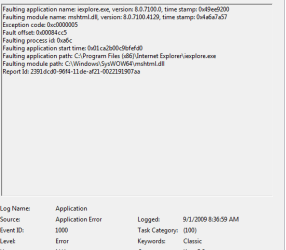
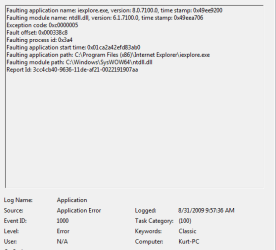
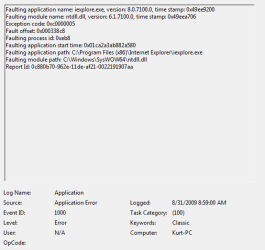
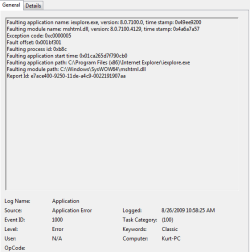
All the faulting files that cause the APPCRASH are .dll files:

MSHTML.DLL
NTDLL.DLL
IEFRAME.dll

Or I get Stackhash errors like the one below:

StackHash_cd4a

I have run with no add ons, same issues
I have reset advanced explorer settings, same issues
I have done all the trouble shooting that I could find with both MS support and by googling this issue to see what other folks have done.

I have my PC specs on here somewhere, but is is possible my Motherboard/Graphic card or some type of driver conflict can be causing these issues? It has become very frustrating.

Any help would be appreciated.
 

My Computer

Computer Manufacturer/Model Number
Dell XPS 630i
OS
Windows 7 RC 64 bit
CPU
Intel Core2 Quad Q8200
Motherboard
Nvidia 650 sli
Memory
4 GB
Graphics Card(s)
Nvidia 9800 GT
Sound Card
Realtek onboard
Monitor(s) Displays
Dell 1800fp LCD
It's a long shot, open an elevated command prompt and type in

regsvr32 actxprxy.dll

restart your box and see if that has helped.

If not, have you tried uninstalling IE8 and reinstalling?
 

My Computer

Computer Manufacturer/Model Number
HP Touchsmart IQ771.uk
OS
Windows 7 Ultimate x64
CPU
AMD Turion(tm) 64 X2 Mobile Technology TL-56
Motherboard
ASUS Pheonix
Memory
3GB Nanya PC2-6400 DDR2-SDRAM SO-DIM (400MHz)
Graphics Card(s)
NVIDIA GeForce Go 7600 256MB GDDR3 SDRAM
Sound Card
High Definition Intergrated NVIDIA MCP51
Monitor(s) Displays
46" Sony Bravia HDTV
Screen Resolution
1600x1200
Hard Drives
1.5TB Samsug
320GB Seagate ST3320820AS - SATA 3Gb/s 8MB
500GB Maxtor Basics STM305003EHD301-RK
Internet Speed
↓6.32 Mb/s ↑0.35 Mb/s ↔26ms
Other Info
BIOS - American Megatrends Inc. 5.07
Ethernet Port - NVIDIA nForce 10/100/1000 Mbps
DVD Drive - TSSTcorp DVDR/RW TS-T632L
just get firefox 3.5 :) if you need to, get vista-aero theme for firefox to give it that IE 8 look.
 

My Computer

Computer Manufacturer/Model Number
Compaq Presario CQ60-215DX
OS
Windows 7 Home Premium
CPU
2 AMD Athlon 64 X2
Graphics Card(s)
NVIDIA GeForce 8200M G graphics
Other browsers give me the same error types, I have tried Google Chrome, Firefox, Opera and Safari with the same results. So far Chrome has the best record of most time spent surfing before the crash. Firefox is actually the worst so far, sometimes it crashes first time opening.
 

My Computer

Computer Manufacturer/Model Number
Dell XPS 630i
OS
Windows 7 RC 64 bit
CPU
Intel Core2 Quad Q8200
Motherboard
Nvidia 650 sli
Memory
4 GB
Graphics Card(s)
Nvidia 9800 GT
Sound Card
Realtek onboard
Monitor(s) Displays
Dell 1800fp LCD
Other browsers give me the same error types, I have tried Google Chrome, Firefox, Opera and Safari with the same results. So far Chrome has the best record of most time spent surfing before the crash. Firefox is actually the worst so far, sometimes it crashes first time opening.
\

could you go into event viewer (type event viewer in search) and go to the windows log>app tab. See what errors relating to app crash are there and use the snipping tool (type snip in search) then upload a snip of that tab.

Ken
 

My Computer

Computer Manufacturer/Model Number
HP Pavillion dv-7 1005 Tx
OS
Win 8 Release candidate 8400
CPU
[email protected]
Memory
4 gigs
Graphics Card(s)
Nvidia 9600M
Sound Card
HD built-in
Monitor(s) Displays
17" Wxga
Screen Resolution
1440x900
Cooling
none
Internet Speed
45Mb down 5Mb up
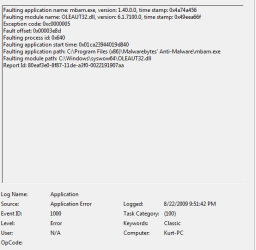
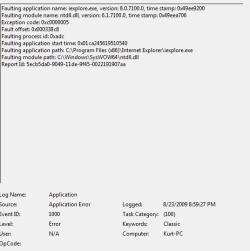
Here are the attached snips of the different errors I am getting. I hope I did this correctly. Maybe you can tell what is going on from these errors. Thanks for all your assistance. I already learned something, snipping.
 

Attachments

  • Capture1.PNG
    Capture1.PNG
    25.2 KB · Views: 37
  • Capture2.PNG
    Capture2.PNG
    24 KB · Views: 27
  • Capture3.PNG
    Capture3.PNG
    22.1 KB · Views: 24
  • Capture4.PNG
    Capture4.PNG
    23.3 KB · Views: 21
  • Capture5.PNG
    Capture5.PNG
    23.5 KB · Views: 20

My Computer

Computer Manufacturer/Model Number
Dell XPS 630i
OS
Windows 7 RC 64 bit
CPU
Intel Core2 Quad Q8200
Motherboard
Nvidia 650 sli
Memory
4 GB
Graphics Card(s)
Nvidia 9800 GT
Sound Card
Realtek onboard
Monitor(s) Displays
Dell 1800fp LCD
banker

All of these are event ID 1000 source 100. they often are caused by DEP being turned off. Can you go into cpanel>system>advanced system settings>performance>date execution prevention. That should be on for all apps.

Ken
 
Last edited:

My Computer

Computer Manufacturer/Model Number
HP Pavillion dv-7 1005 Tx
OS
Win 8 Release candidate 8400
CPU
[email protected]
Memory
4 gigs
Graphics Card(s)
Nvidia 9600M
Sound Card
HD built-in
Monitor(s) Displays
17" Wxga
Screen Resolution
1440x900
Cooling
none
Internet Speed
45Mb down 5Mb up
Well I tried as you suggested and you were correct it was not on for all applications. I have now turned it on and we shall see if this is the magic bullet. I hope so, and of course thank you for taking your time to assist me.
 

My Computer

Computer Manufacturer/Model Number
Dell XPS 630i
OS
Windows 7 RC 64 bit
CPU
Intel Core2 Quad Q8200
Motherboard
Nvidia 650 sli
Memory
4 GB
Graphics Card(s)
Nvidia 9800 GT
Sound Card
Realtek onboard
Monitor(s) Displays
Dell 1800fp LCD
Zigzag,

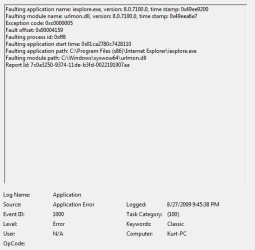
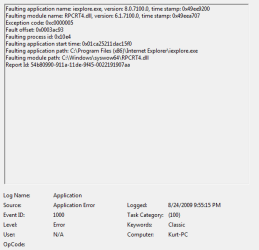
I wanted to post back the results of the changes I made upon your suggestion. Since I made the changes to DEP I get no more crashes in Google Chrome, however I still get crashes on IE8 but it does not appear as frequent. I am attaching the snips of the crashes in IE8, there have been only 3 since I changed DEP. Not sure what is still causing the remaining crashes I guess I might have to backtrack now and see if it is an add-on of some type. Anymore ideas since you seem to be on the right track to solving these types of issues? And again thanks for all your assistance so far....
 

Attachments

  • Capture6.PNG
    Capture6.PNG
    21.5 KB · Views: 26
  • Capture7.PNG
    Capture7.PNG
    22.8 KB · Views: 30
  • Capture8.PNG
    Capture8.PNG
    23.2 KB · Views: 13

My Computer

Computer Manufacturer/Model Number
Dell XPS 630i
OS
Windows 7 RC 64 bit
CPU
Intel Core2 Quad Q8200
Motherboard
Nvidia 650 sli
Memory
4 GB
Graphics Card(s)
Nvidia 9800 GT
Sound Card
Realtek onboard
Monitor(s) Displays
Dell 1800fp LCD
well it seems like we are on the right track. do you have dep on for all apps? If so try making an exception for IE and see if it selps or hurts. dont know if you are crashing or getting bsod on crash. if bsod go into c:\windows\minidump and look for a dump file (*.dmp), zip it and upload it

Ken
 

My Computer

Computer Manufacturer/Model Number
HP Pavillion dv-7 1005 Tx
OS
Win 8 Release candidate 8400
CPU
[email protected]
Memory
4 gigs
Graphics Card(s)
Nvidia 9600M
Sound Card
HD built-in
Monitor(s) Displays
17" Wxga
Screen Resolution
1440x900
Cooling
none
Internet Speed
45Mb down 5Mb up
Ken

I don't get any BSOD. I only get the "Internet Explorer has stopped working" and it shuts and trys to restart the page and usually wants to send info to Microsoft or look for a solution. Although there never seem to be any solutions sent my why from Microsoft. I was able to put in an exception for DEP on IE8, but I had to head off to work and wasnt able to surf and test that but I will tomorrow. The DEP does seem to have worked with Googles Chrome. That is running fine without errors and I tried to make it crash. Multiple tabs, viewing flash videos and such. No errors on that one yet. Thanks again...

Kurt
 

My Computer

Computer Manufacturer/Model Number
Dell XPS 630i
OS
Windows 7 RC 64 bit
CPU
Intel Core2 Quad Q8200
Motherboard
Nvidia 650 sli
Memory
4 GB
Graphics Card(s)
Nvidia 9800 GT
Sound Card
Realtek onboard
Monitor(s) Displays
Dell 1800fp LCD
just uninstall ie and use firefox.:D
 

My Computer

Computer Manufacturer/Model Number
InternetLord
OS
Windows 7 Eternity Build 7600 RTM Activated x86
CPU
Core2Duo E8400
Motherboard
Asus Rampage Formula
Memory
3gis DDR2 6400
Graphics Card(s)
Asus NVidia 9500 GTX 512mb
Sound Card
Sound Blaster X-Fi Xtreme Audio PCI-e
Monitor(s) Displays
SCEPTRE X22WG-1080P 22"
Screen Resolution
1680 x 1050
Hard Drives
Western Digital 300gig SATA VelociRaptor 10,000rpm
two 320gig SATA Seagate Barracuda 7,200rpm
PSU
700 Watt
Case
U2-UFO Black Powder Coat - Solid Top www.mountainmod.com
Cooling
7 x 120mm 2,500rpm case fans, Ultra ChillTEC Thermoelectric
Keyboard
Logitech diNovo Edge
Mouse
Logitech LX8 Laser Mouse
Internet Speed
7mbps
Other Info
Hauppauge WinTV HRV-1800 PCI-e
Ken

I don't get any BSOD. I only get the "Internet Explorer has stopped working" and it shuts and trys to restart the page and usually wants to send info to Microsoft or look for a solution. Although there never seem to be any solutions sent my why from Microsoft. I was able to put in an exception for DEP on IE8, but I had to head off to work and wasnt able to surf and test that but I will tomorrow. The DEP does seem to have worked with Googles Chrome. That is running fine without errors and I tried to make it crash. Multiple tabs, viewing flash videos and such. No errors on that one yet. Thanks again...

Kurt

Only way I found it was after many gray hairs. My DEP was broken so I had to re-install. I would still be curious as to why IE is still puking (wonder if it has something to do with "private" browsing sessions.

Ken
 

My Computer

Computer Manufacturer/Model Number
HP Pavillion dv-7 1005 Tx
OS
Win 8 Release candidate 8400
CPU
[email protected]
Memory
4 gigs
Graphics Card(s)
Nvidia 9600M
Sound Card
HD built-in
Monitor(s) Displays
17" Wxga
Screen Resolution
1440x900
Cooling
none
Internet Speed
45Mb down 5Mb up
How do you re-install DEP? Also I didnt see anyway in Windows 7 to uninstall IE8? I think you can disable it, but not totally uninstall. Is that correct?
 

My Computer

Computer Manufacturer/Model Number
Dell XPS 630i
OS
Windows 7 RC 64 bit
CPU
Intel Core2 Quad Q8200
Motherboard
Nvidia 650 sli
Memory
4 GB
Graphics Card(s)
Nvidia 9800 GT
Sound Card
Realtek onboard
Monitor(s) Displays
Dell 1800fp LCD
ie8 windows 7 32 bit stops working

hi, not a techie, just a housewife but i had same problem 1 month after i got my samsung n150.
tried all, downloaded all fixes i could find, nothing helped, would not connect.

:geek:finally i tried this and it worked...

went to my guest account. hmmm...its working fine here. so i went to program files, ie, right clicked, selected send to email recipient and sent the whole ie file...listed as DEBUG... to myself.

then i switched back to my administrator account, loged into my aol mail thru aol 9.5, downloaded the file, saved it to my desktop.

Then i opened the file, found the file called iexplore, opened it and wham bam my ie8 is runnin like a scalded dog.

havent got a clue why, last ditch effort that worked after many sleepless nights ...

Hope it works for you.
kim
 

My Computer

Computer Manufacturer/Model Number
samsung n150
OS
w7 32 bit
... so i went to program files, ie, right clicked, selected send to email recipient and sent the whole ie file...listed as DEBUG... to myself....

Sounds like you're talking about the Start Menu shortcut which should point to: "C:\Program Files\Internet Explorer\iexplore.exe".

To check the problem with your start menu shortcut just compare the target field in the right-click properties of the shortcut file with the good version that you emailed from the guest account. If you edit it to match the good shortcut that should fix it. You could also delete the bad one and replace it with the good one.
 

My Computer

Computer type
PC/Desktop
Computer Manufacturer/Model Number
OQO 2+
OS
Windows 8 Pro w/MC 32-bit
CPU
Intel Atom 1.86 GHz
Motherboard
OQO 2+
Memory
2 GB
Graphics Card(s)
Intel GMA 500
Sound Card
IDT
Monitor(s) Displays
LCD
Screen Resolution
800 x 480 (portable) 1280 x 1024 (docked)
Hard Drives
64 GB SSD
PSU
9 Ah Battery (portable) or OQO Brick (docked)
Case
Shirt Pocket Sized
Cooling
Tiny Fan
Keyboard
Slide out (portable) DiNovo Edge (docked)
Mouse
Eraser head (portable) Logitech Bluetooth (docked)
Internet Speed
WWAN or 802.11G (portable) T1 (docked)
Browser
IE 10
Other Info
DVD-RW OQO Docking Station
start menu ie8 shortcut

Thanks I will try that... as I found to my chagrin, the next morning when I powered up ad logged into Windows, i had to repeat the aforementioned procedure to fire up ie8.

Maybe your suggestion will provide a more permanent fix . I will post my results soon as I try it.
thank you again,
Kim
 

My Computer

Computer Manufacturer/Model Number
samsung n150
OS
w7 32 bit
Back
Top