
Just joined forum after building i7 Win7 pc

cappaj1

New member
Hello All,

I just joined this site and thought I'd introduce myself and ask a few questions as well.

I just built an i7 pc which has both Vista SP1 64 bit and Windows 7 Ultimate 64 bit on it, and may soon have linux. It consists of:

Antec Nine Hundred mid tower case
Corsair 650W PSU
Asus P6T motherboard
Intel i7 920 Nehalem 2.66GHz LGA 1266 Quad Core CPU
Noctua NH-U12P SE1366 CPU cooler
OCZ Gold 3x2GB 1600 DDR3 memory
HIS HD4670 512MB video card with dual dvi outputs
Two Asus 23" 1080p HDMI lcd monitors
Two Samsung 1TB SATA 7200rpm 3gb/sec internal hard drives
Two LG 22x DVD+- internal DVD SATA DVD burners with LightScribe
LG 6X Blu-ray SATA internal Disc Burner
Microsoft Wireless Laser Desktop 4000 keyboard and mouse
Docked Blackberry Storm
Docked Apple video ipod
Belkin USB 2.0 hub
OCZ ATV 8GB USB thumb drive

I plan to add a Hauppauge WinTV dual tuner tv card to the system soon.

I would like to overclock eventually but for now am running stock.

I really like Windows 7 so far and think it's better than Vista after only a week! Here are some of my experiences thus far with Windows 7:

1.) Drivers installed automatically for most of my hardware.
2.) I still updated my drivers to the latest available from Asus, ATI, etc.
3.) My 5 yr old Canon MP730 mfp printer came with ocr software that won't install on Vista or Windows 7.
4.) After about a week, when I click Start/Computer, there is a scroll bar on top of the screen that never seems to finish. I can stop it by clicking the red x in the upper right of the screen. I'll attach a screen shot.
5.) I have something called Remote Desktop Connection above Start now that wasn't there before??
6.) I've downloaded trial versions of Hi Def video editing software; Corel VideoExpression x2 pro, Sony Vegas Platinum Pro, and Adobe Premier Elements. So far all three seem to work fine.
7.) My docked Blackberry Storm and it's software, updated from Blackberry, seems to run fine.
8.) My Apple video ipod, also docked, and itunes, seem to run fine.
9.) I was able to install two indentical sata DVD burners from LG and have no conflict or problems
10.) I have two identical sata 1tb samsung hard drives, and installed Vista on one, then Win 7 on the other, and have a dual boot system when I start.
11.) I love the Asus P6T motherboard but the install disc that came with it won't run under Win7, and a version of TurboV for Win7 from Asus site also won't install, both giving incompatiblity messages.
12.) I can't get my front audio ports to work; neither the mic or headphones. I've fooled with the settings in the bios for HD audo vs AC97, and also the Realtek sound manager and nothing seems to work.
13.) I love the dual 23" monitor. Both are set at max res and I have a large single desktop and find it very helfpul to view multiple windows side by side.
14.) I'm not a game player, but am a radio control airplane enthusiast and RealFlights G4.5 runs great on my system.

Well, that's all for now, off the top of my head.

Any questions, suggestions or comments would be most welcome!

Thanks!

cappaj1
 

Attachments
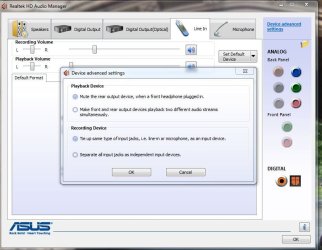
  • RealtekAudioManager.JPG
    RealtekAudioManager.JPG
    80.8 KB · Views: 85
  • Computer.JPG
    Computer.JPG
    45.6 KB · Views: 50

My Computer

OS
Windows 7 Ultimate 64 bit Build 7100
12.) I can't get my front audio ports to work; neither the mic or headphones. I've fooled with the settings in the bios for HD audo vs AC97, and also the Realtek sound manager and nothing seems to work.
I have the Antec 1200 (its nice) case, and I had the same problem. Make sure that you attach the cables from the front of the case to the external USB and Audio ports on the mother board. See your mobo booklet for more info on where.

~Lordbob
 

My Computer

Computer Manufacturer/Model Number
Hera
OS
Windows 7 Ultimate x64, Mint 9
CPU
Intel i5-2500k
Motherboard
ASUS P8P67 Pro
Memory
2x 4Gb Corsair VENGEANCE DDR3-1600
Graphics Card(s)
NVidia GeForce N260GTX Twin Frozr
Sound Card
Realtek HD OnBoard Audio
Monitor(s) Displays
ASUS 24" Monitor
Screen Resolution
1920x1080
Hard Drives
G.SKILL Phoenix Series 60GB SATA II MLC Internal Solid State Drive (SSD)
SAMSUNG Spinpoint F3R 1TB 7200 RPM 32MB Cache SATA II
PSU
Cooler Master Real Power Pro 750W
Case
Cooler Master Haf 932
Cooling
Fans
Keyboard
Razer Tarantula
Mouse
Razer Lachesis
Internet Speed
not fast enough
welcome, if ur like me, then you might learn some stuff :thumbs-up:
 

My Computer

Computer Manufacturer/Model Number
eMachines W3502
OS
Windows 7 Ultimate x32
CPU
Intel Celeron D 3.2 Ghz 533 fsb (LGA 775)
Motherboard
Intel D101GGC
Memory
1 GB (2x512MB) PC-3200 DDR @ 200Mhz
Graphics Card(s)
Nvidia GeForce 9400GT- 1GB
Sound Card
Sound Blaster X-Fi Xtreame Gamer
Monitor(s) Displays
19" LCD HDtv
Screen Resolution
1360x768 @ 60Htz
Hard Drives
SeaGate Barracuda 750GB
SeaGate Barracuda 100GB
Toshiba CD/DVDW/ TS-H552D [DVD+R, DL]
PSU
stock (idk)
Case
The busted remains of the stock case
Cooling
Dust cooled, waitwut?
Keyboard
Stock. Missing a few keys.
Mouse
Logitech LX8 5-btn mouse (wireless)
Internet Speed
TWC 10Mb
Other Info
Keeps going, and going, and going.......
Hi there
well done and congrats.

As for the Audio mode (Front connectors) some motherboards have a set of jumpers / Bios settings to switch from Front to Rear connectors -- be careful as the Rear connectors are usually Realtek HD audio if the front one's are AC 97.

I don't know if you can enable both front and rear at the same time.

For (3) the Canon printer try installing it in VISTA SP2 compatability mode or XP SP3 mode.

If that doesn't work you could run it from the Virtual PC mode (XPM compatability mode) which you can download from MS or run a separate XP Virtual machine (you've got enough memory and fast enough system).

VirtualBox is free and loads of people on this forum use it. I use Vmware workstation but that is a bit more expensive.

Enjoy.

Cheers
jimbo
 

My Computer

Computer type
PC/Desktop
Computer Manufacturer/Model Number
Custom built, several laptops HP/ASUS
OS
Linux CENTOS 7 / various Windows OS'es and servers
CPU
Intel i7 Intel i5
Memory
8GB, 16GB
Graphics Card(s)
On Motherboard
Sound Card
Realtek HD audio
Monitor(s) Displays
Apple Cinema display, Samsung LCD
Screen Resolution
1920 X 1080
Hard Drives
4 X 1TB SATA
Mouse
Toshiba wireless laser
Internet Speed
> 20MB up
Hi there
well done and congrats.

As for the Audio mode (Front connectors) some motherboards have a set of jumpers / Bios settings to switch from Front to Rear connectors -- be careful as the Rear connectors are usually Realtek HD audio if the front one's are AC 97.

I don't know if you can enable both front and rear at the same time.

For (3) the Canon printer try installing it in VISTA SP2 compatability mode or XP SP3 mode.

If that doesn't work you could run it from the Virtual PC mode (XPM compatability mode) which you can download from MS or run a separate XP Virtual machine (you've got enough memory and fast enough system).

VirtualBox is free and loads of people on this forum use it. I use Vmware workstation but that is a bit more expensive.

Enjoy.

Cheers
jimbo

I switched the connector from the front panel of the Antec case, as it had two choices, one for AC97, the other HD Audio. That solved the audio problem! The front and rear audio and mic jacks along with the built in mic in the webcam work at the same time, each being recognized in RealTek. I even get a popup now when I connect or disconnect from the front jacks. COOOOL!

How would I install that OCR software for the Canon printer in XP SP2 compatibility mode exactly?
 

My Computer

OS
Windows 7 Ultimate 64 bit Build 7100
I switched the connector from the front panel of the Antec case, as it had two choices, one for AC97, the other HD Audio. That solved the audio problem! The front and rear audio and mic jacks along with the built in mic in the webcam work at the same time, each being recognized in RealTek. I even get a popup now when I connect or disconnect from the front jacks. COOOOL!
AC97 is for older cases with different plugs...
Did you read the mobo manual?

~Lordbob
 

My Computer

Computer Manufacturer/Model Number
Hera
OS
Windows 7 Ultimate x64, Mint 9
CPU
Intel i5-2500k
Motherboard
ASUS P8P67 Pro
Memory
2x 4Gb Corsair VENGEANCE DDR3-1600
Graphics Card(s)
NVidia GeForce N260GTX Twin Frozr
Sound Card
Realtek HD OnBoard Audio
Monitor(s) Displays
ASUS 24" Monitor
Screen Resolution
1920x1080
Hard Drives
G.SKILL Phoenix Series 60GB SATA II MLC Internal Solid State Drive (SSD)
SAMSUNG Spinpoint F3R 1TB 7200 RPM 32MB Cache SATA II
PSU
Cooler Master Real Power Pro 750W
Case
Cooler Master Haf 932
Cooling
Fans
Keyboard
Razer Tarantula
Mouse
Razer Lachesis
Internet Speed
not fast enough
cappaj1, welcome! I'm pretty new here as well. I've lurked a bit but have been too busy to participate much. That's going to change because I like this forum a lot. It's been very helpful. Nice rig, BTW!
 

My Computer

Computer Manufacturer/Model Number
Dell XPS 410
OS
Win 7 64 bit, 7127
CPU
Intel E6420 C2D 2.13 GHz/4MB
Memory
2 GB
Graphics Card(s)
nVidia 8600 GTS, 256 MB
Monitor(s) Displays
19" LCD, 17" CRT
Screen Resolution
1400x900, 1152x864
Hard Drives
320 GB, 120 GB, 80 GB
Keyboard
Logitech G15 Gaming
Mouse
Logitech MX 518
Internet Speed
8 Mb Cable
Other Info
I like Jello
How would I install that OCR software for the Canon printer in XP SP2 compatibility mode exactly?

Assuming the CD has a "setup.exe" file then you would ignore any Autorun dialogs and explore the CD to that setup.exe file.

- Right click on the setup.exe file
- Select "Properties"
- Select the "Compatibility" tab in the Properties dialog
- Check the "Run this program in compatibilty mode for:" box
- Select the appropriate OS selection from the drop down list
- Select Apply

Also, since an OCR app might require administrator to properly install, you can Right click and select "Run As Administrator" from the context menu but I would only do that as a second try if the first install fails.

You also, if the install is successful, might need to use the above steps for compatibility mode on the actual .exe file for the application file (you can find that from the shortcut it creates properties).

Luck!
 

My Computer

Computer Manufacturer/Model Number
Homebrew
OS
Windows 7 RC Build 7100
CPU
Core i7 920
Motherboard
Gigabyte GA-X58-UD3R
Memory
6G G.Skill DDR3 1600
Graphics Card(s)
Radeon 4870
Sound Card
Integrated RealTek
Monitor(s) Displays
Gateway FDP2400
Screen Resolution
1920x1200
Hard Drives
WD 640G Black Edition
Seagate 320
PSU
Coolermaster 700W
Case
CS Storm Sniper
Cooling
Stock
Keyboard
Logitech Illuminated
Mouse
Logiteck G5
Internet Speed
cable
Assuming the CD has a "setup.exe" file then you would ignore any Autorun dialogs and explore the CD to that setup.exe file.

- Right click on the setup.exe file
- Select "Properties"
- Select the "Compatibility" tab in the Properties dialog
- Check the "Run this program in compatibilty mode for:" box
- Select the appropriate OS selection from the drop down list
- Select Apply

Also, since an OCR app might require administrator to properly install, you can Right click and select "Run As Administrator" from the context menu but I would only do that as a second try if the first install fails.

You also, if the install is successful, might need to use the above steps for compatibility mode on the actual .exe file for the application file (you can find that from the shortcut it creates properties).

Luck!

I actually tried this but it didn't work. And I am admin on the system, but even though I checked Run as Admin. I chose Vista 64 as the compatiblity OS selection since Win7 is 64 bit too. Didn't work though. I never got an error message but never got a completion either, and I have no folder for the ocr program, Omnipage, in Program Files nor do I have anything in Start.

Can't figure it out.
 

My Computer

OS
Windows 7 Ultimate 64 bit Build 7100
I actually tried this but it didn't work. And I am admin on the system, but even though I checked Run as Admin. I chose Vista 64 as the compatiblity OS selection since Win7 is 64 bit too. Didn't work though. I never got an error message but never got a completion either, and I have no folder for the ocr program, Omnipage, in Program Files nor do I have anything in Start.

Can't figure it out.

Try to select XP SP2 for compatibility and see what happens.
 

My Computer

Computer Manufacturer/Model Number
Homebrew
OS
Windows 7 RC Build 7100
CPU
Core i7 920
Motherboard
Gigabyte GA-X58-UD3R
Memory
6G G.Skill DDR3 1600
Graphics Card(s)
Radeon 4870
Sound Card
Integrated RealTek
Monitor(s) Displays
Gateway FDP2400
Screen Resolution
1920x1200
Hard Drives
WD 640G Black Edition
Seagate 320
PSU
Coolermaster 700W
Case
CS Storm Sniper
Cooling
Stock
Keyboard
Logitech Illuminated
Mouse
Logiteck G5
Internet Speed
cable
Thanks, but that didn't work either.

I get the dialog box:
 

Attachments

  • OmniPageError.JPG
    OmniPageError.JPG
    42.5 KB · Views: 8

My Computer

OS
Windows 7 Ultimate 64 bit Build 7100
OK, I'm at a loss as well, did you check to see if Omnipage has an upgrade?
 

My Computer

Computer Manufacturer/Model Number
Homebrew
OS
Windows 7 RC Build 7100
CPU
Core i7 920
Motherboard
Gigabyte GA-X58-UD3R
Memory
6G G.Skill DDR3 1600
Graphics Card(s)
Radeon 4870
Sound Card
Integrated RealTek
Monitor(s) Displays
Gateway FDP2400
Screen Resolution
1920x1200
Hard Drives
WD 640G Black Edition
Seagate 320
PSU
Coolermaster 700W
Case
CS Storm Sniper
Cooling
Stock
Keyboard
Logitech Illuminated
Mouse
Logiteck G5
Internet Speed
cable
Yes. Not for free. They want you to purchase the new version and it's too expensive for me. I still have a feeling there has got to be a way to install it.
 

My Computer

OS
Windows 7 Ultimate 64 bit Build 7100

My Computer

Computer Manufacturer/Model Number
Homebrew
OS
Windows 7 RC Build 7100
CPU
Core i7 920
Motherboard
Gigabyte GA-X58-UD3R
Memory
6G G.Skill DDR3 1600
Graphics Card(s)
Radeon 4870
Sound Card
Integrated RealTek
Monitor(s) Displays
Gateway FDP2400
Screen Resolution
1920x1200
Hard Drives
WD 640G Black Edition
Seagate 320
PSU
Coolermaster 700W
Case
CS Storm Sniper
Cooling
Stock
Keyboard
Logitech Illuminated
Mouse
Logiteck G5
Internet Speed
cable
Thanks for your help! If I figure it out I'll try to remember to post how here.
 

My Computer

OS
Windows 7 Ultimate 64 bit Build 7100
Back
Top
