Putting The Start Menu On The Right Of The Taskbar

Vaughn Whynot

The Bearded Basterd
Member
VIP
Local time
12:38 PM
Messages
106
Location
Nova Scotia
I have been searching all day with no prevail, i keep finding stuff on movie the taskbar to the right but not just the Start Menu button.
i have posted in other forums aswell and either get no reply or people giving wrong info.
i create a image to better explain what i want to do in hopes someone from this forum can help, many of you have helped me before customize my windows over the past years and know someone may know something i don't

there seems to be no image link button or i am blind
but here is the url of the image

ip3_78c_ubq3.png

top is what i have
bottom is what i want
thanks
Vaughn
 
Last edited by a moderator:

My Computer My Computer

Computer type
PC/Desktop
Computer Manufacturer/Model Number
Acer Aspire M3970
OS
Microsoft Windows 7 Ultimate 64-bit SP1
CPU
Intel Core i3 2120 @ 3.30GHz
Motherboard
Acer AM3970
Memory
6.00GB Dual-Channel DDR3 @ 665MHz (9-9-9-24)
Graphics Card(s)
1024MB ATI AMD Radeon HD 5700 Series
Sound Card
Realtek High Definition Audio
Monitor(s) Displays
Acer X223W & HP 2511
Screen Resolution
(1920x1080@60Hz) & (1680x1050@60Hz)
Hard Drives
466GB Seagate ST3500320AS ATA Device (SATA)
932GB Seagate ST31000524AS ATA Device (SATA)
PSU
600 Watt ATX Diablotek DA Series
Case
Acer M3970 Default Case
Cooling
CoolerMaster Hyper 101i
Keyboard
Logitech G5
Mouse
Razer Black Widow Ultimate
Internet Speed
20d/2u
Antivirus
Windows Security Essentials & Malwarebytes Anti-Malware
Browser
Firefox
Sorry it can not be done
Jerry
 

My Computer My Computer

Computer type
Laptop
Computer Manufacturer/Model Number
Sager NP9170
OS
Win 7 Pro x64 / Win 10 Pro
CPU
Intel(R) Core(TM) i7-3630QM CPU @ 2.40GHz
Motherboard
CLEVO P170EM
Memory
12 GB
Graphics Card(s)
(1) Intel(R) HD Graphics 4000 (2) NVIDIA GeForce GTX 675M
Sound Card
(1) Realtek High Definition Audio (2) Intel(R) Display Aud
Monitor(s) Displays
17.3
Screen Resolution
1920x1080
Hard Drives
(1) Samsung 860 EVO 500GB(OS) (1) Samsung 860 EVO 500GB(Data)
Keyboard
Backlite
Antivirus
MSE, Malwarebytes Pro
Browser
Firefox
Other Info
DESKTOP: Custom-built.
OS: Win 10 Pro x64.
CASE: Rosewill R5.
CPU: Intel I5 4670K CPU @ 3.40GHz.
CPU COOLER: Cool Master Hyper 212 EVO.
MOTHERBOARD: Asus Z87-A.
MEMORY: Kingston HyperX 2x4 GB.
GPU: Nvidia Geforce 650 TI.
PSU: Corsair TX750.
DRIVES: (1) Samsung 840 120 GB SSD (2) Western Digital blue 500 GB 7200 RPM.

My Computer My Computer

Computer type
PC/Desktop
Computer Manufacturer/Model Number
Acer Aspire M3970
OS
Microsoft Windows 7 Ultimate 64-bit SP1
CPU
Intel Core i3 2120 @ 3.30GHz
Motherboard
Acer AM3970
Memory
6.00GB Dual-Channel DDR3 @ 665MHz (9-9-9-24)
Graphics Card(s)
1024MB ATI AMD Radeon HD 5700 Series
Sound Card
Realtek High Definition Audio
Monitor(s) Displays
Acer X223W & HP 2511
Screen Resolution
(1920x1080@60Hz) & (1680x1050@60Hz)
Hard Drives
466GB Seagate ST3500320AS ATA Device (SATA)
932GB Seagate ST31000524AS ATA Device (SATA)
PSU
600 Watt ATX Diablotek DA Series
Case
Acer M3970 Default Case
Cooling
CoolerMaster Hyper 101i
Keyboard
Logitech G5
Mouse
Razer Black Widow Ultimate
Internet Speed
20d/2u
Antivirus
Windows Security Essentials & Malwarebytes Anti-Malware
Browser
Firefox
I have been searching all day with no prevail, i keep finding stuff on movie the taskbar to the right but not just the Start Menu button.
i have posted in other forums aswell and either get no reply or people giving wrong info.
i create a image to better explain what i want to do in hopes someone from this forum can help, many of you have helped me before customize my windows over the past years and know someone may know something i don't

there seems to be no image link button or i am blind
but here is the url of the image
http://img40.imagefra.me/i5cp/vaughnwhynot/ip3_78c_ubq3.png
top is what i have
bottom is what i want
thanks
Vaughn

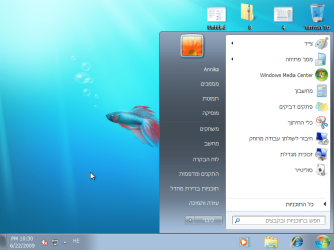
The only time I've seen that was a Hebrew version of Windows.
 

Attachments

  • win7hebrew.png
    win7hebrew.png
    95.1 KB · Views: 40

My Computer My Computer

Computer type
PC/Desktop
Computer Manufacturer/Model Number
Self Built
OS
Win 10 Pro x64
CPU
Intel I5-2500K @3.3GHz
Motherboard
Asrock P67 Extreme4
Memory
16GB G.Skill Ripjaws X (4x4GB)
Graphics Card(s)
EVGA GeForce 750 Ti SC 2GB
Sound Card
ASUS Xonar DG 5.1 Channels 24-bit 96KHz PCI Interface Sound
Monitor(s) Displays
auria eq2367
Screen Resolution
1920 x 1080
Hard Drives
250GB Samsung 850 EVO SSD
1TB WD Blue
1TB Hitachi
PSU
SeaSonic X 650W 80 Plus Gold
Case
Corsair Obsidian 750D
Cooling
Corsair H60, Three 140mm case fans
Keyboard
Logitech Wireless Keyboard K520
Mouse
Logitech Wireless Mouse M310
Internet Speed
Wave Broadband ~ 100 dn 5 up
Antivirus
Windows Defender, Malwarebytes Premium
Browser
Edge, IE11, Chrome
Other Info
Laptop specs: HP g7-1365dx /
CPU: AMD A6-3420M APU with Radeon(tm) HD Graphics /
RAM: Crucial 8Gb (2x4Gb) /
SSD: Crucial M4-CT128M4SSD2 ATA Device/ FW 000F /
GFX: AMD Radeon HD 6520G /
OS: Windows 10 Pro x64
I have been searching all day with no prevail, i keep finding stuff on movie the taskbar to the right but not just the Start Menu button.
i have posted in other forums aswell and either get no reply or people giving wrong info.
i create a image to better explain what i want to do in hopes someone from this forum can help, many of you have helped me before customize my windows over the past years and know someone may know something i don't

there seems to be no image link button or i am blind
but here is the url of the image
http://img40.imagefra.me/i5cp/vaughnwhynot/ip3_78c_ubq3.png
top is what i have
bottom is what i want
thanks
Vaughn

The only time I've seen that was a Hebrew version of Windows.
DANG IT...they think everything..
i saw you could do it through the registry in xp or vista but i don't want to mess around with that stuff because i will fudge it up lol
 

My Computer My Computer

Computer type
PC/Desktop
Computer Manufacturer/Model Number
Acer Aspire M3970
OS
Microsoft Windows 7 Ultimate 64-bit SP1
CPU
Intel Core i3 2120 @ 3.30GHz
Motherboard
Acer AM3970
Memory
6.00GB Dual-Channel DDR3 @ 665MHz (9-9-9-24)
Graphics Card(s)
1024MB ATI AMD Radeon HD 5700 Series
Sound Card
Realtek High Definition Audio
Monitor(s) Displays
Acer X223W & HP 2511
Screen Resolution
(1920x1080@60Hz) & (1680x1050@60Hz)
Hard Drives
466GB Seagate ST3500320AS ATA Device (SATA)
932GB Seagate ST31000524AS ATA Device (SATA)
PSU
600 Watt ATX Diablotek DA Series
Case
Acer M3970 Default Case
Cooling
CoolerMaster Hyper 101i
Keyboard
Logitech G5
Mouse
Razer Black Widow Ultimate
Internet Speed
20d/2u
Antivirus
Windows Security Essentials & Malwarebytes Anti-Malware
Browser
Firefox
sorry to bump my question
but would editing this registry - [HKEY_LOCAL_MACHINE\SOFTWARE\Microsoft\Windows\CurrentVersion\Explorer\Advanced] “TaskbarSizeMove”
change it any?
 

My Computer My Computer

Computer type
PC/Desktop
Computer Manufacturer/Model Number
Acer Aspire M3970
OS
Microsoft Windows 7 Ultimate 64-bit SP1
CPU
Intel Core i3 2120 @ 3.30GHz
Motherboard
Acer AM3970
Memory
6.00GB Dual-Channel DDR3 @ 665MHz (9-9-9-24)
Graphics Card(s)
1024MB ATI AMD Radeon HD 5700 Series
Sound Card
Realtek High Definition Audio
Monitor(s) Displays
Acer X223W & HP 2511
Screen Resolution
(1920x1080@60Hz) & (1680x1050@60Hz)
Hard Drives
466GB Seagate ST3500320AS ATA Device (SATA)
932GB Seagate ST31000524AS ATA Device (SATA)
PSU
600 Watt ATX Diablotek DA Series
Case
Acer M3970 Default Case
Cooling
CoolerMaster Hyper 101i
Keyboard
Logitech G5
Mouse
Razer Black Widow Ultimate
Internet Speed
20d/2u
Antivirus
Windows Security Essentials & Malwarebytes Anti-Malware
Browser
Firefox
In XP i changed the word on the start menu button to my name via a .dll file. It might be under a .dll file and you would need a .dll file editor the veiw it. Of course I could just be talking through my teeth... hope this helps!
 

My Computer My Computer

Computer Manufacturer/Model Number
Gateway DX4600-15e
OS
Windows 7 Home Premium 64-bit SP1 Build 7601
CPU
AMD Phenom II X4 810 Deneb 45mm Technology
Motherboard
Gateway RS780 (AM2)
Memory
8GB Dual-Channel DDR2 @ 399MHz
Graphics Card(s)
ATI Radeon HD 3200 Graphics, GeForce GT 220
Sound Card
Realteck High Definition Audio
Hard Drives
1TB Western Digital SATA
Keyboard
Logitech Wave Keyboard K350
Mouse
Logitech Mouse M510
Internet Speed
3Mb/s
It hasn't been done yet that I know.
You are not the first to ask.

No one has posted a solution. So for now..no.

Mike
 

My Computer My Computer

Computer Manufacturer/Model Number
Hopalong/ Godzilla
OS
Windows7 Pro 64bit SP-1; Windows XP Pro 32bit
CPU
Intel Core i7-870 Lynnfield 2.93GHz LGA 1156 95W Quad-Core
Motherboard
ASUS P7P55D-E PRO
Memory
8GB@1400MHz Crucial Ballistix DDR3-1600 4x2GB
Graphics Card(s)
ASUS ENGTX460 DirectCU/2DI/1GD5 1GB 256-bit GDDR5
Sound Card
VIA Onboard
Monitor(s) Displays
Asus VS248H-P 24"; Samsung SyncMaster 941BW 19"ws
Screen Resolution
1920x1080; 1440x900
Hard Drives
Samsung 830 120GB SSD
Intel 320 120GB SSD
Western Digital Caviar Black WD7501AALS 750GB 7200 RPM SATA 3.0Gb/s
Western Digital Caviar Black WD6401AALS 640GB 7200 RPM SATA 3.0Gb/s
PSU
COOLER MASTER Silent Pro RS850-AMBAJ3-US 850W Modular
Case
COOLER MASTER HAF 932 RC-932-KKN5-GP Black
Cooling
Scythe "Mugen-2 Rev.B" (2 ScytheKaze-Jyuni PWM fans)
Keyboard
Logitech K-320
Mouse
Kensington
Antivirus
Avast Inernet Suite
Browser
IE 9 ; Chrome
thanks guys....i wish MS would add these features
 

My Computer My Computer

Computer type
PC/Desktop
Computer Manufacturer/Model Number
Acer Aspire M3970
OS
Microsoft Windows 7 Ultimate 64-bit SP1
CPU
Intel Core i3 2120 @ 3.30GHz
Motherboard
Acer AM3970
Memory
6.00GB Dual-Channel DDR3 @ 665MHz (9-9-9-24)
Graphics Card(s)
1024MB ATI AMD Radeon HD 5700 Series
Sound Card
Realtek High Definition Audio
Monitor(s) Displays
Acer X223W & HP 2511
Screen Resolution
(1920x1080@60Hz) & (1680x1050@60Hz)
Hard Drives
466GB Seagate ST3500320AS ATA Device (SATA)
932GB Seagate ST31000524AS ATA Device (SATA)
PSU
600 Watt ATX Diablotek DA Series
Case
Acer M3970 Default Case
Cooling
CoolerMaster Hyper 101i
Keyboard
Logitech G5
Mouse
Razer Black Widow Ultimate
Internet Speed
20d/2u
Antivirus
Windows Security Essentials & Malwarebytes Anti-Malware
Browser
Firefox
if it can be done in the hebrew version it can be done with english... or whatever language you choose.. i dont know how, but obiously there is a way
 

My Computer My Computer

Computer type
PC/Desktop
Computer Manufacturer/Model Number
My First Build
OS
Windows 7 64-bit Home
CPU
Intel Core i7-870 Lynnfield 2.93 Ghz
Motherboard
Asus P7P55D-E Pro
Memory
8GB 4x2 A-Data 1333 Mhz
Graphics Card(s)
HIS Radeon HD 5850 1GB
Sound Card
Onboard
Monitor(s) Displays
Dell S2440L 24"
Screen Resolution
1080p
Hard Drives
120 GB Intel X25-M SATA Solid State Drive ///
1 TB Western Digital Caviar Black SATA 6gb/s 7200rpm Drive
PSU
Corsair 650TX 650 Watt
Case
Antec Three Hundred
Cooling
Stock Intel /// 4 Antec Case Fans /// NZXT Sentry-2
Keyboard
Logitech LX 710
Mouse
Logitech LX 710
Other Info
LG Blu-Ray Drive
if it can be done in the hebrew version it can be done with english... or whatever language you choose.. i dont know how, but obiously there is a way
someone told me the reason that the Hebrew is on the right side is because, English is read from left to right and i think Hebrew is read from right to left
not sure if this is true at all...i am not Hebrew lol
 

My Computer My Computer

Computer type
PC/Desktop
Computer Manufacturer/Model Number
Acer Aspire M3970
OS
Microsoft Windows 7 Ultimate 64-bit SP1
CPU
Intel Core i3 2120 @ 3.30GHz
Motherboard
Acer AM3970
Memory
6.00GB Dual-Channel DDR3 @ 665MHz (9-9-9-24)
Graphics Card(s)
1024MB ATI AMD Radeon HD 5700 Series
Sound Card
Realtek High Definition Audio
Monitor(s) Displays
Acer X223W & HP 2511
Screen Resolution
(1920x1080@60Hz) & (1680x1050@60Hz)
Hard Drives
466GB Seagate ST3500320AS ATA Device (SATA)
932GB Seagate ST31000524AS ATA Device (SATA)
PSU
600 Watt ATX Diablotek DA Series
Case
Acer M3970 Default Case
Cooling
CoolerMaster Hyper 101i
Keyboard
Logitech G5
Mouse
Razer Black Widow Ultimate
Internet Speed
20d/2u
Antivirus
Windows Security Essentials & Malwarebytes Anti-Malware
Browser
Firefox
if it can be done in the hebrew version it can be done with english... or whatever language you choose.. i dont know how, but obiously there is a way
someone told me the reason that the Hebrew is on the right side is because, English is read from left to right and i think Hebrew is read from right to left
not sure if this is true at all...i am not Hebrew lol

That's exactly why it is done that way.
 

My Computer My Computer

Computer type
PC/Desktop
Computer Manufacturer/Model Number
Self Built
OS
Win 10 Pro x64
CPU
Intel I5-2500K @3.3GHz
Motherboard
Asrock P67 Extreme4
Memory
16GB G.Skill Ripjaws X (4x4GB)
Graphics Card(s)
EVGA GeForce 750 Ti SC 2GB
Sound Card
ASUS Xonar DG 5.1 Channels 24-bit 96KHz PCI Interface Sound
Monitor(s) Displays
auria eq2367
Screen Resolution
1920 x 1080
Hard Drives
250GB Samsung 850 EVO SSD
1TB WD Blue
1TB Hitachi
PSU
SeaSonic X 650W 80 Plus Gold
Case
Corsair Obsidian 750D
Cooling
Corsair H60, Three 140mm case fans
Keyboard
Logitech Wireless Keyboard K520
Mouse
Logitech Wireless Mouse M310
Internet Speed
Wave Broadband ~ 100 dn 5 up
Antivirus
Windows Defender, Malwarebytes Premium
Browser
Edge, IE11, Chrome
Other Info
Laptop specs: HP g7-1365dx /
CPU: AMD A6-3420M APU with Radeon(tm) HD Graphics /
RAM: Crucial 8Gb (2x4Gb) /
SSD: Crucial M4-CT128M4SSD2 ATA Device/ FW 000F /
GFX: AMD Radeon HD 6520G /
OS: Windows 10 Pro x64
I am going to -attempt- to make a program that will remove the start button and then create a GUI using the same image as the start button. Will be draggable.

But knowing me, I'll fail. xD


EDIT: Would someone be kind enough to give me a copy of their shell32.dll file?
 

My Computer My Computer

Computer type
PC/Desktop
Computer Manufacturer/Model Number
Custom built
OS
Windows 8 Pro 64-bit
CPU
Intel Core i7 950 @4.4GHz
Motherboard
EVGA 131-GT-E767
Memory
12GB DDR3 1333MHz @1400 (9-9-9-24)
Graphics Card(s)
2x AMD Radeon HD 6770
Sound Card
Sound Blaster Audigy
Monitor(s) Displays
Acer S231HL + Acer E19T5W
Screen Resolution
1920x1080 + 1440x900
Hard Drives
128GB Samsung 840 Pro
1TB Seagate Barracuda 7200RPM 64mb
500GB Seagate Barracuda 7200RPM 16mb
PSU
Corsair GS800
Case
Custom-made
Cooling
CM Hyper212+, lots of fans
Keyboard
NMB RT8255C+
Mouse
Func MS-3
Internet Speed
30/1.5
Antivirus
Microsoft Security Essentials/Spybot SD/Malwarebytes
Browser
Google Chrome
Other Info
Onkyo TX-27 receiver & two Realistic Optimus T100s.
Here you go Cody.
 

My Computer My Computer

Computer type
PC/Desktop
Computer Manufacturer/Model Number
Self Built
OS
Win 10 Pro x64
CPU
Intel I5-2500K @3.3GHz
Motherboard
Asrock P67 Extreme4
Memory
16GB G.Skill Ripjaws X (4x4GB)
Graphics Card(s)
EVGA GeForce 750 Ti SC 2GB
Sound Card
ASUS Xonar DG 5.1 Channels 24-bit 96KHz PCI Interface Sound
Monitor(s) Displays
auria eq2367
Screen Resolution
1920 x 1080
Hard Drives
250GB Samsung 850 EVO SSD
1TB WD Blue
1TB Hitachi
PSU
SeaSonic X 650W 80 Plus Gold
Case
Corsair Obsidian 750D
Cooling
Corsair H60, Three 140mm case fans
Keyboard
Logitech Wireless Keyboard K520
Mouse
Logitech Wireless Mouse M310
Internet Speed
Wave Broadband ~ 100 dn 5 up
Antivirus
Windows Defender, Malwarebytes Premium
Browser
Edge, IE11, Chrome
Other Info
Laptop specs: HP g7-1365dx /
CPU: AMD A6-3420M APU with Radeon(tm) HD Graphics /
RAM: Crucial 8Gb (2x4Gb) /
SSD: Crucial M4-CT128M4SSD2 ATA Device/ FW 000F /
GFX: AMD Radeon HD 6520G /
OS: Windows 10 Pro x64
Thanks, mate. I really hope I can get this working... else I'll feel like a total fool. Haha.
 

My Computer My Computer

Computer type
PC/Desktop
Computer Manufacturer/Model Number
Custom built
OS
Windows 8 Pro 64-bit
CPU
Intel Core i7 950 @4.4GHz
Motherboard
EVGA 131-GT-E767
Memory
12GB DDR3 1333MHz @1400 (9-9-9-24)
Graphics Card(s)
2x AMD Radeon HD 6770
Sound Card
Sound Blaster Audigy
Monitor(s) Displays
Acer S231HL + Acer E19T5W
Screen Resolution
1920x1080 + 1440x900
Hard Drives
128GB Samsung 840 Pro
1TB Seagate Barracuda 7200RPM 64mb
500GB Seagate Barracuda 7200RPM 16mb
PSU
Corsair GS800
Case
Custom-made
Cooling
CM Hyper212+, lots of fans
Keyboard
NMB RT8255C+
Mouse
Func MS-3
Internet Speed
30/1.5
Antivirus
Microsoft Security Essentials/Spybot SD/Malwarebytes
Browser
Google Chrome
Other Info
Onkyo TX-27 receiver & two Realistic Optimus T100s.
Thanks, mate. I really hope I can get this working... else I'll feel like a total fool. Haha.

You're welcome, just blame it on your arm if you do. :p
 

My Computer My Computer

Computer type
PC/Desktop
Computer Manufacturer/Model Number
Self Built
OS
Win 10 Pro x64
CPU
Intel I5-2500K @3.3GHz
Motherboard
Asrock P67 Extreme4
Memory
16GB G.Skill Ripjaws X (4x4GB)
Graphics Card(s)
EVGA GeForce 750 Ti SC 2GB
Sound Card
ASUS Xonar DG 5.1 Channels 24-bit 96KHz PCI Interface Sound
Monitor(s) Displays
auria eq2367
Screen Resolution
1920 x 1080
Hard Drives
250GB Samsung 850 EVO SSD
1TB WD Blue
1TB Hitachi
PSU
SeaSonic X 650W 80 Plus Gold
Case
Corsair Obsidian 750D
Cooling
Corsair H60, Three 140mm case fans
Keyboard
Logitech Wireless Keyboard K520
Mouse
Logitech Wireless Mouse M310
Internet Speed
Wave Broadband ~ 100 dn 5 up
Antivirus
Windows Defender, Malwarebytes Premium
Browser
Edge, IE11, Chrome
Other Info
Laptop specs: HP g7-1365dx /
CPU: AMD A6-3420M APU with Radeon(tm) HD Graphics /
RAM: Crucial 8Gb (2x4Gb) /
SSD: Crucial M4-CT128M4SSD2 ATA Device/ FW 000F /
GFX: AMD Radeon HD 6520G /
OS: Windows 10 Pro x64
if it can be done in the hebrew version it can be done with english... or whatever language you choose.. i dont know how, but obiously there is a way
someone told me the reason that the Hebrew is on the right side is because, English is read from left to right and i think Hebrew is read from right to left
not sure if this is true at all...i am not Hebrew lol

That's exactly why it is done that way.

yes i know hebrew is read from right to left, but if the GUI can be moved there for whatever language.. it can be done for english or whatever language.. the code has to exist to move the gui to the interface to the right
 

My Computer My Computer

Computer type
PC/Desktop
Computer Manufacturer/Model Number
My First Build
OS
Windows 7 64-bit Home
CPU
Intel Core i7-870 Lynnfield 2.93 Ghz
Motherboard
Asus P7P55D-E Pro
Memory
8GB 4x2 A-Data 1333 Mhz
Graphics Card(s)
HIS Radeon HD 5850 1GB
Sound Card
Onboard
Monitor(s) Displays
Dell S2440L 24"
Screen Resolution
1080p
Hard Drives
120 GB Intel X25-M SATA Solid State Drive ///
1 TB Western Digital Caviar Black SATA 6gb/s 7200rpm Drive
PSU
Corsair 650TX 650 Watt
Case
Antec Three Hundred
Cooling
Stock Intel /// 4 Antec Case Fans /// NZXT Sentry-2
Keyboard
Logitech LX 710
Mouse
Logitech LX 710
Other Info
LG Blu-Ray Drive
someone told me the reason that the Hebrew is on the right side is because, English is read from left to right and i think Hebrew is read from right to left
not sure if this is true at all...i am not Hebrew lol

That's exactly why it is done that way.

yes i know hebrew is read from right to left, but if the GUI can be moved there for whatever language.. it can be done for english or whatever language.. the code has to exist to move the gui to the interface to the right

I agree, it just needs to be figured out.
 

My Computer My Computer

Computer type
PC/Desktop
Computer Manufacturer/Model Number
Self Built
OS
Win 10 Pro x64
CPU
Intel I5-2500K @3.3GHz
Motherboard
Asrock P67 Extreme4
Memory
16GB G.Skill Ripjaws X (4x4GB)
Graphics Card(s)
EVGA GeForce 750 Ti SC 2GB
Sound Card
ASUS Xonar DG 5.1 Channels 24-bit 96KHz PCI Interface Sound
Monitor(s) Displays
auria eq2367
Screen Resolution
1920 x 1080
Hard Drives
250GB Samsung 850 EVO SSD
1TB WD Blue
1TB Hitachi
PSU
SeaSonic X 650W 80 Plus Gold
Case
Corsair Obsidian 750D
Cooling
Corsair H60, Three 140mm case fans
Keyboard
Logitech Wireless Keyboard K520
Mouse
Logitech Wireless Mouse M310
Internet Speed
Wave Broadband ~ 100 dn 5 up
Antivirus
Windows Defender, Malwarebytes Premium
Browser
Edge, IE11, Chrome
Other Info
Laptop specs: HP g7-1365dx /
CPU: AMD A6-3420M APU with Radeon(tm) HD Graphics /
RAM: Crucial 8Gb (2x4Gb) /
SSD: Crucial M4-CT128M4SSD2 ATA Device/ FW 000F /
GFX: AMD Radeon HD 6520G /
OS: Windows 10 Pro x64
wow, i feel i have sparked a fire under some asses lol
good to know that others feel this should be available in win7
 

My Computer My Computer

Computer type
PC/Desktop
Computer Manufacturer/Model Number
Acer Aspire M3970
OS
Microsoft Windows 7 Ultimate 64-bit SP1
CPU
Intel Core i3 2120 @ 3.30GHz
Motherboard
Acer AM3970
Memory
6.00GB Dual-Channel DDR3 @ 665MHz (9-9-9-24)
Graphics Card(s)
1024MB ATI AMD Radeon HD 5700 Series
Sound Card
Realtek High Definition Audio
Monitor(s) Displays
Acer X223W & HP 2511
Screen Resolution
(1920x1080@60Hz) & (1680x1050@60Hz)
Hard Drives
466GB Seagate ST3500320AS ATA Device (SATA)
932GB Seagate ST31000524AS ATA Device (SATA)
PSU
600 Watt ATX Diablotek DA Series
Case
Acer M3970 Default Case
Cooling
CoolerMaster Hyper 101i
Keyboard
Logitech G5
Mouse
Razer Black Widow Ultimate
Internet Speed
20d/2u
Antivirus
Windows Security Essentials & Malwarebytes Anti-Malware
Browser
Firefox

My Computer My Computer

Computer Manufacturer/Model Number
Toshiba p205-s7469
OS
Windows 7 Ultimate
CPU
intel Core 2 Duo t5250
Motherboard
Mobile Intel® GM965 Express Chipset
Memory
4gb PC2-5300 DDR2 SDRAM
Graphics Card(s)
Mobile Intel® Graphics Media Accelerator X3100 with 64MB-251
Sound Card
Toshiba w/Realtek Audio & Harmon Kardon Speakers(2)+ subwoof
Monitor(s) Displays
17.0” widescreen TruBrite TFT LCD 1440x900
Hard Drives
toshiba 500gb sata (primary) Toshiba 200gb (secondary)
Back
Top