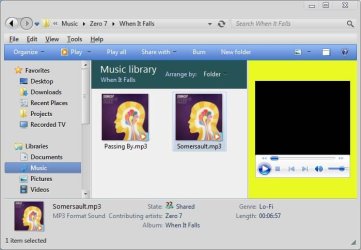
Quick WMP RichPreviewHandler Tip ...

XploRa

New member
Hi there ...

All you need is Restorator 2007 or any other Resource Hacker will do
just as well.

1. Open Wmploc.dll in \System32 dir. with your Res Hacker.
2. Click on OCXLAYOUTFULL.WSZ, which is inside folder 256, rightClick and
copy.
3. Click on RICHPREVIEW.WSZ, also in folder 256, rightClick and paste.
4. Now just save, and before use, open Win Taskmanager and kill wmprph.exe.
5. Away you go ... you now have a new skin inside the PreviewPane !

I guess any other WMP12 skin (not full ones) will sort of work , as long as it's not too complicated. So try and mess with it and see what you can come up with :) .
 

Attachments

  • skin_03.jpg
    skin_03.jpg
    60.5 KB · Views: 12

My Computer

Computer Manufacturer/Model Number
Custom Built
OS
Windows 7 Ultimate 32bit
CPU
Intel Dual-Core 5200
Motherboard
Asus
Memory
4096
Graphics Card(s)
nVidia 9600GT
Sound Card
Asus Xonar D1
Monitor(s) Displays
HP w1907v
Screen Resolution
1440X900
Hard Drives
Samsung 500Gb
WD Caviar 250Gb
PSU
AeroCool
Case
AeroCool i-Curve
Keyboard
Logitech
Mouse
Microsoft Wireless
Internet Speed
iBurst Wireless
Other Info
Hauppauge TV Tuner
Gigabit LAN to Lounge Media Pc
thanks ...

yeah, only there aint no artwork :) in the example, but can be done.
the nice thing is the volume control is there.
 

My Computer

Computer Manufacturer/Model Number
Custom Built
OS
Windows 7 Ultimate 32bit
CPU
Intel Dual-Core 5200
Motherboard
Asus
Memory
4096
Graphics Card(s)
nVidia 9600GT
Sound Card
Asus Xonar D1
Monitor(s) Displays
HP w1907v
Screen Resolution
1440X900
Hard Drives
Samsung 500Gb
WD Caviar 250Gb
PSU
AeroCool
Case
AeroCool i-Curve
Keyboard
Logitech
Mouse
Microsoft Wireless
Internet Speed
iBurst Wireless
Other Info
Hauppauge TV Tuner
Gigabit LAN to Lounge Media Pc
thanks ...

yeah, only there aint no artwork :) in the example, but can be done.
the nice thing is the volume control is there.

Untitled.png


Interesting! I'm not fully clued in on what you are trying to accomplish but whatever it is has tipped me off to something that I have wanted to do for some time now. Every now and then, I like to add the mini player to the taskbar like it was in previous versions of Windows. Sad part about that is, with Win 7 the mini player in the taskbar has always been Black. The black is OK but it doesn't blend in with the msstyle that I'm using. Thanks to you, I managed to find the images for the mini player. I haven't done much to it at the moment other than add some transparency which makes it look somewhat better. I'll have to spend more time with this in the future to get the look I want. What I would really like to have is the images for the mini player that is in WMP 11. For some reason, I'm thinking that with little effort, I can get what I want from those images. Anyone have WMP 11?


Edit: Ok, it appears that the images used are from WMP 11. I wonder why this mini player looks so much better in Vista than in Win 7? It must be reading a background color element from the js or wsz file but I can't figure it out. If that is the case, editing the images wouldn't be needed since one could change the code for the background color if one knew where to find it,lol
 
Last edited:

My Computer

Computer Manufacturer/Model Number
Averatec 6130HS-20
OS
Windows 7 Professional 32-bit (6.1, Build 7600)
CPU
Intel(R) Pentium(R) 4 3.00 GHz HT
Memory
2.0 GB
Graphics Card(s)
ATI Mobility Radeon 9600 64MB
Sound Card
Realtek AC'97 Audio
Screen Resolution
1280 x 800
Hard Drives
Seagate 96023A 60GB 7200RPM -
Seagate FreeAgentDesktop 250GB
Cooling
20 Inch Box Fan
Mouse
Targus PAWM10 Wireless Optical Laptop Mouse
Hi,

I was really looking to customize the look of WMP in the ReadingPane since the background stays white all the time, and I wanted it to be grey like my skin.

It was then that I by chance found out that to use the OCX skin (mini-player) in place of the default one, I found that it worked, but obviously the look is not
as good as the default one in Win7.

Hope that makes sence ...

See the Pic of my ReadingPane as it is at the moment.

btw. I think some features of WMP11 are really missed in WMP12 ...
like:

1. quickly showing nowplaying while in the library.
2. tag editor.
3. double-click played only the song that one chose.
etc.
 

Attachments

  • ReadingPane WMP12.jpg
    ReadingPane WMP12.jpg
    52.6 KB · Views: 7

My Computer

Computer Manufacturer/Model Number
Custom Built
OS
Windows 7 Ultimate 32bit
CPU
Intel Dual-Core 5200
Motherboard
Asus
Memory
4096
Graphics Card(s)
nVidia 9600GT
Sound Card
Asus Xonar D1
Monitor(s) Displays
HP w1907v
Screen Resolution
1440X900
Hard Drives
Samsung 500Gb
WD Caviar 250Gb
PSU
AeroCool
Case
AeroCool i-Curve
Keyboard
Logitech
Mouse
Microsoft Wireless
Internet Speed
iBurst Wireless
Other Info
Hauppauge TV Tuner
Gigabit LAN to Lounge Media Pc
Hi,

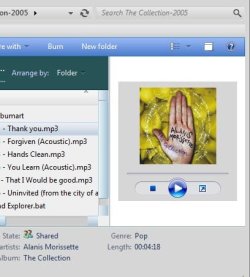
I was really looking to customize the look of WMP in the ReadingPane since the background stays white all the time, and I wanted it to be grey like my skin.

It was then that I by chance found out that to use the OCX skin (mini-player) in place of the default one, I found that it worked, but obviously the look is not
as good as the default one in Win7.

Hope that makes sence ...

See the Pic of my ReadingPane as it is at the moment.

btw. I think some features of WMP11 are really missed in WMP12 ...
like:

1. quickly showing nowplaying while in the library.
2. tag editor.
3. double-click played only the song that one chose.
etc.

I gotcha. The reading pane in the active state as far as I know comes from the Window Color(background) of your msstyle. It is a global system wide setting which as you know affects more than just that area. If you change it gray, it changes to gray in alot of other places as well. The worst being in my opinion, the clicked active text box in explorer etc..
 

My Computer

Computer Manufacturer/Model Number
Averatec 6130HS-20
OS
Windows 7 Professional 32-bit (6.1, Build 7600)
CPU
Intel(R) Pentium(R) 4 3.00 GHz HT
Memory
2.0 GB
Graphics Card(s)
ATI Mobility Radeon 9600 64MB
Sound Card
Realtek AC'97 Audio
Screen Resolution
1280 x 800
Hard Drives
Seagate 96023A 60GB 7200RPM -
Seagate FreeAgentDesktop 250GB
Cooling
20 Inch Box Fan
Mouse
Targus PAWM10 Wireless Optical Laptop Mouse
thanks ...

yeah, only there aint no artwork :) in the example, but can be done.
the nice thing is the volume control is there.

View attachment 127893


Interesting! I'm not fully clued in on what you are trying to accomplish but whatever it is has tipped me off to something that I have wanted to do for some time now. Every now and then, I like to add the mini player to the taskbar like it was in previous versions of Windows. Sad part about that is, with Win 7 the mini player in the taskbar has always been Black. The black is OK but it doesn't blend in with the msstyle that I'm using. Thanks to you, I managed to find the images for the mini player. I haven't done much to it at the moment other than add some transparency which makes it look somewhat better. I'll have to spend more time with this in the future to get the look I want. What I would really like to have is the images for the mini player that is in WMP 11. For some reason, I'm thinking that with little effort, I can get what I want from those images. Anyone have WMP 11?


Edit: Ok, it appears that the images used are from WMP 11. I wonder why this mini player looks so much better in Vista than in Win 7? It must be reading a background color element from the js or wsz file but I can't figure it out. If that is the case, editing the images wouldn't be needed since one could change the code for the background color if one knew where to find it,lol

Oh I see, I was looking for that minimized MiniPlayer but could not find it , hahaa.
So you used that trick thing to get it back in Win7.
Gonna try that out now.
 

My Computer

Computer Manufacturer/Model Number
Custom Built
OS
Windows 7 Ultimate 32bit
CPU
Intel Dual-Core 5200
Motherboard
Asus
Memory
4096
Graphics Card(s)
nVidia 9600GT
Sound Card
Asus Xonar D1
Monitor(s) Displays
HP w1907v
Screen Resolution
1440X900
Hard Drives
Samsung 500Gb
WD Caviar 250Gb
PSU
AeroCool
Case
AeroCool i-Curve
Keyboard
Logitech
Mouse
Microsoft Wireless
Internet Speed
iBurst Wireless
Other Info
Hauppauge TV Tuner
Gigabit LAN to Lounge Media Pc
thanks ...

yeah, only there aint no artwork :) in the example, but can be done.
the nice thing is the volume control is there.

View attachment 127893


Interesting! I'm not fully clued in on what you are trying to accomplish but whatever it is has tipped me off to something that I have wanted to do for some time now. Every now and then, I like to add the mini player to the taskbar like it was in previous versions of Windows. Sad part about that is, with Win 7 the mini player in the taskbar has always been Black. The black is OK but it doesn't blend in with the msstyle that I'm using. Thanks to you, I managed to find the images for the mini player. I haven't done much to it at the moment other than add some transparency which makes it look somewhat better. I'll have to spend more time with this in the future to get the look I want. What I would really like to have is the images for the mini player that is in WMP 11. For some reason, I'm thinking that with little effort, I can get what I want from those images. Anyone have WMP 11?


Edit: Ok, it appears that the images used are from WMP 11. I wonder why this mini player looks so much better in Vista than in Win 7? It must be reading a background color element from the js or wsz file but I can't figure it out. If that is the case, editing the images wouldn't be needed since one could change the code for the background color if one knew where to find it,lol

Oh I see, I was looking for that minimized MiniPlayer but could not find it , hahaa.
So you used that trick thing to get it back in Win7.
Gonna try that out now.

Yes. I used the one that only added and registered a certain .dll file. Prior to that, I used the one that was about a 10mb download. It worked as well but I removed it and went with the minimalist approach to get it. This is the one I used

How to Get Windows Media Player (WMP) 12 Taskbar Toolbar (Taskband) Back in Windows 7 by Restoring wmpband.dll File - Tweaking with Vishal
 

My Computer

Computer Manufacturer/Model Number
Averatec 6130HS-20
OS
Windows 7 Professional 32-bit (6.1, Build 7600)
CPU
Intel(R) Pentium(R) 4 3.00 GHz HT
Memory
2.0 GB
Graphics Card(s)
ATI Mobility Radeon 9600 64MB
Sound Card
Realtek AC'97 Audio
Screen Resolution
1280 x 800
Hard Drives
Seagate 96023A 60GB 7200RPM -
Seagate FreeAgentDesktop 250GB
Cooling
20 Inch Box Fan
Mouse
Targus PAWM10 Wireless Optical Laptop Mouse
thanks ...

yeah, only there aint no artwork :) in the example, but can be done.
the nice thing is the volume control is there.

View attachment 127893


Interesting! I'm not fully clued in on what you are trying to accomplish but whatever it is has tipped me off to something that I have wanted to do for some time now. Every now and then, I like to add the mini player to the taskbar like it was in previous versions of Windows. Sad part about that is, with Win 7 the mini player in the taskbar has always been Black. The black is OK but it doesn't blend in with the msstyle that I'm using. Thanks to you, I managed to find the images for the mini player. I haven't done much to it at the moment other than add some transparency which makes it look somewhat better. I'll have to spend more time with this in the future to get the look I want. What I would really like to have is the images for the mini player that is in WMP 11. For some reason, I'm thinking that with little effort, I can get what I want from those images. Anyone have WMP 11?


Edit: Ok, it appears that the images used are from WMP 11. I wonder why this mini player looks so much better in Vista than in Win 7? It must be reading a background color element from the js or wsz file but I can't figure it out. If that is the case, editing the images wouldn't be needed since one could change the code for the background color if one knew where to find it,lol

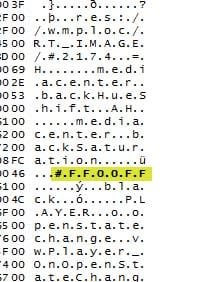
You have to edit the 2174.png inside wmploc.dll (change the transparency).
I cannot see any setting inside that one can modify to change the transparency.:(

Actually there is a way of setting a transparency level ...
 

Attachments

  • TASKBAR.jpg
    TASKBAR.jpg
    43.6 KB · Views: 60
Last edited:

My Computer

Computer Manufacturer/Model Number
Custom Built
OS
Windows 7 Ultimate 32bit
CPU
Intel Dual-Core 5200
Motherboard
Asus
Memory
4096
Graphics Card(s)
nVidia 9600GT
Sound Card
Asus Xonar D1
Monitor(s) Displays
HP w1907v
Screen Resolution
1440X900
Hard Drives
Samsung 500Gb
WD Caviar 250Gb
PSU
AeroCool
Case
AeroCool i-Curve
Keyboard
Logitech
Mouse
Microsoft Wireless
Internet Speed
iBurst Wireless
Other Info
Hauppauge TV Tuner
Gigabit LAN to Lounge Media Pc
thanks ...

yeah, only there aint no artwork :) in the example, but can be done.
the nice thing is the volume control is there.

View attachment 127893


Interesting! I'm not fully clued in on what you are trying to accomplish but whatever it is has tipped me off to something that I have wanted to do for some time now. Every now and then, I like to add the mini player to the taskbar like it was in previous versions of Windows. Sad part about that is, with Win 7 the mini player in the taskbar has always been Black. The black is OK but it doesn't blend in with the msstyle that I'm using. Thanks to you, I managed to find the images for the mini player. I haven't done much to it at the moment other than add some transparency which makes it look somewhat better. I'll have to spend more time with this in the future to get the look I want. What I would really like to have is the images for the mini player that is in WMP 11. For some reason, I'm thinking that with little effort, I can get what I want from those images. Anyone have WMP 11?


Edit: Ok, it appears that the images used are from WMP 11. I wonder why this mini player looks so much better in Vista than in Win 7? It must be reading a background color element from the js or wsz file but I can't figure it out. If that is the case, editing the images wouldn't be needed since one could change the code for the background color if one knew where to find it,lol

You have to edit the 2174.png inside wmploc.dll (change the transparency).
I cannot see any setting inside that one can modify to change the transparency.:(

Actually there is a way of setting a transparency level ...


Got a wild hair,lol. Went and used the downgrade to WMP 11. After all was said and done, you are correct. The 2174 Image after WMP 11 downgrade is a transparent image. Doesn't make sense to me. I copied the wmploc.dll from a working Vista OS with WMP 11 on it and the 2174 image is not transparent. It's the same as the 2174 in WMP 12's wmploc.dll. I have to say that I'm impressed with this WMP 11. The GUI is so much nicer than WMP 12. At any rate, my new 2174 is on an USB HD and I'm rebooting to roll this WMP 11 off. I kinda hate to do it considering in my opinion, it's way much nicer than WMP 12.
 

My Computer

Computer Manufacturer/Model Number
Averatec 6130HS-20
OS
Windows 7 Professional 32-bit (6.1, Build 7600)
CPU
Intel(R) Pentium(R) 4 3.00 GHz HT
Memory
2.0 GB
Graphics Card(s)
ATI Mobility Radeon 9600 64MB
Sound Card
Realtek AC'97 Audio
Screen Resolution
1280 x 800
Hard Drives
Seagate 96023A 60GB 7200RPM -
Seagate FreeAgentDesktop 250GB
Cooling
20 Inch Box Fan
Mouse
Targus PAWM10 Wireless Optical Laptop Mouse
View attachment 127893


Interesting! I'm not fully clued in on what you are trying to accomplish but whatever it is has tipped me off to something that I have wanted to do for some time now. Every now and then, I like to add the mini player to the taskbar like it was in previous versions of Windows. Sad part about that is, with Win 7 the mini player in the taskbar has always been Black. The black is OK but it doesn't blend in with the msstyle that I'm using. Thanks to you, I managed to find the images for the mini player. I haven't done much to it at the moment other than add some transparency which makes it look somewhat better. I'll have to spend more time with this in the future to get the look I want. What I would really like to have is the images for the mini player that is in WMP 11. For some reason, I'm thinking that with little effort, I can get what I want from those images. Anyone have WMP 11?


Edit: Ok, it appears that the images used are from WMP 11. I wonder why this mini player looks so much better in Vista than in Win 7? It must be reading a background color element from the js or wsz file but I can't figure it out. If that is the case, editing the images wouldn't be needed since one could change the code for the background color if one knew where to find it,lol

You have to edit the 2174.png inside wmploc.dll (change the transparency).
I cannot see any setting inside that one can modify to change the transparency.:(

Actually there is a way of setting a transparency level ...


Got a wild hair,lol. Went and used the downgrade to WMP 11. After all was said and done, you are correct. The 2174 Image after WMP 11 downgrade is a transparent image. Doesn't make sense to me. I copied the wmploc.dll from a working Vista OS with WMP 11 on it and the 2174 image is not transparent. It's the same as the 2174 in WMP 12's wmploc.dll. I have to say that I'm impressed with this WMP 11. The GUI is so much nicer than WMP 12. At any rate, my new 2174 is on an USB HD and I'm rebooting to roll this WMP 11 off. I kinda hate to do it considering in my opinion, it's way much nicer than WMP 12.

Ok I get it ... yes WMP11 is way better than 12 for sure ...
Well over here it's almost 12, so happy happy new year to you - will chat again!
 

My Computer

Computer Manufacturer/Model Number
Custom Built
OS
Windows 7 Ultimate 32bit
CPU
Intel Dual-Core 5200
Motherboard
Asus
Memory
4096
Graphics Card(s)
nVidia 9600GT
Sound Card
Asus Xonar D1
Monitor(s) Displays
HP w1907v
Screen Resolution
1440X900
Hard Drives
Samsung 500Gb
WD Caviar 250Gb
PSU
AeroCool
Case
AeroCool i-Curve
Keyboard
Logitech
Mouse
Microsoft Wireless
Internet Speed
iBurst Wireless
Other Info
Hauppauge TV Tuner
Gigabit LAN to Lounge Media Pc

You have to edit the 2174.png inside wmploc.dll (change the transparency).
I cannot see any setting inside that one can modify to change the transparency.:(

Actually there is a way of setting a transparency level ...


Got a wild hair,lol. Went and used the downgrade to WMP 11. After all was said and done, you are correct. The 2174 Image after WMP 11 downgrade is a transparent image. Doesn't make sense to me. I copied the wmploc.dll from a working Vista OS with WMP 11 on it and the 2174 image is not transparent. It's the same as the 2174 in WMP 12's wmploc.dll. I have to say that I'm impressed with this WMP 11. The GUI is so much nicer than WMP 12. At any rate, my new 2174 is on an USB HD and I'm rebooting to roll this WMP 11 off. I kinda hate to do it considering in my opinion, it's way much nicer than WMP 12.

Ok I get it ... yes WMP11 is way better than 12 for sure ...
Well over here it's almost 12, so happy happy new year to you - will chat again!

Happy New Year to you! I'm rolled back now and have added the WMP 11 image 2174 which is more transparent than my attempt. Well not more but it has a base color that's more smooth.

Untitled.png


Earlier attempt
Untitled3.png
 

My Computer

Computer Manufacturer/Model Number
Averatec 6130HS-20
OS
Windows 7 Professional 32-bit (6.1, Build 7600)
CPU
Intel(R) Pentium(R) 4 3.00 GHz HT
Memory
2.0 GB
Graphics Card(s)
ATI Mobility Radeon 9600 64MB
Sound Card
Realtek AC'97 Audio
Screen Resolution
1280 x 800
Hard Drives
Seagate 96023A 60GB 7200RPM -
Seagate FreeAgentDesktop 250GB
Cooling
20 Inch Box Fan
Mouse
Targus PAWM10 Wireless Optical Laptop Mouse
Yes ... that one looks much better.
 

My Computer

Computer Manufacturer/Model Number
Custom Built
OS
Windows 7 Ultimate 32bit
CPU
Intel Dual-Core 5200
Motherboard
Asus
Memory
4096
Graphics Card(s)
nVidia 9600GT
Sound Card
Asus Xonar D1
Monitor(s) Displays
HP w1907v
Screen Resolution
1440X900
Hard Drives
Samsung 500Gb
WD Caviar 250Gb
PSU
AeroCool
Case
AeroCool i-Curve
Keyboard
Logitech
Mouse
Microsoft Wireless
Internet Speed
iBurst Wireless
Other Info
Hauppauge TV Tuner
Gigabit LAN to Lounge Media Pc

Back
Top