install forbidden by system policy

drlinberto

New member
Hi there guys,

I knew there must have been a forum for this great OS!!
in general all my software installs went great, no conflicts or anything like incompatible applications.
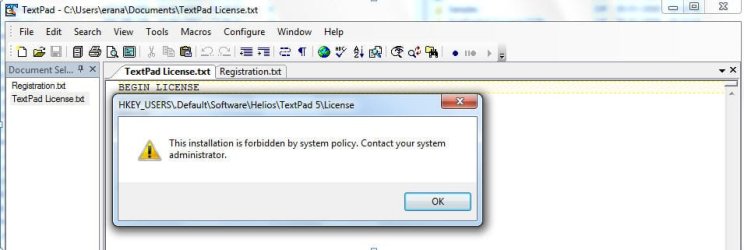
Just one problem with installing textpad, when i try to enter my license information the application is trying to access some registration and the system policy prevents that.
Please help me solve this.

see the attached image

HKEY_USERS\.Deafult\Software\Helios\TextPad 5\License
 

Attachments
  • textpadLicense.jpg
    textpadLicense.jpg
    61.6 KB · Views: 554

My Computer

OS
7
CPU
Q6600
Motherboard
X38-DS5
Memory
2G
Graphics Card(s)
8800 GT
Sound Card
on board
First of all, Are you administrator on your PC?
 

My Computer

OS
Windows 7 Ultimate x86 SP1
Of course I am
I re checked just to make sure :-)
 

My Computer

OS
7
CPU
Q6600
Motherboard
X38-DS5
Memory
2G
Graphics Card(s)
8800 GT
Sound Card
on board
ok.

Right clicking Textpad apliication (exe file) and click "run as Administrator"
And try now.
 

My Computer

OS
Windows 7 Ultimate x86 SP1
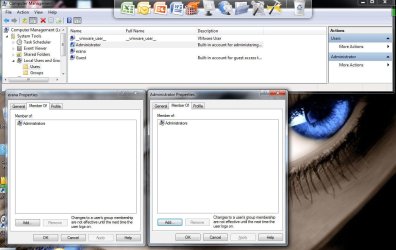
when i look at my user in user management I see i am an administrator.
but hey , I was just thinking of it, when i installed windows , I did not set up an administrator password, so how can i login as admin ?
 

My Computer

OS
7
CPU
Q6600
Motherboard
X38-DS5
Memory
2G
Graphics Card(s)
8800 GT
Sound Card
on board
If didn't help.

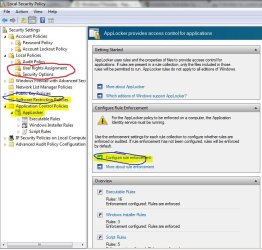
  1. Press Start :orb:
  2. Write "local Security Policy"
  3. And give me screenshot of those to circled options.
  4. Look through 2 options cicled with red. can you see anything that can block installation
Capture.JPG
Note: second circled option "configure rule enforcement" is under Applocker
Note2: you may not have Applocker if you are not running Windows 7 Enterprise or Ultimate
when i look at my user in user management I see i am an administrator.
but hey , I was just thinking of it, when i installed windows , I did not set up an administrator password, so how can i login as admin ?

If you have created only one account then you are administrator.
But UAC downgrades you to level of Standart account in some case for security reasons. and "run as admin" is function to bypass UAC
 

My Computer

OS
Windows 7 Ultimate x86 SP1
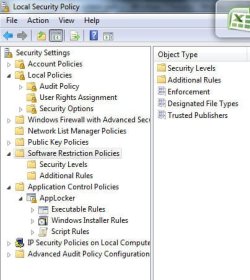
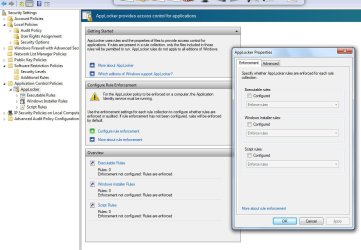
here, I added 2 attachments here..

Thanks for the help mate !!
 

Attachments

  • circle1.jpg
    circle1.jpg
    54.8 KB · Views: 384
  • cirle2.jpg
    cirle2.jpg
    164.6 KB · Views: 638

My Computer

OS
7
CPU
Q6600
Motherboard
X38-DS5
Memory
2G
Graphics Card(s)
8800 GT
Sound Card
on board
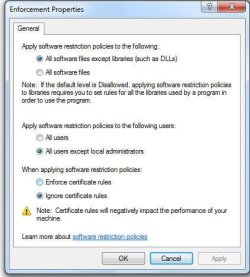
1. hmm.. Can you double click "enforcement" from first screenshot and give screnshot of it?

2. This one may work (but do first and post screenshot, and I will tell you if you need to do)
Press Start
Write gpedit.msc, and then click OK.
Go to Local Computer Policy-->Computer Configuration-->Administrative Templates--> Windows Components-->Windows Installer and then find Prohibit non-administrators from applying vendor signed updates.
Double click it and click Disabled and then ok.
 

My Computer

OS
Windows 7 Ultimate x86 SP1
Enforcement
 

Attachments

  • enforcement.jpg
    enforcement.jpg
    53.9 KB · Views: 257

My Computer

OS
7
CPU
Q6600
Motherboard
X38-DS5
Memory
2G
Graphics Card(s)
8800 GT
Sound Card
on board
1. So, you do have Software restriction Policy enabled? (I wonder why if you use only one account :sarc: ) Have you enabled it yourself?

2. Have you tried "run as Admin"
 

My Computer

OS
Windows 7 Ultimate x86 SP1
I haven't done it my self, I installed the system my self and only one user exists.
when i rightclick the exe there is an option called run as different user and there I have to give username and pass and as i did not set the admin pass I cannot try the thing you said.

when i right click , should i have an option called "Run as Admin" ? I do not
 

My Computer

OS
7
CPU
Q6600
Motherboard
X38-DS5
Memory
2G
Graphics Card(s)
8800 GT
Sound Card
on board
check out these 2 images, this is the users I have currently
 

Attachments

  • users1.jpg
    users1.jpg
    145.8 KB · Views: 309
  • users2.jpg
    users2.jpg
    147.2 KB · Views: 173

My Computer

OS
7
CPU
Q6600
Motherboard
X38-DS5
Memory
2G
Graphics Card(s)
8800 GT
Sound Card
on board
I also tried what you said with the vendor signed updates but it did not work :-(
 

My Computer

OS
7
CPU
Q6600
Motherboard
X38-DS5
Memory
2G
Graphics Card(s)
8800 GT
Sound Card
on board
Thank you !#!#

it helped, I mean, I went to the users management, enabled Admin, set a password to it and than used the run as admin option and it worked like a charm !


Thank you my friend!
 

My Computer

OS
7
CPU
Q6600
Motherboard
X38-DS5
Memory
2G
Graphics Card(s)
8800 GT
Sound Card
on board
Thank you !#!#

it helped, I mean, I went to the users management, enabled Admin, set a password to it and than used the run as admin option and it worked like a charm !


Thank you my friend!

Glad you have it workin :)
Sorry for late, answer.
Guests.... had to get out of comp :p
 

My Computer

OS
Windows 7 Ultimate x86 SP1
I have the same problem but...

I use a W7 64x Professionnal. I tried all actions in this thread, but I already received the message (install forbidden by ...) with all installation software that use Windows Installer.

Using gpedit.msc I open all Windows installer policies.

Do you have an other idea?
 

My Computer

Computer Manufacturer/Model Number
gateway desktop pc with I3-550 processor
OS
Windows 7 Professionnal X64
CPU
i3-550
Motherboard
gateway
Memory
4g
Graphics Card(s)
ati readon
Monitor(s) Displays
Samsung 21"
Hard Drives
2X 500G
I resolved this exact issue by disabling Security Settings-->Local Policies-->Security Options-->User Account Control: Run all administrators in Admin Approval Mode. Not sure if it was the correct thing to do, but I wan able to finally license my Textpad install.
 

My Computer

Computer Manufacturer/Model Number
Dell Inc. OptiPlex 780
OS
Win 7 Pro 64-bit
CPU
3.00 gigahertz Intel Core2 Quad Q9650 64 kilobyte primary me
Motherboard
Board: Dell Inc. 0C27VV A02 Bus Clock: 1333 megahertz
Memory
8126 Megabytes Usable Installed Memory
Graphics Card(s)
ATI Radeon HD 3450
Sound Card
SoundMAX Integrated Digital High Definition Audio
Monitor(s) Displays
2 x DELL E2010H
Hard Drives
WDC WD2500AAJS-75M0A0 [Hard drive] (250.00 GB)
ST330062 2A USB Device [Hard drive] (300.07 GB)
TEAC FD-05PUW USB Device [Floppy drive]
TSSTcorp DVD+-RW TS-H653G [Optical drive]
I resolved this exact issue by disabling Security Settings-->Local Policies-->Security Options-->User Account Control: Run all administrators in Admin Approval Mode. Not sure if it was the correct thing to do, but I wan able to finally license my Textpad install.

Actually you don't have to.

And as I have previously mentioned one should be able to solve this problem by right clicking Textpad.exe and choosing "run as administrator" even if you are administrator.

Textpad forum confirms it aswell: Community :: View topic - Installing license fails in Vista.

The workaround you provided will also work as you are granting yourself full administrative token. However it is not recommended from security point of view.
As far as I can see, you can actually safely re-enable that option after you have completed licensing.
 

My Computer

OS
Windows 7 Ultimate x86 SP1
Hi! I had the exact same problem and it was resolved by performing the license update after starting TextPad.exe with "Run as administrator".
 

My Computer

Computer Manufacturer/Model Number
Lenovo ThinkStation E30
OS
Windows 7 Professional 64bit
Back
Top