Solved RMA new board or incompatible RAM? Asus E35m1-I Deluxe

211

New member
I just recieved parts for my HTPC build:
  • Asus E35M1-I motherboard (AMD cpu/mobo combo)
  • Crucial 4GB (2x2GB) DDR3 1066 (PC3 8500)
  • Kingston SSDNow V Series 30GB SSD (for OS)
  • Samsung slimline DVD/CD burner
  • Windows 7 Ultimate x64
Here's the deal, I battled with error messages and install hangs during the whole installation process. I finally narrowed my install troubles to two things. 1) I had to switch the SATA controller for the SSD from IDE to ACHI mode. 2) I had to remove 1 stick of ram because I would get weird error messages (sometimes different each time I rebooted). ntoskrnl.exe is missing or corrupt was a common one.

Meanwhile I continued the install with only a single 2GB stick in DIMM slot A.
I initially thought the ram issue may be driver related so I waited and installed and updated all drivers and Win updates before troubleshooting the ram issue. After updating the Ram issues still exist and it appears that it's only when two sticks are installed.


I'll outline my troubleshooting steps which helped me come to this conclusion:
  • Windows up and running with all updates current including drivers (NO CURRENT BIOS RELEASE IS AVAILABLE FROM ASUS)
  • Removed RAM Stick2 from DIMM Slot B; Boots fine
  • Swapped Stick1 with Stick2 in SlotA; boots fine with Stick2 in SlotA (both sticks good right?)
  • Installed Stick1 in SlotB (both slots now populated): No boot. (BSOD something about IRQ Equal or less than; basically a hardware error)
  • Removed both sticks and insert Stick1 in SlotB; Boots fine (DIMM SlotB good right?)
  • Pulled Stick1 installed Stick2 in SlotB: Boots fine.
  • Again, reinstalled the remaining stick in the SlotA (both slots populated again); No Boot.
Sounds like the issue is isolated to when both slots are populated.

I'm also getting inconsistant messages in BIOS saying sometimes the memory passes sometimes it doesn't.
Also in BIOS only 2GB is recognized regardless if I have both sticks installed or not.

Strange???

RMA or incomatible memory???
 

My Computer

Computer Manufacturer/Model Number
Custom
OS
Windows 7 Ultimate x64
CPU
Intel Core2 Duo E8400
Motherboard
Gigabyte GA-EP45-DS3L
Memory
4GB OCZ Fatal1ty Ed. PC6400
Graphics Card(s)
Sapphire Radeon HD4870
Sound Card
Onboard
Monitor(s) Displays
Acer P221W
Hard Drives
Seagate Barracuda 500gb
PSU
PC Power & Cooling Silencer PPCs500w
Case
Antec 300
Cooling
Yes
Try downloading Memtest86 bootable disk and run it before boot up. It takes quite awhile but needs to run several passes. It will test the ram to see if the ram is defective.
 

My Computers

System One System Two

  • Computer type
    PC/Desktop
    Computer Manufacturer/Model Number
    ALWAYS UNDER CONSTRUCTION
    OS
    Windows 11 Pro
    CPU
    Ryzen 9 5900X
    Motherboard
    Asus X570 Crosshair Viii Hero
    Memory
    32GB G Skill DDR4-3600
    Graphics Card(s)
    EVGA RTX 3080 FTW 3 Ultra
    Sound Card
    On Board/Sennheiser PC37X Headset
    Monitor(s) Displays
    3 X Asus 27"
    Screen Resolution
    2560x1440
    Hard Drives
    2 X 1 TB NVME drives
    PSU
    EVGA 850
    Case
    Phanteks Eclipse P400A
    Cooling
    EVGA 280 AIO
    Keyboard
    Logitech G510s/ Logitech G13
    Mouse
    Logitech G502
    Internet Speed
    24/1
    Antivirus
    ESET/MBAM Pro/SAS Pro
    Browser
    Chrome/ Firefox/ Edge
  • Computer type
    Laptop
    System Manufacturer/Model Number
    Dell 16 Plus
    OS
    Windows 11 Pro
    CPU
    Intel Ultra 9 288V
    Memory
    32 GB LPDDR5X 8533
    Monitor(s) Displays
    16" Mini-LED HDR600 Touch 90 Hz
    Screen Resolution
    2560X1600
    Hard Drives
    1 TB NVME
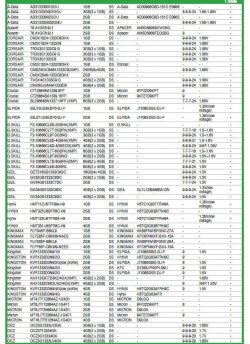
You can go to Gigabyte;s web site and look at their QVL (Qualified Vendors list). This tells you what ram they have tested to be compatiable with your board. It does not mean that no other ram is compatible, just those are the ones that were tested. I have always thought that even if your ram is not listed, if you find a set on the list by the same manuf., with the same frequency, same voltage and same timings; it is more than likely compatible with your board.

I have had the same issues as you and can tell you that it is usually a long drawn out affair to determine what the cause is. I ran the ram for 8 passes (11 hours on my machine) the time it takes depends on the speed of your machine and how much ram is being tested. If you find a stick that shows errors, you need to run it again in a different slot. Basically, what you are testing is the ram modules and the Dimm slots. errors can be caused by bad ram or bad dimm slots. you need to test bad ram in slots that previously tested good, and good ram in slots that tested bad in order to determine if the ram is bad or if the MB dimm slot is bad.

Others will disagree, but from the testing you have done, it looks like more of a motherboard issue than a ram issue. either that or the ram is not matched and does not work well together.Also, I don't know where you purchased the MB., but most places will exchange within 30 days. I will assure you that you will have a much easier time returning it to where you bought it than you will RMAing it to Gigabyte.
 

My Computers

System One System Two

  • Computer type
    PC/Desktop
    Computer Manufacturer/Model Number
    ALWAYS UNDER CONSTRUCTION
    OS
    Windows 11 Pro
    CPU
    Ryzen 9 5900X
    Motherboard
    Asus X570 Crosshair Viii Hero
    Memory
    32GB G Skill DDR4-3600
    Graphics Card(s)
    EVGA RTX 3080 FTW 3 Ultra
    Sound Card
    On Board/Sennheiser PC37X Headset
    Monitor(s) Displays
    3 X Asus 27"
    Screen Resolution
    2560x1440
    Hard Drives
    2 X 1 TB NVME drives
    PSU
    EVGA 850
    Case
    Phanteks Eclipse P400A
    Cooling
    EVGA 280 AIO
    Keyboard
    Logitech G510s/ Logitech G13
    Mouse
    Logitech G502
    Internet Speed
    24/1
    Antivirus
    ESET/MBAM Pro/SAS Pro
    Browser
    Chrome/ Firefox/ Edge
  • Computer type
    Laptop
    System Manufacturer/Model Number
    Dell 16 Plus
    OS
    Windows 11 Pro
    CPU
    Intel Ultra 9 288V
    Memory
    32 GB LPDDR5X 8533
    Monitor(s) Displays
    16" Mini-LED HDR600 Touch 90 Hz
    Screen Resolution
    2560X1600
    Hard Drives
    1 TB NVME
@essenbe: It's Asus, not Gigabyte.

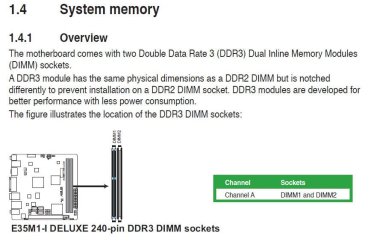
@211: I take it that this is your board: ASUSTeK Computer Inc. - Motherboards - ASUS E35M1-I DELUXE

I'm not sure that I like the positioning of the heatsink assembly. It looks like the end of the heatpipes are overhanging the innermost memory slot. I wonder if this is interfering with the memory module when both slots are populated?
 

My Computer

Computer type
PC/Desktop
Computer Manufacturer/Model Number
Dwarf Dwf/11/2012 r09/2013
OS
Windows 8.1 Pro RTM x64
CPU
Intel Core-i5-3570K 4-core @ 3.4GHz (Ivy Bridge) (OC 4.4GHz)
Motherboard
ASRock Z77 Extreme4-M
Memory
4 x 4GB DDR3-1600 Corsair Vengeance CMZ8GX3M2A1600C9B (16GB)
Graphics Card(s)
MSI GeForce GTX770 Gaming OC 2GB
Sound Card
Realtek High Definition on board solution (ALC 898)
Monitor(s) Displays
ViewSonic VA1912w Widescreen (VGA)
Screen Resolution
1440x900
Hard Drives
OCZ Agility 3 SSD 120GB SATA III x2 (RAID 0)
Samsung HD501LJ 500GB SATA II x2
Hitachi HDS721010CLA332 1TB SATA II
Iomega 1.5TB Ext USB 2.0
WD 2.0TB Ext USB 3.0
PSU
XFX Pro Series 850W Semi-Modular
Case
Gigabyte IF233
Cooling
1 x 120mm Front Inlet 1 x 120mm Rear Exhaust
Keyboard
Microsoft Comfort Curve Keyboard 3000 (USB)
Mouse
Microsoft Comfort Mouse 3000 for Business (USB)
Internet Speed
NetGear DG834Gv3 ADSL Modem/Router (Ethernet) ~4.0 Mb/s (O2)
Antivirus
Avast! 8.0.1497
Browser
IE 11
Other Info
Optical Drive: HL-DT-ST BD-RE BH10LS30 SATA Bluray
Lexmark S305 Printer/Scanner/Copier (USB)
WEI Score: 8.1/8.1/8.5/8.5/8.25
Asus Eee PC 1011PX Netbook (Windows 7 x86 Starter)
Good eye Dwarf.
 

My Computers

System One System Two

  • Computer type
    PC/Desktop
    Computer Manufacturer/Model Number
    ALWAYS UNDER CONSTRUCTION
    OS
    Windows 11 Pro
    CPU
    Ryzen 9 5900X
    Motherboard
    Asus X570 Crosshair Viii Hero
    Memory
    32GB G Skill DDR4-3600
    Graphics Card(s)
    EVGA RTX 3080 FTW 3 Ultra
    Sound Card
    On Board/Sennheiser PC37X Headset
    Monitor(s) Displays
    3 X Asus 27"
    Screen Resolution
    2560x1440
    Hard Drives
    2 X 1 TB NVME drives
    PSU
    EVGA 850
    Case
    Phanteks Eclipse P400A
    Cooling
    EVGA 280 AIO
    Keyboard
    Logitech G510s/ Logitech G13
    Mouse
    Logitech G502
    Internet Speed
    24/1
    Antivirus
    ESET/MBAM Pro/SAS Pro
    Browser
    Chrome/ Firefox/ Edge
  • Computer type
    Laptop
    System Manufacturer/Model Number
    Dell 16 Plus
    OS
    Windows 11 Pro
    CPU
    Intel Ultra 9 288V
    Memory
    32 GB LPDDR5X 8533
    Monitor(s) Displays
    16" Mini-LED HDR600 Touch 90 Hz
    Screen Resolution
    2560X1600
    Hard Drives
    1 TB NVME
Thanks for the feedback.
At this point I'm thinking it's a compatibilty issue with the memory. I have not ran memtest but I did speak w/ a tech from Asus.

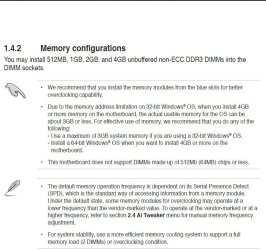
He wasn't very clear but it appears that the mobo does not support dual channel mode. So depending on what memory I'm installing I may only be able to use a single DIMM slot.
Which baffles me because if I can only use one slot why do they offer 2. He kept telling me I need to contact the memory mfg (Crucial) and see if their memory is dual channel memory or not. Which is the other weird thing; if the mobo does not support dual channel memory it shouldn't matter right?
If I install two sticks of ram that are dual channel 'compatible' in a non-dual channel mobo, it'll just see them as two sticks of ram. No more, no less???

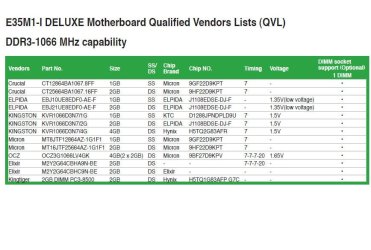
The memory I have is a couple digits off from whats listed in the QVL and basically I was told "unless the numbers match exactly I can't be gurarantted they'll work.

I was always told that ASUS' customer support was top-notch.
I had nothing but a very frustrating experience and I'm still not sure if my question is answered.

@Dwarf: The heatpipes are not in the way of the memory when installed. It is tight but there's clearance.
 

Attachments

  • Image1.jpg
    Image1.jpg
    111.3 KB · Views: 79
  • Image2.jpg
    Image2.jpg
    191.8 KB · Views: 108
  • Image3.jpg
    Image3.jpg
    134.8 KB · Views: 170
  • Image4.jpg
    Image4.jpg
    261.9 KB · Views: 211
  • Image5.jpg
    Image5.jpg
    211.9 KB · Views: 145

My Computer

Computer Manufacturer/Model Number
Custom
OS
Windows 7 Ultimate x64
CPU
Intel Core2 Duo E8400
Motherboard
Gigabyte GA-EP45-DS3L
Memory
4GB OCZ Fatal1ty Ed. PC6400
Graphics Card(s)
Sapphire Radeon HD4870
Sound Card
Onboard
Monitor(s) Displays
Acer P221W
Hard Drives
Seagate Barracuda 500gb
PSU
PC Power & Cooling Silencer PPCs500w
Case
Antec 300
Cooling
Yes
Asus and every other Manuf. I have ever talked to (and there have been a few) will try to blame it on you. The QVL list you posted- Go to Newegg and look up the memory modules. You will find most of them listed as dual channel. I know because I own one of the kits on that list and it is dual channel. I still suggest you run memtest86. At least if the memory passes, you will be able to tell Asus they are full of it, and do go check the descriptions of some of those modules-they are dual channel. After doing that you should probably RMA the board. That's my opinion. You just need to gather the ammunition you will need dealing with Asus.

Also, the G Skill F3-10666CL9T-6GBNQ is tripple channel.
 

My Computers

System One System Two

  • Computer type
    PC/Desktop
    Computer Manufacturer/Model Number
    ALWAYS UNDER CONSTRUCTION
    OS
    Windows 11 Pro
    CPU
    Ryzen 9 5900X
    Motherboard
    Asus X570 Crosshair Viii Hero
    Memory
    32GB G Skill DDR4-3600
    Graphics Card(s)
    EVGA RTX 3080 FTW 3 Ultra
    Sound Card
    On Board/Sennheiser PC37X Headset
    Monitor(s) Displays
    3 X Asus 27"
    Screen Resolution
    2560x1440
    Hard Drives
    2 X 1 TB NVME drives
    PSU
    EVGA 850
    Case
    Phanteks Eclipse P400A
    Cooling
    EVGA 280 AIO
    Keyboard
    Logitech G510s/ Logitech G13
    Mouse
    Logitech G502
    Internet Speed
    24/1
    Antivirus
    ESET/MBAM Pro/SAS Pro
    Browser
    Chrome/ Firefox/ Edge
  • Computer type
    Laptop
    System Manufacturer/Model Number
    Dell 16 Plus
    OS
    Windows 11 Pro
    CPU
    Intel Ultra 9 288V
    Memory
    32 GB LPDDR5X 8533
    Monitor(s) Displays
    16" Mini-LED HDR600 Touch 90 Hz
    Screen Resolution
    2560X1600
    Hard Drives
    1 TB NVME
Answer to your problem

I just recieved parts for my HTPC build:
  • Asus E35M1-I motherboard (AMD cpu/mobo combo)
  • Crucial 4GB (2x2GB) DDR3 1066 (PC3 8500)
  • Kingston SSDNow V Series 30GB SSD (for OS)
  • Samsung slimline DVD/CD burner
  • Windows 7 Ultimate x64
Here's the deal, I battled with error messages and install hangs during the whole installation process. I finally narrowed my install troubles to two things. 1) I had to switch the SATA controller for the SSD from IDE to ACHI mode. 2) I had to remove 1 stick of ram because I would get weird error messages (sometimes different each time I rebooted). ntoskrnl.exe is missing or corrupt was a common one.

Meanwhile I continued the install with only a single 2GB stick in DIMM slot A.
I initially thought the ram issue may be driver related so I waited and installed and updated all drivers and Win updates before troubleshooting the ram issue. After updating the Ram issues still exist and it appears that it's only when two sticks are installed.


I'll outline my troubleshooting steps which helped me come to this conclusion:
  • Windows up and running with all updates current including drivers (NO CURRENT BIOS RELEASE IS AVAILABLE FROM ASUS)
  • Removed RAM Stick2 from DIMM Slot B; Boots fine
  • Swapped Stick1 with Stick2 in SlotA; boots fine with Stick2 in SlotA (both sticks good right?)
  • Installed Stick1 in SlotB (both slots now populated): No boot. (BSOD something about IRQ Equal or less than; basically a hardware error)
  • Removed both sticks and insert Stick1 in SlotB; Boots fine (DIMM SlotB good right?)
  • Pulled Stick1 installed Stick2 in SlotB: Boots fine.
  • Again, reinstalled the remaining stick in the SlotA (both slots populated again); No Boot.
Sounds like the issue is isolated to when both slots are populated.

I'm also getting inconsistant messages in BIOS saying sometimes the memory passes sometimes it doesn't.
Also in BIOS only 2GB is recognized regardless if I have both sticks installed or not.

Strange???

RMA or incomatible memory???
I have the ASUS E35M1-I MB. I had the same problem with 2x 1GB, Crucial Memory CT2kit12864BA1339.4FR memory (4chips, 2 wired front, 2 wired rear ). I had to re-order 2 of the memory sticks from Crucial CT12864BA1339.8FF (8 chips all on the front, wired to the front.) THEN EVERYTHING, both boards, WORKED FINE with NO PROBLEMS. ASUS USA lists the board having DUAL CHANNEL config. ASUS ASIA lists the board having SINGLE CHANNEL config. The manual says nothing. So it is unknown which is correct.
 

My Computer

OS
Win732
CPU
AMD
Motherboard
ASUS E35M1-I
Memory
Crucial CT2kit12864BA1339.8FF
I finally got fed up with ASUS' tech support and them not being able to actually 'explain' why or how two sticks of memory are not compatible with their board.
RMA'd the x2 2gb sticks and bought a single 4gb stick. Runs great now. Always on, silent and cool.
 

My Computer

Computer Manufacturer/Model Number
Custom
OS
Windows 7 Ultimate x64
CPU
Intel Core2 Duo E8400
Motherboard
Gigabyte GA-EP45-DS3L
Memory
4GB OCZ Fatal1ty Ed. PC6400
Graphics Card(s)
Sapphire Radeon HD4870
Sound Card
Onboard
Monitor(s) Displays
Acer P221W
Hard Drives
Seagate Barracuda 500gb
PSU
PC Power & Cooling Silencer PPCs500w
Case
Antec 300
Cooling
Yes
211,
I am running Win7_32bit with the E35M1-I MB. You are running Win64. My info said that with Win7_32bit you cannot effectively use more than 3GB, so I used 2x1GB configured 8FF. Also the same info said with Win7_64bit, memory addresses are unlimited in the software. So the hardware must have a shortcoming for you.
Info is definitely lacking on the memory configuration. Hope a BIOS update can take care of the weird problem but so far none.. I would like to use my 2 sticks of Crucial memory that is configured 4FR. They are not listed in the QVL file. My biggest question is.... am I running Dual Channel with my 2 sticks of 8FF configuration.? ASUS USA says it is Dual Channel. ASUS Asia says Single Channel. But there is nothing in the manual to verify dual channel. ( or with CPU-Z).! Overall though it is a great little MB running cool and fast with the Sata 3 ports and a Crucial M4 SSD. (BTW only $99 today at NewEgg, 1pm PDT.)
This MB is much better than the Intel ITX MB which is not nearly as impressive.
G.L.
 

My Computer

OS
Win732
CPU
AMD
Motherboard
ASUS E35M1-I
Memory
Crucial CT2kit12864BA1339.8FF
I had the same problem...I contacted Asus and they told me to RMA the board...new board came today..ram problems gone, boots up and runs beatifully
Build:
Asus E35M1-I Deluxe
OCZ Vertx 3 120 GB SSD
Kingston DDR 3 1333 ram 8GB (2x4GB) - base board spec is 1066 - you can set board to run 1333 ram in bios setup
Samsung Slimline SATA DVD
Morex T-3500 mini itx fanless case with 60W pico power supply

totally silent pc- no moving parts
total consumed power = 23 watts
 

My Computer

Computer Manufacturer/Model Number
Asus P5ND
OS
Windows 7 32 bit RC1 7100
CPU
Intel CoreDuo E8500
Motherboard
Asus P5ND
Memory
2 x 2G OCZ DDR2 800Mhz SLI Certified
Graphics Card(s)
2 X EGA GT6800GT
Sound Card
Creative X-FI Titanium
Monitor(s) Displays
Samsung 19"
Hard Drives
WD Raptor 10,000 RPM 74 GB
RAID 0 Array
WD Raptor 10,000 RPM 150 GB

WD 7200 RPM 320 GB
PSU
PC Power & Cooling 750W
Case
Performance One P180
Cooling
Thermaltake IFX-14 Heatsink (3) X 120 mm fan, (1) X 80 mm
I did not know that you could run 8GB (2x4GB) with Windows 7, 32 bit.! I have to rethink a lot of things. We both enjoy low powered, quiet, computers with SSDs for hard drives.
 

My Computer

OS
Win732
CPU
AMD
Motherboard
ASUS E35M1-I
Memory
Crucial CT2kit12864BA1339.8FF
I did not know that you could run 8GB (2x4GB) with Windows 7, 32 bit.! I have to rethink a lot of things. We both enjoy low powered, quiet, computers with SSDs for hard drives.
You can run as much memory as you want (with respect to the limitations of the mobo), a 32-bit system will only recognize a little more than 3Gb of that though. I think it's 3.5 or 3.8 gigs.
So yes, you can run with 8Gb, is it worth it? Probably not since the system will not utilize all of it. If you DO have 2x4GB sticks running in dual channel mode you can expect a performance boost from the increased read/write speeds, so from that regard it's not worth running just one stick of 4GB either.... if you have it.

With memory prices dropping all the time there really is no reason to run a 32-bit system anymore.
 

My Computer

Computer Manufacturer/Model Number
Custom
OS
Windows 7 Ultimate x64
CPU
Intel Core2 Duo E8400
Motherboard
Gigabyte GA-EP45-DS3L
Memory
4GB OCZ Fatal1ty Ed. PC6400
Graphics Card(s)
Sapphire Radeon HD4870
Sound Card
Onboard
Monitor(s) Displays
Acer P221W
Hard Drives
Seagate Barracuda 500gb
PSU
PC Power & Cooling Silencer PPCs500w
Case
Antec 300
Cooling
Yes
211, I do not completely understand memory board configurations.
The Crucial CT2kit12864BA1339.4FR (2x1GB) did not work for me. whereas the .8FF did.
RichRich146 used 2x4GB with Win7 32 bit and it worked fine after an RMA and replacement of the E35M1-I MB. But his Kingston DDR3 must have been configured correctly. OK on Win7 64bit. I have to look for a copy. I use "FREE" software when available.:)
 

My Computer

OS
Win732
CPU
AMD
Motherboard
ASUS E35M1-I
Memory
Crucial CT2kit12864BA1339.8FF
hey all,

having read this threat helped me not going nuts on my asus e35m1 deluxe board, so i wanted to thank you and add my solution to the problem.

having experienced the same memory trouble by using both slots (corsair xms3 2x 2gb), but not by using a single one, i contacted asus support (germany) and they told me to update the bios to version 1305 via ez flash 2.

just completed the update and re-started using both slots - everything works just fine now :)

best, wicked
 

My Computer

OS
Win7 64bit

My Computer

Computer Manufacturer/Model Number
Custom
OS
Windows 7 Ultimate x64
CPU
Intel Core2 Duo E8400
Motherboard
Gigabyte GA-EP45-DS3L
Memory
4GB OCZ Fatal1ty Ed. PC6400
Graphics Card(s)
Sapphire Radeon HD4870
Sound Card
Onboard
Monitor(s) Displays
Acer P221W
Hard Drives
Seagate Barracuda 500gb
PSU
PC Power & Cooling Silencer PPCs500w
Case
Antec 300
Cooling
Yes
Back
Top