
Internet Explorer 9 Available now!

Status
Not open for further replies.
My Product ID is also diferent:
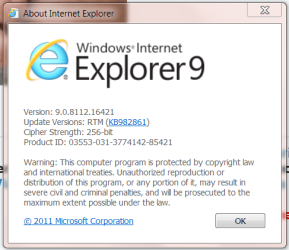
IE9 Help.PNG

I downloaded the 64bit installer from the IE9 site.

Jim :geek:
 

My Computer My Computer

Computer type
PC/Desktop
Computer Manufacturer/Model Number
Home Built
OS
Windows 8.1 Pro w/Media Center 64bit, Windows 7 HP 64bit
CPU
Phenom II X6 1100T
Motherboard
ASUS M5A99X EVO
Memory
Crucial Balistic 8gb DDR3-1866 CL9
Graphics Card(s)
MSI R6850 Cyclone IGD5 PE
Sound Card
On Board
Monitor(s) Displays
ASUS VE258Q 25" LED with DVI-HDMI-DisplayPort
Screen Resolution
1920 x 1080
Hard Drives
Two WD Cavier Black 2TB Sata III, WD My Book Essential 2TB USB 3.0
PSU
Seasonic X650 80 Plus GOLD Modular
Case
Corsair 400R
Cooling
Antec Kuhler H2O 620, Two 120mm and four 140mm
Keyboard
Logitech K120
Mouse
Logitech Marble Mouse USB, Logitech Precision Game Pad
Internet Speed
15MB
Antivirus
Norton IS 2013, Malwarebytes Pro Beta 2
Browser
IE-11, FF-27
Other Info
APC UPS ES 750, Netgear WNR3500L Gigabit & Wireless N Router with SamKnows Test Program, Motorola SB6120 Gigabit Cable Modem. Brother HL-2170W Laser Printer, Epson V300 Scanner
Ah, I see.

It's the Version number on top that you are wanting to look at instead. The product ID will be unique on each computer. :)
 

My Computer My Computer

Computer type
PC/Desktop
Computer Manufacturer/Model Number
Self built custom
OS
64-bit Windows 11 Pro for Workstations
CPU
Intel i7-8700K OC'd to 5 GHz
Motherboard
ASUS ROG Maximus XI Formula Z390
Memory
64 GB (4x16GB) G.SKILL TridentZ RGB DDR4 3600 MHz
Graphics Card(s)
ASUS ROG-STRIX-GTX1080TI-O11G-GAMING
Sound Card
Integrated
Monitor(s) Displays
2 x Samsung Odyssey G7 27"
Screen Resolution
2560x1440
Hard Drives
1TB Samsung 990 PRO M.2,
4TB Samsung 990 PRO PRO M.2,
TerraMaster F8 SSD Plus NAS
PSU
Seasonic Prime Titanium 850W
Case
Thermaltake Core P3
Cooling
Corsair Hydro H115i
Keyboard
Logitech wireless K800
Mouse
Logitech MX Master 4
Internet Speed
2 Gb/s Download and 100 Mb/s Upload
Antivirus
Malwarebyte Anti-Malware Premium
Browser
Google Chrome
Other Info
Logitech Z625 speaker system,
Logitech BRIO 4K Pro webcam,
HP Color LaserJet Pro MFP M477fdn,
APC SMART-UPS RT 1000 XL - SURT1000XLI,
Galaxy S23 Plus phone
I downloaded it last night. Although I will have to get used to it, It seems much faster and the graphics look much better than ie8 or Firefox.
 

My Computers My Computers

System One System Two

  • Computer type
    PC/Desktop
    Computer Manufacturer/Model Number
    ALWAYS UNDER CONSTRUCTION
    OS
    Windows 11 Pro
    CPU
    Ryzen 9 5900X
    Motherboard
    Asus X570 Crosshair Viii Hero
    Memory
    32GB G Skill DDR4-3600
    Graphics Card(s)
    EVGA RTX 3080 FTW 3 Ultra
    Sound Card
    On Board/Sennheiser PC37X Headset
    Monitor(s) Displays
    3 X Asus 27"
    Screen Resolution
    2560x1440
    Hard Drives
    2 X 1 TB NVME drives
    PSU
    EVGA 850
    Case
    Phanteks Eclipse P400A
    Cooling
    EVGA 280 AIO
    Keyboard
    Logitech G510s/ Logitech G13
    Mouse
    Logitech G502
    Internet Speed
    24/1
    Antivirus
    ESET/MBAM Pro/SAS Pro
    Browser
    Chrome/ Firefox/ Edge
  • Computer type
    Laptop
    System Manufacturer/Model Number
    Dell 16 Plus
    OS
    Windows 11 Pro
    CPU
    Intel Ultra 9 288V
    Memory
    32 GB LPDDR5X 8533
    Monitor(s) Displays
    16" Mini-LED HDR600 Touch 90 Hz
    Screen Resolution
    2560X1600
    Hard Drives
    1 TB NVME
While I've been an avid Firefox user since back when IE 6 was around, I must admit I like the cleaner, less cluttered design of IE 9. Yes, it's taking some getting used to, but I think I'll be using it more than past versions. I guess with the laptop market skyrocketing it was finally decided we need to reclaim more 'real estate' on our screens.
 

My Computer My Computer

Computer Manufacturer/Model Number
Gateway GT5464
OS
dual boot Vista 32 bit and Windows 7 32 bit
Memory
2 GB
Why would you want it to come through Windows Update while you had the RC installed? Going by good computing habits, wouldn't you prefer to remove the RC code completely and replace it with the final? I would. I honestly would much rather install it manually first, so I can test it out long before my users see it through WU.
Is that not what Windows Update is for? Those who downloaded and installed both the Beta and the RC are not your casual users and would do as you say, manually uninstall one, then install the next. However, given the number of RC downloads, many casual users also downloaded the RC and will wait for WU. Since MS decided to go final with the browser there seems little use in holding off WU by a week, or if there were problems with the WU the better thing might have been to hold off going final altogether.

I can see an admin testing further, and if potential problems are found for an intranet then holding off even on the WU may be in order.

Which button does the average user use more?
I don't recall any previous version of IE having a larger Back button, but perhaps MS decided it a good thing since other browsers are apparently doing it, like Firefox. Still, at least get it right rather than cut it off. That's my real complaint.
 

My Computer My Computer

Computer type
PC/Desktop
Computer Manufacturer/Model Number
Wordsworth 5000
OS
Windows 10 Pro 64 bit
CPU
Core i7 6700K Skylake 4.0GHz
Motherboard
Asus Z170 Pro
Memory
Corsair Vengeance LPX DDR4 32GB 3000MHz
Graphics Card(s)
Asus Radeon RX480 Strix 8GB
Sound Card
Asus Xonar DSX
Monitor(s) Displays
HP 2709m
Screen Resolution
1920x1080
Hard Drives
Intel 600p M.2 PCIe NVMe SSD 512GB; Intel 335 SSD 240GB ;Western Digital Caviar Black 1TB
PSU
Thermaltake Toughpower Grand Platinum 850W
Case
Lian Li PC-B70
Cooling
CPU-Noctua NH D15, GPU-Stock, Case-Noctua 2x140, 2x120
Keyboard
Microsoft Natural Ergo 4000
Mouse
Microsoft Wireless Optical 1000
Internet Speed
Cable
Other Info
HP bd 340,
HP bd 240,
Klipsch Promedia 5.1 THX
When will IE 9 be available in via Windows Update?
 

My Computer My Computer

Computer Manufacturer/Model Number
HP p6680t
OS
Windows 7 Home Premium 64bit-HP OEM SP1 Installed
CPU
Intel Core i5-650 3.2GHz
Motherboard
MS-7613 (Iona-GL8E) Intel H57 Express Chipset
Memory
6GB DDR3 1333Mhz SDRAM
Graphics Card(s)
Intergrated Intel H57
Sound Card
Intergrated Realtek 7/1
Monitor(s) Displays
HP 3310m 23" diagonal widescreen flat panel monitor
Screen Resolution
1920 x 1080
Hard Drives
1 TB (7,200) SATA 3Gb/s
1.5 TB External
PSU
300W
Case
HP Piano Black
Cooling
Couple Fans
Keyboard
HP USB
Mouse
HP Optical
Internet Speed
3-6.0 Mbps Average around 5.0 Mbps AT&T DSL
Other Info
Security Includes NIS 2011, Malwarebytes, Superantispyware, & SpywareBlaster. Acronis True Home Image 2011 for Backup

My Computer My Computer

Computer type
PC/Desktop
Computer Manufacturer/Model Number
Wordsworth 5000
OS
Windows 10 Pro 64 bit
CPU
Core i7 6700K Skylake 4.0GHz
Motherboard
Asus Z170 Pro
Memory
Corsair Vengeance LPX DDR4 32GB 3000MHz
Graphics Card(s)
Asus Radeon RX480 Strix 8GB
Sound Card
Asus Xonar DSX
Monitor(s) Displays
HP 2709m
Screen Resolution
1920x1080
Hard Drives
Intel 600p M.2 PCIe NVMe SSD 512GB; Intel 335 SSD 240GB ;Western Digital Caviar Black 1TB
PSU
Thermaltake Toughpower Grand Platinum 850W
Case
Lian Li PC-B70
Cooling
CPU-Noctua NH D15, GPU-Stock, Case-Noctua 2x140, 2x120
Keyboard
Microsoft Natural Ergo 4000
Mouse
Microsoft Wireless Optical 1000
Internet Speed
Cable
Other Info
HP bd 340,
HP bd 240,
Klipsch Promedia 5.1 THX

My Computer My Computer

Computer type
PC/Desktop
Computer Manufacturer/Model Number
Wordsworth 5000
OS
Windows 10 Pro 64 bit
CPU
Core i7 6700K Skylake 4.0GHz
Motherboard
Asus Z170 Pro
Memory
Corsair Vengeance LPX DDR4 32GB 3000MHz
Graphics Card(s)
Asus Radeon RX480 Strix 8GB
Sound Card
Asus Xonar DSX
Monitor(s) Displays
HP 2709m
Screen Resolution
1920x1080
Hard Drives
Intel 600p M.2 PCIe NVMe SSD 512GB; Intel 335 SSD 240GB ;Western Digital Caviar Black 1TB
PSU
Thermaltake Toughpower Grand Platinum 850W
Case
Lian Li PC-B70
Cooling
CPU-Noctua NH D15, GPU-Stock, Case-Noctua 2x140, 2x120
Keyboard
Microsoft Natural Ergo 4000
Mouse
Microsoft Wireless Optical 1000
Internet Speed
Cable
Other Info
HP bd 340,
HP bd 240,
Klipsch Promedia 5.1 THX
I can see an admin testing further, and if potential problems are found for an intranet then holding off even on the WU may be in order.
That's the point. Why do you think new products and service packs are usually available, in final form, to MSDN and TechNet first, before the general public? I guess I'm not understanding why there is frustration that it wasn't delivered through Windows Update first. I'd much prefer to have a single file I can use for testing, and then use that file to do all of my installs, rather than direct every computer to WU once I am satisfied it doesn't break anything. IE9 wasn't available in final form to the "testing" community first, so why not make it a manual process so there is a chance to pull the build if it found to have an issue?

Honestly, I would have questioned the decision to make it available on WU first.
 

My Computer My Computer

OS
Windows 7 Ultimate x64 SP1
CPU
Intel Core i7-2600
Motherboard
Gigabyte GA-P67A-UD3P-B3
Memory
12 GB Patriot Extreme DDR3-1333
Graphics Card(s)
Nvidia GTX 470
Monitor(s) Displays
Dell UltraSharp 2209WA
Hard Drives
OCZ Agility3 240 GB, WD5001AALS, WD7501AALS
PSU
OCZ ModStream 700W
Case
CoolerMaster HAF 912 Advanced
Cooling
CoolerMaster Hyper 212 Plus
I can see an admin testing further, and if potential problems are found for an intranet then holding off even on the WU may be in order.
That's the point. Why do you think new products and service packs are usually available, in final form, to MSDN and TechNet first, before the general public? I guess I'm not understanding why there is frustration that it wasn't delivered through Windows Update first. I'd much prefer to have a single file I can use for testing, and then use that file to do all of my installs, rather than direct every computer to WU once I am satisfied it doesn't break anything. IE9 wasn't available in final form to the "testing" community first, so why not make it a manual process so there is a chance to pull the build if it found to have an issue?

Honestly, I would have questioned the decision to make it available on WU first.
I'm looking at this from a home user perspective rather than an IT department perspective, which you appear to be doing. That products and packs are released for IT department use through MSDN, WSUS, and so forth is not what we're discussing. Rather, this is a general availability release of IE9 Final whether through WU or the official MS download page. Until ie9's post stating WU takes place March 21st I had understood that MS would make Final available as of March 15th through WU to RC users, and also to others who wanted to upgrade, through the download site. In either case Final would be universally available for general users. My mistake but understandable given that Windows 7 SP1 general availability occurred February 22nd through both WU and the download site. Where IE9's concerned, for IT departments, perhaps MS should have extended the RC and released Final to them giving them more than this one week window. Another month of RC would not have made a difference to me. But MS made the decision to release IE9 Final in this fashion and thus this discussion is really mute. Their products and they'll release as they see fit.

Personally, since my box is a standalone with only an internet connection I don't need to concern myself with other computers; I decide on a per item basis how I wish to install and for example did a clean install of Windows 7 for SP1 rather than allow WU to simply install the SP over the current 7 install, but had decided to let WU install IE9 Final over RC.

The plans of mice and men. And in the end only a very minor annoyance. There are more important things to me going on in this world than how IE9 gets installed. Nuff said.
 
Last edited:

My Computer My Computer

Computer type
PC/Desktop
Computer Manufacturer/Model Number
Wordsworth 5000
OS
Windows 10 Pro 64 bit
CPU
Core i7 6700K Skylake 4.0GHz
Motherboard
Asus Z170 Pro
Memory
Corsair Vengeance LPX DDR4 32GB 3000MHz
Graphics Card(s)
Asus Radeon RX480 Strix 8GB
Sound Card
Asus Xonar DSX
Monitor(s) Displays
HP 2709m
Screen Resolution
1920x1080
Hard Drives
Intel 600p M.2 PCIe NVMe SSD 512GB; Intel 335 SSD 240GB ;Western Digital Caviar Black 1TB
PSU
Thermaltake Toughpower Grand Platinum 850W
Case
Lian Li PC-B70
Cooling
CPU-Noctua NH D15, GPU-Stock, Case-Noctua 2x140, 2x120
Keyboard
Microsoft Natural Ergo 4000
Mouse
Microsoft Wireless Optical 1000
Internet Speed
Cable
Other Info
HP bd 340,
HP bd 240,
Klipsch Promedia 5.1 THX
I'm looking at this from a home user perspective rather than an IT department perspective, which you appear to be doing.
I don't differentiate between the two. I follow the same practices with my company systems as I do with home, family, and friends. I don't see a reason to treat them differently, nor your apparent objection to me doing so.

Let's say my in-laws do all of their finances, banking, etc online. Don't you think it benefits me to tell them yes, IE9 is safe to install, or no, it isn't, let me stop that from installing for you because it has some major issues? How about a family member who attends an online college?

If IE9 is pushed out through WU to all of these computers, they'll get it regardless if it has issues or not. If I get it first through a manual install process, I'm better prepared to say that it works fine or not...and better prepared to answer questions on how it works, where such and such option is, etc.
 
Last edited:

My Computer My Computer

OS
Windows 7 Ultimate x64 SP1
CPU
Intel Core i7-2600
Motherboard
Gigabyte GA-P67A-UD3P-B3
Memory
12 GB Patriot Extreme DDR3-1333
Graphics Card(s)
Nvidia GTX 470
Monitor(s) Displays
Dell UltraSharp 2209WA
Hard Drives
OCZ Agility3 240 GB, WD5001AALS, WD7501AALS
PSU
OCZ ModStream 700W
Case
CoolerMaster HAF 912 Advanced
Cooling
CoolerMaster Hyper 212 Plus
IE: The browser you use to download the browsers you will use.

;)
 

My Computer My Computer

Computer Manufacturer/Model Number
Dell XPS9100
OS
Window 7 Professional 64
CPU
i7-930 Quad Core
Memory
9gb
Graphics Card(s)
Asus Engtx460
Monitor(s) Displays
LG
Hard Drives
1 TB Serial ATA 2
PSU
525w

My Computer My Computer

Computer Manufacturer/Model Number
DIY
OS
W7x64 Pro, SuSe 12.1/** W7 x64 Pro, XP MCE
CPU
Phenom II 1090T w/Noctua NH-D14 /**4400+ X2 w/CM Hyper TX 3
Motherboard
ASRock 890FX Deluxe 4/**A8N-SLI
Memory
2 x 2GB Patriot PGS34g1600LLKA/**4x1GB Corsair VS
Graphics Card(s)
EVGA GTX460 SC/**EVGA 8800GTS
Sound Card
Asus Xonar D2X/**Xonar D1
Monitor(s) Displays
Acer X233H, Dell E152FPc /**LG M237-WD
Screen Resolution
1920x1080 & 1024x768/**1980x1080
Hard Drives
WDC 2TB, 1.5TB, 1TB, 500GB,Seagate 500GB , Maxtor 80GB /**500GB Seagate & WDC 1TB Black
PSU
CM RS600 w/ APC BX1000G/**Antec 500 TP w/ APC BX1000
Case
HAF922/**Antec 1040IIB
Cooling
3x200mm, 1x140 and 1x120mm/**5x80mm fans
Keyboard
Logitech Media USB/**Saitek Eclipse
Mouse
Cordless Trackman Wheel/**Ditto
Internet Speed
3.3Mbps
Other Info
SB 560 5.1 w/ Sennheiser RS140/**Creative T20 speakers, Dvico FusionHDTV7 Gold RT, Cisco E3000, HP 5510V AIO, Linksys E3000, Belkin F5U237 hub and **F5D8055 adapter
(** = 2nd rig)
I don't differentiate between the two. I follow the same practices with my company systems as I do with home, family, and friends. I don't see a reason to treat them differently, nor your apparent objection to me doing so.

Let's say my in-laws do all of their finances, banking, etc online. Don't you think it benefits me to tell them yes, IE9 is safe to install, or no, it isn't, let me stop that from installing for you because it has some major issues? How about a family member who attends an online college?

If IE9 is pushed out through WU to all of these computers, they'll get it regardless if it has issues or not. If I get it first through a manual install process, I'm better prepared to say that it works fine or not...and better prepared to answer questions on how it works, where such and such option is, etc.
So there's no distinction to be made between a home user and someone with responsibility for a company intranet? Don't you think I can be a little more" experimental" on my home computer if I wish over someone who has that responsibility? Say for example that I wanted to test WU and allow it to install IE9 Final over RC and post here whether it was successful, or not. I should never do that because your company best practices manual says so? I should only cleanly uninstall RC, then install 9 Final?

You say I object to your computing practices but from your first post you have apparently taken exception to mine. The implication of the second paragraph in my previous post was I'll do things in my own way, and by extension you can do them in your own way. I have nothing at stake in how you do things that I'd object.

As for your examples of helping others, instructing them in the use of WU so they can make their own decisions going forward would be the better part, assuming they are adults.
 

My Computer My Computer

Computer type
PC/Desktop
Computer Manufacturer/Model Number
Wordsworth 5000
OS
Windows 10 Pro 64 bit
CPU
Core i7 6700K Skylake 4.0GHz
Motherboard
Asus Z170 Pro
Memory
Corsair Vengeance LPX DDR4 32GB 3000MHz
Graphics Card(s)
Asus Radeon RX480 Strix 8GB
Sound Card
Asus Xonar DSX
Monitor(s) Displays
HP 2709m
Screen Resolution
1920x1080
Hard Drives
Intel 600p M.2 PCIe NVMe SSD 512GB; Intel 335 SSD 240GB ;Western Digital Caviar Black 1TB
PSU
Thermaltake Toughpower Grand Platinum 850W
Case
Lian Li PC-B70
Cooling
CPU-Noctua NH D15, GPU-Stock, Case-Noctua 2x140, 2x120
Keyboard
Microsoft Natural Ergo 4000
Mouse
Microsoft Wireless Optical 1000
Internet Speed
Cable
Other Info
HP bd 340,
HP bd 240,
Klipsch Promedia 5.1 THX
   Warning
DeaconFrost and Wordsworth,

Let's keep it friendly and stop this argumentative debate shall we. To each their own. If you can live by that, then do not continue to post about this.


My Computer My Computer

Computer type
PC/Desktop
Computer Manufacturer/Model Number
Self built custom
OS
64-bit Windows 11 Pro for Workstations
CPU
Intel i7-8700K OC'd to 5 GHz
Motherboard
ASUS ROG Maximus XI Formula Z390
Memory
64 GB (4x16GB) G.SKILL TridentZ RGB DDR4 3600 MHz
Graphics Card(s)
ASUS ROG-STRIX-GTX1080TI-O11G-GAMING
Sound Card
Integrated
Monitor(s) Displays
2 x Samsung Odyssey G7 27"
Screen Resolution
2560x1440
Hard Drives
1TB Samsung 990 PRO M.2,
4TB Samsung 990 PRO PRO M.2,
TerraMaster F8 SSD Plus NAS
PSU
Seasonic Prime Titanium 850W
Case
Thermaltake Core P3
Cooling
Corsair Hydro H115i
Keyboard
Logitech wireless K800
Mouse
Logitech MX Master 4
Internet Speed
2 Gb/s Download and 100 Mb/s Upload
Antivirus
Malwarebyte Anti-Malware Premium
Browser
Google Chrome
Other Info
Logitech Z625 speaker system,
Logitech BRIO 4K Pro webcam,
HP Color LaserJet Pro MFP M477fdn,
APC SMART-UPS RT 1000 XL - SURT1000XLI,
Galaxy S23 Plus phone
I installed the final of IE 9 but I don't like the end result. Adding favorites made my desktop icons flash and for some reason-- it broke my add/remove control panel item (most of the file sizes and all of the dates vanished.) None of that happened in the prior IE9 versions I tried.

Well, I just removed IE9 and flopped back to IE8 as my secondary :o
 

My Computer My Computer

Computer Manufacturer/Model Number
HP DV6 1330sa
OS
Windows 7 Professional 64 Bit SP1
CPU
INTEL DUAL CORE 2.1Ghz
Motherboard
N/A
Memory
4GB DDR3
Graphics Card(s)
INTEL
Sound Card
LAPTOP
Monitor(s) Displays
2
Screen Resolution
3200x1080
Hard Drives
250GB
PSU
LAPTOP
Case
LAPTOP
Cooling
LAPTOP
Keyboard
SOLID YEAR 260U
Mouse
USB
Internet Speed
20 MB/S
I think IE9 seems like a much smoother browser. Honestly, I did not try any beta versions nor try the RC. I just get the idea of what it may be doing from the posts of people on this forum filled with opinions and reactions to IE9. I was waiting for it to appear on Windows Update since Monday but till the last time I checked today, it hasnt so I decided to do a manual install today. I give it a thumbs up since it seems to handle things better than IE8 or Firefox sometimes. I9 launches faster than IE8 or Firefox 3.6 and has a minimalistic approach on the UI so it feels a but like Chrome and it "feels" faster in general. But here are a few cons I dislike:

1. The positioning of the tabs being on the same row as the address bar just bugs me. I have to right click on an empty space just outside the address bar and tick "show tabs on a separate row" to get the opened tabs on the lower row below the address bar but inexperienced users would not immediately picture how to do this.

2. Where the hell is the spelling checker? I noticed that as I type my post on this forum.

3. There are still minor bugs in loading some web pages but still much better than IE8.

4. My Desktop gadgets seem to load slower at startup after the time I installed IE9. Anyone else notice this?
 

My Computer My Computer

Computer Manufacturer/Model Number
Custom Built
OS
Windows 7 Ultimate 32 Bit, Windows Developer Preview, Linux Mint 9 Gnome 32 Bit
CPU
Intel Pentium Dual CPU E2180@2GHz
Motherboard
Elitegroup 671T-M3
Graphics Card(s)
NVIDIA GeForce 7200 GS
Monitor(s) Displays
AOC TFT1560 15" LCD Monitor
Screen Resolution
1024x768
Keyboard
Logitech USB Keyboard
I think IE9 seems like a much smoother browser. Honestly, I did not try any beta versions nor try the RC. I just get the idea of what it may be doing from the posts of people on this forum filled with opinions and reactions to IE9. I was waiting for it to appear on Windows Update since Monday but till the last time I checked today, it hasnt so I decided to do a manual install today. I give it a thumbs up since it seems to handle things better than IE8 or Firefox sometimes. I9 launches faster than IE8 or Firefox 3.6 and has a minimalistic approach on the UI so it feels a but like Chrome and it "feels" faster in general. But here are a few cons I dislike:

1. The positioning of the tabs being on the same row as the address bar just bugs me. I have to right click on an empty space just outside the address bar and tick "show tabs on a separate row" to get the opened tabs on the lower row below the address bar but inexperienced users would not immediately picture how to do this.

2. Where the hell is the spelling checker? I noticed that as I type my post on this forum.

3. There are still minor bugs in loading some web pages but still much better than IE8.

4. My Desktop gadgets seem to load slower at startup after the time I installed IE9. Anyone else notice this?

I find IE9 quite nice, first was a bit little suprised by the UI even if i breifly tested a beta stage.

I'm not using that "show tabs on a separate row" because it gain some space on my screen as i like larger view and do not mind compress the bars.

I only have the letters a little blurry (see screenshot) sometimes while browing inside the pages. I know this is something known, but i have to dig again where i found that infos!!!

I have also noticed the gadgets to load slower when i manually launch them, but seems to stabilized after openning some of them.

PS: Back buttons is soooooo big! But so much faster to get back or go next page, so i'll pardon MS not having make it a full round button!
 

Attachments

  • Capture.PNG
    Capture.PNG
    3.5 KB · Views: 19

My Computer My Computer

Computer type
PC/Desktop
Computer Manufacturer/Model Number
Custom Build
OS
Windows 7 Professional SP1 - x64 [Non-UEFI Boot]
CPU
Ivy Bridge Core i5 3570K (Delidded)
Motherboard
Asus P8Z77-V LE PLUS
Memory
G.Skill "Ares" DDR3 PC3-12800 - 1600MHz (16Gb)
Graphics Card(s)
Asus Dual-RX480-O4G
Sound Card
Creative Sound Blaster Z w/5.1 sound system
Monitor(s) Displays
Asus IPS 23"
Screen Resolution
16/9
Hard Drives
Internal:
500Go Sata 6Gb/s (x2)
500Go Sata 3Gb/s (x2)
SSD 60Go Sata 6Gb/s
PSU
In Win C 900W Series 80+ Platinum
Case
Thermaltake Chaser A71
Cooling
Custom Water Cooling Loop
Keyboard
Cooler Master QuickFire XTi
Mouse
Razer Imperator 2012 (4G)
Antivirus
MSE
Browser
IE 11.0.xxx Rtm
Other Info
"Raid0" with Intel Smart Response Technology (HDD/SSD)
Status
Not open for further replies.
Back
Top
