Dual booting W7 with XP!

Esaias

New member
Local time
2:43 PM
Messages
17
Hello :)!

First off i would just like to say that i am very inexperienced when it comes to working with different OS so give me a break.

I am trying to dual boot W7 with XP. I have W7 already installed on my computer.

This is what i have done so far: I made a disk partition and gave it a letter (:F).
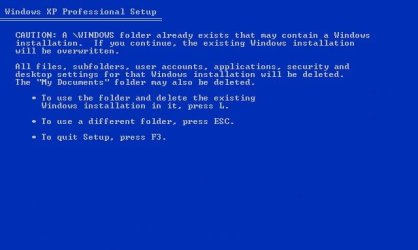
I inserted my windows XP cd and rebooted my computer. It starts working a bit and then i get to a screen where it says something like "There is already a version of windows installed in the "WINDOWS" folder, do you want to overwrite?"
Ofcourse i do not want this because this would remove my W7 wouldnt it?

I have seen on tutorials that people get to choose what disk partition to install XP to but i cannot seem to find this, and im a bit scared to try and choose this current WINDOWS folder and see what happens.

I use SATA HD and i have seen on alot of tutorials that i might need to integrate the sata drivers into my windows XP install disk. So i tryed this (Most likely did it wrong). I located the cd i got with my motherboard (Asus - Socket 1156 - ATX Intel P55 (P7P55D)) and inserted it. Then i tryed to locate the driver ".inf" file but i could not find it. The "DRIVERS" folder contained ALOT of them and i think that the disk contained drivers to more than just my motherboard. I tryed integrating the drivers i thought was right and ran the XP install again but there were no difference!

I have no idea what to do now! It feels like i have done everything someone with my knowledge could do! I really need help with this and would be extremely grateful if anyone could help!

Just a few questions.
1. If i overwrite my current WINDOWS folder with XP it will remove my w7 right?
2. Will it delete all my files too or just the operative system?
3. If it just changes OS would it be possible for me to dual boot XP with w7 (XP preinstalled)? Will i be able to do so with the same product key or will i need a new one? I dont want to buy another copy of W7.


ALOT of questions and it got a bit messy but i hope i could make myself understood, if you dont understand something just tell me and i will explain!
I cannot describe how much i would apreciate getting help with this!

Thanks in advance, Esaias.
 

My Computer My Computer

OS
Windows 7 64bit
Do not overwrite Win7 if you wish to keep it and your files

You must install XP to its own partition if you want to Dual Boot. See Method Two here: Dual Boot Installation with Windows 7 and XP. Tell us at what step you are encountering problems.

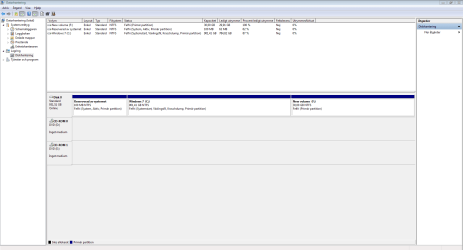
Let's see what you are working with now. Please go to Disk Management, maximize the windows, open the Snipping Tool in Start Menu and make a rectangular snip of the full drive map and listings, attach file in Reply Box using paper clip icon.
 
Thank you for your reply. I have already followed the guide that you linked to and im encountering problems at step 4. I do not get the license agreement window! I also do not get the window where you can choose what partition to install to! All i get is "There is already a version of windows installed in the WINDOWS folder, do you want to overwrite?" or similar.

If i could manage to get the partition window everything would probably be fine (Hopefully) because then i could install it without overwriting anything. Sadly that is not the case.

EDIT: Im from sweden so some of the text is in swedish, ask me if you need to translate!
 

Attachments

  • Diskmanagement.PNG
    Diskmanagement.PNG
    26.6 KB · Views: 27

My Computer My Computer

OS
Windows 7 64bit
Where did you get XP? Is it a known-good installer which has worked before? It seems strange that it can see the HD to calculate an overwrite but won't show you the partitioning. Can you provide camera-snaps of these error messages, or the exact wording so we can find its meaning?

As far as slipstreaming using Nlite, you'll need to discern which are the disk controller drivers which might be Storage, RAID, IDE, SATA, etc. then slipstream all of them into the ISO using text method.

Theog who wrote the tutorial is online now so can possible help you more. Slipstream SATA drivers into Windows XP CD - Windows 7 Forums
 
I forgot to say that when i tryed to integrate my SATA drivers with my XP disc i used nLite!

Pherhaps the cd/installer is the problem, i think it is some sort of a "pirate" version that my dad has always used.

Initially i thought that the installer was the problem aswell, so i downloaded another "version" of a installer and burned it to a disc (Had to buy discs just to try this -.-). But the installer was the same, no license agreement and no disc partitions. I also had a look at my "Local" computer shops to see if they sell new XP discs but they dont, they only sell Windows 7.

As a last resort option is it not possible for me to format my computer, install windows xp with the disc i have, and then dual boot windows 7 afterwards? It seems alot easier to install W7 with XP preinstalled. Im going to try to find screenshots of these screens on some forum/google, if i cannot find them i will take photos using my mobile phone. This is because i simply do not know how to take screenshots while windows is not booted.

I really apreciate you helping me! :)
 

My Computer My Computer

OS
Windows 7 64bit
Found a picture!

I have tryed pressing escape but it only lets me select folder, not disc partitions etc!
 

Attachments

  • Screenshot.JPG
    Screenshot.JPG
    22.7 KB · Views: 22

My Computer My Computer

OS
Windows 7 64bit
I think you need to find a clean copy of XP for your licensed version. Which version of XP do you have a legal Product Key for?

You likely still need the SATA drivers slipstreamed since it isn't finding a HD, only a folder - which I'm still not sure why it sees without SATA controller.

I'm asking Theog to look at this.
 
I see.
When i press esc all i can do is change the "/Windows" To "/Something".

Would it be possible for me to format my computer, install XP to the /windows folder, and then W7 as dual boot?
I have heard that installing w7 with xp preinstalled does not require slipstreaming of drivers is this true?
Also, will i be able to use the same w7 product key as i did when i first installed w7?

I do not know which version of Xp that i have a legal product key for, im not sure i have one at all.
 

My Computer My Computer

OS
Windows 7 64bit
If the XP CD needs SATA drivers then it is no more likely it will install without Win7 on the HD.

You can try it. Be sure to back up your files externally.

I'd also save a free Macrium Reflect or Paragon 11 backup image of your Win7 partition so you can simply reimage it to another partition (without the System Reserved partition, MBR or Track 0/1 if asked), then add it from XP with EasyBCD 2.0? Macrium - Image your system - Windows 7 Forums

If you have a WD or Seagate HD you can use their free version of Acronis's premium cloning/imaging app which is very versatile - from their Support Downloads webpage for your model HD.

If this doesn't work you can reinstall Win7.

If you are going to try this approach, I would go ahead now and let it overwrite the extant Windows folder to see what it leaves you with after install. You may want to start over with a cleaned HD but it also might give you more options. It can't hurt to try it if you're going to start over with XP installed first anyway.
 
Last edited:
Im going to try that! I cannot describe how grateful i am for your help :)!

If i use macrium to create a image, upload it do my ftp, install XP, download it, can i then use EasyBCD to add it to another disc partition? Does this mean that i do not have to install W7 again after XP install? :)
It must be quite frustrating for someone like you to try to teach a noob like me theese things, as i said above i am very grateful :)
 

My Computer My Computer

OS
Windows 7 64bit
No prob, these are very common questions asked by those of all experience levels.

If you can reimage Win7 onto a partition after installing XP then you should be able to add it from XP using EasyBCD 2.0 which will edit it's own boot files. If that fails, we can help you start Win7 on its own so you can add XP from it, which sometimes works better.

Since XP is Xpiring soon, we encourage installing it to second partition which you could of course do even if installing it first by prepartitioning.

It's frustrating that you can't just install it to the partition you created, but the XP installer is growing creaky and error messages like you got today often don't google to any solutions later than tens years ago. So the error you are getting might relate to pre-SP2 or 3, and solve itself by using a SP3 installer for your licensed version.

I would personally want to try the install first with a fresh XP installer with SP3 for your licensed version, which are available on the web. Just be sure to read the comments to assure it is not cracked or otherwise tampered, and rightclick scan with your AV and Malwarebytes
 
Okay thanks alot :) things are alot clearer now.

Im going to try to find a SP3 version and burn it to a disc and test if it makes a difference!

I will ofcourse come back here if encounter more problems or get stuck :)

Thanks x1000!
 

My Computer My Computer

OS
Windows 7 64bit
Hello Esaias, welcome to Seven Forums!


If you were going to start from scratch, there's always this option to install XP first so it will install as C: and then install Windows 7 and that will handle the dual boot and all will be done automatically.


Clean Install Windows 7 : Ahead of XP
 

My Computer My Computer

Computer Manufacturer/Model Number
* BFK Customs *
OS
W 7 64-bit Ultimate
CPU
Intel Q9550 Yorkfield
Motherboard
ASUS P5Q Pro
Memory
8GB Dominator 8500C5D
Graphics Card(s)
ATI : XFX 5870
Sound Card
Realtek HD Audio 7-1
Monitor(s) Displays
1x 47" LCD HDMI & 3x 26" LCD HDMI
Screen Resolution
1920x1080P & 1920x1200
Hard Drives
1x 80GB Intel X25-M G2 SSD : 1x 500GB & 1x 640GB WD Caviar Black(s)
PSU
Corsair 620HX
Case
Cooler Master RC-690
Cooling
Tuniq Tower 120, 2x 140mm and 3x 120mm case fans
Keyboard
Microsoft 500
Mouse
Razer Diamondback 3G
Internet Speed
14 Mb/s
Other Info
1x Koutech 3Gb/s SATA HDD Hot Swap Rack
IM BACK!

I managed to install XP with W7 on C:. The problem was that i had used like 3 bad installers, when i finally found a good one it worked.

Now i have a epic problem =/. When i have installed XP and downloaded easybcd, i do exactly as the tutorial says (the tut u linked to previously) but i get a error message.

The message says "easybcd failed to detect a valid installation of windows nt-2003"

So i googled around a bit and think i found the problem, my "windows folder" is not called WINDOWS, it is called WINXP. Appearantly this inflicts some kind of problem with easybcd. Some guy on a forum said that i should temporarily change the name of the "WINXP" folder to "WINDOWS". So i did this and then it managed to add the entry.
After this i renamed the "WINDOWS" folder back to "WINXP" and rebooted.
When i choose Windows XP in the boot menu i get a error, i do not remember exactly what the error said but i think it was "NTOSKRNL.EXE is missing or corrupt.". So i googled around a bit and i came to the conclusion that something was wrong with my boot.ini.

EDIT: The error is NOT "NTOSKRNL.EXE is missing or corrupt.". This was a previous error that i somehow managed to get rid of. The error is now:

"The following application was unable to run because its either missing or corrupt

File:\NST\easyldr4"
I do not remember the exact words but im pretty sure thats what it said.


Something odd that i noticed which might be the problem is that the windows 7 bootloader path looks normal, but the XP looks very strange, take a look at this!


There are a total of 2 entries listed in the bootloader.

Default: Windows 7 Home Premium
Timeout: 10 seconds
EasyBCD Boot Device: C:\

Entry #1
Name: Windows 7 Home Premium
BCD ID: {current}
Drive: C:\
Bootloader Path: \Windows\system32\winload.exe

Entry #2
Name: Microsoft Windows XP
BCD ID: {979614b4-5e44-11e0-9a53-edb8fab1d5b9}
Drive: F:\
Bootloader Path: \NST\easyldr4


Tell me if i should provide more information! Really hope i can get some help with this as this is far out of my league :)!

Thanks in advance, Esaias.
 

My Computer My Computer

OS
Windows 7 64bit
Before you get too deep into changing Xp to where it becomes irreparable, start up Win7 to add XP from there which is sometimes easier.

To start Win7, mark it Active from the DVD or Repair CD Command LIne: Partition - Mark as Active - Windows 7 Forums

Then boot into DVD Repair console/Repair CD, accept any offered Repair. If Win7 doesn't start, boot back in to Repair tools to Startup Repair - Run 3 Separate Times.

Once Win7 starts, install EasyBCD 2.2, add XP on Add OS tab, accept offered boot files, Save, restart.

You may have to run a Repair Install of XP if it has been damaged: XP Repair Install - Part 1 of 2
 
Last edited:
I can already run W7. It is XP that i cannot run. Basicly you are telling me to make my W7 the active partition and then insert my windows 7 install disc and do a repair?

Im going to try it but i do not see the difference between adding it with easybcd 2.02 now (doesnt work) and after repair!

You are more experienced than me and i trust you so i will give it a shot :) Ill be back if it doesnt work.
 

My Computer My Computer

OS
Windows 7 64bit
No, you are misunderstanding. But before you proceed, did you follow the steps 7-12 in Method Two exactly as given here? Dual Boot Installation with Windows 7 and XP. Double check and, if not, do so now.

If Win7 is already running, then you don't need to run the Repairs to start it up. Just install EasyBCD 2.2 to Win7 and add XP.

Normally when XP is installed, it takes away Win7's ability to boot until EasyBCD adds it back or the repair is run.
 
Yes i did exactly as it said in 7-12. But i get this error when trying to add the XP entry.

"easybcd failed to detect a valid installation of windows nt-2003".

As i said above i googled for a answer and someone said that the problem was my "WINDOWS" folder or in my case my "WINXP" folder. According to him Easybcd caused this error because it did not recognize XP if the folder was not called "WINDOWS".
He said that i should temporarily change the name of my WINXP to WINDOWS and add the entry and then change it back. I did this.

Could this be the problem? Am i giving it the wrong "adress" by doing this? Does it think that it should look for a WINDOWS folder when it doesnt exist?

When i try the method of changing folder names i get the "NTOSKRNL.EXE is missing or corrupt."error :(.

Is there anything else that might be the problem? Is there any other way around this than to change the folder name?

EDIT: If i dont change the folder name back to "WINXP" and keep it at "WINDOWS" i am able to choose Windows XP at boot screen and Windows XP starts loading but when it is almost at the login screen it "freezes". Probably because it cant find the files since the folder is now called WINDOWS.

Just thought it was interesting that i was actually able to make XP boot.
 

My Computer My Computer

OS
Windows 7 64bit
You may still have a bad installer, or it isn't booting correctly. XP should install correctly without having to use such workarounds which tend to dig a hole.

Have you installed EasyBCD to Win7 yet to add XP? This works in many cases where adding it from XP doesn't.

It may be less trouble to consider virtualizing XP in Win7 using Virtual Box, Virtual Player or VMWare. Or install XP programs in Win7 Compatibility Mode
 
Last edited:
Hm, pherhaps the installer is the problem. Im tired of this now and later today i think im going to format whole pc and install xp first and then Windows 7. Is there any cons of doing this?

Thanks for your help, esaias.
 

My Computer My Computer

OS
Windows 7 64bit
Back
Top