
Windows7 sidebar News Feed not update

killer bee

New member
I added new Rss new feeds to windows7 sidebar "Feed headlines" gadget. However they are not properly updates. Why is that? How do i update them every 5 minutes?
If i wait 2 day its not update.
 

My Computer

Computer Manufacturer/Model Number
Intel DG31PR (Intel Dual core 2.5 E5200 @ 2.5GHz)
OS
windows7 Ultimate SP1 x32bit
CPU
Intel
Motherboard
Intel DG31PR
Memory
Kinsgton 1GB an Transcend 2GB
Graphics Card(s)
Intel- onboard
Sound Card
Intel- onboard
Monitor(s) Displays
ViewSonic LCD Widescreen 19
Screen Resolution
1400x900
Hard Drives
Samsung 256GB
PSU
Legend
Case
Legend
Cooling
Intel
Keyboard
Seemo
Mouse
Prolink
Internet Speed
Download Speed-512Kbps, Upload Speed-128Kbps (ADSL wired)
Other Info
UPS- Prolink Pro650s
Router Prolink H5201
Sub Woofer - Creative 2.1
know body know solution for this problem?
 

My Computer

Computer Manufacturer/Model Number
Intel DG31PR (Intel Dual core 2.5 E5200 @ 2.5GHz)
OS
windows7 Ultimate SP1 x32bit
CPU
Intel
Motherboard
Intel DG31PR
Memory
Kinsgton 1GB an Transcend 2GB
Graphics Card(s)
Intel- onboard
Sound Card
Intel- onboard
Monitor(s) Displays
ViewSonic LCD Widescreen 19
Screen Resolution
1400x900
Hard Drives
Samsung 256GB
PSU
Legend
Case
Legend
Cooling
Intel
Keyboard
Seemo
Mouse
Prolink
Internet Speed
Download Speed-512Kbps, Upload Speed-128Kbps (ADSL wired)
Other Info
UPS- Prolink Pro650s
Router Prolink H5201
Sub Woofer - Creative 2.1
There should be some setting about update refresh. Have you tried to hold your cursor over det gadget, and press the Setting bot?

Best Regards,
FredeGail
 

My Computer

Computer Manufacturer/Model Number
Brewed
OS
Microsoft Windows 7 Ultimate: x64 (SP1)
CPU
Intel® Core™ i5-2500K Processor
Motherboard
ASUS P8Z68-V PRO
Memory
Kingston DDR3 HyperX 1600MHz 8GB
Graphics Card(s)
ASUS GTX 560 TI DirectCU II 900MHz
Sound Card
Realtek® ALC892 8-Channel High Definition Audio CODEC
Monitor(s) Displays
ACER LCD P246HBD 1920x1080 (24") - Dell 1280x800
Screen Resolution
ACER LCD P246HBD ~ [1920X1080] - DELL ~ [1280x800]
Hard Drives
500 GB WD Caviar SE116 7200rpm SATA2
PSU
Corsair 750W Power Supply
Case
Coolermaster CM Scout
Cooling
Zalman FS-C77 Fatal1ty CPU Cooler
Keyboard
Logitech G15
Mouse
Coolermaster Sentinel Advanced
Internet Speed
[↓ 10 MB/s DL] [↑ 1 MB/s UL]
Other Info
- ROCCAT™ Kave – Solid 5.1 Surround Sound Gaming Headset
- Not overclocking
There should be some setting about update refresh. Have you tried to hold your cursor over det gadget, and press the Setting bot?

Best Regards,
FredeGail

There's no that kind of update setting? Please tell me more. :)
 

My Computer

Computer Manufacturer/Model Number
Intel DG31PR (Intel Dual core 2.5 E5200 @ 2.5GHz)
OS
windows7 Ultimate SP1 x32bit
CPU
Intel
Motherboard
Intel DG31PR
Memory
Kinsgton 1GB an Transcend 2GB
Graphics Card(s)
Intel- onboard
Sound Card
Intel- onboard
Monitor(s) Displays
ViewSonic LCD Widescreen 19
Screen Resolution
1400x900
Hard Drives
Samsung 256GB
PSU
Legend
Case
Legend
Cooling
Intel
Keyboard
Seemo
Mouse
Prolink
Internet Speed
Download Speed-512Kbps, Upload Speed-128Kbps (ADSL wired)
Other Info
UPS- Prolink Pro650s
Router Prolink H5201
Sub Woofer - Creative 2.1
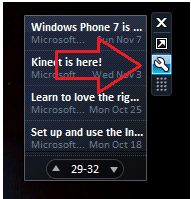
Sorry for delay at my responds :)
There you go!:

   Tip
Hold your cursor around that area!


Unavngivet.png

Best Regards,
FredeGail
 
Last edited:

My Computer

Computer Manufacturer/Model Number
Brewed
OS
Microsoft Windows 7 Ultimate: x64 (SP1)
CPU
Intel® Core™ i5-2500K Processor
Motherboard
ASUS P8Z68-V PRO
Memory
Kingston DDR3 HyperX 1600MHz 8GB
Graphics Card(s)
ASUS GTX 560 TI DirectCU II 900MHz
Sound Card
Realtek® ALC892 8-Channel High Definition Audio CODEC
Monitor(s) Displays
ACER LCD P246HBD 1920x1080 (24") - Dell 1280x800
Screen Resolution
ACER LCD P246HBD ~ [1920X1080] - DELL ~ [1280x800]
Hard Drives
500 GB WD Caviar SE116 7200rpm SATA2
PSU
Corsair 750W Power Supply
Case
Coolermaster CM Scout
Cooling
Zalman FS-C77 Fatal1ty CPU Cooler
Keyboard
Logitech G15
Mouse
Coolermaster Sentinel Advanced
Internet Speed
[↓ 10 MB/s DL] [↑ 1 MB/s UL]
Other Info
- ROCCAT™ Kave – Solid 5.1 Surround Sound Gaming Headset
- Not overclocking
Sorry! there's no that kind of thing. Please look at my screen shot. Its OK delay. :)
 

My Computer

Computer Manufacturer/Model Number
Intel DG31PR (Intel Dual core 2.5 E5200 @ 2.5GHz)
OS
windows7 Ultimate SP1 x32bit
CPU
Intel
Motherboard
Intel DG31PR
Memory
Kinsgton 1GB an Transcend 2GB
Graphics Card(s)
Intel- onboard
Sound Card
Intel- onboard
Monitor(s) Displays
ViewSonic LCD Widescreen 19
Screen Resolution
1400x900
Hard Drives
Samsung 256GB
PSU
Legend
Case
Legend
Cooling
Intel
Keyboard
Seemo
Mouse
Prolink
Internet Speed
Download Speed-512Kbps, Upload Speed-128Kbps (ADSL wired)
Other Info
UPS- Prolink Pro650s
Router Prolink H5201
Sub Woofer - Creative 2.1
There isn't any update speed option on the default MS RSS Feed gadget. Mine seems to be working though, looks like it updates every 20-30 seconds or so.


Try these steps in an elevated command prompt.


   Information
1. Check if Task Scheduler is running
sc queryex schedule

Look at the "STATE:" line, it should read "4 RUNNING" if it's not running, then start it

sc start schedule

2. Check if RSS Download Engine is running
reg query HKCU\Software\Microsoft\Feeds /v SyncStatus

Look at the "Status" line, it should read "0x01" or "0x1". If it isn't enabled, then enable it

msfeedssync enable

3. Check if task is corrupted
schtasks /query | findstr /i "user_feed"

Look for

ERROR: The task image is corrupt or has been tampered with.

ERROR: Task cannot be loaded: User_Feed_Synchronization-{..


If corrupted, then delete and re-create the task

msfeedssync disable

msfeedssync enable
Source: Feeds not updating?


Mine looks all good, so no need for me to run the last commands.


rss.JPG
 

My Computer

Computer type
PC/Desktop
Computer Manufacturer/Model Number
Airbot 2.0
OS
Windows 7 Ultimate x64 SP1
CPU
Core i7 920 (D0) @ 4Ghz, *26c idle *65c full load on air
Motherboard
Asus P6X58D Premium - Sata 6Gb/s - USB 3.0
Memory
12GB DDR3 Corsair Dominator -CMD12GX3M6A1600C8 at 1600MHz
Graphics Card(s)
Zotac Geforce GTX 770
Sound Card
ASUS Xonar D2X
Monitor(s) Displays
1 LG 24" Flatron W2453V-PF 1 Samsung 24" P2450H both 2ms RT
Screen Resolution
1920x1080@60hz
Hard Drives
1 Samsung 250GB 840 Evo SSD
1 OCZ Vertex2 180GB SSD
1 TB Samsung Spinpoint F1 7200RPM 32MB cache
2 500GB WD Caviar Blacks 7200RPM 32MB cache (WD5001AALS)

Pioneer DVD Burner DVR-S18M
PSU
Corsair HX1000W
Case
Cooler Master HAF 932
Cooling
Case Fans *3 230mm, *1 140mm/CPU - *Tuniq Tower 120 Extreme
Keyboard
Logitech Wireless MK700
Mouse
Logitech Wireless MK700
Internet Speed
DL 15 Mbps UL 0.98 Mbps
Antivirus
None
Browser
Firefox Nightly
Other Info
Processor-7.7 *RAM- 7.9 *Graphics-7.9 *Gaming Graphics- 7.9 *SSD- 7.8 W.E.I final score= 7.7
*Phone- LG Nexus 5
There isn't any update speed option on the default MS RSS Feed gadget. Mine seems to be working though, looks like it updates every 20-30 seconds or so.


Try these steps in an elevated command prompt.


   Information
1. Check if Task Scheduler is running
sc queryex schedule

Look at the "STATE:" line, it should read "4 RUNNING" if it's not running, then start it

sc start schedule

2. Check if RSS Download Engine is running
reg query HKCU\Software\Microsoft\Feeds /v SyncStatus

Look at the "Status" line, it should read "0x01" or "0x1". If it isn't enabled, then enable it

msfeedssync enable

3. Check if task is corrupted
schtasks /query | findstr /i "user_feed"

Look for

ERROR: The task image is corrupt or has been tampered with.

ERROR: Task cannot be loaded: User_Feed_Synchronization-{..


If corrupted, then delete and re-create the task

msfeedssync disable

msfeedssync enable
Source: Feeds not updating?


Mine looks all good, so no need for me to run the last commands.


View attachment 156304

My registry there's no that kind of key buddy. And also there's no that kind of service (sc queryex schedule) in my PC. Why is that? I have Windows7 32 bit Ultimate
 

My Computer

Computer Manufacturer/Model Number
Intel DG31PR (Intel Dual core 2.5 E5200 @ 2.5GHz)
OS
windows7 Ultimate SP1 x32bit
CPU
Intel
Motherboard
Intel DG31PR
Memory
Kinsgton 1GB an Transcend 2GB
Graphics Card(s)
Intel- onboard
Sound Card
Intel- onboard
Monitor(s) Displays
ViewSonic LCD Widescreen 19
Screen Resolution
1400x900
Hard Drives
Samsung 256GB
PSU
Legend
Case
Legend
Cooling
Intel
Keyboard
Seemo
Mouse
Prolink
Internet Speed
Download Speed-512Kbps, Upload Speed-128Kbps (ADSL wired)
Other Info
UPS- Prolink Pro650s
Router Prolink H5201
Sub Woofer - Creative 2.1
It's not getting into the registry or services per se, these are commands you're entering into a command prompt to see if the rss feed task is there and working right. :rolleyes:
 

My Computer

Computer type
PC/Desktop
Computer Manufacturer/Model Number
Airbot 2.0
OS
Windows 7 Ultimate x64 SP1
CPU
Core i7 920 (D0) @ 4Ghz, *26c idle *65c full load on air
Motherboard
Asus P6X58D Premium - Sata 6Gb/s - USB 3.0
Memory
12GB DDR3 Corsair Dominator -CMD12GX3M6A1600C8 at 1600MHz
Graphics Card(s)
Zotac Geforce GTX 770
Sound Card
ASUS Xonar D2X
Monitor(s) Displays
1 LG 24" Flatron W2453V-PF 1 Samsung 24" P2450H both 2ms RT
Screen Resolution
1920x1080@60hz
Hard Drives
1 Samsung 250GB 840 Evo SSD
1 OCZ Vertex2 180GB SSD
1 TB Samsung Spinpoint F1 7200RPM 32MB cache
2 500GB WD Caviar Blacks 7200RPM 32MB cache (WD5001AALS)

Pioneer DVD Burner DVR-S18M
PSU
Corsair HX1000W
Case
Cooler Master HAF 932
Cooling
Case Fans *3 230mm, *1 140mm/CPU - *Tuniq Tower 120 Extreme
Keyboard
Logitech Wireless MK700
Mouse
Logitech Wireless MK700
Internet Speed
DL 15 Mbps UL 0.98 Mbps
Antivirus
None
Browser
Firefox Nightly
Other Info
Processor-7.7 *RAM- 7.9 *Graphics-7.9 *Gaming Graphics- 7.9 *SSD- 7.8 W.E.I final score= 7.7
*Phone- LG Nexus 5
Ok Thanks you very much buddy!
That service (sc queryex schedule) not running my PC, then i try to start it as you mention ( past "sc start schedule" in my CMD) . Then i received this error.

"
C:\Windows\system32> sc start schedule
[SC] StartService FAILED 1056:

An instance of the service is already running."

Now what should i do? However i do 2nd process it work (RSS Download Engine is running).
 

My Computer

Computer Manufacturer/Model Number
Intel DG31PR (Intel Dual core 2.5 E5200 @ 2.5GHz)
OS
windows7 Ultimate SP1 x32bit
CPU
Intel
Motherboard
Intel DG31PR
Memory
Kinsgton 1GB an Transcend 2GB
Graphics Card(s)
Intel- onboard
Sound Card
Intel- onboard
Monitor(s) Displays
ViewSonic LCD Widescreen 19
Screen Resolution
1400x900
Hard Drives
Samsung 256GB
PSU
Legend
Case
Legend
Cooling
Intel
Keyboard
Seemo
Mouse
Prolink
Internet Speed
Download Speed-512Kbps, Upload Speed-128Kbps (ADSL wired)
Other Info
UPS- Prolink Pro650s
Router Prolink H5201
Sub Woofer - Creative 2.1
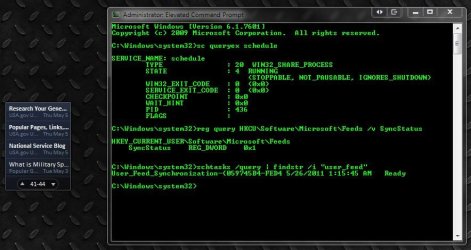
These thing i do in my "CDM" I run it as "Administrator"

Microsoft Windows [Version 6.1.7600]
Copyright (c) 2009 Microsoft Corporation. All rights reserved.

C:\Windows\system32>sc queryex schedule

SERVICE_NAME: schedule
TYPE : 20 WIN32_SHARE_PROCESS
STATE : 4 RUNNING
(STOPPABLE, NOT_PAUSABLE, IGNORES_SHUTDOWN)
WIN32_EXIT_CODE : 0 (0x0)
SERVICE_EXIT_CODE : 0 (0x0)
CHECKPOINT : 0x0
WAIT_HINT : 0x0
PID : 1260
FLAGS :

C:\Windows\system32>reg query HKCU\Software\Microsoft\Feeds /v SyncStatus

HKEY_CURRENT_USER\Software\Microsoft\Feeds
SyncStatus REG_DWORD 0x1


C:\Windows\system32>msfeedssync enable

C:\Windows\system32>schtasks /query | findstr /i "user_feed"
User_Feed_Synchronization-{53CC7D74-7113 6/8/2011 8:47:35 AM Ready

C:\Windows\system32>
 

My Computer

Computer Manufacturer/Model Number
Intel DG31PR (Intel Dual core 2.5 E5200 @ 2.5GHz)
OS
windows7 Ultimate SP1 x32bit
CPU
Intel
Motherboard
Intel DG31PR
Memory
Kinsgton 1GB an Transcend 2GB
Graphics Card(s)
Intel- onboard
Sound Card
Intel- onboard
Monitor(s) Displays
ViewSonic LCD Widescreen 19
Screen Resolution
1400x900
Hard Drives
Samsung 256GB
PSU
Legend
Case
Legend
Cooling
Intel
Keyboard
Seemo
Mouse
Prolink
Internet Speed
Download Speed-512Kbps, Upload Speed-128Kbps (ADSL wired)
Other Info
UPS- Prolink Pro650s
Router Prolink H5201
Sub Woofer - Creative 2.1
Looks like it should to me.

Did you try deleting and recreating the task though, and try a new instance of the gadget to see if it updates now?


If corrupted, then delete and re-create the task

In CMD prompt -

msfeedssync disable

enter

msfeedssync enable
enter
 

My Computer

Computer type
PC/Desktop
Computer Manufacturer/Model Number
Airbot 2.0
OS
Windows 7 Ultimate x64 SP1
CPU
Core i7 920 (D0) @ 4Ghz, *26c idle *65c full load on air
Motherboard
Asus P6X58D Premium - Sata 6Gb/s - USB 3.0
Memory
12GB DDR3 Corsair Dominator -CMD12GX3M6A1600C8 at 1600MHz
Graphics Card(s)
Zotac Geforce GTX 770
Sound Card
ASUS Xonar D2X
Monitor(s) Displays
1 LG 24" Flatron W2453V-PF 1 Samsung 24" P2450H both 2ms RT
Screen Resolution
1920x1080@60hz
Hard Drives
1 Samsung 250GB 840 Evo SSD
1 OCZ Vertex2 180GB SSD
1 TB Samsung Spinpoint F1 7200RPM 32MB cache
2 500GB WD Caviar Blacks 7200RPM 32MB cache (WD5001AALS)

Pioneer DVD Burner DVR-S18M
PSU
Corsair HX1000W
Case
Cooler Master HAF 932
Cooling
Case Fans *3 230mm, *1 140mm/CPU - *Tuniq Tower 120 Extreme
Keyboard
Logitech Wireless MK700
Mouse
Logitech Wireless MK700
Internet Speed
DL 15 Mbps UL 0.98 Mbps
Antivirus
None
Browser
Firefox Nightly
Other Info
Processor-7.7 *RAM- 7.9 *Graphics-7.9 *Gaming Graphics- 7.9 *SSD- 7.8 W.E.I final score= 7.7
*Phone- LG Nexus 5
Looks like it should to me.

Did you try deleting and recreating the task though, and try a new instance of the gadget to see if it updates now?


If corrupted, then delete and re-create the task

In CMD prompt -

msfeedssync disable

enter

msfeedssync enable
enter
Many thanks for try to help me!
I have manually added feeds buddy. I don't want to use Microsoft default feeds. Problem is that feeds.
 

My Computer

Computer Manufacturer/Model Number
Intel DG31PR (Intel Dual core 2.5 E5200 @ 2.5GHz)
OS
windows7 Ultimate SP1 x32bit
CPU
Intel
Motherboard
Intel DG31PR
Memory
Kinsgton 1GB an Transcend 2GB
Graphics Card(s)
Intel- onboard
Sound Card
Intel- onboard
Monitor(s) Displays
ViewSonic LCD Widescreen 19
Screen Resolution
1400x900
Hard Drives
Samsung 256GB
PSU
Legend
Case
Legend
Cooling
Intel
Keyboard
Seemo
Mouse
Prolink
Internet Speed
Download Speed-512Kbps, Upload Speed-128Kbps (ADSL wired)
Other Info
UPS- Prolink Pro650s
Router Prolink H5201
Sub Woofer - Creative 2.1
OK, no problem.
 

My Computer

Computer type
PC/Desktop
Computer Manufacturer/Model Number
Airbot 2.0
OS
Windows 7 Ultimate x64 SP1
CPU
Core i7 920 (D0) @ 4Ghz, *26c idle *65c full load on air
Motherboard
Asus P6X58D Premium - Sata 6Gb/s - USB 3.0
Memory
12GB DDR3 Corsair Dominator -CMD12GX3M6A1600C8 at 1600MHz
Graphics Card(s)
Zotac Geforce GTX 770
Sound Card
ASUS Xonar D2X
Monitor(s) Displays
1 LG 24" Flatron W2453V-PF 1 Samsung 24" P2450H both 2ms RT
Screen Resolution
1920x1080@60hz
Hard Drives
1 Samsung 250GB 840 Evo SSD
1 OCZ Vertex2 180GB SSD
1 TB Samsung Spinpoint F1 7200RPM 32MB cache
2 500GB WD Caviar Blacks 7200RPM 32MB cache (WD5001AALS)

Pioneer DVD Burner DVR-S18M
PSU
Corsair HX1000W
Case
Cooler Master HAF 932
Cooling
Case Fans *3 230mm, *1 140mm/CPU - *Tuniq Tower 120 Extreme
Keyboard
Logitech Wireless MK700
Mouse
Logitech Wireless MK700
Internet Speed
DL 15 Mbps UL 0.98 Mbps
Antivirus
None
Browser
Firefox Nightly
Other Info
Processor-7.7 *RAM- 7.9 *Graphics-7.9 *Gaming Graphics- 7.9 *SSD- 7.8 W.E.I final score= 7.7
*Phone- LG Nexus 5
Now i Fix this problem. I open IE 9 and go to that external RSS feed property and change it refresh time.
 

My Computer

Computer Manufacturer/Model Number
Intel DG31PR (Intel Dual core 2.5 E5200 @ 2.5GHz)
OS
windows7 Ultimate SP1 x32bit
CPU
Intel
Motherboard
Intel DG31PR
Memory
Kinsgton 1GB an Transcend 2GB
Graphics Card(s)
Intel- onboard
Sound Card
Intel- onboard
Monitor(s) Displays
ViewSonic LCD Widescreen 19
Screen Resolution
1400x900
Hard Drives
Samsung 256GB
PSU
Legend
Case
Legend
Cooling
Intel
Keyboard
Seemo
Mouse
Prolink
Internet Speed
Download Speed-512Kbps, Upload Speed-128Kbps (ADSL wired)
Other Info
UPS- Prolink Pro650s
Router Prolink H5201
Sub Woofer - Creative 2.1
Ah. :thumbsup:

Not sure if that even affects the sidebar gadget feed refresh time or not though. My gadget refresh stays the same even with custom rss refresh time from the browser. If it fixed it for you though that's all that matters. :)

Capture2.JPG
 

My Computer

Computer type
PC/Desktop
Computer Manufacturer/Model Number
Airbot 2.0
OS
Windows 7 Ultimate x64 SP1
CPU
Core i7 920 (D0) @ 4Ghz, *26c idle *65c full load on air
Motherboard
Asus P6X58D Premium - Sata 6Gb/s - USB 3.0
Memory
12GB DDR3 Corsair Dominator -CMD12GX3M6A1600C8 at 1600MHz
Graphics Card(s)
Zotac Geforce GTX 770
Sound Card
ASUS Xonar D2X
Monitor(s) Displays
1 LG 24" Flatron W2453V-PF 1 Samsung 24" P2450H both 2ms RT
Screen Resolution
1920x1080@60hz
Hard Drives
1 Samsung 250GB 840 Evo SSD
1 OCZ Vertex2 180GB SSD
1 TB Samsung Spinpoint F1 7200RPM 32MB cache
2 500GB WD Caviar Blacks 7200RPM 32MB cache (WD5001AALS)

Pioneer DVD Burner DVR-S18M
PSU
Corsair HX1000W
Case
Cooler Master HAF 932
Cooling
Case Fans *3 230mm, *1 140mm/CPU - *Tuniq Tower 120 Extreme
Keyboard
Logitech Wireless MK700
Mouse
Logitech Wireless MK700
Internet Speed
DL 15 Mbps UL 0.98 Mbps
Antivirus
None
Browser
Firefox Nightly
Other Info
Processor-7.7 *RAM- 7.9 *Graphics-7.9 *Gaming Graphics- 7.9 *SSD- 7.8 W.E.I final score= 7.7
*Phone- LG Nexus 5
Ah. :thumbsup:

Not sure if that even affects the sidebar gadget feed refresh time or not though. My gadget refresh stays the same even with custom rss refresh time from the browser. If it fixed it for you though that's all that matters. :)

View attachment 158674

Thanks for your help. :) +rep already added. ;)
 

My Computer

Computer Manufacturer/Model Number
Intel DG31PR (Intel Dual core 2.5 E5200 @ 2.5GHz)
OS
windows7 Ultimate SP1 x32bit
CPU
Intel
Motherboard
Intel DG31PR
Memory
Kinsgton 1GB an Transcend 2GB
Graphics Card(s)
Intel- onboard
Sound Card
Intel- onboard
Monitor(s) Displays
ViewSonic LCD Widescreen 19
Screen Resolution
1400x900
Hard Drives
Samsung 256GB
PSU
Legend
Case
Legend
Cooling
Intel
Keyboard
Seemo
Mouse
Prolink
Internet Speed
Download Speed-512Kbps, Upload Speed-128Kbps (ADSL wired)
Other Info
UPS- Prolink Pro650s
Router Prolink H5201
Sub Woofer - Creative 2.1
Glad you got it sorted :)

Best Regards,
FredeGail
 

My Computer

Computer Manufacturer/Model Number
Brewed
OS
Microsoft Windows 7 Ultimate: x64 (SP1)
CPU
Intel® Core™ i5-2500K Processor
Motherboard
ASUS P8Z68-V PRO
Memory
Kingston DDR3 HyperX 1600MHz 8GB
Graphics Card(s)
ASUS GTX 560 TI DirectCU II 900MHz
Sound Card
Realtek® ALC892 8-Channel High Definition Audio CODEC
Monitor(s) Displays
ACER LCD P246HBD 1920x1080 (24") - Dell 1280x800
Screen Resolution
ACER LCD P246HBD ~ [1920X1080] - DELL ~ [1280x800]
Hard Drives
500 GB WD Caviar SE116 7200rpm SATA2
PSU
Corsair 750W Power Supply
Case
Coolermaster CM Scout
Cooling
Zalman FS-C77 Fatal1ty CPU Cooler
Keyboard
Logitech G15
Mouse
Coolermaster Sentinel Advanced
Internet Speed
[↓ 10 MB/s DL] [↑ 1 MB/s UL]
Other Info
- ROCCAT™ Kave – Solid 5.1 Surround Sound Gaming Headset
- Not overclocking
Back
Top