Solved how to change the taskbar color of in a theme

abu46

why so serious ?

Attachments

  • Capture.JPG
    Capture.JPG
    11.4 KB · Views: 62

My Computer

Computer Manufacturer/Model Number
mii-darling
OS
Windows 7 Ultimate x64 SP1
CPU
AMD Phenom II X4 955 BE
Motherboard
ASUS M4A87TD EVO
Memory
2X2 GB CORSAIR DDR3 @ 1333MHz
Graphics Card(s)
ASUS EAH 6850
Sound Card
On-Board
Monitor(s) Displays
viewsonic 19"
Screen Resolution
1440x900
Hard Drives
2x250 GB Seagate Baracudas
PSU
Corsair VX 550W
Case
CM Elite 430
Cooling
CM Hyper 212+
Keyboard
Logitech Wireless MK320
Mouse
Logitech Wireless MK320
Internet Speed
dont even ask :(
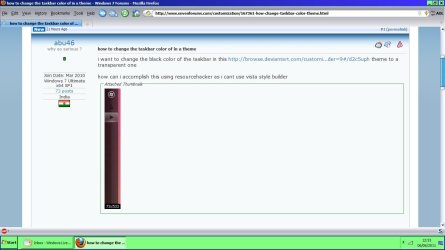
i want to change the black color of the taskbar in this Browsing Visual Styles 7 on deviantART theme to a transparent one

how can i accomplish this using resourcehacker as i cant use vista style builder
Do you have Windows Style Builder? If so I can give you the locations If not I can give you the numbers so you can use resource hacker.
Do you want top, bottom, left, right taskbar images?
Jerry
 

My Computer

Computer type
Laptop
Computer Manufacturer/Model Number
Sager NP9170
OS
Win 7 Pro x64 / Win 10 Pro
CPU
Intel(R) Core(TM) i7-3630QM CPU @ 2.40GHz
Motherboard
CLEVO P170EM
Memory
12 GB
Graphics Card(s)
(1) Intel(R) HD Graphics 4000 (2) NVIDIA GeForce GTX 675M
Sound Card
(1) Realtek High Definition Audio (2) Intel(R) Display Aud
Monitor(s) Displays
17.3
Screen Resolution
1920x1080
Hard Drives
(1) Samsung 860 EVO 500GB(OS) (1) Samsung 860 EVO 500GB(Data)
Keyboard
Backlite
Antivirus
MSE, Malwarebytes Pro
Browser
Firefox
Other Info
DESKTOP: Custom-built.
OS: Win 10 Pro x64.
CASE: Rosewill R5.
CPU: Intel I5 4670K CPU @ 3.40GHz.
CPU COOLER: Cool Master Hyper 212 EVO.
MOTHERBOARD: Asus Z87-A.
MEMORY: Kingston HyperX 2x4 GB.
GPU: Nvidia Geforce 650 TI.
PSU: Corsair TX750.
DRIVES: (1) Samsung 840 120 GB SSD (2) Western Digital blue 500 GB 7200 RPM.
yes i can use windows style builder

i want to use the taskbar image of another theme that i like very much, so i intend to extract the taskbar image from that theme and replace it

thnx
 

My Computer

Computer Manufacturer/Model Number
mii-darling
OS
Windows 7 Ultimate x64 SP1
CPU
AMD Phenom II X4 955 BE
Motherboard
ASUS M4A87TD EVO
Memory
2X2 GB CORSAIR DDR3 @ 1333MHz
Graphics Card(s)
ASUS EAH 6850
Sound Card
On-Board
Monitor(s) Displays
viewsonic 19"
Screen Resolution
1440x900
Hard Drives
2x250 GB Seagate Baracudas
PSU
Corsair VX 550W
Case
CM Elite 430
Cooling
CM Hyper 212+
Keyboard
Logitech Wireless MK320
Mouse
Logitech Wireless MK320
Internet Speed
dont even ask :(
Hi abu46, just to show my Win7 H Prem taskbar.

RR.jpg
 

My Computer

Computer Manufacturer/Model Number
Look in my Signature.
OS
Win7 H.Prem. 32bit+SP1
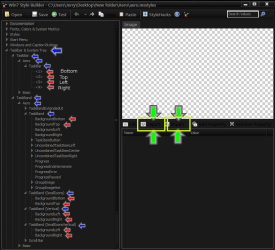
This screenshot will show you the locations the blue arrows are to guide you to the images the images are the red arrows use the Export and Import Buttons highlighted in yellow with green arrows just export your images and then import them to the same locations.
Taskbar.png
If the images you are using are larger than the original you will need to add sizingmargins at the image locations with the red arrows in the above screenshot.
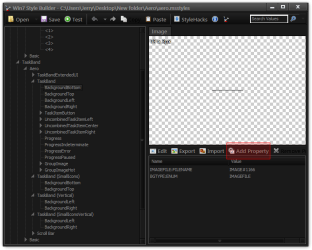
These screenshots will show you how to add a property
#1
Click the Add Property Button
Add Property.png
#2
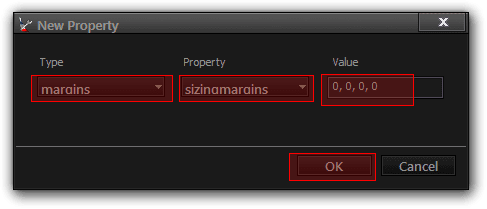
A New Property window will open use the drop down menu under Type choose margins under Property choose sizingmargins under Value put zero , space zero , space zero , space zero (0, 0, 0, 0) and click OK
New Property.png
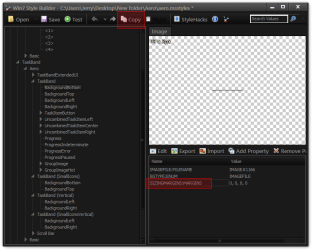
Do that for the first image location then you can click on the SIZINGMARGINS:MARGINS and then click on Copy
copy.png
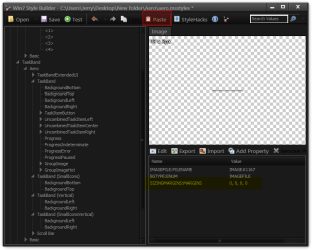
Then go to the next image location and click Paste
paste.png
Do that with all the other image locations and that will copy that margin to the other locations.
Jerry
 

My Computer

Computer type
Laptop
Computer Manufacturer/Model Number
Sager NP9170
OS
Win 7 Pro x64 / Win 10 Pro
CPU
Intel(R) Core(TM) i7-3630QM CPU @ 2.40GHz
Motherboard
CLEVO P170EM
Memory
12 GB
Graphics Card(s)
(1) Intel(R) HD Graphics 4000 (2) NVIDIA GeForce GTX 675M
Sound Card
(1) Realtek High Definition Audio (2) Intel(R) Display Aud
Monitor(s) Displays
17.3
Screen Resolution
1920x1080
Hard Drives
(1) Samsung 860 EVO 500GB(OS) (1) Samsung 860 EVO 500GB(Data)
Keyboard
Backlite
Antivirus
MSE, Malwarebytes Pro
Browser
Firefox
Other Info
DESKTOP: Custom-built.
OS: Win 10 Pro x64.
CASE: Rosewill R5.
CPU: Intel I5 4670K CPU @ 3.40GHz.
CPU COOLER: Cool Master Hyper 212 EVO.
MOTHERBOARD: Asus Z87-A.
MEMORY: Kingston HyperX 2x4 GB.
GPU: Nvidia Geforce 650 TI.
PSU: Corsair TX750.
DRIVES: (1) Samsung 840 120 GB SSD (2) Western Digital blue 500 GB 7200 RPM.
thnx a lot :)

will try this & report back
 

My Computer

Computer Manufacturer/Model Number
mii-darling
OS
Windows 7 Ultimate x64 SP1
CPU
AMD Phenom II X4 955 BE
Motherboard
ASUS M4A87TD EVO
Memory
2X2 GB CORSAIR DDR3 @ 1333MHz
Graphics Card(s)
ASUS EAH 6850
Sound Card
On-Board
Monitor(s) Displays
viewsonic 19"
Screen Resolution
1440x900
Hard Drives
2x250 GB Seagate Baracudas
PSU
Corsair VX 550W
Case
CM Elite 430
Cooling
CM Hyper 212+
Keyboard
Logitech Wireless MK320
Mouse
Logitech Wireless MK320
Internet Speed
dont even ask :(

My Computer

Computer type
Laptop
Computer Manufacturer/Model Number
Sager NP9170
OS
Win 7 Pro x64 / Win 10 Pro
CPU
Intel(R) Core(TM) i7-3630QM CPU @ 2.40GHz
Motherboard
CLEVO P170EM
Memory
12 GB
Graphics Card(s)
(1) Intel(R) HD Graphics 4000 (2) NVIDIA GeForce GTX 675M
Sound Card
(1) Realtek High Definition Audio (2) Intel(R) Display Aud
Monitor(s) Displays
17.3
Screen Resolution
1920x1080
Hard Drives
(1) Samsung 860 EVO 500GB(OS) (1) Samsung 860 EVO 500GB(Data)
Keyboard
Backlite
Antivirus
MSE, Malwarebytes Pro
Browser
Firefox
Other Info
DESKTOP: Custom-built.
OS: Win 10 Pro x64.
CASE: Rosewill R5.
CPU: Intel I5 4670K CPU @ 3.40GHz.
CPU COOLER: Cool Master Hyper 212 EVO.
MOTHERBOARD: Asus Z87-A.
MEMORY: Kingston HyperX 2x4 GB.
GPU: Nvidia Geforce 650 TI.
PSU: Corsair TX750.
DRIVES: (1) Samsung 840 120 GB SSD (2) Western Digital blue 500 GB 7200 RPM.
^^
successfully changed the taskbar color following your guide :)

the new pngs that i used were of diff. size but the style builder resized them

do you have a guide for making windows themes from scratch using style builder, if so plz post it or point me to the link

thnx a lot:)
 

Attachments

  • Capture.JPG
    Capture.JPG
    19.8 KB · Views: 68

My Computer

Computer Manufacturer/Model Number
mii-darling
OS
Windows 7 Ultimate x64 SP1
CPU
AMD Phenom II X4 955 BE
Motherboard
ASUS M4A87TD EVO
Memory
2X2 GB CORSAIR DDR3 @ 1333MHz
Graphics Card(s)
ASUS EAH 6850
Sound Card
On-Board
Monitor(s) Displays
viewsonic 19"
Screen Resolution
1440x900
Hard Drives
2x250 GB Seagate Baracudas
PSU
Corsair VX 550W
Case
CM Elite 430
Cooling
CM Hyper 212+
Keyboard
Logitech Wireless MK320
Mouse
Logitech Wireless MK320
Internet Speed
dont even ask :(

My Computer

Computer type
Laptop
Computer Manufacturer/Model Number
Sager NP9170
OS
Win 7 Pro x64 / Win 10 Pro
CPU
Intel(R) Core(TM) i7-3630QM CPU @ 2.40GHz
Motherboard
CLEVO P170EM
Memory
12 GB
Graphics Card(s)
(1) Intel(R) HD Graphics 4000 (2) NVIDIA GeForce GTX 675M
Sound Card
(1) Realtek High Definition Audio (2) Intel(R) Display Aud
Monitor(s) Displays
17.3
Screen Resolution
1920x1080
Hard Drives
(1) Samsung 860 EVO 500GB(OS) (1) Samsung 860 EVO 500GB(Data)
Keyboard
Backlite
Antivirus
MSE, Malwarebytes Pro
Browser
Firefox
Other Info
DESKTOP: Custom-built.
OS: Win 10 Pro x64.
CASE: Rosewill R5.
CPU: Intel I5 4670K CPU @ 3.40GHz.
CPU COOLER: Cool Master Hyper 212 EVO.
MOTHERBOARD: Asus Z87-A.
MEMORY: Kingston HyperX 2x4 GB.
GPU: Nvidia Geforce 650 TI.
PSU: Corsair TX750.
DRIVES: (1) Samsung 840 120 GB SSD (2) Western Digital blue 500 GB 7200 RPM.
thanks man :)

checkin 'em out
 

My Computer

Computer Manufacturer/Model Number
mii-darling
OS
Windows 7 Ultimate x64 SP1
CPU
AMD Phenom II X4 955 BE
Motherboard
ASUS M4A87TD EVO
Memory
2X2 GB CORSAIR DDR3 @ 1333MHz
Graphics Card(s)
ASUS EAH 6850
Sound Card
On-Board
Monitor(s) Displays
viewsonic 19"
Screen Resolution
1440x900
Hard Drives
2x250 GB Seagate Baracudas
PSU
Corsair VX 550W
Case
CM Elite 430
Cooling
CM Hyper 212+
Keyboard
Logitech Wireless MK320
Mouse
Logitech Wireless MK320
Internet Speed
dont even ask :(

My Computer

Computer type
Laptop
Computer Manufacturer/Model Number
Sager NP9170
OS
Win 7 Pro x64 / Win 10 Pro
CPU
Intel(R) Core(TM) i7-3630QM CPU @ 2.40GHz
Motherboard
CLEVO P170EM
Memory
12 GB
Graphics Card(s)
(1) Intel(R) HD Graphics 4000 (2) NVIDIA GeForce GTX 675M
Sound Card
(1) Realtek High Definition Audio (2) Intel(R) Display Aud
Monitor(s) Displays
17.3
Screen Resolution
1920x1080
Hard Drives
(1) Samsung 860 EVO 500GB(OS) (1) Samsung 860 EVO 500GB(Data)
Keyboard
Backlite
Antivirus
MSE, Malwarebytes Pro
Browser
Firefox
Other Info
DESKTOP: Custom-built.
OS: Win 10 Pro x64.
CASE: Rosewill R5.
CPU: Intel I5 4670K CPU @ 3.40GHz.
CPU COOLER: Cool Master Hyper 212 EVO.
MOTHERBOARD: Asus Z87-A.
MEMORY: Kingston HyperX 2x4 GB.
GPU: Nvidia Geforce 650 TI.
PSU: Corsair TX750.
DRIVES: (1) Samsung 840 120 GB SSD (2) Western Digital blue 500 GB 7200 RPM.
Hi Jerry,
I am trying to make the taskbar black (not blue) in Basic. I have failed (see attached image). The sides change to black but the center area remains blue.

I have followed all your directions, importing images I exported from Cryer's Windows 7 Black Basic aero.msstyles file (which has a correct black basic taskbar) to replace the ones in the stock file. I did this because I have not idea what are the correct colors to change from/to in the images although I am good with using Photoshop.

Can you help me correct what I am doing wrong?
 

Attachments

  • Failed Basic Taskbar Black 7-5-2016 12-05-50 PM.jpg
    Failed Basic Taskbar Black 7-5-2016 12-05-50 PM.jpg
    27.1 KB · Views: 1

My Computer

Computer type
PC/Desktop
OS
Windows 7 Ultimate x64
Hi Jerry,
I am trying to make the taskbar black (not blue) in Basic. I have failed (see attached image). The sides change to black but the center area remains blue.

I have followed all your directions, importing images I exported from Cryer's Windows 7 Black Basic aero.msstyles file (which has a correct black basic taskbar) to replace the ones in the stock file. I did this because I have not idea what are the correct colors to change from/to in the images although I am good with using Photoshop.

Can you help me correct what I am doing wrong?

Welcome to the Seven Forums

Zip up both the msstyles, the one you want to taskbar from and the one you are changing and post them here and I will look at them.

Jerry
 

My Computer

Computer type
Laptop
Computer Manufacturer/Model Number
Sager NP9170
OS
Win 7 Pro x64 / Win 10 Pro
CPU
Intel(R) Core(TM) i7-3630QM CPU @ 2.40GHz
Motherboard
CLEVO P170EM
Memory
12 GB
Graphics Card(s)
(1) Intel(R) HD Graphics 4000 (2) NVIDIA GeForce GTX 675M
Sound Card
(1) Realtek High Definition Audio (2) Intel(R) Display Aud
Monitor(s) Displays
17.3
Screen Resolution
1920x1080
Hard Drives
(1) Samsung 860 EVO 500GB(OS) (1) Samsung 860 EVO 500GB(Data)
Keyboard
Backlite
Antivirus
MSE, Malwarebytes Pro
Browser
Firefox
Other Info
DESKTOP: Custom-built.
OS: Win 10 Pro x64.
CASE: Rosewill R5.
CPU: Intel I5 4670K CPU @ 3.40GHz.
CPU COOLER: Cool Master Hyper 212 EVO.
MOTHERBOARD: Asus Z87-A.
MEMORY: Kingston HyperX 2x4 GB.
GPU: Nvidia Geforce 650 TI.
PSU: Corsair TX750.
DRIVES: (1) Samsung 840 120 GB SSD (2) Western Digital blue 500 GB 7200 RPM.
Back
Top