a good VM?

DWFII

New member
Is there a VM that will work reasonably flawlessly...that has support for USB devices including printers and external hard drives and actually will give me access to older apps that cannot run on Windows7 without so many problems I spend more time tweaking the settings or fiddling with the VM than actually using the apps?

That might, in other words make migrating from XP to Win7, if not pleasant at least painless (or vice versa).
 

My Computer

Computer Manufacturer/Model Number
custom
OS
Windows 7 Ultimate x64
CPU
Intel Core i5 320ghz
Memory
4gbDDR2 800mhz
Graphics Card(s)
Nvidia Gforce 9800
Sound Card
Creative Audigy 2 ZS
Monitor(s) Displays
NEC
Screen Resolution
1280x1024
Hard Drives
500gb ATA
320gb ATA

My Computer

Computer type
Laptop
Computer Manufacturer/Model Number
Hewlett-Packard/G62-107SA Notebook
OS
Microsoft Windows 7 Home Premium 64-bit Service Pack 1
CPU
Intel(R) Core(TM) i3 CPU M 330 @ 2.13GHz
Motherboard
Hewlett-Packard 1425
Memory
8 GB DDR3
Graphics Card(s)
Intel(R) HD Graphics
Sound Card
Realtek High Definition Audio
Monitor(s) Displays
Builtin
Screen Resolution
1366 x 768 x 32 bits (4294967296 colors) @ 60 Hz
Hard Drives
250 GB SATA Hard Disk Drive 7200 rpm
2TB Seagate GoFlex USB 2 Drive
1TB Iomega Prestige USB 2 Drive
1.5TB Iomega Prestige USB 2 Drive (Samsung)
2TB WD MyBook Live NAS.
Mouse
Logitech Anywhere MX
Internet Speed
152 Mbs download 10 Mbs upload
Antivirus
Norton 360
Browser
Chrome
Thank you for responding.

the reason I ask is that I have two machines. One is an XP machine and the other is a Win7x64 Pro. I migrated a lot of my XP apps (or tried to)to the Win7 machine when I first got it. Many such as Wordperfect and Microsoft Access wouldn't work.

So I downloaded and installed a VM. I think it was VMlite.

There was a lot to recommend this VM but I never could get it so see and initialize the printer (USB) consistently...sometimes it would work sometimes it would not...and this seemed the case with all the USB posts.

After waiting for promised upgrades and fixes, eventually I just gave up, uninstalled the whole thing, and bought new apps to replace my legacy apps.

But legacy macros won't work in the new software and...well, I won't list the catalog of frustrations.

Long and short of it, I'd like to upgrade the XP machine to Win7 but I really don't want to loose access to my old apps or have the same sort of hassles and disappointments I encountered first time around with a VM.

Is VMWare ready for prime time right out of the box?
 

My Computer

Computer Manufacturer/Model Number
custom
OS
Windows 7 Ultimate x64
CPU
Intel Core i5 320ghz
Memory
4gbDDR2 800mhz
Graphics Card(s)
Nvidia Gforce 9800
Sound Card
Creative Audigy 2 ZS
Monitor(s) Displays
NEC
Screen Resolution
1280x1024
Hard Drives
500gb ATA
320gb ATA
VMWare Player is a good and easy to use VM manager. I would recommend it although as I said I have not used it for XP.

I presume that you have tried the compatibility options for your XP programs? You may also need to run the installer in compatibility mode.
 

My Computer

Computer type
Laptop
Computer Manufacturer/Model Number
Hewlett-Packard/G62-107SA Notebook
OS
Microsoft Windows 7 Home Premium 64-bit Service Pack 1
CPU
Intel(R) Core(TM) i3 CPU M 330 @ 2.13GHz
Motherboard
Hewlett-Packard 1425
Memory
8 GB DDR3
Graphics Card(s)
Intel(R) HD Graphics
Sound Card
Realtek High Definition Audio
Monitor(s) Displays
Builtin
Screen Resolution
1366 x 768 x 32 bits (4294967296 colors) @ 60 Hz
Hard Drives
250 GB SATA Hard Disk Drive 7200 rpm
2TB Seagate GoFlex USB 2 Drive
1TB Iomega Prestige USB 2 Drive
1.5TB Iomega Prestige USB 2 Drive (Samsung)
2TB WD MyBook Live NAS.
Mouse
Logitech Anywhere MX
Internet Speed
152 Mbs download 10 Mbs upload
Antivirus
Norton 360
Browser
Chrome
Is VMWare ready for prime time right out of the box?
Considering that VMWare is 1 of the pioneers in the virtualization field, I would say they are ready for prime time. They released their first version of VMWare Workstation in 1999. They are nearly the defacto standard for enterprise class virtualization with their vSphere product line.

VMWare Player is the product that I use for my desktop virtualization needs. I don't have a need to pay for the VMWare Workstation product. For my production work needs, we use a mix of their free ESXi hypervisor and licensed copies of vCenter server with shared SAN space so we can use features like HA, DR, vMotion and Storage vMotion.
 

My Computer

Computer Manufacturer/Model Number
Self-Built in July 2009
OS
Windows 7 Ultimate x64
CPU
Intel Q9550 2.83Ghz OC'd to 3.40Ghz
Motherboard
Gigabyte GA-EP45-UD3R rev. 1.1, F12 BIOS
Memory
8GB G.Skill PI DDR2-800, 4-4-4-12 timings
Graphics Card(s)
EVGA 1280MB Nvidia GeForce GTX570
Sound Card
Realtek ALC899A 8 channel onboard audio
Monitor(s) Displays
23" Acer x233H
Screen Resolution
1920x1080
Hard Drives
Intel X25-M 80GB Gen 2 SSD
Western Digital 1TB Caviar Black, 32MB cache. WD1001FALS
PSU
Corsair 620HX modular
Case
Antec P182
Cooling
stock
Keyboard
ABS M1 Mechanical
Mouse
Logitech G9 Laser Mouse
Internet Speed
15/2 cable modem
Other Info
Windows and Linux enthusiast. Logitech G35 Headset.
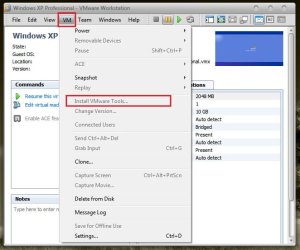
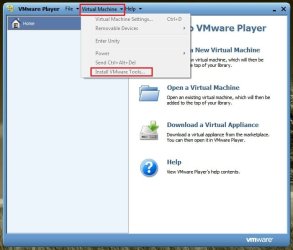
To run a VM Flawlessly with Mouse integration, USB working ,network working and Guest -Host file sharing, it is to install the vmware tools in the guest OS .
 

Attachments

  • Untitled.jpg
    Untitled.jpg
    95.1 KB · Views: 9
  • Untitled1.jpg
    Untitled1.jpg
    85.5 KB · Views: 9

My Computer

Computer type
PC/Desktop
Computer Manufacturer/Model Number
Self Assembled
OS
Microsoft Windows 10 Pro Insider Preview 64-bit
CPU
Intel(R) Core(TM) i3-4130 CPU @ 3.40GHz
Motherboard
Gigabyte Technology Co., Ltd. B85M-D3H
Memory
Corsair Vengence 4GB x2 (8.00GB Dual-Channel DDR3 @ 798MHz)
Graphics Card(s)
2047MB GeForce GTS 450 (ZOTAC International)
Sound Card
Onboard (Realtek High Definition Audio)
Monitor(s) Displays
LG Flatron E2040T
Screen Resolution
1600x900
Hard Drives
Western Digital 1 TB
Seagate 500 GB
PSU
Corsair VS550
Case
Cooler Master K380
Cooling
Cooler Master Seidon 120V Plus
Keyboard
Logitech MK260r
Mouse
Logitech MK260r
Internet Speed
PMPL Broadband
Antivirus
Windows Defender + MBAM
Browser
Firefox
Other Info
Dell Studio 15" Laptop
To run a VM Flawlessly with Mouse integration, USB working ,network working and Guest -Host file sharing, it is to install the vmware tools in the guest OS .
. In VMWare Player they are automatically installed by the VM creation wizard if the guest OS is recognized (XP is).
 

My Computer

Computer type
Laptop
Computer Manufacturer/Model Number
Hewlett-Packard/G62-107SA Notebook
OS
Microsoft Windows 7 Home Premium 64-bit Service Pack 1
CPU
Intel(R) Core(TM) i3 CPU M 330 @ 2.13GHz
Motherboard
Hewlett-Packard 1425
Memory
8 GB DDR3
Graphics Card(s)
Intel(R) HD Graphics
Sound Card
Realtek High Definition Audio
Monitor(s) Displays
Builtin
Screen Resolution
1366 x 768 x 32 bits (4294967296 colors) @ 60 Hz
Hard Drives
250 GB SATA Hard Disk Drive 7200 rpm
2TB Seagate GoFlex USB 2 Drive
1TB Iomega Prestige USB 2 Drive
1.5TB Iomega Prestige USB 2 Drive (Samsung)
2TB WD MyBook Live NAS.
Mouse
Logitech Anywhere MX
Internet Speed
152 Mbs download 10 Mbs upload
Antivirus
Norton 360
Browser
Chrome
I uninstalled VMLite from my Win7 machine some time ago. I can find no vestiges of it although there may be a registry entry.

Do you think I could download and install VMPlayer and run XP in it without any leftover conflicts between it and the previous VM?
 

My Computer

Computer Manufacturer/Model Number
custom
OS
Windows 7 Ultimate x64
CPU
Intel Core i5 320ghz
Memory
4gbDDR2 800mhz
Graphics Card(s)
Nvidia Gforce 9800
Sound Card
Creative Audigy 2 ZS
Monitor(s) Displays
NEC
Screen Resolution
1280x1024
Hard Drives
500gb ATA
320gb ATA
I would think so. It's just another program. I run it and VirtualBox on my PC
 

My Computer

Computer type
Laptop
Computer Manufacturer/Model Number
Hewlett-Packard/G62-107SA Notebook
OS
Microsoft Windows 7 Home Premium 64-bit Service Pack 1
CPU
Intel(R) Core(TM) i3 CPU M 330 @ 2.13GHz
Motherboard
Hewlett-Packard 1425
Memory
8 GB DDR3
Graphics Card(s)
Intel(R) HD Graphics
Sound Card
Realtek High Definition Audio
Monitor(s) Displays
Builtin
Screen Resolution
1366 x 768 x 32 bits (4294967296 colors) @ 60 Hz
Hard Drives
250 GB SATA Hard Disk Drive 7200 rpm
2TB Seagate GoFlex USB 2 Drive
1TB Iomega Prestige USB 2 Drive
1.5TB Iomega Prestige USB 2 Drive (Samsung)
2TB WD MyBook Live NAS.
Mouse
Logitech Anywhere MX
Internet Speed
152 Mbs download 10 Mbs upload
Antivirus
Norton 360
Browser
Chrome
Whats this business about having to activate virtual machines in the bios? I never had to do that with my Win7 machine.

Do computers with newer processors come with the bios setting automatically turned on?
 

My Computer

Computer Manufacturer/Model Number
custom
OS
Windows 7 Ultimate x64
CPU
Intel Core i5 320ghz
Memory
4gbDDR2 800mhz
Graphics Card(s)
Nvidia Gforce 9800
Sound Card
Creative Audigy 2 ZS
Monitor(s) Displays
NEC
Screen Resolution
1280x1024
Hard Drives
500gb ATA
320gb ATA
You need to activate Virtualization Technology (VT) in the BIOS for VMWare Player to work properly. It is a technology built into modern processors which allows VM to work with near native performance. It is disabled by default as it is only needed if you use VMs. It won't have any adverse affect on anything else.
 

My Computer

Computer type
Laptop
Computer Manufacturer/Model Number
Hewlett-Packard/G62-107SA Notebook
OS
Microsoft Windows 7 Home Premium 64-bit Service Pack 1
CPU
Intel(R) Core(TM) i3 CPU M 330 @ 2.13GHz
Motherboard
Hewlett-Packard 1425
Memory
8 GB DDR3
Graphics Card(s)
Intel(R) HD Graphics
Sound Card
Realtek High Definition Audio
Monitor(s) Displays
Builtin
Screen Resolution
1366 x 768 x 32 bits (4294967296 colors) @ 60 Hz
Hard Drives
250 GB SATA Hard Disk Drive 7200 rpm
2TB Seagate GoFlex USB 2 Drive
1TB Iomega Prestige USB 2 Drive
1.5TB Iomega Prestige USB 2 Drive (Samsung)
2TB WD MyBook Live NAS.
Mouse
Logitech Anywhere MX
Internet Speed
152 Mbs download 10 Mbs upload
Antivirus
Norton 360
Browser
Chrome
Whats this business about having to activate virtual machines in the bios? I never had to do that with my Win7 machine.

Do computers with newer processors come with the bios setting automatically turned on?

If you have virtualization support in your processor itself, you will want to turn it on within the BIOS. When you do that, applications like VMWare Player which can take advantage of it, will run the VM with near native machine performance.
 

My Computer

Computer Manufacturer/Model Number
Self-Built in July 2009
OS
Windows 7 Ultimate x64
CPU
Intel Q9550 2.83Ghz OC'd to 3.40Ghz
Motherboard
Gigabyte GA-EP45-UD3R rev. 1.1, F12 BIOS
Memory
8GB G.Skill PI DDR2-800, 4-4-4-12 timings
Graphics Card(s)
EVGA 1280MB Nvidia GeForce GTX570
Sound Card
Realtek ALC899A 8 channel onboard audio
Monitor(s) Displays
23" Acer x233H
Screen Resolution
1920x1080
Hard Drives
Intel X25-M 80GB Gen 2 SSD
Western Digital 1TB Caviar Black, 32MB cache. WD1001FALS
PSU
Corsair 620HX modular
Case
Antec P182
Cooling
stock
Keyboard
ABS M1 Mechanical
Mouse
Logitech G9 Laser Mouse
Internet Speed
15/2 cable modem
Other Info
Windows and Linux enthusiast. Logitech G35 Headset.
How do you get into the Bios on a Win7 machine? During boot-up I assume?

Edit: Nevermind, sorry for the dumb question.
 

My Computer

Computer Manufacturer/Model Number
custom
OS
Windows 7 Ultimate x64
CPU
Intel Core i5 320ghz
Memory
4gbDDR2 800mhz
Graphics Card(s)
Nvidia Gforce 9800
Sound Card
Creative Audigy 2 ZS
Monitor(s) Displays
NEC
Screen Resolution
1280x1024
Hard Drives
500gb ATA
320gb ATA
Hi there
VMWARE for running the virtualisation software.

For 32 bit Guest systems you don't need to enable the Virtualisation in the REAL machine's BIOS -- you only need this if you are using MS'es XP MODE or you want to install a 64 Bit guest.

(Note to people who like to try out stuff -- you CAN certainly run a 64 bit GUEST os on a 32 Bit HOST -- you can run W7 X-64 on XP if you like - your host machine must have a 64 bit CPU of course --- the limitation here is that the MAX ram both the HOST and the GUEST cvan see is 4 GB).

It's a fun exercise actually to get a W7 X-64 VM WITH AERO running on an XP Host. !!!

For the actual GUEST OS I'd suggest EITHER XP PRO or W2K3 Server with the mods on this site (easy to do all standard windows stuff) to run a Server as a desktop -- a server has all sorts of notifications etc that you can turn off so it behaves like a desktop OS.

both of these are EXCELLENT for running almost every known legacy pieceof hardware that you can't get W7 drivers for and apps that for one reason or another won't run on W7 even in Compatability mode.

I prefer W2K3 server myself if you can get it -- it's a ROBUST INCREDIBLY fast efficient OS and it will still be supported until around 2018 or so --unlike XP which is entering "End of Life" phase.

If you CAN get a copy of W2K3 server - here's the link on how to customise it so it behaves like a desktop OS -- it beats XP hands down and is especially suitable for running as a Guest OS -- depending non your requirements a guest RAM size of 512Mb - 640 mb would be MORE than sufficient. (For EITHER of these guest systems).

How to convert your Windows Server 2003... to a Workstation!


If you stil have the physical machine running the legacy system the easiest way to create the basic GUEST is to use the vmware converter tool to create your OS - this saves having to install a guest OS and the applications again.

Cheers
jimbo
 

My Computer

Computer type
PC/Desktop
Computer Manufacturer/Model Number
Custom built, several laptops HP/ASUS
OS
Linux CENTOS 7 / various Windows OS'es and servers
CPU
Intel i7 Intel i5
Memory
8GB, 16GB
Graphics Card(s)
On Motherboard
Sound Card
Realtek HD audio
Monitor(s) Displays
Apple Cinema display, Samsung LCD
Screen Resolution
1920 X 1080
Hard Drives
4 X 1TB SATA
Mouse
Toshiba wireless laser
Internet Speed
> 20MB up
Is there a VM that will work reasonably flawlessly...that has support for USB devices including printers and external hard drives and actually will give me access to older apps that cannot run on Windows7 without so many problems I spend more time tweaking the settings or fiddling with the VM than actually using the apps?

That might, in other words make migrating from XP to Win7, if not pleasant at least painless (or vice versa).

Have you tried Windows Virtual PC XP Mode? It may work fine for your purposes.

I used VMware Player for quite a while until SP1 was released for my Win 7 64 bit OS. Then I had a lot of problems with VMware. They may have worked it out by now, but I then tried Virtual Box & had issues with it also. I know that both of those programs are highly recommended by many, but it just wasn't for me - Possibly cockpit errors!? :sarc:

Anyway, I installed Windows Virtual PC XP Mode a few months ago & have had no problems. It has never had issues with recognizing my USB devices - which was my main problem with the other programs.
 

My Computer

Computer type
PC/Desktop
Computer Manufacturer/Model Number
Custom Build
OS
Windows 7 Professional 64 Bit SP1
CPU
Intel i7-3770K. Mild Overclock to 4.2 Ghz
Motherboard
ASUS Sabertooth Z77
Memory
Crucial Ballistix Sport 32GB DDR3-1600 (PC3-12800)
Graphics Card(s)
Intel 4000 - On CPU
Sound Card
On Board
Monitor(s) Displays
HP w2408h
Screen Resolution
1920 x 1200
Hard Drives
Samsung 840 Pro 256Gb SSD, --
Two - WDC WD1001FALS-00J7B0 SATA
PSU
Antec EarthWatts Green Series 650 Watt ATX
Case
Fractal Design Core 3000 ATX
Cooling
Corsair H80i Water Cooled
Keyboard
Logitech Illuminated
Mouse
Logitech Wireless Trackball M570 + Touchpad T650
Internet Speed
9.5 Mbps down - 25.4 Mbps upload
Antivirus
MSE
Browser
IE 10, Chrome
My first impulse would be to go with Windows XP Mode but I am a visually oriented person and I cannot stand the idea of being limited to 16 bit colour. I know there is a workaround but from what I understand, to implement it cripples other features.

Why, for all love, did Microsoft limit XPMode like this? It makes no sense to me.
 

My Computer

Computer Manufacturer/Model Number
custom
OS
Windows 7 Ultimate x64
CPU
Intel Core i5 320ghz
Memory
4gbDDR2 800mhz
Graphics Card(s)
Nvidia Gforce 9800
Sound Card
Creative Audigy 2 ZS
Monitor(s) Displays
NEC
Screen Resolution
1280x1024
Hard Drives
500gb ATA
320gb ATA
Check HughShaw's 4th post here:

http://www.sevenforums.com/virtualization/32942-i-got-xp-mode-display-24-bit-color-integration.html

This method works & is easy to do.

I do professional photography. I convert & edit image files in my Win 7 64 bit OS, but often must use XP mode to print to a couple of printers that only have 32 bit drivers. When I pull up the images in XP Mode (now 24 bit after following HughShaw's instructions) I see no real difference in color than when viewing in Win 7 with 32 bit color.

When I had only 16 bit color in XP Mode, I could definitely see the difference.
 

My Computer

Computer type
PC/Desktop
Computer Manufacturer/Model Number
Custom Build
OS
Windows 7 Professional 64 Bit SP1
CPU
Intel i7-3770K. Mild Overclock to 4.2 Ghz
Motherboard
ASUS Sabertooth Z77
Memory
Crucial Ballistix Sport 32GB DDR3-1600 (PC3-12800)
Graphics Card(s)
Intel 4000 - On CPU
Sound Card
On Board
Monitor(s) Displays
HP w2408h
Screen Resolution
1920 x 1200
Hard Drives
Samsung 840 Pro 256Gb SSD, --
Two - WDC WD1001FALS-00J7B0 SATA
PSU
Antec EarthWatts Green Series 650 Watt ATX
Case
Fractal Design Core 3000 ATX
Cooling
Corsair H80i Water Cooled
Keyboard
Logitech Illuminated
Mouse
Logitech Wireless Trackball M570 + Touchpad T650
Internet Speed
9.5 Mbps down - 25.4 Mbps upload
Antivirus
MSE
Browser
IE 10, Chrome
Is there a VM that will work reasonably flawlessly...that has support for USB devices including printers and external hard drives and actually will give me access to older apps that cannot run on Windows7 without so many problems I spend more time tweaking the settings or fiddling with the VM than actually using the apps?

That might, in other words make migrating from XP to Win7, if not pleasant at least painless (or vice versa).

Have you tried Windows Virtual PC XP Mode? It may work fine for your purposes.

I used VMware Player for quite a while until SP1 was released for my Win 7 64 bit OS. Then I had a lot of problems with VMware. They may have worked it out by now, but I then tried Virtual Box & had issues with it also. I know that both of those programs are highly recommended by many, but it just wasn't for me - Possibly cockpit errors!? :sarc:

Anyway, I installed Windows Virtual PC XP Mode a few months ago & have had no problems. It has never had issues with recognizing my USB devices - which was my main problem with the other programs.

VMPlayer works well with USB for me on SP1 VirtualBox is still iffy.
 

My Computer

Computer type
Laptop
Computer Manufacturer/Model Number
Hewlett-Packard/G62-107SA Notebook
OS
Microsoft Windows 7 Home Premium 64-bit Service Pack 1
CPU
Intel(R) Core(TM) i3 CPU M 330 @ 2.13GHz
Motherboard
Hewlett-Packard 1425
Memory
8 GB DDR3
Graphics Card(s)
Intel(R) HD Graphics
Sound Card
Realtek High Definition Audio
Monitor(s) Displays
Builtin
Screen Resolution
1366 x 768 x 32 bits (4294967296 colors) @ 60 Hz
Hard Drives
250 GB SATA Hard Disk Drive 7200 rpm
2TB Seagate GoFlex USB 2 Drive
1TB Iomega Prestige USB 2 Drive
1.5TB Iomega Prestige USB 2 Drive (Samsung)
2TB WD MyBook Live NAS.
Mouse
Logitech Anywhere MX
Internet Speed
152 Mbs download 10 Mbs upload
Antivirus
Norton 360
Browser
Chrome
Back
Top