Solved Maximised windows not all the way to top of screen (annoying)

gregvdm

New member
Local time
6:16 AM
Messages
4
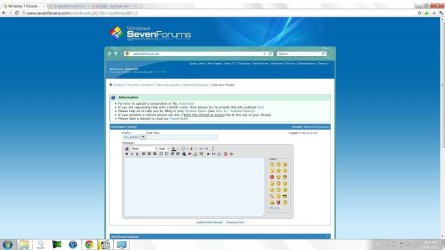
Hi Guys, have a problem I can't seem to work out or find a solution for, on my new dell any time I maximise a window it won't maximise the buttons all the way to the top as you can see in the picture. It doesn't matter which program it is, iTunes, chrome, folders, everything has the buttons about 5mm from the top of the screen. Does anyone know of any solution to this issue. Resolution set to 1920x1080 if that's any help.
Screen problem.jpg

Thanks in advance.
 

My Computer My Computer

At a glance

Windows 7 "Home Premium" 64
OS
Windows 7 "Home Premium" 64
Have you tried to drag the program to the top of the screen, that should maximise it to fill the screen.
 

My Computer My Computer

At a glance

win 7duel core 2.664GBATI 4550
Computer Manufacturer/Model Number
Dell 530s
OS
win 7
CPU
duel core 2.66
Motherboard
dell
Memory
4GB
Graphics Card(s)
ATI 4550
Sound Card
X-FI Xtreme Gamer
Monitor(s) Displays
dell 20inch
PSU
250w
Case
desktop
Keyboard
logitech
Mouse
logitech
Yep, it maximises but it's like it doesn't know the top 5mm of the screen isn't there. However the wallpaper and full screeen movies and games do go all the way up there.
 

My Computer My Computer

At a glance

Windows 7 "Home Premium" 64
OS
Windows 7 "Home Premium" 64
Hello greg and welcome to Seven Forums.

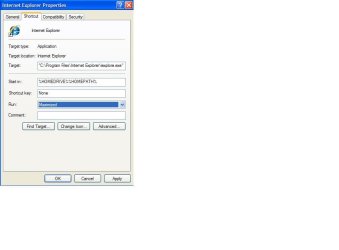
Make sure your browser is set to "maximized". From Start menu > all programs > right click IE > Properties > Shortcut tab > Run: Maximized.

maximize.JPG
 

My Computer My Computer

At a glance

Win 7 Pro 64-bitIntel i5 2.4 Ghz8GB DDR3Intel HD 3000
Computer type
Laptop
Computer Manufacturer/Model Number
Sony Vaio VPCEB47GM Laptop
OS
Win 7 Pro 64-bit
CPU
Intel i5 2.4 Ghz
Memory
8GB DDR3
Graphics Card(s)
Intel HD 3000
Sound Card
IDT High Definition
Monitor(s) Displays
15.6 WGXA Anti-Glare LED
Screen Resolution
1280x800
Hard Drives
640Gb 7200rpm
Antivirus
MSE
Browser
Opera (primary) with IE9 backup
Thanks, have just attempted that but unfortunately to no avail. The problem does occur in any program running maximised so I'm not sure what this thing is doing.
 

My Computer My Computer

At a glance

Windows 7 "Home Premium" 64
OS
Windows 7 "Home Premium" 64
Hi Guys, have a problem I can't seem to work out or find a solution for, on my new dell any time I maximise a window it won't maximise the buttons all the way to the top as you can see in the picture.
Obviously I'm not understanding what you're describing. I don't see what you're trying to point out using that screenshot. What does "maximise the buttons all the way to the top" mean? What are you expecting to see, that you're not?

Is that a full-screen screenshot? Is there something else you expect to see that you're not seeing? I'm obviously missing your point.

Is that a browser (e.g. Firefox or similar) that you've maximized, and are not seeing the entire window? Are you missing the top row(s)? Is that your complaint?

What are "the buttons" you're referring to, that you feel is not being presented correctly?

What should be where, that is not where you expect to see it? What is missing from the screen, or present in the wrong place on the screen?

Sorry for being a bit dense, I guess. I don't see what you're pointing out with your screenshot, but if you straighten out my confusion maybe I can help.
 

My Computer My Computer

At a glance

Windows 7 Pro x64 (1), Win7 Pro X64 (2)i5-3350p 3.1Ghz/6MB-cache (1); E8400 3.0Ghz/6...8GB PC3-12800 DDR3 (1); 4GB PC3-10600 DDR3 (2)ATI HD7750 (1), (see TV cards); ATI R7 250 (2)
Computer type
PC/Desktop
Computer Manufacturer/Model Number
Home-built, two systems (1) and (2)
OS
Windows 7 Pro x64 (1), Win7 Pro X64 (2)
CPU
i5-3350p 3.1Ghz/6MB-cache (1); E8400 3.0Ghz/6MB-cache (2)
Motherboard
ASUS P8Z77-V Pro (1); ASUS P5Q3 (2)
Memory
8GB PC3-12800 DDR3 (1); 4GB PC3-10600 DDR3 (2)
Graphics Card(s)
ATI HD7750 (1), (see TV cards); ATI R7 250 (2)
Sound Card
Realtek ALC892 HD Audio (1); Realtek ALC1200 HD Audio (2)
Monitor(s) Displays
Eizo HD2441W LCD, Eizo S2433W (1); Eizo 24" S2433W (2)
Screen Resolution
1920x1200, 1920x1200 (1); 1920x1200 (2)
Hard Drives
(1) 1TB SATA-II (7200RPM), 2x2TB SATA-III (7200RPM), 250GB SATA-III (10000RPM) for OS; 2x2TB external USB 3.0

(2) 320GB SATA-II (7200RPM), 750GB SATA-II (7200RPM), 150GB SATA-II (10000RPM) for OS; 2TB external USB 3.0
PSU
Nesteq ECS-6001 600W (1); Nesteq ECS-5001 500W (2)
Case
Acousti-Case 360 (1) and (2)
Cooling
Noctua NH-U12P SE2 for CPU, 2x120mm case fans (1) and (2)
Keyboard
IBM PS/2 (1) and (2)
Mouse
Logitech MX Revolution wireless (1); Microsoft wired (2)
Internet Speed
100mbps down / 10mbps up
Antivirus
Microsoft Security Essentials; Malwarebyte Anti-Malware Pro
Browser
Firefox
Other Info
Ceton InfiniTV 4-tuner cablecard-enabled TV card as well as Hauppauge HVR-2250 OTA/ATSC 2-tuner TV card in (1), running under Win7 WMC
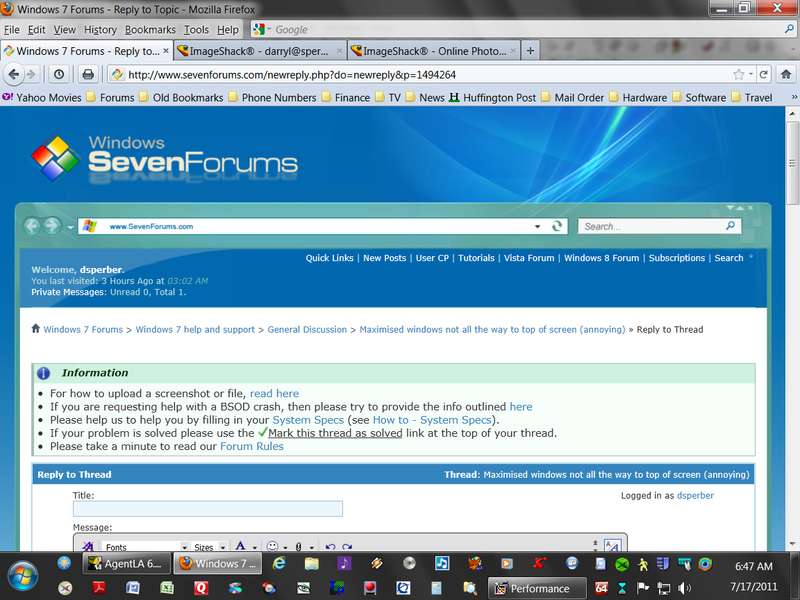
Just for comparison, I use Firefox, which I run maximized. On this particular machine I have a 4:3 CRT running at 1152x864 resolution (so not nearly as much is visible as on your screen).

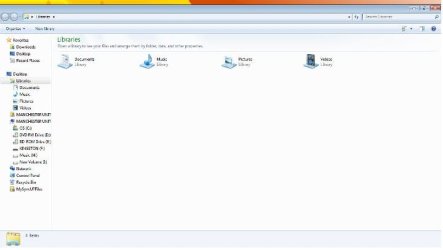
Here is what I believe to be equivalent of what your screenshot is showing, but on my machine. Does my screenshot look right to you, or is it wrong?

We're using different browsers, but aside from that, can you point out on my screenshot what is right or wrong, and that you expect to see on your Dell machine but are not seeing??

fullscreenj.jpg
 

My Computer My Computer

At a glance

Windows 7 Pro x64 (1), Win7 Pro X64 (2)i5-3350p 3.1Ghz/6MB-cache (1); E8400 3.0Ghz/6...8GB PC3-12800 DDR3 (1); 4GB PC3-10600 DDR3 (2)ATI HD7750 (1), (see TV cards); ATI R7 250 (2)
Computer type
PC/Desktop
Computer Manufacturer/Model Number
Home-built, two systems (1) and (2)
OS
Windows 7 Pro x64 (1), Win7 Pro X64 (2)
CPU
i5-3350p 3.1Ghz/6MB-cache (1); E8400 3.0Ghz/6MB-cache (2)
Motherboard
ASUS P8Z77-V Pro (1); ASUS P5Q3 (2)
Memory
8GB PC3-12800 DDR3 (1); 4GB PC3-10600 DDR3 (2)
Graphics Card(s)
ATI HD7750 (1), (see TV cards); ATI R7 250 (2)
Sound Card
Realtek ALC892 HD Audio (1); Realtek ALC1200 HD Audio (2)
Monitor(s) Displays
Eizo HD2441W LCD, Eizo S2433W (1); Eizo 24" S2433W (2)
Screen Resolution
1920x1200, 1920x1200 (1); 1920x1200 (2)
Hard Drives
(1) 1TB SATA-II (7200RPM), 2x2TB SATA-III (7200RPM), 250GB SATA-III (10000RPM) for OS; 2x2TB external USB 3.0

(2) 320GB SATA-II (7200RPM), 750GB SATA-II (7200RPM), 150GB SATA-II (10000RPM) for OS; 2TB external USB 3.0
PSU
Nesteq ECS-6001 600W (1); Nesteq ECS-5001 500W (2)
Case
Acousti-Case 360 (1) and (2)
Cooling
Noctua NH-U12P SE2 for CPU, 2x120mm case fans (1) and (2)
Keyboard
IBM PS/2 (1) and (2)
Mouse
Logitech MX Revolution wireless (1); Microsoft wired (2)
Internet Speed
100mbps down / 10mbps up
Antivirus
Microsoft Security Essentials; Malwarebyte Anti-Malware Pro
Browser
Firefox
Other Info
Ceton InfiniTV 4-tuner cablecard-enabled TV card as well as Hauppauge HVR-2250 OTA/ATSC 2-tuner TV card in (1), running under Win7 WMC
He`s talking about the small amount of space right above his minimize, maximize and close window buttons. click his pic and you will see it.

Did you drag it all the way to the top ? Did you use the auto config on your monitor ? Although your other programs show up fine so it`s probably not that.
 

My Computer My Computer

At a glance

Windows 7 Ultimate 64BitC2D E82008GB PNY PC2-6400BFG 9600GT x 2
Computer Manufacturer/Model Number
Myself
OS
Windows 7 Ultimate 64Bit
CPU
C2D E8200
Motherboard
XFX 750i
Memory
8GB PNY PC2-6400
Graphics Card(s)
BFG 9600GT x 2
Sound Card
Stock XFX Optical
Monitor(s) Displays
Gateway 22" HD Display
Hard Drives
C: 1 TB G: 500 GB H: 500 GB
PSU
Ultra LSP 550 Pro Lifetime Series
Case
Xion2
Cooling
ThermalTake
Hmm, well...I solved it, it seems that if I put my monitor in 120Hz rather than the 60 it was set to it removes that space. Thanks for the help guys, will be back if I have any more issues.
 

My Computer My Computer

At a glance

Windows 7 "Home Premium" 64
OS
Windows 7 "Home Premium" 64
same problem

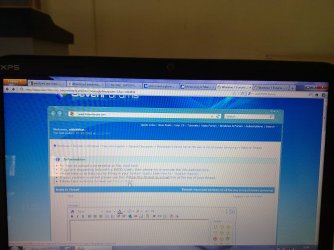
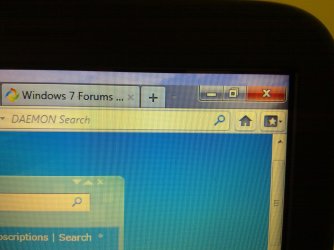
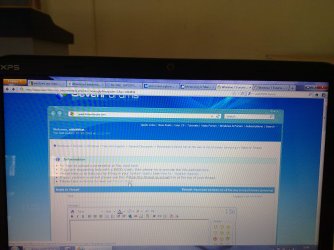
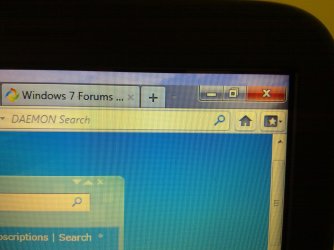
i have the same problem in my dell xps 15 laptop. it seems to be common in dell laptops. i tried to change the frequency to 120hz, but it doesnt go above 60hz. i have attached pics to show the problem. its really annoying. also, the problem is not always there. some times the screen acts normal n sometimes it doesnt. if anyone has any working solutions, plz reply
 

Attachments

  • 23072011036.jpg
    23072011036.jpg
    549.3 KB · Views: 87
  • 23072011037.jpg
    23072011037.jpg
    708.9 KB · Views: 63

My Computer My Computer

At a glance

windows7 ultimate 64bitAMD phenomX4 9950 (64 bit)2GBNVIDIA 8600GT 1GB
Computer Manufacturer/Model Number
custom
OS
windows7 ultimate 64bit
CPU
AMD phenomX4 9950 (64 bit)
Motherboard
ASUS M3N78-EM
Memory
2GB
Graphics Card(s)
NVIDIA 8600GT 1GB
Monitor(s) Displays
Samsung SyncMaster 920NW
Hard Drives
500GB
same problem

i have the same problem in my dell xps 15 laptop. it seems to be common in dell laptops. i tried to change the frequency to 120hz, but it doesnt go above 60hz. i have attached pics to show the problem. its really annoying. also, the problem is not always there. some times the screen acts normal n sometimes it doesnt. if anyone has any working solutions, plz reply
23072011036.jpg
23072011037.jpg
 

My Computer My Computer

At a glance

windows7 ultimate 64bitAMD phenomX4 9950 (64 bit)2GBNVIDIA 8600GT 1GB
Computer Manufacturer/Model Number
custom
OS
windows7 ultimate 64bit
CPU
AMD phenomX4 9950 (64 bit)
Motherboard
ASUS M3N78-EM
Memory
2GB
Graphics Card(s)
NVIDIA 8600GT 1GB
Monitor(s) Displays
Samsung SyncMaster 920NW
Hard Drives
500GB
Fix for Dell screen issue

Try unlocking the task bar, moving it up to the top of the screen, then back down again. It sounds too simple to work, but I had the exact same problem described, and this worked for me. Credit goes to some other forum somewhere on the internet. Good luck.
 

My Computer My Computer

At a glance

Windows 7 Home x64Intel i5-2410M6GB
Computer Manufacturer/Model Number
Dell XPS 15z
OS
Windows 7 Home x64
CPU
Intel i5-2410M
Memory
6GB
Monitor(s) Displays
1080P
I've had the same problem with my new Dell XPS 3800 with 24 inch Dell monitor. I was on these forums trying to find a solution, but nothing mentioned worked. However, good news people... I found how to fix this. And it is really so simple.

Step 1 : Minimize your open windows.
Step 2 : Right click on the task back and verify that the "Lock the taskbar" option isn't checked. If it is, uncheck it.
Step 3 : Move the taskback to the top of the screen.
Step 4 : Maximize a window, any window. Now, the window will take all the space it has. It will not leave a space on top near the taskbar's new position, nor will it create a space at the bottom of the screen.
Step 5 : Keep the window maximized and move the traskbar back at the bottom the way you like it. You can lock it back into this position with the "Lock the taskbar" option as described in step 1.

Result : All windows will now take all the screen and leave no annoying space.

Let me know if it worked for you guys.

Regards,
Peatawn
 

My Computer My Computer

At a glance

Windows 7 Home (x64)
OS
Windows 7 Home (x64)
I have done this however it doesn't stay like that, i think once i have restarted my laptop i have to move the taskbar again, does anyone know how to make this a permanent fix? or knows one?
 

My Computer My Computer

At a glance

Windows 7 Home Premium 64 bitIntel Core i7-2630QM8.00 GBNVIDIA GeForce GT555m 3GB, Integrated Intel H...
Computer Manufacturer/Model Number
Dell XPS 17 (L702x)
OS
Windows 7 Home Premium 64 bit
CPU
Intel Core i7-2630QM
Memory
8.00 GB
Graphics Card(s)
NVIDIA GeForce GT555m 3GB, Integrated Intel HD Graphics
Hard Drives
2 x 500 Gb
same problem with Dell XPS!!! above method worked but only till next reboot :(
 

My Computer My Computer

At a glance

Windows 7 Home Premium 64bitIntl Core i56 GBNvidia
Computer Manufacturer/Model Number
Dell XPS
OS
Windows 7 Home Premium 64bit
CPU
Intl Core i5
Memory
6 GB
Graphics Card(s)
Nvidia
same problem as nitish bhat plz help.....rate options 40hz and 60hz only
 

Attachments

  • 317526_10150766971035103_748285102_20603080_7175242_n.jpg
    317526_10150766971035103_748285102_20603080_7175242_n.jpg
    21.5 KB · Views: 41

My Computer My Computer

At a glance

windows 7 premiun 32bit
Computer Manufacturer/Model Number
dell
OS
windows 7 premiun 32bit
I actually signed up to this forum while google searching a fix to the same problem.
I tried moving the taskbar to the top of the screen (suggested by previous poster) and Dell DataSafe Local Backup Program crashed.

When that Backup program crashed and closed, the gap was gone. The gap did not return after restart, so please go ahead and try to do that...
Try closing the DataSafe Local Backup program and see what it does.

As I can't reproduce the problem, I cant tell if that is the actual culprit. I'm guessing if most Dell computer has this prob, it should be caused by their software that came with their computer, and not windows or any 3rd party sw.

Hope this helps

forgot to mention the problem was first seen on my friend Inspiron 15 that im currently setting up for him.
 

My Computer My Computer

At a glance

Windows 7 Ultimate x64i7 9203x2GB Corsair XMS3HD5770
OS
Windows 7 Ultimate x64
CPU
i7 920
Motherboard
Asus P6TSE
Memory
3x2GB Corsair XMS3
Graphics Card(s)
HD5770
Monitor(s) Displays
Dell S2409W
PSU
OCZ 600w
Case
Coolermaster Haf 912
Cooling
Corsair H50
a quick update. the "invisible bar" came back after i lock/unlock the computer.
by shutting down the software solved the issue. you can only close the DataSafe software from Task Manager.


Hope this helps =)
 

My Computer My Computer

At a glance

Windows 7 Ultimate x64i7 9203x2GB Corsair XMS3HD5770
OS
Windows 7 Ultimate x64
CPU
i7 920
Motherboard
Asus P6TSE
Memory
3x2GB Corsair XMS3
Graphics Card(s)
HD5770
Monitor(s) Displays
Dell S2409W
PSU
OCZ 600w
Case
Coolermaster Haf 912
Cooling
Corsair H50
Same problem here. There are no Windows 7 drivers for my Dell 2001FP monitor so Windows is using a Generic PnP Monitor driver. I'm guessing this is not uncommon and usually does the same job but it might not properly support as many resolutions as the actual manufacturer's driver? I was having trouble with the 1280x960 resolution btw (caused a 1 cm gap above maximized windows). In the end I just switched to a slightly different resolution (1152x864) and it works properly.
 

My Computer My Computer

At a glance

Windows 7 Professional x64Intel Core i7 970 3.2 GHz6GB DDR3 1600 MHz1x NVIDIA GeForce GTX 570 1.2GB
Computer Manufacturer/Model Number
Digital Storm Desktop 286251
OS
Windows 7 Professional x64
CPU
Intel Core i7 970 3.2 GHz
Motherboard
ASUS Rampage III Extreme (Intel X58 Chipset)
Memory
6GB DDR3 1600 MHz
Graphics Card(s)
1x NVIDIA GeForce GTX 570 1.2GB
Sound Card
Creative Labs X-Fi Titanium Fatal1ty Professional
Monitor(s) Displays
Dell 2001FP
Screen Resolution
1152x864
Hard Drives
250 GB Solid State Intel (Model: 510 Series)
PSU
1200W Corsair Pro Gold Series
Case
Black OPS HailStorm Edition
Cooling
Extreme Cooling H2O Stage 6
Keyboard
Dell Multimedia Keyboard
Mouse
Logitech MX 1000
Internet Speed
Cable
Remove Dell DataSafe Backup

Hi Guys,

I have had this same problem with my XPS 8300 for the past two weeks since turning my machine on and have been able to temporary fix with solutions suggested in this forum however it would always return UNTIL I removed Dell DataSafe remote backup. Halfway through the uninstall all the maximised windows snapped back to the top and have stayed that way. I have no need for DataSafe so no loss for me. Hope this helps anyone else. thanks, lincoln
 

My Computer My Computer

At a glance

Windows 7 Ultimate x64
OS
Windows 7 Ultimate x64
Back
Top