How to increase CPU usage for window Live MovieMaker over 50-60%?

unityole

Banned
currently asking for the unusual. whenever I publish a movie with WindowLiveMovieMaker, cpu usage goes to around 60% at max. Is there any way or any settings I could change to make it at least 80%? save me about a good 3-5 minutes if the movie is long in length.

I am using Asus G74SX-BBK7 i7 quadcore 2.0ghz, overclock to 2.9 and i think nvidia 560M GPU but only 128 bit buswidth.

any idea? thanks in advance
 

My Computer

Computer Manufacturer/Model Number
ASUS G74SX-BBK7
OS
64bit
CPU
i7 2630QM 2.0 GHz Quad-Core 8 threads
Memory
DDR3 1333 MHZ, 9-9-9-24
Graphics Card(s)
nvidia GTX 560M 2GB DDR5, 128-bit
Screen Resolution
1600x900, 900p
Hard Drives
2x 750 sata drive.
Cooling
DUAL FAN 120 MM
CPU usage depends on the encoder settings, just because WLMM isn't stressing your CPU doesn't mean it's not efficient ;)
 

My Computer

Computer type
Laptop
Computer Manufacturer/Model Number
Custom
OS
Windows 7 Home Premium x64
CPU
Intel Core i5 2500K
Motherboard
MSI MS-7750
Memory
8GB DDR3
Graphics Card(s)
nVidia GeForce GTX650 Ti BOOST
Sound Card
Realtek
Monitor(s) Displays
21' Philips
Screen Resolution
Full HD
Hard Drives
1TB
PSU
500W
CPU usage depends on the encoder settings, just because WLMM isn't stressing your CPU doesn't mean it's not efficient ;)

so where can i access this settings i just want to change it to 70 or 80. is that possible?
 

My Computer

Computer Manufacturer/Model Number
ASUS G74SX-BBK7
OS
64bit
CPU
i7 2630QM 2.0 GHz Quad-Core 8 threads
Memory
DDR3 1333 MHZ, 9-9-9-24
Graphics Card(s)
nvidia GTX 560M 2GB DDR5, 128-bit
Screen Resolution
1600x900, 900p
Hard Drives
2x 750 sata drive.
Cooling
DUAL FAN 120 MM
No, I don't think so. It all depends on the output file settings.
Perhaps changing the priority in Task Manager can help, though I doubt it.

1. Once you start exporting the clip, right click an empty area of the taskbar and choose Task Manager
2. Switch to Processes tab
3. Find WLMM.exe (or something like that), it should say Windows Live Movie Maker in the Description
3. Right click the process -> Set priority -> High (or Realtime, though I don't recommend it)

Also, take note that if you assign a higher priority to it, you shouldn't use your system at all until the process of exporting the clip is finished. Chances are the rest of your system will be bogged down and you'll just make it unstable by forcing it to do something else.
 

My Computer

Computer type
Laptop
Computer Manufacturer/Model Number
Custom
OS
Windows 7 Home Premium x64
CPU
Intel Core i5 2500K
Motherboard
MSI MS-7750
Memory
8GB DDR3
Graphics Card(s)
nVidia GeForce GTX650 Ti BOOST
Sound Card
Realtek
Monitor(s) Displays
21' Philips
Screen Resolution
Full HD
Hard Drives
1TB
PSU
500W
No, I don't think so. It all depends on the output file settings.
Perhaps changing the priority in Task Manager can help, though I doubt it.

1. Once you start exporting the clip, right click an empty area of the taskbar and choose Task Manager
2. Switch to Processes tab
3. Find WLMM.exe (or something like that), it should say Windows Live Movie Maker in the Description
3. Right click the process -> Set priority -> High (or Realtime, though I don't recommend it)

Also, take note that if you assign a higher priority to it, you shouldn't use your system at all until the process of exporting the clip is finished. Chances are the rest of your system will be bogged down and you'll just make it unstable by forcing it to do something else.

thank you very much sir i will try that !
 

My Computer

Computer Manufacturer/Model Number
ASUS G74SX-BBK7
OS
64bit
CPU
i7 2630QM 2.0 GHz Quad-Core 8 threads
Memory
DDR3 1333 MHZ, 9-9-9-24
Graphics Card(s)
nvidia GTX 560M 2GB DDR5, 128-bit
Screen Resolution
1600x900, 900p
Hard Drives
2x 750 sata drive.
Cooling
DUAL FAN 120 MM
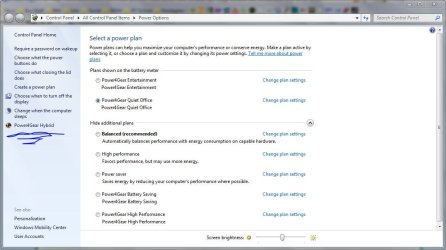
Asus sometimes has Power Gear Hybrid Settings

Set the Power Plan to High Performance, then look to the left column ans see if you see something that says Power Gear Hybrid


If you have it, then you can set the max Processor power to 90/100%
 

Attachments

  • screen1.JPG
    screen1.JPG
    103.3 KB · Views: 51
  • screen2.JPG
    screen2.JPG
    72 KB · Views: 35

My Computer

Computer type
Laptop
Computer Manufacturer/Model Number
ASUS G60-RBBX05
OS
Win7 Home Premium 64x
CPU
Intel Core 2 Duo P7450 / 2.13 GHz (2.29 with Extreme Turbo)
Memory
4 GB PC-6400 Hyundai (2X2) at 800Mhz
Graphics Card(s)
NVIDIA GeForce GTX 260M 1GB DDR3 VRAM
Monitor(s) Displays
16" LED Backlit
Screen Resolution
1366 x 768 on laptop 1600x1050 max res on 22" external mon
Hard Drives
OCZ Agility 3 60GB SSD / 320 GB - Serial ATA-150 - 7200 rpm
PSU
6-cell Lithium ion { lasts 1.5 hours }
Case
ASUS G60 Laptop
Keyboard
Chicklet type back-lit (white light) keyboard
Mouse
Logitech G9 Laser Mouse 3200dpi and 1000 reports per minute
Internet Speed
Comcast 8.60mb/s up - 3.11mb/s down
Antivirus
MSE
Browser
Firefox
Other Info
General mid-budget gaming Comp. Low batterylife - High FrameRates - currently overheating problems :(

2nd Rig: Case: Rosewill BLACKHAWK Gaming ATX Mid Tower Computer Case

Mobo: GIGABYTE GA-990FXA-UD3
CPU: AMD FX-6200 Zambezi 3.8GHz (4.1GHz Turbo)
Heatsink: COOLER MASTER V8 CPU Cooler
RAM: Patriot Viper 3 8GB (2 x 4GB) 240-Pin DDR3 SDRAM 1866 (PC3 15000)
GPU: SAPPHIRE Radeon HD 6850 1GB 2
Asus sometimes has Power Gear Hybrid Settings

Set the Power Plan to High Performance, then look to the left column ans see if you see something that says Power Gear Hybrid


If you have it, then you can set the max Processor power to 90/100%

damn i already have my processor to max power but it still only uses about 50% cpu when i publish movies. and ive tried to put priority on high, nothing seems to change though.
 

My Computer

Computer Manufacturer/Model Number
ASUS G74SX-BBK7
OS
64bit
CPU
i7 2630QM 2.0 GHz Quad-Core 8 threads
Memory
DDR3 1333 MHZ, 9-9-9-24
Graphics Card(s)
nvidia GTX 560M 2GB DDR5, 128-bit
Screen Resolution
1600x900, 900p
Hard Drives
2x 750 sata drive.
Cooling
DUAL FAN 120 MM
What its doing is reserving the second core for other processes so that the system never bogs down, but you want to use max.... I will look to see if I can find anything for changing this function. I would say ahead of time that this might be in the BIOS, but I am not certain.
 

My Computer

Computer type
Laptop
Computer Manufacturer/Model Number
ASUS G60-RBBX05
OS
Win7 Home Premium 64x
CPU
Intel Core 2 Duo P7450 / 2.13 GHz (2.29 with Extreme Turbo)
Memory
4 GB PC-6400 Hyundai (2X2) at 800Mhz
Graphics Card(s)
NVIDIA GeForce GTX 260M 1GB DDR3 VRAM
Monitor(s) Displays
16" LED Backlit
Screen Resolution
1366 x 768 on laptop 1600x1050 max res on 22" external mon
Hard Drives
OCZ Agility 3 60GB SSD / 320 GB - Serial ATA-150 - 7200 rpm
PSU
6-cell Lithium ion { lasts 1.5 hours }
Case
ASUS G60 Laptop
Keyboard
Chicklet type back-lit (white light) keyboard
Mouse
Logitech G9 Laser Mouse 3200dpi and 1000 reports per minute
Internet Speed
Comcast 8.60mb/s up - 3.11mb/s down
Antivirus
MSE
Browser
Firefox
Other Info
General mid-budget gaming Comp. Low batterylife - High FrameRates - currently overheating problems :(

2nd Rig: Case: Rosewill BLACKHAWK Gaming ATX Mid Tower Computer Case

Mobo: GIGABYTE GA-990FXA-UD3
CPU: AMD FX-6200 Zambezi 3.8GHz (4.1GHz Turbo)
Heatsink: COOLER MASTER V8 CPU Cooler
RAM: Patriot Viper 3 8GB (2 x 4GB) 240-Pin DDR3 SDRAM 1866 (PC3 15000)
GPU: SAPPHIRE Radeon HD 6850 1GB 2
We need more info for your system. Please fill out system specs:

http://www.sevenforums.com/profile.php?do=extra

Also give us some info on whether or not you are using dual channel RAM and how many sticks of ram you have because this might be a factor as well. You might not benefit from using both cores due to limitations on through-put elsewhere (Im not sure of this, but it might be)
 

My Computer

Computer type
Laptop
Computer Manufacturer/Model Number
ASUS G60-RBBX05
OS
Win7 Home Premium 64x
CPU
Intel Core 2 Duo P7450 / 2.13 GHz (2.29 with Extreme Turbo)
Memory
4 GB PC-6400 Hyundai (2X2) at 800Mhz
Graphics Card(s)
NVIDIA GeForce GTX 260M 1GB DDR3 VRAM
Monitor(s) Displays
16" LED Backlit
Screen Resolution
1366 x 768 on laptop 1600x1050 max res on 22" external mon
Hard Drives
OCZ Agility 3 60GB SSD / 320 GB - Serial ATA-150 - 7200 rpm
PSU
6-cell Lithium ion { lasts 1.5 hours }
Case
ASUS G60 Laptop
Keyboard
Chicklet type back-lit (white light) keyboard
Mouse
Logitech G9 Laser Mouse 3200dpi and 1000 reports per minute
Internet Speed
Comcast 8.60mb/s up - 3.11mb/s down
Antivirus
MSE
Browser
Firefox
Other Info
General mid-budget gaming Comp. Low batterylife - High FrameRates - currently overheating problems :(

2nd Rig: Case: Rosewill BLACKHAWK Gaming ATX Mid Tower Computer Case

Mobo: GIGABYTE GA-990FXA-UD3
CPU: AMD FX-6200 Zambezi 3.8GHz (4.1GHz Turbo)
Heatsink: COOLER MASTER V8 CPU Cooler
RAM: Patriot Viper 3 8GB (2 x 4GB) 240-Pin DDR3 SDRAM 1866 (PC3 15000)
GPU: SAPPHIRE Radeon HD 6850 1GB 2
Another issue is that the software you are using might not be designed in a manner to benefit from dual cores. These are usually older programs and are designed to send single commands to the CPU instead of using multiple threads that can utilize either core. So check with the software as well.
 

My Computer

Computer type
Laptop
Computer Manufacturer/Model Number
ASUS G60-RBBX05
OS
Win7 Home Premium 64x
CPU
Intel Core 2 Duo P7450 / 2.13 GHz (2.29 with Extreme Turbo)
Memory
4 GB PC-6400 Hyundai (2X2) at 800Mhz
Graphics Card(s)
NVIDIA GeForce GTX 260M 1GB DDR3 VRAM
Monitor(s) Displays
16" LED Backlit
Screen Resolution
1366 x 768 on laptop 1600x1050 max res on 22" external mon
Hard Drives
OCZ Agility 3 60GB SSD / 320 GB - Serial ATA-150 - 7200 rpm
PSU
6-cell Lithium ion { lasts 1.5 hours }
Case
ASUS G60 Laptop
Keyboard
Chicklet type back-lit (white light) keyboard
Mouse
Logitech G9 Laser Mouse 3200dpi and 1000 reports per minute
Internet Speed
Comcast 8.60mb/s up - 3.11mb/s down
Antivirus
MSE
Browser
Firefox
Other Info
General mid-budget gaming Comp. Low batterylife - High FrameRates - currently overheating problems :(

2nd Rig: Case: Rosewill BLACKHAWK Gaming ATX Mid Tower Computer Case

Mobo: GIGABYTE GA-990FXA-UD3
CPU: AMD FX-6200 Zambezi 3.8GHz (4.1GHz Turbo)
Heatsink: COOLER MASTER V8 CPU Cooler
RAM: Patriot Viper 3 8GB (2 x 4GB) 240-Pin DDR3 SDRAM 1866 (PC3 15000)
GPU: SAPPHIRE Radeon HD 6850 1GB 2
After setting you computer to performance that is it. The CPU will only do what ever it needs to do to get the job done.(What is being requested) If a program or what ever only demands 50% of your CPU ability that's all you get. You only get 80,90, or 100% when their is a demand for that much CPU work from a program or combination of things. This is a good thing.
 

My Computer

Computer type
PC/Desktop
Computer Manufacturer/Model Number
Home made Desktop
OS
Windows 10 Pro. 64/ version 1709 Windows 7 Pro/64
CPU
Intel i7-6800K @ 4.3
Motherboard
ASUS X-99 Deluxe II
Memory
Corsair Platinum 16 gig @2400
Graphics Card(s)
EVGA GTX 1070 OC
Monitor(s) Displays
Asus 27" LED LCD/VE278Q
Screen Resolution
1920-1080 or 1280-720 HDMI
Hard Drives
INTEL SSD 730-240 Gb Sata 3.0/
PSU
EVGA Platium 1200W
Case
Phanteks Luxe Tempered Glass 8 fans/ one radiator
Cooling
XSPC/ Water Cooled CPU
Keyboard
Das 4 Professional
Mouse
Logitech M705/MX Anywhere 2-S
Internet Speed
100 mbits
Antivirus
Microsoft Security Essentials/ Malwarebytes Premium 3.0/ SAS
Browser
I.E. 11 default/Firefox/ ISP Time Warner Cable/Spectrum
Other Info
LG BluRay Burner/
Sound system-KLipsch-THX/
Icy Dock ssd Hot Swap bays.
+1

Especially when encoding video. That's actually all I have to add xD
 

My Computer

Computer type
Laptop
Computer Manufacturer/Model Number
Custom
OS
Windows 7 Home Premium x64
CPU
Intel Core i5 2500K
Motherboard
MSI MS-7750
Memory
8GB DDR3
Graphics Card(s)
nVidia GeForce GTX650 Ti BOOST
Sound Card
Realtek
Monitor(s) Displays
21' Philips
Screen Resolution
Full HD
Hard Drives
1TB
PSU
500W
Another issue is that the software you are using might not be designed in a manner to benefit from dual cores. These are usually older programs and are designed to send single commands to the CPU instead of using multiple threads that can utilize either core. So check with the software as well.

Hey sorry for the late reply. I have filled out my laptop specs except the motherboard portion, don't know where I can find such info on my computer. cpuz or gpuz? anyway both window movie maker 6.0 and window live movie maker are multiple threads program and use multiple cores.

I've encode a few times and on core temp and cpu gadget show that all cores/threads are being used.
 

My Computer

Computer Manufacturer/Model Number
ASUS G74SX-BBK7
OS
64bit
CPU
i7 2630QM 2.0 GHz Quad-Core 8 threads
Memory
DDR3 1333 MHZ, 9-9-9-24
Graphics Card(s)
nvidia GTX 560M 2GB DDR5, 128-bit
Screen Resolution
1600x900, 900p
Hard Drives
2x 750 sata drive.
Cooling
DUAL FAN 120 MM
I like your computer.....

From what I have seen in other threads about MovieMaker, it should run at max cpu usage, but laptops work differently. I have not seen yet any replication of this issue anywhere else. Any examples of it running at full processor load are on Tower computers.

Your laptop, while awesome for gaming and many other things, has a mobile processor and as such is not as powerful as the i7 of desktop computers. They are designed to work with less energy and at lower voltages. They also usually have either throttling or the ability to lock down 1 core to prevent overheating.

I dont know if this can be changed, but if it can, I would worry about overheating as using a mobile CPU at max for that long would cause a lot of heat and your gaming laptop might or might not be able to exhaust all the heat?

Good luck though.
 

My Computer

Computer type
Laptop
Computer Manufacturer/Model Number
ASUS G60-RBBX05
OS
Win7 Home Premium 64x
CPU
Intel Core 2 Duo P7450 / 2.13 GHz (2.29 with Extreme Turbo)
Memory
4 GB PC-6400 Hyundai (2X2) at 800Mhz
Graphics Card(s)
NVIDIA GeForce GTX 260M 1GB DDR3 VRAM
Monitor(s) Displays
16" LED Backlit
Screen Resolution
1366 x 768 on laptop 1600x1050 max res on 22" external mon
Hard Drives
OCZ Agility 3 60GB SSD / 320 GB - Serial ATA-150 - 7200 rpm
PSU
6-cell Lithium ion { lasts 1.5 hours }
Case
ASUS G60 Laptop
Keyboard
Chicklet type back-lit (white light) keyboard
Mouse
Logitech G9 Laser Mouse 3200dpi and 1000 reports per minute
Internet Speed
Comcast 8.60mb/s up - 3.11mb/s down
Antivirus
MSE
Browser
Firefox
Other Info
General mid-budget gaming Comp. Low batterylife - High FrameRates - currently overheating problems :(

2nd Rig: Case: Rosewill BLACKHAWK Gaming ATX Mid Tower Computer Case

Mobo: GIGABYTE GA-990FXA-UD3
CPU: AMD FX-6200 Zambezi 3.8GHz (4.1GHz Turbo)
Heatsink: COOLER MASTER V8 CPU Cooler
RAM: Patriot Viper 3 8GB (2 x 4GB) 240-Pin DDR3 SDRAM 1866 (PC3 15000)
GPU: SAPPHIRE Radeon HD 6850 1GB 2
No, I don't think so. It all depends on the output file settings.
Perhaps changing the priority in Task Manager can help, though I doubt it.

1. Once you start exporting the clip, right click an empty area of the taskbar and choose Task Manager
2. Switch to Processes tab
3. Find WLMM.exe (or something like that), it should say Windows Live Movie Maker in the Description
3. Right click the process -> Set priority -> High (or Realtime, though I don't recommend it)

Also, take note that if you assign a higher priority to it, you shouldn't use your system at all until the process of exporting the clip is finished. Chances are the rest of your system will be bogged down and you'll just make it unstable by forcing it to do something else.


thanks for this information sir!!!i'll try this one in my pc!
 

My Computer

OS
windows 8
Back
Top