Solved Create a System Repair Disc

ukthesis

New member
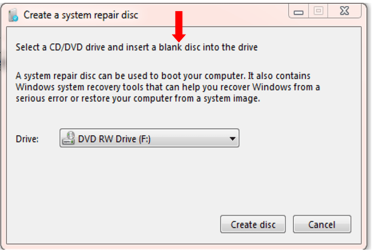
Using Windows 7 Backup and Restore, I am attempting to create a disc to save:

"Create a System Repair Disc"

However, when I put in a blank DVD-R disc, that's not been used, the message comes up:

"The disc in the selected drive is not blank"

I've tested the DVD disc and it comes out fine.
 

My Computer

OS
64 bit
As theog points out, you need a blank CD-R, not a DVD-R.
 

My Computer

Computer Manufacturer/Model Number
HP Pavilion Elite 495UK
OS
Windows 7 Ultimate SP1 64-Bit
CPU
Intel Core i7 870 @ 2.93GHz
Motherboard
MSI 2A9C (CPU1)
Memory
8Gb Dual-Channel DDR3 @ 664MHz
Graphics Card(s)
nVidia GeForce GTX 460 1024MB dedicated RAM
Sound Card
Realtek HD Audio
Monitor(s) Displays
HP2310i
Screen Resolution
1920 x 1080
Hard Drives
1x1954GB Hitachi HDS22020ALA 330 (RAID), 1x1954GB Hitachi External for backup and storage
PSU
460W
Case
HP Elite
Cooling
Air cooled
Keyboard
Logitech K750 solar-powered keyboard
Mouse
Logitech Wireless M180 mouse
Internet Speed
2Mb
Other Info
Pure Avanti Flow Internet Radio with iPod Dock, 64Gb iPod, HP USB Speakers, Sony MDR-V500 Headphones, Sony Vaio F-Series Laptop
You can use either a CD or DVD to create a system repair disc with. I have done both, and used a DVD-R and DVD+R without issue.

The DVD will have to be unformatted and blank though.
 

My Computer

Computer type
PC/Desktop
Computer Manufacturer/Model Number
Self built custom
OS
64-bit Windows 11 Pro for Workstations
CPU
Intel i7-8700K OC'd to 5 GHz
Motherboard
ASUS ROG Maximus XI Formula Z390
Memory
64 GB (4x16GB) G.SKILL TridentZ RGB DDR4 3600 MHz
Graphics Card(s)
ASUS ROG-STRIX-GTX1080TI-O11G-GAMING
Sound Card
Integrated
Monitor(s) Displays
2 x Samsung Odyssey G7 27"
Screen Resolution
2560x1440
Hard Drives
1TB Samsung 990 PRO M.2,
4TB Samsung 990 PRO PRO M.2,
TerraMaster F8 SSD Plus NAS
PSU
Seasonic Prime Titanium 850W
Case
Thermaltake Core P3
Cooling
Corsair Hydro H115i
Keyboard
Logitech wireless K800
Mouse
Logitech MX Master 4
Internet Speed
2 Gb/s Download and 100 Mb/s Upload
Antivirus
Malwarebyte Anti-Malware Premium
Browser
Google Chrome
Other Info
Logitech Z625 speaker system,
Logitech BRIO 4K Pro webcam,
HP Color LaserJet Pro MFP M477fdn,
APC SMART-UPS RT 1000 XL - SURT1000XLI,
Galaxy S23 Plus phone
Likewise I use DVDs for system repair disks and most other situations that aren't specifically audio/music related. Live boots fire up faster with DVDs as well.
 

My Computer

Computer type
PC/Desktop
Computer Manufacturer/Model Number
Own build
OS
Windows 7x64 Home Premium SP1
CPU
Intel i7 2600k
Motherboard
ASUS P8Z68 Deluxe
Memory
G.Skill Ripjaws (DDR3-1600) 2x4GB
Graphics Card(s)
Nvidia GeForce GTS 450; Intel HD Graphics 3000(GT2+)
Monitor(s) Displays
Dell Ultrasharp IPS panel U2311H, Samsung SyncMaster P2350
Screen Resolution
1920x1080
Hard Drives
Samsung 850 Pro SSD 256GB, Samsung SSD 840 120GB, Seagates 1TB Barracuda ST31000528AS x2
PSU
Seasonic M12II 520W
Case
Lian Li Lancool PC-K60
Cooling
Case: 1x120mm, 3x140mm CPU: Hyper 212+
Keyboard
Logitech MK520 (wireless)
Mouse
Logitech MK520
Internet Speed
6-7 Mbps
Antivirus
Norton Security Premium, Malwarebytes on 2 (MSE on 3rd PC)
Browser
FireFox
Other Info
Audio: Logitech Z523 2.1
Perhaps it's a computer related issue. I tried making a system repair disk using a DVD on my Dell Vostro. Didn't work. Same DVD but on my Sony Vaio. Worked just fine.
 

My Computer

Computer type
Laptop
Computer Manufacturer/Model Number
Sony Vaio VPCEB47GM Laptop
OS
Win 7 Pro 64-bit
CPU
Intel i5 2.4 Ghz
Memory
8GB DDR3
Graphics Card(s)
Intel HD 3000
Sound Card
IDT High Definition
Monitor(s) Displays
15.6 WGXA Anti-Glare LED
Screen Resolution
1280x800
Hard Drives
640Gb 7200rpm
Antivirus
MSE
Browser
Opera (primary) with IE9 backup
Perhaps it's a computer related issue. I tried making a system repair disk using a DVD on my Dell Vostro. Didn't work. Same DVD but on my Sony Vaio. Worked just fine.
There you go. Surprised, but a fact is a fact.
I thought it was just down to both having the El Torito Bootable CD Specification - there's obviously more to it.

Edit: It may be generally useful to get an idea of who else has experienced problems replacing a system repair CD with a DVD.
 
Last edited:

My Computer

Computer type
PC/Desktop
Computer Manufacturer/Model Number
Own build
OS
Windows 7x64 Home Premium SP1
CPU
Intel i7 2600k
Motherboard
ASUS P8Z68 Deluxe
Memory
G.Skill Ripjaws (DDR3-1600) 2x4GB
Graphics Card(s)
Nvidia GeForce GTS 450; Intel HD Graphics 3000(GT2+)
Monitor(s) Displays
Dell Ultrasharp IPS panel U2311H, Samsung SyncMaster P2350
Screen Resolution
1920x1080
Hard Drives
Samsung 850 Pro SSD 256GB, Samsung SSD 840 120GB, Seagates 1TB Barracuda ST31000528AS x2
PSU
Seasonic M12II 520W
Case
Lian Li Lancool PC-K60
Cooling
Case: 1x120mm, 3x140mm CPU: Hyper 212+
Keyboard
Logitech MK520 (wireless)
Mouse
Logitech MK520
Internet Speed
6-7 Mbps
Antivirus
Norton Security Premium, Malwarebytes on 2 (MSE on 3rd PC)
Browser
FireFox
Other Info
Audio: Logitech Z523 2.1
You can also simply make a bootable system repair flash drive with easybcd and the RE files on the hard disk.
 

My Computer

Computer Manufacturer/Model Number
Too many to describe...
OS
Windows 7 x64 pro/ Windows 7 x86 Pro/ XP SP3 x86
I'm not technically sophisticated so some of these answers beg, for me, more questions. For example, how do I do this?

"You can also simply make a bootable system repair flash drive with easybcd and the RE files on the hard disk."

The bit about formatting I did understand though. How do I un-format and make blank a DVD disc? I have a few formatted ones here I can use.
 

My Computer

OS
64 bit
I'm not technically sophisticated so some of these answers beg, for me, more questions. For example, how do I do this?

"You can also simply make a bootable system repair flash drive with easybcd and the RE files on the hard disk."
Now that you have the system repair disk, it doesnt really matter but anyhoo...

Make a bootable flash drive. I use this method:

http://www.sevenforums.com/tutorials/2432-usb-windows-7-installation-key-drive-create.html

Dont dump the win7 iso contents to the flash drive, instead copy all the files off the repair disk you created and paste them to the flash drive. Just paste them as they are, dont make any folders etc. Thats it. make sure the computer is set to boot from usb first.

Using the RE files on the hard disk is slightly more involved so we'll let it be.
 
Last edited by a moderator:

My Computer

Computer Manufacturer/Model Number
Too many to describe...
OS
Windows 7 x64 pro/ Windows 7 x86 Pro/ XP SP3 x86
I'll keep that for reference. It would seem simpler to "un" format a DVD, but how's that done? Also, to remove all other files from it.
 

My Computer

OS
64 bit
Unformat a dvd? You mean erase the dvd contents? Just use any dvd burning program, all of them can erase the dvd, provided its a rewritable dvd. You cant erase the contents of a recordable only dvd.
 

My Computer

Computer Manufacturer/Model Number
Too many to describe...
OS
Windows 7 x64 pro/ Windows 7 x86 Pro/ XP SP3 x86
Bill, that was going to be my answer. Stop being so fast on the keyboard! :D
 

My Computer

Computer type
Laptop
Computer Manufacturer/Model Number
Sony Vaio VPCEB47GM Laptop
OS
Win 7 Pro 64-bit
CPU
Intel i5 2.4 Ghz
Memory
8GB DDR3
Graphics Card(s)
Intel HD 3000
Sound Card
IDT High Definition
Monitor(s) Displays
15.6 WGXA Anti-Glare LED
Screen Resolution
1280x800
Hard Drives
640Gb 7200rpm
Antivirus
MSE
Browser
Opera (primary) with IE9 backup
No, it's not a RW disc. DVD-R. So if it's formatted, I can't use it because I can't undo the formatting?
 

My Computer

OS
64 bit
No, it's not a RW disc. DVD-R. So if it's formatted, I can't use it because I can't undo the formatting?
You cant remove the stuff already there. But if its a multisession disk (you didnt close the session/disk after the first burn) then you can use the remaining empty space on the disk to add more files.
 

My Computer

Computer Manufacturer/Model Number
Too many to describe...
OS
Windows 7 x64 pro/ Windows 7 x86 Pro/ XP SP3 x86
Did it with an unformatted CD lying around. THANKS. But why isn't it made clear when it tells you on Backup and Restore about this function that you need to use an unformatted disc? Any how PROBLEM SOLVED!
 

My Computer

OS
64 bit
Without wanting to seem pedantic, I assumed that you could have a formatted disc that's also "blank" (ie blank in that it has no files saved by myself on it). I bet if you ask most who just fiddle about on their computers, and not those knowing more, they won't know this difference. They will probably assume that if they've not done anything but format their CD's, they consider them as blank (ie with no files they've saved on them).

The other point is that, for routine PC work, formatting discs before use is the norm. This is what one normally does to get them to work.
 

My Computer

OS
64 bit
Install DVDs

Just curious. If you have a problem with a System Repair DVD as opposed to CD then wouldn't you expect problems using the Install DVD for the same purpose?
 

My Computer

Computer type
PC/Desktop
Computer Manufacturer/Model Number
Own build
OS
Windows 7x64 Home Premium SP1
CPU
Intel i7 2600k
Motherboard
ASUS P8Z68 Deluxe
Memory
G.Skill Ripjaws (DDR3-1600) 2x4GB
Graphics Card(s)
Nvidia GeForce GTS 450; Intel HD Graphics 3000(GT2+)
Monitor(s) Displays
Dell Ultrasharp IPS panel U2311H, Samsung SyncMaster P2350
Screen Resolution
1920x1080
Hard Drives
Samsung 850 Pro SSD 256GB, Samsung SSD 840 120GB, Seagates 1TB Barracuda ST31000528AS x2
PSU
Seasonic M12II 520W
Case
Lian Li Lancool PC-K60
Cooling
Case: 1x120mm, 3x140mm CPU: Hyper 212+
Keyboard
Logitech MK520 (wireless)
Mouse
Logitech MK520
Internet Speed
6-7 Mbps
Antivirus
Norton Security Premium, Malwarebytes on 2 (MSE on 3rd PC)
Browser
FireFox
Other Info
Audio: Logitech Z523 2.1
Just curious. If you have a problem with a System Repair DVD as opposed to CD then wouldn't you expect problems using the Install DVD for the same purpose?

Please correct me if I misunderstood your question. :o

The only problem here was that the DVD had been previously formatted. To create the system repair disc the CD or DVD has to be unformatted (blank).
 

My Computer

Computer type
PC/Desktop
Computer Manufacturer/Model Number
Self built custom
OS
64-bit Windows 11 Pro for Workstations
CPU
Intel i7-8700K OC'd to 5 GHz
Motherboard
ASUS ROG Maximus XI Formula Z390
Memory
64 GB (4x16GB) G.SKILL TridentZ RGB DDR4 3600 MHz
Graphics Card(s)
ASUS ROG-STRIX-GTX1080TI-O11G-GAMING
Sound Card
Integrated
Monitor(s) Displays
2 x Samsung Odyssey G7 27"
Screen Resolution
2560x1440
Hard Drives
1TB Samsung 990 PRO M.2,
4TB Samsung 990 PRO PRO M.2,
TerraMaster F8 SSD Plus NAS
PSU
Seasonic Prime Titanium 850W
Case
Thermaltake Core P3
Cooling
Corsair Hydro H115i
Keyboard
Logitech wireless K800
Mouse
Logitech MX Master 4
Internet Speed
2 Gb/s Download and 100 Mb/s Upload
Antivirus
Malwarebyte Anti-Malware Premium
Browser
Google Chrome
Other Info
Logitech Z625 speaker system,
Logitech BRIO 4K Pro webcam,
HP Color LaserJet Pro MFP M477fdn,
APC SMART-UPS RT 1000 XL - SURT1000XLI,
Galaxy S23 Plus phone
Back
Top