Will this graphics card work on my computer?

douggoud

New member
Local time
4:35 AM
Messages
9
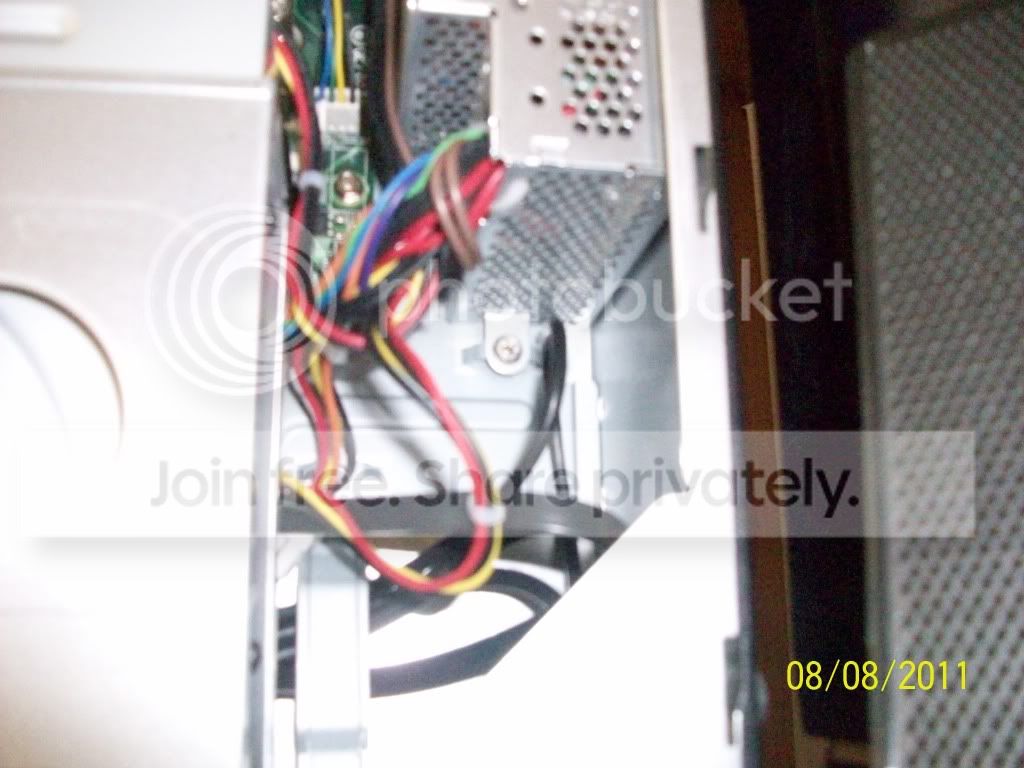
Hi, I recently got a new desktop, an Acer Aspire X1420G-U5832, 1TB, quad-core processor desktop. Well, I was planning on using games on this computer, but I also needed autodesk to run on this computer. It does, but not very well. So I wanted to upgrade the graphics card. I purchased a SAPPHIRE 100293L Radeon HD 5570 1GB 128-bit DDR3 PCI Express 2.1 x16 HDCP Ready Low Profile Ready Video Card from newegg .com Newegg.com - SAPPHIRE 100293L Radeon HD 5570 1GB 128-bit DDR3 PCI Express 2.1 x16 HDCP Ready Low Profile Ready Video Card . but I'm worried that it wont fit in my computer, or that you can't upgrade its graphics, because I can't find the graphics card (I may know alot of things about computers, but the graphics card and motherbored, etc. Thats something I know very little about). Heres some pictures of the inside of the computer.
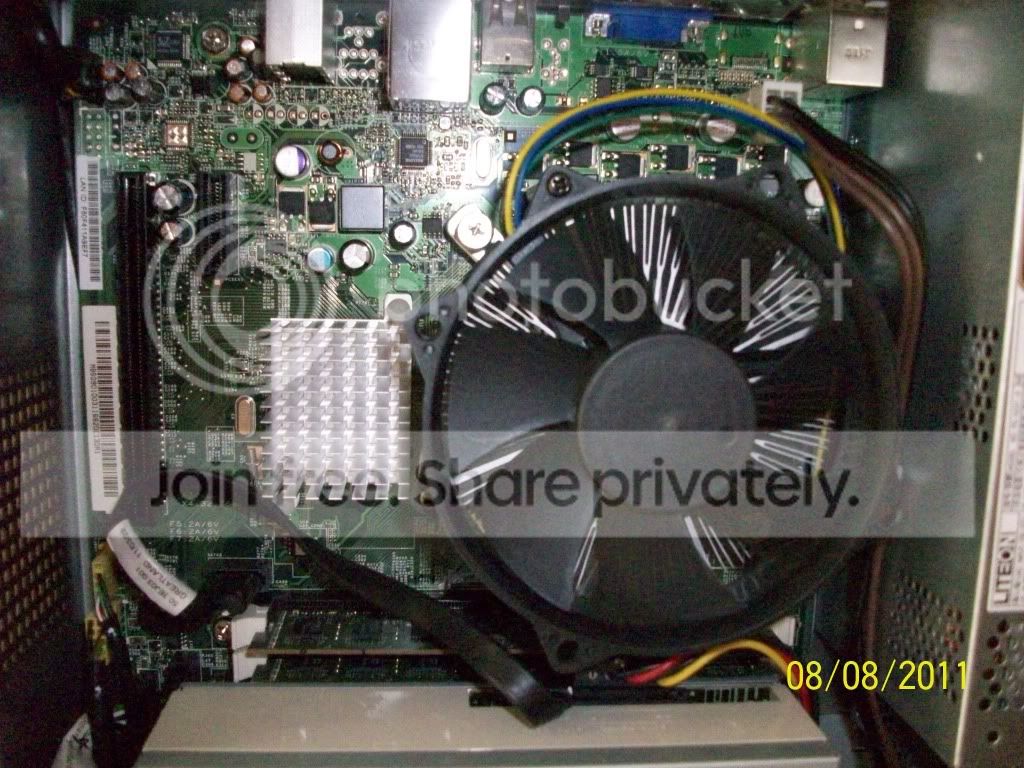
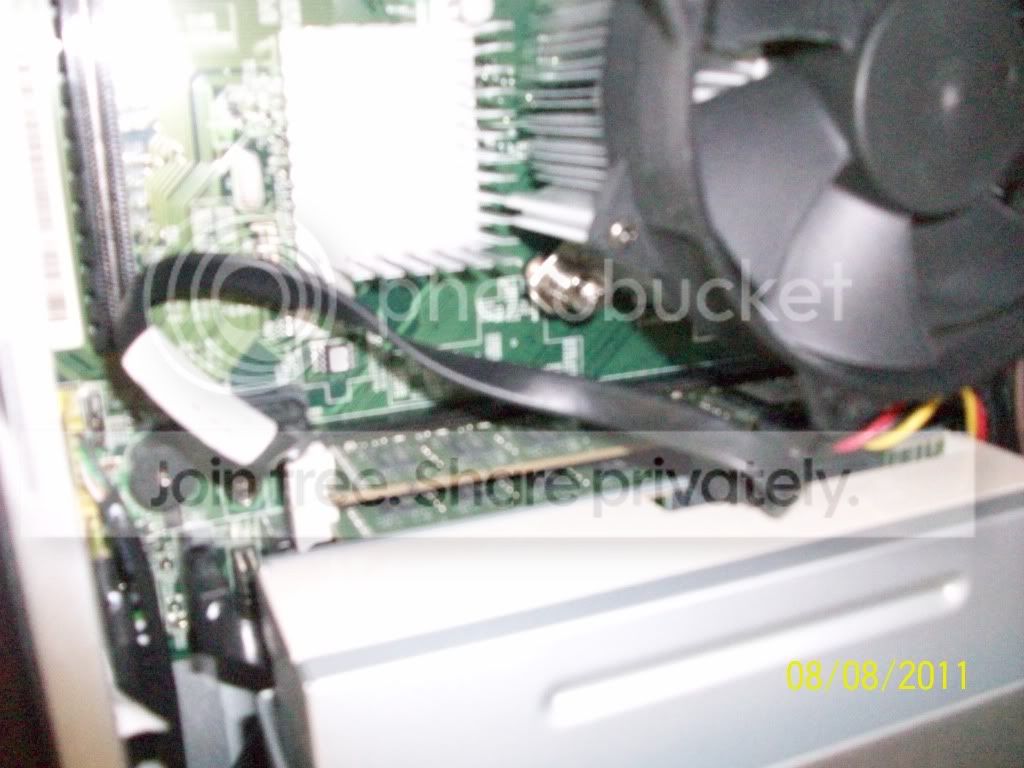
100_3077.jpg


100_3078.jpg


100_3079.jpg


100_3080.jpg


Now, if someone could tell me which one of these is the graphics card and how I replace it with the new one would be a BIG help (like it would for anyone that asks for help on here, lol) :D but yeah, any help would be much appreciated.
 

My Computer My Computer

Computer Manufacturer/Model Number
Acer Aspire X1420G
OS
Windows 7 Home Premium 64bit
CPU
AMD Athlon II X4 645 quad-core processor
Memory
4GB DDR3
Graphics Card(s)
SAPPHIRE Radeon HD 5570 1GB 128-bit DDR3 PCI Express 2.1 x16
Monitor(s) Displays
Samsung 20" LCD TV
Screen Resolution
1080p
the motherboard has built in nforce 430 graphics, can't find the proper specs for the motherboard to tell if there is 16x lane avail...
 
Last edited:

My Computer My Computer

Computer type
Laptop
Computer Manufacturer/Model Number
HP 17-ak0xx, dv7 3173nr
OS
Win7 Home Premium x64 W10Pro&Home
CPU
A12 9720p 4+8 TurionII M520
Motherboard
HP 3839
Memory
6GB 8GB
Graphics Card(s)
R7
Monitor(s) Displays
24" sa550
Screen Resolution
1600x900 1920x1080
Mouse
Logitechx2
Internet Speed
120Mb/s down 12up
The graphics card is apparently integrated.
Meaning the chip is on the motherboard somewhere and physically a part of it.

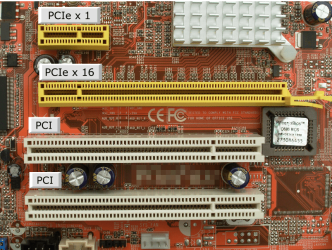
Unfortunately from what I can determine your system has no expansion slot into which that card can be plugged as it apparently has no pci-e slot.
AX1420G-U5832 | Product Model

DMholt - are you sure it has a pci-e slot, from the images that slot appears to be a regular pci.
 
Last edited:

My Computer My Computer

Computer Manufacturer/Model Number
Insane hobo technologies. ;-)
OS
Windows 7 x64
CPU
Intel i7 2600k
Motherboard
Asrock z68 extreme 4 gen 3
Memory
G.skill Ripjaw 16gigs @ 1866
Graphics Card(s)
Nvidia gtx580 (evga)
Sound Card
Integrated HD audio + hdmi
Monitor(s) Displays
24" ASUS widescreen + 42" insignia
Screen Resolution
1080p (1920x1080)
Hard Drives
128 Samsung 830
256 Samsung 840
3 x 1tb storage drive (various)
1 western digital 1tb (eSATA)
1 Seagate 1tb (eSATA)
PSU
1 kilowatt SLI/Crossfire rated Silverstone modular
Case
NZXT Phantom + additional 220 fan
Cooling
Zalmann
Keyboard
Microsoft wireless 3000 (v2)
Mouse
MS - wireless 5000 (bluetrack)
Internet Speed
depends on if you ask me or my provider.
Other Info
The above information is provided as is, and the author assumes no responsibility for issues it may cause with your sanity or fanboyism.
I found an older thread regarding pretty much the same thing on here, it does't look great from what I gather from it.

But may help a little

http://www.sevenforums.com/graphic-cards/170512-new-computer-question.html

I participated in the earlier thread.

The Walmart specs for the system claimed that it had two PCI-E X16 slots, and two PCI-E X1 slots.

From the photos from douggood, looks more like one PCI-E X1 and one PCI (not express). (I guess that it's PCI, due to its placement near the edge of the motherboard.)

Short version: no PCI-E graphics upgrade possible. Any graphics card upgrade is dicey, thanks to the Acer's 220W PSU. (It's a small form factor system, 4" thick, 10 1/2" tall.)

It may be posssible to use a low-profile PCI graphics card. Unfortunately, the choices will be limited, and the prices high compared to PCI-E.

Your best choice would be to use it as Walmart and Acer intended: it's an appliance PC. It's quite impressive for its price: AMD quad core, 4 GB of RAM, 1 TB hard drive, all for $400US.
 

My Computer My Computer

Computer Manufacturer/Model Number
homegrown
OS
Windows 7 Pro X64 SP1
CPU
Intel Core I7-3930k
Motherboard
Asus P9X79 Pro
Memory
16 GB Gskill DDR3-2133
Graphics Card(s)
eVGA GTX680
Sound Card
Creative X-Fi Titanium
Monitor(s) Displays
As PA246Q
Screen Resolution
1920 X 1200
Hard Drives
Corsair Force GT, 120 GB
WDC 1.5TB Caviar Black
PSU
PCP&C Silencer 750 Crossfire
Case
Silverstone FT02
Cooling
Noctua NH-D14
Keyboard
cheap Logitech USB
Mouse
Microsoft Intellimouse Explorer (old optical) USB
Internet Speed
6Mb cable
Other Info
Pioneer BDR-205
Samsung SH-203B
Monsoon 5.1 speakers
I found an older thread regarding pretty much the same thing on here, it does't look great from what I gather from it.

But may help a little

http://www.sevenforums.com/graphic-cards/170512-new-computer-question.html

I participated in the earlier thread.

The Walmart specs for the system claimed that it had two PCI-E X16 slots, and two PCI-E X1 slots.

From the photos from douggood, looks more like one PCI-E X1 and one PCI (not express). (I guess that it's PCI, due to its placement near the edge of the motherboard.)

Short version: no PCI-E graphics upgrade possible. Any graphics card upgrade is dicey, thanks to the Acer's 220W PSU. (It's a small form factor system, 4" thick, 10 1/2" tall.)

It may be posssible to use a low-profile PCI graphics card. Unfortunately, the choices will be limited, and the prices high compared to PCI-E.

Your best choice would be to use it as Walmart and Acer intended: it's an appliance PC. It's quite impressive for its price: AMD quad core, 4 GB of RAM, 1 TB hard drive, all for $400US.

So the graphics card I got won't work? :( The one I got IS a low profile one. Is there a way to change the motherboard and make it possible to make a graphics upgrade, because I really need a better graphics card, the one in this thing can't run things very well that need more power (graphically anyways). The new graphics card actually doesn't take too much more power too (at least thats what they said on newegg). I mean, I think the graphics card in my moms old 2002 Dell was better than this one, which is kinda sad. There has to be a way to do some wiring to fix it, right? I'm about willing to do anything right now.
 

My Computer My Computer

Computer Manufacturer/Model Number
Acer Aspire X1420G
OS
Windows 7 Home Premium 64bit
CPU
AMD Athlon II X4 645 quad-core processor
Memory
4GB DDR3
Graphics Card(s)
SAPPHIRE Radeon HD 5570 1GB 128-bit DDR3 PCI Express 2.1 x16
Monitor(s) Displays
Samsung 20" LCD TV
Screen Resolution
1080p
So the graphics card I got won't work? :( The one I got IS a low profile one. Is there a way to change the motherboard and make it possible to make a graphics upgrade, because I really need a better graphics card, the one in this thing can't run things very well that need more power (graphically anyways). The new graphics card actually doesn't take too much more power too (at least thats what they said on newegg). I mean, I think the graphics card in my moms old 2002 Dell was better than this one, which is kinda sad. There has to be a way to do some wiring to fix it, right? I'm about willing to do anything right now.

The only practical way to change the motherboard is to replace it.

While you're at it. replace the case and power supply. You can re-use the CPU, RAM, and drives. (The optical drive might be a challenge in a regular case, if it's a laptop style one.) You probably can't re-use Windows, as it'd be an OEM license (tied to the original motherboard).

If I'm wrong about the PCI-E slot, I apologize. I'm fairly sure about it, though.

Motherboards at Newegg:

http://www.newegg.com/Product/Produ...&SpeTabStoreType=&AdvancedSearch=1&srchInDesc=

(About $50. Avoid the open box deals, which may not include I/O shields.)

Antec 300 case w/ 430W PSU:

http://www.newegg.com/Product/Product.aspx?Item=N82E16811129065

($95 + $15 shipping). You might need a normal DVD burner for about $20. If you can't transfer the CPU cooler from the Acer, that might be another $20 or so. Windows 7 Home Premium OEM, another $100. Total, without graphics card, approx. $300.
 

My Computer My Computer

Computer Manufacturer/Model Number
homegrown
OS
Windows 7 Pro X64 SP1
CPU
Intel Core I7-3930k
Motherboard
Asus P9X79 Pro
Memory
16 GB Gskill DDR3-2133
Graphics Card(s)
eVGA GTX680
Sound Card
Creative X-Fi Titanium
Monitor(s) Displays
As PA246Q
Screen Resolution
1920 X 1200
Hard Drives
Corsair Force GT, 120 GB
WDC 1.5TB Caviar Black
PSU
PCP&C Silencer 750 Crossfire
Case
Silverstone FT02
Cooling
Noctua NH-D14
Keyboard
cheap Logitech USB
Mouse
Microsoft Intellimouse Explorer (old optical) USB
Internet Speed
6Mb cable
Other Info
Pioneer BDR-205
Samsung SH-203B
Monsoon 5.1 speakers
actually, in response to your last post, The one I got is a PCI graphics card, I looked up PCI graphics cards, and luckly it popped up, but where in gods name would I put it? (and I don't care if I have to leave the side off of the case. I only say that because I see a slot, but if I were to put that card in it would stick out the side, though I'm guessing that what I'm looking at is for memory expansion). Do I need to take more pictures? Because I can if you need them to find it. $300? Thats about as much as this whole system, I don't know if I can fork out that much just to use a new graphics card. $50 would be easy for one of those new plugs for more power, but $300 is quite a bit :(
 

My Computer My Computer

Computer Manufacturer/Model Number
Acer Aspire X1420G
OS
Windows 7 Home Premium 64bit
CPU
AMD Athlon II X4 645 quad-core processor
Memory
4GB DDR3
Graphics Card(s)
SAPPHIRE Radeon HD 5570 1GB 128-bit DDR3 PCI Express 2.1 x16
Monitor(s) Displays
Samsung 20" LCD TV
Screen Resolution
1080p
actually, in response to your last post, The one I got is a PCI graphics card, I looked up PCI graphics cards, and luckly it popped up, but where in gods name would I put it? (and I don't care if I have to leave the side off of the case. I only say that because I see a slot, but if I were to put that card in it would stick out the side, though I'm guessing that what I'm looking at is for memory expansion). Do I need to take more pictures? Because I can if you need them to find it. $300? Thats about as much as this whole system, I don't know if I can fork out that much just to use a new graphics card. $50 would be easy for one of those new plugs for more power, but $300 is quite a bit :(

Sorry but the card you got is a PCI Express (PCIe) and will not fit in a PCI slot.

Jim :geek:
 

My Computer My Computer

Computer type
PC/Desktop
Computer Manufacturer/Model Number
Home Built
OS
Windows 8.1 Pro w/Media Center 64bit, Windows 7 HP 64bit
CPU
Phenom II X6 1100T
Motherboard
ASUS M5A99X EVO
Memory
Crucial Balistic 8gb DDR3-1866 CL9
Graphics Card(s)
MSI R6850 Cyclone IGD5 PE
Sound Card
On Board
Monitor(s) Displays
ASUS VE258Q 25" LED with DVI-HDMI-DisplayPort
Screen Resolution
1920 x 1080
Hard Drives
Two WD Cavier Black 2TB Sata III, WD My Book Essential 2TB USB 3.0
PSU
Seasonic X650 80 Plus GOLD Modular
Case
Corsair 400R
Cooling
Antec Kuhler H2O 620, Two 120mm and four 140mm
Keyboard
Logitech K120
Mouse
Logitech Marble Mouse USB, Logitech Precision Game Pad
Internet Speed
15MB
Antivirus
Norton IS 2013, Malwarebytes Pro Beta 2
Browser
IE-11, FF-27
Other Info
APC UPS ES 750, Netgear WNR3500L Gigabit & Wireless N Router with SamKnows Test Program, Motorola SB6120 Gigabit Cable Modem. Brother HL-2170W Laser Printer, Epson V300 Scanner
Sorry but the card you got is a PCI Express (PCIe) and will not fit in a PCI slot.

Jim :geek:

Right. It was inconsiderate of Intel to name their new slot architecture "PCI Express", as it's completely incompatible with PCI cards and vice versa.
 

My Computer My Computer

Computer Manufacturer/Model Number
homegrown
OS
Windows 7 Pro X64 SP1
CPU
Intel Core I7-3930k
Motherboard
Asus P9X79 Pro
Memory
16 GB Gskill DDR3-2133
Graphics Card(s)
eVGA GTX680
Sound Card
Creative X-Fi Titanium
Monitor(s) Displays
As PA246Q
Screen Resolution
1920 X 1200
Hard Drives
Corsair Force GT, 120 GB
WDC 1.5TB Caviar Black
PSU
PCP&C Silencer 750 Crossfire
Case
Silverstone FT02
Cooling
Noctua NH-D14
Keyboard
cheap Logitech USB
Mouse
Microsoft Intellimouse Explorer (old optical) USB
Internet Speed
6Mb cable
Other Info
Pioneer BDR-205
Samsung SH-203B
Monsoon 5.1 speakers
thanks for your help guys, ends up that the slot was a PCI-E slot (or the card was a PCI) either way I fits and it works without a power upgrade. Thanks again :D:cool:
 

My Computer My Computer

Computer Manufacturer/Model Number
Acer Aspire X1420G
OS
Windows 7 Home Premium 64bit
CPU
AMD Athlon II X4 645 quad-core processor
Memory
4GB DDR3
Graphics Card(s)
SAPPHIRE Radeon HD 5570 1GB 128-bit DDR3 PCI Express 2.1 x16
Monitor(s) Displays
Samsung 20" LCD TV
Screen Resolution
1080p
thanks for your help guys, ends up that the slot was a PCI-E slot (or the card was a PCI) either way I fits and it works without a power upgrade. Thanks again :D:cool:

The card fit in that slot, way over near the edge of the motherboard?

The Sapphire 5570 that you gave a link for is definitely a PCI-E card. I'm not sure that it exists in PCI form.

If you'd like to stress test your upgraded system, this utility is a killer:

FurMark: VGA Stress Test, Graphics Card and GPU Stability Test, Burn-in Test, OpenGL Benchmark and GPU Temperature | oZone3D.Net

(I don't know if they still do it, but AMD used to detect Furmark in their drivers, and prevent it from maxxing out the card. A work around: renaming the Furmark executable.)
 

My Computer My Computer

Computer Manufacturer/Model Number
homegrown
OS
Windows 7 Pro X64 SP1
CPU
Intel Core I7-3930k
Motherboard
Asus P9X79 Pro
Memory
16 GB Gskill DDR3-2133
Graphics Card(s)
eVGA GTX680
Sound Card
Creative X-Fi Titanium
Monitor(s) Displays
As PA246Q
Screen Resolution
1920 X 1200
Hard Drives
Corsair Force GT, 120 GB
WDC 1.5TB Caviar Black
PSU
PCP&C Silencer 750 Crossfire
Case
Silverstone FT02
Cooling
Noctua NH-D14
Keyboard
cheap Logitech USB
Mouse
Microsoft Intellimouse Explorer (old optical) USB
Internet Speed
6Mb cable
Other Info
Pioneer BDR-205
Samsung SH-203B
Monsoon 5.1 speakers
thanks for your help guys, ends up that the slot was a PCI-E slot (or the card was a PCI) either way I fits and it works without a power upgrade. Thanks again :D:cool:

The card fit in that slot, way over near the edge of the motherboard?

The Sapphire 5570 that you gave a link for is definitely a PCI-E card. I'm not sure that it exists in PCI form.

If you'd like to stress test your upgraded system, this utility is a killer:

FurMark: VGA Stress Test, Graphics Card and GPU Stability Test, Burn-in Test, OpenGL Benchmark and GPU Temperature | oZone3D.Net

(I don't know if they still do it, but AMD used to detect Furmark in their drivers, and prevent it from maxxing out the card. A work around: renaming the Furmark executable.)

you mean the long slot? yeah, i don't know much about these things, but either ati makes both pci-e and pci versions of the same graphics card, or the slot is a pci-e slot (or vise-vera, i forget), either way, it works, all my games took off and autodesk works (better), WO!
 

My Computer My Computer

Computer Manufacturer/Model Number
Acer Aspire X1420G
OS
Windows 7 Home Premium 64bit
CPU
AMD Athlon II X4 645 quad-core processor
Memory
4GB DDR3
Graphics Card(s)
SAPPHIRE Radeon HD 5570 1GB 128-bit DDR3 PCI Express 2.1 x16
Monitor(s) Displays
Samsung 20" LCD TV
Screen Resolution
1080p

My Computer My Computer

Computer Manufacturer/Model Number
Insane hobo technologies. ;-)
OS
Windows 7 x64
CPU
Intel i7 2600k
Motherboard
Asrock z68 extreme 4 gen 3
Memory
G.skill Ripjaw 16gigs @ 1866
Graphics Card(s)
Nvidia gtx580 (evga)
Sound Card
Integrated HD audio + hdmi
Monitor(s) Displays
24" ASUS widescreen + 42" insignia
Screen Resolution
1080p (1920x1080)
Hard Drives
128 Samsung 830
256 Samsung 840
3 x 1tb storage drive (various)
1 western digital 1tb (eSATA)
1 Seagate 1tb (eSATA)
PSU
1 kilowatt SLI/Crossfire rated Silverstone modular
Case
NZXT Phantom + additional 220 fan
Cooling
Zalmann
Keyboard
Microsoft wireless 3000 (v2)
Mouse
MS - wireless 5000 (bluetrack)
Internet Speed
depends on if you ask me or my provider.
Other Info
The above information is provided as is, and the author assumes no responsibility for issues it may cause with your sanity or fanboyism.
actually i think the walmart website mentioned some slots, i forget wether they were pci or pci-e slots that they mentioned in the specs
 

My Computer My Computer

Computer Manufacturer/Model Number
Acer Aspire X1420G
OS
Windows 7 Home Premium 64bit
CPU
AMD Athlon II X4 645 quad-core processor
Memory
4GB DDR3
Graphics Card(s)
SAPPHIRE Radeon HD 5570 1GB 128-bit DDR3 PCI Express 2.1 x16
Monitor(s) Displays
Samsung 20" LCD TV
Screen Resolution
1080p
Yeah the 'official listing' for it doesn't even mention the one slot that is obviously there in the picture.
 

My Computer My Computer

Computer Manufacturer/Model Number
Insane hobo technologies. ;-)
OS
Windows 7 x64
CPU
Intel i7 2600k
Motherboard
Asrock z68 extreme 4 gen 3
Memory
G.skill Ripjaw 16gigs @ 1866
Graphics Card(s)
Nvidia gtx580 (evga)
Sound Card
Integrated HD audio + hdmi
Monitor(s) Displays
24" ASUS widescreen + 42" insignia
Screen Resolution
1080p (1920x1080)
Hard Drives
128 Samsung 830
256 Samsung 840
3 x 1tb storage drive (various)
1 western digital 1tb (eSATA)
1 Seagate 1tb (eSATA)
PSU
1 kilowatt SLI/Crossfire rated Silverstone modular
Case
NZXT Phantom + additional 220 fan
Cooling
Zalmann
Keyboard
Microsoft wireless 3000 (v2)
Mouse
MS - wireless 5000 (bluetrack)
Internet Speed
depends on if you ask me or my provider.
Other Info
The above information is provided as is, and the author assumes no responsibility for issues it may cause with your sanity or fanboyism.
See if this may help you.
Capture.PNG
 

My Computers My Computers

System One System Two

  • Computer type
    PC/Desktop
    Computer Manufacturer/Model Number
    ALWAYS UNDER CONSTRUCTION
    OS
    Windows 11 Pro
    CPU
    Ryzen 9 5900X
    Motherboard
    Asus X570 Crosshair Viii Hero
    Memory
    32GB G Skill DDR4-3600
    Graphics Card(s)
    EVGA RTX 3080 FTW 3 Ultra
    Sound Card
    On Board/Sennheiser PC37X Headset
    Monitor(s) Displays
    3 X Asus 27"
    Screen Resolution
    2560x1440
    Hard Drives
    2 X 1 TB NVME drives
    PSU
    EVGA 850
    Case
    Phanteks Eclipse P400A
    Cooling
    EVGA 280 AIO
    Keyboard
    Logitech G510s/ Logitech G13
    Mouse
    Logitech G502
    Internet Speed
    24/1
    Antivirus
    ESET/MBAM Pro/SAS Pro
    Browser
    Chrome/ Firefox/ Edge
  • Computer type
    Laptop
    System Manufacturer/Model Number
    Dell 16 Plus
    OS
    Windows 11 Pro
    CPU
    Intel Ultra 9 288V
    Memory
    32 GB LPDDR5X 8533
    Monitor(s) Displays
    16" Mini-LED HDR600 Touch 90 Hz
    Screen Resolution
    2560X1600
    Hard Drives
    1 TB NVME
Question for OP

I have the same computer and am also considering updating this ancient graphics card.

#1 i need to know if the one you got work is good with the power supply as is
#2 how much did you pay for the card and where
#3 does it use PCI or PCI- express
#4 what are some of the games you are running with it
#5 does it run stuff like photoshop ok ?

Thanks for your help !
 

My Computer My Computer

OS
Windows 7 Home Premium 64 bit
I have the same computer and am also considering updating this ancient graphics card.

#1 i need to know if the one you got work is good with the power supply as is
#2 how much did you pay for the card and where
#3 does it use PCI or PCI- express
#4 what are some of the games you are running with it
#5 does it run stuff like photoshop ok ?

Thanks for your help !


1) Yes, I have had no problems in about 2 months of use related to power or any other functions of the computer
2) I got it for somewhere around 50 to 60 (70 something with the shipping) at newegg .com
3) You just insert the card into the slot, like a memory upgrade, and use the low profile mounts, otherwise it'll seem confusing as to how it fits in there (they come with it by the way)
4) I've run GTA 4 on fairly high graphics with little lag, I've also played portal 2 on high graphics, Far Cry 2 and Amnesia work pretty well on here too, as well as Need For Speed Shift I can run at a pretty high graphics setting. So all the new games run pretty well on the new graphics card, and games like richard burns rally (old 2005 games and older) run very well too.
5) Yep, I've run photoshop on here, does very well with that program, as well as autodesk.

any other questions? I'd be glad to help.
 

My Computer My Computer

Computer Manufacturer/Model Number
Acer Aspire X1420G
OS
Windows 7 Home Premium 64bit
CPU
AMD Athlon II X4 645 quad-core processor
Memory
4GB DDR3
Graphics Card(s)
SAPPHIRE Radeon HD 5570 1GB 128-bit DDR3 PCI Express 2.1 x16
Monitor(s) Displays
Samsung 20" LCD TV
Screen Resolution
1080p
I have the same computer.. Acer aspire x1420g, I need to also upgrade my grpahics card to play The Witcher 2, can somebody recommend me a graphics card that fits and that will support the game and also run well with my power supply(220w)?
 

My Computer My Computer

Computer Manufacturer/Model Number
Acer Aspire x1420g
OS
64
Back
Top