All Video files won't open (... has stopped working and looking for..)

ShadowXWolf

New member
Local time
6:54 AM
Messages
9
i get that error message whenever i try to open any type of video file on both MPC home cinema an Windows Media Player, it started yesterday and the things i've done since last playing a video and this error are:

-uninstalling NVIDIA graphics driver and redownloading it (310m with CUDA).
-downloading some Win 7 updates.

i run a SONY VAIO S series (VPCS1), i5, Win 7 64-bit.
 

My Computer My Computer

At a glance

Windows Home-Premium (64-bit)
OS
Windows Home-Premium (64-bit)
1. What exactly is the error message you get?

2. Does the Device Manager show that this driver is correctly installed? 280.26 dated 09Aug 2011

The answers may help a more accurate diagnosis for suggesesting possible solutions.
 

My Computer My Computer

At a glance

Windows 7 Home Premium 32 bit
OS
Windows 7 Home Premium 32 bit

My Computer My Computer

At a glance

Microsoft Windows 10 Pro Insider Preview 64-bitIntel(R) Core(TM) i3-4130 CPU @ 3.40GHzCorsair Vengence 4GB x2 (8.00GB Dual-Channel ...2047MB GeForce GTS 450 (ZOTAC International)
Computer type
PC/Desktop
Computer Manufacturer/Model Number
Self Assembled
OS
Microsoft Windows 10 Pro Insider Preview 64-bit
CPU
Intel(R) Core(TM) i3-4130 CPU @ 3.40GHz
Motherboard
Gigabyte Technology Co., Ltd. B85M-D3H
Memory
Corsair Vengence 4GB x2 (8.00GB Dual-Channel DDR3 @ 798MHz)
Graphics Card(s)
2047MB GeForce GTS 450 (ZOTAC International)
Sound Card
Onboard (Realtek High Definition Audio)
Monitor(s) Displays
LG Flatron E2040T
Screen Resolution
1600x900
Hard Drives
Western Digital 1 TB
Seagate 500 GB
PSU
Corsair VS550
Case
Cooler Master K380
Cooling
Cooler Master Seidon 120V Plus
Keyboard
Logitech MK260r
Mouse
Logitech MK260r
Internet Speed
PMPL Broadband
Antivirus
Windows Defender + MBAM
Browser
Firefox
Other Info
Dell Studio 15" Laptop
Untitled.png

this is what happens when i press play on a video file.
i suspect that i didn't uninstall my previous graphics driver correctly and its causing a problem, is there a way for me to check if my current graphics driver is installed properly or not?
 

My Computer My Computer

At a glance

Windows Home-Premium (64-bit)
OS
Windows Home-Premium (64-bit)
May be problem with Codecs? Try with VLC Player.
 

My Computer My Computer

At a glance

MS Windows 7 Ultimate 64-bit SP1i5-2410M 2.3GHz (2.9GHz Turbo-Boost) Sandy Br...4GB+4GB Samsung DDR3 PC3-10700 (1333 MHz)Video Intel(R) HD Graphics Family, 1696MB ava...
Computer Manufacturer/Model Number
Toshiba Satellite P775-S7232
OS
MS Windows 7 Ultimate 64-bit SP1
CPU
i5-2410M 2.3GHz (2.9GHz Turbo-Boost) Sandy Bridge 32nm
Motherboard
Toshiba PHRAA ver. PSBY1U-00F003
Memory
4GB+4GB Samsung DDR3 PC3-10700 (1333 MHz)
Graphics Card(s)
Video Intel(R) HD Graphics Family, 1696MB available memory
Sound Card
Realtek High Definition Audio version=6.0.1.6323
Monitor(s) Displays
17.3 " Trubrite TFT LCD, LED Backlit
Screen Resolution
1600x900 32 bit, Native support for 720P content
Hard Drives
TOSHIBA MK6476GSXN
580.614 [GB] partitioned C: 80GB and D: 500GB with hidden recovery partitons.

Spare bay for 2nd HDD but no SATA connector :-(
PSU
Toshiba AC/DC Adapter
Case
Notebook
Cooling
Built-in Fan
Keyboard
Premium Raised Tile keyboard
Mouse
Logitech M215 wireless mouse
Internet Speed
Not fast enough
Other Info
Built-in Harman Kardon speakers with Dolby Advanced Audio, Waves MaxxAudio® 3. HDMI, 1xUSB3+3xUSB2 ports, WebCam, Battery life 4hrs 11mins, 4GB Readyboost SDHC card, WD My Book Essential Ext HDDs 2 TB, 2x1TB, My Passport SE 1TB and WDTV 1st Gen for Multimedia playing on a Sony Wega 32" LCD.
Recent addition to my toys are Asus Transformer Pad TF300T with 32GB onboard sd card + 32GB microsd card.

My Computer My Computer

At a glance

Microsoft Windows 10 Pro Insider Preview 64-bitIntel(R) Core(TM) i3-4130 CPU @ 3.40GHzCorsair Vengence 4GB x2 (8.00GB Dual-Channel ...2047MB GeForce GTS 450 (ZOTAC International)
Computer type
PC/Desktop
Computer Manufacturer/Model Number
Self Assembled
OS
Microsoft Windows 10 Pro Insider Preview 64-bit
CPU
Intel(R) Core(TM) i3-4130 CPU @ 3.40GHz
Motherboard
Gigabyte Technology Co., Ltd. B85M-D3H
Memory
Corsair Vengence 4GB x2 (8.00GB Dual-Channel DDR3 @ 798MHz)
Graphics Card(s)
2047MB GeForce GTS 450 (ZOTAC International)
Sound Card
Onboard (Realtek High Definition Audio)
Monitor(s) Displays
LG Flatron E2040T
Screen Resolution
1600x900
Hard Drives
Western Digital 1 TB
Seagate 500 GB
PSU
Corsair VS550
Case
Cooler Master K380
Cooling
Cooler Master Seidon 120V Plus
Keyboard
Logitech MK260r
Mouse
Logitech MK260r
Internet Speed
PMPL Broadband
Antivirus
Windows Defender + MBAM
Browser
Firefox
Other Info
Dell Studio 15" Laptop
i just tried VLC media player and it worked, so i guess that means my computer's fine, right?
and how are both MPC and Windows Media Player not opening, yet it doesn't affect VLC ?
 

My Computer My Computer

At a glance

Windows Home-Premium (64-bit)
OS
Windows Home-Premium (64-bit)
Reinstall MPC and check whether it comes back to life.
 

My Computer My Computer

At a glance

Windows 7 Home Premium 32 bit
OS
Windows 7 Home Premium 32 bit
Most probably somehow you got your codecs corrupted . As vlc uses it's own codecs, it is not affected by this corruption. If you have installed any codec packs earlier, uninstall it (use the advanced options of uninstallation of Revo Uninstaller Freeware , so that there will be no leftover ); and then install Shark007's FREE Codec solutions - Windows 7 codecs .

I guess your WMP will work fine after it .
 

My Computer My Computer

At a glance

Microsoft Windows 10 Pro Insider Preview 64-bitIntel(R) Core(TM) i3-4130 CPU @ 3.40GHzCorsair Vengence 4GB x2 (8.00GB Dual-Channel ...2047MB GeForce GTS 450 (ZOTAC International)
Computer type
PC/Desktop
Computer Manufacturer/Model Number
Self Assembled
OS
Microsoft Windows 10 Pro Insider Preview 64-bit
CPU
Intel(R) Core(TM) i3-4130 CPU @ 3.40GHz
Motherboard
Gigabyte Technology Co., Ltd. B85M-D3H
Memory
Corsair Vengence 4GB x2 (8.00GB Dual-Channel DDR3 @ 798MHz)
Graphics Card(s)
2047MB GeForce GTS 450 (ZOTAC International)
Sound Card
Onboard (Realtek High Definition Audio)
Monitor(s) Displays
LG Flatron E2040T
Screen Resolution
1600x900
Hard Drives
Western Digital 1 TB
Seagate 500 GB
PSU
Corsair VS550
Case
Cooler Master K380
Cooling
Cooler Master Seidon 120V Plus
Keyboard
Logitech MK260r
Mouse
Logitech MK260r
Internet Speed
PMPL Broadband
Antivirus
Windows Defender + MBAM
Browser
Firefox
Other Info
Dell Studio 15" Laptop
Most probably somehow you got your codecs corrupted .....

I know most of the time we are only groping in the dark - that includes me ( So I am not finding fault with anybody.:) ).

This "somehow" is what baffles me.

Can installing a new display driver corrupt the codecs? - Most probably not. If it were, it would have been reported widely.

Can installing Windows updates corrupt the codecs? Again the same answer.

If I am not wrong, MPC Home Cinema also installs its own codecs. That is exactly why I suggested reinstalling MPC Home Cinema and check.

So my interpretation here is that VLC could play because it was installed later and not because it had in-built codecs.

If reinstalling MPC brings it back to life, then reinstalling WMP should also resolve the problem. That is my line of thinking - right or wrong. :)
 

My Computer My Computer

At a glance

Windows 7 Home Premium 32 bit
OS
Windows 7 Home Premium 32 bit
So my interpretation here is that VLC could play because it was installed later and not because it had in-built codecs.

If reinstalling MPC brings it back to life, then reinstalling WMP should also resolve the problem. That is my line of thinking - right or wrong. :)

Wrong.

MPC is identical to VLC.
It defaults to using internal codecs EXACTLY like VLC does.
The MPC Homecinima installer has never installed codecs to your system, ever.
 

My Computer My Computer

At a glance

Windows 7 Ultimate 64biti7 2600k16GB (4x4) corsair vengeanceIntel HD3000 iGPU / AMD HD6870 1024MB
Computer Manufacturer/Model Number
Selfbuilt
OS
Windows 7 Ultimate 64bit
CPU
i7 2600k
Motherboard
asus P8Z68-V LE
Memory
16GB (4x4) corsair vengeance
Graphics Card(s)
Intel HD3000 iGPU / AMD HD6870 1024MB
Sound Card
bitstreamed to an Onkyo 609
Monitor(s) Displays
Asus VE278 27" LED / Bravia EX7 60" LED
Screen Resolution
native 1080p x2
Hard Drives
4x 2TB int. + 2x 2TB external and a SSD for the boot drive.
PSU
650w Antec
Case
NZXT tempest evo
Cooling
air/stock
Keyboard
Dell
Mouse
logitech m505
Internet Speed
dual: cable/blackberry tether for travel use
Other Info
BD re-writer //
asus notebook G73Jw
I am afraid there is some misunderstanding here. Let me clarify and also ask some clarifications.

What I have stated: Like VLC, MPC-HC also has internal codecs. So MPC-HC is identical to VLC. So reinstalling MPC-HC should bring it back to life for the OP. OP requested to check.

I know, Shark007, that apart from WMP the only other palyer you recommend is MPC-HC and your codec pack is preconfigured for it.

I was indeed using MPC-HC downloaded from your Tools section alongwith your codec pack thinking it was necessary to play mkvs and bluray discs.

That was till another forum member - I think it is Ponmayilal - reported here that starting from a particular version, MPC-HC has its own codecs installed and your codec pack is no longer necessary.

It was indeed so. I have since completely uninstalled your codec pack and MPC-HC can play my mkv and bluray discs without your codec pack. How come? Then why MPC-HC from your tools section and your preconfigured codec pack for it?

I stand to be corrected if I am wrong.
 

My Computer My Computer

At a glance

Windows 7 Home Premium 32 bit
OS
Windows 7 Home Premium 32 bit
I am afraid there is some misunderstanding here. Let me clarify and also ask some clarifications.
What I have stated: Like VLC, MPC-HC also has internal codecs.
sorry - I misuhderstood

If I am not wrong, MPC Home Cinema also installs its own codecs.
but it does not install codecs and i prefer to squash falicies before they spread.
it can use external codecs when setup for that, but by default, it is a self contained player


I know, Shark007, that apart from WMP the only other palyer you recommend is MPC-HC and your codec pack is preconfigured for it.
No, my codecpack targets all players and has specific functionality empowering the user to take control of playback in the locked down Windows players. What is pre-configred is the version of MPC-HC that I redistribute. It is pre-configured to use system installed codecs, and not the builtin ones.


MPC-HC has its own codecs installed
If being tied to using a single player is OK with you, that is fine, it is your choice. Their are many instances when that player will fail people. VLC is probably a better choice. Occassionally though, there is a person or 2 that would like to use WMP, and Media Center for its remote control-ability.

I stand to be corrected if I am wrong.
consider yourself correct for the 2nd time today.
 
Last edited:

My Computer My Computer

At a glance

Windows 7 Ultimate 64biti7 2600k16GB (4x4) corsair vengeanceIntel HD3000 iGPU / AMD HD6870 1024MB
Computer Manufacturer/Model Number
Selfbuilt
OS
Windows 7 Ultimate 64bit
CPU
i7 2600k
Motherboard
asus P8Z68-V LE
Memory
16GB (4x4) corsair vengeance
Graphics Card(s)
Intel HD3000 iGPU / AMD HD6870 1024MB
Sound Card
bitstreamed to an Onkyo 609
Monitor(s) Displays
Asus VE278 27" LED / Bravia EX7 60" LED
Screen Resolution
native 1080p x2
Hard Drives
4x 2TB int. + 2x 2TB external and a SSD for the boot drive.
PSU
650w Antec
Case
NZXT tempest evo
Cooling
air/stock
Keyboard
Dell
Mouse
logitech m505
Internet Speed
dual: cable/blackberry tether for travel use
Other Info
BD re-writer //
asus notebook G73Jw
i've tried everything posted here so far, uninstalled my codecs and even installed Shark007's codec and MPC HC and Win Media player still doesn't work, i've downloaded Media player classic (Gabest) v 6.4.9.1 and it works.

but i really want to get my old ones working, what could possibly crash them every time i open a video with any of them, and i found a ton of Windows error reports, i just wish i could find the error.

could i have something that's either blocking or crashing some of my codecs?
 

My Computer My Computer

At a glance

Windows Home-Premium (64-bit)
OS
Windows Home-Premium (64-bit)
Choosing to disable UAC can cause these problems.
If you have lowered the setting of UAC (user account control)

as a test . . . in this order

uninstall the codecs
set UAC to the 'Default' setting, reboot your system
re-install the codecs, open each app as an admin using a rightclick on the shortcut
(64bit systems need a 2nd installation called the x64Components, get it from MajorGeeks)
select the SUGGESTED settings checkbox in each app

test you files
 

My Computer My Computer

At a glance

Windows 7 Ultimate 64biti7 2600k16GB (4x4) corsair vengeanceIntel HD3000 iGPU / AMD HD6870 1024MB
Computer Manufacturer/Model Number
Selfbuilt
OS
Windows 7 Ultimate 64bit
CPU
i7 2600k
Motherboard
asus P8Z68-V LE
Memory
16GB (4x4) corsair vengeance
Graphics Card(s)
Intel HD3000 iGPU / AMD HD6870 1024MB
Sound Card
bitstreamed to an Onkyo 609
Monitor(s) Displays
Asus VE278 27" LED / Bravia EX7 60" LED
Screen Resolution
native 1080p x2
Hard Drives
4x 2TB int. + 2x 2TB external and a SSD for the boot drive.
PSU
650w Antec
Case
NZXT tempest evo
Cooling
air/stock
Keyboard
Dell
Mouse
logitech m505
Internet Speed
dual: cable/blackberry tether for travel use
Other Info
BD re-writer //
asus notebook G73Jw
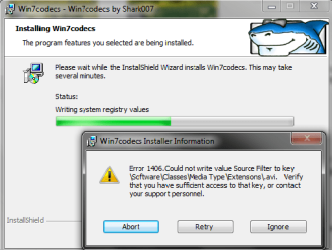
Shark codec.png

i did what you said up to this point in installing Win7codecs where i got this error, what should i do? and what does this error indicate?
 

My Computer My Computer

At a glance

Windows Home-Premium (64-bit)
OS
Windows Home-Premium (64-bit)
It is indicating that the installer doesnt have full administrative privileges.

It is quite possible that the current user account is corrupted.

If you were to create a new user account and try the installation from the new user, it may resolve this problem, and many others you are experiencing,
 

My Computer My Computer

At a glance

Windows 7 Ultimate 64biti7 2600k16GB (4x4) corsair vengeanceIntel HD3000 iGPU / AMD HD6870 1024MB
Computer Manufacturer/Model Number
Selfbuilt
OS
Windows 7 Ultimate 64bit
CPU
i7 2600k
Motherboard
asus P8Z68-V LE
Memory
16GB (4x4) corsair vengeance
Graphics Card(s)
Intel HD3000 iGPU / AMD HD6870 1024MB
Sound Card
bitstreamed to an Onkyo 609
Monitor(s) Displays
Asus VE278 27" LED / Bravia EX7 60" LED
Screen Resolution
native 1080p x2
Hard Drives
4x 2TB int. + 2x 2TB external and a SSD for the boot drive.
PSU
650w Antec
Case
NZXT tempest evo
Cooling
air/stock
Keyboard
Dell
Mouse
logitech m505
Internet Speed
dual: cable/blackberry tether for travel use
Other Info
BD re-writer //
asus notebook G73Jw
it did the same error with the new user.
 

My Computer My Computer

At a glance

Windows Home-Premium (64-bit)
OS
Windows Home-Premium (64-bit)
I'm really stumped on this one.

The error message states Software\Classes\Media Type\ as a path but that isnt even a valid path nor does my software try to install to that path.

Try re-downloading the Installer - maybe it is corrupted.
 

My Computer My Computer

At a glance

Windows 7 Ultimate 64biti7 2600k16GB (4x4) corsair vengeanceIntel HD3000 iGPU / AMD HD6870 1024MB
Computer Manufacturer/Model Number
Selfbuilt
OS
Windows 7 Ultimate 64bit
CPU
i7 2600k
Motherboard
asus P8Z68-V LE
Memory
16GB (4x4) corsair vengeance
Graphics Card(s)
Intel HD3000 iGPU / AMD HD6870 1024MB
Sound Card
bitstreamed to an Onkyo 609
Monitor(s) Displays
Asus VE278 27" LED / Bravia EX7 60" LED
Screen Resolution
native 1080p x2
Hard Drives
4x 2TB int. + 2x 2TB external and a SSD for the boot drive.
PSU
650w Antec
Case
NZXT tempest evo
Cooling
air/stock
Keyboard
Dell
Mouse
logitech m505
Internet Speed
dual: cable/blackberry tether for travel use
Other Info
BD re-writer //
asus notebook G73Jw
i've downloaded it a few times already i'm pretty sure it's not corrupted.
 

My Computer My Computer

At a glance

Windows Home-Premium (64-bit)
OS
Windows Home-Premium (64-bit)
Back
Top