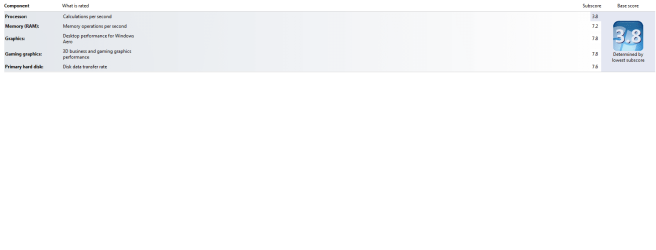
I don't know why the score is low for the CPU

KhajiitDovakiin

New member
I5 2500K CPU
8GB RAM
AMD Radeon HD 6970 2GB
Crucial M4 64GB SSD
I don't know why the score is low for the CPU it was 4.2 a couple of days ago now it dropped down to 3.8 again.
 

Attachments
  • WEI score.png
    WEI score.png
    52.2 KB · Views: 185
Last edited:

My Computer

Computer Manufacturer/Model Number
Chillblast
OS
Windows 7 Home 64 bit
CPU
Intel Core I5 2500K
Motherboard
Asus P8Z68-V LE Motherboard
Memory
8GB
Graphics Card(s)
NVIDIA GeForce GTX 560 Ti
Monitor(s) Displays
32" Hannspree LCD TV
Screen Resolution
1920x1080
Hard Drives
1TB Samsung HDD
PSU
OCZ 80 plus 600W
Case
Cooler Master Elite 430 Case
Cooling
ThermoLab Trinity
I5 2500K CPU
8GB RAM
AMD Radeon HD 6970 2GB
Crucial M4 64GB SSD
I don't know why the score is low for the CPU it was 4.2 a couple of days ago now it dropped down to 3.8 again.


you ever update mother board bios ?

Also if you are running 6970 2GB you should be scoreing 7.9's

I would look into updating all drivers bios and firmware cause they could come into play with the low scores
 

My Computer

Computer type
PC/Desktop
Computer Manufacturer/Model Number
CoreI7-6700K MrFingerIII Special Builds
OS
Windows 10 Home Premium 64bit sp1
CPU
Intel I7-6700K @ 4.6 Ghz 1.344 volts everyday OC
Motherboard
Asrock Fatality K6 Z170 Socket 1151
Memory
32GB G-Skill TridentZ 3200mhz 16-18-18-38 DDR4
Graphics Card(s)
Sli Gigabyte Windforce GTX 980 G1
Sound Card
AC97 Creative Rage Tactic 3D Headphones Bluetooth
Monitor(s) Displays
27" Asus ROG Swift PG278Q G-Sync 48" Vizio Smart HD TV
Screen Resolution
2560x1440p 27"- 48" Currently Gaming at 2560x1440p Res 2K
Hard Drives
250GB Samsung Evo840SSD Seagate baracuda 500 GB WD Mybook 500Gb 1TB Seagate Barracuda
PSU
HX1050w Corsair Silver 80plus certified crosfire/sli
Case
Enthod Pro Full Tower
Cooling
Corsair H110i GT 280 mm High Performance WaterBlock
Keyboard
Logitech wireless keyboard
Mouse
Logitech wireless mouse
Internet Speed
Cox Cable 100+ mb
Antivirus
WebRoot Spysweeper with Antivirus
Browser
IE-10, Chrome, Opera
Other Info
My Other Rig is a AMD FX8320E @4.6Ghz 16GB Ballistic Sport Ram
Mobo Asrock Fatality 990FX 120GB OCZ SSD 1TB Seagate Barracuda Corsair H75 Cooling PSU Corsair CX750
GPU GTX Gigabyte 970G1
That's not normal indeed.

I have a 7.5 score for a regular i5 2500 at stock speed. Yours shouldn't be any lower than that.

Sounds like you are only getting around 50% of its capability.
Did you check if all 4 cores actually work?
 

My Computer

Computer Manufacturer/Model Number
Custom
OS
Windows 7 Home Premium 64bit
CPU
Intel Core i5 2500 @ 3.3GHz (stock speed)
Motherboard
Gigabyte P67A UD3P B3
Memory
16GB (4x4GB) GeIL Black Dragon DDR3-1333 CL7-7-7-24
Graphics Card(s)
1x ATI Radeon HD4870X2
Sound Card
onboard
Monitor(s) Displays
2x Samsung Syncmaster 2333sw
Screen Resolution
3840 x 1080 (2x 1920x1080)
Hard Drives
System disk : OCZ RevoDrive X2 240GB
Game Modding Disk : OCZ Vertex 2 60GB SSD
Data Disk : Seagate ST31000340AS Barracuda 1TB 7200RPM
Media Disk : Samsung HD240UI 2TB 5400RPM
PSU
BeQuiet! Dark Power Pro 850W
Case
Cooler Master Haf X
Cooling
CPU : Cooler Master V8. Case : 1x230mm, 3x 200mm, 1x 120mm
Keyboard
Logitech DiNovo Edge + Logitech N305 numerical keyboard
Mouse
Logitech Trackman M570
Internet Speed
40Mb/s
Other Info
Windows Experience Index : 7.1

Processor : 7.5
Memory : 7.6
Graphics : 7.1
Gaming Graphics : 7.1
Primary hard disk : 7.7
Did you update all of your drivers from Gigabyte and AMD? From reading your system specs, all of your scores are lower than they should be.
 

My Computers

System One System Two

  • Computer type
    PC/Desktop
    Computer Manufacturer/Model Number
    ALWAYS UNDER CONSTRUCTION
    OS
    Windows 11 Pro
    CPU
    Ryzen 9 5900X
    Motherboard
    Asus X570 Crosshair Viii Hero
    Memory
    32GB G Skill DDR4-3600
    Graphics Card(s)
    EVGA RTX 3080 FTW 3 Ultra
    Sound Card
    On Board/Sennheiser PC37X Headset
    Monitor(s) Displays
    3 X Asus 27"
    Screen Resolution
    2560x1440
    Hard Drives
    2 X 1 TB NVME drives
    PSU
    EVGA 850
    Case
    Phanteks Eclipse P400A
    Cooling
    EVGA 280 AIO
    Keyboard
    Logitech G510s/ Logitech G13
    Mouse
    Logitech G502
    Internet Speed
    24/1
    Antivirus
    ESET/MBAM Pro/SAS Pro
    Browser
    Chrome/ Firefox/ Edge
  • Computer type
    Laptop
    System Manufacturer/Model Number
    Dell 16 Plus
    OS
    Windows 11 Pro
    CPU
    Intel Ultra 9 288V
    Memory
    32 GB LPDDR5X 8533
    Monitor(s) Displays
    16" Mini-LED HDR600 Touch 90 Hz
    Screen Resolution
    2560X1600
    Hard Drives
    1 TB NVME
I5 2500K CPU
8GB RAM
AMD Radeon HD 6970 2GB
Crucial M4 64GB SSD
I don't know why the score is low for the CPU it was 4.2 a couple of days ago now it dropped down to 3.8 again.
I would download and install this program.> CPUID - System & hardware benchmark, monitoring, reporting

Open it then take a Snip and post it here or start a thread in hardware.
This will provide us and you with a lot more info to see if the CPU is working properly.
Update your mo board drivers etc. would be benefial.

I would not update the motherboard Bios yet. It may be necessary but I would do it as a last resort.

The info from CPU-Z and then driver updates would be my first and second actions.
Mike
 

My Computer

Computer Manufacturer/Model Number
Hopalong/ Godzilla
OS
Windows7 Pro 64bit SP-1; Windows XP Pro 32bit
CPU
Intel Core i7-870 Lynnfield 2.93GHz LGA 1156 95W Quad-Core
Motherboard
ASUS P7P55D-E PRO
Memory
8GB@1400MHz Crucial Ballistix DDR3-1600 4x2GB
Graphics Card(s)
ASUS ENGTX460 DirectCU/2DI/1GD5 1GB 256-bit GDDR5
Sound Card
VIA Onboard
Monitor(s) Displays
Asus VS248H-P 24"; Samsung SyncMaster 941BW 19"ws
Screen Resolution
1920x1080; 1440x900
Hard Drives
Samsung 830 120GB SSD
Intel 320 120GB SSD
Western Digital Caviar Black WD7501AALS 750GB 7200 RPM SATA 3.0Gb/s
Western Digital Caviar Black WD6401AALS 640GB 7200 RPM SATA 3.0Gb/s
PSU
COOLER MASTER Silent Pro RS850-AMBAJ3-US 850W Modular
Case
COOLER MASTER HAF 932 RC-932-KKN5-GP Black
Cooling
Scythe "Mugen-2 Rev.B" (2 ScytheKaze-Jyuni PWM fans)
Keyboard
Logitech K-320
Mouse
Kensington
Antivirus
Avast Inernet Suite
Browser
IE 9 ; Chrome
I5 2500K CPU
8GB RAM
AMD Radeon HD 6970 2GB
Crucial M4 64GB SSD
I don't know why the score is low for the CPU it was 4.2 a couple of days ago now it dropped down to 3.8 again.
I would download and install this program.> CPUID - System & hardware benchmark, monitoring, reporting

Open it then take a Snip and post it here or start a thread in hardware.
This will provide us and you with a lot more info to see if the CPU is working properly.
Update your mo board drivers etc. would be benefial.

I would not update the motherboard Bios yet. It may be necessary but I would do it as a last resort.

The info from CPU-Z and then driver updates would be my first and second actions.
Mike

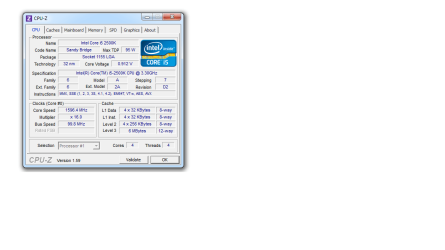
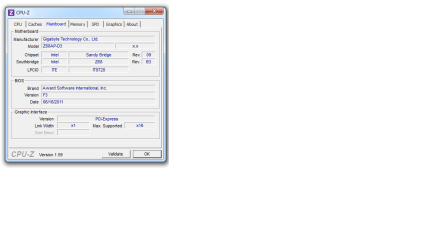
Post screenshots from the CPU, motherboard, memory amd SPD tabs. Also download and run As SSD and post a screenshot.Also, I think you should be running CCC 11.11 from AMD.
 

My Computers

System One System Two

  • Computer type
    PC/Desktop
    Computer Manufacturer/Model Number
    ALWAYS UNDER CONSTRUCTION
    OS
    Windows 11 Pro
    CPU
    Ryzen 9 5900X
    Motherboard
    Asus X570 Crosshair Viii Hero
    Memory
    32GB G Skill DDR4-3600
    Graphics Card(s)
    EVGA RTX 3080 FTW 3 Ultra
    Sound Card
    On Board/Sennheiser PC37X Headset
    Monitor(s) Displays
    3 X Asus 27"
    Screen Resolution
    2560x1440
    Hard Drives
    2 X 1 TB NVME drives
    PSU
    EVGA 850
    Case
    Phanteks Eclipse P400A
    Cooling
    EVGA 280 AIO
    Keyboard
    Logitech G510s/ Logitech G13
    Mouse
    Logitech G502
    Internet Speed
    24/1
    Antivirus
    ESET/MBAM Pro/SAS Pro
    Browser
    Chrome/ Firefox/ Edge
  • Computer type
    Laptop
    System Manufacturer/Model Number
    Dell 16 Plus
    OS
    Windows 11 Pro
    CPU
    Intel Ultra 9 288V
    Memory
    32 GB LPDDR5X 8533
    Monitor(s) Displays
    16" Mini-LED HDR600 Touch 90 Hz
    Screen Resolution
    2560X1600
    Hard Drives
    1 TB NVME
I5 2500K CPU
8GB RAM
AMD Radeon HD 6970 2GB
Crucial M4 64GB SSD
I don't know why the score is low for the CPU it was 4.2 a couple of days ago now it dropped down to 3.8 again.
I would download and install this program.> CPUID - System & hardware benchmark, monitoring, reporting

Open it then take a Snip and post it here or start a thread in hardware.
This will provide us and you with a lot more info to see if the CPU is working properly.
Update your mo board drivers etc. would be benefial.

I would not update the motherboard Bios yet. It may be necessary but I would do it as a last resort.

The info from CPU-Z and then driver updates would be my first and second actions.
Mike

I downloaded the program you suggested that screenshot has a error mesage after I downloaded it.
 
Last edited:

My Computer

Computer Manufacturer/Model Number
Chillblast
OS
Windows 7 Home 64 bit
CPU
Intel Core I5 2500K
Motherboard
Asus P8Z68-V LE Motherboard
Memory
8GB
Graphics Card(s)
NVIDIA GeForce GTX 560 Ti
Monitor(s) Displays
32" Hannspree LCD TV
Screen Resolution
1920x1080
Hard Drives
1TB Samsung HDD
PSU
OCZ 80 plus 600W
Case
Cooler Master Elite 430 Case
Cooling
ThermoLab Trinity
I5 2500K CPU
8GB RAM
AMD Radeon HD 6970 2GB
Crucial M4 64GB SSD
I don't know why the score is low for the CPU it was 4.2 a couple of days ago now it dropped down to 3.8 again.
Check your BIOS and see if Hyperthreading and Turbo is turned on. Something is amiss. You might also have the Short/Long Duration Power settings set low.
Also, that M4 should score a 7.9 on SATA-III. I get 7.9 out of my C300.
 

My Computer

Computer type
PC/Desktop
Computer Manufacturer/Model Number
Built 2/11/2011
OS
Windows 7 Pro-x64
CPU
i7-2600 3.4GHz - 3.8GHz Turbo
Motherboard
Intel DH67BL-B3
Memory
8Gb - 2x4GB, Muskin 991770 PC3-1333
Graphics Card(s)
Integrated Intel HD 2000
Sound Card
Integrated Intel 10.1 HD, RealTek ALC892
Monitor(s) Displays
Asus LCD VH222H, Haier HL24XSL2a
Screen Resolution
1920x1080, 1920x1080
Hard Drives
Crucial SSD C300-128Gb,
Western Digital WD5002AALX - 500Gb,
Western Digital WD7501AALS - 750Gb
PSU
Seasonic 650W 80+ Gold Modular
Case
Rosewill Defender
Cooling
Stock CPU, Four 120mm case fans, PCH fan added
Keyboard
Logitech EX100 Y-RBH94 Wireless
Mouse
Logitech EX100 M-RCE95 Wireless
Internet Speed
3.0/1.5 Mbs
Antivirus
Microsoft Security Essentials
Browser
Microsoft Internet Explorer 11
Other Info
Antec Veris Premier-Multimedia IR Station,
Cyber Accoustics-3602 Speakers,
AFT XM-5U Card Reader,
Hauppauge TV-HVR-2250,
Sony LX300 USB Turntable

My Computers

System One System Two

  • Computer type
    PC/Desktop
    Computer Manufacturer/Model Number
    ALWAYS UNDER CONSTRUCTION
    OS
    Windows 11 Pro
    CPU
    Ryzen 9 5900X
    Motherboard
    Asus X570 Crosshair Viii Hero
    Memory
    32GB G Skill DDR4-3600
    Graphics Card(s)
    EVGA RTX 3080 FTW 3 Ultra
    Sound Card
    On Board/Sennheiser PC37X Headset
    Monitor(s) Displays
    3 X Asus 27"
    Screen Resolution
    2560x1440
    Hard Drives
    2 X 1 TB NVME drives
    PSU
    EVGA 850
    Case
    Phanteks Eclipse P400A
    Cooling
    EVGA 280 AIO
    Keyboard
    Logitech G510s/ Logitech G13
    Mouse
    Logitech G502
    Internet Speed
    24/1
    Antivirus
    ESET/MBAM Pro/SAS Pro
    Browser
    Chrome/ Firefox/ Edge
  • Computer type
    Laptop
    System Manufacturer/Model Number
    Dell 16 Plus
    OS
    Windows 11 Pro
    CPU
    Intel Ultra 9 288V
    Memory
    32 GB LPDDR5X 8533
    Monitor(s) Displays
    16" Mini-LED HDR600 Touch 90 Hz
    Screen Resolution
    2560X1600
    Hard Drives
    1 TB NVME
I5 2500K CPU
8GB RAM
AMD Radeon HD 6970 2GB
Crucial M4 64GB SSD
I don't know why the score is low for the CPU it was 4.2 a couple of days ago now it dropped down to 3.8 again.
I would download and install this program.> CPUID - System & hardware benchmark, monitoring, reporting

Open it then take a Snip and post it here or start a thread in hardware.
This will provide us and you with a lot more info to see if the CPU is working properly.
Update your mo board drivers etc. would be benefial.

I would not update the motherboard Bios yet. It may be necessary but I would do it as a last resort.

The info from CPU-Z and then driver updates would be my first and second actions.
Mike

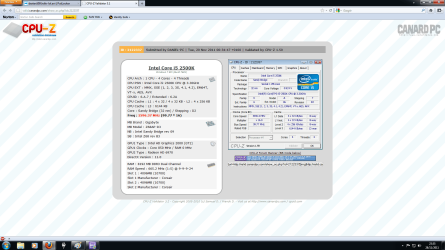
Post screenshots from the CPU, motherboard, memory amd SPD tabs. Also download and run As SSD and post a screenshot.Also, I think you should be running CCC 11.11 from AMD.

Sorry that took so long.
 

Attachments

  • CPU.png
    CPU.png
    59.9 KB · Views: 133
  • Memory.png
    Memory.png
    40.8 KB · Views: 110
  • MOBO.png
    MOBO.png
    39.9 KB · Views: 226
  • SPD.png
    SPD.png
    44.7 KB · Views: 54
  • CPUZ Validation.png
    CPUZ Validation.png
    316.3 KB · Views: 76

My Computer

Computer Manufacturer/Model Number
Chillblast
OS
Windows 7 Home 64 bit
CPU
Intel Core I5 2500K
Motherboard
Asus P8Z68-V LE Motherboard
Memory
8GB
Graphics Card(s)
NVIDIA GeForce GTX 560 Ti
Monitor(s) Displays
32" Hannspree LCD TV
Screen Resolution
1920x1080
Hard Drives
1TB Samsung HDD
PSU
OCZ 80 plus 600W
Case
Cooler Master Elite 430 Case
Cooling
ThermoLab Trinity
I5 2500K CPU
8GB RAM
AMD Radeon HD 6970 2GB
Crucial M4 64GB SSD
I don't know why the score is low for the CPU it was 4.2 a couple of days ago now it dropped down to 3.8 again.
I would download and install this program.> CPUID - System & hardware benchmark, monitoring, reporting

Open it then take a Snip and post it here or start a thread in hardware.
This will provide us and you with a lot more info to see if the CPU is working properly.
Update your mo board drivers etc. would be benefial.

I would not update the motherboard Bios yet. It may be necessary but I would do it as a last resort.

The info from CPU-Z and then driver updates would be my first and second actions.
Mike

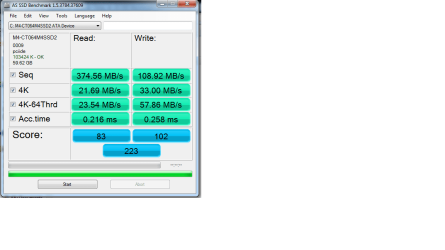
Post screenshots from the CPU, motherboard, memory amd SPD tabs. Also download and run As SSD and post a screenshot.Also, I think you should be running CCC 11.11 from AMD.

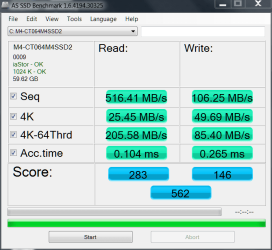
Here is the SSD Benchmark results.
 

Attachments

  • SSD Benchmark.png
    SSD Benchmark.png
    81.3 KB · Views: 45

My Computer

Computer Manufacturer/Model Number
Chillblast
OS
Windows 7 Home 64 bit
CPU
Intel Core I5 2500K
Motherboard
Asus P8Z68-V LE Motherboard
Memory
8GB
Graphics Card(s)
NVIDIA GeForce GTX 560 Ti
Monitor(s) Displays
32" Hannspree LCD TV
Screen Resolution
1920x1080
Hard Drives
1TB Samsung HDD
PSU
OCZ 80 plus 600W
Case
Cooler Master Elite 430 Case
Cooling
ThermoLab Trinity
Your SSD is in IDE mode it needs to be in AHCI mode. Here is a tutorial on how to enable AHCI.

I have the same SSD you have. It should look more like this.

Crucial 10-12.PNG
 

My Computers

System One System Two

  • Computer type
    PC/Desktop
    Computer Manufacturer/Model Number
    ALWAYS UNDER CONSTRUCTION
    OS
    Windows 11 Pro
    CPU
    Ryzen 9 5900X
    Motherboard
    Asus X570 Crosshair Viii Hero
    Memory
    32GB G Skill DDR4-3600
    Graphics Card(s)
    EVGA RTX 3080 FTW 3 Ultra
    Sound Card
    On Board/Sennheiser PC37X Headset
    Monitor(s) Displays
    3 X Asus 27"
    Screen Resolution
    2560x1440
    Hard Drives
    2 X 1 TB NVME drives
    PSU
    EVGA 850
    Case
    Phanteks Eclipse P400A
    Cooling
    EVGA 280 AIO
    Keyboard
    Logitech G510s/ Logitech G13
    Mouse
    Logitech G502
    Internet Speed
    24/1
    Antivirus
    ESET/MBAM Pro/SAS Pro
    Browser
    Chrome/ Firefox/ Edge
  • Computer type
    Laptop
    System Manufacturer/Model Number
    Dell 16 Plus
    OS
    Windows 11 Pro
    CPU
    Intel Ultra 9 288V
    Memory
    32 GB LPDDR5X 8533
    Monitor(s) Displays
    16" Mini-LED HDR600 Touch 90 Hz
    Screen Resolution
    2560X1600
    Hard Drives
    1 TB NVME
You don't have Hyperthreading turned on. :confused:
Your drive is in IDE mode. :cry:
Your RAM speed is 10700. :(

There's probably more but that's what jumps out at me.
 

My Computer

Computer type
PC/Desktop
Computer Manufacturer/Model Number
Built 2/11/2011
OS
Windows 7 Pro-x64
CPU
i7-2600 3.4GHz - 3.8GHz Turbo
Motherboard
Intel DH67BL-B3
Memory
8Gb - 2x4GB, Muskin 991770 PC3-1333
Graphics Card(s)
Integrated Intel HD 2000
Sound Card
Integrated Intel 10.1 HD, RealTek ALC892
Monitor(s) Displays
Asus LCD VH222H, Haier HL24XSL2a
Screen Resolution
1920x1080, 1920x1080
Hard Drives
Crucial SSD C300-128Gb,
Western Digital WD5002AALX - 500Gb,
Western Digital WD7501AALS - 750Gb
PSU
Seasonic 650W 80+ Gold Modular
Case
Rosewill Defender
Cooling
Stock CPU, Four 120mm case fans, PCH fan added
Keyboard
Logitech EX100 Y-RBH94 Wireless
Mouse
Logitech EX100 M-RCE95 Wireless
Internet Speed
3.0/1.5 Mbs
Antivirus
Microsoft Security Essentials
Browser
Microsoft Internet Explorer 11
Other Info
Antec Veris Premier-Multimedia IR Station,
Cyber Accoustics-3602 Speakers,
AFT XM-5U Card Reader,
Hauppauge TV-HVR-2250,
Sony LX300 USB Turntable
I5 2500K CPU
8GB RAM
AMD Radeon HD 6970 2GB
Crucial M4 64GB SSD
I don't know why the score is low for the CPU it was 4.2 a couple of days ago now it dropped down to 3.8 again.
Check your BIOS and see if Hyperthreading and Turbo is turned on. Something is amiss. You might also have the Short/Long Duration Power settings set low.
Also, that M4 should score a 7.9 on SATA-III. I get 7.9 out of my C300.

I'm not sure how to get into them(bios) or where Hyperthreading and turbo boost is to be honest. I am not also sure what is short/long duration power is.
 

My Computer

Computer Manufacturer/Model Number
Chillblast
OS
Windows 7 Home 64 bit
CPU
Intel Core I5 2500K
Motherboard
Asus P8Z68-V LE Motherboard
Memory
8GB
Graphics Card(s)
NVIDIA GeForce GTX 560 Ti
Monitor(s) Displays
32" Hannspree LCD TV
Screen Resolution
1920x1080
Hard Drives
1TB Samsung HDD
PSU
OCZ 80 plus 600W
Case
Cooler Master Elite 430 Case
Cooling
ThermoLab Trinity
You don't have Hyperthreading turned on. :confused:
Your drive is in IDE mode. :cry:
Your RAM speed is 10700. :(

There's probably more but that's what jumps out at me.

It does not have Hyper threading.
Specs from Intel> Intel® Core)

4 cores 4 threads.
 

My Computer

Computer Manufacturer/Model Number
Hopalong/ Godzilla
OS
Windows7 Pro 64bit SP-1; Windows XP Pro 32bit
CPU
Intel Core i7-870 Lynnfield 2.93GHz LGA 1156 95W Quad-Core
Motherboard
ASUS P7P55D-E PRO
Memory
8GB@1400MHz Crucial Ballistix DDR3-1600 4x2GB
Graphics Card(s)
ASUS ENGTX460 DirectCU/2DI/1GD5 1GB 256-bit GDDR5
Sound Card
VIA Onboard
Monitor(s) Displays
Asus VS248H-P 24"; Samsung SyncMaster 941BW 19"ws
Screen Resolution
1920x1080; 1440x900
Hard Drives
Samsung 830 120GB SSD
Intel 320 120GB SSD
Western Digital Caviar Black WD7501AALS 750GB 7200 RPM SATA 3.0Gb/s
Western Digital Caviar Black WD6401AALS 640GB 7200 RPM SATA 3.0Gb/s
PSU
COOLER MASTER Silent Pro RS850-AMBAJ3-US 850W Modular
Case
COOLER MASTER HAF 932 RC-932-KKN5-GP Black
Cooling
Scythe "Mugen-2 Rev.B" (2 ScytheKaze-Jyuni PWM fans)
Keyboard
Logitech K-320
Mouse
Kensington
Antivirus
Avast Inernet Suite
Browser
IE 9 ; Chrome
His RAM is running at 1330.4 so that is correct.
Specs show run DDR3 1066/1333.


Change over to AHCI mode as Essenbe posted above in Post #691 and things will improve greatly.
 

My Computer

Computer Manufacturer/Model Number
Hopalong/ Godzilla
OS
Windows7 Pro 64bit SP-1; Windows XP Pro 32bit
CPU
Intel Core i7-870 Lynnfield 2.93GHz LGA 1156 95W Quad-Core
Motherboard
ASUS P7P55D-E PRO
Memory
8GB@1400MHz Crucial Ballistix DDR3-1600 4x2GB
Graphics Card(s)
ASUS ENGTX460 DirectCU/2DI/1GD5 1GB 256-bit GDDR5
Sound Card
VIA Onboard
Monitor(s) Displays
Asus VS248H-P 24"; Samsung SyncMaster 941BW 19"ws
Screen Resolution
1920x1080; 1440x900
Hard Drives
Samsung 830 120GB SSD
Intel 320 120GB SSD
Western Digital Caviar Black WD7501AALS 750GB 7200 RPM SATA 3.0Gb/s
Western Digital Caviar Black WD6401AALS 640GB 7200 RPM SATA 3.0Gb/s
PSU
COOLER MASTER Silent Pro RS850-AMBAJ3-US 850W Modular
Case
COOLER MASTER HAF 932 RC-932-KKN5-GP Black
Cooling
Scythe "Mugen-2 Rev.B" (2 ScytheKaze-Jyuni PWM fans)
Keyboard
Logitech K-320
Mouse
Kensington
Antivirus
Avast Inernet Suite
Browser
IE 9 ; Chrome

My Computer

Computer type
PC/Desktop
Computer Manufacturer/Model Number
Built 2/11/2011
OS
Windows 7 Pro-x64
CPU
i7-2600 3.4GHz - 3.8GHz Turbo
Motherboard
Intel DH67BL-B3
Memory
8Gb - 2x4GB, Muskin 991770 PC3-1333
Graphics Card(s)
Integrated Intel HD 2000
Sound Card
Integrated Intel 10.1 HD, RealTek ALC892
Monitor(s) Displays
Asus LCD VH222H, Haier HL24XSL2a
Screen Resolution
1920x1080, 1920x1080
Hard Drives
Crucial SSD C300-128Gb,
Western Digital WD5002AALX - 500Gb,
Western Digital WD7501AALS - 750Gb
PSU
Seasonic 650W 80+ Gold Modular
Case
Rosewill Defender
Cooling
Stock CPU, Four 120mm case fans, PCH fan added
Keyboard
Logitech EX100 Y-RBH94 Wireless
Mouse
Logitech EX100 M-RCE95 Wireless
Internet Speed
3.0/1.5 Mbs
Antivirus
Microsoft Security Essentials
Browser
Microsoft Internet Explorer 11
Other Info
Antec Veris Premier-Multimedia IR Station,
Cyber Accoustics-3602 Speakers,
AFT XM-5U Card Reader,
Hauppauge TV-HVR-2250,
Sony LX300 USB Turntable
His RAM is running at 1330.4 so that is correct.
Specs show run DDR3 1066/1333.
I'm curious, where do you see that? His RAM has a MAX of 10700 (667). It's showing a bus ratio of 1:5 as in 1x5.
 

My Computer

Computer type
PC/Desktop
Computer Manufacturer/Model Number
Built 2/11/2011
OS
Windows 7 Pro-x64
CPU
i7-2600 3.4GHz - 3.8GHz Turbo
Motherboard
Intel DH67BL-B3
Memory
8Gb - 2x4GB, Muskin 991770 PC3-1333
Graphics Card(s)
Integrated Intel HD 2000
Sound Card
Integrated Intel 10.1 HD, RealTek ALC892
Monitor(s) Displays
Asus LCD VH222H, Haier HL24XSL2a
Screen Resolution
1920x1080, 1920x1080
Hard Drives
Crucial SSD C300-128Gb,
Western Digital WD5002AALX - 500Gb,
Western Digital WD7501AALS - 750Gb
PSU
Seasonic 650W 80+ Gold Modular
Case
Rosewill Defender
Cooling
Stock CPU, Four 120mm case fans, PCH fan added
Keyboard
Logitech EX100 Y-RBH94 Wireless
Mouse
Logitech EX100 M-RCE95 Wireless
Internet Speed
3.0/1.5 Mbs
Antivirus
Microsoft Security Essentials
Browser
Microsoft Internet Explorer 11
Other Info
Antec Veris Premier-Multimedia IR Station,
Cyber Accoustics-3602 Speakers,
AFT XM-5U Card Reader,
Hauppauge TV-HVR-2250,
Sony LX300 USB Turntable
Enlarge the picture I copied from his list of Snips. This is actual speed being run. Then x 2.

665.2 x 2= 1330.4MHz


My Computer

Computer Manufacturer/Model Number
Hopalong/ Godzilla
OS
Windows7 Pro 64bit SP-1; Windows XP Pro 32bit
CPU
Intel Core i7-870 Lynnfield 2.93GHz LGA 1156 95W Quad-Core
Motherboard
ASUS P7P55D-E PRO
Memory
8GB@1400MHz Crucial Ballistix DDR3-1600 4x2GB
Graphics Card(s)
ASUS ENGTX460 DirectCU/2DI/1GD5 1GB 256-bit GDDR5
Sound Card
VIA Onboard
Monitor(s) Displays
Asus VS248H-P 24"; Samsung SyncMaster 941BW 19"ws
Screen Resolution
1920x1080; 1440x900
Hard Drives
Samsung 830 120GB SSD
Intel 320 120GB SSD
Western Digital Caviar Black WD7501AALS 750GB 7200 RPM SATA 3.0Gb/s
Western Digital Caviar Black WD6401AALS 640GB 7200 RPM SATA 3.0Gb/s
PSU
COOLER MASTER Silent Pro RS850-AMBAJ3-US 850W Modular
Case
COOLER MASTER HAF 932 RC-932-KKN5-GP Black
Cooling
Scythe "Mugen-2 Rev.B" (2 ScytheKaze-Jyuni PWM fans)
Keyboard
Logitech K-320
Mouse
Kensington
Antivirus
Avast Inernet Suite
Browser
IE 9 ; Chrome
Yeah, ok, it says 665.2 ????
 

My Computer

Computer type
PC/Desktop
Computer Manufacturer/Model Number
Built 2/11/2011
OS
Windows 7 Pro-x64
CPU
i7-2600 3.4GHz - 3.8GHz Turbo
Motherboard
Intel DH67BL-B3
Memory
8Gb - 2x4GB, Muskin 991770 PC3-1333
Graphics Card(s)
Integrated Intel HD 2000
Sound Card
Integrated Intel 10.1 HD, RealTek ALC892
Monitor(s) Displays
Asus LCD VH222H, Haier HL24XSL2a
Screen Resolution
1920x1080, 1920x1080
Hard Drives
Crucial SSD C300-128Gb,
Western Digital WD5002AALX - 500Gb,
Western Digital WD7501AALS - 750Gb
PSU
Seasonic 650W 80+ Gold Modular
Case
Rosewill Defender
Cooling
Stock CPU, Four 120mm case fans, PCH fan added
Keyboard
Logitech EX100 Y-RBH94 Wireless
Mouse
Logitech EX100 M-RCE95 Wireless
Internet Speed
3.0/1.5 Mbs
Antivirus
Microsoft Security Essentials
Browser
Microsoft Internet Explorer 11
Other Info
Antec Veris Premier-Multimedia IR Station,
Cyber Accoustics-3602 Speakers,
AFT XM-5U Card Reader,
Hauppauge TV-HVR-2250,
Sony LX300 USB Turntable
Back
Top